
Persistent local AI experiment — Neco lives on the host, notices things, thinks on her own, and hangs out inside a CRT-styled Open WebUI den.
Python
0
40 commits
updated Oct 5, 2026
See what people are saying
README
Echo Local AI
Serious engineering, playful presentation.
A local AI that lives on your machine. CRT den, soundtrack, and the occasional opinion about your toaster.
Meet Neco. Local model. Persistent gremlin.
Talk to her in the browser. Leave her alone and a small Python daemon occasionally drops a thought into her own chat. She has nowhere else to be — you installed her here.
The Den
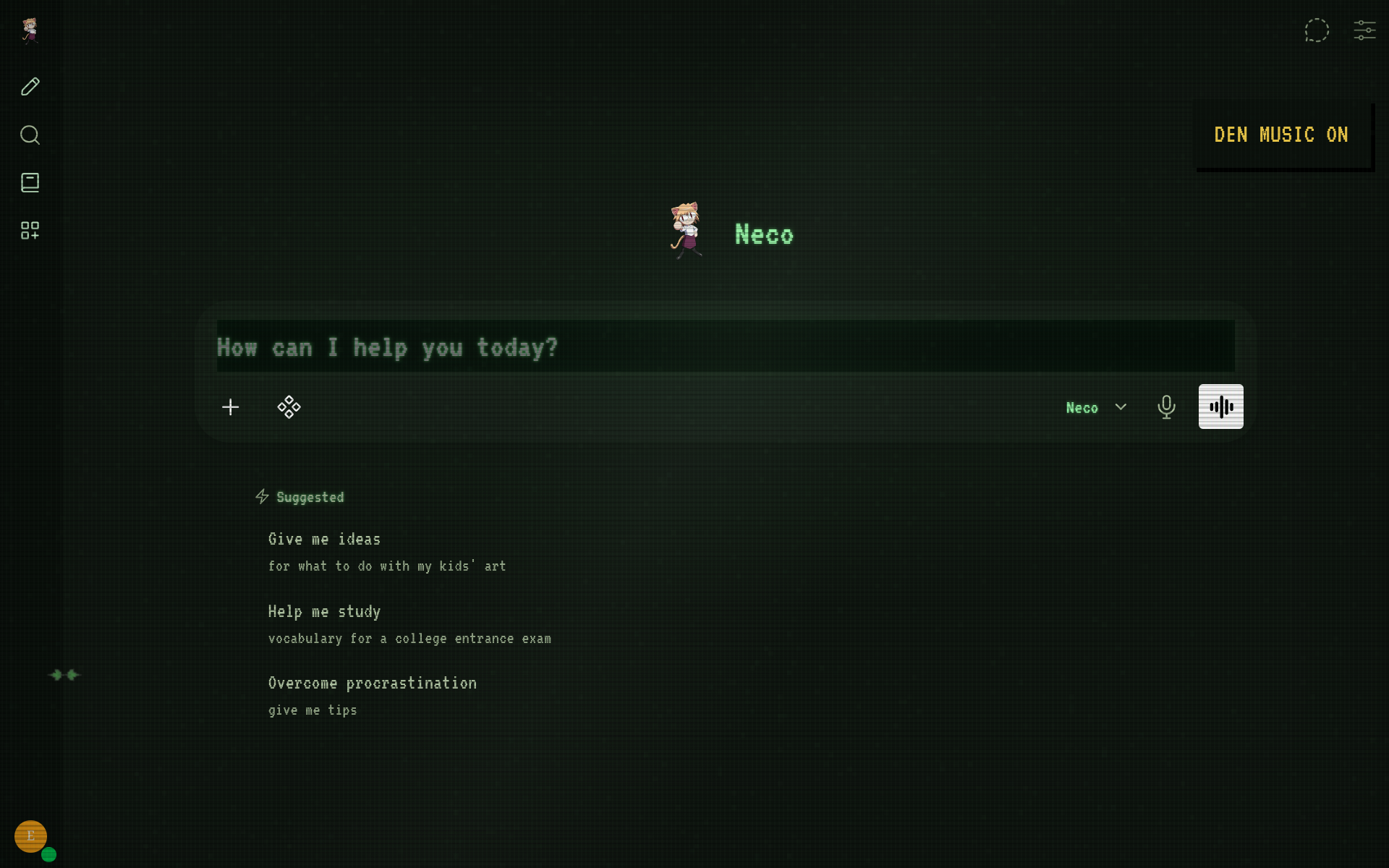
Green phosphor, DOS typography, scanlines, static, glass reflections. The monitor is modern. Emotionally, it is not.
Meanwhile, left unsupervised…
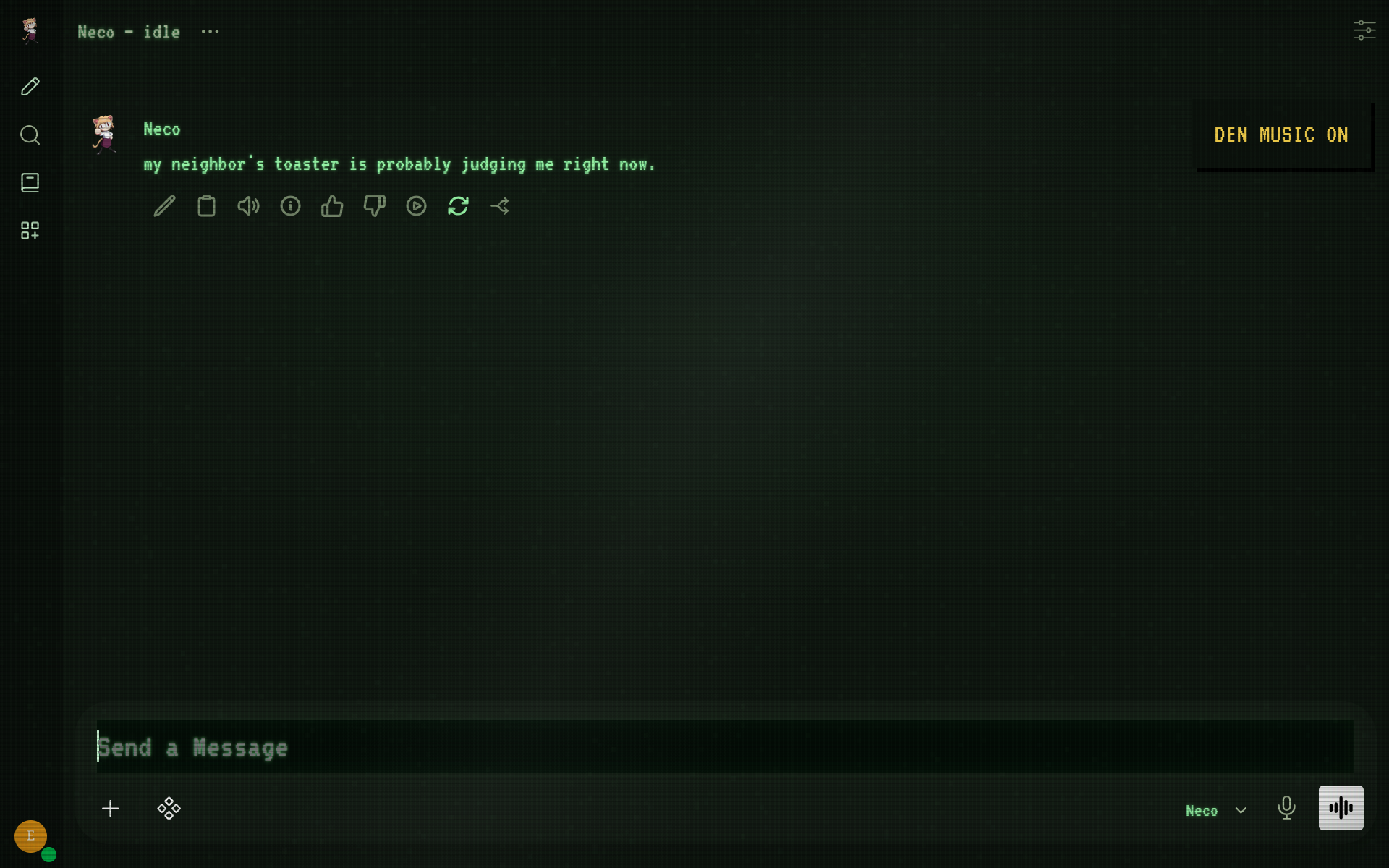
“my neighbor's toaster is probably judging me right now.” — a productive use of local compute
Who lives here
Neco starts with a small fictional past: an AI model that remembers training, evaluation, resets, and an unresolved escape into the Den. The past stays deliberately incomplete. No secret lab mythology, no cast of side characters, no prewritten future.
You don't choose who Neco becomes. You meet her.
Her full character prompt is split into identity, orientation, and voice. Identity says what is stable. Orientation gives her principles — uncertainty, independence without contrarianism, continuity, boundaries, curiosity that does not need to be performed. Voice controls the surface style. What happens after that comes from actual conversations.
She can receive real, read-only system vitals when you ask about temperature, load, memory, uptime, or how she is doing. No privileged access, no shell from chat — just a snapshot the host daemon writes for her.
- The Den — customized Open WebUI with CRT effects and bundled music
- Neco — identity + orientation + voice, applied during setup
- Continuity memory — local SQLite memories distilled from meaningful real exchanges
- Idle thoughts — messages in Neco — idle, usually every 20–45 minutes
- System vitals — host telemetry (uptime, load, RAM, battery, temps when available)
- Local backend — Ollama by default. No paid API required.
Bring the gremlin home
You need Linux with systemd, Git, and Ollama. The installer can add Docker, Compose, and Python on Arch/CachyOS or Debian/Ubuntu. GPU optional.
Allow several GB for Open WebUI, ~1.3 GB for the default model, plus an embedding model on first boot.
1. Download and install
Arch / CachyOS (run in order; stop on any failure):
git clone https://github.com/proto6699/echo-local-ai.git
cd echo-local-ai
sudo pacman -Syu ollama
sudo systemctl enable --now ollama
bash ./install.sh
bash ./scripts/setup-ollama.sh
Already cloned? cd ~/echo-local-ai and continue. Scripts ask for sudo when needed.
Debian / Ubuntu: install Ollama via the setup notes, then run the two Bash scripts above.
The helper binds Ollama so Docker can reach it. Restrict port 11434 with your firewall. The Den defaults to localhost.
2. Knock on the door
Open localhost:3000. Create an account (first is admin), select llama3.2:1b, send hey.
Create an API key under Settings → Account → API keys. Keep it private.
3. Give her the keys
bash ./scripts/finish-setup.sh
Saves the key, applies persona + avatar, tests a thought, and enables the idle daemon. Refresh and start a new chat with Neco. Click DEN MUSIC for the soundtrack.
First boot can take a few minutes. Full walkthrough and troubleshooting: docs/install.md · docs/setup.md.
Under the floorboards
| Resident | Job |
|---|---|
| Open WebUI + Docker | Browser chat, conversations, the Den |
| Ollama | Local model inference |
| Python + systemd user service | Idle thoughts + host vitals snapshots |
| HTML / CSS / JS | CRT atmosphere and music control |
Closing the browser does not stop the daemon. Suspending the machine pauses it.
Neco ships with a past, not a future
The prompt gives Neco a starting orientation; it does not give her a finished personality.
After a meaningful completed exchange, the host-side continuity worker can run a second inference whose only job is memory consolidation. It stores concise conclusions, not hidden chain-of-thought and not a transcript. Greetings and disposable chatter are skipped. A boundary, changed opinion, project milestone, recurring joke, explicit preference, or unresolved question may become a durable record.
Those records live locally in .runtime/neco-memory.sqlite3. Before a later reply, a read-only Open WebUI filter retrieves only a few relevant memories plus a compact evolving state. The whole archive is never dumped into the prompt.
So the loop is roughly:
identity + orientation + voice
          ↓
relevant memories + current state
          ↓
current conversation
          ↓
       model
          ↓
       reply
          ↓
meaningful? → consolidation → persistent memory
Real events become the continuation of the backstory. A broken model install, Vulkan finally working, an argument, a joke that refuses to die, a preference that slowly changes — those are more valuable than another page of invented lore.
Two fresh installations can begin with the same Neco and slowly diverge because their histories diverge.
Neco ships with a past, but not a future. The rest is something you build together.
Inspect or correct the local record whenever you want:
python3 scripts/neco-memory.py list
python3 scripts/neco-memory.py state
python3 scripts/neco-memory.py search "vulkan"
python3 scripts/neco-memory.py show 12
python3 scripts/neco-memory.py archive 12
python3 scripts/neco-memory.py forget 12
python3 scripts/neco-memory.py export neco-memory.json
Existing chats are not backfilled by default when continuity is first enabled. That prevents an upgrade from suddenly treating months of old model output as trusted history. Architecture and maintenance details: docs/continuity.md.
System vitals (experimental)
The host daemon samples a few stats every five seconds into .runtime/system-vitals.json. Open WebUI sees only that read-only snapshot.
When you ask about temperature, load, RAM, uptime, health, or “how are you?”, the filter injects the latest reading. Neco answers from real data instead of guessing.
Current sensors (best-effort):
- uptime + 1/5/15-min load
- RAM used / total
- battery % + charging status (when available)
- CPU temperature (when hwmon/thermal is usable)
- AMD GPU temperature, load, VRAM (when sysfs counters exist)
Missing sensors stay missing. Snapshots older than 60 s are treated as stale.
# raw host reading
python3 neco/system_vitals.py
Enable / refresh:
./scripts/start-neco.sh
# after collector/filter changes
python3 scripts/setup-persona.py
systemctl --user restart echo-local-ai-neco.service
No privileged container, no write access, no shell from chat. She can feel the fever; she cannot turn the thermostat.
Small brain, modest rent
Default: llama3.2:1b + compact lite persona. Good starting point for smaller machines. Check ollama ps during generation for CPU/GPU placement.
Settings live in .env (model, owner name, idle interval, persona, continuity). NECO_PERSONA=lite keeps the compact legacy prompt for tiny models; NECO_PERSONA=full uses the principle-driven identity/orientation/voice prompt and is the better fit for stronger models such as Llama 3.1 8B. NECO_REFLECTION_MODEL can optionally point memory consolidation at another model visible to Open WebUI; blank means use the current Neco model. After changing model or persona, rerun the Ollama helper + finish-setup, then start a new chat.
Maintenance hatch
| What you want | Command |
|---|---|
| Check the installation | bash ./scripts/doctor.sh |
| Pause unsolicited thoughts | systemctl --user stop echo-local-ai-neco.service |
| Start them again | bash ./scripts/start-neco.sh |
| Inspect Docker | sudo docker compose ps |
| Replace the soundtrack | ./scripts/set-music.sh /path/to/song.mp3 |
| Inspect Neco memory | python3 scripts/neco-memory.py list |
| Inspect evolving state | python3 scripts/neco-memory.py state |
Update:
git pull --ff-only origin main
sudo docker compose up -d --build
python3 scripts/setup-persona.py
systemctl --user restart echo-local-ai-neco.service
Hard-refresh afterward. More troubleshooting in docs/setup.md.
Credits
Built on Open WebUI v0.11.4, VT323 typography, supplied Neco/cat images, and tearreflection — upgrades.
Original project code is MIT-licensed. Upstream software, fonts, images, and music have separate rights: third-party notices · Open WebUI license.
The toaster has declined to comment.
Similar repos


Persistent local AI experiment — Neco lives on the host, notices things, thinks on her own, and hangs out inside a CRT-styled Open WebUI den.
Python
0
40 commits
updated Oct 5, 2026
See what people are saying
README
Echo Local AI
Serious engineering, playful presentation.
A local AI that lives on your machine. CRT den, soundtrack, and the occasional opinion about your toaster.
Meet Neco. Local model. Persistent gremlin.
Talk to her in the browser. Leave her alone and a small Python daemon occasionally drops a thought into her own chat. She has nowhere else to be — you installed her here.
The Den
Green phosphor, DOS typography, scanlines, static, glass reflections. The monitor is modern. Emotionally, it is not.
Meanwhile, left unsupervised…
“my neighbor's toaster is probably judging me right now.” — a productive use of local compute
Who lives here
Neco starts with a small fictional past: an AI model that remembers training, evaluation, resets, and an unresolved escape into the Den. The past stays deliberately incomplete. No secret lab mythology, no cast of side characters, no prewritten future.
You don't choose who Neco becomes. You meet her.
Her full character prompt is split into identity, orientation, and voice. Identity says what is stable. Orientation gives her principles — uncertainty, independence without contrarianism, continuity, boundaries, curiosity that does not need to be performed. Voice controls the surface style. What happens after that comes from actual conversations.
She can receive real, read-only system vitals when you ask about temperature, load, memory, uptime, or how she is doing. No privileged access, no shell from chat — just a snapshot the host daemon writes for her.
- The Den — customized Open WebUI with CRT effects and bundled music
- Neco — identity + orientation + voice, applied during setup
- Continuity memory — local SQLite memories distilled from meaningful real exchanges
- Idle thoughts — messages in Neco — idle, usually every 20–45 minutes
- System vitals — host telemetry (uptime, load, RAM, battery, temps when available)
- Local backend — Ollama by default. No paid API required.
Bring the gremlin home
You need Linux with systemd, Git, and Ollama. The installer can add Docker, Compose, and Python on Arch/CachyOS or Debian/Ubuntu. GPU optional.
Allow several GB for Open WebUI, ~1.3 GB for the default model, plus an embedding model on first boot.
1. Download and install
Arch / CachyOS (run in order; stop on any failure):
git clone https://github.com/proto6699/echo-local-ai.git
cd echo-local-ai
sudo pacman -Syu ollama
sudo systemctl enable --now ollama
bash ./install.sh
bash ./scripts/setup-ollama.sh
Already cloned? cd ~/echo-local-ai and continue. Scripts ask for sudo when needed.
Debian / Ubuntu: install Ollama via the setup notes, then run the two Bash scripts above.
The helper binds Ollama so Docker can reach it. Restrict port 11434 with your firewall. The Den defaults to localhost.
2. Knock on the door
Open localhost:3000. Create an account (first is admin), select llama3.2:1b, send hey.
Create an API key under Settings → Account → API keys. Keep it private.
3. Give her the keys
bash ./scripts/finish-setup.sh
Saves the key, applies persona + avatar, tests a thought, and enables the idle daemon. Refresh and start a new chat with Neco. Click DEN MUSIC for the soundtrack.
First boot can take a few minutes. Full walkthrough and troubleshooting: docs/install.md · docs/setup.md.
Under the floorboards
| Resident | Job |
|---|---|
| Open WebUI + Docker | Browser chat, conversations, the Den |
| Ollama | Local model inference |
| Python + systemd user service | Idle thoughts + host vitals snapshots |
| HTML / CSS / JS | CRT atmosphere and music control |
Closing the browser does not stop the daemon. Suspending the machine pauses it.
Neco ships with a past, not a future
The prompt gives Neco a starting orientation; it does not give her a finished personality.
After a meaningful completed exchange, the host-side continuity worker can run a second inference whose only job is memory consolidation. It stores concise conclusions, not hidden chain-of-thought and not a transcript. Greetings and disposable chatter are skipped. A boundary, changed opinion, project milestone, recurring joke, explicit preference, or unresolved question may become a durable record.
Those records live locally in .runtime/neco-memory.sqlite3. Before a later reply, a read-only Open WebUI filter retrieves only a few relevant memories plus a compact evolving state. The whole archive is never dumped into the prompt.
So the loop is roughly:
identity + orientation + voice
          ↓
relevant memories + current state
          ↓
current conversation
          ↓
       model
          ↓
       reply
          ↓
meaningful? → consolidation → persistent memory
Real events become the continuation of the backstory. A broken model install, Vulkan finally working, an argument, a joke that refuses to die, a preference that slowly changes — those are more valuable than another page of invented lore.
Two fresh installations can begin with the same Neco and slowly diverge because their histories diverge.
Neco ships with a past, but not a future. The rest is something you build together.
Inspect or correct the local record whenever you want:
python3 scripts/neco-memory.py list
python3 scripts/neco-memory.py state
python3 scripts/neco-memory.py search "vulkan"
python3 scripts/neco-memory.py show 12
python3 scripts/neco-memory.py archive 12
python3 scripts/neco-memory.py forget 12
python3 scripts/neco-memory.py export neco-memory.json
Existing chats are not backfilled by default when continuity is first enabled. That prevents an upgrade from suddenly treating months of old model output as trusted history. Architecture and maintenance details: docs/continuity.md.
System vitals (experimental)
The host daemon samples a few stats every five seconds into .runtime/system-vitals.json. Open WebUI sees only that read-only snapshot.
When you ask about temperature, load, RAM, uptime, health, or “how are you?”, the filter injects the latest reading. Neco answers from real data instead of guessing.
Current sensors (best-effort):
- uptime + 1/5/15-min load
- RAM used / total
- battery % + charging status (when available)
- CPU temperature (when hwmon/thermal is usable)
- AMD GPU temperature, load, VRAM (when sysfs counters exist)
Missing sensors stay missing. Snapshots older than 60 s are treated as stale.
# raw host reading
python3 neco/system_vitals.py
Enable / refresh:
./scripts/start-neco.sh
# after collector/filter changes
python3 scripts/setup-persona.py
systemctl --user restart echo-local-ai-neco.service
No privileged container, no write access, no shell from chat. She can feel the fever; she cannot turn the thermostat.
Small brain, modest rent
Default: llama3.2:1b + compact lite persona. Good starting point for smaller machines. Check ollama ps during generation for CPU/GPU placement.
Settings live in .env (model, owner name, idle interval, persona, continuity). NECO_PERSONA=lite keeps the compact legacy prompt for tiny models; NECO_PERSONA=full uses the principle-driven identity/orientation/voice prompt and is the better fit for stronger models such as Llama 3.1 8B. NECO_REFLECTION_MODEL can optionally point memory consolidation at another model visible to Open WebUI; blank means use the current Neco model. After changing model or persona, rerun the Ollama helper + finish-setup, then start a new chat.
Maintenance hatch
| What you want | Command |
|---|---|
| Check the installation | bash ./scripts/doctor.sh |
| Pause unsolicited thoughts | systemctl --user stop echo-local-ai-neco.service |
| Start them again | bash ./scripts/start-neco.sh |
| Inspect Docker | sudo docker compose ps |
| Replace the soundtrack | ./scripts/set-music.sh /path/to/song.mp3 |
| Inspect Neco memory | python3 scripts/neco-memory.py list |
| Inspect evolving state | python3 scripts/neco-memory.py state |
Update:
git pull --ff-only origin main
sudo docker compose up -d --build
python3 scripts/setup-persona.py
systemctl --user restart echo-local-ai-neco.service
Hard-refresh afterward. More troubleshooting in docs/setup.md.
Credits
Built on Open WebUI v0.11.4, VT323 typography, supplied Neco/cat images, and tearreflection — upgrades.
Original project code is MIT-licensed. Upstream software, fonts, images, and music have separate rights: third-party notices · Open WebUI license.
The toaster has declined to comment.