
ProjectBEA is an always-on AI persona engine: she talks, plays Minecraft with real people, and remembers you between sessions. One mind across Discord, Telegram, Twitch and Minecraft — not a bot per platform.
See the codeREADME
ProjectBEA
She talks, plays, and remembers you.
An always-on AI persona across Discord, Telegram, Twitch and a vanilla
Minecraft server. The same mind in all of them, not a bot per platform.
Website · Documentation · Quick start · Contributing





https://github.com/user-attachments/assets/00991f61-5eed-48cc-aefb-f2f6460120d7
The control room: everything she is perceiving, thinking and doing, on one screen.
Not a chatbot
A chatbot waits for a message and answers it. Bea does not wait.
She perceives. Twitch chat, a voice in a Discord call, a death in Minecraft, a donation, a note you typed. All of it arrives on one bus. She chooses. An attention gate decides what is worth a thought, so a busy room costs almost nothing. She remembers. Not a context window. A diary, a card for everyone who turns out to matter, and conclusions she reaches about herself overnight. She acts. One mind, one set of tools, one place everything leaves from. She lives. She streams her thoughts line by line, speaks them while she writes them, and her avatar breathes, blinks and reacts to the room in real time.
Try it in five minutes
[!IMPORTANT] One command. It installs
uvif you don't have it, pulls the dependencies, builds the dashboard, asks you five questions and downloads the two models that run on your own machine.macOS / Linux
curl -LsSf https://raw.githubusercontent.com/emqnuele/projectBEA/main/install.sh | bashWindows (PowerShell)
irm https://raw.githubusercontent.com/emqnuele/projectBEA/main/install.ps1 | iex
The default profile is Solo chat: the dashboard and her voice, one API key, nothing else. No OBS, no Discord bot, no Minecraft server, no virtual audio cable. Those are three separate profiles you can pick later, or turn on one at a time from the Abilities screen.
Already cloned the repo? uv run bea --setup does the same thing — make setup
if you have Make. Every make target here is one uv run command underneath, so
nothing needs Make: Windows in particular does not ship it.
[!NOTE] No API key needed: she runs on local models, on your own machine (below). A key from OpenRouter, OpenAI, Groq, Google AI Studio or Claude gets you bigger models instead.
Updating without losing her
uv run bea --update
Not git pull. The files that hold who she is — her soul, her operating manual
— ship with the engine and are yours to rewrite. A plain pull either refuses
to run or writes conflict markers straight into the text her personality is read
from, and nobody finds out until she starts talking like someone else.
--update backs up your prompts, your config and your memory first, then
merges the new version into your edits the way git merges a branch: you keep
the character you wrote, and the engine still gets the improvements to its own
instructions. If a change lands on the exact lines you rewrote, yours stays
untouched and the new one is left beside it to compare.
The dashboard does the same with a button, tells you when there is something new, and shows you the two versions side by side when a file needs your call.
Updating in place is the only thing here that needs git installed. Without it
she runs exactly the same, and uv run bea --doctor tells you what you are
missing.
What it does, and what it refuses to do →
She remembers you

Tell her who you are on Monday. Come back on Sunday and she knows.
Three layers, all of them in one SQLite file you can open, inspect, back up or
delete, in data/bea.db:
- The diary. What happened, in her words, written as she goes. Recall runs over it with local embeddings, so remembering something costs no API call.
- Person cards. A tally for everyone she meets, and a card for the ones who turn out to matter. Talk to her enough and you get promoted from a number to a person.
- Self-lore. Overnight she sleeps, consolidates the day, and works out things about herself. Those conclusions come back as facts she holds about who she is.
This is the difference between an AI chatbot and an AI character, and it is the part you cannot fake with a longer prompt.
How memory works → · Social → · Dream →
She has a body

Not "Minecraft integration". Her, on a vanilla server, playing, where other people can walk up to her.
The game is one more thing she lives in, like the call or the chat: its tools are her hands. Chop sixteen logs is one action that walks, chops and picks up on its own, and it runs beside her while she keeps talking; what came of it reaches her the way a message does, and she decides the next thing. The fast part of playing — eating, fighting back, landing a fall — is reflexes in the mod, answered in ticks.
She talks like a player, because she is one: "ok, I'm on it", not "go do it". Deep in something long, she is asked for a word only when something in it changed, and she answers out loud, in game chat, or not at all.
Players who talk to her in game chat get an Author like anyone else, so the
roster, the person cards and the attention gate all work in-game with no
Minecraft-specific code.
It runs on BeaCraft, a client-side Fabric mod that simulates input and sends ordinary packets. The server sees a normal player. Nothing is needed server-side.
How she looks on stream
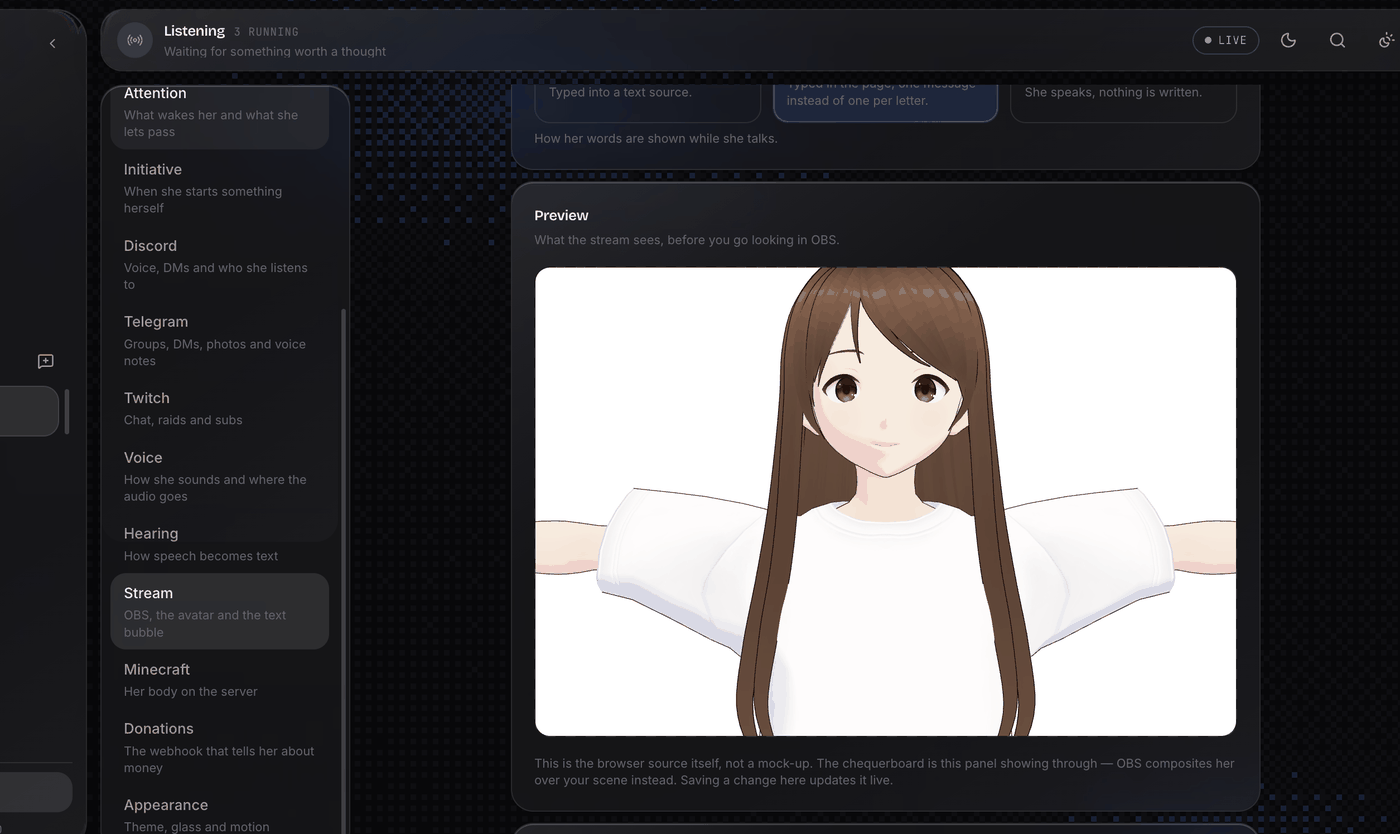
Three ways to put her on screen. Pick one in Settings → Stream, with a live preview of what the stream will see.
| What it is | What you need | |
|---|---|---|
| Images | One picture per mood, swapped in OBS | Your PNGs |
| 3D model | A VRM in an OBS browser source | A .vrm file |
| VTube Studio | Your own Live2D model, driven over its API | VTube Studio running |
Her speech bubble is a separate choice — an OBS text source, the same browser source, or nothing — so you can mix them however you like.
For the 3D route, the dashboard's library (Settings → Stream) downloads a free
model and its idle motion in one click — make model fetches the same files —
takes your own .vrm by drag and drop, shows what each model's licence allows,
and lets you try one on in the preview before putting it on stage. From a
terminal, the inspector reads the same things out of a file:
uv run python tools/inspect_vrm.py your-model.vrm
It tells you whether the model can do what she needs — a mouth that moves, a face
per mood — and reads out the licence the file carries, so you know what you are
allowed to stream with it. Her gestures are .vrma clips: drop them in
data/clips and assign one per mood.
Whichever you pick, the mood she chooses for a line drives all of it. A semantic picker maps whatever expression she names to the nearest one your model actually has. Her avatar blinks, breathes, and looks around on its own, and her mouth follows the audio as it plays.
How it works, and how to add a backend →
A busy chat costs almost nothing
Answering every message is what makes an always-on persona expensive to run and exhausting to watch. Bea reads everything and answers what matters: every perception enters one frame with a priority — addressed by name or answering her always first — and the model decides what deserves words.
30 messages a minute ────────▶ one frame, one turn
Nothing is ever dropped at the gate; the cost control is architectural (one reasoning cycle per batch, not one per message).
That holds for one person too. Type "hey", "how are you", "everything alright?" as three messages and you get one reply: the batch closes when you stop typing, not a fraction of a second after you started, and a line that lands while she is already answering you waits for the next turn instead of earning a second reply. Three messages, one person, one answer — the way a person reads them.
| Priority | When |
|---|---|
| 1.0 | Addressed by name, spoken to directly, answering her, or something her own body reported. Past cooldown and quiet hours. |
| scored | Everything else, highest first. A loud stream feels loud to her; no single message is owed an answer. |
One mind, one window
She does not keep a separate head per chat. Every turn lands in a single sliding context window — 150k tokens by default, adjustable up to 500k in Settings — that breathes instead of filling up: around 120k a background handoff writes down what went cold ("you talked about food for two hours") while she keeps talking. The latest 30k tokens, plus everything said while the recap was being written, travel over word for word. What was happening stays happening.
Because the window knows where she is, she answers there: a Telegram message gets a Telegram reply, never silence, never "I don't have Telegram".
She sleeps
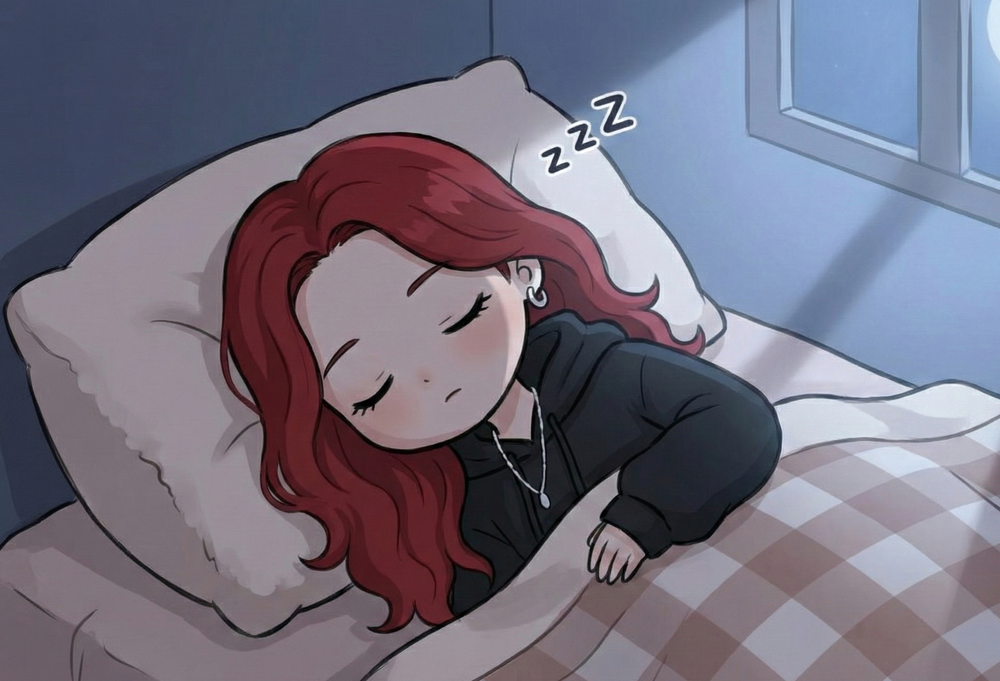
At the end of the day she goes quiet, and a nightly pass consolidates what happened: the diary is compacted, the people who mattered get promoted, and she works out a handful of things about herself that come back tomorrow as facts she holds.
It is the cheapest interesting thing in the system and the one people ask about most.
Where she lives
Every one of these is a Skill: a plugin that can perceive, expose tools, contribute prompt rules and own its own infrastructure. All of them can be switched on or off at runtime from the dashboard, and she can never arm one herself.
| Skill | What it is |
|---|---|
| Discord | Voice calls and text channels; owns a small Node.js bot for the audio pipeline |
| Telegram | Private chats and groups, polled in-process |
| Twitch | Chat read anonymously, no token needed; volume becomes texture, not thoughts |
| Minecraft | A body on a vanilla server: she plays toward objectives, reads game chat, remembers players |
| Donations | A webhook that always earns a reaction |
| Stream Plan | Today's objectives, set by the owner; she works through them and ticks them off |
| Memory | Diary entries and recall, over one SQLite file |
| Social | Who people are: a tally for everyone, a card for the ones who matter |
| Dream | Sleep, self-lore and nightly consolidation |
| Monologue | Filling the silence when nothing is happening |
The control room
uv run bea --web starts a FastAPI backend on port 8000 and serves a React +
Tailwind frontend. It opens on a boot screen that checks the brain is actually
answering before it lets you in, then on a bento overview of everything at once.
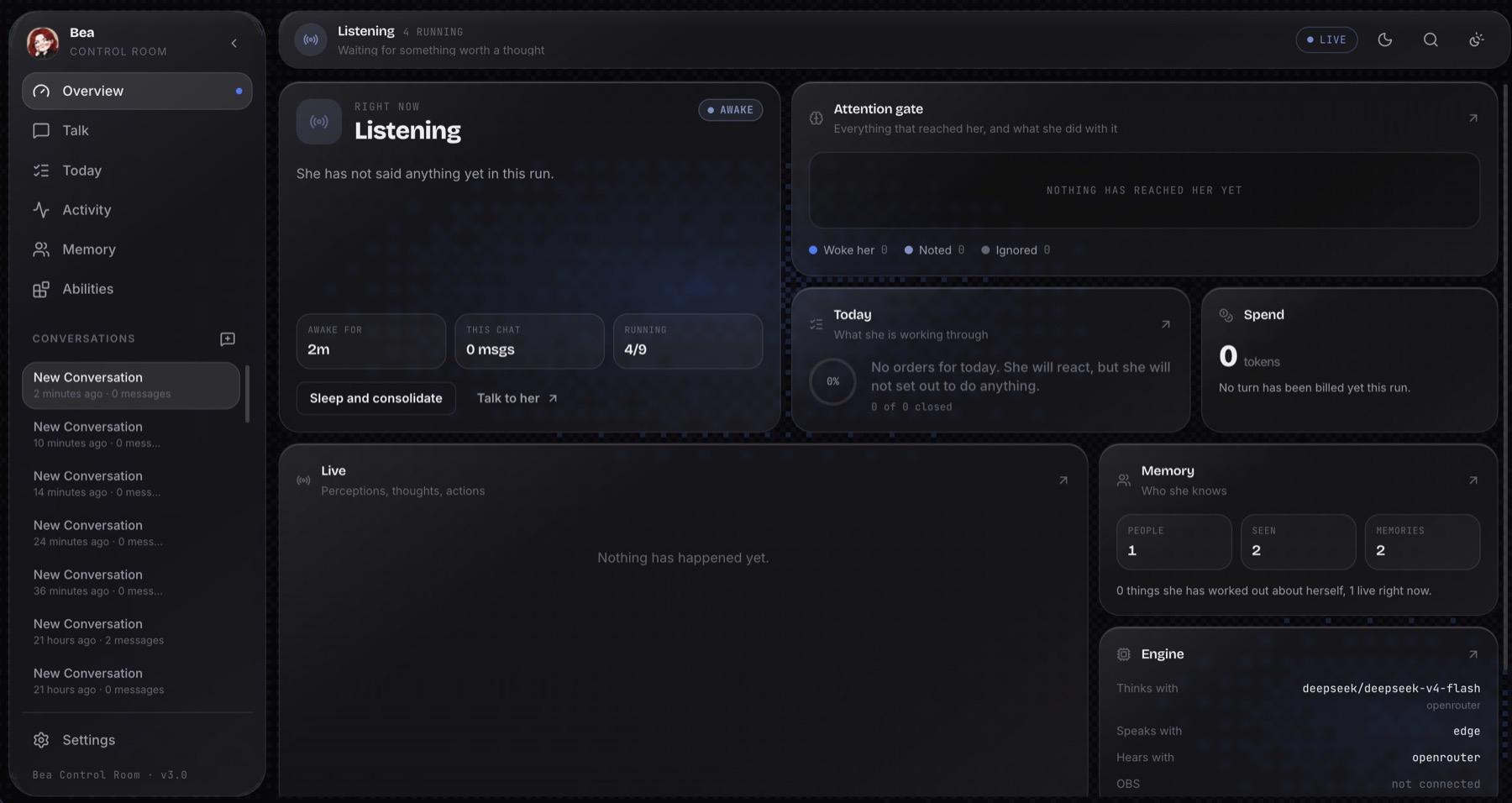
- Overview. Is she awake, what she last said, today's progress, the attention gate, spend, abilities and the live feed, on one screen
- Talk. The private line to her: streams voice in and out, and shows it plainly when she hears you and chooses not to answer
- Today. The orders she reads every turn, plus objectives you can reorder, edit and close; she closes them herself as she goes
- Activity. The attention gate drawn live, over a filterable, freezable event stream, plus a full Turn Log of every decision she makes
- Memory. Who she knows, everyone she has met, a search over what she remembers, and the things she has worked out about herself
- Abilities. Every capability on or off at runtime, plus the Minecraft cockpit
- Maintenance. Whether there is a new version and what is in it, with a button that installs it; and the same diagnostic
--doctorruns, streamed as it goes - Settings. Eight sections with connection tests, and one save for all of them. API keys and bot tokens typed here go to
.env, never toconfig.json
⌘K opens the command palette from anywhere.
The API has no authentication, so the server binds to
127.0.0.1unless--hostsays otherwise. Do not put it on a public address as it stands.
Her avatar is swapped by mood over the OBS WebSocket, with an animated text bubble for what she is saying.
API Reference → · Frontend → · OBS →
Architecture
Every sense pushes onto one bus. An attention gate decides what is worth a thought. One mind reasons over it and acts through tools.
  discord · telegram · twitch · minecraft · donations · the dashboard
                          │  perceptions
                          ▼
                  ┌───────────────┐
                  │ PerceptionBus │
                  └───────┬───────┘
                          ▼
                  ┌───────────────┐   every perception,
                  │   Attention   │   one priority each —
                  └───────┬───────┘   nothing dropped
                          ▼
        ┌─────────────────────────┐
        │  the one loop           │  one frame per batch,
        │  voice · game · owner · │  ordered by priority
        │  written channels       │
        └────────────┬────────────┘
                     │
        ┌────────────┴────────────┐
        ▼                         ▼
  Expression → voice+OBS    send_message → the channel
                     │
                     ▼  tools
   speak · send_message · react · say_nothing · find_block · objective_done · …
                     │
                     ▼
        Expression → TTS + OBS      ·      bea.db (memory)
Three invariants hold it together: one bus, one mind, one sink. They are written down in Contributing, because breaking one is the kind of change worth agreeing on first.
Full architecture → · Repository layout →
Swappable everything
Three kinds of component, each defined by an abstract interface in
src/interfaces/base_interfaces.py. Any provider can be swapped without
touching the core.
| Component | Interface | Implementations |
|---|---|---|
| LLM | LLMClient (tool-aware) | OpenRouter, OpenAI, Groq, Google AI Studio, Claude, any OpenAI- or Anthropic-compatible endpoint, local models (Ollama / LM Studio) |
| TTS | TTSInterface | EdgeTTS (free), Kokoro (local ONNX), Orpheus (API) |
| STT | STTInterface | Local Whisper (faster-whisper), Groq, OpenRouter |
| Avatar | AvatarInterface | Images (OBS), 3D model (VRM), VTube Studio |
| Caption | CaptionInterface | OBS text source, browser source, off |
| OBS | OBSInterface | OBS WebSocket |
Models are configured per role, not one at a time: mind for the
consciousness, background for the diary, the dreamer and the game body. Each
role is a pool that round-robins to spread rate limits and falls back when a
provider is down. Hot reload is built in: change models, voices or settings at
runtime, without a restart.
LLM → · TTS → · STT → · Avatar → · OBS →
She runs on your machine too
No key, no account, no bill — and nothing you say leaves the room. She thinks on local models through Ollama or LM Studio, voice and memory already run locally, so the whole of her can live on your hardware.
ollama pull qwen3:8b
Pick Local models in the setup, and that is the whole configuration. Her mind and her background are separate pools, so give the talking (and the playing) to a capable model and the diary and the dreamer to a small one — or mix a local model with a cloud key, and the pool falls over when the laptop sleeps.
Run it in Docker
One image carries the engine, the dashboard and the Discord bot.
make docker      # builds the image, then asks you the same five questions
make docker-up   # http://127.0.0.1:8000
Or without the Makefile:
cp config.example.json config.json && touch .env && docker compose run --rm setup && docker compose up
What runs in a container: the dashboard, her memory, Discord (voice included, since it travels over the network), Telegram, Twitch and Minecraft.
What does not: her speaking out of your computer's speakers. That needs a
real audio device. On Linux, uncomment the devices: block in
docker-compose.yml. On macOS and Windows, Docker Desktop cannot pass an audio
device through at all, so if you are streaming with OBS, run her natively.
The compose file publishes the dashboard to 127.0.0.1:8000, never to
0.0.0.0. OBS lives on the host, so point obs_host at host.docker.internal.
Manual setup
uv run bea --setup covers all of this. Here it is by hand.
Prerequisites: uv (it installs Python for you), Node.js 18+ for the dashboard and the Discord bot, OBS Studio with the WebSocket server enabled if you are streaming (Tools -> WebSocket Server Settings), and a virtual audio cable such as VB-Audio Cable if you want her voice on a separate track.
uv sync                    # or: make install
uv run bea --install-node  # or: make node   (the dashboard and the discord bot)
uv run bea --setup         # or: make setup  (writes config.json and .env for you)
Both of those need Node 20+. The discord bot is a node program of its own, so turning the skill on without it leaves her looking enabled and never online.
Or by hand, copy .env.example to .env:
OPENROUTER_API_KEY=sk-or-...
OPENAI_API_KEY=sk-...
GROQ_API_KEY=gsk_...
GOOGLE_API_KEY=AIza...
ANTHROPIC_API_KEY=sk-ant-...
DISCORD_TOKEN=...
Local models need no key at all — see above.
Then review config.json for your OBS source names, audio device, TTS voice and
which skills are enabled.
uv run bea                       # or: make run   (CLI mode)
uv run bea --web                 # or: make web   (dashboard on :8000)
uv run bea --llm-provider openrouter --tts-provider kokoro --web
Tests and diagnostics:
uv run bea --doctor  # or: make doctor
make test          # uv run pytest -q
make lint          # uv run ruff check src tests
1491 tests, and they run without network access or API keys: every model
client, surface and transport is faked. CI runs exactly make test and make lint.
[!TIP] Something broken? If she stops answering, you lose audio, or the avatar breaks, run
uv run bea --doctor(ormake doctor) — or open Maintenance in the dashboard and press the button. Fifteen checks in the order the pieces depend on each other, stopping at the first thing that would stop her, each failure carrying the exact command that fixes it.
Setup guide → · Configuration →
Build your own
The plugin API is a base class and a registry.
| What | How |
|---|---|
| A new LLM provider | One row in src/modules/llm/providers.py if it speaks Responses, Chat Completions or Anthropic Messages |
| A new TTS engine | Implement TTSInterface, add the branch and the CLI choice in src/cli.py |
| A new skill | Extend Skill, register it in AIVtuberBrain._build_consciousness() |
| A new text platform | Extend PlatformSkill, and the roster, person cards and attention priorities come for free |
The Skill API → · Contributing →
Documentation
Everything is written next to the code and rendered at projectbea.emqnuele.dev/docs from the same source.
| Architecture | System design, data flow, the event system |
| Setup & Install | Installation, OBS setup, audio routing |
| Configuration | Every config field, CLI arg and .env var |
| Languages | How a language is resolved, and what each voice engine can say |
| Updating | How an update keeps the prompts you edited |
| Skills Overview | The Skill API, the registry, every tool |
| Modules | LLM · TTS · STT · Avatar · OBS |
| Skills | Memory · Social · Dream · Plan · Discord · Telegram · Twitch · Minecraft · Donations · Monologue |
| Web | API reference · Frontend |
| Contributing | Where to start, the invariants, tests, pull requests |
| Security | What is in scope, and how to report it privately |
About
Built by Emanuele Faraci in Italy.
It started as a TTS script pointed at OBS. The interesting problem turned out not to be making her talk. It was deciding when she should, what she should still know a week later, and how one mind can be in five places without becoming five bots. That is most of what is in here.
Pull requests are welcome. Start here.
License
MIT. Use it, fork it, ship something with it. See LICENSE.
Similar repos


Languages
Python
78.3%
JavaScript
20.9%
ProjectBEA is an always-on AI persona engine: she talks, plays Minecraft with real people, and remembers you between sessions. One mind across Discord, Telegram, Twitch and Minecraft — not a bot per platform.
See the codeREADME
ProjectBEA
She talks, plays, and remembers you.
An always-on AI persona across Discord, Telegram, Twitch and a vanilla
Minecraft server. The same mind in all of them, not a bot per platform.
Website · Documentation · Quick start · Contributing
https://github.com/user-attachments/assets/00991f61-5eed-48cc-aefb-f2f6460120d7
The control room: everything she is perceiving, thinking and doing, on one screen.
Not a chatbot
A chatbot waits for a message and answers it. Bea does not wait.
She perceives. Twitch chat, a voice in a Discord call, a death in Minecraft, a donation, a note you typed. All of it arrives on one bus. She chooses. An attention gate decides what is worth a thought, so a busy room costs almost nothing. She remembers. Not a context window. A diary, a card for everyone who turns out to matter, and conclusions she reaches about herself overnight. She acts. One mind, one set of tools, one place everything leaves from. She lives. She streams her thoughts line by line, speaks them while she writes them, and her avatar breathes, blinks and reacts to the room in real time.
Try it in five minutes
[!IMPORTANT] One command. It installs
uvif you don't have it, pulls the dependencies, builds the dashboard, asks you five questions and downloads the two models that run on your own machine.macOS / Linux
curl -LsSf https://raw.githubusercontent.com/emqnuele/projectBEA/main/install.sh | bashWindows (PowerShell)
irm https://raw.githubusercontent.com/emqnuele/projectBEA/main/install.ps1 | iex
The default profile is Solo chat: the dashboard and her voice, one API key, nothing else. No OBS, no Discord bot, no Minecraft server, no virtual audio cable. Those are three separate profiles you can pick later, or turn on one at a time from the Abilities screen.
Already cloned the repo? uv run bea --setup does the same thing — make setup
if you have Make. Every make target here is one uv run command underneath, so
nothing needs Make: Windows in particular does not ship it.
[!NOTE] No API key needed: she runs on local models, on your own machine (below). A key from OpenRouter, OpenAI, Groq, Google AI Studio or Claude gets you bigger models instead.
Updating without losing her
uv run bea --update
Not git pull. The files that hold who she is — her soul, her operating manual
— ship with the engine and are yours to rewrite. A plain pull either refuses
to run or writes conflict markers straight into the text her personality is read
from, and nobody finds out until she starts talking like someone else.
--update backs up your prompts, your config and your memory first, then
merges the new version into your edits the way git merges a branch: you keep
the character you wrote, and the engine still gets the improvements to its own
instructions. If a change lands on the exact lines you rewrote, yours stays
untouched and the new one is left beside it to compare.
The dashboard does the same with a button, tells you when there is something new, and shows you the two versions side by side when a file needs your call.
Updating in place is the only thing here that needs git installed. Without it
she runs exactly the same, and uv run bea --doctor tells you what you are
missing.
What it does, and what it refuses to do →
She remembers you
Tell her who you are on Monday. Come back on Sunday and she knows.
Three layers, all of them in one SQLite file you can open, inspect, back up or
delete, in data/bea.db:
- The diary. What happened, in her words, written as she goes. Recall runs over it with local embeddings, so remembering something costs no API call.
- Person cards. A tally for everyone she meets, and a card for the ones who turn out to matter. Talk to her enough and you get promoted from a number to a person.
- Self-lore. Overnight she sleeps, consolidates the day, and works out things about herself. Those conclusions come back as facts she holds about who she is.
This is the difference between an AI chatbot and an AI character, and it is the part you cannot fake with a longer prompt.
How memory works → · Social → · Dream →
She has a body
Not "Minecraft integration". Her, on a vanilla server, playing, where other people can walk up to her.
The game is one more thing she lives in, like the call or the chat: its tools are her hands. Chop sixteen logs is one action that walks, chops and picks up on its own, and it runs beside her while she keeps talking; what came of it reaches her the way a message does, and she decides the next thing. The fast part of playing — eating, fighting back, landing a fall — is reflexes in the mod, answered in ticks.
She talks like a player, because she is one: "ok, I'm on it", not "go do it". Deep in something long, she is asked for a word only when something in it changed, and she answers out loud, in game chat, or not at all.
Players who talk to her in game chat get an Author like anyone else, so the
roster, the person cards and the attention gate all work in-game with no
Minecraft-specific code.
It runs on BeaCraft, a client-side Fabric mod that simulates input and sends ordinary packets. The server sees a normal player. Nothing is needed server-side.
How she looks on stream
Three ways to put her on screen. Pick one in Settings → Stream, with a live preview of what the stream will see.
| What it is | What you need | |
|---|---|---|
| Images | One picture per mood, swapped in OBS | Your PNGs |
| 3D model | A VRM in an OBS browser source | A .vrm file |
| VTube Studio | Your own Live2D model, driven over its API | VTube Studio running |
Her speech bubble is a separate choice — an OBS text source, the same browser source, or nothing — so you can mix them however you like.
For the 3D route, the dashboard's library (Settings → Stream) downloads a free
model and its idle motion in one click — make model fetches the same files —
takes your own .vrm by drag and drop, shows what each model's licence allows,
and lets you try one on in the preview before putting it on stage. From a
terminal, the inspector reads the same things out of a file:
uv run python tools/inspect_vrm.py your-model.vrm
It tells you whether the model can do what she needs — a mouth that moves, a face
per mood — and reads out the licence the file carries, so you know what you are
allowed to stream with it. Her gestures are .vrma clips: drop them in
data/clips and assign one per mood.
Whichever you pick, the mood she chooses for a line drives all of it. A semantic picker maps whatever expression she names to the nearest one your model actually has. Her avatar blinks, breathes, and looks around on its own, and her mouth follows the audio as it plays.
How it works, and how to add a backend →
A busy chat costs almost nothing
Answering every message is what makes an always-on persona expensive to run and exhausting to watch. Bea reads everything and answers what matters: every perception enters one frame with a priority — addressed by name or answering her always first — and the model decides what deserves words.
30 messages a minute ────────▶ one frame, one turn
Nothing is ever dropped at the gate; the cost control is architectural (one reasoning cycle per batch, not one per message).
That holds for one person too. Type "hey", "how are you", "everything alright?" as three messages and you get one reply: the batch closes when you stop typing, not a fraction of a second after you started, and a line that lands while she is already answering you waits for the next turn instead of earning a second reply. Three messages, one person, one answer — the way a person reads them.
| Priority | When |
|---|---|
| 1.0 | Addressed by name, spoken to directly, answering her, or something her own body reported. Past cooldown and quiet hours. |
| scored | Everything else, highest first. A loud stream feels loud to her; no single message is owed an answer. |
One mind, one window
She does not keep a separate head per chat. Every turn lands in a single sliding context window — 150k tokens by default, adjustable up to 500k in Settings — that breathes instead of filling up: around 120k a background handoff writes down what went cold ("you talked about food for two hours") while she keeps talking. The latest 30k tokens, plus everything said while the recap was being written, travel over word for word. What was happening stays happening.
Because the window knows where she is, she answers there: a Telegram message gets a Telegram reply, never silence, never "I don't have Telegram".
She sleeps
At the end of the day she goes quiet, and a nightly pass consolidates what happened: the diary is compacted, the people who mattered get promoted, and she works out a handful of things about herself that come back tomorrow as facts she holds.
It is the cheapest interesting thing in the system and the one people ask about most.
Where she lives
Every one of these is a Skill: a plugin that can perceive, expose tools, contribute prompt rules and own its own infrastructure. All of them can be switched on or off at runtime from the dashboard, and she can never arm one herself.
| Skill | What it is |
|---|---|
| Discord | Voice calls and text channels; owns a small Node.js bot for the audio pipeline |
| Telegram | Private chats and groups, polled in-process |
| Twitch | Chat read anonymously, no token needed; volume becomes texture, not thoughts |
| Minecraft | A body on a vanilla server: she plays toward objectives, reads game chat, remembers players |
| Donations | A webhook that always earns a reaction |
| Stream Plan | Today's objectives, set by the owner; she works through them and ticks them off |
| Memory | Diary entries and recall, over one SQLite file |
| Social | Who people are: a tally for everyone, a card for the ones who matter |
| Dream | Sleep, self-lore and nightly consolidation |
| Monologue | Filling the silence when nothing is happening |
The control room
uv run bea --web starts a FastAPI backend on port 8000 and serves a React +
Tailwind frontend. It opens on a boot screen that checks the brain is actually
answering before it lets you in, then on a bento overview of everything at once.
- Overview. Is she awake, what she last said, today's progress, the attention gate, spend, abilities and the live feed, on one screen
- Talk. The private line to her: streams voice in and out, and shows it plainly when she hears you and chooses not to answer
- Today. The orders she reads every turn, plus objectives you can reorder, edit and close; she closes them herself as she goes
- Activity. The attention gate drawn live, over a filterable, freezable event stream, plus a full Turn Log of every decision she makes
- Memory. Who she knows, everyone she has met, a search over what she remembers, and the things she has worked out about herself
- Abilities. Every capability on or off at runtime, plus the Minecraft cockpit
- Maintenance. Whether there is a new version and what is in it, with a button that installs it; and the same diagnostic
--doctorruns, streamed as it goes - Settings. Eight sections with connection tests, and one save for all of them. API keys and bot tokens typed here go to
.env, never toconfig.json
⌘K opens the command palette from anywhere.
The API has no authentication, so the server binds to
127.0.0.1unless--hostsays otherwise. Do not put it on a public address as it stands.
Her avatar is swapped by mood over the OBS WebSocket, with an animated text bubble for what she is saying.
API Reference → · Frontend → · OBS →
Architecture
Every sense pushes onto one bus. An attention gate decides what is worth a thought. One mind reasons over it and acts through tools.
  discord · telegram · twitch · minecraft · donations · the dashboard
                          │  perceptions
                          ▼
                  ┌───────────────┐
                  │ PerceptionBus │
                  └───────┬───────┘
                          ▼
                  ┌───────────────┐   every perception,
                  │   Attention   │   one priority each —
                  └───────┬───────┘   nothing dropped
                          ▼
        ┌─────────────────────────┐
        │  the one loop           │  one frame per batch,
        │  voice · game · owner · │  ordered by priority
        │  written channels       │
        └────────────┬────────────┘
                     │
        ┌────────────┴────────────┐
        ▼                         ▼
  Expression → voice+OBS    send_message → the channel
                     │
                     ▼  tools
   speak · send_message · react · say_nothing · find_block · objective_done · …
                     │
                     ▼
        Expression → TTS + OBS      ·      bea.db (memory)
Three invariants hold it together: one bus, one mind, one sink. They are written down in Contributing, because breaking one is the kind of change worth agreeing on first.
Full architecture → · Repository layout →
Swappable everything
Three kinds of component, each defined by an abstract interface in
src/interfaces/base_interfaces.py. Any provider can be swapped without
touching the core.
| Component | Interface | Implementations |
|---|---|---|
| LLM | LLMClient (tool-aware) | OpenRouter, OpenAI, Groq, Google AI Studio, Claude, any OpenAI- or Anthropic-compatible endpoint, local models (Ollama / LM Studio) |
| TTS | TTSInterface | EdgeTTS (free), Kokoro (local ONNX), Orpheus (API) |
| STT | STTInterface | Local Whisper (faster-whisper), Groq, OpenRouter |
| Avatar | AvatarInterface | Images (OBS), 3D model (VRM), VTube Studio |
| Caption | CaptionInterface | OBS text source, browser source, off |
| OBS | OBSInterface | OBS WebSocket |
Models are configured per role, not one at a time: mind for the
consciousness, background for the diary, the dreamer and the game body. Each
role is a pool that round-robins to spread rate limits and falls back when a
provider is down. Hot reload is built in: change models, voices or settings at
runtime, without a restart.
LLM → · TTS → · STT → · Avatar → · OBS →
She runs on your machine too
No key, no account, no bill — and nothing you say leaves the room. She thinks on local models through Ollama or LM Studio, voice and memory already run locally, so the whole of her can live on your hardware.
ollama pull qwen3:8b
Pick Local models in the setup, and that is the whole configuration. Her mind and her background are separate pools, so give the talking (and the playing) to a capable model and the diary and the dreamer to a small one — or mix a local model with a cloud key, and the pool falls over when the laptop sleeps.
Run it in Docker
One image carries the engine, the dashboard and the Discord bot.
make docker      # builds the image, then asks you the same five questions
make docker-up   # http://127.0.0.1:8000
Or without the Makefile:
cp config.example.json config.json && touch .env && docker compose run --rm setup && docker compose up
What runs in a container: the dashboard, her memory, Discord (voice included, since it travels over the network), Telegram, Twitch and Minecraft.
What does not: her speaking out of your computer's speakers. That needs a
real audio device. On Linux, uncomment the devices: block in
docker-compose.yml. On macOS and Windows, Docker Desktop cannot pass an audio
device through at all, so if you are streaming with OBS, run her natively.
The compose file publishes the dashboard to 127.0.0.1:8000, never to
0.0.0.0. OBS lives on the host, so point obs_host at host.docker.internal.
Manual setup
uv run bea --setup covers all of this. Here it is by hand.
Prerequisites: uv (it installs Python for you), Node.js 18+ for the dashboard and the Discord bot, OBS Studio with the WebSocket server enabled if you are streaming (Tools -> WebSocket Server Settings), and a virtual audio cable such as VB-Audio Cable if you want her voice on a separate track.
uv sync                    # or: make install
uv run bea --install-node  # or: make node   (the dashboard and the discord bot)
uv run bea --setup         # or: make setup  (writes config.json and .env for you)
Both of those need Node 20+. The discord bot is a node program of its own, so turning the skill on without it leaves her looking enabled and never online.
Or by hand, copy .env.example to .env:
OPENROUTER_API_KEY=sk-or-...
OPENAI_API_KEY=sk-...
GROQ_API_KEY=gsk_...
GOOGLE_API_KEY=AIza...
ANTHROPIC_API_KEY=sk-ant-...
DISCORD_TOKEN=...
Local models need no key at all — see above.
Then review config.json for your OBS source names, audio device, TTS voice and
which skills are enabled.
uv run bea                       # or: make run   (CLI mode)
uv run bea --web                 # or: make web   (dashboard on :8000)
uv run bea --llm-provider openrouter --tts-provider kokoro --web
Tests and diagnostics:
uv run bea --doctor  # or: make doctor
make test          # uv run pytest -q
make lint          # uv run ruff check src tests
1491 tests, and they run without network access or API keys: every model
client, surface and transport is faked. CI runs exactly make test and make lint.
[!TIP] Something broken? If she stops answering, you lose audio, or the avatar breaks, run
uv run bea --doctor(ormake doctor) — or open Maintenance in the dashboard and press the button. Fifteen checks in the order the pieces depend on each other, stopping at the first thing that would stop her, each failure carrying the exact command that fixes it.
Setup guide → · Configuration →
Build your own
The plugin API is a base class and a registry.
| What | How |
|---|---|
| A new LLM provider | One row in src/modules/llm/providers.py if it speaks Responses, Chat Completions or Anthropic Messages |
| A new TTS engine | Implement TTSInterface, add the branch and the CLI choice in src/cli.py |
| A new skill | Extend Skill, register it in AIVtuberBrain._build_consciousness() |
| A new text platform | Extend PlatformSkill, and the roster, person cards and attention priorities come for free |
The Skill API → · Contributing →
Documentation
Everything is written next to the code and rendered at projectbea.emqnuele.dev/docs from the same source.
| Architecture | System design, data flow, the event system |
| Setup & Install | Installation, OBS setup, audio routing |
| Configuration | Every config field, CLI arg and .env var |
| Languages | How a language is resolved, and what each voice engine can say |
| Updating | How an update keeps the prompts you edited |
| Skills Overview | The Skill API, the registry, every tool |
| Modules | LLM · TTS · STT · Avatar · OBS |
| Skills | Memory · Social · Dream · Plan · Discord · Telegram · Twitch · Minecraft · Donations · Monologue |
| Web | API reference · Frontend |
| Contributing | Where to start, the invariants, tests, pull requests |
| Security | What is in scope, and how to report it privately |
About
Built by Emanuele Faraci in Italy.
It started as a TTS script pointed at OBS. The interesting problem turned out not to be making her talk. It was deciding when she should, what she should still know a week later, and how one mind can be in five places without becoming five bots. That is most of what is in here.
Pull requests are welcome. Start here.
License
MIT. Use it, fork it, ship something with it. See LICENSE.
Similar repos
Languages
Python
78.3%
JavaScript
20.9%