
A private, local AI chat for Ollama — easy to install, runs entirely on your own computer. No account, no cloud, no subscription. Open source (GPLv3), Linux only.
Python
1
2 commits
updated Oct 3, 2026
See what people are saying
README
Hearth
Your own AI chat, running entirely on your computer.
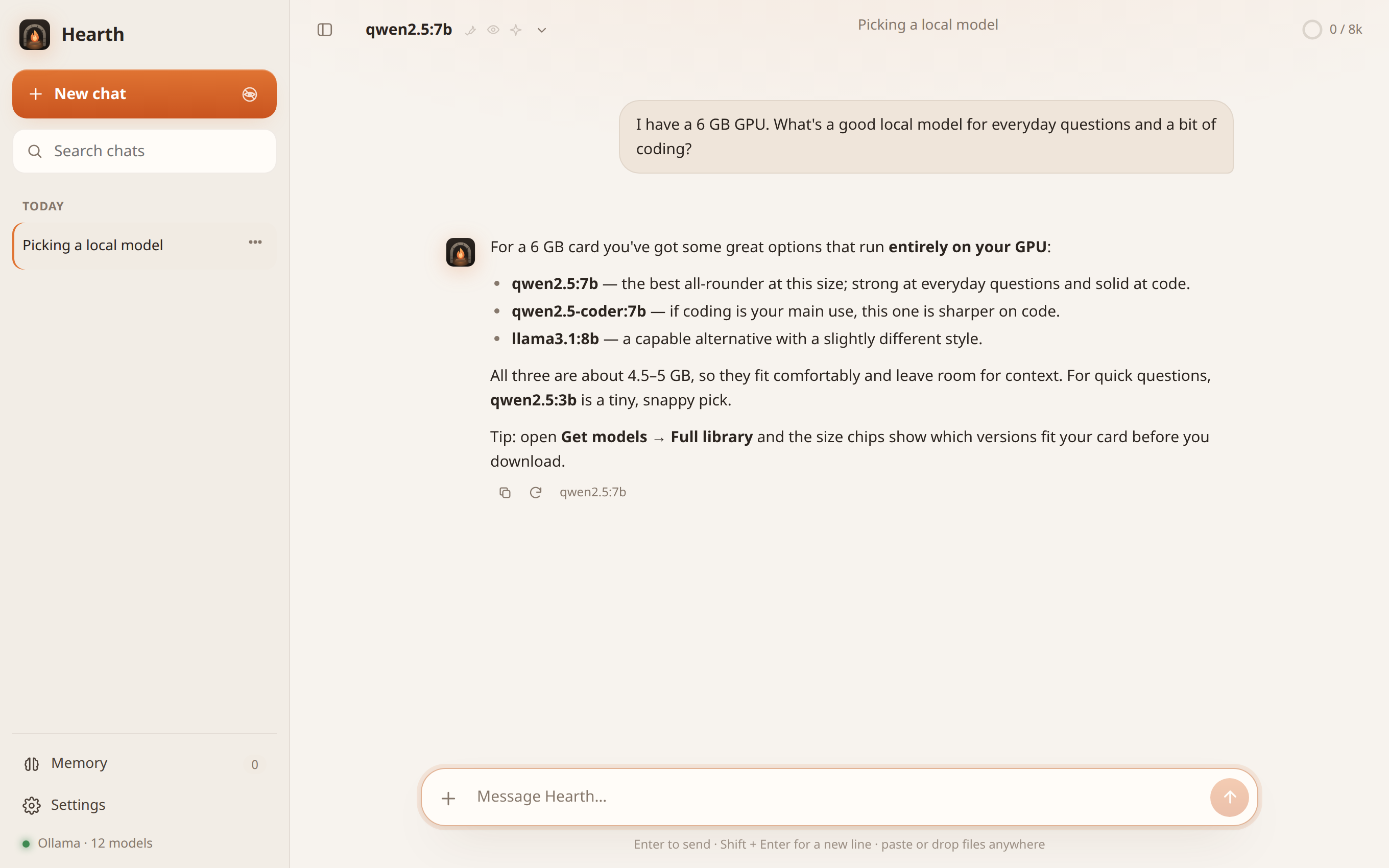
Hearth is a private AI assistant you can talk to like ChatGPT — but it runs on your own machine instead of someone else's servers. Nothing you type, no file you share, and no picture you make ever leaves your computer. There's no account to create, no subscription, and no company reading your conversations.
It gives you a clean chat window in your browser, powered by AI models running locally through a free tool called Ollama.
Why you might want it
- It's completely private. Your chats, files, and memory stay on your computer. Hearth only ever talks to the AI running locally — it never phones home.
- It's free to run. No API keys, no monthly bill. The only cost is your own electricity.
- It works offline. Once a model is downloaded, you can chat with no internet connection at all.
- You're in control. You choose which AI models to use, what the assistant is allowed to do, and what it remembers.
What's Ollama? (the one thing you need first)
Hearth doesn't contain an AI model itself — it's the friendly front end. The actual "brain" is provided by Ollama, a free program that downloads and runs AI models on your computer.
So the setup is: install Ollama once, then install Hearth, and Hearth takes care of the rest (it can even download models for you from inside its own window).
Install Ollama from ollama.com — it's a normal one-click install.
What it can do
- Chat with any AI model, with answers that stream in as they're written, nicely formatted code, and Markdown.
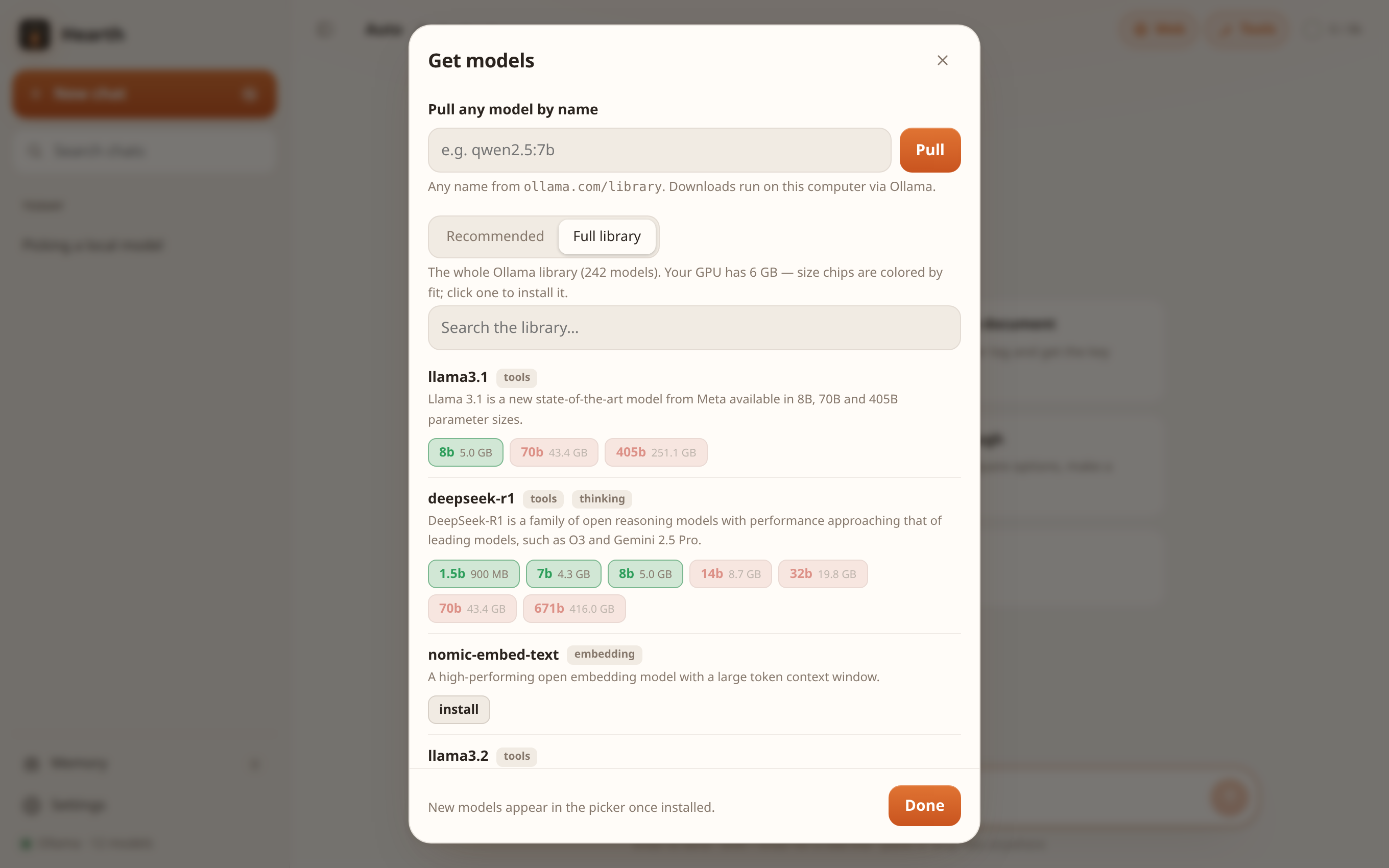
- Get models without leaving the app. A built-in browser shows the whole library of available models. If you have an NVIDIA graphics card, it even checks your card's memory and tells you, at a glance, which models fit your GPU, which are a tight fit, and which are too big. Click to download, watch the progress, and remove ones you don't want.
- Search and read the web when you want up-to-date answers (you can turn this off anytime).
- Read your files. Drop in a PDF, document, or log and ask questions about it.
- Make and edit pictures right on your computer (optional — needs a little extra setup).
- Remember things about you across conversations — your name, your preferences, your projects — so you don't have to repeat yourself.
- Private chats. Start an "incognito" chat that's never saved to disk and vanishes the moment you leave it.
- A safe coding helper. Point it at a folder and it can read and write files there to help you build things — but only in folders you allow, it always keeps a backup of anything it changes, and it can never run commands on your system.
- Projects. Tell Hearth about the folders you work in, and each one gets its own chat that already knows the context.
Screenshots
Browse the whole Ollama library and see what fits your GPU before you download — green means it runs fully on your card, red means it would spill to the CPU:
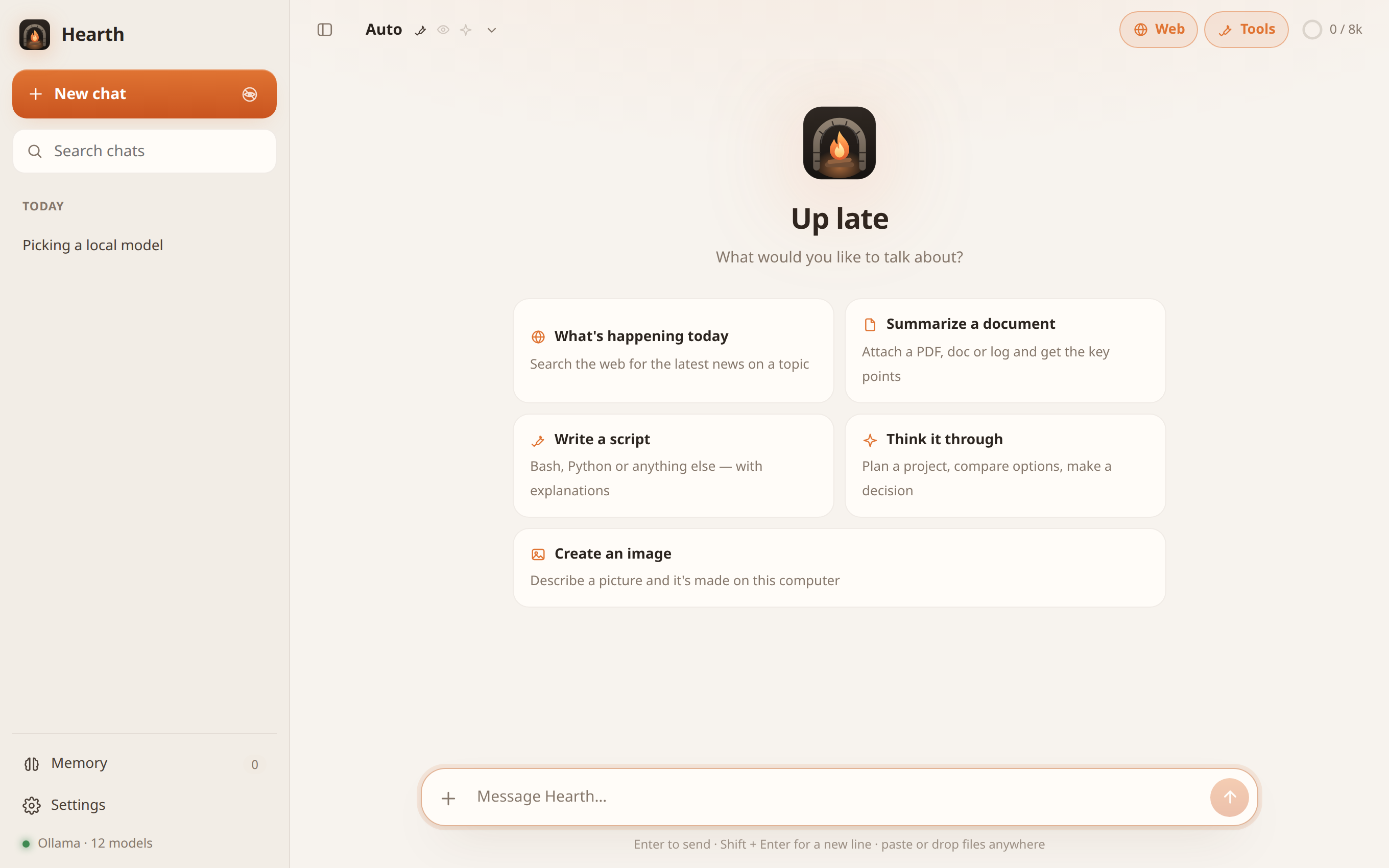
A clean start screen with your conversations in the sidebar and nothing sent anywhere:
Setting it up
You'll need a Linux computer, Python 3.10 or newer (almost always already installed), and Ollama (see above).
1. Install Ollama from ollama.com if you haven't already.
2. Download Hearth and install it:
git clone https://github.com/dprice0823/hearth.git
cd hearth
bash install.sh
That's it. Hearth now starts automatically when you log in and adds itself to your applications menu and desktop, like any other app.
3. Open it — click the Hearth icon, or go to this address in your browser:
http://127.0.0.1:8410
4. Get a model. The first time, click the model menu → Get models, and download one to start with (something small like qwen2.5:3b is a great, fast first choice). Then start chatting.
Keeping it up to date
cd hearth
bash install.sh
Removing it
bash install.sh --uninstall
Your chats and memory are kept even if you uninstall, in case you reinstall later.
How it works (the short version)
Hearth is intentionally simple. It's one small program with no complicated machinery behind it — just three parts talking to each other, all on your computer:
   The chat window in your browser
                │
                ▼
   Hearth  (the program this project is)
                │
                ▼
   Ollama  (runs the actual AI model on your GPU or CPU)
When you send a message, Hearth gathers everything the AI should know — your message, anything it remembers about you, the current conversation, and whichever abilities ("tools") you've switched on — and passes it to Ollama. The answer streams back into your chat window word by word.
If the AI needs to do something — search the web, read a file you attached, do some math, draw a picture — Hearth runs that for it and hands back the result, and you see exactly what it did right in the conversation. Long chats are automatically condensed in the background so they can keep going without slowing down.
Everything personal (your chats, memory, and settings) is stored quietly in a folder on your computer, separate from the program itself, so updating Hearth never touches your data.
Your privacy, in plain terms
- Hearth listens only on
127.0.0.1— an address that means "this computer only." It is not reachable from your network or the internet, and it has no login because it doesn't need one. - The only things Hearth reaches out to on the internet are the ones you ask for: a web search, reading a page you pointed it at, or downloading a model. With web access turned off, it talks to nothing but the AI running on your own machine.
- The AI can only read and change files in folders you've specifically allowed, and it can never run system commands.
License
Hearth is free and open source under the GNU General Public License v3.0. You're welcome to use it, study it, share it, and change it; if you distribute your own changed version, it needs to stay open under the same license.
Built with Claude.
Similar repos


Languages
Python
44.9%
JavaScript
28.5%
CSS
15.7%
HTML
7.4%
Shell
3.5%
A private, local AI chat for Ollama — easy to install, runs entirely on your own computer. No account, no cloud, no subscription. Open source (GPLv3), Linux only.
Python
1
2 commits
updated Oct 3, 2026
See what people are saying
README
Hearth
Your own AI chat, running entirely on your computer.
Hearth is a private AI assistant you can talk to like ChatGPT — but it runs on your own machine instead of someone else's servers. Nothing you type, no file you share, and no picture you make ever leaves your computer. There's no account to create, no subscription, and no company reading your conversations.
It gives you a clean chat window in your browser, powered by AI models running locally through a free tool called Ollama.
Why you might want it
- It's completely private. Your chats, files, and memory stay on your computer. Hearth only ever talks to the AI running locally — it never phones home.
- It's free to run. No API keys, no monthly bill. The only cost is your own electricity.
- It works offline. Once a model is downloaded, you can chat with no internet connection at all.
- You're in control. You choose which AI models to use, what the assistant is allowed to do, and what it remembers.
What's Ollama? (the one thing you need first)
Hearth doesn't contain an AI model itself — it's the friendly front end. The actual "brain" is provided by Ollama, a free program that downloads and runs AI models on your computer.
So the setup is: install Ollama once, then install Hearth, and Hearth takes care of the rest (it can even download models for you from inside its own window).
Install Ollama from ollama.com — it's a normal one-click install.
What it can do
- Chat with any AI model, with answers that stream in as they're written, nicely formatted code, and Markdown.
- Get models without leaving the app. A built-in browser shows the whole library of available models. If you have an NVIDIA graphics card, it even checks your card's memory and tells you, at a glance, which models fit your GPU, which are a tight fit, and which are too big. Click to download, watch the progress, and remove ones you don't want.
- Search and read the web when you want up-to-date answers (you can turn this off anytime).
- Read your files. Drop in a PDF, document, or log and ask questions about it.
- Make and edit pictures right on your computer (optional — needs a little extra setup).
- Remember things about you across conversations — your name, your preferences, your projects — so you don't have to repeat yourself.
- Private chats. Start an "incognito" chat that's never saved to disk and vanishes the moment you leave it.
- A safe coding helper. Point it at a folder and it can read and write files there to help you build things — but only in folders you allow, it always keeps a backup of anything it changes, and it can never run commands on your system.
- Projects. Tell Hearth about the folders you work in, and each one gets its own chat that already knows the context.
Screenshots
Browse the whole Ollama library and see what fits your GPU before you download — green means it runs fully on your card, red means it would spill to the CPU:
A clean start screen with your conversations in the sidebar and nothing sent anywhere:
Setting it up
You'll need a Linux computer, Python 3.10 or newer (almost always already installed), and Ollama (see above).
1. Install Ollama from ollama.com if you haven't already.
2. Download Hearth and install it:
git clone https://github.com/dprice0823/hearth.git
cd hearth
bash install.sh
That's it. Hearth now starts automatically when you log in and adds itself to your applications menu and desktop, like any other app.
3. Open it — click the Hearth icon, or go to this address in your browser:
http://127.0.0.1:8410
4. Get a model. The first time, click the model menu → Get models, and download one to start with (something small like qwen2.5:3b is a great, fast first choice). Then start chatting.
Keeping it up to date
cd hearth
bash install.sh
Removing it
bash install.sh --uninstall
Your chats and memory are kept even if you uninstall, in case you reinstall later.
How it works (the short version)
Hearth is intentionally simple. It's one small program with no complicated machinery behind it — just three parts talking to each other, all on your computer:
   The chat window in your browser
                │
                ▼
   Hearth  (the program this project is)
                │
                ▼
   Ollama  (runs the actual AI model on your GPU or CPU)
When you send a message, Hearth gathers everything the AI should know — your message, anything it remembers about you, the current conversation, and whichever abilities ("tools") you've switched on — and passes it to Ollama. The answer streams back into your chat window word by word.
If the AI needs to do something — search the web, read a file you attached, do some math, draw a picture — Hearth runs that for it and hands back the result, and you see exactly what it did right in the conversation. Long chats are automatically condensed in the background so they can keep going without slowing down.
Everything personal (your chats, memory, and settings) is stored quietly in a folder on your computer, separate from the program itself, so updating Hearth never touches your data.
Your privacy, in plain terms
- Hearth listens only on
127.0.0.1— an address that means "this computer only." It is not reachable from your network or the internet, and it has no login because it doesn't need one. - The only things Hearth reaches out to on the internet are the ones you ask for: a web search, reading a page you pointed it at, or downloading a model. With web access turned off, it talks to nothing but the AI running on your own machine.
- The AI can only read and change files in folders you've specifically allowed, and it can never run system commands.
License
Hearth is free and open source under the GNU General Public License v3.0. You're welcome to use it, study it, share it, and change it; if you distribute your own changed version, it needs to stay open under the same license.
Built with Claude.
Similar repos
Languages
Python
44.9%
JavaScript
28.5%
CSS
15.7%
HTML
7.4%
Shell
3.5%