
Desktop and Mobile App for ivx/ai Chat Interface
See the codeSee what people are saying (1)
README
ivx/ai Chat
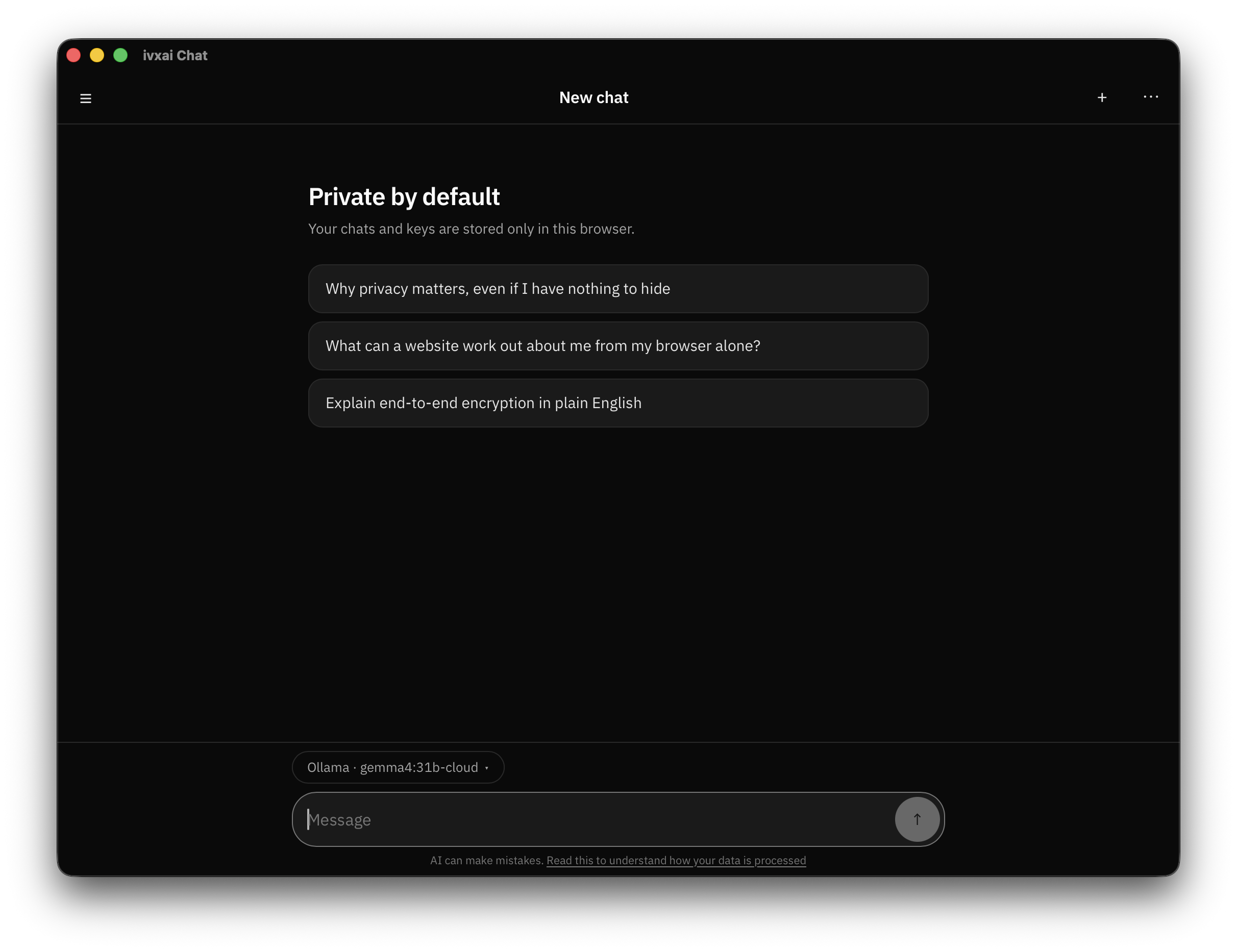
ivx/ai Chat is a lightweight, browser-based chat client designed for users who want total control over their data and their AI interactions. It has no backend, no accounts, no analytics and zero telemetry: a pure frontend that talks to your chosen model directly, so your conversations and API keys never pass through a third party server and stay entirely within your browser.
Try it · Download · Help · Discord
Nobody in the middle
Most chat apps keep your conversations on their servers, count what you do with them, and train on them. ivx/ai Chat has no server to keep anything on.
- No account. Nothing to sign up for, nothing to log in to.
- Nothing is collected. No tracking, no ads, no usage reports, not even a count of how often you open it.
- Your chats stay on your device, along with your keys, which you can lock behind a passphrase.
- Nothing else is loaded. No outside code, fonts or trackers, and the app is built so it cannot quietly start fetching any.
Your messages do go to whichever AI service you pick, which no app can change. Choose one you trust, or run a model on your own computer and skip that too.
Any model you like
- In your browser. Pick the built-in option and a small model runs on your own computer, inside the browser. No key, no setup, nothing to install.
- On your computer. Already running Ollama, LM Studio, llama.cpp, Jan, vLLM, LocalAI or Text generation WebUI? Scan for local servers finds it.
- From a service. OpenRouter, OpenAI, Anthropic, Groq, Mistral, Together, DeepSeek, and most others. Paste your key and pick a model.
Anything other than the in-browser model may need the helper below, depending on whether it accepts calls from a web page.
Step-by-step setup for each: ai.ivx.run/docs.
What you can do with it
- Agents. Save a model together with a prompt and a name, then chat with it. Change the agent and every chat using it follows. Agents can ask each other for help.
- Tools. Let an agent use tools such as search or file access, through any MCP server you add.
- The Store. Ready-made services, agents, tools and skills you can install in a tap.
- Settings per chat. Its own prompt, creativity, length limit and how much history to send.
- Fix and retry. Edit any message and run the conversation again from there.
- Share a chat with a link that carries the conversation inside it, so no server ever holds a copy.
- Export one chat as a file, or everything at once as a backup.
- Search your chats.
- Works offline once installed, if the model is on your own computer.
- Erase everything in one go.
Three ways to use it
1. In your browser: ai.ivx.run/chat
Nothing to install. Choose Install or Add to Home Screen to keep it like any other app.
The model that runs inside the browser needs nothing else. For most other services, on your computer or online, you will also want the helper below.
2. Installed, on macOS, Windows or Linux
The helper is built in, so every service works with nothing extra to set up. This is the easiest way to use it.
Download it from the releases page, or on a Mac:
brew tap ivxlabs/tap
brew trust ivxlabs/tap
brew install --cask ivxai-chat
We do not pay Apple or Microsoft for a signing certificate, so both warn you the first time you open it. The release notes show what to click.
Android and iOS work but are not published yet.
3. On your own server
For a copy your household or team can share, on a rented server or a spare machine at home: Self-hosting.
The helper: ivx-bridge
Browsers do not let a web page talk to programs on your own computer, and many online services refuse calls that come from a web page. Neither is a fault in the model or tool you are using.
ivx-bridge makes those calls on the page's behalf. The installed apps carry it
inside them, so this only matters in the browser version: install it, leave it
running, then turn on Settings → CORS bypass → Look for the bridge.
brew install ivx-bridge     # or download it from the releases page
ivx-bridge
It reads nothing, stores nothing, and only answers ivx/ai Chat. More: The bridge.
For developers
web/ | the app itself |
crates/ivx-bridge/ | the bridge: library and standalone daemon |
src-tauri/ | the desktop and mobile shell, which embeds that library |
packaging/extension/ | the same app as a Chrome, Firefox and Safari extension |
git clone https://github.com/ivxlabs/ivxai-app
cd ivxai-app
npm install
| What | Command | Needs |
|---|---|---|
| The web app | npm run web:build | Node |
| The bridge | cargo build --release -p ivx-bridge | Rust |
| The app | npm run build | Rust, Node, Tauri prerequisites |
| The app, running | npm run dev | same |
| The extensions | npm run ext:build | Node |
| ...checked in a real browser | npm run ext:test | Chrome and Firefox installed |
| ...the Safari one | npm run ext:safari | Xcode |
Mobile builds, the release process and the rest of the notes are in Building it.
Supporting it

Licence
Free software under the GNU GPL v3.0 or later, see LICENSE.
Contributors

39 commits
Similar repos


Languages
JavaScript
79.1%
Rust
11.5%
CSS
7.7%
HTML
1.1%
Desktop and Mobile App for ivx/ai Chat Interface
See the codeSee what people are saying (1)
README
ivx/ai Chat
ivx/ai Chat is a lightweight, browser-based chat client designed for users who want total control over their data and their AI interactions. It has no backend, no accounts, no analytics and zero telemetry: a pure frontend that talks to your chosen model directly, so your conversations and API keys never pass through a third party server and stay entirely within your browser.
Try it · Download · Help · Discord
Nobody in the middle
Most chat apps keep your conversations on their servers, count what you do with them, and train on them. ivx/ai Chat has no server to keep anything on.
- No account. Nothing to sign up for, nothing to log in to.
- Nothing is collected. No tracking, no ads, no usage reports, not even a count of how often you open it.
- Your chats stay on your device, along with your keys, which you can lock behind a passphrase.
- Nothing else is loaded. No outside code, fonts or trackers, and the app is built so it cannot quietly start fetching any.
Your messages do go to whichever AI service you pick, which no app can change. Choose one you trust, or run a model on your own computer and skip that too.
Any model you like
- In your browser. Pick the built-in option and a small model runs on your own computer, inside the browser. No key, no setup, nothing to install.
- On your computer. Already running Ollama, LM Studio, llama.cpp, Jan, vLLM, LocalAI or Text generation WebUI? Scan for local servers finds it.
- From a service. OpenRouter, OpenAI, Anthropic, Groq, Mistral, Together, DeepSeek, and most others. Paste your key and pick a model.
Anything other than the in-browser model may need the helper below, depending on whether it accepts calls from a web page.
Step-by-step setup for each: ai.ivx.run/docs.
What you can do with it
- Agents. Save a model together with a prompt and a name, then chat with it. Change the agent and every chat using it follows. Agents can ask each other for help.
- Tools. Let an agent use tools such as search or file access, through any MCP server you add.
- The Store. Ready-made services, agents, tools and skills you can install in a tap.
- Settings per chat. Its own prompt, creativity, length limit and how much history to send.
- Fix and retry. Edit any message and run the conversation again from there.
- Share a chat with a link that carries the conversation inside it, so no server ever holds a copy.
- Export one chat as a file, or everything at once as a backup.
- Search your chats.
- Works offline once installed, if the model is on your own computer.
- Erase everything in one go.
Three ways to use it
1. In your browser: ai.ivx.run/chat
Nothing to install. Choose Install or Add to Home Screen to keep it like any other app.
The model that runs inside the browser needs nothing else. For most other services, on your computer or online, you will also want the helper below.
2. Installed, on macOS, Windows or Linux
The helper is built in, so every service works with nothing extra to set up. This is the easiest way to use it.
Download it from the releases page, or on a Mac:
brew tap ivxlabs/tap
brew trust ivxlabs/tap
brew install --cask ivxai-chat
We do not pay Apple or Microsoft for a signing certificate, so both warn you the first time you open it. The release notes show what to click.
Android and iOS work but are not published yet.
3. On your own server
For a copy your household or team can share, on a rented server or a spare machine at home: Self-hosting.
The helper: ivx-bridge
Browsers do not let a web page talk to programs on your own computer, and many online services refuse calls that come from a web page. Neither is a fault in the model or tool you are using.
ivx-bridge makes those calls on the page's behalf. The installed apps carry it
inside them, so this only matters in the browser version: install it, leave it
running, then turn on Settings → CORS bypass → Look for the bridge.
brew install ivx-bridge     # or download it from the releases page
ivx-bridge
It reads nothing, stores nothing, and only answers ivx/ai Chat. More: The bridge.
For developers
web/ | the app itself |
crates/ivx-bridge/ | the bridge: library and standalone daemon |
src-tauri/ | the desktop and mobile shell, which embeds that library |
packaging/extension/ | the same app as a Chrome, Firefox and Safari extension |
git clone https://github.com/ivxlabs/ivxai-app
cd ivxai-app
npm install
| What | Command | Needs |
|---|---|---|
| The web app | npm run web:build | Node |
| The bridge | cargo build --release -p ivx-bridge | Rust |
| The app | npm run build | Rust, Node, Tauri prerequisites |
| The app, running | npm run dev | same |
| The extensions | npm run ext:build | Node |
| ...checked in a real browser | npm run ext:test | Chrome and Firefox installed |
| ...the Safari one | npm run ext:safari | Xcode |
Mobile builds, the release process and the rest of the notes are in Building it.
Supporting it
Licence
Free software under the GNU GPL v3.0 or later, see LICENSE.
Similar repos
Contributors
39 commits
Languages
JavaScript
79.1%
Rust
11.5%
CSS
7.7%
HTML
1.1%