
MindSpark - Mind Map for Everyone
See the codeSee what people are saying
README
MindSpark
MindSpark is an open-source mind-mapping app you actually own - no accounts, no paywalls, no feature gates, no usage limits. Self-host it in one command, run it free in the browser with every map saved to your own private GitHub repo, or add one small Cloudflare Worker to unlock real-time sharing and collaboration. It's vanilla JavaScript with zero runtime dependencies, MIT-licensed, AI-assisted, and yours to run, modify, and extend.



▶ Try full version (Worker, OAuth + live collab) → mindspark.githubpage.workers.dev - runs entirely in your browser. Sign in with GitHub (OAuth or PAT) and your maps are saved as private JSON files in a mindspark-maps repo on your own account (no server in between).
▶ Try PAT-only (GitHub Pages, no worker) → prasadpatil25.github.io/MindSpark - same editor on *.github.io, sign in with a personal access token only. No OAuth, no live collaboration - ideal for forks and static hosting. Your fork lives at https://<you>.github.io/MindSpark/.
🧠 Make maps by chatting → MindSpark - Mind Map for Everyone - describe a topic and the GPT builds the map, then hands you a link to open and edit it in MindSpark. No account needed to view.
🔌 Connect from Claude or ChatGPT via MCP → mindspark-mcp - a Model Context Protocol server for MindSpark, with three ways to connect depending on what you need: your own token, per-user GitHub sign-in, or no login at all.
Features
Everything below the "Collaboration" heading needs the optional cloud worker; everything above it works fully offline / self-hosted with no account. See Local vs cloud for the exact split.
Editing & canvas (always local)
- Infinite canvas with smooth pan & zoom, fit-to-screen, and a minimap
- Keyboard-first editing -
Tabfor child,Enterfor sibling,F2to rename,Delto remove, start typing to edit - Live auto-layout - the tree tidies itself as you type, so a growing node never overlaps its neighbours
- Drag-and-drop reordering - drop a topic on another's centre to nest it, or on its top/bottom edge to insert it between siblings and reorder
- Layout options - Balanced (split left/right), Right, Left, or Down (org-chart)
- Incremental collapse / expand - one branch depth per click, either per-node or across the whole map at once (cycles fully-open ↔ fully-closed, reporting progress as it goes)
- Touch support - pan, pinch-zoom, drag and select on phones and tablets
- Math - write
$...$(inline) or$$...$$(display) LaTeX and it renders as native MathML; equations also render in PNG exports. Zero dependencies - covers the common inline subset (sub/superscripts, Greek, operators,\frac,\sqrt, accents, fonts, function names) - Node formulas - a small Excel-like formula engine lives inside nodes:
SUM(children),AVERAGE,MIN/MAX,IF,ROUND,SQRT, and more, with autocomplete as you type. Turns a branch of numbers into a live-computed rollup instead of static text - Version history - browse, diff (added / removed / edited nodes), preview, and restore past versions
- Rich text & nodes - bold/italic/underline/strikethrough, highlight & text colour, font size, alignment, bulleted/numbered lists (including multi-line lists inside a single node), links, notes, images, citations, task progress
- Color themes - 10 built in (Light, Dark, Dracula, Catppuccin Light/Dark, Rosé Pine Moon/Dawn, Nord, GitHub Light/Dark), set per node or per map
- Undo / redo (full history) · search & highlight · presentation mode
- Multiple maps with a clickable sidebar; create, rename, duplicate, delete
- Import JSON, OPML, Markdown, GitMind (
.gmind) and MindMeister (.mind) files - Export to PNG, PDF, JSON, Markdown/text, Word (
.doc), Mermaid, a references list, or a prompt - Read-only share links - Copy share link gzip-encodes the entire map into a
#view=URL; anyone can open it without an account or server, then save an editable copy into their own MindSpark - Persistence - SQLite when self-hosted, or your own private GitHub repo in cloud mode
Markdown ⇄ Mind map (always local)
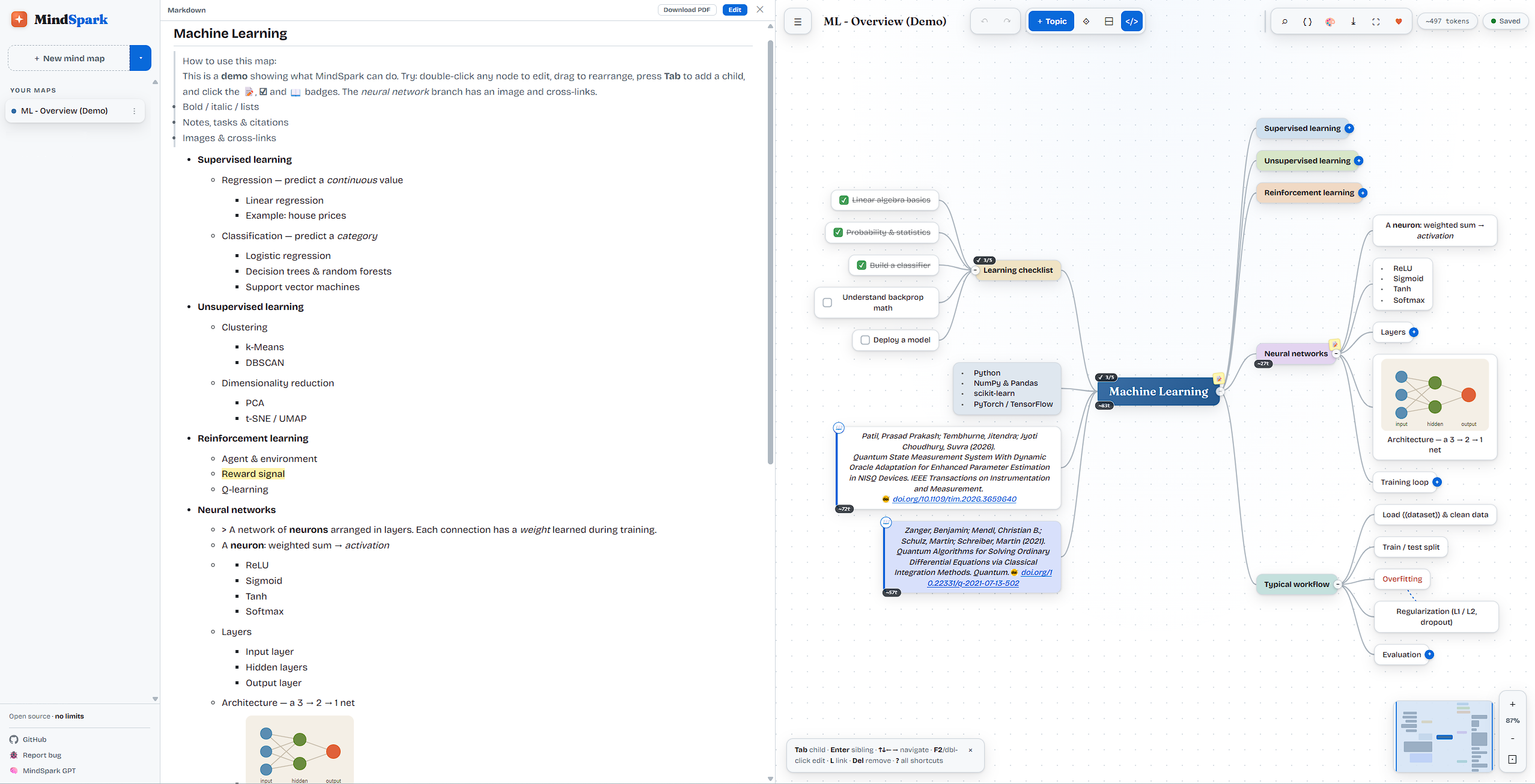
Every map is a Markdown outline - not a one-way export bolted on afterward. Toggle Markdown mode (</>) and edit either side; they stay in sync live, in both directions.
- Split-pane text editor with a line-numbered gutter, real syntax highlighting, and autocomplete for Markdown/formula syntax as you type
- Fold / unfold any branch independently - including the map's own metadata comment at the top of the file - so you can work on one section of a long outline at a time
- Word wrap toggle for long lines, with the gutter staying correctly aligned either way
- Click to jump - click a line in the text and its node is selected on the canvas, or select a node and its line is revealed and scrolled into view (unfolding ancestors as needed)
- Live rendered preview toggle, and download that preview as a PDF directly from the editor
- Formatting round-trips as real Markdown/HTML, not flattened to plain text - bold, italic, underline, strikethrough, highlight, text colour, font size, alignment, bulleted/numbered lists, and inline code all survive a round trip through the text and back
- Paste or type a Markdown outline straight into a node or the editor and it becomes real structure - headings become branches,
`inline code`renders as code, fenced blocks and tables carry through
Built for researchers & engineers (always local)
- Citations with DOI autofill - open the citation form on any node, paste a DOI, and MindSpark fetches authors/title/year/venue from Crossref automatically. Cited nodes get a reference marker and roll up into Export → References list
- Compile subtree → prompt - assemble any branch into a structured prompt, substitute
{{variables}}, see a live token estimate, then copy it or run it directly against Anthropic or OpenAI with your own API key, right from the map - Prompt-engineering templates - Role/Task/Context/Constraints/Examples, Chain-of-Thought, Function-calling schema, Few-shot examples
- Research templates - IMRaD research paper, literature review synthesis, research proposal, experiment design, systematic review (PRISMA), research question (FINER), thesis / multi-paper arc, conference talk outline, reviewer response / rebuttal
- AI & agent templates - AI Agent Architecture, Agentic Workflow Patterns, and a Claude Agent Skill scaffold (a ready-made
SKILL.mdwith frontmatter) - Software-engineering templates - system architecture, design doc / RFC, Domain-Driven Design, sprint / feature plan, incident post-mortem
- 50+ built-in templates in total, spanning research, prompt engineering, AI/agents, software, product, design, study, writing, career, and project management - browse them from + Topic ▾
Collaboration ☁ (needs the cloud worker - see below)
- Sign in with GitHub - one-click OAuth (the static build also supports a personal-access-token login with no worker)
- Cloud share (editable) - publish a map to a shared
#shared=room and copy an edit link collaborators can open and save to - Real-time collaboration - multiple people editing the same shared map, with automatic merge
- Identity-based access control - add named collaborators with editor / viewer roles, set per-link access (view / edit, optionally sign-in required), and revoke access at any time
- Shared-maps sidebar - one place for maps shared by you and shared with you, with relationship badges
- Recently opened by - see which signed-in collaborators have opened a shared map
What makes MindSpark different
- A Markdown file, not a proprietary format. Most mind-mapping tools treat Markdown as a one-way export. Here it's the native format in both directions - the canvas and the text editor are two views of the same document, live-synced, so you can drop into a text editor for fast bulk edits and still get a proper diagram back.
- You own the data. No required account. Self-host with one command (
node server.js, SQLite, zero setup) or run the static build for $0 forever, with every map saved as a plain JSON file in your own private GitHub repo - never on a vendor's server you don't control. - No feature gates, ever. Real-time collaboration, unlimited maps and nodes, full version history with diffs, every export format - none of it is paywalled or capped, self-hosted or cloud.
- Zero runtime dependencies. The canvas, the LaTeX math rendering, the formula engine, the Markdown parser - all hand-written vanilla JavaScript. Nothing to
npm install, a minimal supply-chain surface, and the whole editor is one file you can actually read. - Computation inside a mind map. A built-in formula engine (
SUM(children),AVERAGE,IF, …) with autocomplete - most mind-mapping tools treat every node as inert text; here a branch of numbers can compute a live rollup. - A bridge to LLM workflows, not just a diagram. Compile any branch into a prompt with a token estimate, substitute
{{variables}}, and run it against Anthropic or OpenAI directly from the map - plus dedicated templates for prompt engineering (Chain-of-Thought, few-shot, function-calling schemas) and agent design (including a Claude Agent Skill scaffold). - Purpose-built for research writing, not just business templates - IMRaD papers, PRISMA systematic reviews, FINER research questions, literature reviews - with citation management (DOI → Crossref autofill, a formatted references export) built directly into node editing.
What works offline vs. what needs the cloud
MindSpark's editor is 100% client-side. The only things that require the optional Cloudflare Worker are the ones that inherently need a shared server between people. There are three deployment shapes - see Deployment modes.
| Capability | Local (node server.js) | Static Pages (*.github.io, PAT-only) | Worker (*.workers.dev, full) |
|---|---|---|---|
| Create / edit maps, all layouts, math, formulas, prompt building | ✅ | ✅ | ✅ |
| Markdown mode (two-way sync, preview, PDF export), citations | ✅ | ✅ | ✅ |
Import / export (JSON, OPML, Markdown, PNG, PDF, .doc, Mermaid, …) | ✅ | ✅ | ✅ |
| Version history, undo/redo, search, presentation mode | ✅ | ✅ | ✅ |
Read-only share links (#view=, whole map encoded in the URL) | ✅ | ✅ | ✅ |
| Save maps to your own private repo (GitHub, Gitea, Forgejo, GitLab) | ✅ (SQLite, no forge) | ✅ (token) | ✅ (token, or GitHub OAuth) |
| One-click "Sign in with GitHub" (OAuth) | ❌ | ❌ | ✅ |
Cloud share (editable) #shared= links | ❌ | ❌ | ✅ |
| Real-time collaboration / live merge | ❌ | ❌ | ✅ |
| Access control (named collaborators, roles, revoke, link modes) | ❌ | ❌ | ✅ |
| Shared-maps sidebar, "recently opened by" | ❌ | ❌ | ✅ |
GPT map-import endpoint (POST /api/import) | ❌ | ❌ | ✅ (recipients still open a local #view= link) |
Notes:
- Local (
node server.js/ SQLite) has no shared backend - local maps +#view=links only, no OAuth/collab. Detected viafetch('/healthz')→MODE='server'(public/app.js:361). - Static Pages (
*.github.io, e.g.https://prasadpatil25.github.io/MindSpark/) is pure browser + GitHub API with arepo-scoped PAT.OAuth/collab UI is hidden by host gate/(^|\.)github\.io$/.test(location.hostname)→oauthConfigured()=false(public/app.js:11534),collabAvailable()=false(public/app.js:11537). Forks gethttps://<you>.github.io/MindSpark/automatically PAT-only. - Worker (
*.workers.dev, e.g.https://mindspark.githubpage.workers.dev/viawrangler.jsonc) serves the samepublic/as static assets plus the collab/OAuth worker (worker/oauth-worker.js).GH_OAUTH.workerUrlis honoured only off-github.io, enablingOAuth,#shared=, live merge and ACLs. - The two share links are different by design:
#view=carries the whole map in the URL and needs nothing server-side (read-only);#shared=points to a live room in the worker and supports editing, collaboration, and access control. - Access control (JWT-signed identities, roles, revoke) additionally requires the worker's
AUTH_SECRETto be set. Without it the worker returns501for identity and the app falls back to legacy capability links.
Creating a map
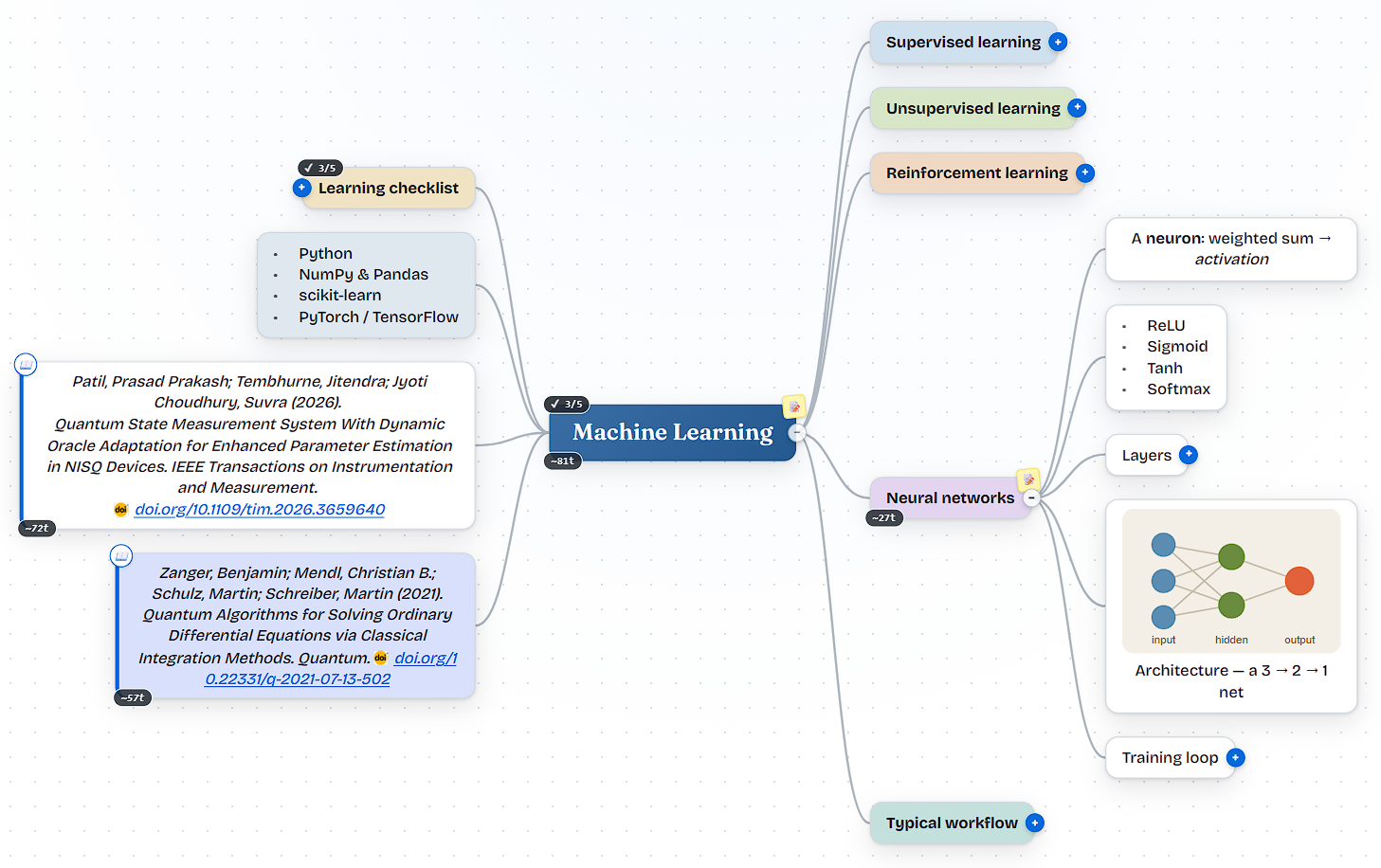
Press Tab to add a child topic and Enter to add a sibling - the tree auto-arranges into a balanced layout as you go. New sign-ins start with the “ML - Overview (Demo)” sample above so there's something to explore right away.
Make maps with AI - the MindSpark GPT
MindSpark - Mind Map for Everyone is a Custom GPT that builds maps for you. Describe a topic, outline, or paste some notes - it generates a structured map (branches, bullets, sticky notes, checklists, citations) and returns a link.
The link opens the map read-only in MindSpark (no account needed to view). Click "Make an editable copy" to save it into your own workspace - your repo, your token, nothing stored on anyone else's server.
How it works: the GPT calls a small endpoint, POST /api/import, which turns the map spec into the same gzip-encoded #view= share link the Copy share link feature produces. No personal access token and no repo writes are involved, so it works for every user. The endpoint lives in the optional Cloudflare Worker under worker/ - see worker/README.md to self-host it, along with the OpenAPI Action schema and map JSON schema for wiring up your own Custom GPT.
Or connect via MCP
mindspark-mcp is a separate, standalone Model Context Protocol server for MindSpark - same underlying idea as the GPT above (an AI assistant that creates and shows you maps), but usable from Claude Desktop, Claude Code, ChatGPT (via the Apps SDK), or any other MCP-compatible client, with real tools to create, read, edit, and visually render maps directly in the conversation.
Three deployment modes, matching different needs:
| Auth | Best for | |
|---|---|---|
| Single-user | One shared GitHub token | Personal use |
| Multi-user (OAuth) | Each person signs in with their own GitHub account | Deployed once, for a team - everyone keeps their own maps |
| No-login | None at all - maps become shareable #view= links | Anyone, zero setup |
See the mindspark-mcp README for setup instructions for each mode.
Quick start (self-hosted)
Requires Node.js ≥ 22 (for the built-in SQLite + HTTP - no packages to install).
node server.js
# → http://localhost:3000
That's it. No build step, no npm install, no native compilation. A SQLite database file is created automatically at ./data/mindspark.db.
Optionally, via npm (just runs the same command, but silences the experimental-SQLite notice):
npm start
Configuration
All optional, set as environment variables:
| Variable | Default | Description |
|---|---|---|
PORT | 3000 | HTTP port |
DB_PATH | ./data/mindspark.db | SQLite database file path |
MS_PUBLIC | ./public | Static frontend directory (legacy PUBLIC also honoured unless it's the Windows OS default) |
PORT=8080 DB_PATH=/var/lib/mindspark/db.sqlite node server.js
Deployment modes
MindSpark detects how it's running and picks a storage backend automatically (the client probes /healthz at boot - if it answers, it's the self-hosted server; otherwise it's GitHub-backed cloud mode). The cloud mode further splits by hostname - *.github.io is PAT-only, *.workers.dev (or custom) is full.
| Mode | Example URL | How to run | Auth | Storage | Collaboration | Cost |
|---|---|---|---|---|---|---|
| Local | http://localhost:3000 | node server.js | None - single user | SQLite on disk | ❌ | Your server |
| Static Pages (token-only) | https://prasadpatil25.github.io/MindSpark/ (https://<you>.github.io/MindSpark/ for forks) | Host public/ on GitHub Pages (or any static host) | GitHub fine-grained token, or a Gitea/Forgejo/GitLab token | User's own private mindspark-maps repo | ❌ (no OAuth, no #shared=, no live) | $0 |
| Worker (full) | https://mindspark.githubpage.workers.dev | public/ on Cloudflare Workers + the worker/ collab worker | GitHub OAuth or PAT | User's GitHub repo + shared rooms in the worker | ✅ | $0 on CF free tier |
Static Pages deployment (PAT-only) - $0 forever
Pure browser app, talks directly to the GitHub API. Each visitor stores their own maps in their own private repository. No backend to maintain. OAuth and collaboration are intentionally disabled on *.github.io (host gate in public/app.js:11534).
- GitHub Pages - the repo ships a workflow at
.github/workflows/static.ymlthat publishespublic/on every push tomain. Live athttps://prasadpatil25.github.io/MindSpark/- forks automatically gethttps://<you>.github.io/MindSpark/. First enable Settings → Pages → Source: GitHub Actions then Settings → Actions → General → Workflow permissions: Read and write - otherwiseactions/configure-pages@v5fails withGet Pages site failed / Resource not accessible by integration. - Cloudflare Pages / Netlify / Vercel - point any static host at
public/. No build command, output directorypublic. Any*.github.iohost stays PAT-only; non-github.iostatic hosts behave the same unless you pointGH_OAUTHat your own worker.
User flow (per visitor): create a private mindspark-maps repo, then a fine-grained token limited to that one repo with Contents: Read and write, paste it in, and sign in. Every save commits a small JSON file. Revoke at https://github.com/settings/personal-access-tokens.
One repository per person, or one for the team
The login screen has a Repository field. Left at mindspark-maps, every person gets a private repository of that name on their own account (created on first sign-in where the token allows it). Enter a full path instead - acme/mindspark-maps on GitHub or Gitea, group/subgroup/mindspark-maps on GitLab - and everyone who types the same path shares that one repository: each person still signs in as themselves, so every commit carries its author. A shared repository is never created by MindSpark - someone with the rights creates it once and grants write access - because creating it would silently land under the person signing in rather than the team. Deploying for a team? Set DEFAULT_REPO in public/app.js to the shared path and the field comes pre-filled.
Git hosts: GitHub, Gitea/Forgejo and GitLab
The login screen has a host picker. Gitea and Forgejo (Codeberg included) share one adapter, because Gitea mirrors GitHub's contents API and Forgejo is a Gitea fork - same /contents/{path} shape, same base64 + sha writes. GitLab shares none of it: projects are addressed by URL-encoded path, listing a directory is a different endpoint from reading a file, a branch must be named on every call, and a successful write returns no sha to reuse. So each descriptor in FORGES (public/app.js) supplies whole URLs and response readers rather than a few flags. The rule is that a per-host difference lives in that descriptor, never as an if inside CloudStore, so index reconciliation and tombstones stay host-agnostic. test/forge-adapters.test.mjs enforces both halves of that.
| GitHub | Gitea / Forgejo | GitLab | |
|---|---|---|---|
| Sign-in | fine-grained token, or OAuth on the Worker deploy | access token, or OAuth (PKCE) from any deploy | access token, or OAuth (PKCE) from any deploy |
| Token scope | can be limited to the one repo | account-wide - no per-repo scoping exists | account-wide - the Files API needs api; write_repository covers only git over HTTP |
| Repo creation | fine-grained tokens can't create repos, so you make it first | write:repository creates it for you - one step fewer | api creates it for you - one step fewer |
| Version history | ✅ commits | ✅ commits | ✅ commits |
| Concurrent-write check | ✅ blob sha sent with every write | ✅ blob sha sent with every write | ✅ last_commit_id on every action of a commit |
| Save = one commit | ❌ map and index are two writes | ❌ same | ✅ map + index (+ tombstones) in one atomic commit |
Live collaboration / #shared= | ✅ on the Worker deploy, or with a companion backend | ✅ with a companion backend | ✅ with a companion backend |
GitLab writes go through the commits API rather than the files API: a save is one commit carrying the map and the index (a delete also carries the tombstone list), each action locked on the commit its file was last read or written at, and the new commit id becomes the lock for the next save - no read in between. If someone else's save lands in the meantime, GitLab refuses the commit; MindSpark then re-reads, re-merges the index and tombstones (they merge by construction) and commits once more. If the map itself was changed elsewhere, that is reported as a conflict - "changed elsewhere, reload or your next save overwrites" - rather than silently winning, the way draw.io handles the same case. On every host, saves also re-read and merge the server index first, so a second device can never drop the first one's maps.
Self-hosted instances need one extra step. connect-src is a fixed allowlist and can't learn a new origin at runtime, so only codeberg.org, gitea.com and gitlab.com work out of the box. For your own instance, add its origin to the three CSP copies (public/index.html, public/_headers, server.js) and redeploy - the app checks this before it makes a request and tells you exactly what's missing rather than failing as an opaque network error.
OAuth
The hosts get there by different routes, because GitHub OAuth Apps have no PKCE support:
- GitHub - authorization code with a client secret, so the exchange has to happen server-side. That is what
worker/oauth-worker.jsis for, and why the button only appears on the Worker deploy. - Gitea / Forgejo and GitLab - authorization code with PKCE and a public client: no secret, so the whole exchange runs in the browser and works from a purely static deploy, GitHub Pages included.
public/oauth-callback.htmlis the redirect target; it never sees a token, only the one-time code, which it posts to the opener (the only window holding the verifier).
Because nobody can pre-register an OAuth app on your server, both PKCE hosts ask for a client ID once, remembered per host and per instance. Set the redirect URI to the exact string the login screen shows you (…/oauth-callback.html):
- Gitea / Forgejo - Settings → Applications → Create a new OAuth2 application, and leave "Confidential Client" unchecked.
- GitLab - Preferences → Applications → Add new application, scope
api, and leave "Confidential" unchecked.
Gitea and Forgejo need one instance-side setting: the token exchange is a cross-origin POST, so [cors] ENABLED = true must be set in app.ini. Codeberg has had this on since February 2024; self-hosted instances default to off. GitLab allows the exchange from a browser out of the box. Either way, if it fails MindSpark names the likely cause and opens the access-token flow instead, which needs no instance configuration at all.
A classic repo-scoped token still works and skips the repo-creation step (fine-grained tokens can't create repositories), but repo grants read/write to every private repository on the account - so a token that leaked would reach all of them, not just the maps. The login screen offers it as a labelled fallback, not the default.
On keeping the token in the browser: it lives in localStorage, so anything that manages to run script on the origin can read it. Two things narrow that: the app loads no third-party scripts, and ships a Content-Security-Policy (<meta> in public/index.html, headers in public/_headers and server.js, kept in sync by test/csp.test.mjs) whose script-src names no external host and whose connect-src is an allowlist - so there is no origin to post a stolen token to. Scoping the token to one repo is what bounds the damage if both fail. Moving the token behind a server-side proxy would stop it being stolen, but not stop injected script using it, and it would cost the "no backend, no server in between" property the static mode exists for.
Worker deployment (full - OAuth + live collaboration)
This is how the full live demo runs (https://mindspark.githubpage.workers.dev): the public/ app is served as a Cloudflare Worker with static assets (see wrangler.jsonc), paired with the collaboration/OAuth worker in worker/. On *.workers.dev (or any non-github.io host) public/app.js:11534 enables GH_OAUTH, so OAuth, #shared= and live merge are available.
# 1) Deploy the app (public/) as a Cloudflare Worker
npx wrangler deploy                                   # uses wrangler.jsonc

# 2) Deploy the collaboration + OAuth worker (Durable Objects live here)
npx wrangler deploy --config worker/wrangler.toml

# 3) Set the worker secrets (enables OAuth, sharing, and access control)
npx wrangler secret put GITHUB_CLIENT_ID   --config worker/wrangler.toml
npx wrangler secret put GITHUB_CLIENT_SECRET --config worker/wrangler.toml
npx wrangler secret put AUTH_SECRET        --config worker/wrangler.toml   # required for identity-based access control
# npx wrangler secret put IMPORT_TOKEN     --config worker/wrangler.toml   # only if using the GPT /api/import flow
Then set GH_OAUTH.workerUrl (and clientId) in public/app.js to your worker's URL - it is honoured only off-github.io (host gate public/app.js:11534). If you skip the worker entirely and leave GH_OAUTH blank, only the token login shows and collaboration is hidden - everything else keeps working. See worker/README.md for the OAuth App setup and the GPT Action schema.
The app and the worker are two separate deploys.
npx wrangler deployships the app (public/);npx wrangler deploy --config worker/wrangler.tomlships the collab/OAuth worker. Set worker secrets against the worker config, as shown above. Static*.github.iodeploys stay PAT-only even ifGH_OAUTHis set - the gate inpublic/app.js:11534prevents the tokenpostMessagefrom leaking to Pages origins.
Companion backend (community collaboration for self-hosters)
The collaboration backend does not have to be the Cloudflare worker. The client discovers its backend: if the origin that serves public/ answers GET /healthz with {"mode":"collab"}, that origin is the collaboration backend - the WebSocket, the shared-map API, the identity mint and the Collaborate menu all resolve to it through collabBase(), and GH_OAUTH is not consulted. Any other 200 on /healthz still means the SQLite server; no answer means static hosting. Discovery is same-origin only, on purpose: there is nothing to configure, so a fork can never ship pointing at someone else's backend.
A backend that wants to be discovered implements the worker's client contract:
| Route | What the client expects |
|---|---|
GET /healthz | {"mode":"collab"} |
POST /api/session | Body {token, forge, instance}: the user's forge token, the forge id (github, gitea, gitlab) and, for a self-hosted forge, its origin. Verify the token against that forge and answer {token, exp, id, login} - a signed identity the client then sends as Authorization: Bearer - or 501 to run without identities (sharing still works by capability link; Manage access stays hidden). |
GET / PUT / PATCH /api/collab/<room> | Shared-map snapshot: read, publish, merge. X-Edit-Token carries a capability link's token. |
GET / POST /api/collab/<room>/acl, DELETE …/acl/<id>, POST …/link | Access list, add or remove a collaborator, link mode. Owner-only, by identity. A collaborator's userId is looked up by the client on the signed-in forge and carries the same namespace the backend gave the caller's own id. |
/api/collab/<room> (WebSocket upgrade) | Live-session relay, same messages as worker/collab-do.js. The identity rides on the URL as ?token=<jwt> (a browser socket cannot set headers); a room with an access list is gated like its HTTP API - read to join, write per snapshot or op, re-read so a revoke lands mid-session. A room without one stays open. |
worker/collab-http.js and worker/auth-core.js are the reference for the HTTP surface and the authorization rules; both are pure modules a backend can run unmodified. Maps never touch the backend. They are read and written by the browser against the user's own forge with the user's own token, which the backend never receives; it holds room state only - snapshots of shared maps, access lists, presence.
Community companion: mindspark-collab is a self-hostable implementation of this contract - one Node process, zero runtime dependencies, SQLite - that verifies GitLab, Gitea/Forgejo and GitHub tokens, so a team on a self-managed instance gets named collaborators and access control. It is maintained separately and is not part of MindSpark.
Self-hosted (VPS / Docker)
git clone <your-repo> mindspark && cd mindspark
PORT=80 node server.js        # put nginx/Caddy in front for TLS

# or Docker:
docker build -t mindspark .
docker run -p 3000:3000 -v mindspark-data:/app/data mindspark
Keep it running with systemd/pm2. Sample unit:
[Service]
ExecStart=/usr/bin/node /opt/mindspark/server.js
Environment=PORT=3000
Restart=always
WorkingDirectory=/opt/mindspark
REST API (self-hosted server)
A plain REST API - build other clients, scripts, or integrations on top of it.
| Method | Path | Description |
|---|---|---|
GET | /api/maps | List all maps (id, title, color) |
GET | /api/maps/:id | Get one full map (nodes + structure) |
POST | /api/maps | Create a map (body = map JSON) |
PUT | /api/maps/:id | Update / upsert a map |
DELETE | /api/maps/:id | Delete a map |
GET | /healthz | Health check |
The collaboration worker exposes a separate /api/collab/* surface (shared-map read/write, access-control list, link modes) plus /api/session (mint a signed identity) and /api/import (GPT map import). Those are documented in worker/README.md.
A "map" is JSON shaped like:
{
  "id": "abc123",
  "title": "My Map",
  "color": "#e0613a",
  "rootId": "r1",
  "nodes": {
    "r1": { "id": "r1", "text": "Central Idea", "parent": null, "x": 0, "y": 0, "side": "root" },
    "n2": { "id": "n2", "text": "Branch",       "parent": "r1", "side": "right", "color": "#dcefce" }
  }
}
Using a different database
The data layer lives entirely in server.js (the Q prepared statements and upsert() helper). To switch to PostgreSQL / MySQL, replace those with your driver's queries - the table is just (id, title, color, data, updated) where data is the full map JSON. Nothing else in the app needs to change.
Project layout
mindspark/
├── server.js              # zero-dependency Node HTTP + SQLite API (self-hosted mode)
├── package.json           # scripts only; wrangler is a dev tool (no runtime deps)
├── wrangler.jsonc         # Cloudflare Worker config for serving public/ as the app
├── Dockerfile             # container for the self-hosted server
├── .env.example           # sample environment variables
├── public/                # the app (static assets - this is what ships)
│   ├── index.html         # app shell
│   ├── styles.css         # all styling (themeable via CSS variables)
│   ├── app.js             # the full mind-map editor (vanilla JS)
│   └── demo-map.json      # the "ML - Overview (Demo)" starter map
├── worker/                # optional Cloudflare Worker: OAuth + sharing + collaboration
│   ├── oauth-worker.js    # entry: GitHub OAuth, /api/session, request routing
│   ├── collab-do.js       # CollabRoom Durable Object (shared + live maps)
│   ├── collab-http.js     # shared-map HTTP API + access-control routing (pure)
│   ├── auth-core.js       # JWT mint/verify + authorization decisions (pure)
│   ├── import-core.js     # builds the #view= share link from a map spec (GPT import)
│   ├── wrangler.toml      # worker config + secrets documentation
│   └── README.md          # worker deploy guide + GPT Action/JSON schemas
├── .github/               # issue forms, PR template, Pages deploy workflow
├── docs/                  # screenshots / gifs used in this README
└── data/                  # created at runtime - your SQLite database
Roadmap - what's next
Contributions welcome (see the issue templates under New issue). Ideas on the list:
- Cross-device shared-maps sidebar. The "shared by me / with me" list is currently per-browser (localStorage). Now that sign-in provides a stable identity, sync it per-user so the same list follows you across devices.
- "The room is the map." Optionally make a shared room the single source of truth (Overleaf-style) so the owner doesn't keep a separate copy that can drift.
- Upgrade legacy share links. A one-click re-publish to move older anonymous capability links onto identity-gated access.
- Collaboration for self-hosters. The client side is in place - the app discovers a backend on its own origin (see Companion backend) and a community companion exists. Still open: running one alongside
node server.jsout of the box. - Docs. Expand
worker/README.mdwith the full/api/collab/*and access-control reference. - Mobile polish. Continue hardening touch/gesture handling and small-screen layout.
Repo housekeeping (good first tasks)
- Add contributor docs:
CONTRIBUTING.md,SECURITY.md,CODE_OF_CONDUCT.md, and a pull-request template. - The issue-template chooser links to Discussions - enable Discussions (Settings → Features) or update the links in
.github/ISSUE_TEMPLATE/config.yml.
License
MIT - do anything you want with it. No restrictions.
Contributors

240 commits

8 commits

3 commits

2 commits
Similar repos


Languages
JavaScript
81.7%
CSS
16.6%
HTML
1.7%
MindSpark - Mind Map for Everyone
See the codeSee what people are saying
README
MindSpark
MindSpark is an open-source mind-mapping app you actually own - no accounts, no paywalls, no feature gates, no usage limits. Self-host it in one command, run it free in the browser with every map saved to your own private GitHub repo, or add one small Cloudflare Worker to unlock real-time sharing and collaboration. It's vanilla JavaScript with zero runtime dependencies, MIT-licensed, AI-assisted, and yours to run, modify, and extend.
▶ Try full version (Worker, OAuth + live collab) → mindspark.githubpage.workers.dev - runs entirely in your browser. Sign in with GitHub (OAuth or PAT) and your maps are saved as private JSON files in a mindspark-maps repo on your own account (no server in between).
▶ Try PAT-only (GitHub Pages, no worker) → prasadpatil25.github.io/MindSpark - same editor on *.github.io, sign in with a personal access token only. No OAuth, no live collaboration - ideal for forks and static hosting. Your fork lives at https://<you>.github.io/MindSpark/.
🧠 Make maps by chatting → MindSpark - Mind Map for Everyone - describe a topic and the GPT builds the map, then hands you a link to open and edit it in MindSpark. No account needed to view.
🔌 Connect from Claude or ChatGPT via MCP → mindspark-mcp - a Model Context Protocol server for MindSpark, with three ways to connect depending on what you need: your own token, per-user GitHub sign-in, or no login at all.
Features
Everything below the "Collaboration" heading needs the optional cloud worker; everything above it works fully offline / self-hosted with no account. See Local vs cloud for the exact split.
Editing & canvas (always local)
- Infinite canvas with smooth pan & zoom, fit-to-screen, and a minimap
- Keyboard-first editing -
Tabfor child,Enterfor sibling,F2to rename,Delto remove, start typing to edit - Live auto-layout - the tree tidies itself as you type, so a growing node never overlaps its neighbours
- Drag-and-drop reordering - drop a topic on another's centre to nest it, or on its top/bottom edge to insert it between siblings and reorder
- Layout options - Balanced (split left/right), Right, Left, or Down (org-chart)
- Incremental collapse / expand - one branch depth per click, either per-node or across the whole map at once (cycles fully-open ↔ fully-closed, reporting progress as it goes)
- Touch support - pan, pinch-zoom, drag and select on phones and tablets
- Math - write
$...$(inline) or$$...$$(display) LaTeX and it renders as native MathML; equations also render in PNG exports. Zero dependencies - covers the common inline subset (sub/superscripts, Greek, operators,\frac,\sqrt, accents, fonts, function names) - Node formulas - a small Excel-like formula engine lives inside nodes:
SUM(children),AVERAGE,MIN/MAX,IF,ROUND,SQRT, and more, with autocomplete as you type. Turns a branch of numbers into a live-computed rollup instead of static text - Version history - browse, diff (added / removed / edited nodes), preview, and restore past versions
- Rich text & nodes - bold/italic/underline/strikethrough, highlight & text colour, font size, alignment, bulleted/numbered lists (including multi-line lists inside a single node), links, notes, images, citations, task progress
- Color themes - 10 built in (Light, Dark, Dracula, Catppuccin Light/Dark, Rosé Pine Moon/Dawn, Nord, GitHub Light/Dark), set per node or per map
- Undo / redo (full history) · search & highlight · presentation mode
- Multiple maps with a clickable sidebar; create, rename, duplicate, delete
- Import JSON, OPML, Markdown, GitMind (
.gmind) and MindMeister (.mind) files - Export to PNG, PDF, JSON, Markdown/text, Word (
.doc), Mermaid, a references list, or a prompt - Read-only share links - Copy share link gzip-encodes the entire map into a
#view=URL; anyone can open it without an account or server, then save an editable copy into their own MindSpark - Persistence - SQLite when self-hosted, or your own private GitHub repo in cloud mode
Markdown ⇄ Mind map (always local)
Every map is a Markdown outline - not a one-way export bolted on afterward. Toggle Markdown mode (</>) and edit either side; they stay in sync live, in both directions.
- Split-pane text editor with a line-numbered gutter, real syntax highlighting, and autocomplete for Markdown/formula syntax as you type
- Fold / unfold any branch independently - including the map's own metadata comment at the top of the file - so you can work on one section of a long outline at a time
- Word wrap toggle for long lines, with the gutter staying correctly aligned either way
- Click to jump - click a line in the text and its node is selected on the canvas, or select a node and its line is revealed and scrolled into view (unfolding ancestors as needed)
- Live rendered preview toggle, and download that preview as a PDF directly from the editor
- Formatting round-trips as real Markdown/HTML, not flattened to plain text - bold, italic, underline, strikethrough, highlight, text colour, font size, alignment, bulleted/numbered lists, and inline code all survive a round trip through the text and back
- Paste or type a Markdown outline straight into a node or the editor and it becomes real structure - headings become branches,
`inline code`renders as code, fenced blocks and tables carry through
Built for researchers & engineers (always local)
- Citations with DOI autofill - open the citation form on any node, paste a DOI, and MindSpark fetches authors/title/year/venue from Crossref automatically. Cited nodes get a reference marker and roll up into Export → References list
- Compile subtree → prompt - assemble any branch into a structured prompt, substitute
{{variables}}, see a live token estimate, then copy it or run it directly against Anthropic or OpenAI with your own API key, right from the map - Prompt-engineering templates - Role/Task/Context/Constraints/Examples, Chain-of-Thought, Function-calling schema, Few-shot examples
- Research templates - IMRaD research paper, literature review synthesis, research proposal, experiment design, systematic review (PRISMA), research question (FINER), thesis / multi-paper arc, conference talk outline, reviewer response / rebuttal
- AI & agent templates - AI Agent Architecture, Agentic Workflow Patterns, and a Claude Agent Skill scaffold (a ready-made
SKILL.mdwith frontmatter) - Software-engineering templates - system architecture, design doc / RFC, Domain-Driven Design, sprint / feature plan, incident post-mortem
- 50+ built-in templates in total, spanning research, prompt engineering, AI/agents, software, product, design, study, writing, career, and project management - browse them from + Topic ▾
Collaboration ☁ (needs the cloud worker - see below)
- Sign in with GitHub - one-click OAuth (the static build also supports a personal-access-token login with no worker)
- Cloud share (editable) - publish a map to a shared
#shared=room and copy an edit link collaborators can open and save to - Real-time collaboration - multiple people editing the same shared map, with automatic merge
- Identity-based access control - add named collaborators with editor / viewer roles, set per-link access (view / edit, optionally sign-in required), and revoke access at any time
- Shared-maps sidebar - one place for maps shared by you and shared with you, with relationship badges
- Recently opened by - see which signed-in collaborators have opened a shared map
What makes MindSpark different
- A Markdown file, not a proprietary format. Most mind-mapping tools treat Markdown as a one-way export. Here it's the native format in both directions - the canvas and the text editor are two views of the same document, live-synced, so you can drop into a text editor for fast bulk edits and still get a proper diagram back.
- You own the data. No required account. Self-host with one command (
node server.js, SQLite, zero setup) or run the static build for $0 forever, with every map saved as a plain JSON file in your own private GitHub repo - never on a vendor's server you don't control. - No feature gates, ever. Real-time collaboration, unlimited maps and nodes, full version history with diffs, every export format - none of it is paywalled or capped, self-hosted or cloud.
- Zero runtime dependencies. The canvas, the LaTeX math rendering, the formula engine, the Markdown parser - all hand-written vanilla JavaScript. Nothing to
npm install, a minimal supply-chain surface, and the whole editor is one file you can actually read. - Computation inside a mind map. A built-in formula engine (
SUM(children),AVERAGE,IF, …) with autocomplete - most mind-mapping tools treat every node as inert text; here a branch of numbers can compute a live rollup. - A bridge to LLM workflows, not just a diagram. Compile any branch into a prompt with a token estimate, substitute
{{variables}}, and run it against Anthropic or OpenAI directly from the map - plus dedicated templates for prompt engineering (Chain-of-Thought, few-shot, function-calling schemas) and agent design (including a Claude Agent Skill scaffold). - Purpose-built for research writing, not just business templates - IMRaD papers, PRISMA systematic reviews, FINER research questions, literature reviews - with citation management (DOI → Crossref autofill, a formatted references export) built directly into node editing.
What works offline vs. what needs the cloud
MindSpark's editor is 100% client-side. The only things that require the optional Cloudflare Worker are the ones that inherently need a shared server between people. There are three deployment shapes - see Deployment modes.
| Capability | Local (node server.js) | Static Pages (*.github.io, PAT-only) | Worker (*.workers.dev, full) |
|---|---|---|---|
| Create / edit maps, all layouts, math, formulas, prompt building | ✅ | ✅ | ✅ |
| Markdown mode (two-way sync, preview, PDF export), citations | ✅ | ✅ | ✅ |
Import / export (JSON, OPML, Markdown, PNG, PDF, .doc, Mermaid, …) | ✅ | ✅ | ✅ |
| Version history, undo/redo, search, presentation mode | ✅ | ✅ | ✅ |
Read-only share links (#view=, whole map encoded in the URL) | ✅ | ✅ | ✅ |
| Save maps to your own private repo (GitHub, Gitea, Forgejo, GitLab) | ✅ (SQLite, no forge) | ✅ (token) | ✅ (token, or GitHub OAuth) |
| One-click "Sign in with GitHub" (OAuth) | ❌ | ❌ | ✅ |
Cloud share (editable) #shared= links | ❌ | ❌ | ✅ |
| Real-time collaboration / live merge | ❌ | ❌ | ✅ |
| Access control (named collaborators, roles, revoke, link modes) | ❌ | ❌ | ✅ |
| Shared-maps sidebar, "recently opened by" | ❌ | ❌ | ✅ |
GPT map-import endpoint (POST /api/import) | ❌ | ❌ | ✅ (recipients still open a local #view= link) |
Notes:
- Local (
node server.js/ SQLite) has no shared backend - local maps +#view=links only, no OAuth/collab. Detected viafetch('/healthz')→MODE='server'(public/app.js:361). - Static Pages (
*.github.io, e.g.https://prasadpatil25.github.io/MindSpark/) is pure browser + GitHub API with arepo-scoped PAT.OAuth/collab UI is hidden by host gate/(^|\.)github\.io$/.test(location.hostname)→oauthConfigured()=false(public/app.js:11534),collabAvailable()=false(public/app.js:11537). Forks gethttps://<you>.github.io/MindSpark/automatically PAT-only. - Worker (
*.workers.dev, e.g.https://mindspark.githubpage.workers.dev/viawrangler.jsonc) serves the samepublic/as static assets plus the collab/OAuth worker (worker/oauth-worker.js).GH_OAUTH.workerUrlis honoured only off-github.io, enablingOAuth,#shared=, live merge and ACLs. - The two share links are different by design:
#view=carries the whole map in the URL and needs nothing server-side (read-only);#shared=points to a live room in the worker and supports editing, collaboration, and access control. - Access control (JWT-signed identities, roles, revoke) additionally requires the worker's
AUTH_SECRETto be set. Without it the worker returns501for identity and the app falls back to legacy capability links.
Creating a map
Press Tab to add a child topic and Enter to add a sibling - the tree auto-arranges into a balanced layout as you go. New sign-ins start with the “ML - Overview (Demo)” sample above so there's something to explore right away.
Make maps with AI - the MindSpark GPT
MindSpark - Mind Map for Everyone is a Custom GPT that builds maps for you. Describe a topic, outline, or paste some notes - it generates a structured map (branches, bullets, sticky notes, checklists, citations) and returns a link.
The link opens the map read-only in MindSpark (no account needed to view). Click "Make an editable copy" to save it into your own workspace - your repo, your token, nothing stored on anyone else's server.
How it works: the GPT calls a small endpoint, POST /api/import, which turns the map spec into the same gzip-encoded #view= share link the Copy share link feature produces. No personal access token and no repo writes are involved, so it works for every user. The endpoint lives in the optional Cloudflare Worker under worker/ - see worker/README.md to self-host it, along with the OpenAPI Action schema and map JSON schema for wiring up your own Custom GPT.
Or connect via MCP
mindspark-mcp is a separate, standalone Model Context Protocol server for MindSpark - same underlying idea as the GPT above (an AI assistant that creates and shows you maps), but usable from Claude Desktop, Claude Code, ChatGPT (via the Apps SDK), or any other MCP-compatible client, with real tools to create, read, edit, and visually render maps directly in the conversation.
Three deployment modes, matching different needs:
| Auth | Best for | |
|---|---|---|
| Single-user | One shared GitHub token | Personal use |
| Multi-user (OAuth) | Each person signs in with their own GitHub account | Deployed once, for a team - everyone keeps their own maps |
| No-login | None at all - maps become shareable #view= links | Anyone, zero setup |
See the mindspark-mcp README for setup instructions for each mode.
Quick start (self-hosted)
Requires Node.js ≥ 22 (for the built-in SQLite + HTTP - no packages to install).
node server.js
# → http://localhost:3000
That's it. No build step, no npm install, no native compilation. A SQLite database file is created automatically at ./data/mindspark.db.
Optionally, via npm (just runs the same command, but silences the experimental-SQLite notice):
npm start
Configuration
All optional, set as environment variables:
| Variable | Default | Description |
|---|---|---|
PORT | 3000 | HTTP port |
DB_PATH | ./data/mindspark.db | SQLite database file path |
MS_PUBLIC | ./public | Static frontend directory (legacy PUBLIC also honoured unless it's the Windows OS default) |
PORT=8080 DB_PATH=/var/lib/mindspark/db.sqlite node server.js
Deployment modes
MindSpark detects how it's running and picks a storage backend automatically (the client probes /healthz at boot - if it answers, it's the self-hosted server; otherwise it's GitHub-backed cloud mode). The cloud mode further splits by hostname - *.github.io is PAT-only, *.workers.dev (or custom) is full.
| Mode | Example URL | How to run | Auth | Storage | Collaboration | Cost |
|---|---|---|---|---|---|---|
| Local | http://localhost:3000 | node server.js | None - single user | SQLite on disk | ❌ | Your server |
| Static Pages (token-only) | https://prasadpatil25.github.io/MindSpark/ (https://<you>.github.io/MindSpark/ for forks) | Host public/ on GitHub Pages (or any static host) | GitHub fine-grained token, or a Gitea/Forgejo/GitLab token | User's own private mindspark-maps repo | ❌ (no OAuth, no #shared=, no live) | $0 |
| Worker (full) | https://mindspark.githubpage.workers.dev | public/ on Cloudflare Workers + the worker/ collab worker | GitHub OAuth or PAT | User's GitHub repo + shared rooms in the worker | ✅ | $0 on CF free tier |
Static Pages deployment (PAT-only) - $0 forever
Pure browser app, talks directly to the GitHub API. Each visitor stores their own maps in their own private repository. No backend to maintain. OAuth and collaboration are intentionally disabled on *.github.io (host gate in public/app.js:11534).
- GitHub Pages - the repo ships a workflow at
.github/workflows/static.ymlthat publishespublic/on every push tomain. Live athttps://prasadpatil25.github.io/MindSpark/- forks automatically gethttps://<you>.github.io/MindSpark/. First enable Settings → Pages → Source: GitHub Actions then Settings → Actions → General → Workflow permissions: Read and write - otherwiseactions/configure-pages@v5fails withGet Pages site failed / Resource not accessible by integration. - Cloudflare Pages / Netlify / Vercel - point any static host at
public/. No build command, output directorypublic. Any*.github.iohost stays PAT-only; non-github.iostatic hosts behave the same unless you pointGH_OAUTHat your own worker.
User flow (per visitor): create a private mindspark-maps repo, then a fine-grained token limited to that one repo with Contents: Read and write, paste it in, and sign in. Every save commits a small JSON file. Revoke at https://github.com/settings/personal-access-tokens.
One repository per person, or one for the team
The login screen has a Repository field. Left at mindspark-maps, every person gets a private repository of that name on their own account (created on first sign-in where the token allows it). Enter a full path instead - acme/mindspark-maps on GitHub or Gitea, group/subgroup/mindspark-maps on GitLab - and everyone who types the same path shares that one repository: each person still signs in as themselves, so every commit carries its author. A shared repository is never created by MindSpark - someone with the rights creates it once and grants write access - because creating it would silently land under the person signing in rather than the team. Deploying for a team? Set DEFAULT_REPO in public/app.js to the shared path and the field comes pre-filled.
Git hosts: GitHub, Gitea/Forgejo and GitLab
The login screen has a host picker. Gitea and Forgejo (Codeberg included) share one adapter, because Gitea mirrors GitHub's contents API and Forgejo is a Gitea fork - same /contents/{path} shape, same base64 + sha writes. GitLab shares none of it: projects are addressed by URL-encoded path, listing a directory is a different endpoint from reading a file, a branch must be named on every call, and a successful write returns no sha to reuse. So each descriptor in FORGES (public/app.js) supplies whole URLs and response readers rather than a few flags. The rule is that a per-host difference lives in that descriptor, never as an if inside CloudStore, so index reconciliation and tombstones stay host-agnostic. test/forge-adapters.test.mjs enforces both halves of that.
| GitHub | Gitea / Forgejo | GitLab | |
|---|---|---|---|
| Sign-in | fine-grained token, or OAuth on the Worker deploy | access token, or OAuth (PKCE) from any deploy | access token, or OAuth (PKCE) from any deploy |
| Token scope | can be limited to the one repo | account-wide - no per-repo scoping exists | account-wide - the Files API needs api; write_repository covers only git over HTTP |
| Repo creation | fine-grained tokens can't create repos, so you make it first | write:repository creates it for you - one step fewer | api creates it for you - one step fewer |
| Version history | ✅ commits | ✅ commits | ✅ commits |
| Concurrent-write check | ✅ blob sha sent with every write | ✅ blob sha sent with every write | ✅ last_commit_id on every action of a commit |
| Save = one commit | ❌ map and index are two writes | ❌ same | ✅ map + index (+ tombstones) in one atomic commit |
Live collaboration / #shared= | ✅ on the Worker deploy, or with a companion backend | ✅ with a companion backend | ✅ with a companion backend |
GitLab writes go through the commits API rather than the files API: a save is one commit carrying the map and the index (a delete also carries the tombstone list), each action locked on the commit its file was last read or written at, and the new commit id becomes the lock for the next save - no read in between. If someone else's save lands in the meantime, GitLab refuses the commit; MindSpark then re-reads, re-merges the index and tombstones (they merge by construction) and commits once more. If the map itself was changed elsewhere, that is reported as a conflict - "changed elsewhere, reload or your next save overwrites" - rather than silently winning, the way draw.io handles the same case. On every host, saves also re-read and merge the server index first, so a second device can never drop the first one's maps.
Self-hosted instances need one extra step. connect-src is a fixed allowlist and can't learn a new origin at runtime, so only codeberg.org, gitea.com and gitlab.com work out of the box. For your own instance, add its origin to the three CSP copies (public/index.html, public/_headers, server.js) and redeploy - the app checks this before it makes a request and tells you exactly what's missing rather than failing as an opaque network error.
OAuth
The hosts get there by different routes, because GitHub OAuth Apps have no PKCE support:
- GitHub - authorization code with a client secret, so the exchange has to happen server-side. That is what
worker/oauth-worker.jsis for, and why the button only appears on the Worker deploy. - Gitea / Forgejo and GitLab - authorization code with PKCE and a public client: no secret, so the whole exchange runs in the browser and works from a purely static deploy, GitHub Pages included.
public/oauth-callback.htmlis the redirect target; it never sees a token, only the one-time code, which it posts to the opener (the only window holding the verifier).
Because nobody can pre-register an OAuth app on your server, both PKCE hosts ask for a client ID once, remembered per host and per instance. Set the redirect URI to the exact string the login screen shows you (…/oauth-callback.html):
- Gitea / Forgejo - Settings → Applications → Create a new OAuth2 application, and leave "Confidential Client" unchecked.
- GitLab - Preferences → Applications → Add new application, scope
api, and leave "Confidential" unchecked.
Gitea and Forgejo need one instance-side setting: the token exchange is a cross-origin POST, so [cors] ENABLED = true must be set in app.ini. Codeberg has had this on since February 2024; self-hosted instances default to off. GitLab allows the exchange from a browser out of the box. Either way, if it fails MindSpark names the likely cause and opens the access-token flow instead, which needs no instance configuration at all.
A classic repo-scoped token still works and skips the repo-creation step (fine-grained tokens can't create repositories), but repo grants read/write to every private repository on the account - so a token that leaked would reach all of them, not just the maps. The login screen offers it as a labelled fallback, not the default.
On keeping the token in the browser: it lives in localStorage, so anything that manages to run script on the origin can read it. Two things narrow that: the app loads no third-party scripts, and ships a Content-Security-Policy (<meta> in public/index.html, headers in public/_headers and server.js, kept in sync by test/csp.test.mjs) whose script-src names no external host and whose connect-src is an allowlist - so there is no origin to post a stolen token to. Scoping the token to one repo is what bounds the damage if both fail. Moving the token behind a server-side proxy would stop it being stolen, but not stop injected script using it, and it would cost the "no backend, no server in between" property the static mode exists for.
Worker deployment (full - OAuth + live collaboration)
This is how the full live demo runs (https://mindspark.githubpage.workers.dev): the public/ app is served as a Cloudflare Worker with static assets (see wrangler.jsonc), paired with the collaboration/OAuth worker in worker/. On *.workers.dev (or any non-github.io host) public/app.js:11534 enables GH_OAUTH, so OAuth, #shared= and live merge are available.
# 1) Deploy the app (public/) as a Cloudflare Worker
npx wrangler deploy                                   # uses wrangler.jsonc

# 2) Deploy the collaboration + OAuth worker (Durable Objects live here)
npx wrangler deploy --config worker/wrangler.toml

# 3) Set the worker secrets (enables OAuth, sharing, and access control)
npx wrangler secret put GITHUB_CLIENT_ID   --config worker/wrangler.toml
npx wrangler secret put GITHUB_CLIENT_SECRET --config worker/wrangler.toml
npx wrangler secret put AUTH_SECRET        --config worker/wrangler.toml   # required for identity-based access control
# npx wrangler secret put IMPORT_TOKEN     --config worker/wrangler.toml   # only if using the GPT /api/import flow
Then set GH_OAUTH.workerUrl (and clientId) in public/app.js to your worker's URL - it is honoured only off-github.io (host gate public/app.js:11534). If you skip the worker entirely and leave GH_OAUTH blank, only the token login shows and collaboration is hidden - everything else keeps working. See worker/README.md for the OAuth App setup and the GPT Action schema.
The app and the worker are two separate deploys.
npx wrangler deployships the app (public/);npx wrangler deploy --config worker/wrangler.tomlships the collab/OAuth worker. Set worker secrets against the worker config, as shown above. Static*.github.iodeploys stay PAT-only even ifGH_OAUTHis set - the gate inpublic/app.js:11534prevents the tokenpostMessagefrom leaking to Pages origins.
Companion backend (community collaboration for self-hosters)
The collaboration backend does not have to be the Cloudflare worker. The client discovers its backend: if the origin that serves public/ answers GET /healthz with {"mode":"collab"}, that origin is the collaboration backend - the WebSocket, the shared-map API, the identity mint and the Collaborate menu all resolve to it through collabBase(), and GH_OAUTH is not consulted. Any other 200 on /healthz still means the SQLite server; no answer means static hosting. Discovery is same-origin only, on purpose: there is nothing to configure, so a fork can never ship pointing at someone else's backend.
A backend that wants to be discovered implements the worker's client contract:
| Route | What the client expects |
|---|---|
GET /healthz | {"mode":"collab"} |
POST /api/session | Body {token, forge, instance}: the user's forge token, the forge id (github, gitea, gitlab) and, for a self-hosted forge, its origin. Verify the token against that forge and answer {token, exp, id, login} - a signed identity the client then sends as Authorization: Bearer - or 501 to run without identities (sharing still works by capability link; Manage access stays hidden). |
GET / PUT / PATCH /api/collab/<room> | Shared-map snapshot: read, publish, merge. X-Edit-Token carries a capability link's token. |
GET / POST /api/collab/<room>/acl, DELETE …/acl/<id>, POST …/link | Access list, add or remove a collaborator, link mode. Owner-only, by identity. A collaborator's userId is looked up by the client on the signed-in forge and carries the same namespace the backend gave the caller's own id. |
/api/collab/<room> (WebSocket upgrade) | Live-session relay, same messages as worker/collab-do.js. The identity rides on the URL as ?token=<jwt> (a browser socket cannot set headers); a room with an access list is gated like its HTTP API - read to join, write per snapshot or op, re-read so a revoke lands mid-session. A room without one stays open. |
worker/collab-http.js and worker/auth-core.js are the reference for the HTTP surface and the authorization rules; both are pure modules a backend can run unmodified. Maps never touch the backend. They are read and written by the browser against the user's own forge with the user's own token, which the backend never receives; it holds room state only - snapshots of shared maps, access lists, presence.
Community companion: mindspark-collab is a self-hostable implementation of this contract - one Node process, zero runtime dependencies, SQLite - that verifies GitLab, Gitea/Forgejo and GitHub tokens, so a team on a self-managed instance gets named collaborators and access control. It is maintained separately and is not part of MindSpark.
Self-hosted (VPS / Docker)
git clone <your-repo> mindspark && cd mindspark
PORT=80 node server.js        # put nginx/Caddy in front for TLS

# or Docker:
docker build -t mindspark .
docker run -p 3000:3000 -v mindspark-data:/app/data mindspark
Keep it running with systemd/pm2. Sample unit:
[Service]
ExecStart=/usr/bin/node /opt/mindspark/server.js
Environment=PORT=3000
Restart=always
WorkingDirectory=/opt/mindspark
REST API (self-hosted server)
A plain REST API - build other clients, scripts, or integrations on top of it.
| Method | Path | Description |
|---|---|---|
GET | /api/maps | List all maps (id, title, color) |
GET | /api/maps/:id | Get one full map (nodes + structure) |
POST | /api/maps | Create a map (body = map JSON) |
PUT | /api/maps/:id | Update / upsert a map |
DELETE | /api/maps/:id | Delete a map |
GET | /healthz | Health check |
The collaboration worker exposes a separate /api/collab/* surface (shared-map read/write, access-control list, link modes) plus /api/session (mint a signed identity) and /api/import (GPT map import). Those are documented in worker/README.md.
A "map" is JSON shaped like:
{
  "id": "abc123",
  "title": "My Map",
  "color": "#e0613a",
  "rootId": "r1",
  "nodes": {
    "r1": { "id": "r1", "text": "Central Idea", "parent": null, "x": 0, "y": 0, "side": "root" },
    "n2": { "id": "n2", "text": "Branch",       "parent": "r1", "side": "right", "color": "#dcefce" }
  }
}
Using a different database
The data layer lives entirely in server.js (the Q prepared statements and upsert() helper). To switch to PostgreSQL / MySQL, replace those with your driver's queries - the table is just (id, title, color, data, updated) where data is the full map JSON. Nothing else in the app needs to change.
Project layout
mindspark/
├── server.js              # zero-dependency Node HTTP + SQLite API (self-hosted mode)
├── package.json           # scripts only; wrangler is a dev tool (no runtime deps)
├── wrangler.jsonc         # Cloudflare Worker config for serving public/ as the app
├── Dockerfile             # container for the self-hosted server
├── .env.example           # sample environment variables
├── public/                # the app (static assets - this is what ships)
│   ├── index.html         # app shell
│   ├── styles.css         # all styling (themeable via CSS variables)
│   ├── app.js             # the full mind-map editor (vanilla JS)
│   └── demo-map.json      # the "ML - Overview (Demo)" starter map
├── worker/                # optional Cloudflare Worker: OAuth + sharing + collaboration
│   ├── oauth-worker.js    # entry: GitHub OAuth, /api/session, request routing
│   ├── collab-do.js       # CollabRoom Durable Object (shared + live maps)
│   ├── collab-http.js     # shared-map HTTP API + access-control routing (pure)
│   ├── auth-core.js       # JWT mint/verify + authorization decisions (pure)
│   ├── import-core.js     # builds the #view= share link from a map spec (GPT import)
│   ├── wrangler.toml      # worker config + secrets documentation
│   └── README.md          # worker deploy guide + GPT Action/JSON schemas
├── .github/               # issue forms, PR template, Pages deploy workflow
├── docs/                  # screenshots / gifs used in this README
└── data/                  # created at runtime - your SQLite database
Roadmap - what's next
Contributions welcome (see the issue templates under New issue). Ideas on the list:
- Cross-device shared-maps sidebar. The "shared by me / with me" list is currently per-browser (localStorage). Now that sign-in provides a stable identity, sync it per-user so the same list follows you across devices.
- "The room is the map." Optionally make a shared room the single source of truth (Overleaf-style) so the owner doesn't keep a separate copy that can drift.
- Upgrade legacy share links. A one-click re-publish to move older anonymous capability links onto identity-gated access.
- Collaboration for self-hosters. The client side is in place - the app discovers a backend on its own origin (see Companion backend) and a community companion exists. Still open: running one alongside
node server.jsout of the box. - Docs. Expand
worker/README.mdwith the full/api/collab/*and access-control reference. - Mobile polish. Continue hardening touch/gesture handling and small-screen layout.
Repo housekeeping (good first tasks)
- Add contributor docs:
CONTRIBUTING.md,SECURITY.md,CODE_OF_CONDUCT.md, and a pull-request template. - The issue-template chooser links to Discussions - enable Discussions (Settings → Features) or update the links in
.github/ISSUE_TEMPLATE/config.yml.
License
MIT - do anything you want with it. No restrictions.
Similar repos
Contributors
240 commits
8 commits
3 commits
2 commits
Languages
JavaScript
81.7%
CSS
16.6%
HTML
1.7%