This is a project that translates a .pdf file, preserving the original layout of that .pdf file. [UPDATED] We have achieved the Second Prize of the Cinnamon AI Bootcamp 2023.
See the code
| Name | Profile |
|---|---|
| Phạm Khánh Trình | @phkhanhtrinh23 |
| Nguyễn Bảo Tín | @nbtin |
| Yang Tuấn Anh | @YangTuanAnh |
| Nguyễn Hoàng Ngọc Hà | @ngochafromdn |
| Nguyễn Minh Lý | @lynguyenminh |
Translation with Layout Recovery is a cutting-edge approach in the field of natural language processing that goes beyond traditional machine translation methods. While conventional translation models focus solely on converting text from one language to another, 5tasy takes into account the visual layout and formatting of the text. This approach aims to preserve not only the linguistic content but also the spatial arrangement, font styles, and other visual elements present in the source text. Some detailed information can be found in this slide and our YouTube presentation.
.
├── Backend
│   ├── account
│   ├── services
│   └── translation
├── Frontend
│   ├── app
│   │   ├── api
│   │   ├── components
│   │   ├── history
│   │   │   └── api
│   │   ├── login
│   │   │   └── api
│   │   ├── profile
│   │   │   └── api
│   │   └── register
│   │       └── api
│   └── public
└── Model
    └── utils
    └── main.py
To install and run the 5tasy web app, please follow the steps below:
Ensure that Docker is installed on your system. You can download and install Docker from the official website: Docker Engine for Ubuntu or Docker Desktop.
Clone this repository to your local machine using the following command:
git clone https://github.com/phkhanhtrinh23/translation_layoutrecovery.git
Navigate to the project directory:
cd translation_layoutrecovery
Important: Then, put the necessary environment files (.env) in this folder.
Build the Docker image and run the container using the following command:
docker compose up --build
Wait for the installation process to complete. Once the downloading is done, the web app will be ready to use.
To stop the web app, press Ctrl + C in the terminal and run the following command:
docker compose down
To use the web app, follow the steps below:
Open your web browser and navigate to http://localhost:3000.
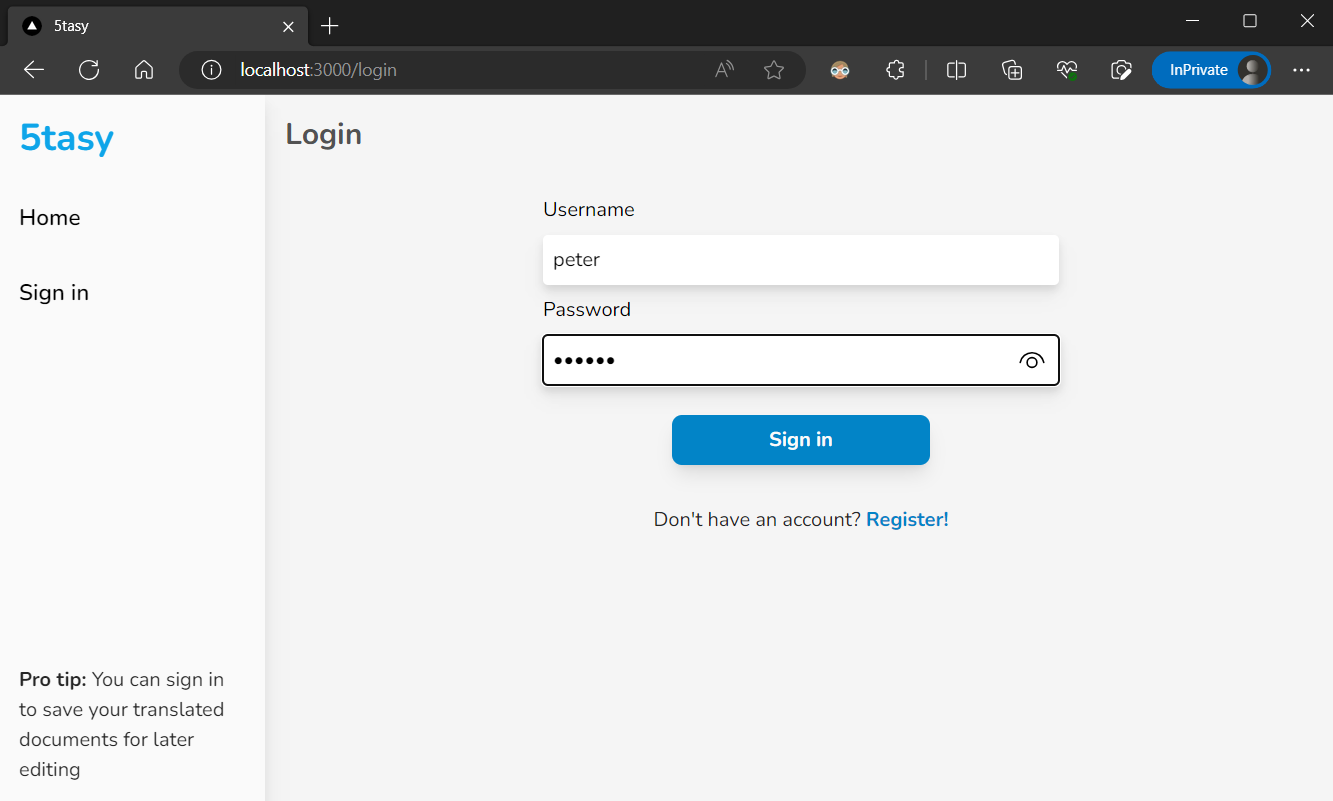
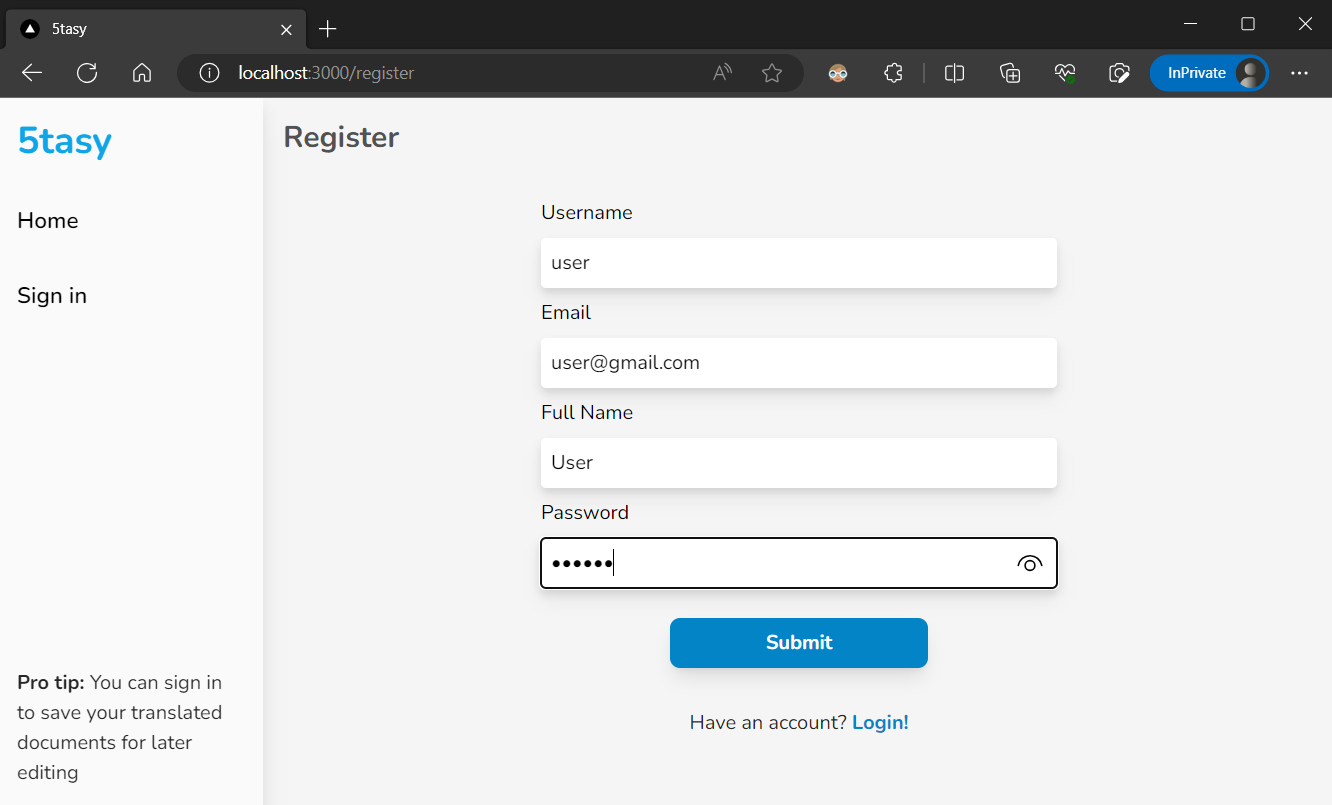
You first need to register the account and sign in to use the web functions.
In the web app, you can browse and upload an English PDF file using the provided interface.
Click to choose the target language and Hit the Translate button to start the translation process.
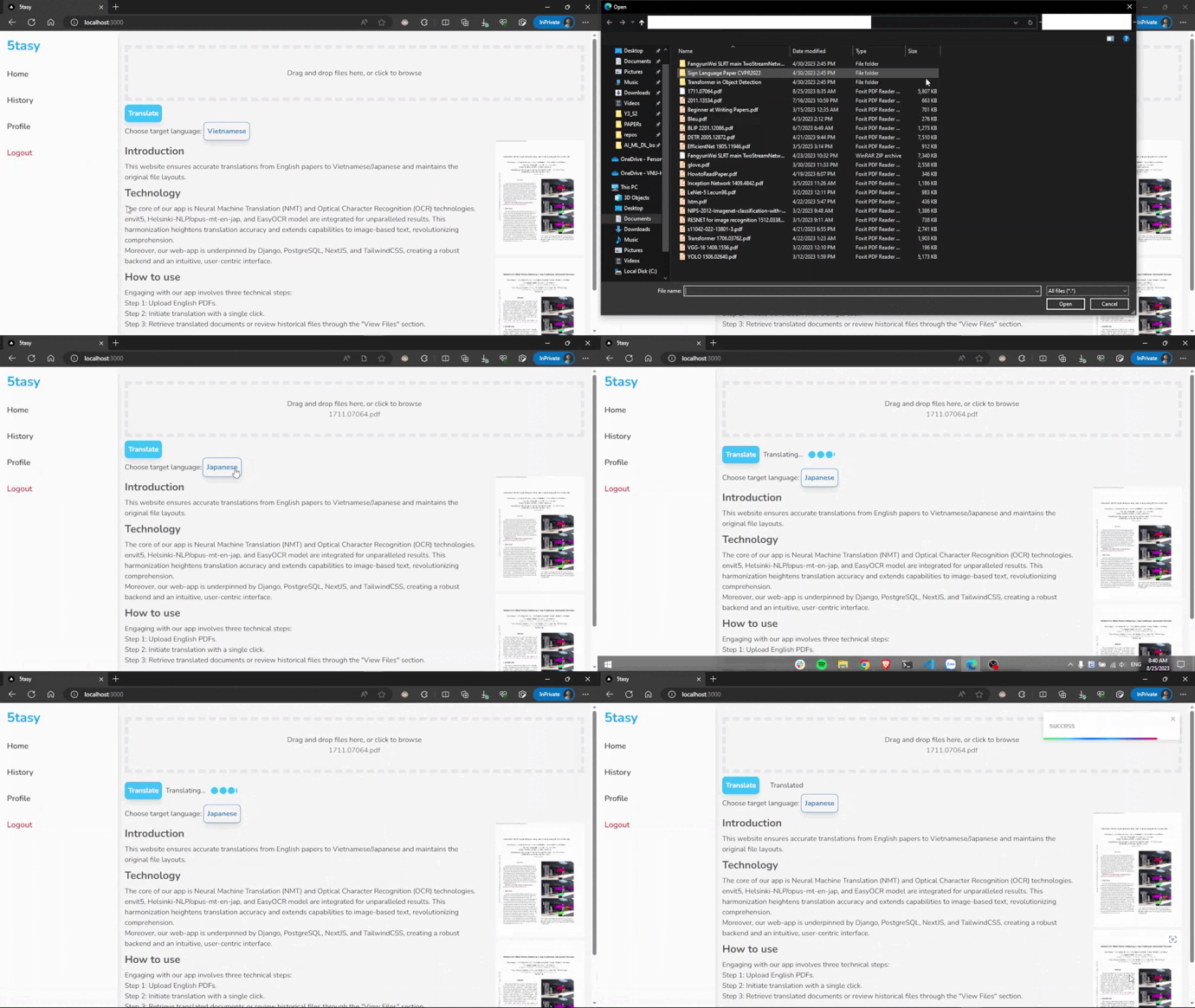
The model will then process your file and return the translated PDF file with the same layout as the original one. Hit the Translated linklabel or open the History bar to view the result. Here you can open to view and download your files.
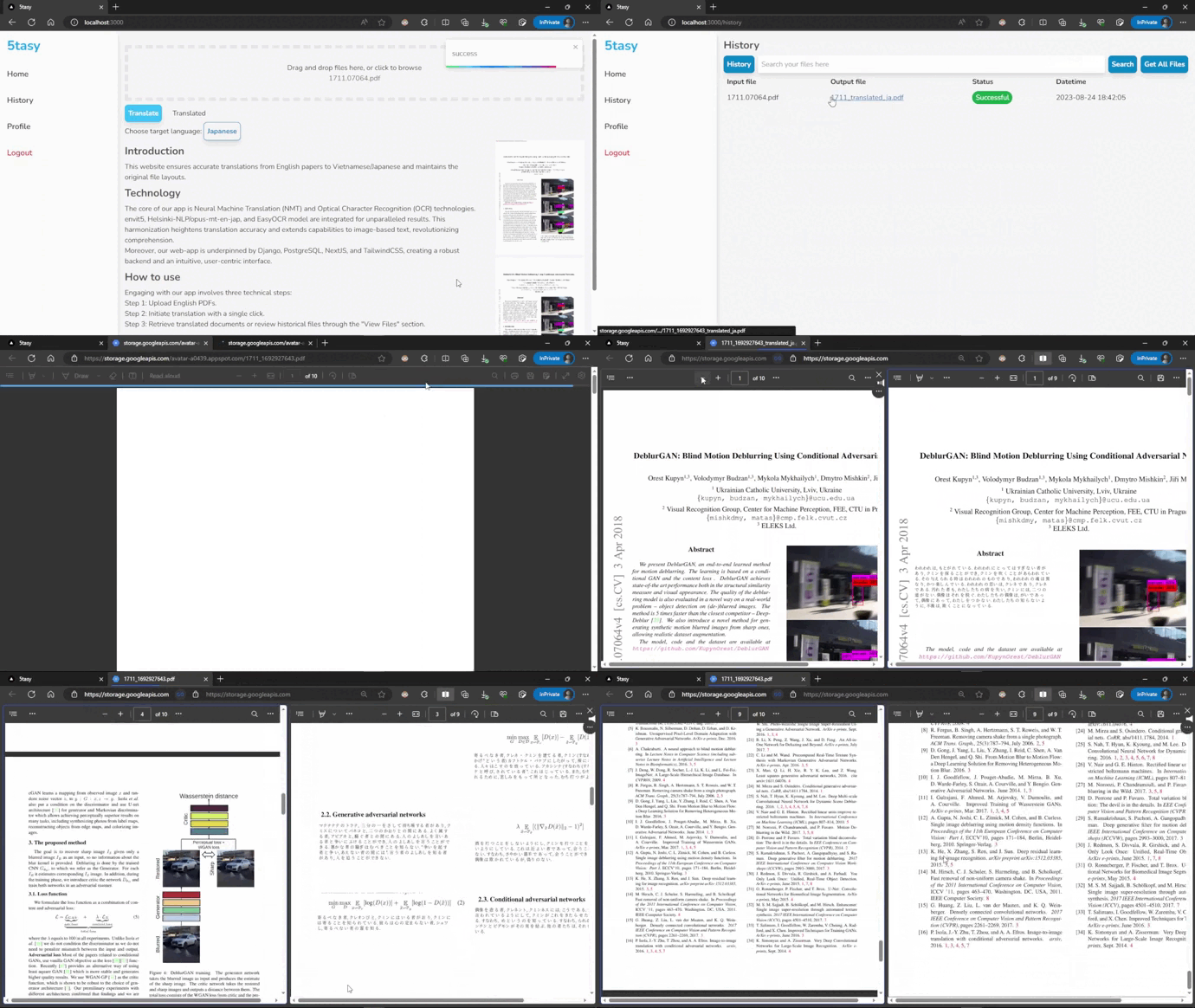
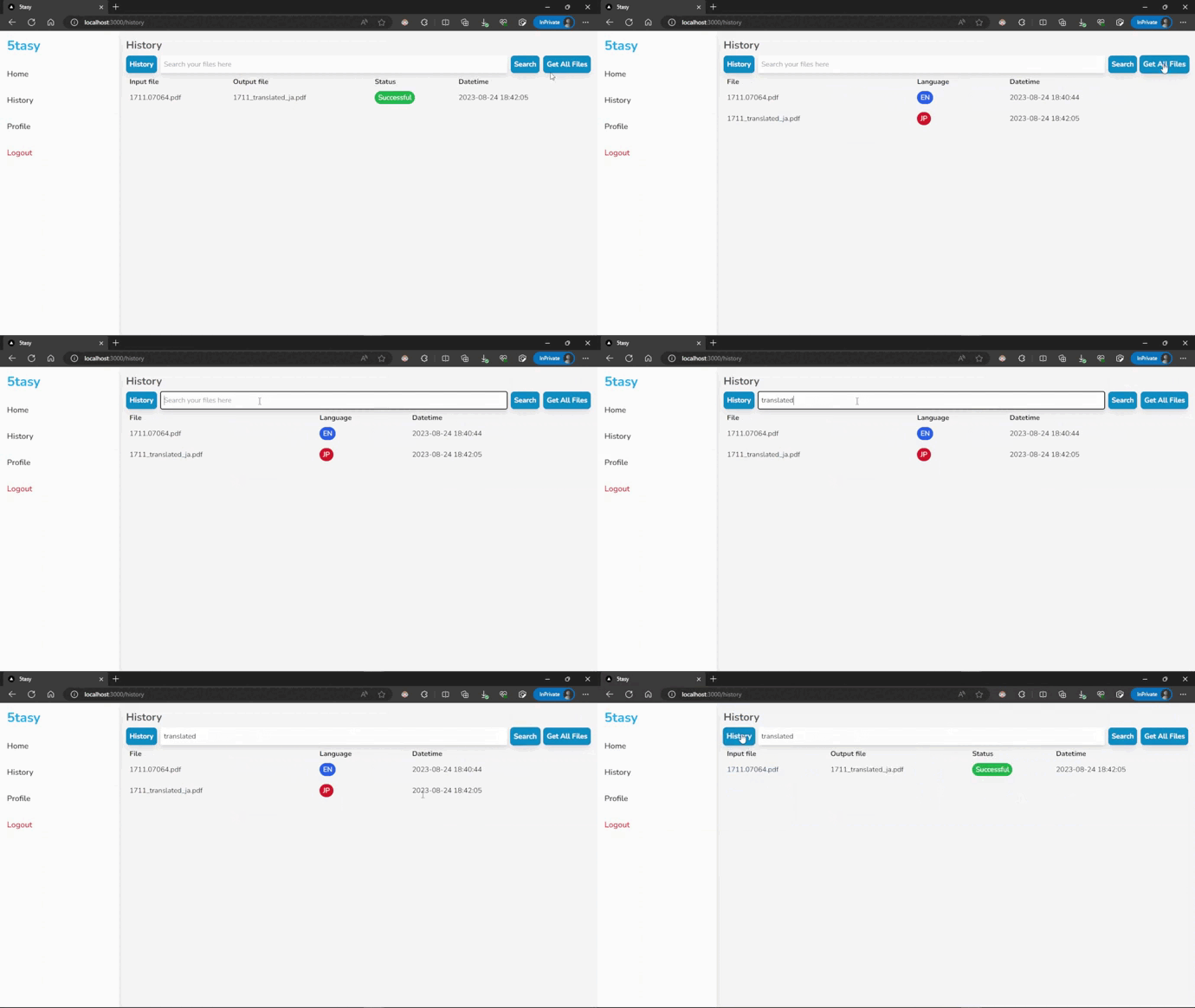
You can also search for your files in the History bar by entering the keywords in the search box.
Contributions are what make GitHub such an amazing place to be learn, inspire, and create. Any contributions you make are greatly appreciated.
git checkout -b contribute/Contributegit commit -m 'add your messages'git push origin contribute/Contribute239 followers · starred Apr 2025
7 followers · starred Oct 2024
This is a project that translates a .pdf file, preserving the original layout of that .pdf file. [UPDATED] We have achieved the Second Prize of the Cinnamon AI Bootcamp 2023.
See the code
| Name | Profile |
|---|---|
| Phạm Khánh Trình | @phkhanhtrinh23 |
| Nguyễn Bảo Tín | @nbtin |
| Yang Tuấn Anh | @YangTuanAnh |
| Nguyễn Hoàng Ngọc Hà | @ngochafromdn |
| Nguyễn Minh Lý | @lynguyenminh |
Translation with Layout Recovery is a cutting-edge approach in the field of natural language processing that goes beyond traditional machine translation methods. While conventional translation models focus solely on converting text from one language to another, 5tasy takes into account the visual layout and formatting of the text. This approach aims to preserve not only the linguistic content but also the spatial arrangement, font styles, and other visual elements present in the source text. Some detailed information can be found in this slide and our YouTube presentation.
.
├── Backend
│   ├── account
│   ├── services
│   └── translation
├── Frontend
│   ├── app
│   │   ├── api
│   │   ├── components
│   │   ├── history
│   │   │   └── api
│   │   ├── login
│   │   │   └── api
│   │   ├── profile
│   │   │   └── api
│   │   └── register
│   │       └── api
│   └── public
└── Model
    └── utils
    └── main.py
To install and run the 5tasy web app, please follow the steps below:
Ensure that Docker is installed on your system. You can download and install Docker from the official website: Docker Engine for Ubuntu or Docker Desktop.
Clone this repository to your local machine using the following command:
git clone https://github.com/phkhanhtrinh23/translation_layoutrecovery.git
Navigate to the project directory:
cd translation_layoutrecovery
Important: Then, put the necessary environment files (.env) in this folder.
Build the Docker image and run the container using the following command:
docker compose up --build
Wait for the installation process to complete. Once the downloading is done, the web app will be ready to use.
To stop the web app, press Ctrl + C in the terminal and run the following command:
docker compose down
To use the web app, follow the steps below:
Open your web browser and navigate to http://localhost:3000.
You first need to register the account and sign in to use the web functions.
In the web app, you can browse and upload an English PDF file using the provided interface.
Click to choose the target language and Hit the Translate button to start the translation process.
The model will then process your file and return the translated PDF file with the same layout as the original one. Hit the Translated linklabel or open the History bar to view the result. Here you can open to view and download your files.
You can also search for your files in the History bar by entering the keywords in the search box.
Contributions are what make GitHub such an amazing place to be learn, inspire, and create. Any contributions you make are greatly appreciated.
git checkout -b contribute/Contributegit commit -m 'add your messages'git push origin contribute/Contribute239 followers · starred Apr 2025
7 followers · starred Oct 2024