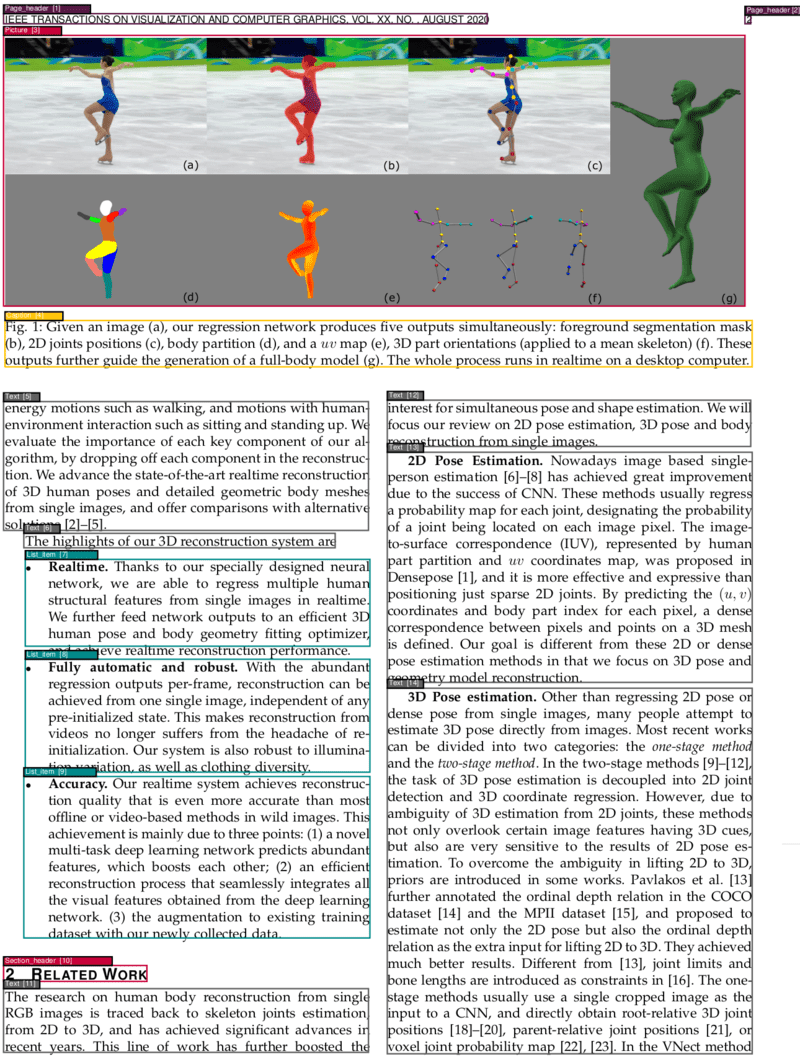
A Docker-powered service for PDF document layout analysis. This service provides a powerful and flexible PDF analysis service. The service allows for the segmentation and classification of different parts of PDF pages, identifying the elements such as texts, titles, pictures, tables and so on.
Python
1,356
312 commits
updated Oct 6, 2026
A Docker-powered microservice for intelligent PDF document layout analysis, OCR, and content extraction




Built with ❤️ by HURIDOCS
⭐ Star us on GitHub • 🐳 Pull from Docker Hub • 🤗 View on Hugging Face
Are you using this tool in your workflow? We’d love to learn more about your experience. Sharing your use case helps us improve the service for everyone.
This project provides a powerful and flexible PDF analysis microservice built with Clean Architecture principles. The service enables OCR, segmentation, and classification of different parts of PDF pages, identifying elements such as texts, titles, pictures, tables, formulas, and more. Additionally, it determines the correct reading order of these identified elements and can convert PDFs to various formats including Markdown and HTML with automatic translation support powered by Ollama.
The service offers both a user-friendly Gradio web interface for interactive use and a comprehensive REST API for programmatic access and integration.
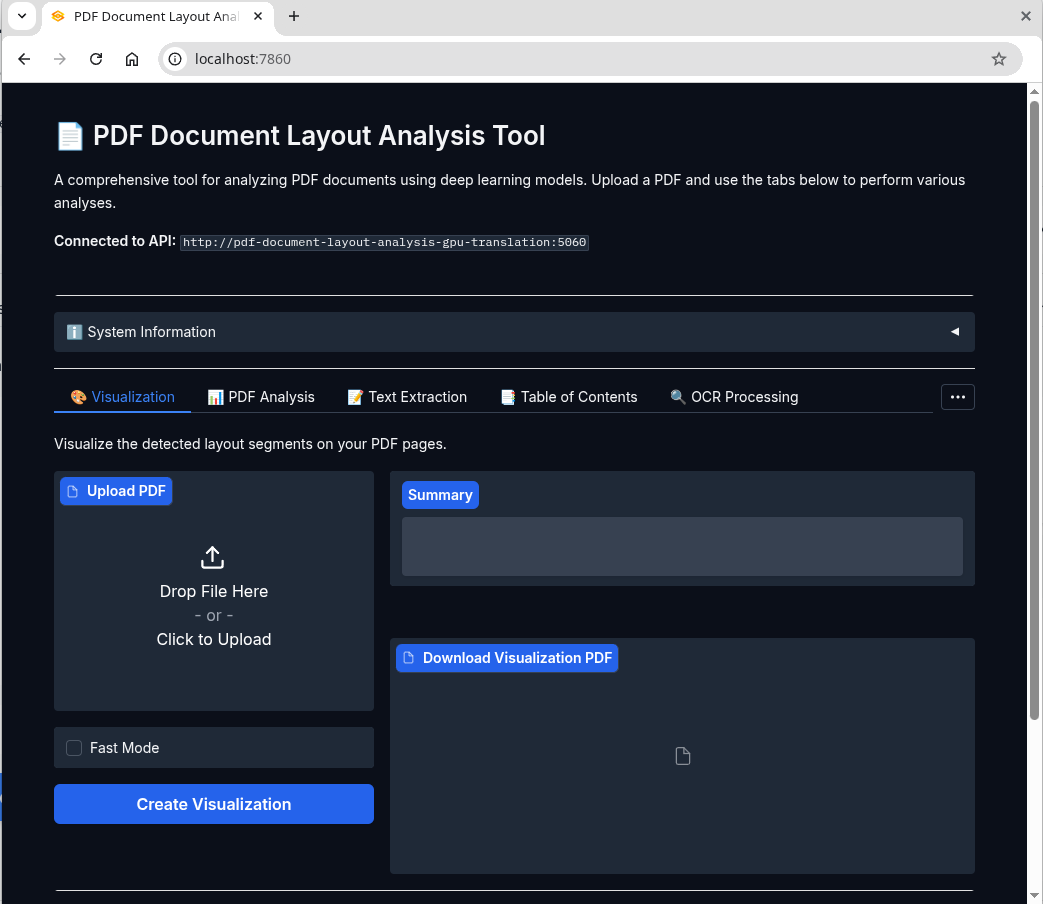
Gradio Web Interface - Easy-to-use UI for PDF analysis, conversion, and translation
make start # or `just start` (https://github.com/casey/just)
The service provides two interfaces:
http://localhost:7860 - User-friendly interface for all featureshttp://localhost:5060 - Programmatic access for integrationsSee all available commands:
make help
Check service status:
curl http://localhost:5060/info
Simply open your browser and navigate to http://localhost:7860 to access the intuitive web interface. The UI provides:
Analyze a PDF document (VGT model - high accuracy):
curl -X POST -F 'file=@/path/to/your/document.pdf' http://localhost:5060
Fast analysis (LightGBM models - faster processing):
curl -X POST -F 'file=@/path/to/your/document.pdf' -F "fast=true" http://localhost:5060
make stop
💡 Tip: The Web UI at
http://localhost:7860is the easiest way to get started. For automation and integration, use the REST API athttp://localhost:5060.
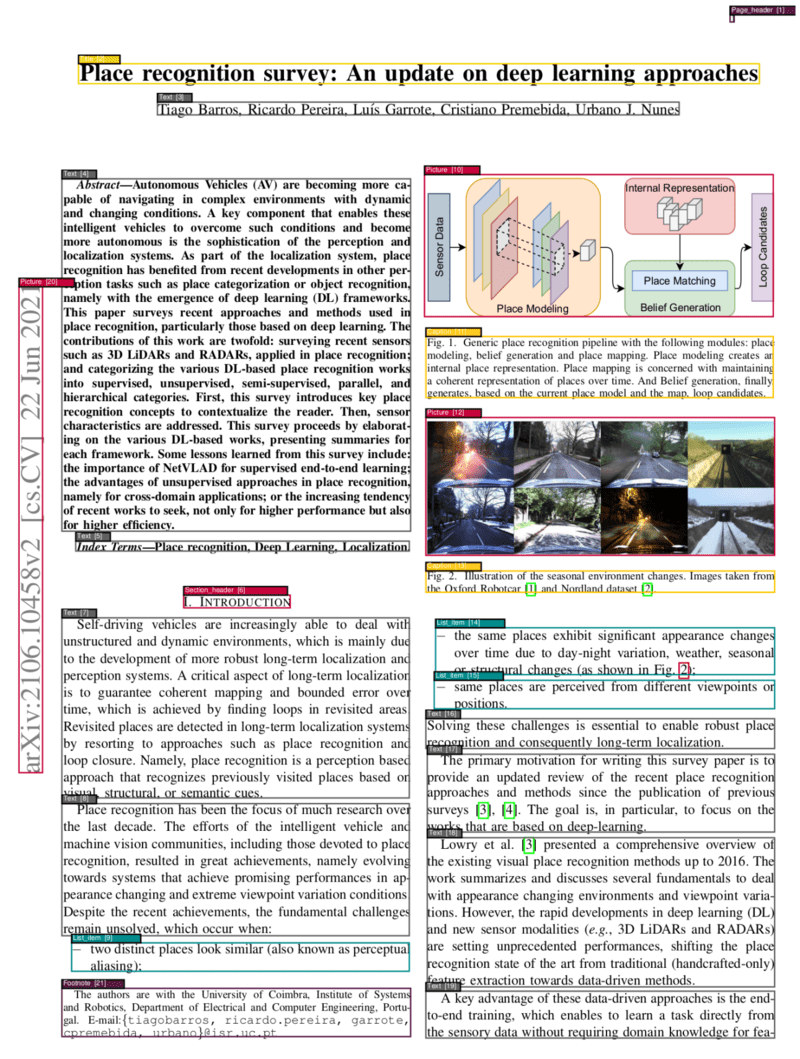
|
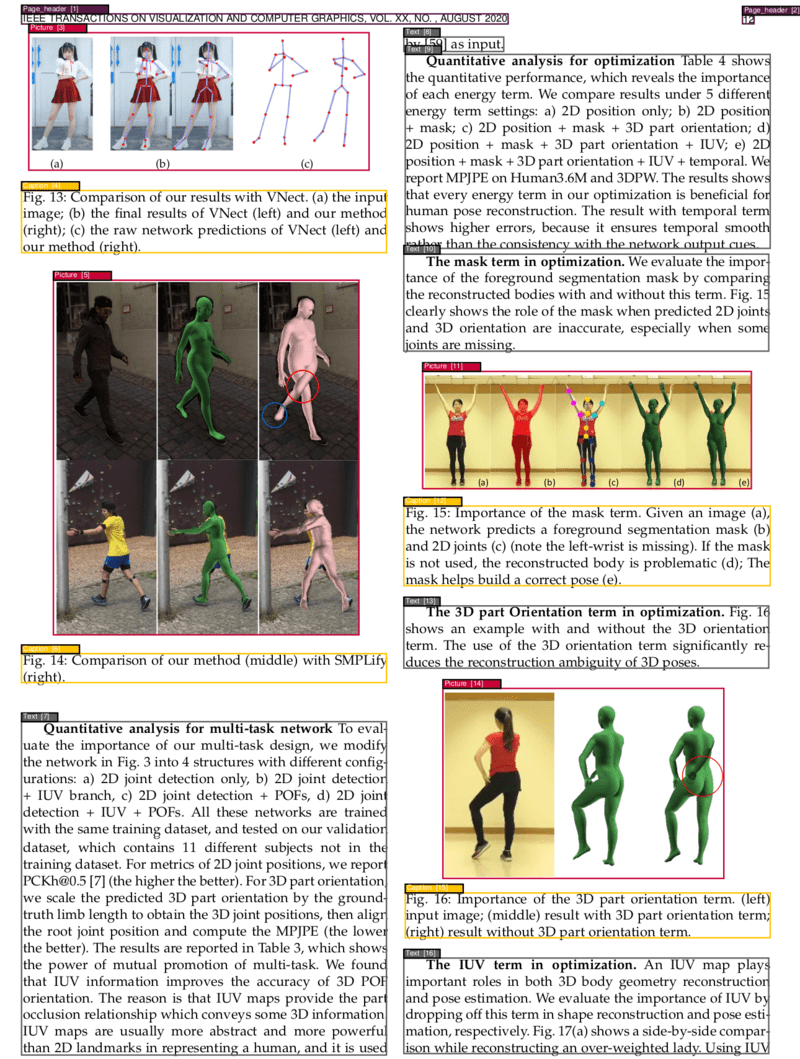
|
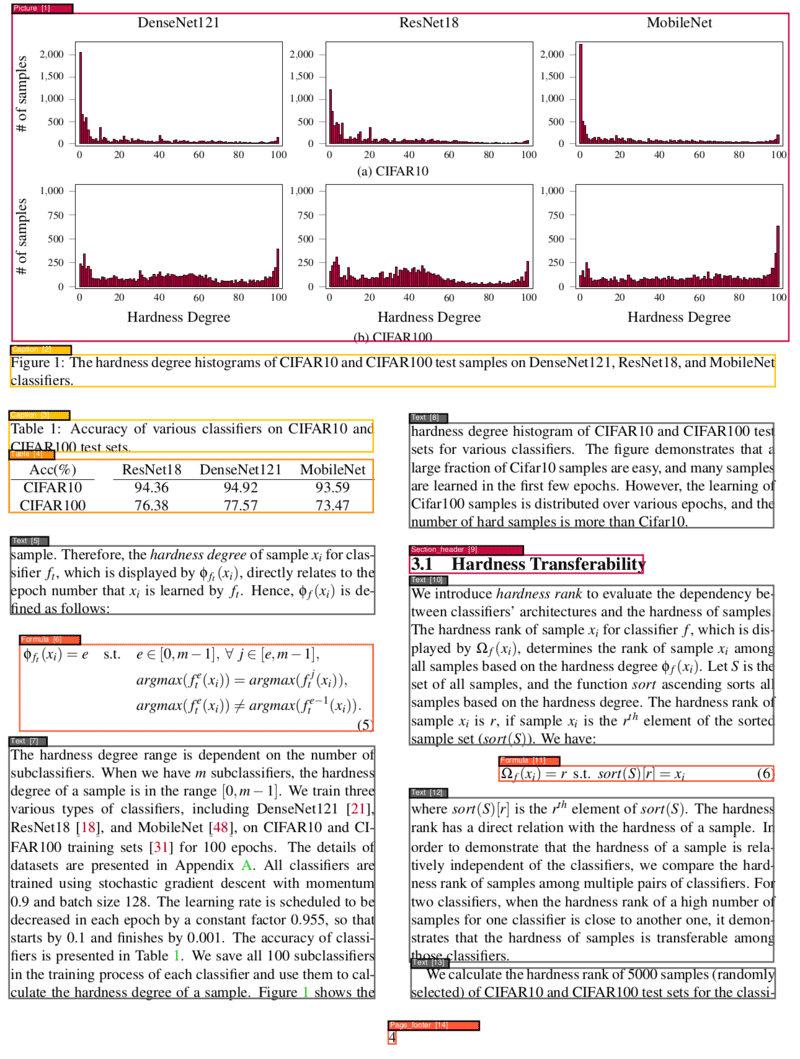
|
|
The GPU stack is picked by select_gpu_stack.sh based on
compute capability, and its legacy/nextgen profiles already build and run
on aarch64 hosts — their CUDA base images ship arm64 manifests, and nextgen's
compute-capability check (>= 10.0) already matches Blackwell GPUs like the
GB10, running via PTX JIT.
For native aarch64 hardware such as the DGX Spark (Grace CPU + GB10 GPU,
sm_121), this adds an explicit grace profile that targets CUDA 13 and
compiles native SASS for the GPU instead of relying on nextgen's PTX JIT
fallback:
GPU_STACK_PROFILE=grace just start_detached_gpu
which resolves to:
| Build arg | Value |
|---|---|
BUILDER_IMAGE | nvidia/cuda:13.0.3-cudnn-devel-ubuntu24.04 |
TORCH_INDEX_URL | https://download.pytorch.org/whl/cu130 |
TORCH_CUDA_ARCH_LIST | 12.0;12.1 |
Verified on: DGX Spark, aarch64, NVIDIA GB10 (compute capability 12.1),
driver 580 / CUDA 13.0. No pin relaxation was needed — cu130 ships
manylinux_2_28_aarch64 wheels for the exact torch/torchvision versions
this project already pins, and 13.0.3-cudnn-devel-ubuntu24.04 is the newest
cudnn-devel-ubuntu24.04 tag with an arm64 manifest at the time of writing.
| Note | Detail |
|---|---|
| Native vs. PTX JIT | nextgen (cu128, 12.0+PTX) also runs on the GB10 via PTX JIT; grace compiles native sm_120/sm_121 SASS to match the host's CUDA 13 driver, avoiding first-call JIT compilation. |
| GPU device-name log line | Upstream's get_model_configuration device-name log line was not observed to fire on this hardware; GPU use is still confirmed via nvidia-smi and the "Is PyTorch using GPU: True" log line. |
detectron2 build | Compiles from source at the pinned commit against the grace arch list; no changes were needed beyond the existing TORCH_CUDA_ARCH_LIST build arg. |
| Build time | Docker's layer cache makes rebuilds after the first near-instant; the first build compiles detectron2 and downloads several GB of wheels/models, same as any other profile. |
The service provides a comprehensive RESTful API with the following endpoints:
| Endpoint | Method | Description | Parameters |
|---|---|---|---|
/ | POST | Analyze PDF layout and extract segments | file, fast, parse_tables_and_math |
/analyze | POST | Analyze PDF and return segments + XML in one response | file, fast |
/save_xml/{filename} | POST | Analyze PDF and save XML output | file, xml_file_name, fast |
/get_xml/{filename} | GET | Retrieve saved XML analysis | xml_file_name |
| Endpoint | Method | Description | Parameters |
|---|---|---|---|
/text | POST | Extract text by content types | file, fast, types |
/toc | POST | Extract table of contents | file, fast |
/toc_legacy_uwazi_compatible | POST | Extract TOC (Uwazi compatible) | file |
| Endpoint | Method | Description | Parameters |
|---|---|---|---|
/markdown | POST | Convert PDF to Markdown (includes segmentation data in zip) | file, fast, extract_toc, dpi, output_file, target_languages, translation_model, segment_boxes |
/html | POST | Convert PDF to HTML (includes segmentation data in zip) | file, fast, extract_toc, dpi, output_file, target_languages, translation_model, segment_boxes |
/visualize | POST | Visualize segmentation results on the PDF | file, fast |
| Endpoint | Method | Description | Parameters |
|---|---|---|---|
| /ocr | POST | Apply OCR to PDF | file, language, rotate_pages, deskew |
/info | GET | Get service information | - |
/ | GET | Health check and system info | - |
/error | GET | Test error handling | - |
file: PDF file to process (multipart/form-data)fast: Use LightGBM models instead of VGT (boolean, default: false)parse_tables_and_math: Apply OCR to table regions (boolean, default: false) and convert formulas to LaTeXlanguage: OCR language code (string, default: "en")types: Comma-separated content types to extract (string, default: "all")extract_toc: Include table of contents at the beginning of the output (boolean, default: false)dpi: Image resolution for conversion (integer, default: 120)target_languages: Comma-separated list of target languages for translation (e.g. "Turkish, Spanish, French")translation_model: Ollama model to use for translation (string, default: "gpt-oss")segment_boxes: JSON-encoded list of segment boxes from a prior analysis of the same document (e.g. the response of POST /). When provided, /markdown and /html skip re-running layout analysis and convert using these segments directly — the same pattern /toc_from_xml already uses for its own segment_boxes parameterStandard analysis with VGT model:
curl -X POST \
  -F '[email protected]' \
  http://localhost:5060
Fast analysis with LightGBM models:
curl -X POST \
  -F '[email protected]' \
  -F 'fast=true' \
  http://localhost:5060
Analysis with table and math parsing:
curl -X POST \
  -F '[email protected]' \
  -F 'parse_tables_and_math=true' \
  http://localhost:5060
Extract all text:
curl -X POST \
  -F '[email protected]' \
  -F 'types=all' \
  http://localhost:5060/text
Extract specific content types:
curl -X POST \
  -F '[email protected]' \
  -F 'types=title,text,table' \
  http://localhost:5060/text
Convert to Markdown:
curl -X POST http://localhost:5060/markdown \
  -F '[email protected]' \
  -F 'extract_toc=true' \
  -F 'output_file=document.md' \
  --output 'document.zip'
Convert to HTML:
curl -X POST http://localhost:5060/html \
  -F '[email protected]' \
  -F 'extract_toc=true' \
  -F 'output_file=document.md' \
  --output 'document.zip'
Convert to Markdown reusing segments from a prior analysis (skips re-analysis):
# 1. Analyze once and keep the segments
curl -X POST http://localhost:5060 -F '[email protected]' > segments.json

# 2. Reuse them for both /markdown and /html without re-running analysis
curl -X POST http://localhost:5060/markdown \
  -F '[email protected]' \
  -F "segment_boxes=$(cat segments.json)" \
  --output 'document.zip'
Convert to Markdown with Translation:
curl -X POST http://localhost:5060/markdown \
  -F '[email protected]' \
  -F 'output_file=document.md' \
  -F 'target_languages=Turkish, Spanish' \
  -F 'translation_model=gpt-oss' \
  --output 'document.zip'
Convert to HTML with Translation:
curl -X POST http://localhost:5060/html \
  -F '[email protected]' \
  -F 'output_file=document.md' \
  -F 'target_languages=French, Russian' \
  -F 'translation_model=huihui_ai/hunyuan-mt-abliterated' \
  --output 'document.zip'
📋 Segmentation Data & Translations: Format conversion endpoints automatically include detailed segmentation data in the zip output. The resulting zip file contains:
- Original file: The converted document in the requested format
- Segmentation data:
{filename}_segmentation.jsonfile with information about each detected document segment:
- Coordinates:
left,top,width,height- Page information:
page_number,page_width,page_height- Content:
textcontent and segmenttype(e.g., "Title", "Text", "Table", "Picture")- Translated files (if
target_languagesspecified):{filename}_{language}.{extension}for each target language- Images (if present):
{filename}_pictures/directory containing extracted images
The /markdown and /html endpoints support automatic translation of the converted content into multiple languages using Ollama models.
Translation Requirements:
output_file must be specified (translations are only included in zip responses)Supported Translation Models:
gpt-oss, llama2, mistral, etc.)Translation Process:
ollama pull{filename}_{language}.{extension}Note that the quality of translations mostly depends on the models used. When using smaller models, the output may contain many unexpected or undesired elements. For regular users, we aimed for a balance between performance and quality, so we tested with different models with a reasonable size. The results for gpt-oss were satisfactory, which is why we set it as the default model. If you need something smaller you can also try huihui_ai/hunyuan-mt-abliterated, we saw it gives decent results especially if the text does not have much styling.
Example Translation Output:
document.zip
├── document.md                   # Source text with markdown/html styling
├── document_Spanish.md           # Spanish translation
├── document_French.md            # French translation
├── document_Turkish.md           # Turkish translation
├── document_segmentation.json    # Segmentation information
└── document_pictures/       # (if images present)
    ├── document_1_1.png
    └── document_1_2.png
OCR in English:
curl -X POST \
  -F 'file=@scanned_document.pdf' \
  -F 'language=en' \
  http://localhost:5060/ocr \
  --output ocr_processed.pdf
OCR in other languages:
# French
curl -X POST \
  -F 'file=@document_french.pdf' \
  -F 'language=fr' \
  http://localhost:5060/ocr \
  --output ocr_french.pdf

# Spanish
curl -X POST \
  -F 'file=@document_spanish.pdf' \
  -F 'language=es' \
  http://localhost:5060/ocr \
  --output ocr_spanish.pdf
OCR with rotation fix for sideways scanned documents
curl -X POST \
  -F 'file=@scanned_document.pdf' \
  -F 'language=en' \
  -F 'rotate_pages=true' \
  http://localhost:5060/ocr \
  --output ocr_processed.pdf
OCR with deskew for crooked scans
curl -X POST \
  -F 'file=@scanned_document.pdf' \
  -F 'language=en' \
  -F 'deskew=true' \
  http://localhost:5060/ocr \
  --output ocr_processed.pdf
Generate visualization PDF:
curl -X POST \
  -F '[email protected]' \
  http://localhost:5060/visualize \
  --output visualization.pdf
Extract structured TOC:
curl -X POST \
  -F '[email protected]' \
  http://localhost:5060/toc
Analyze and get segmentation plus XML in one call:
curl -X POST \
  -F '[email protected]' \
  http://localhost:5060/analyze
Returns {"segmentation": [...], "xml": "<pdftohtml XML>"}. Nothing is persisted to disk, so no follow-up retrieval call is needed.
Analyze and save XML:
curl -X POST \
  -F '[email protected]' \
  http://localhost:5060/save_xml/my_analysis
Retrieve saved XML:
curl http://localhost:5060/get_xml/my_analysis.xml
Get service info and supported languages:
curl http://localhost:5060/info
Health check:
curl http://localhost:5060/
Most endpoints return JSON with segment information:
[
  {
    "left": 72.0,
    "top": 84.0,
    "width": 451.2,
    "height": 23.04,
    "page_number": 1,
    "page_width": 595.32,
    "page_height": 841.92,
    "text": "Document Title",
    "type": "Title"
  },
  {
    "left": 72.0,
    "top": 120.0,
    "width": 451.2,
    "height": 200.0,
    "page_number": 1,
    "page_width": 595.32,
    "page_height": 841.92,
    "text": "This is the main text content...",
    "type": "Text"
  }
]
Caption - Image and table captionsFootnote - Footnote textFormula - Mathematical formulasList item - List items and bullet pointsPage footer - Footer contentPage header - Header contentPicture - Images and figuresSection header - Section headingsTable - Table contentText - Regular text paragraphsTitle - Document and section titlesThis project follows Clean Architecture principles, ensuring separation of concerns, testability, and maintainability. The codebase is organized into distinct layers:
src/
├── domain/                 # Enterprise Business Rules
│   ├── PdfImages.py       # PDF image handling domain logic
│   ├── PdfSegment.py      # PDF segment entity
│   ├── Prediction.py      # ML prediction entity
│   └── SegmentBox.py      # Core segment box entity
├── use_cases/             # Application Business Rules
│   ├── pdf_analysis/      # PDF analysis use case
│   ├── text_extraction/   # Text extraction use case
│   ├── toc_extraction/    # Table of contents extraction
│   ├── visualization/     # PDF visualization use case
│   ├── ocr/              # OCR processing use case
│   ├── markdown_conversion/ # Markdown conversion use case (with translation)
│   └── html_conversion/   # HTML conversion use case (with translation)
├── adapters/              # Interface Adapters
│   ├── infrastructure/    # External service adapters
│   ├── ml/               # Machine learning model adapters
│   ├── storage/          # File storage adapters
│   └── web/              # Web framework adapters
├── ports/                 # Interface definitions
│   ├── services/         # Service interfaces
│   └── repositories/     # Repository interfaces
└── drivers/              # Frameworks & Drivers
    └── web/              # FastAPI application setup
The service offers two complementary model approaches, each optimized for different use cases:
Overview: A state-of-the-art visual model developed by Alibaba Research Group that "sees" the entire page layout.
Key Features:
Resource Requirements:
Overview: Lightweight ensemble of two specialized models using XML-based features from Poppler.
Key Features:
Trade-offs:
Both models integrate seamlessly with OCR capabilities:
| Use Case | Recommended Model | Reason |
|---|---|---|
| High accuracy requirements | VGT | Superior visual understanding |
| Batch processing | LightGBM | Faster processing, lower resources |
| GPU available | VGT | Leverages GPU acceleration |
| CPU-only environment | LightGBM | Optimized for CPU processing |
| Real-time applications | LightGBM | Consistent fast response times |
| Research/analysis | VGT | Best accuracy for detailed analysis |
Both model types are trained on the comprehensive DocLayNet dataset, a large-scale document layout analysis dataset containing over 80,000 document pages.
The models can identify and classify 11 distinct content types:
| ID | Category | Description |
|---|---|---|
| 1 | Caption | Image and table captions |
| 2 | Footnote | Footnote references and text |
| 3 | Formula | Mathematical equations and formulas |
| 4 | List item | Bulleted and numbered list items |
| 5 | Page footer | Footer content and page numbers |
| 6 | Page header | Header content and titles |
| 7 | Picture | Images, figures, and graphics |
| 8 | Section header | Section and subsection headings |
| 9 | Table | Tabular data and structures |
| 10 | Text | Regular paragraph text |
| 11 | Title | Document and chapter titles |
For detailed information about the dataset, visit the DocLayNet repository.
Clone the repository:
git clone https://github.com/huridocs/pdf-document-layout-analysis.git
cd pdf-document-layout-analysis
Create virtual environment:
make install_venv
Activate environment:
source .venv/bin/activate
Install dependencies:
make install
Format code:
make formatter
Check formatting:
make check_format
Run tests:
make test
Integration tests:
# End-to-end tests require a running service on http://localhost:5060
python -m pytest src/tests/test_end_to_end.py
Build and start:
# Standard start (includes translation features)
make start

# Start without translation support
make start_no_translation

# Start in detached mode (API only, no UI)
make start_detached

# Start in detached mode with GPU (API only, no UI)
make start_detached_gpu

# Force CPU mode with translation
make start_no_gpu
Clean up Docker resources:
# Stop all services
make stop

# Remove containers
make remove_docker_containers

# Remove images
make remove_docker_images
pdf-document-layout-analysis/
├── src/                    # Source code
│   ├── domain/            # Business entities
│   ├── use_cases/         # Application logic
│   ├── adapters/          # External integrations
│   ├── ports/             # Interface definitions
│   ├── drivers/           # Framework configurations
│   ├── app.py             # FastAPI application
│   └── gradio_app.py      # Gradio web interface
├── test_pdfs/             # Test PDF files
├── models/                # ML model storage
├── docker-compose.yml     # Docker configuration
├── Dockerfile             # FastAPI container definition
├── Dockerfile.gradio      # Gradio container definition
├── justfile              # Development commands (just)
├── pyproject.toml        # Python project configuration
└── requirements.txt      # Python dependencies
Key configuration options:
# OCR configuration
OCR_SOURCE=/tmp/ocr_source

# Model paths (auto-configured)
MODELS_PATH=./models

# Service configuration
HOST=0.0.0.0
PORT=5060

# Translation configuration (when using translation features)
OLLAMA_HOST=http://ollama:11434  # Ollama service endpoint
src/domain/src/use_cases/src/adapters/src/ports/src/adapters/web/View logs:
docker compose logs -f
Access container:
docker exec -it pdf-document-layout-analysis /bin/bash
Free up disk space:
make free_up_space
The service returns SegmentBox elements in a carefully determined reading order:
For segments without text (e.g., images):
text propertyParse tables and extract them in HTML format by setting parse_tables_and_math=true:
curl -X POST -F '[email protected]' -F 'parse_tables_and_math=true' http://localhost:5060
VGT model performance on PubLayNet dataset:
| Metric | Overall | Text | Title | List | Table | Figure |
|---|---|---|---|---|---|---|
| F1 Score | 0.962 | 0.950 | 0.939 | 0.968 | 0.981 | 0.971 |
📊 Comparison: View comprehensive model comparisons at Papers With Code
Performance benchmarks on 15-page academic documents:
| Model | Hardware | Speed (sec/page) | Use Case |
|---|---|---|---|
| LightGBM | CPU (i7-8700 3.2GHz) | 0.42 | Fast processing |
| VGT | GPU (GTX 1070) | 1.75 | High accuracy |
| VGT | CPU (i7-8700 3.2GHz) | 13.5 | CPU fallback |
The service uses Tesseract OCR with support for 150+ languages. The Docker image includes only common languages to minimize image size.
docker exec -it --user root pdf-document-layout-analysis /bin/bash
# Install specific language
apt-get update
apt-get install tesseract-ocr-[LANGCODE]
# Korean
apt-get install tesseract-ocr-kor

# German
apt-get install tesseract-ocr-deu

# French
apt-get install tesseract-ocr-fra

# Spanish
apt-get install tesseract-ocr-spa

# Chinese Simplified
apt-get install tesseract-ocr-chi-sim

# Arabic
apt-get install tesseract-ocr-ara

# Japanese
apt-get install tesseract-ocr-jpn
curl http://localhost:5060/info
Find Tesseract language codes in the ISO to Tesseract mapping.
Common language codes:
eng - Englishfra - Frenchdeu - Germanspa - Spanishita - Italianpor - Portugueserus - Russianchi-sim - Chinese Simplifiedchi-tra - Chinese Traditionaljpn - Japanesekor - Koreanara - Arabichin - Hindi# OCR with specific language
curl -X POST \
-F '[email protected]' \
-F 'language=fr' \
http://localhost:5060/ocr \
--output french_ocr.pdf
Explore our ecosystem of PDF processing services built on this foundation:
🔍 Purpose: Intelligent extraction of structured table of contents from PDF documents
Key Features:
📝 Purpose: Advanced text extraction with layout awareness
Key Features:
These services work seamlessly together:
We welcome contributions to improve the PDF Document Layout Analysis service!
Fork the Repository
git clone https://github.com/your-username/pdf-document-layout-analysis.git
Create a Feature Branch
git checkout -b feature/your-feature-name
Set Up Development Environment
make install_venv
make install
Make Your Changes
Run Tests and Quality Checks
make test
make check_format
Submit a Pull Request
This project is licensed under the terms specified in the LICENSE file.
16 followers · starred Aug 2026
257 followers · starred Mar 2025
5 followers · starred May 2025
A Docker-powered service for PDF document layout analysis. This service provides a powerful and flexible PDF analysis service. The service allows for the segmentation and classification of different parts of PDF pages, identifying the elements such as texts, titles, pictures, tables and so on.
Python
1,356
312 commits
updated Oct 6, 2026
A Docker-powered microservice for intelligent PDF document layout analysis, OCR, and content extraction
Built with ❤️ by HURIDOCS
⭐ Star us on GitHub • 🐳 Pull from Docker Hub • 🤗 View on Hugging Face
Are you using this tool in your workflow? We’d love to learn more about your experience. Sharing your use case helps us improve the service for everyone.
This project provides a powerful and flexible PDF analysis microservice built with Clean Architecture principles. The service enables OCR, segmentation, and classification of different parts of PDF pages, identifying elements such as texts, titles, pictures, tables, formulas, and more. Additionally, it determines the correct reading order of these identified elements and can convert PDFs to various formats including Markdown and HTML with automatic translation support powered by Ollama.
The service offers both a user-friendly Gradio web interface for interactive use and a comprehensive REST API for programmatic access and integration.
Gradio Web Interface - Easy-to-use UI for PDF analysis, conversion, and translation
make start # or `just start` (https://github.com/casey/just)
The service provides two interfaces:
http://localhost:7860 - User-friendly interface for all featureshttp://localhost:5060 - Programmatic access for integrationsSee all available commands:
make help
Check service status:
curl http://localhost:5060/info
Simply open your browser and navigate to http://localhost:7860 to access the intuitive web interface. The UI provides:
Analyze a PDF document (VGT model - high accuracy):
curl -X POST -F 'file=@/path/to/your/document.pdf' http://localhost:5060
Fast analysis (LightGBM models - faster processing):
curl -X POST -F 'file=@/path/to/your/document.pdf' -F "fast=true" http://localhost:5060
make stop
💡 Tip: The Web UI at
http://localhost:7860is the easiest way to get started. For automation and integration, use the REST API athttp://localhost:5060.
|
|
|
|
|
The GPU stack is picked by select_gpu_stack.sh based on
compute capability, and its legacy/nextgen profiles already build and run
on aarch64 hosts — their CUDA base images ship arm64 manifests, and nextgen's
compute-capability check (>= 10.0) already matches Blackwell GPUs like the
GB10, running via PTX JIT.
For native aarch64 hardware such as the DGX Spark (Grace CPU + GB10 GPU,
sm_121), this adds an explicit grace profile that targets CUDA 13 and
compiles native SASS for the GPU instead of relying on nextgen's PTX JIT
fallback:
GPU_STACK_PROFILE=grace just start_detached_gpu
which resolves to:
| Build arg | Value |
|---|---|
BUILDER_IMAGE | nvidia/cuda:13.0.3-cudnn-devel-ubuntu24.04 |
TORCH_INDEX_URL | https://download.pytorch.org/whl/cu130 |
TORCH_CUDA_ARCH_LIST | 12.0;12.1 |
Verified on: DGX Spark, aarch64, NVIDIA GB10 (compute capability 12.1),
driver 580 / CUDA 13.0. No pin relaxation was needed — cu130 ships
manylinux_2_28_aarch64 wheels for the exact torch/torchvision versions
this project already pins, and 13.0.3-cudnn-devel-ubuntu24.04 is the newest
cudnn-devel-ubuntu24.04 tag with an arm64 manifest at the time of writing.
| Note | Detail |
|---|---|
| Native vs. PTX JIT | nextgen (cu128, 12.0+PTX) also runs on the GB10 via PTX JIT; grace compiles native sm_120/sm_121 SASS to match the host's CUDA 13 driver, avoiding first-call JIT compilation. |
| GPU device-name log line | Upstream's get_model_configuration device-name log line was not observed to fire on this hardware; GPU use is still confirmed via nvidia-smi and the "Is PyTorch using GPU: True" log line. |
detectron2 build | Compiles from source at the pinned commit against the grace arch list; no changes were needed beyond the existing TORCH_CUDA_ARCH_LIST build arg. |
| Build time | Docker's layer cache makes rebuilds after the first near-instant; the first build compiles detectron2 and downloads several GB of wheels/models, same as any other profile. |
The service provides a comprehensive RESTful API with the following endpoints:
| Endpoint | Method | Description | Parameters |
|---|---|---|---|
/ | POST | Analyze PDF layout and extract segments | file, fast, parse_tables_and_math |
/analyze | POST | Analyze PDF and return segments + XML in one response | file, fast |
/save_xml/{filename} | POST | Analyze PDF and save XML output | file, xml_file_name, fast |
/get_xml/{filename} | GET | Retrieve saved XML analysis | xml_file_name |
| Endpoint | Method | Description | Parameters |
|---|---|---|---|
/text | POST | Extract text by content types | file, fast, types |
/toc | POST | Extract table of contents | file, fast |
/toc_legacy_uwazi_compatible | POST | Extract TOC (Uwazi compatible) | file |
| Endpoint | Method | Description | Parameters |
|---|---|---|---|
/markdown | POST | Convert PDF to Markdown (includes segmentation data in zip) | file, fast, extract_toc, dpi, output_file, target_languages, translation_model, segment_boxes |
/html | POST | Convert PDF to HTML (includes segmentation data in zip) | file, fast, extract_toc, dpi, output_file, target_languages, translation_model, segment_boxes |
/visualize | POST | Visualize segmentation results on the PDF | file, fast |
| Endpoint | Method | Description | Parameters |
|---|---|---|---|
| /ocr | POST | Apply OCR to PDF | file, language, rotate_pages, deskew |
/info | GET | Get service information | - |
/ | GET | Health check and system info | - |
/error | GET | Test error handling | - |
file: PDF file to process (multipart/form-data)fast: Use LightGBM models instead of VGT (boolean, default: false)parse_tables_and_math: Apply OCR to table regions (boolean, default: false) and convert formulas to LaTeXlanguage: OCR language code (string, default: "en")types: Comma-separated content types to extract (string, default: "all")extract_toc: Include table of contents at the beginning of the output (boolean, default: false)dpi: Image resolution for conversion (integer, default: 120)target_languages: Comma-separated list of target languages for translation (e.g. "Turkish, Spanish, French")translation_model: Ollama model to use for translation (string, default: "gpt-oss")segment_boxes: JSON-encoded list of segment boxes from a prior analysis of the same document (e.g. the response of POST /). When provided, /markdown and /html skip re-running layout analysis and convert using these segments directly — the same pattern /toc_from_xml already uses for its own segment_boxes parameterStandard analysis with VGT model:
curl -X POST \
  -F '[email protected]' \
  http://localhost:5060
Fast analysis with LightGBM models:
curl -X POST \
  -F '[email protected]' \
  -F 'fast=true' \
  http://localhost:5060
Analysis with table and math parsing:
curl -X POST \
  -F '[email protected]' \
  -F 'parse_tables_and_math=true' \
  http://localhost:5060
Extract all text:
curl -X POST \
  -F '[email protected]' \
  -F 'types=all' \
  http://localhost:5060/text
Extract specific content types:
curl -X POST \
  -F '[email protected]' \
  -F 'types=title,text,table' \
  http://localhost:5060/text
Convert to Markdown:
curl -X POST http://localhost:5060/markdown \
  -F '[email protected]' \
  -F 'extract_toc=true' \
  -F 'output_file=document.md' \
  --output 'document.zip'
Convert to HTML:
curl -X POST http://localhost:5060/html \
  -F '[email protected]' \
  -F 'extract_toc=true' \
  -F 'output_file=document.md' \
  --output 'document.zip'
Convert to Markdown reusing segments from a prior analysis (skips re-analysis):
# 1. Analyze once and keep the segments
curl -X POST http://localhost:5060 -F '[email protected]' > segments.json

# 2. Reuse them for both /markdown and /html without re-running analysis
curl -X POST http://localhost:5060/markdown \
  -F '[email protected]' \
  -F "segment_boxes=$(cat segments.json)" \
  --output 'document.zip'
Convert to Markdown with Translation:
curl -X POST http://localhost:5060/markdown \
  -F '[email protected]' \
  -F 'output_file=document.md' \
  -F 'target_languages=Turkish, Spanish' \
  -F 'translation_model=gpt-oss' \
  --output 'document.zip'
Convert to HTML with Translation:
curl -X POST http://localhost:5060/html \
  -F '[email protected]' \
  -F 'output_file=document.md' \
  -F 'target_languages=French, Russian' \
  -F 'translation_model=huihui_ai/hunyuan-mt-abliterated' \
  --output 'document.zip'
📋 Segmentation Data & Translations: Format conversion endpoints automatically include detailed segmentation data in the zip output. The resulting zip file contains:
- Original file: The converted document in the requested format
- Segmentation data:
{filename}_segmentation.jsonfile with information about each detected document segment:
- Coordinates:
left,top,width,height- Page information:
page_number,page_width,page_height- Content:
textcontent and segmenttype(e.g., "Title", "Text", "Table", "Picture")- Translated files (if
target_languagesspecified):{filename}_{language}.{extension}for each target language- Images (if present):
{filename}_pictures/directory containing extracted images
The /markdown and /html endpoints support automatic translation of the converted content into multiple languages using Ollama models.
Translation Requirements:
output_file must be specified (translations are only included in zip responses)Supported Translation Models:
gpt-oss, llama2, mistral, etc.)Translation Process:
ollama pull{filename}_{language}.{extension}Note that the quality of translations mostly depends on the models used. When using smaller models, the output may contain many unexpected or undesired elements. For regular users, we aimed for a balance between performance and quality, so we tested with different models with a reasonable size. The results for gpt-oss were satisfactory, which is why we set it as the default model. If you need something smaller you can also try huihui_ai/hunyuan-mt-abliterated, we saw it gives decent results especially if the text does not have much styling.
Example Translation Output:
document.zip
├── document.md                   # Source text with markdown/html styling
├── document_Spanish.md           # Spanish translation
├── document_French.md            # French translation
├── document_Turkish.md           # Turkish translation
├── document_segmentation.json    # Segmentation information
└── document_pictures/       # (if images present)
    ├── document_1_1.png
    └── document_1_2.png
OCR in English:
curl -X POST \
  -F 'file=@scanned_document.pdf' \
  -F 'language=en' \
  http://localhost:5060/ocr \
  --output ocr_processed.pdf
OCR in other languages:
# French
curl -X POST \
  -F 'file=@document_french.pdf' \
  -F 'language=fr' \
  http://localhost:5060/ocr \
  --output ocr_french.pdf

# Spanish
curl -X POST \
  -F 'file=@document_spanish.pdf' \
  -F 'language=es' \
  http://localhost:5060/ocr \
  --output ocr_spanish.pdf
OCR with rotation fix for sideways scanned documents
curl -X POST \
  -F 'file=@scanned_document.pdf' \
  -F 'language=en' \
  -F 'rotate_pages=true' \
  http://localhost:5060/ocr \
  --output ocr_processed.pdf
OCR with deskew for crooked scans
curl -X POST \
  -F 'file=@scanned_document.pdf' \
  -F 'language=en' \
  -F 'deskew=true' \
  http://localhost:5060/ocr \
  --output ocr_processed.pdf
Generate visualization PDF:
curl -X POST \
  -F '[email protected]' \
  http://localhost:5060/visualize \
  --output visualization.pdf
Extract structured TOC:
curl -X POST \
  -F '[email protected]' \
  http://localhost:5060/toc
Analyze and get segmentation plus XML in one call:
curl -X POST \
  -F '[email protected]' \
  http://localhost:5060/analyze
Returns {"segmentation": [...], "xml": "<pdftohtml XML>"}. Nothing is persisted to disk, so no follow-up retrieval call is needed.
Analyze and save XML:
curl -X POST \
  -F '[email protected]' \
  http://localhost:5060/save_xml/my_analysis
Retrieve saved XML:
curl http://localhost:5060/get_xml/my_analysis.xml
Get service info and supported languages:
curl http://localhost:5060/info
Health check:
curl http://localhost:5060/
Most endpoints return JSON with segment information:
[
  {
    "left": 72.0,
    "top": 84.0,
    "width": 451.2,
    "height": 23.04,
    "page_number": 1,
    "page_width": 595.32,
    "page_height": 841.92,
    "text": "Document Title",
    "type": "Title"
  },
  {
    "left": 72.0,
    "top": 120.0,
    "width": 451.2,
    "height": 200.0,
    "page_number": 1,
    "page_width": 595.32,
    "page_height": 841.92,
    "text": "This is the main text content...",
    "type": "Text"
  }
]
Caption - Image and table captionsFootnote - Footnote textFormula - Mathematical formulasList item - List items and bullet pointsPage footer - Footer contentPage header - Header contentPicture - Images and figuresSection header - Section headingsTable - Table contentText - Regular text paragraphsTitle - Document and section titlesThis project follows Clean Architecture principles, ensuring separation of concerns, testability, and maintainability. The codebase is organized into distinct layers:
src/
├── domain/                 # Enterprise Business Rules
│   ├── PdfImages.py       # PDF image handling domain logic
│   ├── PdfSegment.py      # PDF segment entity
│   ├── Prediction.py      # ML prediction entity
│   └── SegmentBox.py      # Core segment box entity
├── use_cases/             # Application Business Rules
│   ├── pdf_analysis/      # PDF analysis use case
│   ├── text_extraction/   # Text extraction use case
│   ├── toc_extraction/    # Table of contents extraction
│   ├── visualization/     # PDF visualization use case
│   ├── ocr/              # OCR processing use case
│   ├── markdown_conversion/ # Markdown conversion use case (with translation)
│   └── html_conversion/   # HTML conversion use case (with translation)
├── adapters/              # Interface Adapters
│   ├── infrastructure/    # External service adapters
│   ├── ml/               # Machine learning model adapters
│   ├── storage/          # File storage adapters
│   └── web/              # Web framework adapters
├── ports/                 # Interface definitions
│   ├── services/         # Service interfaces
│   └── repositories/     # Repository interfaces
└── drivers/              # Frameworks & Drivers
    └── web/              # FastAPI application setup
The service offers two complementary model approaches, each optimized for different use cases:
Overview: A state-of-the-art visual model developed by Alibaba Research Group that "sees" the entire page layout.
Key Features:
Resource Requirements:
Overview: Lightweight ensemble of two specialized models using XML-based features from Poppler.
Key Features:
Trade-offs:
Both models integrate seamlessly with OCR capabilities:
| Use Case | Recommended Model | Reason |
|---|---|---|
| High accuracy requirements | VGT | Superior visual understanding |
| Batch processing | LightGBM | Faster processing, lower resources |
| GPU available | VGT | Leverages GPU acceleration |
| CPU-only environment | LightGBM | Optimized for CPU processing |
| Real-time applications | LightGBM | Consistent fast response times |
| Research/analysis | VGT | Best accuracy for detailed analysis |
Both model types are trained on the comprehensive DocLayNet dataset, a large-scale document layout analysis dataset containing over 80,000 document pages.
The models can identify and classify 11 distinct content types:
| ID | Category | Description |
|---|---|---|
| 1 | Caption | Image and table captions |
| 2 | Footnote | Footnote references and text |
| 3 | Formula | Mathematical equations and formulas |
| 4 | List item | Bulleted and numbered list items |
| 5 | Page footer | Footer content and page numbers |
| 6 | Page header | Header content and titles |
| 7 | Picture | Images, figures, and graphics |
| 8 | Section header | Section and subsection headings |
| 9 | Table | Tabular data and structures |
| 10 | Text | Regular paragraph text |
| 11 | Title | Document and chapter titles |
For detailed information about the dataset, visit the DocLayNet repository.
Clone the repository:
git clone https://github.com/huridocs/pdf-document-layout-analysis.git
cd pdf-document-layout-analysis
Create virtual environment:
make install_venv
Activate environment:
source .venv/bin/activate
Install dependencies:
make install
Format code:
make formatter
Check formatting:
make check_format
Run tests:
make test
Integration tests:
# End-to-end tests require a running service on http://localhost:5060
python -m pytest src/tests/test_end_to_end.py
Build and start:
# Standard start (includes translation features)
make start

# Start without translation support
make start_no_translation

# Start in detached mode (API only, no UI)
make start_detached

# Start in detached mode with GPU (API only, no UI)
make start_detached_gpu

# Force CPU mode with translation
make start_no_gpu
Clean up Docker resources:
# Stop all services
make stop

# Remove containers
make remove_docker_containers

# Remove images
make remove_docker_images
pdf-document-layout-analysis/
├── src/                    # Source code
│   ├── domain/            # Business entities
│   ├── use_cases/         # Application logic
│   ├── adapters/          # External integrations
│   ├── ports/             # Interface definitions
│   ├── drivers/           # Framework configurations
│   ├── app.py             # FastAPI application
│   └── gradio_app.py      # Gradio web interface
├── test_pdfs/             # Test PDF files
├── models/                # ML model storage
├── docker-compose.yml     # Docker configuration
├── Dockerfile             # FastAPI container definition
├── Dockerfile.gradio      # Gradio container definition
├── justfile              # Development commands (just)
├── pyproject.toml        # Python project configuration
└── requirements.txt      # Python dependencies
Key configuration options:
# OCR configuration
OCR_SOURCE=/tmp/ocr_source

# Model paths (auto-configured)
MODELS_PATH=./models

# Service configuration
HOST=0.0.0.0
PORT=5060

# Translation configuration (when using translation features)
OLLAMA_HOST=http://ollama:11434  # Ollama service endpoint
src/domain/src/use_cases/src/adapters/src/ports/src/adapters/web/View logs:
docker compose logs -f
Access container:
docker exec -it pdf-document-layout-analysis /bin/bash
Free up disk space:
make free_up_space
The service returns SegmentBox elements in a carefully determined reading order:
For segments without text (e.g., images):
text propertyParse tables and extract them in HTML format by setting parse_tables_and_math=true:
curl -X POST -F '[email protected]' -F 'parse_tables_and_math=true' http://localhost:5060
VGT model performance on PubLayNet dataset:
| Metric | Overall | Text | Title | List | Table | Figure |
|---|---|---|---|---|---|---|
| F1 Score | 0.962 | 0.950 | 0.939 | 0.968 | 0.981 | 0.971 |
📊 Comparison: View comprehensive model comparisons at Papers With Code
Performance benchmarks on 15-page academic documents:
| Model | Hardware | Speed (sec/page) | Use Case |
|---|---|---|---|
| LightGBM | CPU (i7-8700 3.2GHz) | 0.42 | Fast processing |
| VGT | GPU (GTX 1070) | 1.75 | High accuracy |
| VGT | CPU (i7-8700 3.2GHz) | 13.5 | CPU fallback |
The service uses Tesseract OCR with support for 150+ languages. The Docker image includes only common languages to minimize image size.
docker exec -it --user root pdf-document-layout-analysis /bin/bash
# Install specific language
apt-get update
apt-get install tesseract-ocr-[LANGCODE]
# Korean
apt-get install tesseract-ocr-kor

# German
apt-get install tesseract-ocr-deu

# French
apt-get install tesseract-ocr-fra

# Spanish
apt-get install tesseract-ocr-spa

# Chinese Simplified
apt-get install tesseract-ocr-chi-sim

# Arabic
apt-get install tesseract-ocr-ara

# Japanese
apt-get install tesseract-ocr-jpn
curl http://localhost:5060/info
Find Tesseract language codes in the ISO to Tesseract mapping.
Common language codes:
eng - Englishfra - Frenchdeu - Germanspa - Spanishita - Italianpor - Portugueserus - Russianchi-sim - Chinese Simplifiedchi-tra - Chinese Traditionaljpn - Japanesekor - Koreanara - Arabichin - Hindi# OCR with specific language
curl -X POST \
-F '[email protected]' \
-F 'language=fr' \
http://localhost:5060/ocr \
--output french_ocr.pdf
Explore our ecosystem of PDF processing services built on this foundation:
🔍 Purpose: Intelligent extraction of structured table of contents from PDF documents
Key Features:
📝 Purpose: Advanced text extraction with layout awareness
Key Features:
These services work seamlessly together:
We welcome contributions to improve the PDF Document Layout Analysis service!
Fork the Repository
git clone https://github.com/your-username/pdf-document-layout-analysis.git
Create a Feature Branch
git checkout -b feature/your-feature-name
Set Up Development Environment
make install_venv
make install
Make Your Changes
Run Tests and Quality Checks
make test
make check_format
Submit a Pull Request
This project is licensed under the terms specified in the LICENSE file.
16 followers · starred Aug 2026
257 followers · starred Mar 2025
5 followers · starred May 2025