Wear a different hat for each client: run several Claude Code accounts side by side, move a live conversation between them, pin folders to accounts, and hand work to Codex.
Shell
1
25 commits
updated Oct 13, 2026

Every client's Claude Code account, signed in at once. Swap mid-conversation.



hatswap keeps each Claude Code account signed in at the same time and moves work between them — by resuming a conversation, or by starting a fresh session from a compact, repository-aware handoff brief. The same brief can restart an overgrown session on the same account, or seed an OpenAI Codex session.

Recorded in a sandbox with example accounts and a stand-in for claude; reproduce with bash demo/setup.sh && vhs demo/demo.tape.
switch moves the current conversation to another account. In tmux (including desktop apps that host tabs in tmux), Terminal.app and iTerm2, the same tab restarts on the new login with its history intact.default (or --default) picks the account plain claude starts on; setup-shell installs the one-line hook for zsh, bash or fish.pin acme in a client's folder and every claude started there uses that client's account.hatswap on its own for a list of every account with its email, limits, default and pin; pick one with the arrow keys and start Claude, set the default or pin the folder with one key.usage shows every account's 5-hour and weekly limits in one table, the numbers /usage shows inside Claude.statusline --install puts the account and email at the bottom of every session, ahead of any status line you already have.vscode acme makes the Claude extension use acme's login in that folder; desktop acme opens Claude Desktop signed in as acme, in its own window.exec (or the claude/codex shims from shim) looks the account up on every call, so a long-running bot that starts claude -p per job moves to a new default without a restart.handoff codex uses the one that belongs to the session's account.update. The installer sets up PATH, the shell hook and the slash commands; outdated slash commands are flagged.--resume, or fork a copy of it./handoff and /switch. A running Claude Code session writes its own brief, from full context, at no extra cost, or moves itself to another account.| Operating system | macOS or Linux |
| Shell | Bash 3.2 or later (the macOS default works) |
| Runtime | Python 3 |
| Claude Code | claude on your PATH |
| Optional | gh for open pull requests in briefs · codex for handoff codex · tmux for switching a session in place |
curl -fsSL https://raw.githubusercontent.com/orvi2014/hatswap/main/install.sh | bash
This installs hatswap to ~/.local/bin, adds that folder to your PATH if needed, installs the default-account shell hook and the /handoff and /switch commands. Open a new terminal afterwards. Every change is marked and reversible (see Uninstall).
Options go after bash -s --, for example curl -fsSL …/install.sh | bash -s -- --no-shell:
| Option | Effect |
|---|---|
--no-shell | Do not edit shell startup files (no PATH line, no default-account hook). |
--no-commands | Do not install /handoff and /switch. |
--bin-dir <dir> | Install somewhere other than ~/.local/bin. |
Update later with hatswap update. It also refreshes the slash commands.
mkdir -p ~/.local/bin
curl -fsSL https://raw.githubusercontent.com/orvi2014/hatswap/main/bin/hatswap \
  -o ~/.local/bin/hatswap
chmod +x ~/.local/bin/hatswap
If ~/.local/bin is not on your PATH, add it to your shell profile.
git clone https://github.com/orvi2014/hatswap.git
ln -s "$PWD/hatswap/bin/hatswap" ~/.local/bin/hatswap
git pull in the clone (or hatswap update) then updates the command.
hatswap list
Your existing Claude Code login appears as main. It is used as-is and never modified.
hatswap add work
A browser window opens. Sign in with the other account — if the browser is already signed in to your main account, use a private window. Pass --email [email protected] to prefill the address, or --console to use an Anthropic Console (API billing) login.
hatswap list
#   main   [email protected]   (~/.claude)
#   work   [email protected]
claude follow a default account (optional)hatswap setup-shell # adds a guarded hook to your shell's startup file
hatswap default work # plain `claude` now starts on "work"
setup-shell detects zsh, bash or fish (override with --shell), is safe to run twice, and is undone with setup-shell --remove. Open a new terminal afterwards.
/handoff inside Claude Code (optional)hatswap install-command
This adds ~/.claude/commands/handoff.md and switch.md, which every account shares. In any Claude Code session you can then run /switch work, /handoff work, /handoff codex or /handoff.
Formerly
claude-account. Renamed in 0.5.0 to avoid confusion with an unrelated project of the same name. Old links redirect here, and theclaude-accountcommand keeps working as an alias.
claude-account update # installs hatswap next to it; claude-account becomes an alias
Or re-run the installer. Nothing else changes: your accounts, logins, briefs, default account, pins and shell hook keep working. The data folder is still ~/.claude-accounts, because Claude Code ties each account's Keychain login to that path; moving it would sign every account out. Older names are still honoured:
| New | Still accepted |
|---|---|
hatswap | claude-account (alias) |
.hatswap pin files | .claude-account (pin converts it when you re-pin) |
HATSWAP_DIR | CLAUDE_ACCOUNTS_DIR |
HATSWAP_KEEP_AUTH_ENV, HATSWAP_SWITCH_DELAY | CLAUDE_ACCOUNT_KEEP_AUTH_ENV, CLAUDE_ACCOUNT_SWITCH_DELAY |
# >>> hatswap >>> hook block | # >>> claude-account >>> |
Run hatswap install-command once to update /handoff and /switch (they now call hatswap); hatswap list reminds you.
hatswap setup-shell --remove # if you added the shell hook
hatswap remove work          # repeat for each added account (also signs out its Codex login)
rm -f ~/.local/bin/hatswap ~/.local/bin/claude-account ~/.claude/commands/handoff.md ~/.claude/commands/switch.md
rm -r ~/.claude-accounts            # saved briefs
The installer's PATH line is marked # hatswap PATH in your shell profile; delete that line too.
Work on another account
hatswap use work             # or simply: hatswap work
hatswap main                 # back to the main account (~/.claude)
Run each in its own terminal to use both at once. hatswap whoami shows which account the current shell or Claude session is on, and which one a new claude starts on (inside Claude Code, ! hatswap whoami or /status).
Switch the account of the current conversation
Inside Claude Code:
! hatswap switch work            # or /switch work (after install-command)
! hatswap switch work --default  # also make "work" the default for new sessions
A running Claude Code process cannot change its login, so switch restarts it: the same conversation (full history, same ID) resumes on the other account, in the same tab:
| Where the session runs | What happens |
|---|---|
| tmux, including desktop apps that host each tab in tmux | The pane restarts in place, keeping its original flags, hooks and MCP config. |
| Terminal.app or iTerm2 (macOS) | Claude exits and the resume command is typed into that tab. macOS asks once to let your terminal control Terminal/iTerm2. |
| Anything else | Type /exit, then run hatswap switch work in that terminal. |
Run from a different terminal, switch restarts the session in its own tab when it can, and otherwise closes it there and resumes it in the terminal you ran it from.
Choose the default account
hatswap default work         # plain `claude` now starts on "work"
hatswap use work --default   # set it and start a session
hatswap default main         # back to ~/.claude
hatswap default              # show the current default
The first time you set a default, hatswap offers to add a one-line hook to your shell's startup file (~/.zshenv, ~/.bash_profile / ~/.bashrc, or fish conf.d) so plain claude follows it. For zsh it goes in ~/.zshenv rather than ~/.zshrc so that sessions an app reopens after a restart (with zsh -l -c claude …) also get it; an older hook in ~/.zshrc moves itself there the next time a terminal opens. The hook reads the default on every call, so changing it later needs no reload. An explicit CLAUDE_CONFIG_DIR always wins.
Pin a folder to an account
cd ~/clients/acme && hatswap pin acme   # plain `claude` here, and in every subfolder, starts on "acme"
hatswap pin                             # show which pin applies here
hatswap pin main                        # this folder uses main, whatever the default
hatswap pin --clear                     # remove this folder's pin
pin writes a one-line .hatswap file. Inside a git repository it is added to the repository's local ignore (.git/info/exclude), so it is never committed. The nearest pin wins, so a subfolder can pin a different account. Order of precedence for a plain claude: an explicit CLAUDE_CONFIG_DIR, then the nearest pin, then the default account, then main. whoami shows which one applies and why, and refresh and handoff codex follow it too. Pins work through the same shell hook as the default.
Move a task to another account
hatswap sessions             # conversations in this folder, and where each is open
hatswap handoff work --brief # fresh session on "work", seeded with a brief
hatswap handoff work         # or resume the full conversation (close the original first)
Restart a session that has grown too long
hatswap refresh              # brief + fresh session on the same account
hatswap refresh --edit       # review the brief in $EDITOR first
Hand off from inside a running session
/handoff work
Claude writes the brief from its own context, saves it, and prints the command to continue — for example hatswap handoff work --from ~/.claude-accounts/.briefs/….md.
Continue in Codex
hatswap handoff codex
Give each account its own Codex login
hatswap codex-login acme      # sign "acme" in to its Codex (ChatGPT/OpenAI) account
hatswap codex acme            # start Codex on acme's login
hatswap handoff codex         # uses the session's account's Codex login when it has one
hatswap handoff codex --as acme
Each account's Codex login lives in its own CODEX_HOME (~/.claude-accounts/<name>/codex). config.toml, AGENTS.md, prompts, rules, skills and plugins are shared with ~/.codex; the login, history and sessions are not. main uses ~/.codex. add acme --codex signs in to both at once, and list shows each account's Codex email.
Keep a client's conversations to its own account
hatswap add acme --private    # new account with its own history and memory
hatswap private acme          # or convert an existing one
hatswap private acme --off    # share history again (only while its own history is empty)
By default every account shares conversation history. A private account keeps its conversations and memory in its own projects/ folder, so other accounts never read them; settings, skills and MCP servers are still shared. sessions, brief and handoff see private conversations too. When you deliberately hand one to another account, it is copied into that account's history and the command says so.
Pick an account from a list
Type hatswap with nothing after it in a terminal:
hatswap ─ new sessions in ~/clients/acme start on acme

   main     [email protected]    5h    0% ░░░░░░  week  100% ██████
 ▸ acme     [email protected]        5h   10% █░░░░░  week   27% ██░░░░  ★ default  codex

 ↑↓ choose   ⏎ start claude   d default   p pin folder   s continue last chat   c codex   l sign in   q quit
It draws in place rather than taking over the screen, so it behaves in tmux and terminal apps. Scripts, pipes and ! inside Claude still get the help text; HATSWAP_NO_PICKER=1 turns it off.
See every account's limits
hatswap usage            # all accounts
hatswap usage acme       # one; --json for scripts
ACCOUNT        EMAIL                          5-HOUR  RESETS      WEEK  RESETS
main           [email protected]                   0%              100%  Fri 14:00
acme           [email protected]                       5%  in 0h44m     23%  Sat 16:00
The numbers come from the same endpoint Claude's /usage reads. It is not a public API, so it may change; results are cached for 3 minutes because it is rate-limited. hatswap reads each login from the Keychain (or .credentials.json on Linux) only to make that request: tokens are never printed, written or refreshed. An expired one says so; starting Claude on that account refreshes it. hatswap never switches accounts for you.
Show the account in Claude's status line
hatswap statusline --install   # ⎈ acme · [email protected]  │ <your existing status line>
hatswap statusline --remove    # put back what you had
All accounts share settings.json, so one install covers every account. A status line you already had keeps running, after the account.
Use an account in VS Code, Cursor or Claude Desktop
cd ~/clients/acme
hatswap vscode acme        # the Claude extension uses acme in this folder
hatswap vscode             # same, using this folder's pin or the default
hatswap vscode --clear
hatswap desktop acme       # Claude Desktop as acme, in its own window
vscode sets CLAUDE_CONFIG_DIR in the folder's .vscode/settings.json (claudeCode.environmentVariables), keeping your other settings, and adds the file to the repository's local ignore. Reload the window afterwards and open that folder itself, not a parent. For main it removes the entry, because Claude finds main's login only when the variable is unset. A settings.json with comments is left alone and the line to add is printed. The extension's own session list may still show ~/.claude conversations (anthropics/claude-code#30538).
desktop starts a separate Claude Desktop with its own profile folder (~/.claude-accounts/<name>/desktop), so each account has its own window and login. Sign in once; it stays signed in. desktop main opens the app as usual.
Run bots and scripts on the current default
The shell hook only covers claude typed in a terminal. A bot started by launchd, cron or pm2 runs the claude binary directly, so it stays on whatever account it started with. Route it through hatswap instead:
hatswap exec claude -p "summarise today's issues"   # runs on the pin, then the default, at call time
hatswap shim                                        # writes ~/.claude-accounts/bin/claude and codex
Point the bot at ~/.claude-accounts/bin/claude (or put ~/.claude-accounts/bin first on its PATH). Each call looks up the account again, so hatswap default acme applies to the bot's next call, with no restart. The lookup uses the bot's working folder, so a pinned folder still wins. To keep one bot on one account whatever the default is, set HATSWAP_ACCOUNT=acme in its environment (or use exec --account acme).
exec ignores a CLAUDE_CONFIG_DIR the bot inherited, because following it would keep the bot on its old account. It clears ANTHROPIC_API_KEY and the other login variables for named accounts, quietly, and sets CODEX_HOME when the account has its own Codex login. A process that is already running keeps the account it started on: a bot that holds one Claude session open for hours picks up the new default only when it next starts claude. Keep the shim folder off your interactive PATH; the shell hook is the right tool there.
Work with saved briefs
hatswap briefs                          # list, with each brief's goal
hatswap handoff work --from <file>      # start any account from a saved brief
hatswap brief --edit                    # write, review and print a brief without switching
| Command | Description |
|---|---|
add <name> [--email <addr>] [--console] [--private] [--codex] | Create an account profile and sign in. --private keeps its history to itself; --codex also signs it in to Codex. |
private <name> [--off] | Give an existing account its own history and memory, or share again. |
codex-login <name|main> | Sign an account in to its own Codex login. |
codex <name|main> [codex args…] | Start Codex on that account's Codex login. |
use <name> [--default] [claude args…] | Start Claude Code on an account. hatswap <name> is equivalent. --default also makes it the default. |
| (no command) | In a terminal: the account picker. Otherwise the help text. |
exec [--account <name|main>] <command> [args…] | Run a command (claude, codex, a bot) on the account a new session would get now: --account, then HATSWAP_ACCOUNT, then the folder pin, then the default. No terminal needed. |
usage [name…] [--json] | Each account's 5-hour and weekly limits and reset times. Read-only. |
statusline [--install|--remove] | Show the account in Claude Code's status line, keeping an existing one. |
vscode [name|main|--clear] | Make the Claude extension in VS Code or Cursor use that account in this folder. |
desktop [name|main] | Open Claude Desktop signed in to that account, in its own window (macOS). |
shim [--remove] | Write (or remove) claude and codex wrappers in ~/.claude-accounts/bin that run through exec. |
main [claude args…] | Start Claude Code on the main account (~/.claude). |
switch <target> [id] [--default] [--yes] | Continue a conversation on another account, restarting it in its own tab (tmux, Terminal.app, iTerm2) or resuming it here. |
default [name|main] | Show or set the account plain claude starts on. |
pin [name|main|--clear] | Pin the current folder and its subfolders to an account, show the pin, or remove it. |
setup-shell [--remove] [--shell zsh|bash|fish] | Install or remove the hook that makes plain claude follow the default. |
shell-init [zsh|bash|fish] | Print that hook. |
list | List accounts and the email each is signed in as. |
whoami | Show the account this shell or session is on, and the one new sessions start on. |
--version | Print the version. |
login <name> | Sign an account in again. |
remove <name> | Sign out and delete a profile; shared files are kept. |
sessions [n] | Recent conversations in the current folder and where each is open. |
handoff <target> [id] [--fork] | Resume a conversation on another account. |
handoff <target|codex> [id] --brief [--as <name>] | Start a fresh session there from a brief. For Codex, --as picks whose Codex login to use. |
refresh [id] | Brief and fresh session on the same account. |
brief [id] | Write and print a brief without switching. |
briefs [n] | List saved briefs. |
install-command [--force] | Install or update the /handoff and /switch commands. --force also replaces files it did not write. |
update | Update hatswap (a clone is updated with git pull) and its slash commands. |
<target> is an account name or main. Without an id, the most recent conversation in the current folder is used; IDs are listed by sessions.
Brief options (for handoff --brief, refresh and brief):
| Option | Effect |
|---|---|
--edit | Open the brief in $VISUAL / $EDITOR before it is used. |
--from <file> | Use a saved brief instead of writing a new one. |
--model <name> | Model that writes the brief (default sonnet). |
--no-repo | Leave out repository state. |
Commands that start Claude Code need a terminal; they will not run through Claude Code's ! prefix. switch is the exception.
When the installed /handoff or /switch is older than the current templates, list, whoami and the handoff commands print a one-line note to run hatswap install-command.
--resume (default) | --fork | --brief / refresh | |
|---|---|---|---|
| New session starts with | the full conversation | a copy of the full conversation | a structured brief |
| Context loaded | entire history | entire history | typically 1–3k tokens |
| Original session | must be closed | may stay open | may stay open |
| Targets | Claude Code | Claude Code | Claude Code or Codex |
| Fidelity | exact | exact | summarised, then verified against the repository |
Use --resume when exact continuity matters. Use a brief for long sessions, when the original is still running, or when moving to Codex. In testing, a 17 MB compacted session produced a brief of about 7 KB.
A brief is Markdown with fixed sections:
| Section | Contents |
|---|---|
| Goal | What the user asked for, in their words where possible |
| Done (verified) | Completed work with evidence: pull requests, commits, deploys, test results |
| In flight | The step in progress when the session stopped |
| Decisions and constraints | Choices and rules the user set, quoted when strict |
| Tried and rejected | Approaches that were tried or considered and dropped, with the reason, so they are not repeated |
| Key pointers | Repositories, branches, files, commands, URLs and IDs |
| Open questions / blockers | Anything blocked or waiting on the user |
| Next step | One or two concrete first actions |
The receiving agent is told to verify the repository before relying on the brief, and to confirm with the user before any destructive or outward-facing action.
Two ways to write one
hatswap brief / --brief | /handoff inside Claude Code | |
|---|---|---|
| Written by | a separate claude -p call | the running session itself |
| Input | condensed transcript + repository state | full live context + repository state |
| Billed to | the account receiving the handoff | the current account |
| Works after the session has closed | yes | no |
How the transcript is condensed. The input reflects what the model actually had in context: the latest compaction summary, the messages Claude Code retained verbatim when it compacted, and everything after. It keeps user messages, assistant replies, one-line tool calls and tool errors, and drops side chains, system reminders and tool output. Repository state is appended as a block the model treats as ground truth. The claude -p call uses a dedicated system prompt with tools, MCP servers and project settings disabled.
Briefs are saved to ~/.claude-accounts/.briefs/ with mode 600.
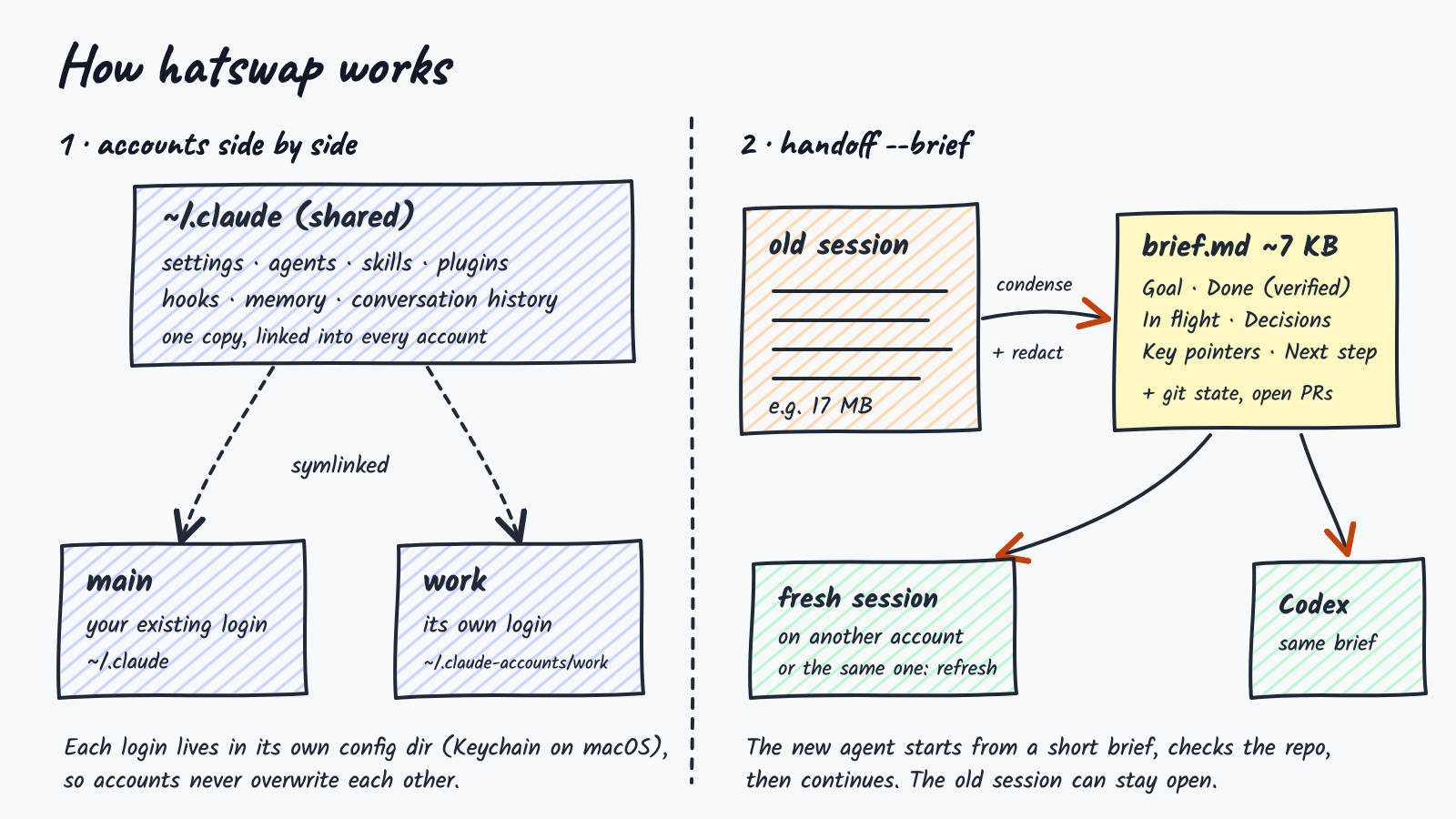
CLAUDE_CONFIG_DIR under ~/.claude-accounts/<name>. Claude Code stores one login per configuration directory — in the macOS Keychain, or in the directory itself on Linux — so accounts never overwrite each other. The default account runs with CLAUDE_CONFIG_DIR unset.settings.json, settings.local.json, CLAUDE.md, keybindings.json, agents/, skills/, plugins/, commands/, hooks/, rules/, output-styles/ and projects/ are symlinked from ~/.claude. User-scope MCP servers are copied once when an account is added.projects/ directory. Open sessions are detected from each account's session registry and confirmed by process ID.switch restarts it with --resume under the other account. If the session's registry entry names a tmux pane, the restart is scheduled through the tmux server (respawn-pane), so it works from inside the session and keeps the pane's original start command. Otherwise the session is asked to exit (SIGTERM) and resumed in the terminal that ran switch.projects/ folder instead of the shared symlink, and a .private marker so it is never re-linked. Session discovery scans every distinct history folder.$CODEX_HOME; each account gets ~/.claude-accounts/<name>/codex, with configuration symlinked from ~/.codex. The Codex email shown by list is read from the login's ID-token claims; tokens are never printed or copied.~/.claude-accounts/.default; a pin is a .hatswap file holding an account name. The shell hook defines a claude function that, on every call, looks for the nearest .hatswap from the current folder upwards, falls back to the default, and sets CLAUDE_CONFIG_DIR only when it is not already set. It uses shell builtins for the folder walk, so it adds no noticeable start-up time.ANTHROPIC_API_KEY, ANTHROPIC_AUTH_TOKEN and CLAUDE_CODE_OAUTH_TOKEN override a login, so they are cleared (with a one-line note) whenever Claude starts on a named account, including through the shell hook. Your shell keeps them, and main is left alone. Set HATSWAP_KEEP_AUTH_ENV=1 to keep them.[redacted]. Redaction is pattern-based; an unlabelled secret in free text may not be caught.--private, projects/ is shared, so every account can read every conversation. Use private accounts where clients must be kept separate. Settings, CLAUDE.md, skills and MCP servers are still shared.bash tests/run.sh # 150 tests
bash demo/setup.sh && vhs demo/demo.tape # re-record the demo GIF (requires vhs)
The test suite is self-contained: a temporary HOME, stand-in claude, codex, gh, tmux, osascript, curl and editor executables, and synthetic session files. It never touches your real configuration or credentials. CI runs it on Ubuntu and macOS.
Issues and pull requests are welcome.
Several tools give each Claude Code account its own configuration directory, including an earlier, unrelated project also called claude-account. hatswap starts from the same idea and focuses on moving work between accounts:
switch), restarting it in the same tab;pin), a default account, and a separate Codex login per account;exec);main runs with CLAUDE_CONFIG_DIR unset. Claude Code names its Keychain item after that variable, so setting it to ~/.claude would look for a login that does not exist, a trap several tools fall into;usage only reports.See CHANGELOG.md.
Wear a different hat for each client: run several Claude Code accounts side by side, move a live conversation between them, pin folders to accounts, and hand work to Codex.
Shell
1
25 commits
updated Oct 13, 2026
Every client's Claude Code account, signed in at once. Swap mid-conversation.
hatswap keeps each Claude Code account signed in at the same time and moves work between them — by resuming a conversation, or by starting a fresh session from a compact, repository-aware handoff brief. The same brief can restart an overgrown session on the same account, or seed an OpenAI Codex session.
Recorded in a sandbox with example accounts and a stand-in for claude; reproduce with bash demo/setup.sh && vhs demo/demo.tape.
switch moves the current conversation to another account. In tmux (including desktop apps that host tabs in tmux), Terminal.app and iTerm2, the same tab restarts on the new login with its history intact.default (or --default) picks the account plain claude starts on; setup-shell installs the one-line hook for zsh, bash or fish.pin acme in a client's folder and every claude started there uses that client's account.hatswap on its own for a list of every account with its email, limits, default and pin; pick one with the arrow keys and start Claude, set the default or pin the folder with one key.usage shows every account's 5-hour and weekly limits in one table, the numbers /usage shows inside Claude.statusline --install puts the account and email at the bottom of every session, ahead of any status line you already have.vscode acme makes the Claude extension use acme's login in that folder; desktop acme opens Claude Desktop signed in as acme, in its own window.exec (or the claude/codex shims from shim) looks the account up on every call, so a long-running bot that starts claude -p per job moves to a new default without a restart.handoff codex uses the one that belongs to the session's account.update. The installer sets up PATH, the shell hook and the slash commands; outdated slash commands are flagged.--resume, or fork a copy of it./handoff and /switch. A running Claude Code session writes its own brief, from full context, at no extra cost, or moves itself to another account.| Operating system | macOS or Linux |
| Shell | Bash 3.2 or later (the macOS default works) |
| Runtime | Python 3 |
| Claude Code | claude on your PATH |
| Optional | gh for open pull requests in briefs · codex for handoff codex · tmux for switching a session in place |
curl -fsSL https://raw.githubusercontent.com/orvi2014/hatswap/main/install.sh | bash
This installs hatswap to ~/.local/bin, adds that folder to your PATH if needed, installs the default-account shell hook and the /handoff and /switch commands. Open a new terminal afterwards. Every change is marked and reversible (see Uninstall).
Options go after bash -s --, for example curl -fsSL …/install.sh | bash -s -- --no-shell:
| Option | Effect |
|---|---|
--no-shell | Do not edit shell startup files (no PATH line, no default-account hook). |
--no-commands | Do not install /handoff and /switch. |
--bin-dir <dir> | Install somewhere other than ~/.local/bin. |
Update later with hatswap update. It also refreshes the slash commands.
mkdir -p ~/.local/bin
curl -fsSL https://raw.githubusercontent.com/orvi2014/hatswap/main/bin/hatswap \
  -o ~/.local/bin/hatswap
chmod +x ~/.local/bin/hatswap
If ~/.local/bin is not on your PATH, add it to your shell profile.
git clone https://github.com/orvi2014/hatswap.git
ln -s "$PWD/hatswap/bin/hatswap" ~/.local/bin/hatswap
git pull in the clone (or hatswap update) then updates the command.
hatswap list
Your existing Claude Code login appears as main. It is used as-is and never modified.
hatswap add work
A browser window opens. Sign in with the other account — if the browser is already signed in to your main account, use a private window. Pass --email [email protected] to prefill the address, or --console to use an Anthropic Console (API billing) login.
hatswap list
#   main   [email protected]   (~/.claude)
#   work   [email protected]
claude follow a default account (optional)hatswap setup-shell # adds a guarded hook to your shell's startup file
hatswap default work # plain `claude` now starts on "work"
setup-shell detects zsh, bash or fish (override with --shell), is safe to run twice, and is undone with setup-shell --remove. Open a new terminal afterwards.
/handoff inside Claude Code (optional)hatswap install-command
This adds ~/.claude/commands/handoff.md and switch.md, which every account shares. In any Claude Code session you can then run /switch work, /handoff work, /handoff codex or /handoff.
Formerly
claude-account. Renamed in 0.5.0 to avoid confusion with an unrelated project of the same name. Old links redirect here, and theclaude-accountcommand keeps working as an alias.
claude-account update # installs hatswap next to it; claude-account becomes an alias
Or re-run the installer. Nothing else changes: your accounts, logins, briefs, default account, pins and shell hook keep working. The data folder is still ~/.claude-accounts, because Claude Code ties each account's Keychain login to that path; moving it would sign every account out. Older names are still honoured:
| New | Still accepted |
|---|---|
hatswap | claude-account (alias) |
.hatswap pin files | .claude-account (pin converts it when you re-pin) |
HATSWAP_DIR | CLAUDE_ACCOUNTS_DIR |
HATSWAP_KEEP_AUTH_ENV, HATSWAP_SWITCH_DELAY | CLAUDE_ACCOUNT_KEEP_AUTH_ENV, CLAUDE_ACCOUNT_SWITCH_DELAY |
# >>> hatswap >>> hook block | # >>> claude-account >>> |
Run hatswap install-command once to update /handoff and /switch (they now call hatswap); hatswap list reminds you.
hatswap setup-shell --remove # if you added the shell hook
hatswap remove work          # repeat for each added account (also signs out its Codex login)
rm -f ~/.local/bin/hatswap ~/.local/bin/claude-account ~/.claude/commands/handoff.md ~/.claude/commands/switch.md
rm -r ~/.claude-accounts            # saved briefs
The installer's PATH line is marked # hatswap PATH in your shell profile; delete that line too.
Work on another account
hatswap use work             # or simply: hatswap work
hatswap main                 # back to the main account (~/.claude)
Run each in its own terminal to use both at once. hatswap whoami shows which account the current shell or Claude session is on, and which one a new claude starts on (inside Claude Code, ! hatswap whoami or /status).
Switch the account of the current conversation
Inside Claude Code:
! hatswap switch work            # or /switch work (after install-command)
! hatswap switch work --default  # also make "work" the default for new sessions
A running Claude Code process cannot change its login, so switch restarts it: the same conversation (full history, same ID) resumes on the other account, in the same tab:
| Where the session runs | What happens |
|---|---|
| tmux, including desktop apps that host each tab in tmux | The pane restarts in place, keeping its original flags, hooks and MCP config. |
| Terminal.app or iTerm2 (macOS) | Claude exits and the resume command is typed into that tab. macOS asks once to let your terminal control Terminal/iTerm2. |
| Anything else | Type /exit, then run hatswap switch work in that terminal. |
Run from a different terminal, switch restarts the session in its own tab when it can, and otherwise closes it there and resumes it in the terminal you ran it from.
Choose the default account
hatswap default work         # plain `claude` now starts on "work"
hatswap use work --default   # set it and start a session
hatswap default main         # back to ~/.claude
hatswap default              # show the current default
The first time you set a default, hatswap offers to add a one-line hook to your shell's startup file (~/.zshenv, ~/.bash_profile / ~/.bashrc, or fish conf.d) so plain claude follows it. For zsh it goes in ~/.zshenv rather than ~/.zshrc so that sessions an app reopens after a restart (with zsh -l -c claude …) also get it; an older hook in ~/.zshrc moves itself there the next time a terminal opens. The hook reads the default on every call, so changing it later needs no reload. An explicit CLAUDE_CONFIG_DIR always wins.
Pin a folder to an account
cd ~/clients/acme && hatswap pin acme   # plain `claude` here, and in every subfolder, starts on "acme"
hatswap pin                             # show which pin applies here
hatswap pin main                        # this folder uses main, whatever the default
hatswap pin --clear                     # remove this folder's pin
pin writes a one-line .hatswap file. Inside a git repository it is added to the repository's local ignore (.git/info/exclude), so it is never committed. The nearest pin wins, so a subfolder can pin a different account. Order of precedence for a plain claude: an explicit CLAUDE_CONFIG_DIR, then the nearest pin, then the default account, then main. whoami shows which one applies and why, and refresh and handoff codex follow it too. Pins work through the same shell hook as the default.
Move a task to another account
hatswap sessions             # conversations in this folder, and where each is open
hatswap handoff work --brief # fresh session on "work", seeded with a brief
hatswap handoff work         # or resume the full conversation (close the original first)
Restart a session that has grown too long
hatswap refresh              # brief + fresh session on the same account
hatswap refresh --edit       # review the brief in $EDITOR first
Hand off from inside a running session
/handoff work
Claude writes the brief from its own context, saves it, and prints the command to continue — for example hatswap handoff work --from ~/.claude-accounts/.briefs/….md.
Continue in Codex
hatswap handoff codex
Give each account its own Codex login
hatswap codex-login acme      # sign "acme" in to its Codex (ChatGPT/OpenAI) account
hatswap codex acme            # start Codex on acme's login
hatswap handoff codex         # uses the session's account's Codex login when it has one
hatswap handoff codex --as acme
Each account's Codex login lives in its own CODEX_HOME (~/.claude-accounts/<name>/codex). config.toml, AGENTS.md, prompts, rules, skills and plugins are shared with ~/.codex; the login, history and sessions are not. main uses ~/.codex. add acme --codex signs in to both at once, and list shows each account's Codex email.
Keep a client's conversations to its own account
hatswap add acme --private    # new account with its own history and memory
hatswap private acme          # or convert an existing one
hatswap private acme --off    # share history again (only while its own history is empty)
By default every account shares conversation history. A private account keeps its conversations and memory in its own projects/ folder, so other accounts never read them; settings, skills and MCP servers are still shared. sessions, brief and handoff see private conversations too. When you deliberately hand one to another account, it is copied into that account's history and the command says so.
Pick an account from a list
Type hatswap with nothing after it in a terminal:
hatswap ─ new sessions in ~/clients/acme start on acme

   main     [email protected]    5h    0% ░░░░░░  week  100% ██████
 ▸ acme     [email protected]        5h   10% █░░░░░  week   27% ██░░░░  ★ default  codex

 ↑↓ choose   ⏎ start claude   d default   p pin folder   s continue last chat   c codex   l sign in   q quit
It draws in place rather than taking over the screen, so it behaves in tmux and terminal apps. Scripts, pipes and ! inside Claude still get the help text; HATSWAP_NO_PICKER=1 turns it off.
See every account's limits
hatswap usage            # all accounts
hatswap usage acme       # one; --json for scripts
ACCOUNT        EMAIL                          5-HOUR  RESETS      WEEK  RESETS
main           [email protected]                   0%              100%  Fri 14:00
acme           [email protected]                       5%  in 0h44m     23%  Sat 16:00
The numbers come from the same endpoint Claude's /usage reads. It is not a public API, so it may change; results are cached for 3 minutes because it is rate-limited. hatswap reads each login from the Keychain (or .credentials.json on Linux) only to make that request: tokens are never printed, written or refreshed. An expired one says so; starting Claude on that account refreshes it. hatswap never switches accounts for you.
Show the account in Claude's status line
hatswap statusline --install   # ⎈ acme · [email protected]  │ <your existing status line>
hatswap statusline --remove    # put back what you had
All accounts share settings.json, so one install covers every account. A status line you already had keeps running, after the account.
Use an account in VS Code, Cursor or Claude Desktop
cd ~/clients/acme
hatswap vscode acme        # the Claude extension uses acme in this folder
hatswap vscode             # same, using this folder's pin or the default
hatswap vscode --clear
hatswap desktop acme       # Claude Desktop as acme, in its own window
vscode sets CLAUDE_CONFIG_DIR in the folder's .vscode/settings.json (claudeCode.environmentVariables), keeping your other settings, and adds the file to the repository's local ignore. Reload the window afterwards and open that folder itself, not a parent. For main it removes the entry, because Claude finds main's login only when the variable is unset. A settings.json with comments is left alone and the line to add is printed. The extension's own session list may still show ~/.claude conversations (anthropics/claude-code#30538).
desktop starts a separate Claude Desktop with its own profile folder (~/.claude-accounts/<name>/desktop), so each account has its own window and login. Sign in once; it stays signed in. desktop main opens the app as usual.
Run bots and scripts on the current default
The shell hook only covers claude typed in a terminal. A bot started by launchd, cron or pm2 runs the claude binary directly, so it stays on whatever account it started with. Route it through hatswap instead:
hatswap exec claude -p "summarise today's issues"   # runs on the pin, then the default, at call time
hatswap shim                                        # writes ~/.claude-accounts/bin/claude and codex
Point the bot at ~/.claude-accounts/bin/claude (or put ~/.claude-accounts/bin first on its PATH). Each call looks up the account again, so hatswap default acme applies to the bot's next call, with no restart. The lookup uses the bot's working folder, so a pinned folder still wins. To keep one bot on one account whatever the default is, set HATSWAP_ACCOUNT=acme in its environment (or use exec --account acme).
exec ignores a CLAUDE_CONFIG_DIR the bot inherited, because following it would keep the bot on its old account. It clears ANTHROPIC_API_KEY and the other login variables for named accounts, quietly, and sets CODEX_HOME when the account has its own Codex login. A process that is already running keeps the account it started on: a bot that holds one Claude session open for hours picks up the new default only when it next starts claude. Keep the shim folder off your interactive PATH; the shell hook is the right tool there.
Work with saved briefs
hatswap briefs                          # list, with each brief's goal
hatswap handoff work --from <file>      # start any account from a saved brief
hatswap brief --edit                    # write, review and print a brief without switching
| Command | Description |
|---|---|
add <name> [--email <addr>] [--console] [--private] [--codex] | Create an account profile and sign in. --private keeps its history to itself; --codex also signs it in to Codex. |
private <name> [--off] | Give an existing account its own history and memory, or share again. |
codex-login <name|main> | Sign an account in to its own Codex login. |
codex <name|main> [codex args…] | Start Codex on that account's Codex login. |
use <name> [--default] [claude args…] | Start Claude Code on an account. hatswap <name> is equivalent. --default also makes it the default. |
| (no command) | In a terminal: the account picker. Otherwise the help text. |
exec [--account <name|main>] <command> [args…] | Run a command (claude, codex, a bot) on the account a new session would get now: --account, then HATSWAP_ACCOUNT, then the folder pin, then the default. No terminal needed. |
usage [name…] [--json] | Each account's 5-hour and weekly limits and reset times. Read-only. |
statusline [--install|--remove] | Show the account in Claude Code's status line, keeping an existing one. |
vscode [name|main|--clear] | Make the Claude extension in VS Code or Cursor use that account in this folder. |
desktop [name|main] | Open Claude Desktop signed in to that account, in its own window (macOS). |
shim [--remove] | Write (or remove) claude and codex wrappers in ~/.claude-accounts/bin that run through exec. |
main [claude args…] | Start Claude Code on the main account (~/.claude). |
switch <target> [id] [--default] [--yes] | Continue a conversation on another account, restarting it in its own tab (tmux, Terminal.app, iTerm2) or resuming it here. |
default [name|main] | Show or set the account plain claude starts on. |
pin [name|main|--clear] | Pin the current folder and its subfolders to an account, show the pin, or remove it. |
setup-shell [--remove] [--shell zsh|bash|fish] | Install or remove the hook that makes plain claude follow the default. |
shell-init [zsh|bash|fish] | Print that hook. |
list | List accounts and the email each is signed in as. |
whoami | Show the account this shell or session is on, and the one new sessions start on. |
--version | Print the version. |
login <name> | Sign an account in again. |
remove <name> | Sign out and delete a profile; shared files are kept. |
sessions [n] | Recent conversations in the current folder and where each is open. |
handoff <target> [id] [--fork] | Resume a conversation on another account. |
handoff <target|codex> [id] --brief [--as <name>] | Start a fresh session there from a brief. For Codex, --as picks whose Codex login to use. |
refresh [id] | Brief and fresh session on the same account. |
brief [id] | Write and print a brief without switching. |
briefs [n] | List saved briefs. |
install-command [--force] | Install or update the /handoff and /switch commands. --force also replaces files it did not write. |
update | Update hatswap (a clone is updated with git pull) and its slash commands. |
<target> is an account name or main. Without an id, the most recent conversation in the current folder is used; IDs are listed by sessions.
Brief options (for handoff --brief, refresh and brief):
| Option | Effect |
|---|---|
--edit | Open the brief in $VISUAL / $EDITOR before it is used. |
--from <file> | Use a saved brief instead of writing a new one. |
--model <name> | Model that writes the brief (default sonnet). |
--no-repo | Leave out repository state. |
Commands that start Claude Code need a terminal; they will not run through Claude Code's ! prefix. switch is the exception.
When the installed /handoff or /switch is older than the current templates, list, whoami and the handoff commands print a one-line note to run hatswap install-command.
--resume (default) | --fork | --brief / refresh | |
|---|---|---|---|
| New session starts with | the full conversation | a copy of the full conversation | a structured brief |
| Context loaded | entire history | entire history | typically 1–3k tokens |
| Original session | must be closed | may stay open | may stay open |
| Targets | Claude Code | Claude Code | Claude Code or Codex |
| Fidelity | exact | exact | summarised, then verified against the repository |
Use --resume when exact continuity matters. Use a brief for long sessions, when the original is still running, or when moving to Codex. In testing, a 17 MB compacted session produced a brief of about 7 KB.
A brief is Markdown with fixed sections:
| Section | Contents |
|---|---|
| Goal | What the user asked for, in their words where possible |
| Done (verified) | Completed work with evidence: pull requests, commits, deploys, test results |
| In flight | The step in progress when the session stopped |
| Decisions and constraints | Choices and rules the user set, quoted when strict |
| Tried and rejected | Approaches that were tried or considered and dropped, with the reason, so they are not repeated |
| Key pointers | Repositories, branches, files, commands, URLs and IDs |
| Open questions / blockers | Anything blocked or waiting on the user |
| Next step | One or two concrete first actions |
The receiving agent is told to verify the repository before relying on the brief, and to confirm with the user before any destructive or outward-facing action.
Two ways to write one
hatswap brief / --brief | /handoff inside Claude Code | |
|---|---|---|
| Written by | a separate claude -p call | the running session itself |
| Input | condensed transcript + repository state | full live context + repository state |
| Billed to | the account receiving the handoff | the current account |
| Works after the session has closed | yes | no |
How the transcript is condensed. The input reflects what the model actually had in context: the latest compaction summary, the messages Claude Code retained verbatim when it compacted, and everything after. It keeps user messages, assistant replies, one-line tool calls and tool errors, and drops side chains, system reminders and tool output. Repository state is appended as a block the model treats as ground truth. The claude -p call uses a dedicated system prompt with tools, MCP servers and project settings disabled.
Briefs are saved to ~/.claude-accounts/.briefs/ with mode 600.
CLAUDE_CONFIG_DIR under ~/.claude-accounts/<name>. Claude Code stores one login per configuration directory — in the macOS Keychain, or in the directory itself on Linux — so accounts never overwrite each other. The default account runs with CLAUDE_CONFIG_DIR unset.settings.json, settings.local.json, CLAUDE.md, keybindings.json, agents/, skills/, plugins/, commands/, hooks/, rules/, output-styles/ and projects/ are symlinked from ~/.claude. User-scope MCP servers are copied once when an account is added.projects/ directory. Open sessions are detected from each account's session registry and confirmed by process ID.switch restarts it with --resume under the other account. If the session's registry entry names a tmux pane, the restart is scheduled through the tmux server (respawn-pane), so it works from inside the session and keeps the pane's original start command. Otherwise the session is asked to exit (SIGTERM) and resumed in the terminal that ran switch.projects/ folder instead of the shared symlink, and a .private marker so it is never re-linked. Session discovery scans every distinct history folder.$CODEX_HOME; each account gets ~/.claude-accounts/<name>/codex, with configuration symlinked from ~/.codex. The Codex email shown by list is read from the login's ID-token claims; tokens are never printed or copied.~/.claude-accounts/.default; a pin is a .hatswap file holding an account name. The shell hook defines a claude function that, on every call, looks for the nearest .hatswap from the current folder upwards, falls back to the default, and sets CLAUDE_CONFIG_DIR only when it is not already set. It uses shell builtins for the folder walk, so it adds no noticeable start-up time.ANTHROPIC_API_KEY, ANTHROPIC_AUTH_TOKEN and CLAUDE_CODE_OAUTH_TOKEN override a login, so they are cleared (with a one-line note) whenever Claude starts on a named account, including through the shell hook. Your shell keeps them, and main is left alone. Set HATSWAP_KEEP_AUTH_ENV=1 to keep them.[redacted]. Redaction is pattern-based; an unlabelled secret in free text may not be caught.--private, projects/ is shared, so every account can read every conversation. Use private accounts where clients must be kept separate. Settings, CLAUDE.md, skills and MCP servers are still shared.bash tests/run.sh # 150 tests
bash demo/setup.sh && vhs demo/demo.tape # re-record the demo GIF (requires vhs)
The test suite is self-contained: a temporary HOME, stand-in claude, codex, gh, tmux, osascript, curl and editor executables, and synthetic session files. It never touches your real configuration or credentials. CI runs it on Ubuntu and macOS.
Issues and pull requests are welcome.
Several tools give each Claude Code account its own configuration directory, including an earlier, unrelated project also called claude-account. hatswap starts from the same idea and focuses on moving work between accounts:
switch), restarting it in the same tab;pin), a default account, and a separate Codex login per account;exec);main runs with CLAUDE_CONFIG_DIR unset. Claude Code names its Keychain item after that variable, so setting it to ~/.claude would look for a login that does not exist, a trap several tools fall into;usage only reports.See CHANGELOG.md.



