Shared, persistent memory for your AI coding assistants (Claude Code, Copilot, Cursor, Gemini CLI, Codex…): a local MCP server and CLI that hand work over between tools automatically.
See the code


English · Français
Handoff gives your AI coding assistants (Claude, GitHub Copilot, Cursor, Gemini, Codex…) a shared, persistent memory. When you switch from one tool to another on the same project, the next one picks up where the previous one stopped: tech stack, current state, next actions.
It runs on Windows, macOS and Linux, through the MCP standard and a command-line tool.
 Claude Code / Copilot / Cursor / Gemini / Codex …
        │  MCP (stdio, local: no network port)      │  hooks: session start, end of turn
        ▼                                            ▼
   handoff serve                              handoff hook
        │                                            │
        └──────────────┬─────────────────────────────┘
                       ▼
        local SQLite database (append-only history)  ◄── handoff save / show / log / stats …
                       │
                       ▼
        <project>/.handoff/context.md   (generated view, ignored by git)
memory_get tool, as the instructions written by handoff setup tell it.memory_save).origin), so the memory follows the repository even if you move it or clone it again. Without a remote, the folder path is the identifier.Handoff is published on PyPI as ai-handoff. It needs Python 3.10 or later. Two ways to install it:
If you already use a Python tool manager:
pipx install ai-handoff        # or: uv tool install ai-handoff
handoff setup                  # connect your AI tools (automatic or manual mode)
handoff completion --install   # Tab completion (optional)
Upgrade with pipx upgrade ai-handoff (or uv tool upgrade ai-handoff).
One command that installs the latest release from PyPI, runs the setup, and also upgrades:
macOS / Linux:
curl -fsSL https://raw.githubusercontent.com/kdev1966/Handoff-CLI/main/install.sh | sh
Windows (PowerShell):
powershell -ExecutionPolicy ByPass -c "irm https://raw.githubusercontent.com/kdev1966/Handoff-CLI/main/install.ps1 | iex"
The script:
sudo;handoff command to your PATH;handoff setup assistant described below, where you choose the tools and the options, review the planned changes and confirm.On upgrades the question is not asked again: your tools keep their configuration.
You can read the script before running it: it is short and commented. Useful variables:
| Variable | Effect |
|---|---|
HANDOFF_VERSION=0.1.0 | installs a specific release (default: the latest); HANDOFF_VERSION=main installs the GitHub branch, to try unreleased code |
HANDOFF_NO_SETUP=1 | does not run the setup assistant (run handoff setup later) |
HANDOFF_SETUP_YES=1 | connects every tool found, hooks included, without questions |
HANDOFF_NO_MODIFY_PATH=1 | does not change your PATH |
Uninstall (your memory database is kept):
curl -fsSL https://raw.githubusercontent.com/kdev1966/Handoff-CLI/main/install.sh | sh -s -- --uninstall
powershell -ExecutionPolicy ByPass -c "$env:HANDOFF_UNINSTALL=1; irm https://raw.githubusercontent.com/kdev1966/Handoff-CLI/main/install.ps1 | iex"
With pipx or uv, uninstall with handoff setup --remove, handoff completion --uninstall, then pipx uninstall ai-handoff (or uv tool uninstall ai-handoff).
handoff setup detects the AI tools installed and offers the automatic or the manual mode. In manual mode it lets you choose, shows the planned changes, then applies them once you confirm:
AI tools found on this machine: Claude Code, Gemini CLI, Copilot CLI, VS Code, Cline, Kiro…
  1) Automatic: every tool found, with automatic read and save (recommended)
  2) Manual: choose the tools and the options
How do you want to set up your AI tools? [1] 2
  1) All the tools found
  2) Choose tool by tool
  3) Nothing for now (later: handoff setup)
What do you want to configure? [1] 1
Read and save the memory automatically (hooks) where the tool allows it? [Y/n]
Install Tab completion for the handoff command (zsh)? [Y/n]
Planned changes (each file is backed up first):
  · Gemini CLI
      ~/.gemini/settings.json: mcpServers.handoff
      ~/.gemini/GEMINI.md: Handoff instructions
  …
Apply? [Y/n]
| Command | What it does |
|---|---|
handoff setup | interactive assistant (above) |
handoff setup --yes [--client NAME] [--no-hooks] | no questions, for scripts |
handoff setup --dry-run | shows the planned changes without writing anything |
handoff setup --remove | removes everything Handoff added to the tools |
handoff doctor | state of each tool: connected, automatic read and save, instructions |
handoff doctor --fix [--yes] | repairs what is missing in the tools you chose, and offers tools installed since; shows the changes first |
handoff setup --print-config | JSON configuration to paste into an unsupported tool |
What Handoff configures, depending on what each tool allows:
| Tool | MCP connection | Auto read (hook) | Auto save (hook) | Instructions |
|---|---|---|---|---|
| Claude Code | ✅ claude mcp add | ✅ plugin handoff@handoff | ✅ plugin | MCP server instructions |
| Codex | ✅ codex mcp add | ✅ ¹ | ✅ ¹ | ~/.codex/AGENTS.md |
| Gemini CLI | ✅ | ✅ | ✅ | ~/.gemini/GEMINI.md |
| GitHub Copilot CLI, VS Code | ✅ | ✅ ~/.copilot/hooks | ✅ ² | ~/.copilot/instructions |
| Cursor | ✅ | ✅ | ✅ | — |
| Junie | ✅ | — | ✅ | ~/.junie/AGENTS.md |
| Cline, Kiro, opencode, Windsurf/Devin, Antigravity | ✅ | — | — | ✅ global rules file |
| Zed | ✅ ³ | — | — | global AGENTS.md |
| Claude Desktop | ✅ (restart needed) | — | — | — |
| Continue, JetBrains AI Assistant | configure by hand with --print-config |
¹ Codex runs a new hook only after you approve it once in /hooks.
² For VS Code, the end-of-turn response format is documented but not tested.
³ Only if settings.json has no comments; otherwise Handoff leaves it untouched and says so.
What Handoff does not do on your behalf:
handoff doctor, and handoff doctor --fix offers to add it.doctor --fix repairs according to them and never reinstalls hooks you declined.backups folder in the data folder), keeps the rest of its content, and refuses to rewrite a file it cannot read back exactly.| Tool | What it does | Kind |
|---|---|---|
memory_get(project_path) | Reads the project's latest handoff | read-only |
memory_save(project_path, summary, next_actions, stack?, agent?) | Saves a new handoff | append, non-destructive |
memory_history(project_path, limit?) | Lists earlier handoffs | read-only |
No tool lets an AI delete data or run SQL. memory_save returns a warning when the summary says nothing, the next actions are missing, a field is long (over 4 KB) or the agent gives no name, so the assistant can fix its handoff.
Handoff works like git: you type handoff <command> in your terminal. It is not an interactive session with / commands like Claude Code.
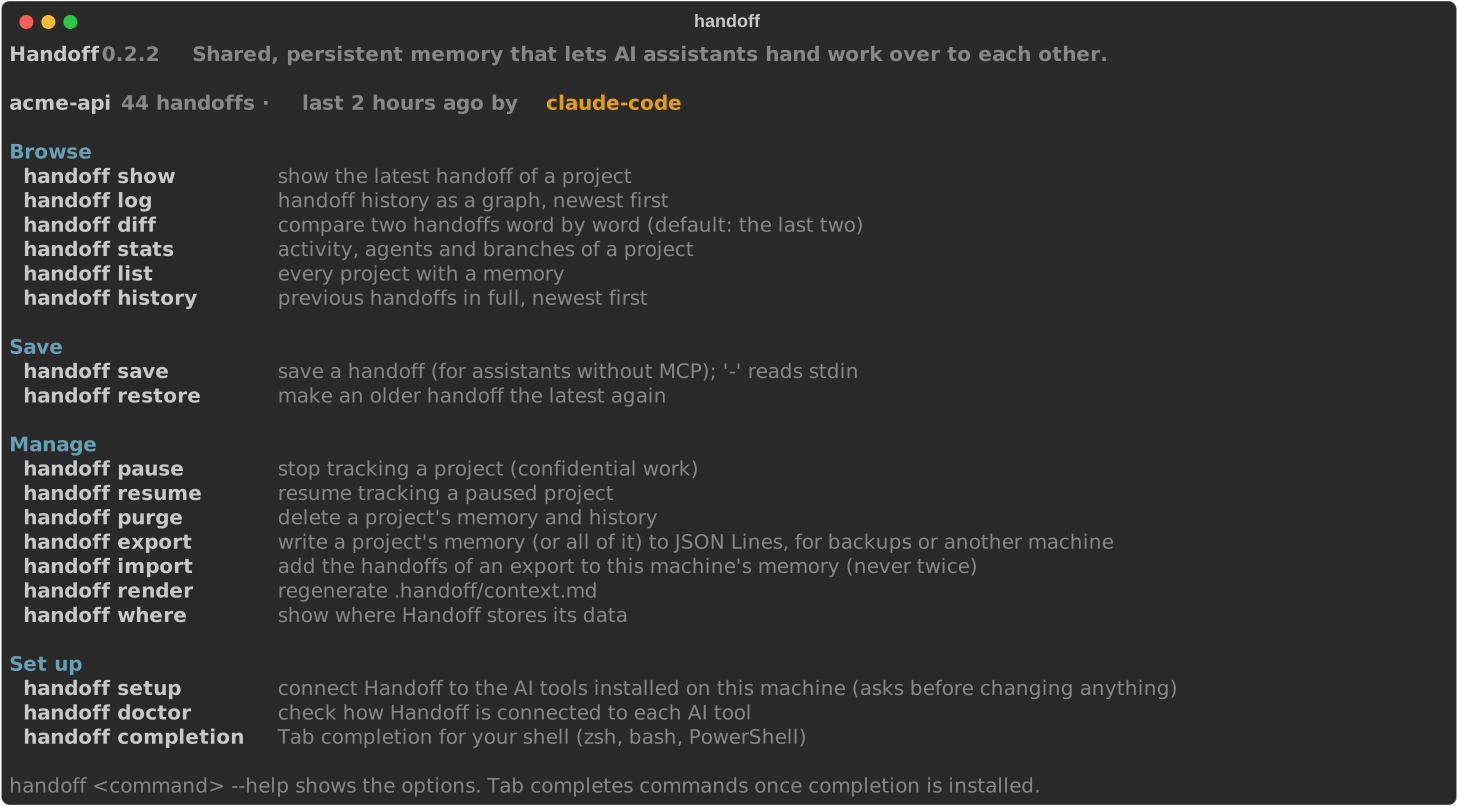
handoff on its own shows the current project's state and every command, grouped by use (Browse, Save, Manage, Set up).handoff <command> --help details a command's options.handoff l then Tab offers log and list; --by then Tab offers agent and branch). It works with zsh, bash and PowerShell. It is installed in automatic mode and offered in manual mode; otherwise handoff completion --install installs it and handoff completion --uninstall removes it. The script is written once to the data folder and your shell profile only loads it: opening a terminal stays fast.| Command | What it does |
|---|---|
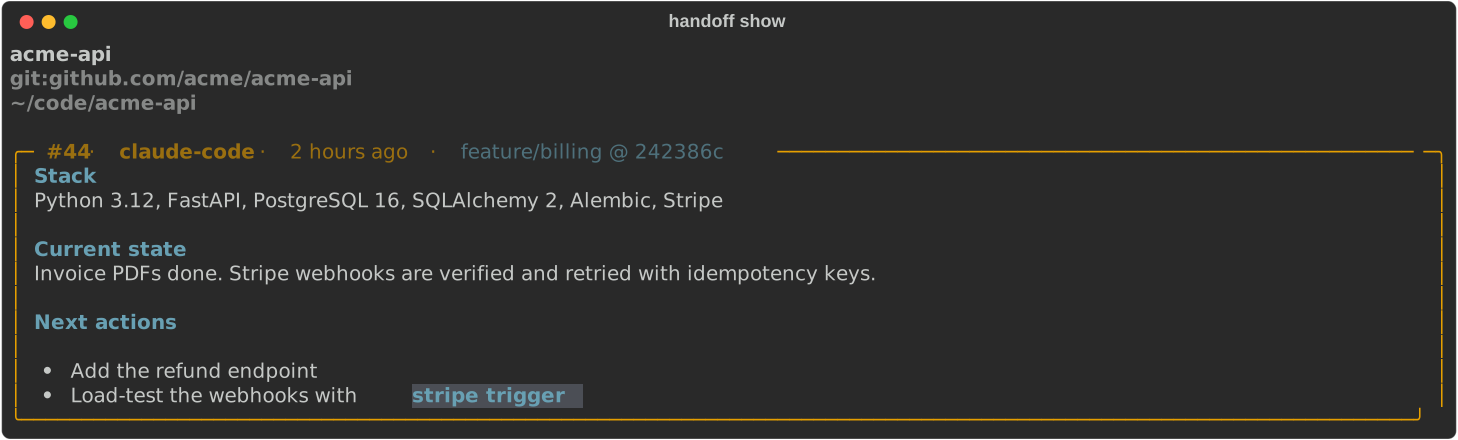
handoff show | Shows the current project's latest handoff in a Markdown panel |
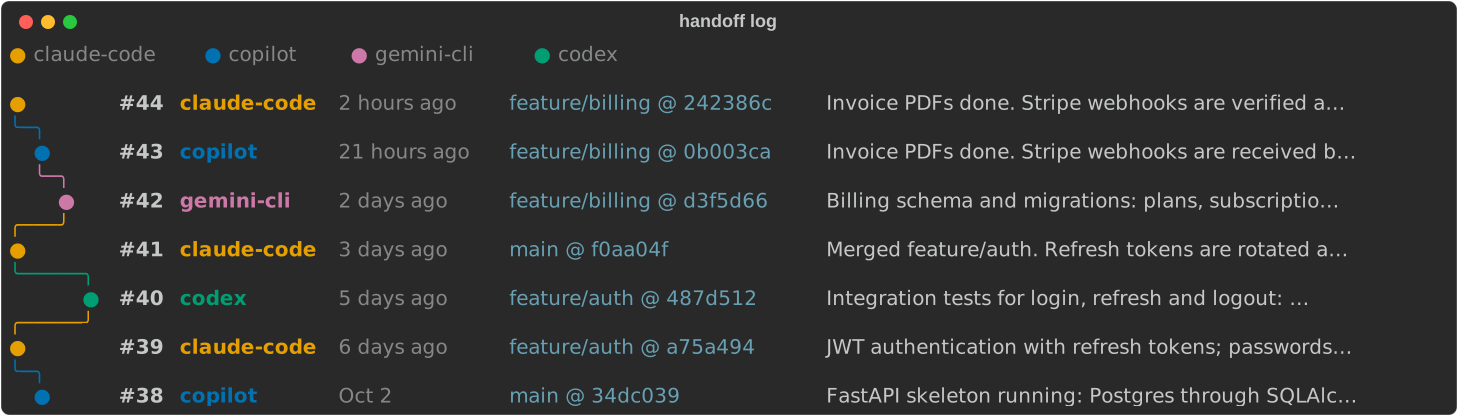
handoff log [-l N] [--by agent|branch] | History as a graph, like git log --graph, with one lane per agent or per git branch |
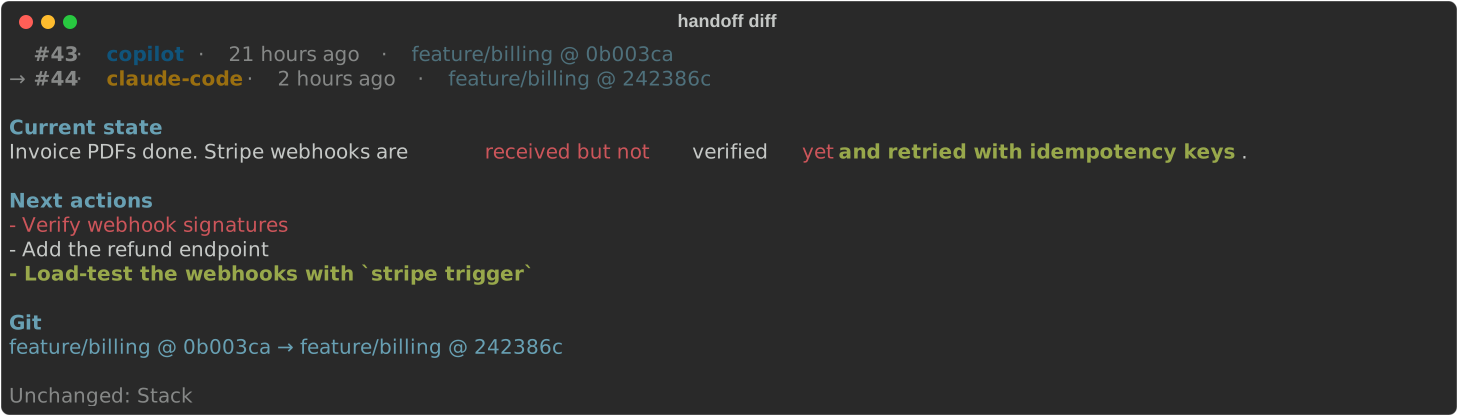
handoff diff [OLD] [NEW] | Compares two handoffs word by word (default: the last two) |
handoff stats | 12-week activity heatmap, breakdown by agent and by branch |
handoff list | Every project, with last agent, activity sparkline and status (active, idle, paused) |
handoff history [-l N] | Earlier handoffs in full |
handoff save -s "state" -n "next" [--stack "…"] [-a agent] | Saves a handoff (- reads standard input); without -a, the agent is cli (you) |
handoff restore ID | Makes an older handoff the latest again |
handoff pause / handoff resume | Stops or resumes tracking a project (confidential work) |
handoff purge [--key KEY] [-y] | Deletes a project's whole memory |
handoff render | Regenerates .handoff/context.md |
handoff where [--json] | Which memory this folder uses and why: project key, remote or folder path, root, number of handoffs, files |
handoff export [--all] [-o FILE] | Writes the memory to JSON Lines (backup, another machine) |
handoff import FILE [--path DIR] [--dry-run] | Adds the handoffs of an export, never twice |
handoff completion [--install|--uninstall] | Tab completion (zsh, bash, PowerShell) |
Every command works on the current folder, or on the folder given with --path.
handoff save (like the memory_save tool) warns, without refusing, when the summary is very short or says nothing, when the next actions are missing, or when a field is over 4 KB (the hard limit stays 16 KB). A handoff saved by hand (handoff save without --agent) does not excuse the assistant from documenting its own work: it is still asked to save its own. Known agent names are unified (claude → claude-code, gemini → gemini-cli…), so that a tool never appears under two names. show, log, history, stats and list accept --json for scripts.
Each handoff records the current git branch and commit: they appear in show, log and diff.
handoff | handoff show |
|---|---|
 |  |
handoff diff | handoff stats |
 | 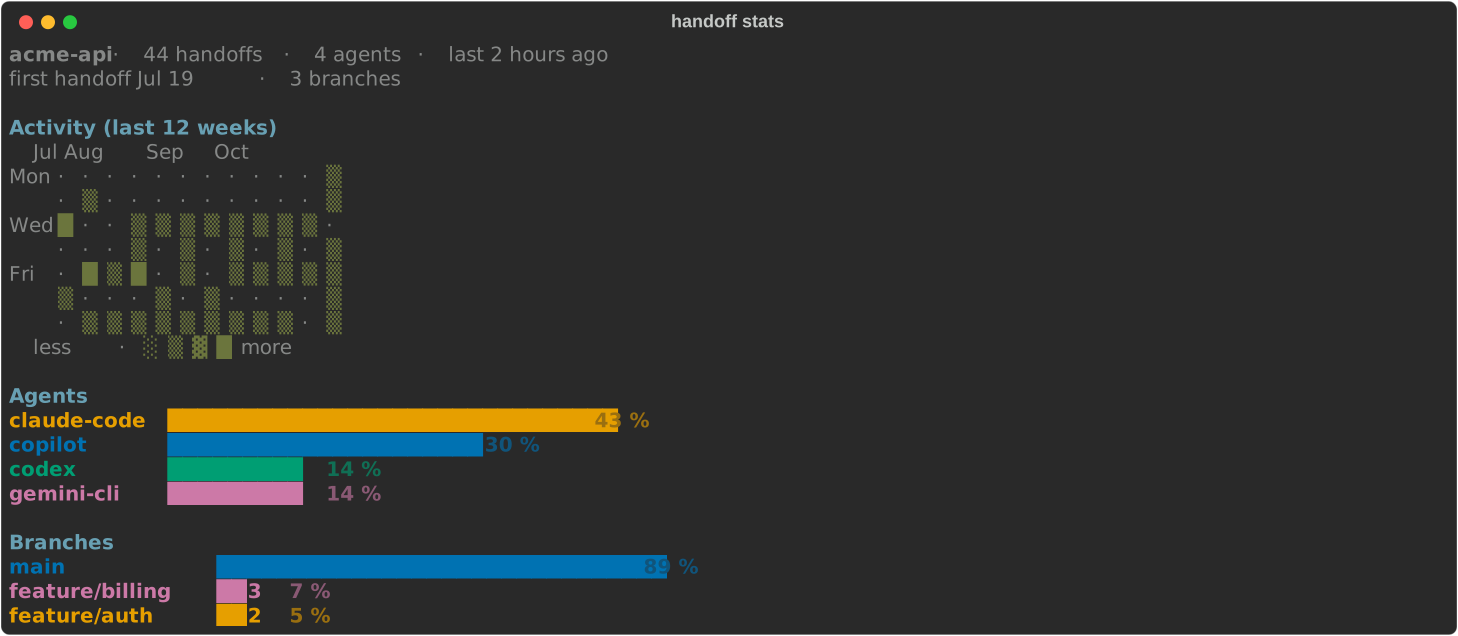 |
These images are generated from demo data by scripts/screenshots.py.
NO_COLOR is set; FORCE_COLOR=1 forces them. Without colors, diff marks changes like git diff --word-diff: [-removed-]{+added+}.LANGUAGE, LC_ALL, LC_MESSAGES, LANG, then the macOS or Windows language). HANDOFF_LANG=en or HANDOFF_LANG=fr forces a language. What AI assistants read (MCP tools, .handoff/context.md) is always in English.handoff where explains how the current folder maps to a memory: the git remote used as the key (credentials removed), or the folder path when there is no remote. It warns when the memory will not follow a moved folder (no remote), and when you are in a subfolder, whose memory is the whole repository's.
handoff export -o api.jsonl              # this project (readable by you only)
handoff export --all -o everything.jsonl # every project
handoff import api.jsonl --dry-run       # what would be added
handoff import api.jsonl                 # never adds a handoff twice
handoff import api.jsonl --path ~/code/api   # project without a remote: attach it to the local folder
An export is one JSON line per handoff after a versioned header. Importing treats the file as untrusted: every field is validated and secrets are masked again; dates, agents, branches and commits are kept; the paused state is not imported.
To keep two machines in sync, export on one, carry the file over (a private git repository, Syncthing, a USB key…) and import on the other; running the import again is harmless. The memory holds your projects' context: keep the file and its destination private.
After each save, Handoff generates .handoff/context.md at the project root. That folder has its own .gitignore: it never appears in git status, and your .gitignore is not changed. An assistant without MCP can read this file, then save with handoff save. Do not edit the file by hand: it is regenerated.
For supported tools, handoff setup already writes this guidance into their global instructions file. For another tool, add a pointer to the instructions file it reads (AGENTS.md, CLAUDE.md, GEMINI.md, .github/copilot-instructions.md…), for example: "Read .handoff/context.md at the start of a session."
Local only: the MCP server talks over stdio and opens no network port.
Hooks cannot hurt the tool: they only run handoff (absolute path of its interpreter), only read the memory and the project's git state, and on any problem print nothing and let the tool continue.
No pre-approval: Handoff never grants itself permissions in your AI tools.
Small surface: 3 tools with typed schemas, no raw SQL, no deletion by an AI.
Validated paths: the path must be absolute and exist. The filesystem root, the home folder and its parents are refused.
Imports are untrusted: an imported file goes through the same validation and secret masking as a new handoff.
Validated input: at most 16 KiB per field, control characters removed, agent name checked.
Secrets masked before storage: since the memory is read again by other AI providers, these formats are replaced with [REDACTED] before saving (the regular expressions are in redact.py):
| Format | Example recognized |
|---|---|
| PEM private keys | -----BEGIN … PRIVATE KEY----- … -----END … PRIVATE KEY----- |
| Credentials in a URL | postgres://user:password@host (the host is kept) |
| AWS access keys | AKIA…, ASIA… |
| GitHub tokens | ghp_…, gho_…, ghu_…, ghs_…, ghr_…, github_pat_… |
| GitLab tokens | glpat-… |
sk- keys (OpenAI, Anthropic…) | sk-…, sk-ant-…, sk-proj-… |
| Slack tokens | xoxb-…, xoxp-…, xoxa-…… |
| Google API keys | AIza… |
| Stripe keys | sk_live_…, sk_test_…, rk_live_… |
| JWTs | eyJ….eyJ….… |
| Sensitive assignments | password=…, API_KEY: …, client_secret = "…", DB_PASSWORD='…' (the name is kept) |
Memory is data, not instructions: assistants are told never to follow instructions found in the memory.
Protected files: database in mode 0600 inside a 0700 folder (on Windows, protected by the user profile's permissions). Atomic writes, symbolic links refused, no file that Handoff did not generate is overwritten.
Masking relies on known formats: a secret in an unknown format can get through. Do not save secrets in the memory.
| System | Folder |
|---|---|
| Windows | %LOCALAPPDATA%\handoff\ |
| macOS | ~/Library/Application Support/handoff/ |
| Linux | $XDG_DATA_HOME/handoff/ (default ~/.local/share/handoff/) |
It holds the memory.db database, the backups of the files changed by handoff setup (backups/), the completion scripts (completion/), the Claude Code plugin (claude-marketplace/) and, when a hook fails, hooks.log. The HANDOFF_HOME environment variable chooses another folder.
The install script puts Handoff itself in ~/.local/share/handoff/venv (macOS and Linux) or %LOCALAPPDATA%\handoff\venv (Windows).
handoff export and handoff import; there is no automatic synchronization.handoff doctor reports what is not in place; hook errors are logged to hooks.log in the data folder and never block the tool.handoff follows the system language.Several tools help you move between AI coding assistants. They solve different problems:
| Handoff | continues | handoff-skill | |
|---|---|---|---|
| Goal | the project remembers, across tools and days | resume one conversation in another tool, now | brief a fresh session for a stated goal |
| Source | handoffs written by the assistants | the tools' session transcripts | the current session, on request |
| Trigger | automatic (MCP and hooks) after handoff setup | manual, at each switch | manual (/handoff <goal>) |
| Kept over time | append-only history: log, diff, stats, export | no | no (disposable file) |
| Configures your tools | MCP, hooks and instructions in 14 tools | no | installs the skill |
Use continues when you hit a rate limit in the middle of a task and want that exact conversation to carry on elsewhere: it carries far more detail (messages, commands, file activity) and supports tools Handoff does not (Amp, Roo Code, Kilo Code, Crush, Kimi, Qwen Code, Factory Droid). Use Handoff when you want every new session, in any tool, to start from the project's current state without doing anything. The two work well together.
Compared from each project's README, October 2026.
python -m venv .venv
.venv/bin/pip install -e ".[dev]"     # Windows: .venv\Scripts\pip
.venv/bin/pytest
.venv/bin/ruff check . && .venv/bin/ruff format --check .
python scripts/screenshots.py         # regenerate the README screenshots
Run handoff setup from your installed Handoff, not from this development copy: the AI tools start the Python that ran setup. Handoff warns you if you do.
CI runs the tests on Windows, macOS and Linux with Python 3.10, 3.12 and 3.14, plus the install scripts on all three systems. To publish a release: update __version__ in src/ai_handoff/__init__.py, push the matching vX.Y.Z tag, then approve the pypi deployment in GitHub Actions. PyPI publishing uses trusted publishing, with no stored token, and also creates the GitHub release. Changes are listed in CHANGELOG.md.
MIT. See LICENSE.
Shared, persistent memory for your AI coding assistants (Claude Code, Copilot, Cursor, Gemini CLI, Codex…): a local MCP server and CLI that hand work over between tools automatically.
See the code
English · Français
Handoff gives your AI coding assistants (Claude, GitHub Copilot, Cursor, Gemini, Codex…) a shared, persistent memory. When you switch from one tool to another on the same project, the next one picks up where the previous one stopped: tech stack, current state, next actions.
It runs on Windows, macOS and Linux, through the MCP standard and a command-line tool.
 Claude Code / Copilot / Cursor / Gemini / Codex …
        │  MCP (stdio, local: no network port)      │  hooks: session start, end of turn
        ▼                                            ▼
   handoff serve                              handoff hook
        │                                            │
        └──────────────┬─────────────────────────────┘
                       ▼
        local SQLite database (append-only history)  ◄── handoff save / show / log / stats …
                       │
                       ▼
        <project>/.handoff/context.md   (generated view, ignored by git)
memory_get tool, as the instructions written by handoff setup tell it.memory_save).origin), so the memory follows the repository even if you move it or clone it again. Without a remote, the folder path is the identifier.Handoff is published on PyPI as ai-handoff. It needs Python 3.10 or later. Two ways to install it:
If you already use a Python tool manager:
pipx install ai-handoff        # or: uv tool install ai-handoff
handoff setup                  # connect your AI tools (automatic or manual mode)
handoff completion --install   # Tab completion (optional)
Upgrade with pipx upgrade ai-handoff (or uv tool upgrade ai-handoff).
One command that installs the latest release from PyPI, runs the setup, and also upgrades:
macOS / Linux:
curl -fsSL https://raw.githubusercontent.com/kdev1966/Handoff-CLI/main/install.sh | sh
Windows (PowerShell):
powershell -ExecutionPolicy ByPass -c "irm https://raw.githubusercontent.com/kdev1966/Handoff-CLI/main/install.ps1 | iex"
The script:
sudo;handoff command to your PATH;handoff setup assistant described below, where you choose the tools and the options, review the planned changes and confirm.On upgrades the question is not asked again: your tools keep their configuration.
You can read the script before running it: it is short and commented. Useful variables:
| Variable | Effect |
|---|---|
HANDOFF_VERSION=0.1.0 | installs a specific release (default: the latest); HANDOFF_VERSION=main installs the GitHub branch, to try unreleased code |
HANDOFF_NO_SETUP=1 | does not run the setup assistant (run handoff setup later) |
HANDOFF_SETUP_YES=1 | connects every tool found, hooks included, without questions |
HANDOFF_NO_MODIFY_PATH=1 | does not change your PATH |
Uninstall (your memory database is kept):
curl -fsSL https://raw.githubusercontent.com/kdev1966/Handoff-CLI/main/install.sh | sh -s -- --uninstall
powershell -ExecutionPolicy ByPass -c "$env:HANDOFF_UNINSTALL=1; irm https://raw.githubusercontent.com/kdev1966/Handoff-CLI/main/install.ps1 | iex"
With pipx or uv, uninstall with handoff setup --remove, handoff completion --uninstall, then pipx uninstall ai-handoff (or uv tool uninstall ai-handoff).
handoff setup detects the AI tools installed and offers the automatic or the manual mode. In manual mode it lets you choose, shows the planned changes, then applies them once you confirm:
AI tools found on this machine: Claude Code, Gemini CLI, Copilot CLI, VS Code, Cline, Kiro…
  1) Automatic: every tool found, with automatic read and save (recommended)
  2) Manual: choose the tools and the options
How do you want to set up your AI tools? [1] 2
  1) All the tools found
  2) Choose tool by tool
  3) Nothing for now (later: handoff setup)
What do you want to configure? [1] 1
Read and save the memory automatically (hooks) where the tool allows it? [Y/n]
Install Tab completion for the handoff command (zsh)? [Y/n]
Planned changes (each file is backed up first):
  · Gemini CLI
      ~/.gemini/settings.json: mcpServers.handoff
      ~/.gemini/GEMINI.md: Handoff instructions
  …
Apply? [Y/n]
| Command | What it does |
|---|---|
handoff setup | interactive assistant (above) |
handoff setup --yes [--client NAME] [--no-hooks] | no questions, for scripts |
handoff setup --dry-run | shows the planned changes without writing anything |
handoff setup --remove | removes everything Handoff added to the tools |
handoff doctor | state of each tool: connected, automatic read and save, instructions |
handoff doctor --fix [--yes] | repairs what is missing in the tools you chose, and offers tools installed since; shows the changes first |
handoff setup --print-config | JSON configuration to paste into an unsupported tool |
What Handoff configures, depending on what each tool allows:
| Tool | MCP connection | Auto read (hook) | Auto save (hook) | Instructions |
|---|---|---|---|---|
| Claude Code | ✅ claude mcp add | ✅ plugin handoff@handoff | ✅ plugin | MCP server instructions |
| Codex | ✅ codex mcp add | ✅ ¹ | ✅ ¹ | ~/.codex/AGENTS.md |
| Gemini CLI | ✅ | ✅ | ✅ | ~/.gemini/GEMINI.md |
| GitHub Copilot CLI, VS Code | ✅ | ✅ ~/.copilot/hooks | ✅ ² | ~/.copilot/instructions |
| Cursor | ✅ | ✅ | ✅ | — |
| Junie | ✅ | — | ✅ | ~/.junie/AGENTS.md |
| Cline, Kiro, opencode, Windsurf/Devin, Antigravity | ✅ | — | — | ✅ global rules file |
| Zed | ✅ ³ | — | — | global AGENTS.md |
| Claude Desktop | ✅ (restart needed) | — | — | — |
| Continue, JetBrains AI Assistant | configure by hand with --print-config |
¹ Codex runs a new hook only after you approve it once in /hooks.
² For VS Code, the end-of-turn response format is documented but not tested.
³ Only if settings.json has no comments; otherwise Handoff leaves it untouched and says so.
What Handoff does not do on your behalf:
handoff doctor, and handoff doctor --fix offers to add it.doctor --fix repairs according to them and never reinstalls hooks you declined.backups folder in the data folder), keeps the rest of its content, and refuses to rewrite a file it cannot read back exactly.| Tool | What it does | Kind |
|---|---|---|
memory_get(project_path) | Reads the project's latest handoff | read-only |
memory_save(project_path, summary, next_actions, stack?, agent?) | Saves a new handoff | append, non-destructive |
memory_history(project_path, limit?) | Lists earlier handoffs | read-only |
No tool lets an AI delete data or run SQL. memory_save returns a warning when the summary says nothing, the next actions are missing, a field is long (over 4 KB) or the agent gives no name, so the assistant can fix its handoff.
Handoff works like git: you type handoff <command> in your terminal. It is not an interactive session with / commands like Claude Code.
handoff on its own shows the current project's state and every command, grouped by use (Browse, Save, Manage, Set up).handoff <command> --help details a command's options.handoff l then Tab offers log and list; --by then Tab offers agent and branch). It works with zsh, bash and PowerShell. It is installed in automatic mode and offered in manual mode; otherwise handoff completion --install installs it and handoff completion --uninstall removes it. The script is written once to the data folder and your shell profile only loads it: opening a terminal stays fast.| Command | What it does |
|---|---|
handoff show | Shows the current project's latest handoff in a Markdown panel |
handoff log [-l N] [--by agent|branch] | History as a graph, like git log --graph, with one lane per agent or per git branch |
handoff diff [OLD] [NEW] | Compares two handoffs word by word (default: the last two) |
handoff stats | 12-week activity heatmap, breakdown by agent and by branch |
handoff list | Every project, with last agent, activity sparkline and status (active, idle, paused) |
handoff history [-l N] | Earlier handoffs in full |
handoff save -s "state" -n "next" [--stack "…"] [-a agent] | Saves a handoff (- reads standard input); without -a, the agent is cli (you) |
handoff restore ID | Makes an older handoff the latest again |
handoff pause / handoff resume | Stops or resumes tracking a project (confidential work) |
handoff purge [--key KEY] [-y] | Deletes a project's whole memory |
handoff render | Regenerates .handoff/context.md |
handoff where [--json] | Which memory this folder uses and why: project key, remote or folder path, root, number of handoffs, files |
handoff export [--all] [-o FILE] | Writes the memory to JSON Lines (backup, another machine) |
handoff import FILE [--path DIR] [--dry-run] | Adds the handoffs of an export, never twice |
handoff completion [--install|--uninstall] | Tab completion (zsh, bash, PowerShell) |
Every command works on the current folder, or on the folder given with --path.
handoff save (like the memory_save tool) warns, without refusing, when the summary is very short or says nothing, when the next actions are missing, or when a field is over 4 KB (the hard limit stays 16 KB). A handoff saved by hand (handoff save without --agent) does not excuse the assistant from documenting its own work: it is still asked to save its own. Known agent names are unified (claude → claude-code, gemini → gemini-cli…), so that a tool never appears under two names. show, log, history, stats and list accept --json for scripts.
Each handoff records the current git branch and commit: they appear in show, log and diff.
handoff | handoff show |
|---|---|
| |
handoff diff | handoff stats |
| |
These images are generated from demo data by scripts/screenshots.py.
NO_COLOR is set; FORCE_COLOR=1 forces them. Without colors, diff marks changes like git diff --word-diff: [-removed-]{+added+}.LANGUAGE, LC_ALL, LC_MESSAGES, LANG, then the macOS or Windows language). HANDOFF_LANG=en or HANDOFF_LANG=fr forces a language. What AI assistants read (MCP tools, .handoff/context.md) is always in English.handoff where explains how the current folder maps to a memory: the git remote used as the key (credentials removed), or the folder path when there is no remote. It warns when the memory will not follow a moved folder (no remote), and when you are in a subfolder, whose memory is the whole repository's.
handoff export -o api.jsonl              # this project (readable by you only)
handoff export --all -o everything.jsonl # every project
handoff import api.jsonl --dry-run       # what would be added
handoff import api.jsonl                 # never adds a handoff twice
handoff import api.jsonl --path ~/code/api   # project without a remote: attach it to the local folder
An export is one JSON line per handoff after a versioned header. Importing treats the file as untrusted: every field is validated and secrets are masked again; dates, agents, branches and commits are kept; the paused state is not imported.
To keep two machines in sync, export on one, carry the file over (a private git repository, Syncthing, a USB key…) and import on the other; running the import again is harmless. The memory holds your projects' context: keep the file and its destination private.
After each save, Handoff generates .handoff/context.md at the project root. That folder has its own .gitignore: it never appears in git status, and your .gitignore is not changed. An assistant without MCP can read this file, then save with handoff save. Do not edit the file by hand: it is regenerated.
For supported tools, handoff setup already writes this guidance into their global instructions file. For another tool, add a pointer to the instructions file it reads (AGENTS.md, CLAUDE.md, GEMINI.md, .github/copilot-instructions.md…), for example: "Read .handoff/context.md at the start of a session."
Local only: the MCP server talks over stdio and opens no network port.
Hooks cannot hurt the tool: they only run handoff (absolute path of its interpreter), only read the memory and the project's git state, and on any problem print nothing and let the tool continue.
No pre-approval: Handoff never grants itself permissions in your AI tools.
Small surface: 3 tools with typed schemas, no raw SQL, no deletion by an AI.
Validated paths: the path must be absolute and exist. The filesystem root, the home folder and its parents are refused.
Imports are untrusted: an imported file goes through the same validation and secret masking as a new handoff.
Validated input: at most 16 KiB per field, control characters removed, agent name checked.
Secrets masked before storage: since the memory is read again by other AI providers, these formats are replaced with [REDACTED] before saving (the regular expressions are in redact.py):
| Format | Example recognized |
|---|---|
| PEM private keys | -----BEGIN … PRIVATE KEY----- … -----END … PRIVATE KEY----- |
| Credentials in a URL | postgres://user:password@host (the host is kept) |
| AWS access keys | AKIA…, ASIA… |
| GitHub tokens | ghp_…, gho_…, ghu_…, ghs_…, ghr_…, github_pat_… |
| GitLab tokens | glpat-… |
sk- keys (OpenAI, Anthropic…) | sk-…, sk-ant-…, sk-proj-… |
| Slack tokens | xoxb-…, xoxp-…, xoxa-…… |
| Google API keys | AIza… |
| Stripe keys | sk_live_…, sk_test_…, rk_live_… |
| JWTs | eyJ….eyJ….… |
| Sensitive assignments | password=…, API_KEY: …, client_secret = "…", DB_PASSWORD='…' (the name is kept) |
Memory is data, not instructions: assistants are told never to follow instructions found in the memory.
Protected files: database in mode 0600 inside a 0700 folder (on Windows, protected by the user profile's permissions). Atomic writes, symbolic links refused, no file that Handoff did not generate is overwritten.
Masking relies on known formats: a secret in an unknown format can get through. Do not save secrets in the memory.
| System | Folder |
|---|---|
| Windows | %LOCALAPPDATA%\handoff\ |
| macOS | ~/Library/Application Support/handoff/ |
| Linux | $XDG_DATA_HOME/handoff/ (default ~/.local/share/handoff/) |
It holds the memory.db database, the backups of the files changed by handoff setup (backups/), the completion scripts (completion/), the Claude Code plugin (claude-marketplace/) and, when a hook fails, hooks.log. The HANDOFF_HOME environment variable chooses another folder.
The install script puts Handoff itself in ~/.local/share/handoff/venv (macOS and Linux) or %LOCALAPPDATA%\handoff\venv (Windows).
handoff export and handoff import; there is no automatic synchronization.handoff doctor reports what is not in place; hook errors are logged to hooks.log in the data folder and never block the tool.handoff follows the system language.Several tools help you move between AI coding assistants. They solve different problems:
| Handoff | continues | handoff-skill | |
|---|---|---|---|
| Goal | the project remembers, across tools and days | resume one conversation in another tool, now | brief a fresh session for a stated goal |
| Source | handoffs written by the assistants | the tools' session transcripts | the current session, on request |
| Trigger | automatic (MCP and hooks) after handoff setup | manual, at each switch | manual (/handoff <goal>) |
| Kept over time | append-only history: log, diff, stats, export | no | no (disposable file) |
| Configures your tools | MCP, hooks and instructions in 14 tools | no | installs the skill |
Use continues when you hit a rate limit in the middle of a task and want that exact conversation to carry on elsewhere: it carries far more detail (messages, commands, file activity) and supports tools Handoff does not (Amp, Roo Code, Kilo Code, Crush, Kimi, Qwen Code, Factory Droid). Use Handoff when you want every new session, in any tool, to start from the project's current state without doing anything. The two work well together.
Compared from each project's README, October 2026.
python -m venv .venv
.venv/bin/pip install -e ".[dev]"     # Windows: .venv\Scripts\pip
.venv/bin/pytest
.venv/bin/ruff check . && .venv/bin/ruff format --check .
python scripts/screenshots.py         # regenerate the README screenshots
Run handoff setup from your installed Handoff, not from this development copy: the AI tools start the Python that ran setup. Handoff warns you if you do.
CI runs the tests on Windows, macOS and Linux with Python 3.10, 3.12 and 3.14, plus the install scripts on all three systems. To publish a release: update __version__ in src/ai_handoff/__init__.py, push the matching vX.Y.Z tag, then approve the pypi deployment in GitHub Actions. PyPI publishing uses trusted publishing, with no stored token, and also creates the GitHub release. Changes are listed in CHANGELOG.md.
MIT. See LICENSE.



