Switch between multiple accounts of AI coding agents (Codex, Claude Code, Antigravity) from one small binary
Go
15
26 commits
updated Oct 12, 2026


A fast, compact, privacy-first account switcher for Codex, Claude Code and the Antigravity CLI.
With more than one subscription, copying the login file back and forth only lasts a few days: the saved copy expires, and signing in again logs out the account you were using. agentswap keeps every saved account signed in, shows how much of each account's limits is left, and switches with one command. Only the login changes; the rest of your agent's settings stay as they are. Your tokens stay on your machine, encrypted.
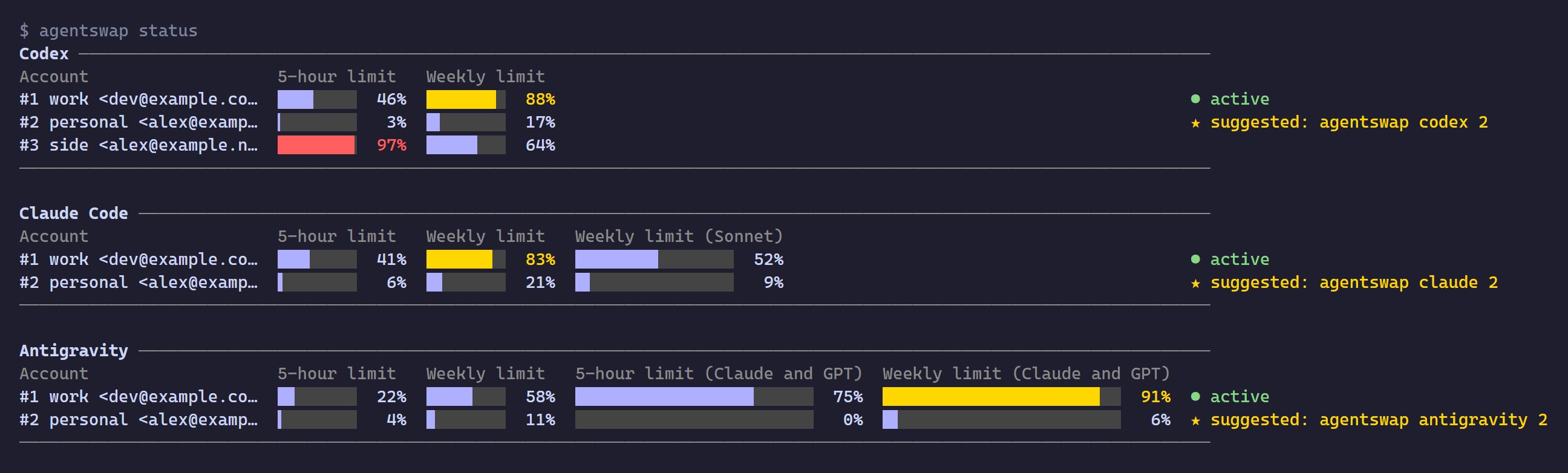
One small program for macOS, Linux and Windows. Nothing else to install, nothing running in the background.
agentswap was inspired by claude-swap (cswap). It brings the same idea to Codex and the Antigravity CLI, keeps every saved account encrypted so only your user on this computer can open it, and comes as one program with nothing else to install. If you are moving over, ccswap import brings your accounts with you.
macOS / Linux:
curl -fsSL https://github.com/WellWells/agentswap/releases/latest/download/install.sh | sh
Windows (PowerShell):
irm https://github.com/WellWells/agentswap/releases/latest/download/install.ps1 | iex
Homebrew (macOS / Linux):
brew install wellwells/tap/agentswap
The scripts install to ~/.local/bin (Windows: %LOCALAPPDATA%\agentswap\bin, added to your PATH) together with the cxswap, ccswap and agswap commands. There is no security prompt to click through. AGENTSWAP_VERSION=v1.0.0 pins a version, AGENTSWAP_INSTALL_DIR changes the folder.
With Go: go install github.com/WellWells/agentswap/cmd/agentswap@latest, then agentswap link.
agentswap update installs the latest release (Homebrew: brew upgrade agentswap). When a new release is out, agentswap mentions it in one line.
Removing agentswap does not sign you out of any agent; the account in use stays signed in.
macOS / Linux, installed with the script:
agentswap unlink                  # remove cxswap, ccswap and the other commands
rm ~/.local/bin/agentswap
Homebrew:
brew uninstall agentswap
Windows, in PowerShell. This deletes the program folder, which also holds cxswap, ccswap and the other commands, and removes it from your user PATH:
Remove-Item -Recurse -Force "$env:LOCALAPPDATA\agentswap"
$key = Get-Item HKCU:\Environment
$path = ($key.GetValue('Path', '', 'DoNotExpandEnvironmentNames') -split ';' | Where-Object { $_ -and $_ -ne "$env:LOCALAPPDATA\agentswap\bin" }) -join ';'
Set-ItemProperty HKCU:\Environment Path $path -Type $key.GetValueKind('Path')
If you installed with AGENTSWAP_INSTALL_DIR, use that folder instead.
Saved accounts stay until you delete them. If you set AGENTSWAP_HOME, delete that folder instead.
rm -rf ~/.agentswap # macOS / Linux
Remove-Item -Recurse -Force "$HOME\.agentswap" # Windows
Encryption key: Windows has nothing else to remove. On macOS and Linux the key stays in the system keyring:
security delete-generic-password -s agentswap -a vault-key   # macOS
secret-tool clear service agentswap key vault                # Linux
cxswap add work          # save the account you are signed in to
cxswap login personal    # sign in to another account and save it
cxswap list
Codex accounts

  #  Account                      Plan  Switch with
  1  work <[email protected]>       team  ● active
  2  personal <[email protected]>  plus  cxswap 2
  3  side <[email protected]>      pro   cxswap 3

Switch with `cxswap <number>`. Numbers follow the order accounts were added and shift up when one is removed.
You can also use an alias or email (`cxswap <alias|email>`); `cxswap -` switches back to the previous account.
cxswap 2                 # switch to #2
cxswap -                 # and back
Restart Codex after switching; if it is still running, cxswap offers to close it. Once an account is saved, add more with cxswap login rather than codex login or codex logout, which sign out the account you are using. Codex set to keep its login in the system keyring is not supported yet.
ccswap add work          # save the account you are signed in to
ccswap status
ccswap 2                 # running sessions pick it up on their next request
Sign in to other accounts with /login inside Claude Code, then ccswap add. Only the login is swapped; your settings and MCP servers stay as they are. Claude subscription logins only, not API keys.
Coming from claude-swap:
ccswap import            # choose 1) cswap, or run `ccswap import 1`
ccswap list              # check that every account came over
cswap purge              # then remove the copies claude-swap kept
Aliases come along, and accounts you already saved are skipped. Stop using cswap afterwards: both tools would keep refreshing the same logins and sign each other out.
agswap add work          # save the account you are signed in to
agswap list
agswap 2                 # offers to close running agy first
To add another account, run /logout in agy, sign in to the other account and run agswap add. Logging out does not affect saved accounts. agy only picks up a new login when it starts, so agswap asks to close every running agy, agy remote-control included, and cancels the switch if you say no. The desktop app is not supported yet.
| Agent | Commands |
|---|---|
| OpenAI Codex | cxswap, codexswap, agentswap codex |
| Claude Code | ccswap, claudeswap, agentswap claude |
Antigravity CLI (agy) | agswap, agyswap, agentswap antigravity |
Every agent has the same commands. <account> is the number from list, an alias, an email, or any unique part of one.
| Command | |
|---|---|
cxswap status [account] | limits of every saved account, or just one, and which account has the most room left (usage is the same) |
cxswap list | numbers, aliases, plans and which account is active |
cxswap <account> | switch (also cxswap switch <account>); --yes closes running sessions without asking |
cxswap - | switch back to the previous account |
cxswap add [alias] | save the account you are signed in to |
cxswap login [alias] | Codex only: sign in to another account and save it |
ccswap import | Claude Code only: import accounts from claude-swap |
cxswap alias <account> [name] | set an alias, or clear it |
cxswap rm <account> | forget a saved account (it stays signed in) |
agentswap status | all agents at once |
agentswap lang [language] | English (en), Traditional Chinese (zh-TW) or Simplified Chinese (zh-CN); auto follows the system |
Run any command without arguments for its help.
| Environment variable | |
|---|---|
AGENTSWAP_HOME | where saved accounts live (default ~/.agentswap) |
CODEX_HOME, CLAUDE_CONFIG_DIR | respected the same way the agents respect them |
AGENTSWAP_LANG | message language, overrides agentswap lang |
AGENTSWAP_NO_UPDATE_CHECK | set to anything to skip the release check |
NO_COLOR | plain output |
agentswap has no server, no sign-up and no telemetry. Here is everything it does with your logins:
On your computer, saved accounts live in ~/.agentswap, encrypted with a key that only your user on this computer can use, kept by the system: Windows itself, the Keychain on macOS, the keyring on Linux. Copied to another computer, they cannot be opened. On Linux without a keyring, agentswap uses a key file instead and tells you so.
On the network, each token goes only to the company that issued it, to read usage and keep the login fresh:
| Agent | Hosts |
|---|---|
| Codex | chatgpt.com, auth.openai.com |
| Claude Code | api.anthropic.com, platform.claude.com |
| Antigravity CLI | cloudcode-pa.googleapis.com, oauth2.googleapis.com |
The only other connection is the release check on github.com, which carries no token. AGENTSWAP_NO_UPDATE_CHECK=1 turns it off.
Before replacing your current login, agentswap keeps an encrypted backup of it. Only the latest five are kept.
Open source under the MIT License, with no third-party code.
Questions, bug reports and pull requests are welcome. The bug report form asks for the details that usually matter, and feature requests are the place to suggest another agent. See CONTRIBUTING.md for building and testing, and SECURITY.md for reporting anything that could expose tokens. Writing in English or Chinese is fine.
Copyright 2026 WellsTsai. MIT License, see NOTICE.
agentswap is not affiliated with OpenAI, Anthropic or Google.
Switch between multiple accounts of AI coding agents (Codex, Claude Code, Antigravity) from one small binary
Go
15
26 commits
updated Oct 12, 2026
A fast, compact, privacy-first account switcher for Codex, Claude Code and the Antigravity CLI.
With more than one subscription, copying the login file back and forth only lasts a few days: the saved copy expires, and signing in again logs out the account you were using. agentswap keeps every saved account signed in, shows how much of each account's limits is left, and switches with one command. Only the login changes; the rest of your agent's settings stay as they are. Your tokens stay on your machine, encrypted.
One small program for macOS, Linux and Windows. Nothing else to install, nothing running in the background.
agentswap was inspired by claude-swap (cswap). It brings the same idea to Codex and the Antigravity CLI, keeps every saved account encrypted so only your user on this computer can open it, and comes as one program with nothing else to install. If you are moving over, ccswap import brings your accounts with you.
macOS / Linux:
curl -fsSL https://github.com/WellWells/agentswap/releases/latest/download/install.sh | sh
Windows (PowerShell):
irm https://github.com/WellWells/agentswap/releases/latest/download/install.ps1 | iex
Homebrew (macOS / Linux):
brew install wellwells/tap/agentswap
The scripts install to ~/.local/bin (Windows: %LOCALAPPDATA%\agentswap\bin, added to your PATH) together with the cxswap, ccswap and agswap commands. There is no security prompt to click through. AGENTSWAP_VERSION=v1.0.0 pins a version, AGENTSWAP_INSTALL_DIR changes the folder.
With Go: go install github.com/WellWells/agentswap/cmd/agentswap@latest, then agentswap link.
agentswap update installs the latest release (Homebrew: brew upgrade agentswap). When a new release is out, agentswap mentions it in one line.
Removing agentswap does not sign you out of any agent; the account in use stays signed in.
macOS / Linux, installed with the script:
agentswap unlink                  # remove cxswap, ccswap and the other commands
rm ~/.local/bin/agentswap
Homebrew:
brew uninstall agentswap
Windows, in PowerShell. This deletes the program folder, which also holds cxswap, ccswap and the other commands, and removes it from your user PATH:
Remove-Item -Recurse -Force "$env:LOCALAPPDATA\agentswap"
$key = Get-Item HKCU:\Environment
$path = ($key.GetValue('Path', '', 'DoNotExpandEnvironmentNames') -split ';' | Where-Object { $_ -and $_ -ne "$env:LOCALAPPDATA\agentswap\bin" }) -join ';'
Set-ItemProperty HKCU:\Environment Path $path -Type $key.GetValueKind('Path')
If you installed with AGENTSWAP_INSTALL_DIR, use that folder instead.
Saved accounts stay until you delete them. If you set AGENTSWAP_HOME, delete that folder instead.
rm -rf ~/.agentswap # macOS / Linux
Remove-Item -Recurse -Force "$HOME\.agentswap" # Windows
Encryption key: Windows has nothing else to remove. On macOS and Linux the key stays in the system keyring:
security delete-generic-password -s agentswap -a vault-key   # macOS
secret-tool clear service agentswap key vault                # Linux
cxswap add work          # save the account you are signed in to
cxswap login personal    # sign in to another account and save it
cxswap list
Codex accounts

  #  Account                      Plan  Switch with
  1  work <[email protected]>       team  ● active
  2  personal <[email protected]>  plus  cxswap 2
  3  side <[email protected]>      pro   cxswap 3

Switch with `cxswap <number>`. Numbers follow the order accounts were added and shift up when one is removed.
You can also use an alias or email (`cxswap <alias|email>`); `cxswap -` switches back to the previous account.
cxswap 2                 # switch to #2
cxswap -                 # and back
Restart Codex after switching; if it is still running, cxswap offers to close it. Once an account is saved, add more with cxswap login rather than codex login or codex logout, which sign out the account you are using. Codex set to keep its login in the system keyring is not supported yet.
ccswap add work          # save the account you are signed in to
ccswap status
ccswap 2                 # running sessions pick it up on their next request
Sign in to other accounts with /login inside Claude Code, then ccswap add. Only the login is swapped; your settings and MCP servers stay as they are. Claude subscription logins only, not API keys.
Coming from claude-swap:
ccswap import            # choose 1) cswap, or run `ccswap import 1`
ccswap list              # check that every account came over
cswap purge              # then remove the copies claude-swap kept
Aliases come along, and accounts you already saved are skipped. Stop using cswap afterwards: both tools would keep refreshing the same logins and sign each other out.
agswap add work          # save the account you are signed in to
agswap list
agswap 2                 # offers to close running agy first
To add another account, run /logout in agy, sign in to the other account and run agswap add. Logging out does not affect saved accounts. agy only picks up a new login when it starts, so agswap asks to close every running agy, agy remote-control included, and cancels the switch if you say no. The desktop app is not supported yet.
| Agent | Commands |
|---|---|
| OpenAI Codex | cxswap, codexswap, agentswap codex |
| Claude Code | ccswap, claudeswap, agentswap claude |
Antigravity CLI (agy) | agswap, agyswap, agentswap antigravity |
Every agent has the same commands. <account> is the number from list, an alias, an email, or any unique part of one.
| Command | |
|---|---|
cxswap status [account] | limits of every saved account, or just one, and which account has the most room left (usage is the same) |
cxswap list | numbers, aliases, plans and which account is active |
cxswap <account> | switch (also cxswap switch <account>); --yes closes running sessions without asking |
cxswap - | switch back to the previous account |
cxswap add [alias] | save the account you are signed in to |
cxswap login [alias] | Codex only: sign in to another account and save it |
ccswap import | Claude Code only: import accounts from claude-swap |
cxswap alias <account> [name] | set an alias, or clear it |
cxswap rm <account> | forget a saved account (it stays signed in) |
agentswap status | all agents at once |
agentswap lang [language] | English (en), Traditional Chinese (zh-TW) or Simplified Chinese (zh-CN); auto follows the system |
Run any command without arguments for its help.
| Environment variable | |
|---|---|
AGENTSWAP_HOME | where saved accounts live (default ~/.agentswap) |
CODEX_HOME, CLAUDE_CONFIG_DIR | respected the same way the agents respect them |
AGENTSWAP_LANG | message language, overrides agentswap lang |
AGENTSWAP_NO_UPDATE_CHECK | set to anything to skip the release check |
NO_COLOR | plain output |
agentswap has no server, no sign-up and no telemetry. Here is everything it does with your logins:
On your computer, saved accounts live in ~/.agentswap, encrypted with a key that only your user on this computer can use, kept by the system: Windows itself, the Keychain on macOS, the keyring on Linux. Copied to another computer, they cannot be opened. On Linux without a keyring, agentswap uses a key file instead and tells you so.
On the network, each token goes only to the company that issued it, to read usage and keep the login fresh:
| Agent | Hosts |
|---|---|
| Codex | chatgpt.com, auth.openai.com |
| Claude Code | api.anthropic.com, platform.claude.com |
| Antigravity CLI | cloudcode-pa.googleapis.com, oauth2.googleapis.com |
The only other connection is the release check on github.com, which carries no token. AGENTSWAP_NO_UPDATE_CHECK=1 turns it off.
Before replacing your current login, agentswap keeps an encrypted backup of it. Only the latest five are kept.
Open source under the MIT License, with no third-party code.
Questions, bug reports and pull requests are welcome. The bug report form asks for the details that usually matter, and feature requests are the place to suggest another agent. See CONTRIBUTING.md for building and testing, and SECURITY.md for reporting anything that could expose tokens. Writing in English or Chinese is fine.
Copyright 2026 WellsTsai. MIT License, see NOTICE.
agentswap is not affiliated with OpenAI, Anthropic or Google.



