Mnemo is a free, open-source study application built with Photino X and .NET 10, designed to help students, researchers, and lifelong learners master any subject.
See the code


Free. Open source. Local first. Built by learners, for learners.
Mnemo is a desktop study app for notes, flashcards, mind maps and progress tracking. It keeps those tools together without taking ownership of your work.
Your notes and study data live on your machine. Mnemo has no accounts and no tracking. By default, it makes a request to GitHub Releases when it starts to check for updates. You can turn this off in Settings > Updates. Mnemo sends no account or analytics data with that request.
No ads. No accounts. No tracking. Local by default.
Mnemo combines a React and TypeScript interface with a local .NET backend. PhotinoX hosts the interface in the operating system's native web view.
|
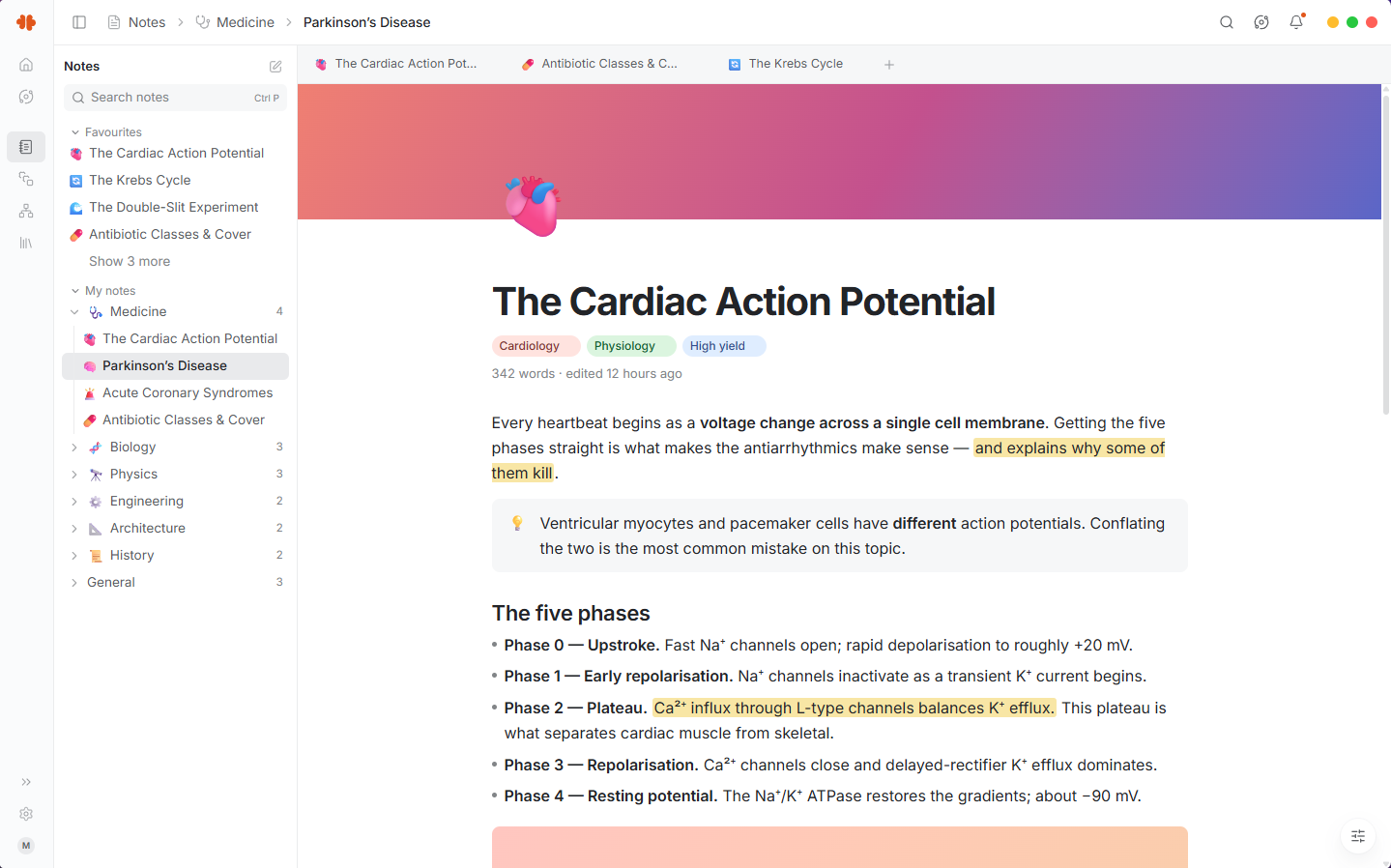
Notes Editor
|
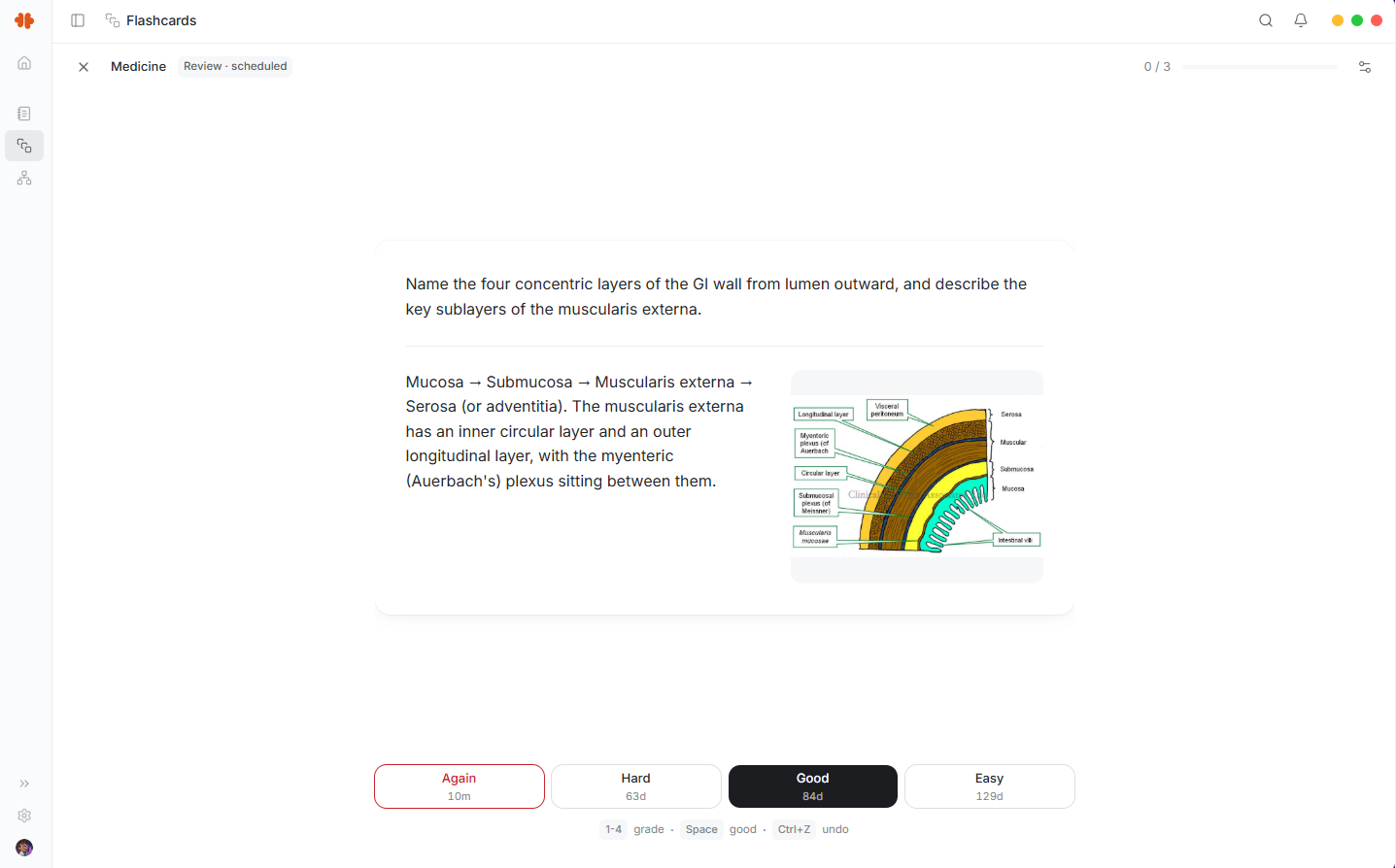
Flashcards
|
|
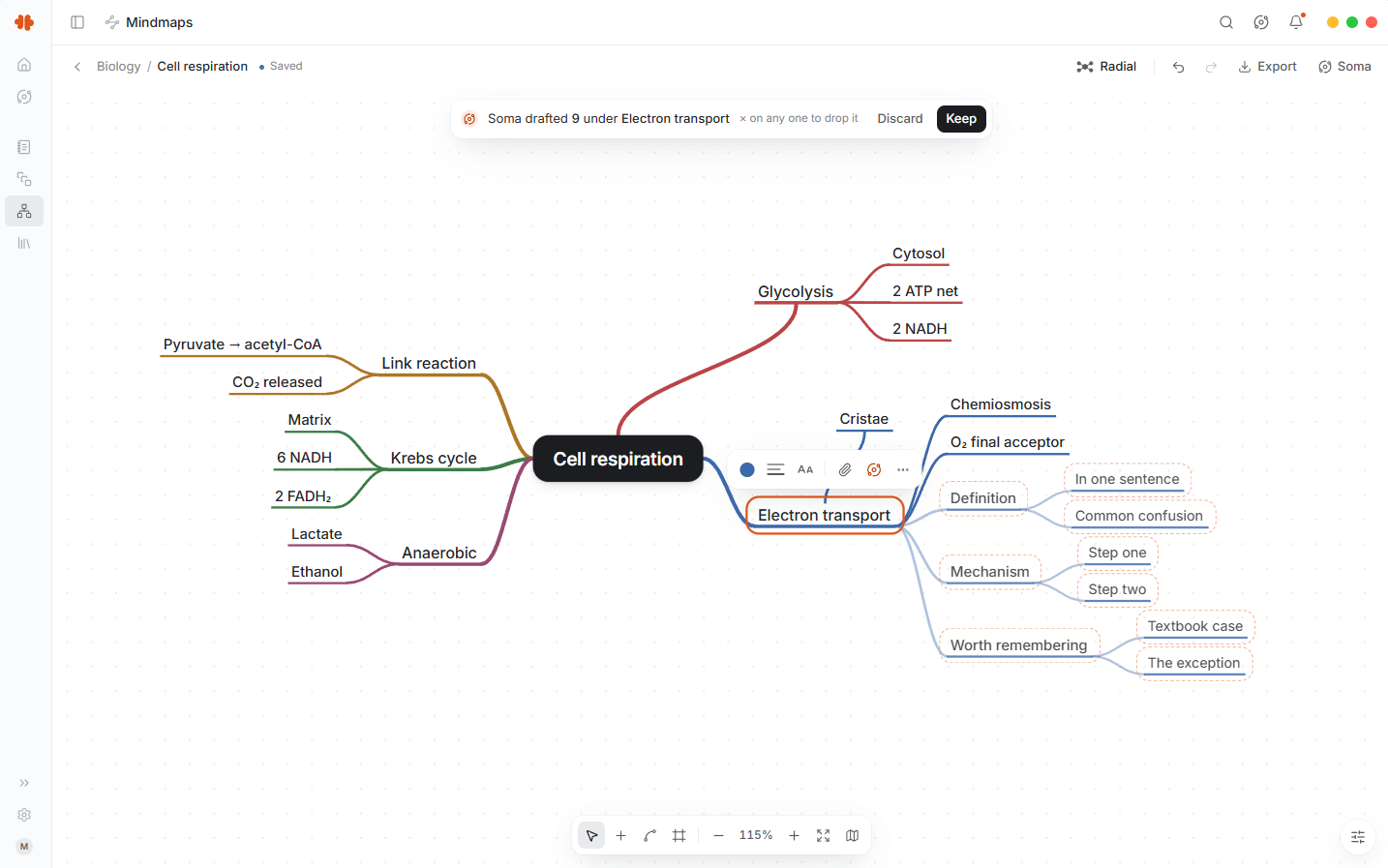
Mind map
| |
Notes use a block editor built for long documents, with rich text, math, code, images,
callouts, columns, page links, tabs, find and replace, and a draggable note tree. Notes export
to Markdown, portable .mnemo packages, or PDF through a bundled Typst compiler.
Flashcards support classic, cloze and image occlusion cards, decks and folders, and
review scheduling through FSRS. A separate self-graded test mode lets you test yourself without
changing the review schedule. Decks can move through Anki packages, CSV and .mnemo packages.
Mind maps run on an infinite canvas built for Mnemo. Maps support nodes, shapes, text, images, frames, several layout algorithms, custom edges, reusable styles and a minimap. You can export a map to PNG, SVG or a Markdown outline.
Overview is a configurable study dashboard. Its widgets cover activity, recent notes and decks, study goals, usage, memory and testing.
Across the app you also get light and dark themes, remappable shortcuts, global search, notification history and interface support for English, German, Spanish, Japanese and Norwegian Bokmål.
Mnemo does not try to trap your material inside the application.
.mnemo packages.mnemo packages.mnemo packagesMnemo is currently in the 0.8.1 beta.
| Platform | Build | Status |
|---|---|---|
| Windows 10 and 11, x64 | Installer and portable zip | Most stable, unsigned |
| macOS, Apple silicon | Installer package and portable app | Tested on an Apple silicon Mac, signed from 0.8.1-nightly.5 |
| Linux, x64 | AppImage and portable archive | First preview |
Windows has had months of daily use. macOS has been tested on an Apple silicon Mac but has seen far less use. Linux is the least tested, so treat it as a preview. Please report problems specific to your platform.
Starting with v0.8.1-nightly.5, the macOS downloads are signed and notarized. macOS still asks
you to confirm the first time you open an app downloaded from the internet, but no longer blocks
it. Earlier macOS releases, including the 0.8.0 release candidates, are unsigned; see
macOS. The Windows builds are not code signed yet, so SmartScreen warns before the
first run. Tagged releases are built from public source through GitHub Actions, and the 0.8
release workflow publishes a SHA256SUMS.txt file for its installers and portable archives;
see Verify a download.
This is pre-release software. Keep a current backup of anything important.
Choose the newest 0.8 beta on the releases page.
Download SHA256SUMS.txt from the same release into the folder that holds your download, then
run the line for your platform there. A match prints the file name (with OK on macOS and Linux).
Select-String (Get-FileHash .\<downloaded file>).Hash SHA256SUMS.txtshasum -a 256 -c SHA256SUMS.txt --ignore-missingsha256sum -c --ignore-missing SHA256SUMS.txtAn existing 0.6.x installation will not offer the 0.8 update because the package identity changed with the rebuild. Download and run the 0.8 installer directly. Your notes, flashcards, mind maps and settings stay in the same data directory and are migrated when 0.8 first opens. Close Mnemo and make a backup of that directory before upgrading.
Mnemo requires the Microsoft Edge WebView2 Evergreen Runtime. It is normally already present on Windows 11 and current Windows 10 installations. Windows Server, LTSC and stripped Windows images may need it installed separately.
The current macOS build supports Apple silicon. Most people should use the installer package:
download the .pkg file, open it and follow the installer.
To use the portable app instead, download Mnemo-Portable-osx-arm64.zip and open it to unpack
Mnemo.app. Move Mnemo.app into your Applications folder before you open it for the
first time. If you open it from Downloads, macOS runs it from a temporary read-only copy and
Mnemo cannot update itself.
The first time you open Mnemo, macOS asks whether you want to open an app downloaded from the internet. Choose Open.
Releases before v0.8.1-nightly.5 are unsigned, and macOS blocks them.
Their portable download is a .tar.gz folder rather than Mnemo.app. First check the
download against the release's SHA256SUMS.txt. Then try to open it once, open System
Settings > Privacy & Security, scroll to Security, choose Open Anyway, and confirm
Open.
The current Linux build supports x64 and targets Ubuntu 22.04 or newer. Download the AppImage, make it executable, then run it:
chmod +x Mnemo.Desktop.V2-linux-x64-*.AppImage
./Mnemo.Desktop.V2-linux-x64-*.AppImage
Install the native runtime packages first. On Ubuntu 24.04:
sudo apt install libfuse2t64 libwebkit2gtk-4.1-0 libjavascriptcoregtk-4.1-0 libgtk-3-0t64 libnotify4
On Ubuntu 22.04:
sudo apt install libfuse2 libwebkit2gtk-4.1-0 libjavascriptcoregtk-4.1-0 libgtk-3-0 libnotify4
Other distributions need equivalent GTK 3, WebKitGTK 4.1, JavaScriptCoreGTK, libnotify and FUSE 2 packages. If libnotify, WebKitGTK, JavaScriptCoreGTK or GTK 3 is missing, Mnemo does not start and says which package to install.
Mnemo turns off WebKit's DMA-BUF renderer before GTK starts, which avoids a blank or black window
on some graphics stacks, unless WEBKIT_DISABLE_DMABUF_RENDERER is already set in your
environment. If the window still opens blank or black, make sure the variable is not set to 0,
or start Mnemo with it set explicitly:
WEBKIT_DISABLE_DMABUF_RENDERER=1 ./Mnemo.Desktop.V2-linux-x64-*.AppImage
Open Settings > Storage & data to create one complete backup file containing your notes, flashcards, mind maps, conversations, settings, trash, and the images and files inside them. API keys stay on the device. Restore the file from the same page. Mnemo validates it before replacing anything and keeps a recovery copy of the previous data.
For a manual backup, open Settings > Support > Open data folder, close Mnemo, then copy the complete data directory somewhere safe. Restoring that copy restores the application as a whole.
A .mnemo export covers the notes, decks or maps selected for that export. It does not include
the trash, Overview layout or all application settings. Items in the trash are permanently
removed after 30 days.
An installed copy can be removed through the operating system; on macOS, drag Mnemo.app from Applications to the Trash. A portable copy can be removed by deleting its extracted folder, or Mnemo.app on macOS. Mnemo leaves your data directory in place so uninstalling or upgrading does not erase your work. Delete that directory yourself only when you want to remove all Mnemo data.
Turn off Launch at startup before uninstalling. If Mnemo was removed first, clear the leftover
startup entry named Mnemo from the Windows Startup Apps list, the macOS login items, or your
Linux desktop's autostart settings.
Optional sync and a mobile app are next. See ROADMAP.md for what we're working on and what comes after.
Mnemo ships a web frontend and .NET backend together as one desktop application.
mnemo-web contains the React, TypeScript and Tailwind interface.Mnemo.Host opens the PhotinoX window, runs the loopback-only local API and serves the frontend.Mnemo.Core contains shared models, interfaces and contracts.Mnemo.Infrastructure contains storage, notes, flashcards, mind maps, import, export and assistant implementations.The backend uses .NET 10, ASP.NET Core and SQLite. The frontend uses React 19, TypeScript and Vite, with ProseMirror for editing, KaTeX for math and Typst for PDF export.
You will need:
Install the frontend dependencies from the lockfile:
cd mnemo-web
npm ci
cd ..
Restore the bundled Typst binary:
./scripts/restore-typst.ps1
On Linux or macOS:
./scripts/restore-typst.sh
For development, start the host first:
dotnet run --project Mnemo.Host -- --dev
Then start the frontend in another terminal:
cd mnemo-web
npm run dev
The host and Vite communicate through a per-launch development handshake, so the host needs to start first.
On Windows, dev.bat starts both processes, each in its own terminal, and installs the web
dependencies on first run.
For development workflow, testing and contribution guidelines, see CONTRIBUTING.md.
Contributions are welcome.
Read CONTRIBUTING.md and coding-standard.md before
opening a pull request. Issues labelled good first issue are a good place to start.
Please also see:
Mnemo is licensed under the Apache License 2.0.
See LICENSE for the full license, NOTICE for attribution and THIRD-PARTY-NOTICES for bundled dependencies.
The Mnemo name, logo and visual identity are covered separately by BRAND.md.
Mnemo is a free, open-source study application built with Photino X and .NET 10, designed to help students, researchers, and lifelong learners master any subject.
See the code
Free. Open source. Local first. Built by learners, for learners.
Mnemo is a desktop study app for notes, flashcards, mind maps and progress tracking. It keeps those tools together without taking ownership of your work.
Your notes and study data live on your machine. Mnemo has no accounts and no tracking. By default, it makes a request to GitHub Releases when it starts to check for updates. You can turn this off in Settings > Updates. Mnemo sends no account or analytics data with that request.
No ads. No accounts. No tracking. Local by default.
Mnemo combines a React and TypeScript interface with a local .NET backend. PhotinoX hosts the interface in the operating system's native web view.
|
Notes Editor
|
Flashcards
|
|
Mind map
| |
Notes use a block editor built for long documents, with rich text, math, code, images,
callouts, columns, page links, tabs, find and replace, and a draggable note tree. Notes export
to Markdown, portable .mnemo packages, or PDF through a bundled Typst compiler.
Flashcards support classic, cloze and image occlusion cards, decks and folders, and
review scheduling through FSRS. A separate self-graded test mode lets you test yourself without
changing the review schedule. Decks can move through Anki packages, CSV and .mnemo packages.
Mind maps run on an infinite canvas built for Mnemo. Maps support nodes, shapes, text, images, frames, several layout algorithms, custom edges, reusable styles and a minimap. You can export a map to PNG, SVG or a Markdown outline.
Overview is a configurable study dashboard. Its widgets cover activity, recent notes and decks, study goals, usage, memory and testing.
Across the app you also get light and dark themes, remappable shortcuts, global search, notification history and interface support for English, German, Spanish, Japanese and Norwegian Bokmål.
Mnemo does not try to trap your material inside the application.
.mnemo packages.mnemo packages.mnemo packagesMnemo is currently in the 0.8.1 beta.
| Platform | Build | Status |
|---|---|---|
| Windows 10 and 11, x64 | Installer and portable zip | Most stable, unsigned |
| macOS, Apple silicon | Installer package and portable app | Tested on an Apple silicon Mac, signed from 0.8.1-nightly.5 |
| Linux, x64 | AppImage and portable archive | First preview |
Windows has had months of daily use. macOS has been tested on an Apple silicon Mac but has seen far less use. Linux is the least tested, so treat it as a preview. Please report problems specific to your platform.
Starting with v0.8.1-nightly.5, the macOS downloads are signed and notarized. macOS still asks
you to confirm the first time you open an app downloaded from the internet, but no longer blocks
it. Earlier macOS releases, including the 0.8.0 release candidates, are unsigned; see
macOS. The Windows builds are not code signed yet, so SmartScreen warns before the
first run. Tagged releases are built from public source through GitHub Actions, and the 0.8
release workflow publishes a SHA256SUMS.txt file for its installers and portable archives;
see Verify a download.
This is pre-release software. Keep a current backup of anything important.
Choose the newest 0.8 beta on the releases page.
Download SHA256SUMS.txt from the same release into the folder that holds your download, then
run the line for your platform there. A match prints the file name (with OK on macOS and Linux).
Select-String (Get-FileHash .\<downloaded file>).Hash SHA256SUMS.txtshasum -a 256 -c SHA256SUMS.txt --ignore-missingsha256sum -c --ignore-missing SHA256SUMS.txtAn existing 0.6.x installation will not offer the 0.8 update because the package identity changed with the rebuild. Download and run the 0.8 installer directly. Your notes, flashcards, mind maps and settings stay in the same data directory and are migrated when 0.8 first opens. Close Mnemo and make a backup of that directory before upgrading.
Mnemo requires the Microsoft Edge WebView2 Evergreen Runtime. It is normally already present on Windows 11 and current Windows 10 installations. Windows Server, LTSC and stripped Windows images may need it installed separately.
The current macOS build supports Apple silicon. Most people should use the installer package:
download the .pkg file, open it and follow the installer.
To use the portable app instead, download Mnemo-Portable-osx-arm64.zip and open it to unpack
Mnemo.app. Move Mnemo.app into your Applications folder before you open it for the
first time. If you open it from Downloads, macOS runs it from a temporary read-only copy and
Mnemo cannot update itself.
The first time you open Mnemo, macOS asks whether you want to open an app downloaded from the internet. Choose Open.
Releases before v0.8.1-nightly.5 are unsigned, and macOS blocks them.
Their portable download is a .tar.gz folder rather than Mnemo.app. First check the
download against the release's SHA256SUMS.txt. Then try to open it once, open System
Settings > Privacy & Security, scroll to Security, choose Open Anyway, and confirm
Open.
The current Linux build supports x64 and targets Ubuntu 22.04 or newer. Download the AppImage, make it executable, then run it:
chmod +x Mnemo.Desktop.V2-linux-x64-*.AppImage
./Mnemo.Desktop.V2-linux-x64-*.AppImage
Install the native runtime packages first. On Ubuntu 24.04:
sudo apt install libfuse2t64 libwebkit2gtk-4.1-0 libjavascriptcoregtk-4.1-0 libgtk-3-0t64 libnotify4
On Ubuntu 22.04:
sudo apt install libfuse2 libwebkit2gtk-4.1-0 libjavascriptcoregtk-4.1-0 libgtk-3-0 libnotify4
Other distributions need equivalent GTK 3, WebKitGTK 4.1, JavaScriptCoreGTK, libnotify and FUSE 2 packages. If libnotify, WebKitGTK, JavaScriptCoreGTK or GTK 3 is missing, Mnemo does not start and says which package to install.
Mnemo turns off WebKit's DMA-BUF renderer before GTK starts, which avoids a blank or black window
on some graphics stacks, unless WEBKIT_DISABLE_DMABUF_RENDERER is already set in your
environment. If the window still opens blank or black, make sure the variable is not set to 0,
or start Mnemo with it set explicitly:
WEBKIT_DISABLE_DMABUF_RENDERER=1 ./Mnemo.Desktop.V2-linux-x64-*.AppImage
Open Settings > Storage & data to create one complete backup file containing your notes, flashcards, mind maps, conversations, settings, trash, and the images and files inside them. API keys stay on the device. Restore the file from the same page. Mnemo validates it before replacing anything and keeps a recovery copy of the previous data.
For a manual backup, open Settings > Support > Open data folder, close Mnemo, then copy the complete data directory somewhere safe. Restoring that copy restores the application as a whole.
A .mnemo export covers the notes, decks or maps selected for that export. It does not include
the trash, Overview layout or all application settings. Items in the trash are permanently
removed after 30 days.
An installed copy can be removed through the operating system; on macOS, drag Mnemo.app from Applications to the Trash. A portable copy can be removed by deleting its extracted folder, or Mnemo.app on macOS. Mnemo leaves your data directory in place so uninstalling or upgrading does not erase your work. Delete that directory yourself only when you want to remove all Mnemo data.
Turn off Launch at startup before uninstalling. If Mnemo was removed first, clear the leftover
startup entry named Mnemo from the Windows Startup Apps list, the macOS login items, or your
Linux desktop's autostart settings.
Optional sync and a mobile app are next. See ROADMAP.md for what we're working on and what comes after.
Mnemo ships a web frontend and .NET backend together as one desktop application.
mnemo-web contains the React, TypeScript and Tailwind interface.Mnemo.Host opens the PhotinoX window, runs the loopback-only local API and serves the frontend.Mnemo.Core contains shared models, interfaces and contracts.Mnemo.Infrastructure contains storage, notes, flashcards, mind maps, import, export and assistant implementations.The backend uses .NET 10, ASP.NET Core and SQLite. The frontend uses React 19, TypeScript and Vite, with ProseMirror for editing, KaTeX for math and Typst for PDF export.
You will need:
Install the frontend dependencies from the lockfile:
cd mnemo-web
npm ci
cd ..
Restore the bundled Typst binary:
./scripts/restore-typst.ps1
On Linux or macOS:
./scripts/restore-typst.sh
For development, start the host first:
dotnet run --project Mnemo.Host -- --dev
Then start the frontend in another terminal:
cd mnemo-web
npm run dev
The host and Vite communicate through a per-launch development handshake, so the host needs to start first.
On Windows, dev.bat starts both processes, each in its own terminal, and installs the web
dependencies on first run.
For development workflow, testing and contribution guidelines, see CONTRIBUTING.md.
Contributions are welcome.
Read CONTRIBUTING.md and coding-standard.md before
opening a pull request. Issues labelled good first issue are a good place to start.
Please also see:
Mnemo is licensed under the Apache License 2.0.
See LICENSE for the full license, NOTICE for attribution and THIRD-PARTY-NOTICES for bundled dependencies.
The Mnemo name, logo and visual identity are covered separately by BRAND.md.