Capture first. Organize later. A local-first Markdown app that turns scattered records into clear notes with AI.
See the codeCapture first. Organize later.
A local-first Markdown app that helps you collect scattered information and organize it into clear notes with AI.
Documentation · Download · Business · Donate · Discussions



Access leading AI models through PackyCode with one API endpoint and one API key. Enjoy fast, reliable access with automatic failover and dedicated high-speed routes for Codex and Claude Code. Get started with $1 in free credits, a discount on your first top-up, and savings of up to 80% on eligible routes. Pay in RMB with no currency conversion markups or extra top-up fees.
Sign up through the link and start building today.

Thanks to Infistar.cc Infinity Galaxy for sponsoring NoteGen and supporting the project with model services!
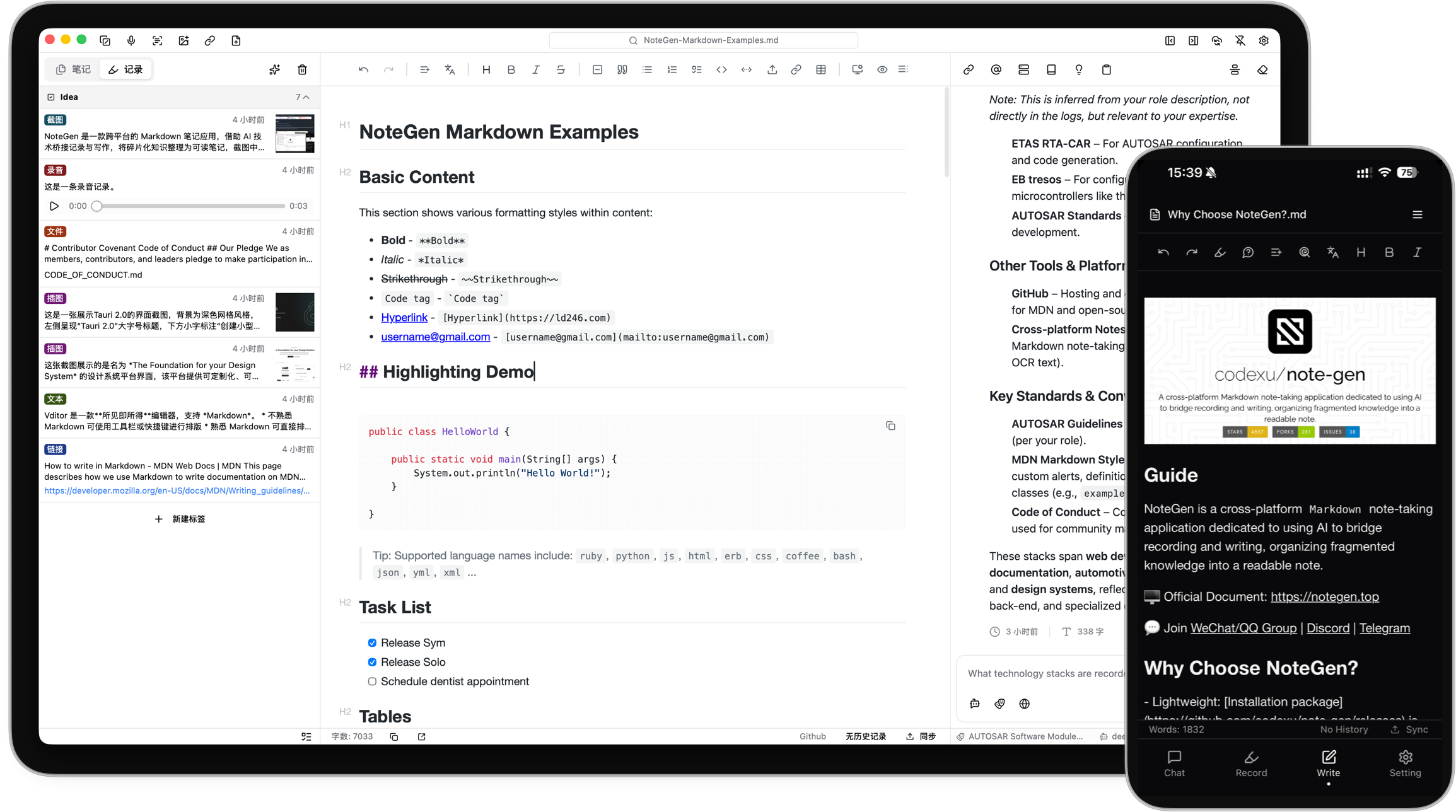
An idea may begin as a sentence, a voice recording, a screenshot, or a link you do not have time to read yet. You should not have to choose a title, folder, and structure before saving it.
NoteGen separates capturing from organizing.
Save information as it appears. Later, select the records that belong together and organize them into a structured Markdown note. You can then review the result, add your own thinking, and continue writing.
The goal is not to let AI write everything for you. It is to make sure useful fragments do not disappear before you have time to turn them into something complete.
Capture what happened
Save a thought, voice recording, screenshot, image, link, file, or todo while it is still fresh.
Choose the material
Filter records by tag, time, or type, then select the items that belong together.
Organize the records
Choose a template or describe what you want to write. NoteGen can organize the selected material into a summary, report, article, or another Markdown structure.
Keep writing
Review the draft in the editor, change the structure, add details, and continue writing in your own words.
Your written notes remain ordinary Markdown files in the workspace you choose.
You can edit them with NoteGen, open them with another Markdown editor, keep them in Git, or move them without exporting from a proprietary format. NoteGen adds recording, AI, search, and organization around those files instead of replacing them.
The editor supports:
NoteGen connects to the AI providers and models you configure. You can use different models for chat, writing, embeddings, image recognition, OCR, and audio.
AI can help you:
AI is part of the workflow, but the result remains editable. You decide what to keep.
A note should remain useful after you finish writing it.
NoteGen can build a searchable knowledge base from your files and combine semantic retrieval with local text search. You can use a note, a group of records, or the knowledge base as context in a conversation instead of copying everything into a new prompt.
For advanced workflows, NoteGen also supports:
NoteGen includes a canvas workspace for material that is easier to understand visually.
You can create and edit:
Canvas elements remain editable after they are created, including content suggested by AI.
Notes are stored locally first. When you need them on another device, you can sync through services you already use.
Supported options include:
You can also keep local backups without enabling cloud sync.
| Platform | Status | Download |
|---|---|---|
| Windows | Beta | Download for Windows |
| macOS | Beta | Download for Apple Silicon or Intel |
| Linux | Beta | AppImage, DEB, or RPM |
| Android | Alpha · ARM64 | Download APK |
| iOS | Alpha | Join TestFlight |
GitHub Releases are also available as a fallback mirror:
View the latest GitHub Release
You do not need to configure every feature before writing your first note.
| Repository | Purpose |
|---|---|
| note-gen-docs | Official website, bilingual documentation, and download pages. |
| note-gen-server | Sync service and account management, with support for self-hosting. |
| note-gen-clipper | Browser extension for saving selected text, images, and page links to NoteGen. |
| note-gen-plugin-sdk | TypeScript API, project scaffolding, CLI, and test tools for developing NoteGen plugins. |
| note-gen-plugins | Official plugin source code and plugin marketplace publishing tools. |
NoteGen is open source and contributions are welcome.
Before opening a pull request, read the contribution guide.
You can also:
Thanks to everyone who has reported a problem, proposed an idea, improved a translation, written documentation, or contributed code.


NoteGen is tested with BrowserStack.
SiliconFlow provides model service support for the project.
AIHubMix sponsors model services for the project.
We also appreciate the service support provided by:
NoteGen is released under the GNU General Public License v3.0.
(top 24 of 34)
345 followers · starred Apr 2025
4,413 followers · starred Jun 2025
12,637 followers · starred Jun 2025
43 followers · starred Jun 2026
Capture first. Organize later. A local-first Markdown app that turns scattered records into clear notes with AI.
See the codeCapture first. Organize later.
A local-first Markdown app that helps you collect scattered information and organize it into clear notes with AI.
Documentation · Download · Business · Donate · Discussions
Access leading AI models through PackyCode with one API endpoint and one API key. Enjoy fast, reliable access with automatic failover and dedicated high-speed routes for Codex and Claude Code. Get started with $1 in free credits, a discount on your first top-up, and savings of up to 80% on eligible routes. Pay in RMB with no currency conversion markups or extra top-up fees.
Sign up through the link and start building today.
Thanks to Infistar.cc Infinity Galaxy for sponsoring NoteGen and supporting the project with model services!
An idea may begin as a sentence, a voice recording, a screenshot, or a link you do not have time to read yet. You should not have to choose a title, folder, and structure before saving it.
NoteGen separates capturing from organizing.
Save information as it appears. Later, select the records that belong together and organize them into a structured Markdown note. You can then review the result, add your own thinking, and continue writing.
The goal is not to let AI write everything for you. It is to make sure useful fragments do not disappear before you have time to turn them into something complete.
Capture what happened
Save a thought, voice recording, screenshot, image, link, file, or todo while it is still fresh.
Choose the material
Filter records by tag, time, or type, then select the items that belong together.
Organize the records
Choose a template or describe what you want to write. NoteGen can organize the selected material into a summary, report, article, or another Markdown structure.
Keep writing
Review the draft in the editor, change the structure, add details, and continue writing in your own words.
Your written notes remain ordinary Markdown files in the workspace you choose.
You can edit them with NoteGen, open them with another Markdown editor, keep them in Git, or move them without exporting from a proprietary format. NoteGen adds recording, AI, search, and organization around those files instead of replacing them.
The editor supports:
NoteGen connects to the AI providers and models you configure. You can use different models for chat, writing, embeddings, image recognition, OCR, and audio.
AI can help you:
AI is part of the workflow, but the result remains editable. You decide what to keep.
A note should remain useful after you finish writing it.
NoteGen can build a searchable knowledge base from your files and combine semantic retrieval with local text search. You can use a note, a group of records, or the knowledge base as context in a conversation instead of copying everything into a new prompt.
For advanced workflows, NoteGen also supports:
NoteGen includes a canvas workspace for material that is easier to understand visually.
You can create and edit:
Canvas elements remain editable after they are created, including content suggested by AI.
Notes are stored locally first. When you need them on another device, you can sync through services you already use.
Supported options include:
You can also keep local backups without enabling cloud sync.
| Platform | Status | Download |
|---|---|---|
| Windows | Beta | Download for Windows |
| macOS | Beta | Download for Apple Silicon or Intel |
| Linux | Beta | AppImage, DEB, or RPM |
| Android | Alpha · ARM64 | Download APK |
| iOS | Alpha | Join TestFlight |
GitHub Releases are also available as a fallback mirror:
View the latest GitHub Release
You do not need to configure every feature before writing your first note.
| Repository | Purpose |
|---|---|
| note-gen-docs | Official website, bilingual documentation, and download pages. |
| note-gen-server | Sync service and account management, with support for self-hosting. |
| note-gen-clipper | Browser extension for saving selected text, images, and page links to NoteGen. |
| note-gen-plugin-sdk | TypeScript API, project scaffolding, CLI, and test tools for developing NoteGen plugins. |
| note-gen-plugins | Official plugin source code and plugin marketplace publishing tools. |
NoteGen is open source and contributions are welcome.
Before opening a pull request, read the contribution guide.
You can also:
Thanks to everyone who has reported a problem, proposed an idea, improved a translation, written documentation, or contributed code.
NoteGen is tested with BrowserStack.
SiliconFlow provides model service support for the project.
AIHubMix sponsors model services for the project.
We also appreciate the service support provided by:
NoteGen is released under the GNU General Public License v3.0.
(top 24 of 34)
345 followers · starred Apr 2025
4,413 followers · starred Jun 2025
12,637 followers · starred Jun 2025
43 followers · starred Jun 2026



