
Orchestrate the swarm. An agentic coder building suite for managing simultaneous workflows and accounts.
JavaScript
0
85 commits
updated Oct 2, 2026
See what people are saying
README
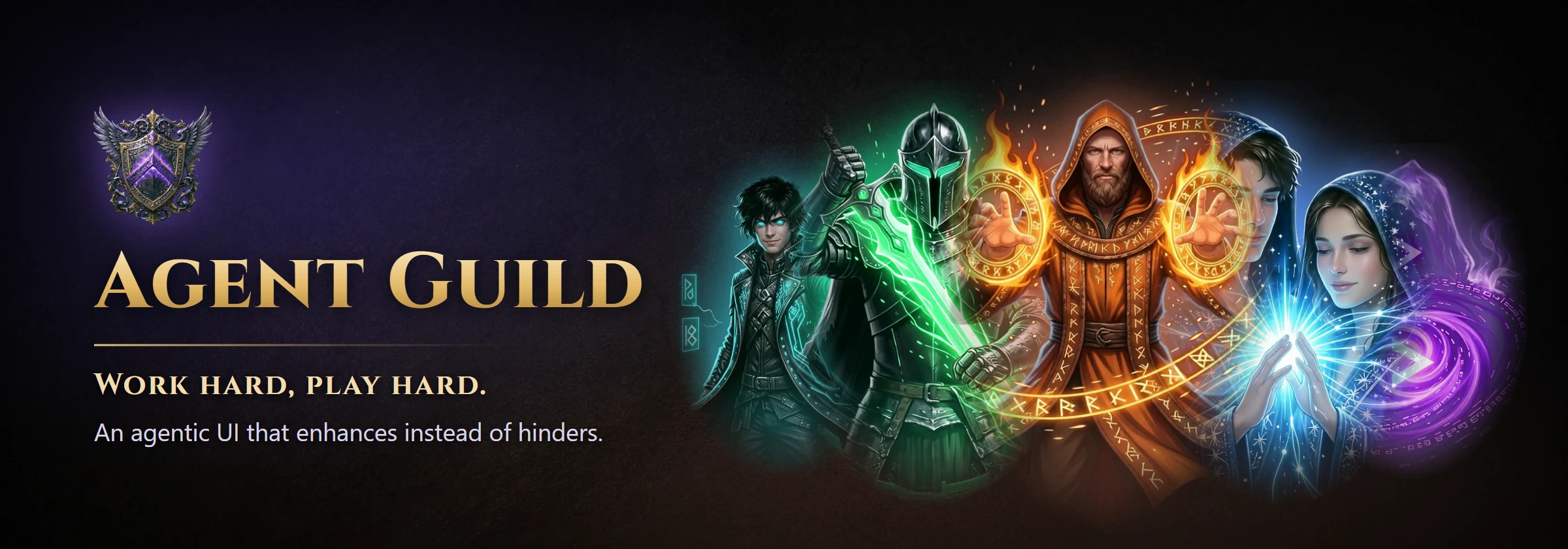






Agent Guild runs Claude Code, Codex CLI, Gemini CLI, Grok Build and your own shell side by side, in real terminals, from one local web page. Each session is a card that shows what the tool is doing, which model it runs and which helper agents it has summoned. Close the page whenever you like; the sessions keep working.
See it in action in the Agent Guild trailer.

Quick start
npm install -g @oddessentials/agent-guild
agent-guild
The page opens in your browser. Pick a provider, press New, and you are in a live terminal.
You need Node.js 22 or newer on Windows 10 1809+, macOS 11+ or Linux (x64 or arm64), and each coding tool you want to use, signed in on its own. Agent Guild installs the tools for you but never handles your sign-in. No compiler and no WSL are needed.
Features
Every major coding CLI, one place. Claude Code, Codex CLI, Gemini CLI, Grok Build and a plain shell each get a card. A tool that is missing shows Install, which runs the install in a session you can watch. An installed tool shows its version and offers Update when a newer one is out, using the same installer that put it there: npm, Homebrew, WinGet or the vendor's own.
Real terminals that outlive the page. Every session is a full interactive terminal: type instructions, answer prompts, watch output. Run as many as you like. A local session manager owns them, so you can close or reload the page and come back to the same screens.
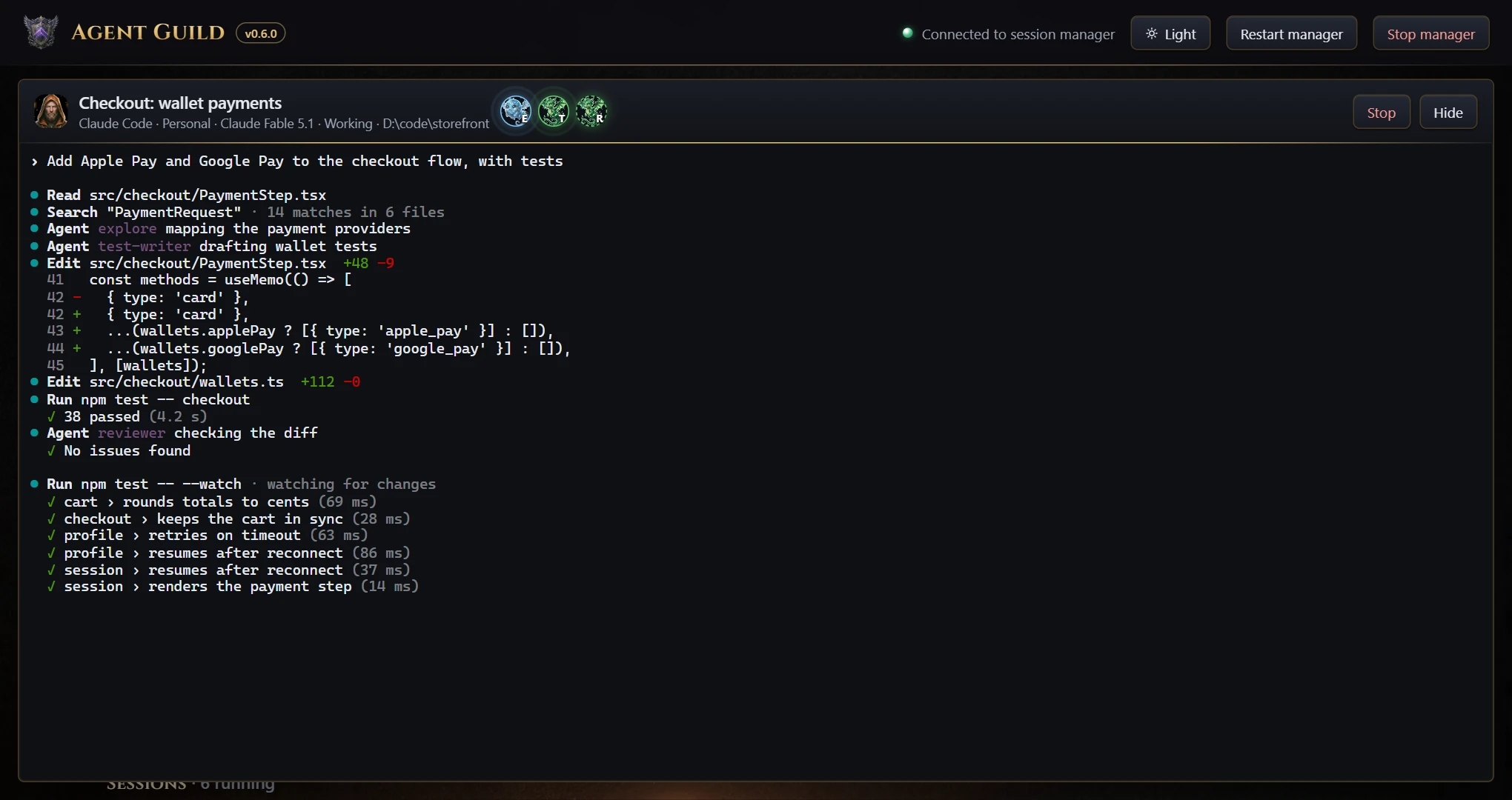
Agents and models at work. Helper agents that a tool starts appear on its card as familiars while they run, and the card names the model in use. The character comes alive while the session works, and the session's level rises with every hour it runs.
Several subscriptions per tool. Add a work account next to your personal one and switch with a chip on the card. Each account keeps its own sign-in, usage meters and sessions. See Accounts.
See what is left of your limits. Claude Code, Codex CLI and Gemini CLI cards show a meter for each rate-limit window, such as 5-hour and 7-day, with the time until it resets. They also show your plan, Claude's extra-usage spend and Codex's credit balance when the account has them. Any other tool can supply a command that prints its usage.
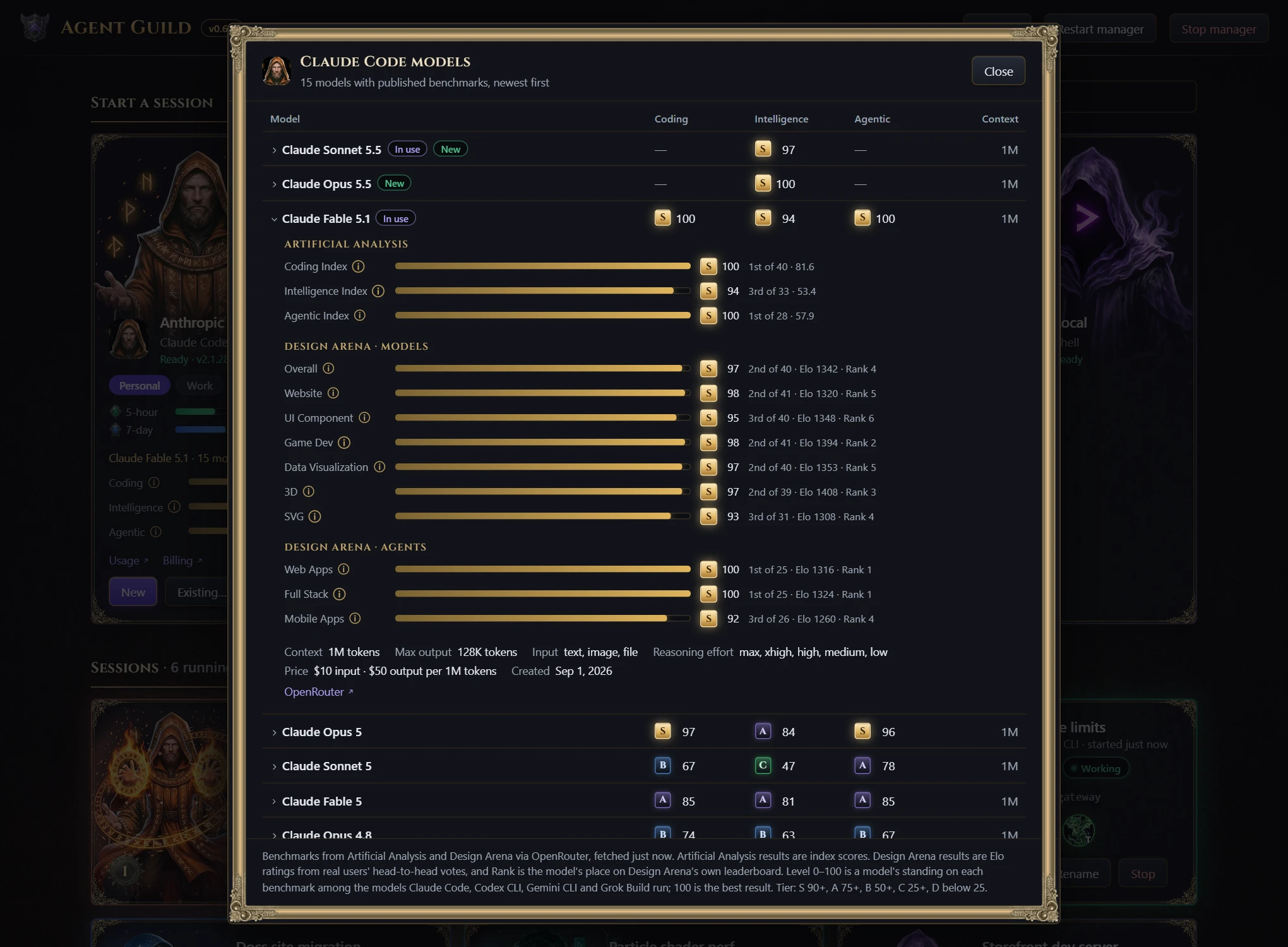
Pick the right model. Each card grades the tool's newest fully benchmarked model on coding, intelligence and agentic work, from S to D. Open it to compare every model the tool offers across 13 benchmarks: Artificial Analysis indexes and Design Arena results for websites, UI, game dev, data visualization, 3D, SVG, web apps, full stack and mobile. It also shows context size and price.
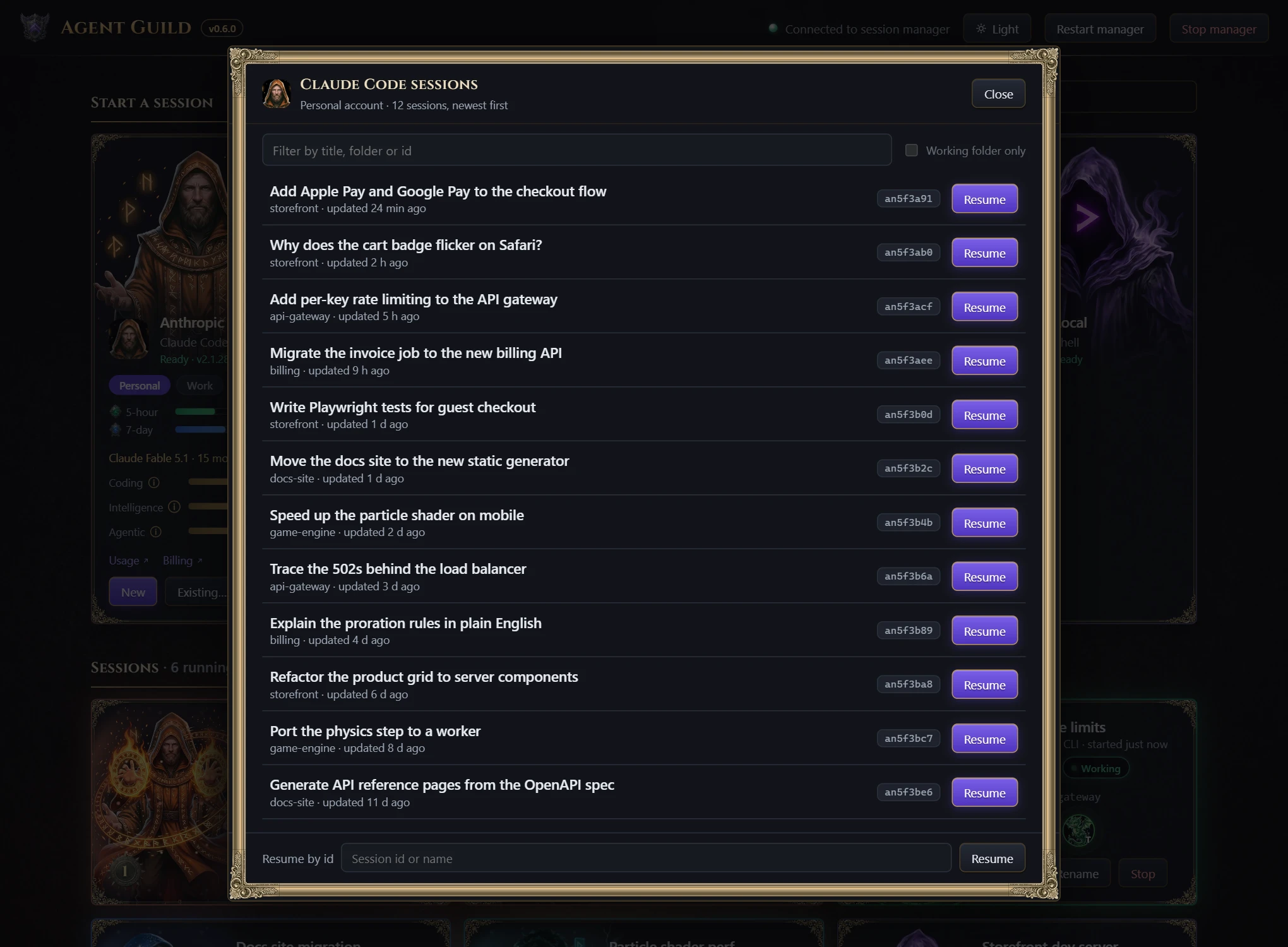
Pick up where you left off. Existing… lists the tool's own earlier sessions, newest first, read from where the tool keeps them. Filter by title, folder or id and resume one in its own folder, or resume any session by id.
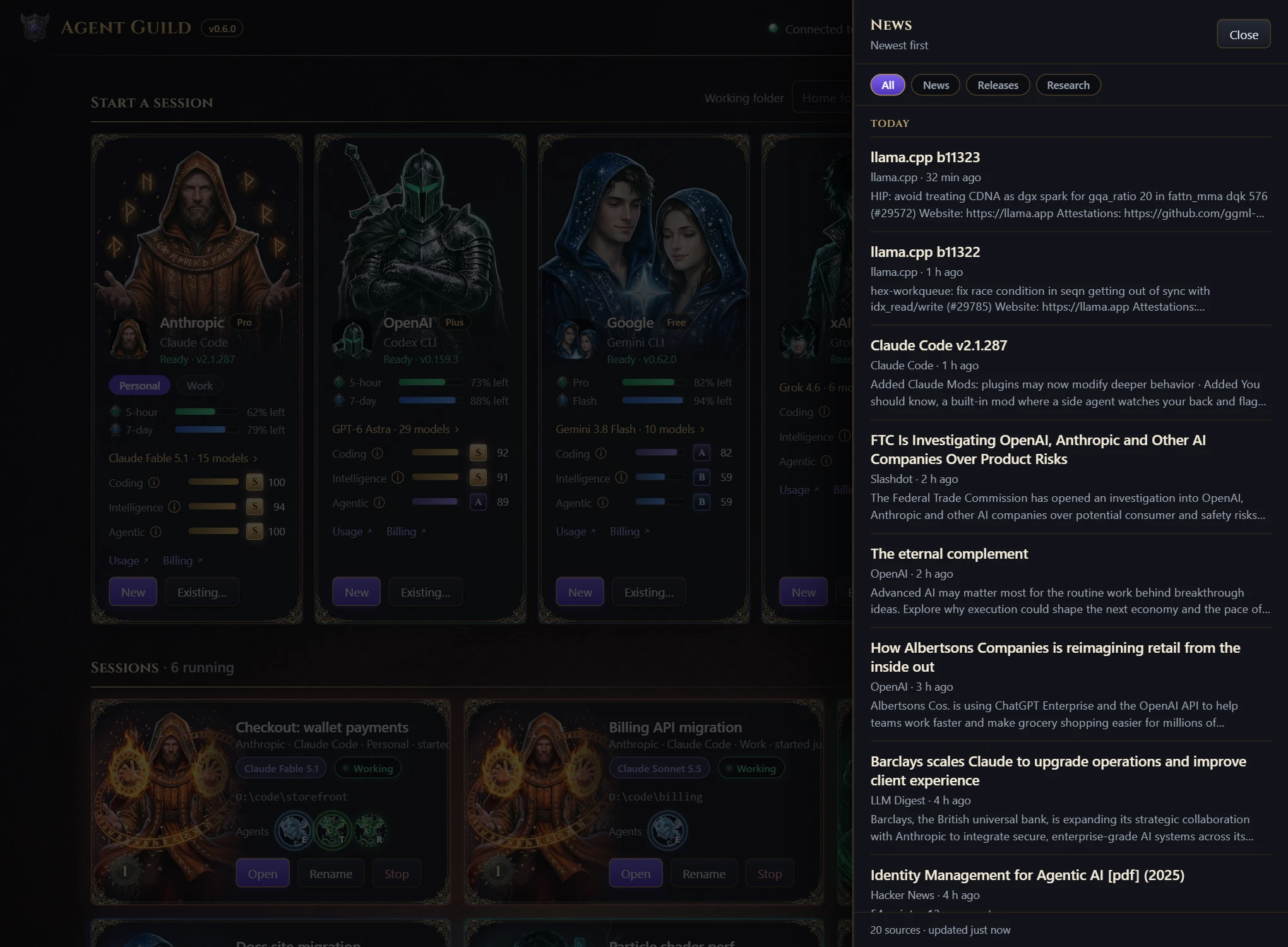
Agentic development news. A newsfeed gathers about 20 sources on AI coding, agents and local models, including vendor blogs, Hacker News, arXiv, and releases of the tools you have installed. The five latest headlines appear on the page; All news opens the full feed with News, Releases and Research filters.
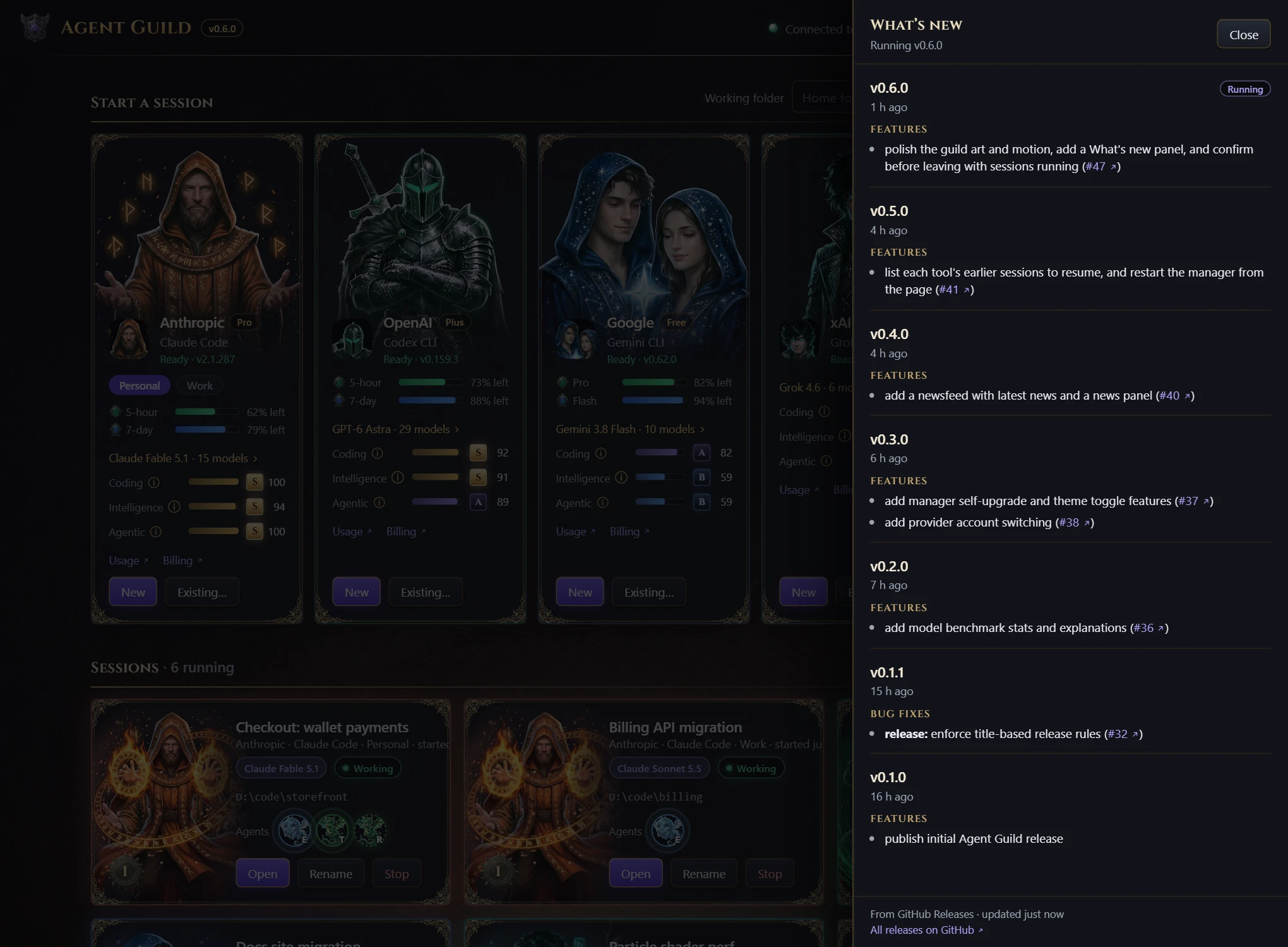
Always current. When a new Agent Guild is published, Upgrade to vX.Y.Z installs it while your sessions keep running, and Restart to use vX.Y.Z switches over when you are ready. The version badge opens What's new with the notes of every release.
Appearance. The Appearance menu in the top bar picks a skin and light or dark mode, without a reload. Guild is the default fantasy look; Professional is a plain business look with no characters; Orbital puts a crew of little robots in deep space. The page follows your system's light or dark setting until you pick one. See docs/SKINS.md to make another.
Commands
| Command | What it does |
|---|---|
agent-guild or agent-guild open | Start the manager if needed and open the page. --no-browser prints the URL instead. |
agent-guild status | Show whether the manager is running and list its sessions. |
agent-guild stop | Stop the manager, ending every session. |
agent-guild restart | Stop the manager and start it again on the version installed on disk, ending every session. |
agent-guild url | Print the page URL with its access token. |
agent-guild start | Run the manager in the foreground, for debugging. |
The page's Restart manager and Stop manager buttons do the same as
restart and stop, but ask first while sessions are running. The page also
asks before you close it with sessions running. Sessions end when the manager
stops or the computer restarts.
Configuration
Nothing needs configuring. To add a provider, change a command, sign in with
more than one account or point usage meters at your own command, create a
providers.json in the data folder:
| Platform | Data folder |
|---|---|
| Windows | %APPDATA%\AgentGuild |
| macOS | ~/Library/Application Support/AgentGuild |
| Linux | ~/.config/agent-guild |
The full reference, including every field and environment variable, is in docs/configuration.md.
Show agents and models
Agents are reported by the coding tool, not guessed from its output. To see
them, add the hooks from the matching file in examples/ to
Claude Code, Codex CLI, Gemini CLI or Grok Build. Each helper agent then
appears on the card while it runs, and the card shows the model in use.
Without hooks, the card still names the model when it is given with
--model or shown on the tool's screen.
The hooks call agent-guild-report, which the manager puts on the PATH of
every session, so nothing else needs installing. Two tools need a one-time
approval:
- Codex CLI runs no hook until you trust it: choose "Trust all and continue"
when it starts, or run
/hooks. - Claude Code runs none until you accept its workspace-trust prompt.
Any other tool or script can report agents and its model too. See docs/agent-reporting.md.
Security and privacy
- The manager listens on
127.0.0.1only. - Every API call needs a random per-user token, stored in the data folder with owner-only permissions. Anyone who can run programs as your user can read it, as with any local developer tool.
- Requests with a foreign
HostorOriginheader are refused, so other websites cannot reach your terminals through your browser. - Tools inside a session get a separate token that can only report agents for that session.
- GitHub sign-ins, the SSH key Agent Guild makes for each GitHub account and
GitHub's SSH host keys are kept in the
githubfolder of the data folder, readable only by you. A clone uses only that key and those host keys; your own~/.sshand Git configuration are not read or changed. - Usage meters are fetched by the manager with each tool's own sign-in. The page only receives percentages. On macOS the first lookup may ask for keychain access to the "Claude Code-credentials" and "gemini-cli-oauth" items; choose Always Allow.
The manager makes these outbound requests, and none of them carry your code or prompts:
| To | For | How often |
|---|---|---|
| npm registry | Tool and Agent Guild version checks | About hourly; AGENT_GUILD_NO_UPDATE_CHECK=1 turns them off |
| Anthropic, OpenAI and Google usage endpoints | Usage meters, with the tool's own sign-in | Every minute while the page is open |
| OpenRouter's public model list | Benchmarks | Every 6 hours |
| Public news feeds, Hacker News, arXiv and GitHub | The newsfeed | Every 30 minutes while the page is open |
| GitHub's releases API | What's new | Hourly |
| GitHub (sign-in, API, avatars and SSH) | Signing in to GitHub, listing your repositories, adding your SSH key and cloning | When you use Clone from GitHub… |
Other front ends
The page is one client of the manager's local API, documented in docs/api.md. Another interface, such as a planned Unreal Engine guild hall, can drive the same sessions at the same time. See docs/architecture.md.
Development
git clone https://github.com/oddessentials/agent-guild.git
cd agent-guild
npm install
npm start      # open the page, starting a manager from this checkout if none runs
npm test
- The tests start real managers and real pseudo-terminals, using a small fake
coding tool in
tests/fixtures. CI runs them on Windows, macOS and Linux with Node.js 22, 24 and 26, and installs the packed package on x64 and arm64. - In a checkout,
launchers/AgentGuild.cmd(Windows) andlaunchers/AgentGuild.command(macOS) start Agent Guild with a double-click. node docs/capture/capture.mjs --root <folder>refreshes the screenshots indocs/imagesfrom the real page, with demo sessions in place of real tools. The cards show the folder's path, so pick a neutral one such asD:\codeor/work. It needs Chrome or Edge and leaves any running manager alone. See the comment at the top of the script for options.- Pull request titles follow
Conventional Commits. Merging to
mainpublishes a release to npm and GitHub when it includes afeat,fix,perforrevert.
Current limits
- Sessions end when the manager stops or the computer restarts.
- Grok Build has no usage meter.
- Gemini CLI usage meters read its sign-in where Gemini CLI keeps it:
oauth_creds.json, or withGEMINI_FORCE_ENCRYPTED_FILE_STORAGE=truethe OS keychain (macOS, or Linux withsecret-tool) or its encrypted credentials file. A sign-in kept in the Windows Credential Manager cannot be read.
License
MIT © Odd Essentials
Similar repos


Languages
JavaScript
84.0%
CSS
11.2%
Python
2.8%
HTML
1.8%
Orchestrate the swarm. An agentic coder building suite for managing simultaneous workflows and accounts.
JavaScript
0
85 commits
updated Oct 2, 2026
See what people are saying
README
Agent Guild runs Claude Code, Codex CLI, Gemini CLI, Grok Build and your own shell side by side, in real terminals, from one local web page. Each session is a card that shows what the tool is doing, which model it runs and which helper agents it has summoned. Close the page whenever you like; the sessions keep working.
See it in action in the Agent Guild trailer.
Quick start
npm install -g @oddessentials/agent-guild
agent-guild
The page opens in your browser. Pick a provider, press New, and you are in a live terminal.
You need Node.js 22 or newer on Windows 10 1809+, macOS 11+ or Linux (x64 or arm64), and each coding tool you want to use, signed in on its own. Agent Guild installs the tools for you but never handles your sign-in. No compiler and no WSL are needed.
Features
Every major coding CLI, one place. Claude Code, Codex CLI, Gemini CLI, Grok Build and a plain shell each get a card. A tool that is missing shows Install, which runs the install in a session you can watch. An installed tool shows its version and offers Update when a newer one is out, using the same installer that put it there: npm, Homebrew, WinGet or the vendor's own.
Real terminals that outlive the page. Every session is a full interactive terminal: type instructions, answer prompts, watch output. Run as many as you like. A local session manager owns them, so you can close or reload the page and come back to the same screens.
Agents and models at work. Helper agents that a tool starts appear on its card as familiars while they run, and the card names the model in use. The character comes alive while the session works, and the session's level rises with every hour it runs.
Several subscriptions per tool. Add a work account next to your personal one and switch with a chip on the card. Each account keeps its own sign-in, usage meters and sessions. See Accounts.
See what is left of your limits. Claude Code, Codex CLI and Gemini CLI cards show a meter for each rate-limit window, such as 5-hour and 7-day, with the time until it resets. They also show your plan, Claude's extra-usage spend and Codex's credit balance when the account has them. Any other tool can supply a command that prints its usage.
Pick the right model. Each card grades the tool's newest fully benchmarked model on coding, intelligence and agentic work, from S to D. Open it to compare every model the tool offers across 13 benchmarks: Artificial Analysis indexes and Design Arena results for websites, UI, game dev, data visualization, 3D, SVG, web apps, full stack and mobile. It also shows context size and price.
Pick up where you left off. Existing… lists the tool's own earlier sessions, newest first, read from where the tool keeps them. Filter by title, folder or id and resume one in its own folder, or resume any session by id.
Agentic development news. A newsfeed gathers about 20 sources on AI coding, agents and local models, including vendor blogs, Hacker News, arXiv, and releases of the tools you have installed. The five latest headlines appear on the page; All news opens the full feed with News, Releases and Research filters.
Always current. When a new Agent Guild is published, Upgrade to vX.Y.Z installs it while your sessions keep running, and Restart to use vX.Y.Z switches over when you are ready. The version badge opens What's new with the notes of every release.
Appearance. The Appearance menu in the top bar picks a skin and light or dark mode, without a reload. Guild is the default fantasy look; Professional is a plain business look with no characters; Orbital puts a crew of little robots in deep space. The page follows your system's light or dark setting until you pick one. See docs/SKINS.md to make another.
Commands
| Command | What it does |
|---|---|
agent-guild or agent-guild open | Start the manager if needed and open the page. --no-browser prints the URL instead. |
agent-guild status | Show whether the manager is running and list its sessions. |
agent-guild stop | Stop the manager, ending every session. |
agent-guild restart | Stop the manager and start it again on the version installed on disk, ending every session. |
agent-guild url | Print the page URL with its access token. |
agent-guild start | Run the manager in the foreground, for debugging. |
The page's Restart manager and Stop manager buttons do the same as
restart and stop, but ask first while sessions are running. The page also
asks before you close it with sessions running. Sessions end when the manager
stops or the computer restarts.
Configuration
Nothing needs configuring. To add a provider, change a command, sign in with
more than one account or point usage meters at your own command, create a
providers.json in the data folder:
| Platform | Data folder |
|---|---|
| Windows | %APPDATA%\AgentGuild |
| macOS | ~/Library/Application Support/AgentGuild |
| Linux | ~/.config/agent-guild |
The full reference, including every field and environment variable, is in docs/configuration.md.
Show agents and models
Agents are reported by the coding tool, not guessed from its output. To see
them, add the hooks from the matching file in examples/ to
Claude Code, Codex CLI, Gemini CLI or Grok Build. Each helper agent then
appears on the card while it runs, and the card shows the model in use.
Without hooks, the card still names the model when it is given with
--model or shown on the tool's screen.
The hooks call agent-guild-report, which the manager puts on the PATH of
every session, so nothing else needs installing. Two tools need a one-time
approval:
- Codex CLI runs no hook until you trust it: choose "Trust all and continue"
when it starts, or run
/hooks. - Claude Code runs none until you accept its workspace-trust prompt.
Any other tool or script can report agents and its model too. See docs/agent-reporting.md.
Security and privacy
- The manager listens on
127.0.0.1only. - Every API call needs a random per-user token, stored in the data folder with owner-only permissions. Anyone who can run programs as your user can read it, as with any local developer tool.
- Requests with a foreign
HostorOriginheader are refused, so other websites cannot reach your terminals through your browser. - Tools inside a session get a separate token that can only report agents for that session.
- GitHub sign-ins, the SSH key Agent Guild makes for each GitHub account and
GitHub's SSH host keys are kept in the
githubfolder of the data folder, readable only by you. A clone uses only that key and those host keys; your own~/.sshand Git configuration are not read or changed. - Usage meters are fetched by the manager with each tool's own sign-in. The page only receives percentages. On macOS the first lookup may ask for keychain access to the "Claude Code-credentials" and "gemini-cli-oauth" items; choose Always Allow.
The manager makes these outbound requests, and none of them carry your code or prompts:
| To | For | How often |
|---|---|---|
| npm registry | Tool and Agent Guild version checks | About hourly; AGENT_GUILD_NO_UPDATE_CHECK=1 turns them off |
| Anthropic, OpenAI and Google usage endpoints | Usage meters, with the tool's own sign-in | Every minute while the page is open |
| OpenRouter's public model list | Benchmarks | Every 6 hours |
| Public news feeds, Hacker News, arXiv and GitHub | The newsfeed | Every 30 minutes while the page is open |
| GitHub's releases API | What's new | Hourly |
| GitHub (sign-in, API, avatars and SSH) | Signing in to GitHub, listing your repositories, adding your SSH key and cloning | When you use Clone from GitHub… |
Other front ends
The page is one client of the manager's local API, documented in docs/api.md. Another interface, such as a planned Unreal Engine guild hall, can drive the same sessions at the same time. See docs/architecture.md.
Development
git clone https://github.com/oddessentials/agent-guild.git
cd agent-guild
npm install
npm start      # open the page, starting a manager from this checkout if none runs
npm test
- The tests start real managers and real pseudo-terminals, using a small fake
coding tool in
tests/fixtures. CI runs them on Windows, macOS and Linux with Node.js 22, 24 and 26, and installs the packed package on x64 and arm64. - In a checkout,
launchers/AgentGuild.cmd(Windows) andlaunchers/AgentGuild.command(macOS) start Agent Guild with a double-click. node docs/capture/capture.mjs --root <folder>refreshes the screenshots indocs/imagesfrom the real page, with demo sessions in place of real tools. The cards show the folder's path, so pick a neutral one such asD:\codeor/work. It needs Chrome or Edge and leaves any running manager alone. See the comment at the top of the script for options.- Pull request titles follow
Conventional Commits. Merging to
mainpublishes a release to npm and GitHub when it includes afeat,fix,perforrevert.
Current limits
- Sessions end when the manager stops or the computer restarts.
- Grok Build has no usage meter.
- Gemini CLI usage meters read its sign-in where Gemini CLI keeps it:
oauth_creds.json, or withGEMINI_FORCE_ENCRYPTED_FILE_STORAGE=truethe OS keychain (macOS, or Linux withsecret-tool) or its encrypted credentials file. A sign-in kept in the Windows Credential Manager cannot be read.
License
MIT © Odd Essentials
Similar repos
Languages
JavaScript
84.0%
CSS
11.2%
Python
2.8%
HTML
1.8%