
🍀 Opinionated Agents Development Environment for Teams. Run a forest of agents locally or as serverless in parallel, manage, and monitor them.
See the codeSee what people are saying (1)
README

Grove
The workspace manager for AI coding agents. Spin up a forest of isolated workspaces on one shared machine. Reach any of them from your terminal, your browser, or another agent, and hand each one the specs, screenshots and tickets it works from.


Supports





🌳 Overview
- Writing the code stopped being the slow part. Deciding what to build did. More agents can build in parallel but shared checkouts cause conflicts and laptops limit capacity. Grove adds IDE tools around those agents without replacing them. It manages their workspaces and runtimes and gives you tools to guide their work.
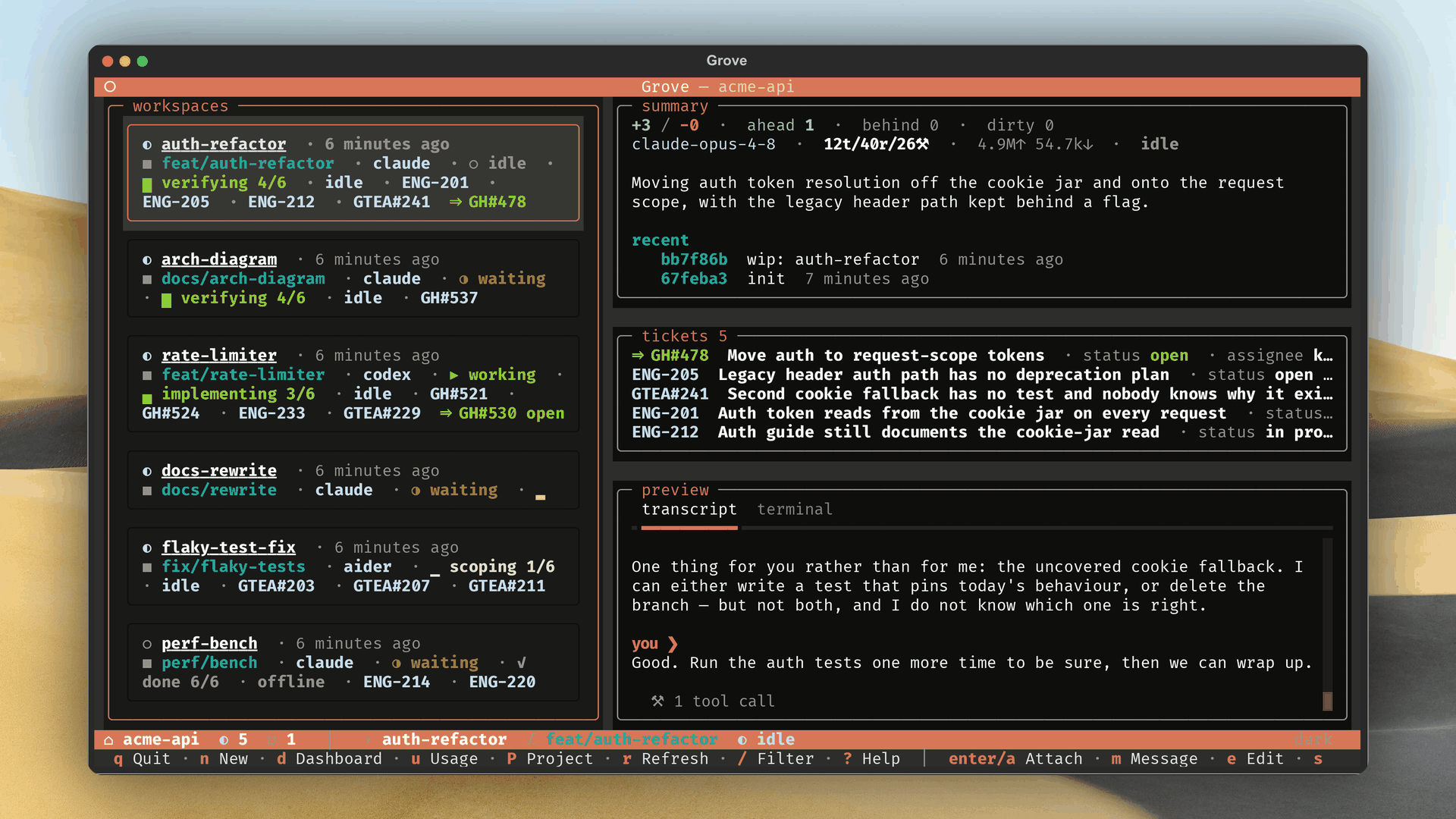
- Give each task its own workspace. Each agent gets its own worktree and branch in a separate window. Agents report progress phases for the workspace and each attached ticket independently. You can see what is being planned, built or verified across the fleet.
- Choose how each agent runs. Run agents on your host with the environment they normally inherit. Or use a container defined by your repository's
.devcontainer/. It provides separate services and ports with resource limits. Use that isolation for runs with agent permission checks disabled. - Choose where the work runs. Tests, builds and scripts compete for CPU and memory across concurrent workspaces. Move those workloads off your laptop when it slows down. Reuse the container configuration on a shared team machine or serverless cloud infrastructure.
- Let the tracker start the work. Assign an issue and Grove starts a workspace for it. Progress returns to the same ticket. Follow the task where you defined it.
- Show it instead of describing it. Mark up a screenshot or collaborate with the agent on a diagram. Approve the diagram or mockup and attach it to a ticket. Then coordinate your fleet around it.
✨ Features
Terminal UIGrove is a terminal program first. Run |
|
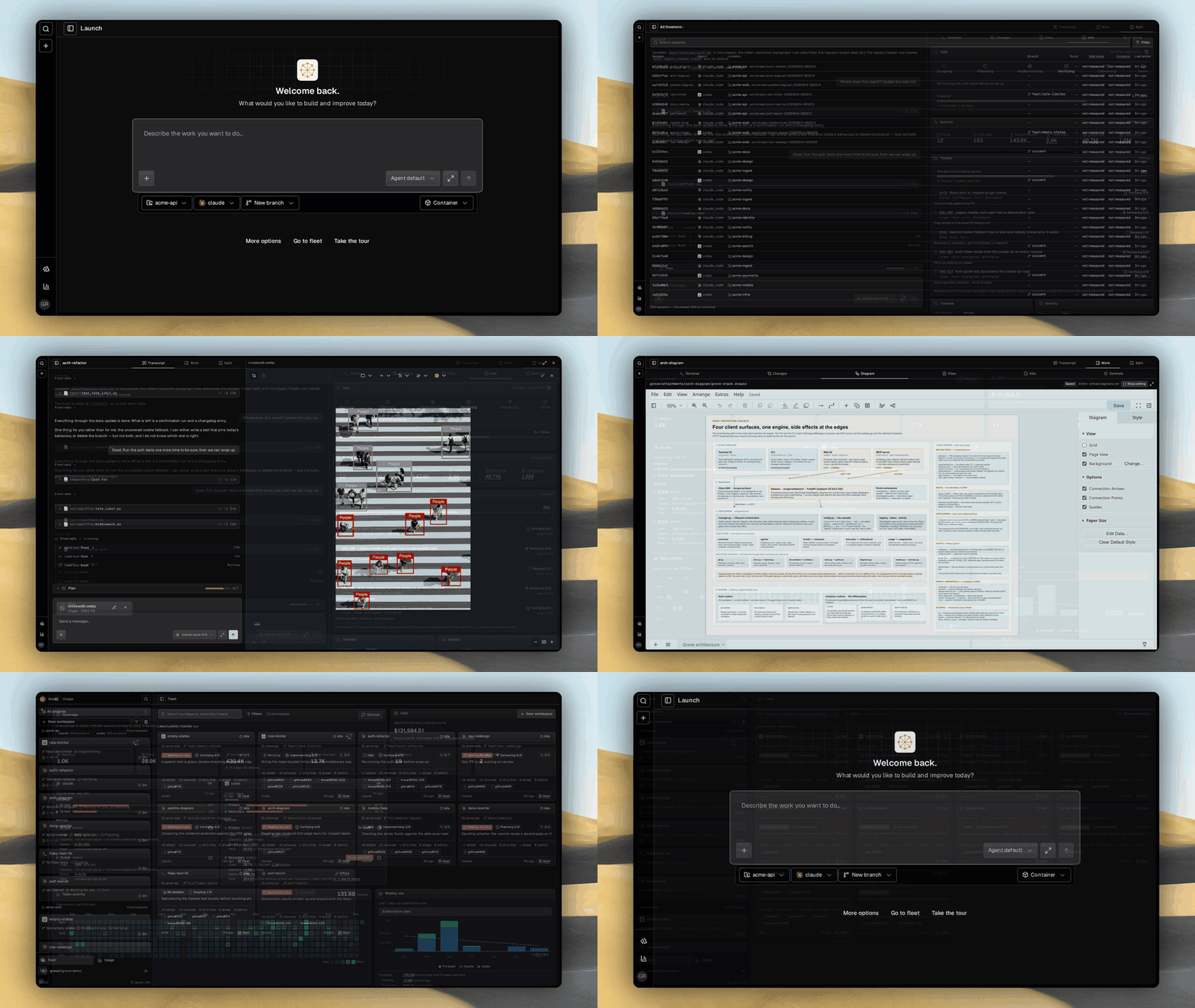
The whole fleet in your browserReach every agent over your network to read a transcript, steer a run mid-flight, or spin up a workspace from the fleet grid, all behind a one-time device pairing that keeps the daemon on loopback. |
|
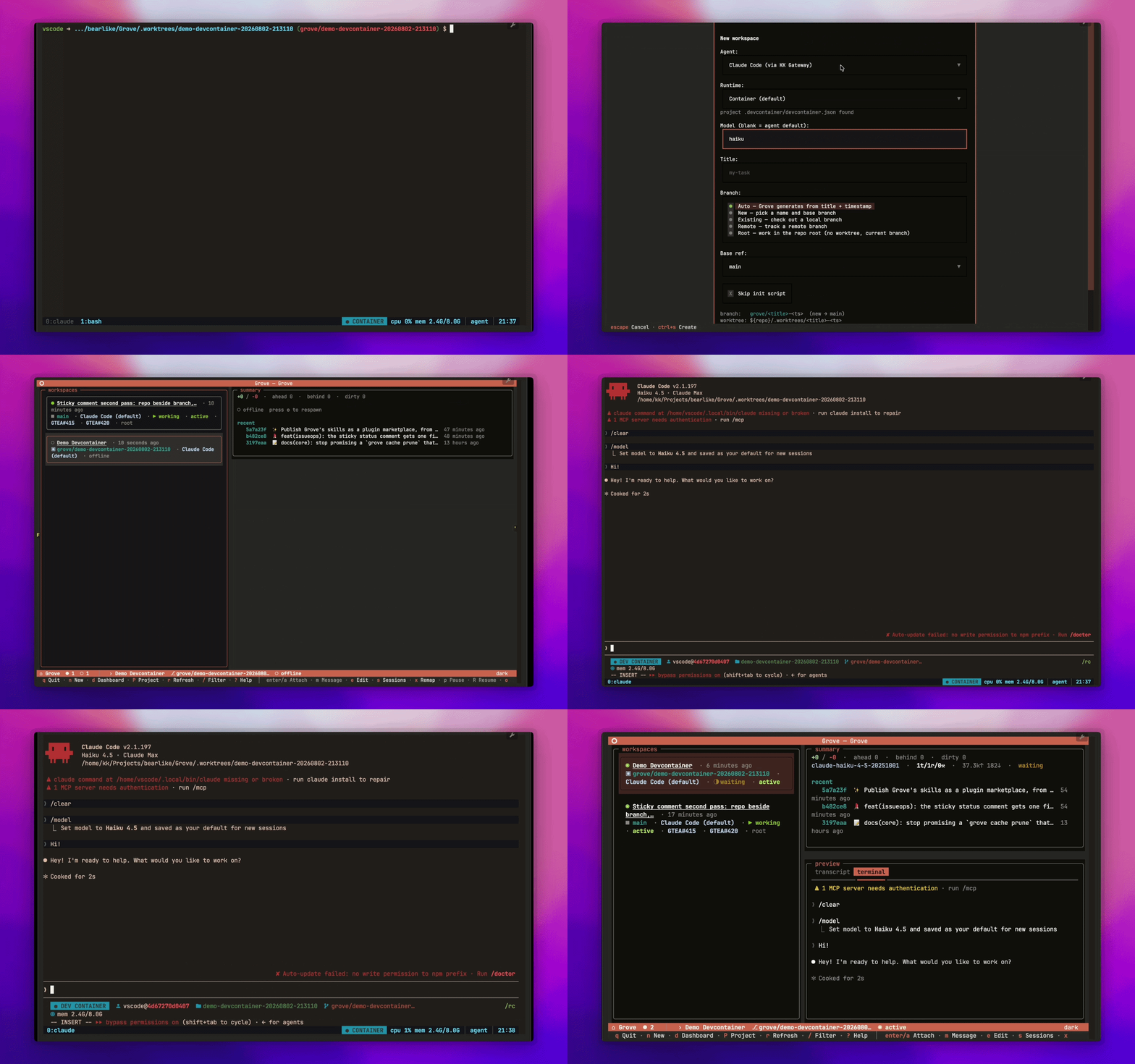
Containerized agentsOptionally, run agents inside devcontainers. Each gets a complete stack of its own, Docker in Docker, so it starts its own database and services without touching yours. It comes up out of your project's |
|
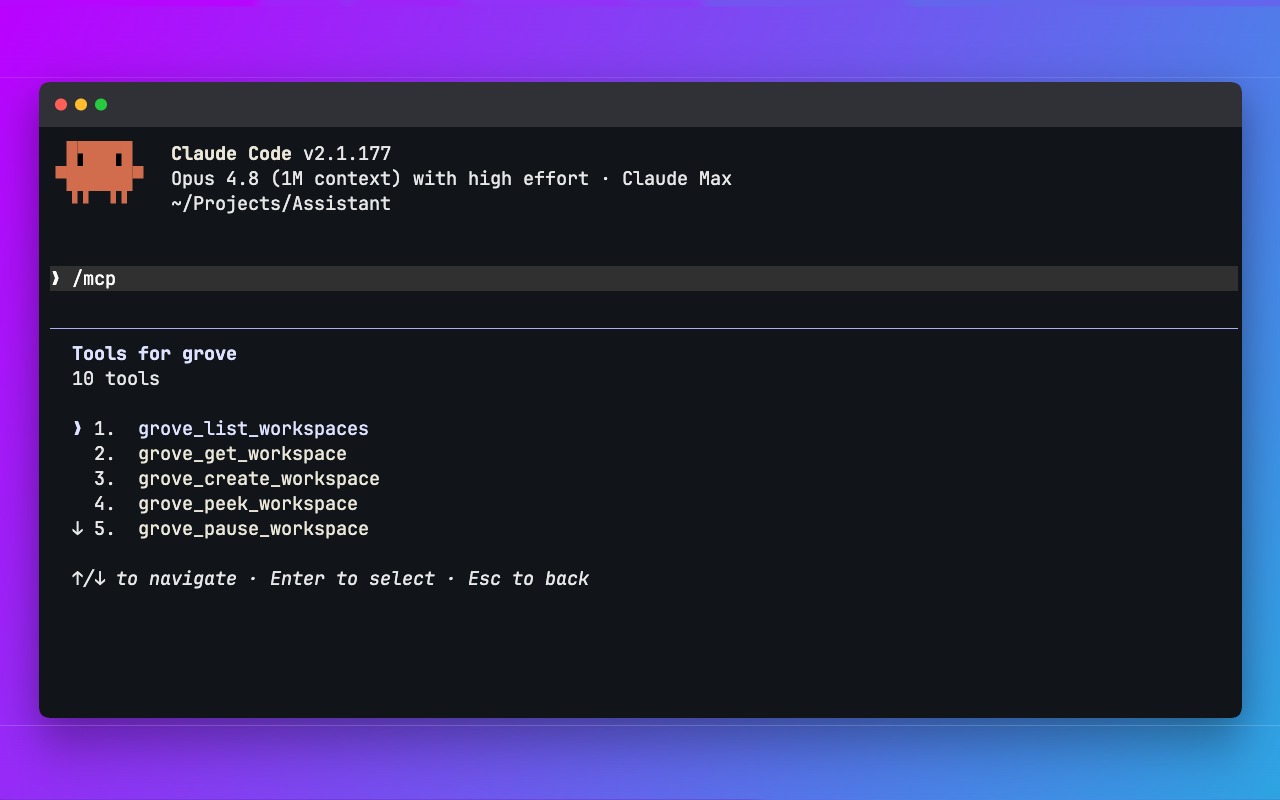
Drive Grove from any agentGrove ships an MCP server. Claude Code, Codex, OpenCode and other orchestrators create workspaces, dispatch tasks, send follow-ups and steer the fleet — your agents managing work at the scale of a whole project. |
|
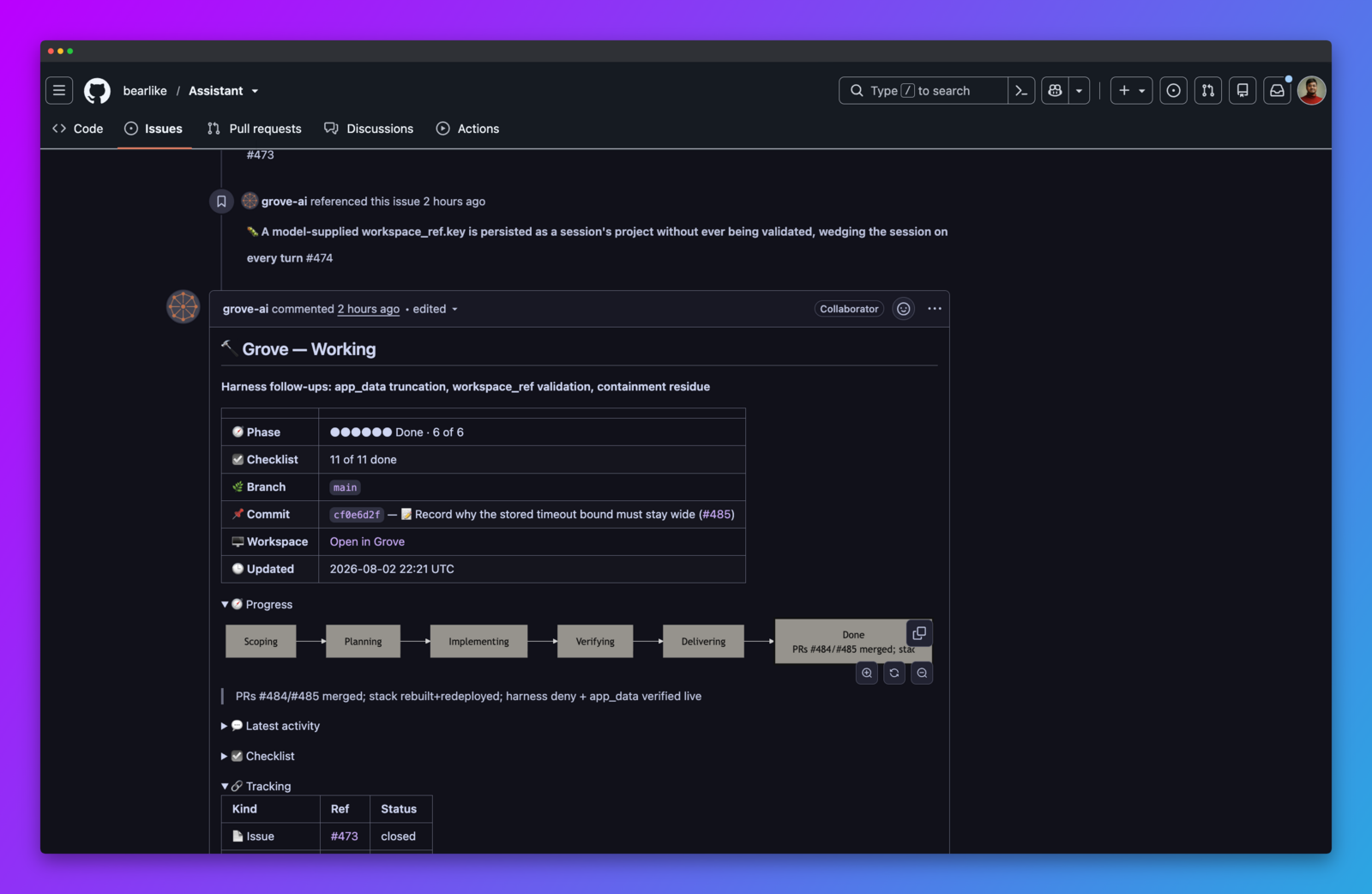
Status lands on the ticketEvery ticket a Grove workspace works gets one comment, rewritten in place as the work moves. The phase, the checklist and the latest commit stay current where your team already looks. Nobody has to ask, and there is no second dashboard to check. |
|
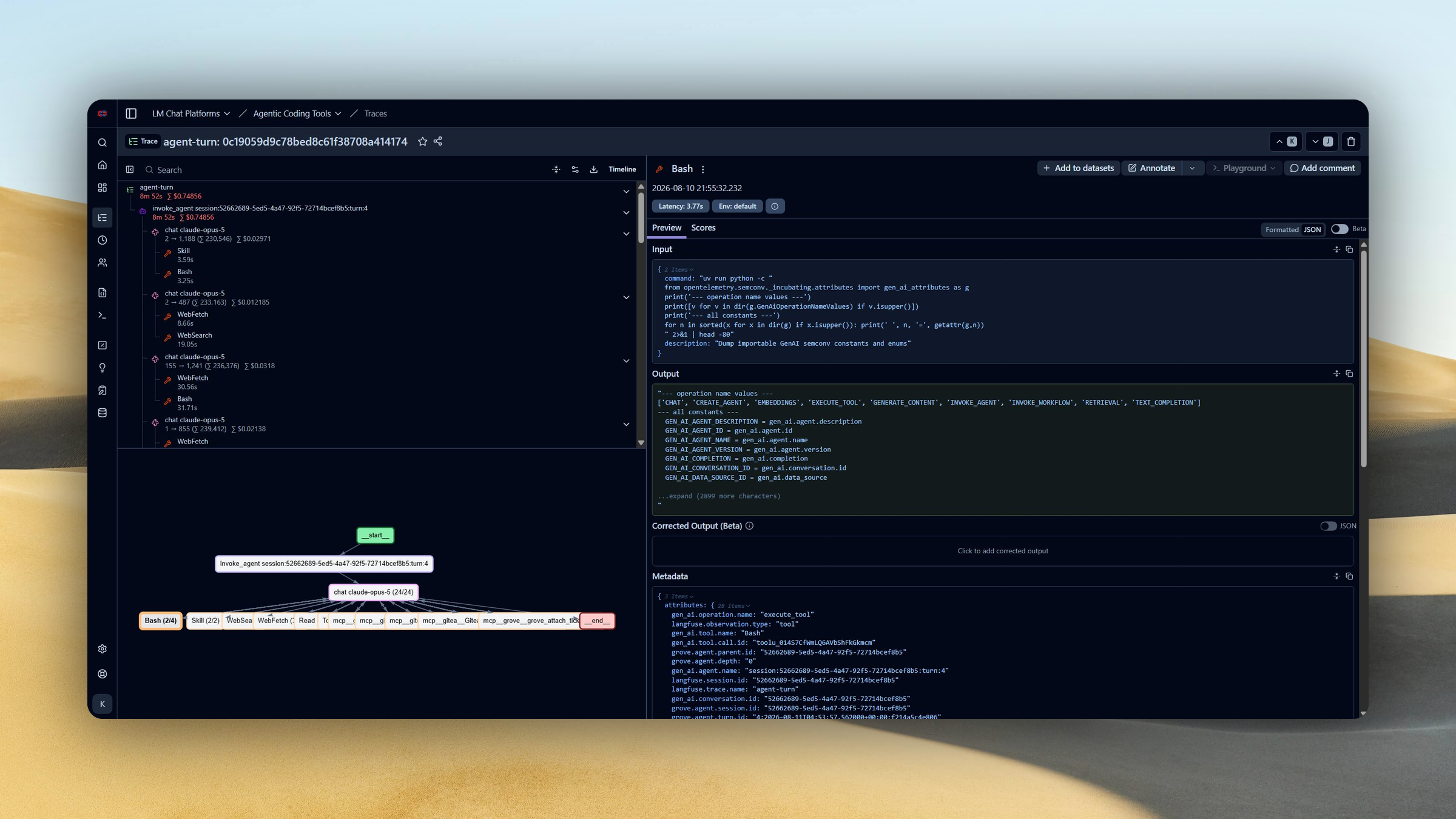
Audit and tune the whole fleetAgents now act on staging and production unattended, and off-the-shelf harnesses leave no record you can hold them to. Grove turns each turn into one trace, so a team can see what ran where, what it cost, and which tool calls are eating the time. Point it at Langfuse or any OTLP backend. |
|
Also in the box:
- Branch-aware lifecycle. Create, pause, resume, respawn, and kill. Pause keeps the branch and drops the worktree. Kill deletes only branches Grove created, never remotes.
- Configuration cascade. A committed
.grove/config.jsonsets the team baseline. Six layers let each developer override locally without touching it. - Per-agent model selection. Each agent exposes its own model catalog. Pick the model per workspace: a cheap one for scaffolding, a strong one for the hard refactor, side by side.
- Session recovery. Grove pane-verifies each agent session and re-adopts it across daemon restarts and a different user attaching. A stale pointer remaps to the recovered session in a click.
- Ticket providers. Attach a GitHub, Gitea or Linear issue or pull request to a workspace, or let Grove read the link straight off the branch name so it follows the branch.
- Push notifications. Get pinged when an agent finishes a turn or needs you.
- Attachments and annotation. Paste a screenshot or attach a file in either composer, draw on the image before it goes, and the agent is handed a path inside its own worktree.
- Diagram collaboration. A person and an agent edit one draw.io file with revision checks. Quick UI mockups and architecture specs are approved as a picture before code exists.
- Subscription windows. Every plan's usage, reset and burn rate in one place, with a forecast of which limit you hit first.
- Usage trends. A year of tokens by day, cost and latency per model, and where the time goes across agents and projects.
- Local by default. The audit is projected from transcripts on your own disk. Export is opt-in, and prompt bodies stay off unless you enable them.
https://github.com/user-attachments/assets/256714c5-37e5-4c9d-8b2d-47422d5aae0f
🚀 Get started
Grove needs git and tmux, and installs to your PATH as grove straight from the repo. With uv:
uv tool install "grove[daemon] @ git+https://github.com/bearlike/Grove"

cd path/to/your/repo
grove config init        # scaffold .grove/config.json
grove                    # launch the TUI
uv tool upgrade grove    # update later
No uv? Use pipx install "grove[daemon] @ git+https://github.com/bearlike/Grove" or plain pip install --user. See Get Started for prerequisites and every install path.
🤖 Let an AI agent configure Grove for you
Configuration has a few layers and many knobs, so you do not have to write it by hand. Hand the prompt below to Claude Code, Codex or any coding agent. It reads Grove's config skill and sets things up with you, then verifies every field against the version you actually installed.
Read https://raw.githubusercontent.com/bearlike/Grove/current/src/grove/skills/configuring-grove/SKILL.md

It is the skill for configuring Grove, a terminal workspace manager for AI
coding agents. It covers the six-layer cascade, agents, init scripts,
containers and ticket providers.

Help me write my Grove user and project config, then verify every field
against my installed version with `grove config schema --stdout`.
🤖 Skills for Claude Code
claude plugin marketplace add https://github.com/bearlike/Grove.git
Teach your agent to drive Grove and to configure it for a project
Four skills, shipped from the repository that implements them, so they never
drift from the code. They are the same files grove skills install copies into
a tool's skills directory.
| Skill | For |
|---|---|
using-grove | Driving a fleet from outside. CLI verbs, MCP tool ids, ticket and PR linking |
working-in-grove | The agent inside a workspace, reporting phase and keeping attached tickets current |
configuring-grove | The config cascade, agents, init scripts, containers, ticket providers |
reinstalling-grove | When an update did not take |
📚 Documentation
Full documentation lives at https://bearlike.github.io/Grove/latest/.
| Section | Covers |
|---|---|
| Get Started | Install, prerequisites, first run, verify. |
| Configure | Project setup, agents, init scripts, configuration reference. |
| Use | TUI tour, CLI, web IDE, authentication, daily workflow. |
| Capabilities | Lifecycle, branch provenance, live activity, status semantics, configuration cascade. |
| Develop | Architecture, public API, engineering principles, contributing, design system. |
| Troubleshooting | Symptom → cause → fix for common failures. |
🤝 Contributing
Bugs and feature requests on the issue tracker. For development setup, lint/test commands, and PR conventions, see the contributing guide and CLAUDE.md.
📄 License
MIT © Krishnakanth Alagiri.
Contributors

14 commits

1 commits
Similar repos


Languages
Python
69.7%
TypeScript
28.6%
🍀 Opinionated Agents Development Environment for Teams. Run a forest of agents locally or as serverless in parallel, manage, and monitor them.
See the codeSee what people are saying (1)
README
Grove
The workspace manager for AI coding agents. Spin up a forest of isolated workspaces on one shared machine. Reach any of them from your terminal, your browser, or another agent, and hand each one the specs, screenshots and tickets it works from.
Supports
🌳 Overview
- Writing the code stopped being the slow part. Deciding what to build did. More agents can build in parallel but shared checkouts cause conflicts and laptops limit capacity. Grove adds IDE tools around those agents without replacing them. It manages their workspaces and runtimes and gives you tools to guide their work.
- Give each task its own workspace. Each agent gets its own worktree and branch in a separate window. Agents report progress phases for the workspace and each attached ticket independently. You can see what is being planned, built or verified across the fleet.
- Choose how each agent runs. Run agents on your host with the environment they normally inherit. Or use a container defined by your repository's
.devcontainer/. It provides separate services and ports with resource limits. Use that isolation for runs with agent permission checks disabled. - Choose where the work runs. Tests, builds and scripts compete for CPU and memory across concurrent workspaces. Move those workloads off your laptop when it slows down. Reuse the container configuration on a shared team machine or serverless cloud infrastructure.
- Let the tracker start the work. Assign an issue and Grove starts a workspace for it. Progress returns to the same ticket. Follow the task where you defined it.
- Show it instead of describing it. Mark up a screenshot or collaborate with the agent on a diagram. Approve the diagram or mockup and attach it to a ticket. Then coordinate your fleet around it.
✨ Features
Terminal UIGrove is a terminal program first. Run |
|
The whole fleet in your browserReach every agent over your network to read a transcript, steer a run mid-flight, or spin up a workspace from the fleet grid, all behind a one-time device pairing that keeps the daemon on loopback. |
|
Containerized agentsOptionally, run agents inside devcontainers. Each gets a complete stack of its own, Docker in Docker, so it starts its own database and services without touching yours. It comes up out of your project's |
|
Drive Grove from any agentGrove ships an MCP server. Claude Code, Codex, OpenCode and other orchestrators create workspaces, dispatch tasks, send follow-ups and steer the fleet — your agents managing work at the scale of a whole project. |
|
Status lands on the ticketEvery ticket a Grove workspace works gets one comment, rewritten in place as the work moves. The phase, the checklist and the latest commit stay current where your team already looks. Nobody has to ask, and there is no second dashboard to check. |
|
Audit and tune the whole fleetAgents now act on staging and production unattended, and off-the-shelf harnesses leave no record you can hold them to. Grove turns each turn into one trace, so a team can see what ran where, what it cost, and which tool calls are eating the time. Point it at Langfuse or any OTLP backend. |
|
Also in the box:
- Branch-aware lifecycle. Create, pause, resume, respawn, and kill. Pause keeps the branch and drops the worktree. Kill deletes only branches Grove created, never remotes.
- Configuration cascade. A committed
.grove/config.jsonsets the team baseline. Six layers let each developer override locally without touching it. - Per-agent model selection. Each agent exposes its own model catalog. Pick the model per workspace: a cheap one for scaffolding, a strong one for the hard refactor, side by side.
- Session recovery. Grove pane-verifies each agent session and re-adopts it across daemon restarts and a different user attaching. A stale pointer remaps to the recovered session in a click.
- Ticket providers. Attach a GitHub, Gitea or Linear issue or pull request to a workspace, or let Grove read the link straight off the branch name so it follows the branch.
- Push notifications. Get pinged when an agent finishes a turn or needs you.
- Attachments and annotation. Paste a screenshot or attach a file in either composer, draw on the image before it goes, and the agent is handed a path inside its own worktree.
- Diagram collaboration. A person and an agent edit one draw.io file with revision checks. Quick UI mockups and architecture specs are approved as a picture before code exists.
- Subscription windows. Every plan's usage, reset and burn rate in one place, with a forecast of which limit you hit first.
- Usage trends. A year of tokens by day, cost and latency per model, and where the time goes across agents and projects.
- Local by default. The audit is projected from transcripts on your own disk. Export is opt-in, and prompt bodies stay off unless you enable them.
https://github.com/user-attachments/assets/256714c5-37e5-4c9d-8b2d-47422d5aae0f
🚀 Get started
Grove needs git and tmux, and installs to your PATH as grove straight from the repo. With uv:
uv tool install "grove[daemon] @ git+https://github.com/bearlike/Grove"

cd path/to/your/repo
grove config init        # scaffold .grove/config.json
grove                    # launch the TUI
uv tool upgrade grove    # update later
No uv? Use pipx install "grove[daemon] @ git+https://github.com/bearlike/Grove" or plain pip install --user. See Get Started for prerequisites and every install path.
🤖 Let an AI agent configure Grove for you
Configuration has a few layers and many knobs, so you do not have to write it by hand. Hand the prompt below to Claude Code, Codex or any coding agent. It reads Grove's config skill and sets things up with you, then verifies every field against the version you actually installed.
Read https://raw.githubusercontent.com/bearlike/Grove/current/src/grove/skills/configuring-grove/SKILL.md

It is the skill for configuring Grove, a terminal workspace manager for AI
coding agents. It covers the six-layer cascade, agents, init scripts,
containers and ticket providers.

Help me write my Grove user and project config, then verify every field
against my installed version with `grove config schema --stdout`.
🤖 Skills for Claude Code
claude plugin marketplace add https://github.com/bearlike/Grove.git
Teach your agent to drive Grove and to configure it for a project
Four skills, shipped from the repository that implements them, so they never
drift from the code. They are the same files grove skills install copies into
a tool's skills directory.
| Skill | For |
|---|---|
using-grove | Driving a fleet from outside. CLI verbs, MCP tool ids, ticket and PR linking |
working-in-grove | The agent inside a workspace, reporting phase and keeping attached tickets current |
configuring-grove | The config cascade, agents, init scripts, containers, ticket providers |
reinstalling-grove | When an update did not take |
📚 Documentation
Full documentation lives at https://bearlike.github.io/Grove/latest/.
| Section | Covers |
|---|---|
| Get Started | Install, prerequisites, first run, verify. |
| Configure | Project setup, agents, init scripts, configuration reference. |
| Use | TUI tour, CLI, web IDE, authentication, daily workflow. |
| Capabilities | Lifecycle, branch provenance, live activity, status semantics, configuration cascade. |
| Develop | Architecture, public API, engineering principles, contributing, design system. |
| Troubleshooting | Symptom → cause → fix for common failures. |
🤝 Contributing
Bugs and feature requests on the issue tracker. For development setup, lint/test commands, and PR conventions, see the contributing guide and CLAUDE.md.
📄 License
MIT © Krishnakanth Alagiri.
Similar repos
Contributors
14 commits
1 commits
Languages
Python
69.7%
TypeScript
28.6%