
See what people are saying
README
ProjectTodo
A small to-do board for a person and their AI assistant, kept on your own machine. One page, a JSON file, no dependencies, and an MCP server so the assistant you already use (Claude Code, Claude Desktop, or anything that speaks MCP) can read and update the same to-dos you see.
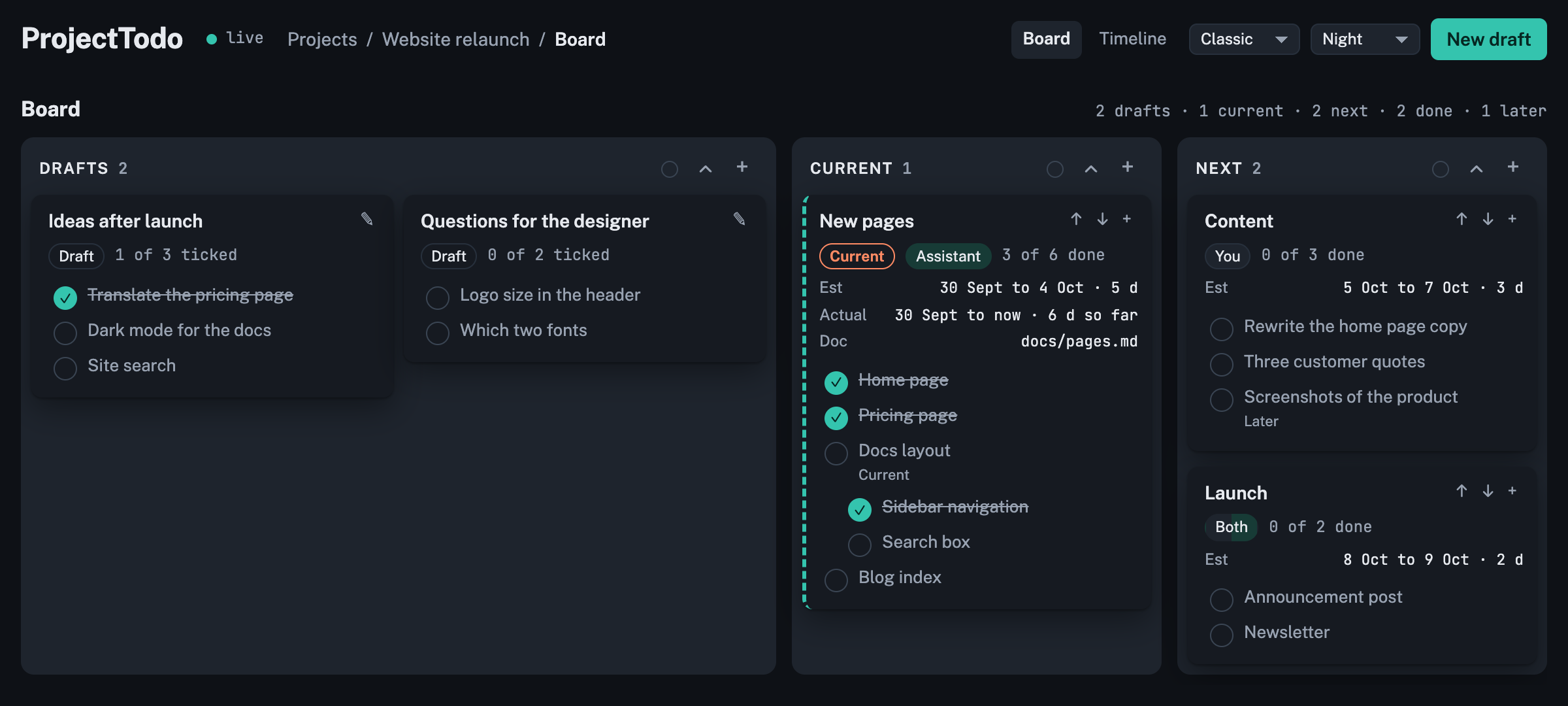
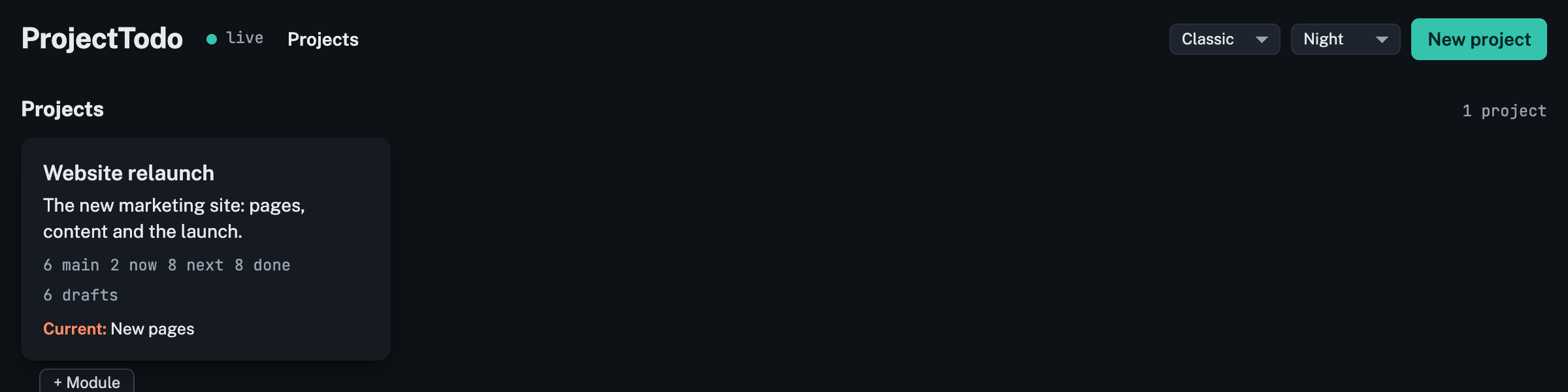
- Projects on the first page, each a card. Open one for its board; the pencil on a card
edits its name, description and folders. A project can keep its to-dos in a folder of
its own (
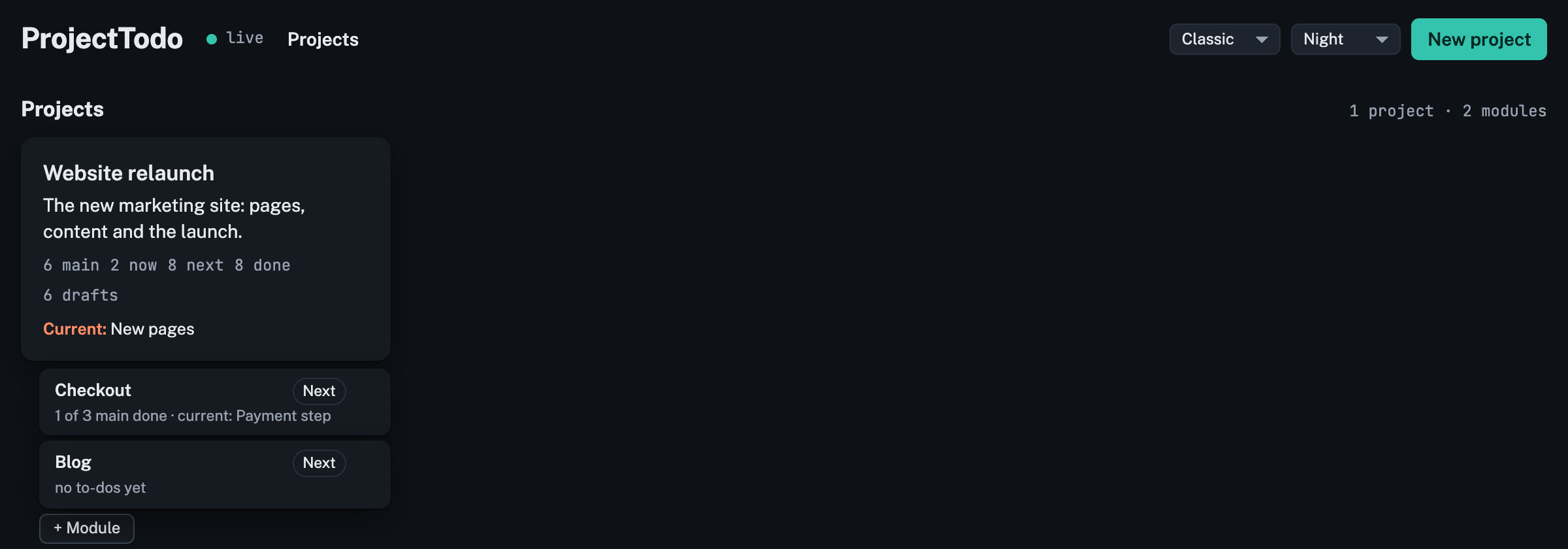
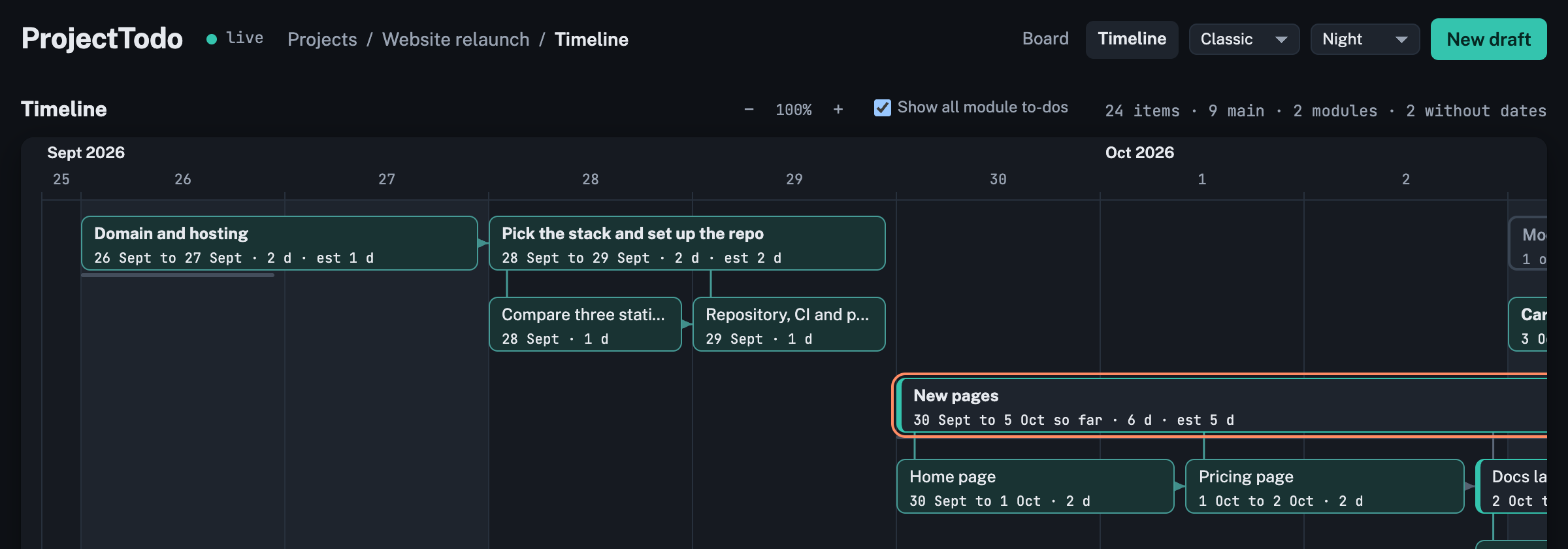
todos.jsoninside it, so a repository can commit its own rows) and read and write its documents in its own folder; both are asked for when the project is made and default to the server's folders. The server reads and writes whichever folders you name, which is fine on your own machine and the reason it should stay there. - Modules: a project can be split into modules, each a project inside it with its own board, timeline, lanes, current to-do and documents (it uses the project's folders unless it sets its own). A module has a status of its own, like a card (Current, Next, Later or Done; new modules start in Next), whatever is inside it. The projects page lists a project's modules with that status, how many main to-dos are done and the current one; on the project's board a module is a card of its own in that lane, marked Module, which opens the module's board; drag the card to another lane to change its status; "+ Module" adds one. The header's breadcrumb reads Projects / project / module / Board or Timeline, each part a link, and the Board and Timeline switch sits at the right by the layout picker. The project's own timeline shows each module as a bar from its earliest start to its latest end, with a "Show all module to-dos" switch that hangs every to-do of every module under its bar, trees included. To move a to-do into a module, drop its card on the module's card; to move it back to the project or to another module, pick the place in the editor's In field; everything under it moves along.
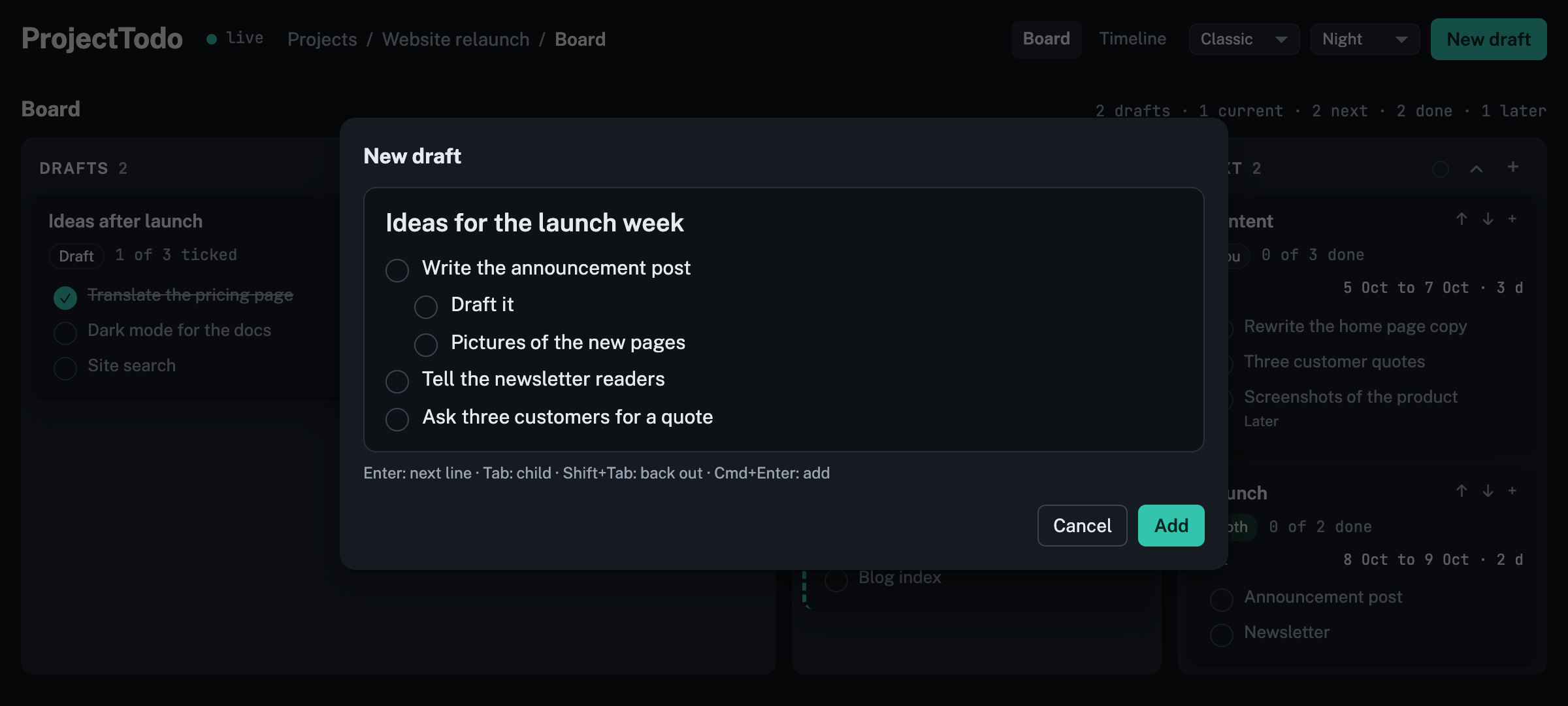
- Board: lanes for Drafts, Current, Next, Done and Later. Press + on Drafts (or "New draft") and type a title and a list like a notepad: Enter for the next line, Tab for a child, Shift+Tab back out; the pad is one text field, so you can select across lines, copy the list, or paste a list in (each line becomes a line). "Add" makes one draft card with those lines; the title can wait, an untitled draft is a loose list the assistant groups and titles when it is submitted, and a to-do needs a title before it leaves Drafts. You go through the drafts with your assistant; it fills in the details and moves them on. A card is a main to-do; everything under it is listed inside the card, ticked when done. Drag cards between lanes. Click a card's header to fold it to one row or open it again (Done and Later cards start folded); click the card's body or a line to see that to-do's details, with an Edit button there; double-click the header to edit the main to-do straight away; click a line's circle to tick it done. The + on a card, or in the details view, opens the pad without a title field: its lines become to-dos under that one, in its lane, with Tab making a child of the line above. A card cannot go to Done until every line in it is ticked. Each lane's header has an arrow that folds or opens every card in it, and a colour dot that colours the lane; drag a lane's header to move the lane. Order and colours are kept on the project. Drafts is twice as wide as the other lanes; Done and Later sit past the right edge and scroll into view.
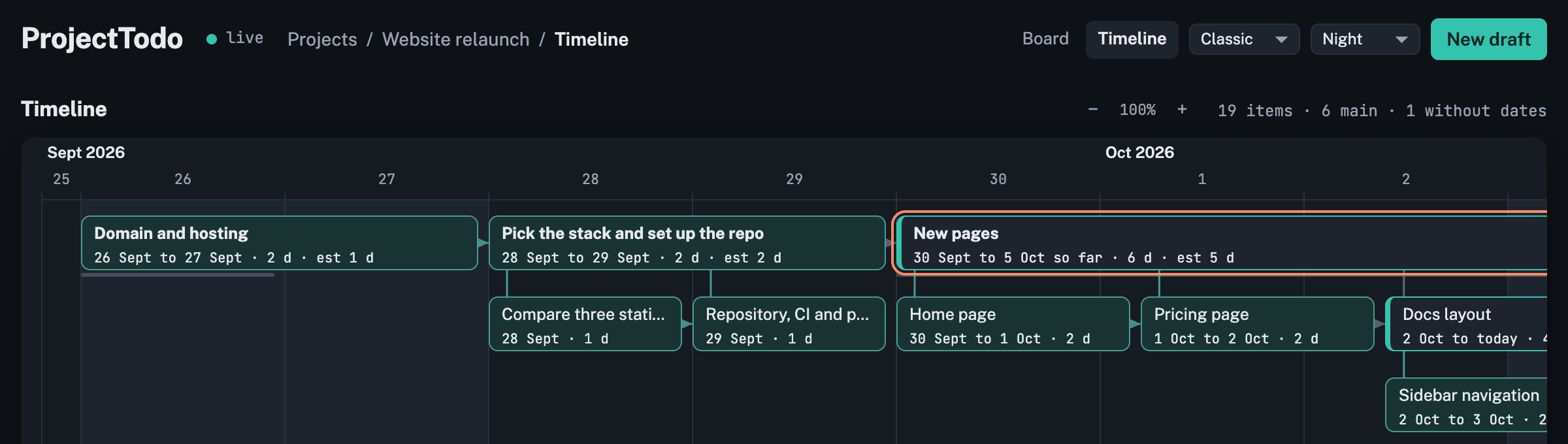
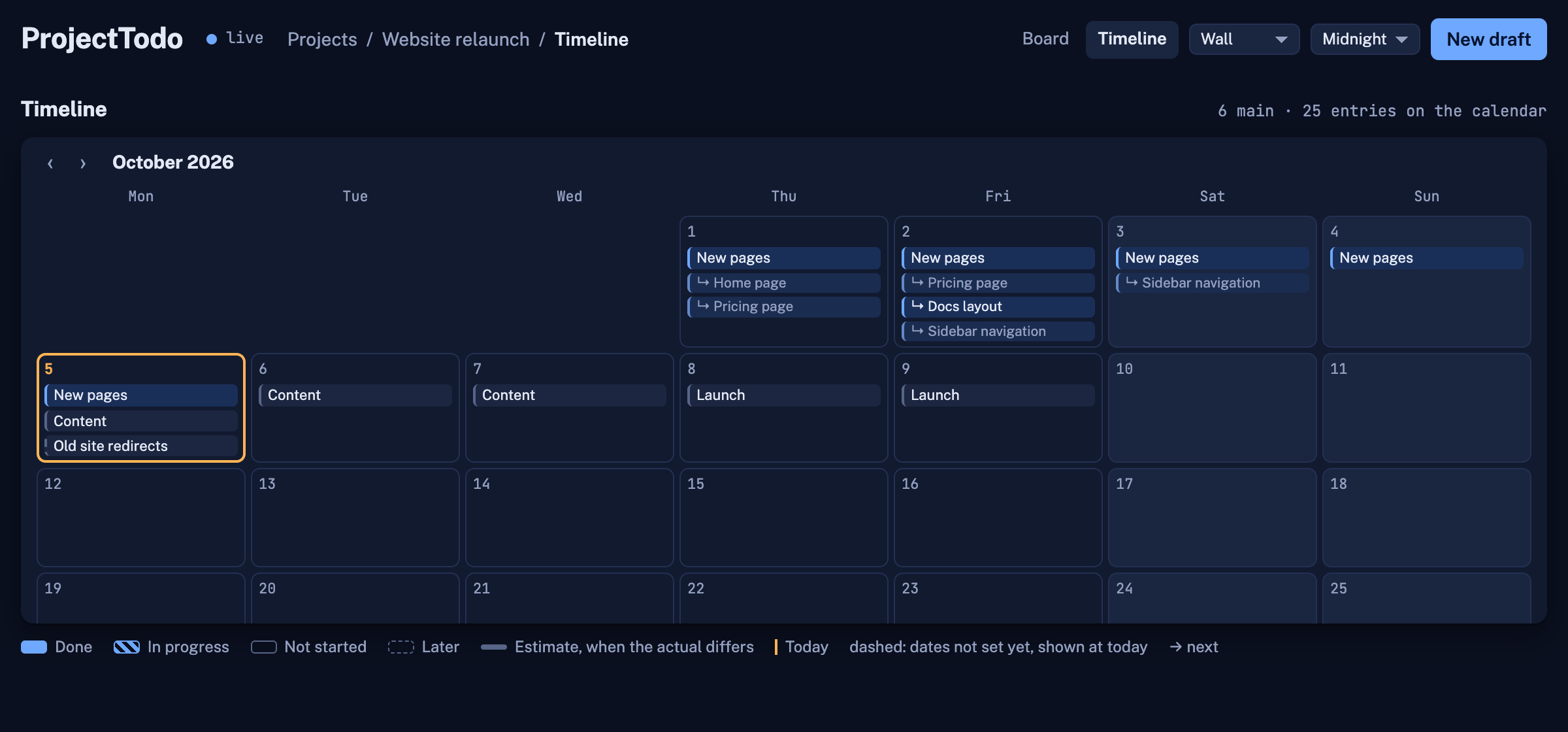
- Timeline: dates along the top. A main to-do (one without a parent) spans its days, and one with a start time begins at that time and ends at its end time or at now, kept at least as wide as its tree needs; one with only an end time ends at that time. The boxes pack to the top in the board's order, all lanes together, each in the first row with room for it; rows are one box tall and a tree takes several, so a box can sit under another box whose tree does not reach there. Drag a box to any row where nothing is in its way (a band shows the row, red where there is no room) and it stays there; nothing else moves. A main to-do that has not started can also be dragged along the days to move its estimated dates, or stretched at either edge to change its estimated start or end; its to-dos hang under it, siblings left to right, children below their parent, in as many columns as its days allow. A main to-do with no dates is shown at today, dashed, until it gets dates (dragging it sets them), so moving another to-do never moves it. The thin line under a main to-do is its estimate when the actual days differ. The project's current main to-do is outlined: setting it starts it today; when it is done, its end is the end of the last finished to-do under it. So by finishing things, every to-do ends up with its real dates. A main to-do dropped into an empty Current lane becomes the current one; dropped beside another it is a second card in progress; moved out of Current or finished, it stops being current. The timeline opens on today, a line walks across today's column with the time (hover it to read it), and the view zooms with the − and + buttons, Cmd and scroll, or Cmd and minus, plus and 0.
- Live: every change saves at once and shows up for everyone with the page open.
- On a phone: one lane at a time on the board, swiped sideways; dialogs open at the top so the keyboard does not cover them; the draft pad has ‹ › buttons for levels since a phone has no Tab key; touch targets are larger and hover-only controls are always shown.
- Themes: Auto (follows the system), Day, Night, Midnight, Forest, Ember, Paper, Rose and Slate, from the menu in the header; remembered per browser.
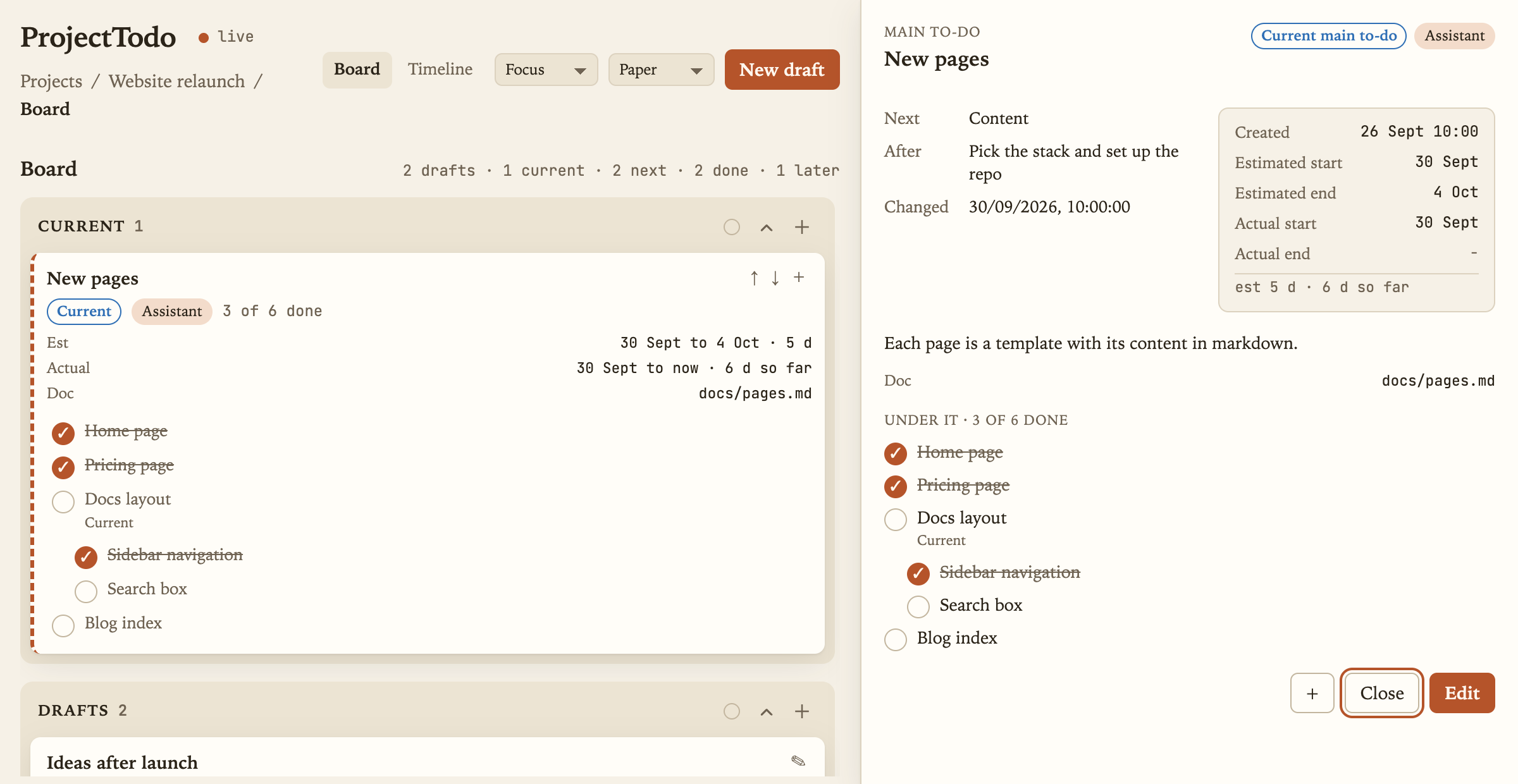
- Layouts, from the menu beside the theme; a layout changes the structure, a theme the colours, and changing one leaves the other as chosen. Classic is the board above. Compact (pictured in Slate): every lane one unit wide, tighter cards and smaller type, smaller boxes on the timeline. Focus (pictured in Paper): one column with Current first, a click shows a to-do's details docked on the right instead of a modal, and the timeline is an agenda, one row per day with what starts, runs or finishes on it, times included; board and agenda end at the bottom of the window and scroll inside themselves, the agenda opening on today. Wall (pictured in Midnight): a grid of equal cards with the lane as a tag on each, and the timeline is a month calendar, one month in view, moved with the arrows or a sideways scroll; here a to-do changes lane through its form.
| Projects | Draft pad |
|---|---|
 |  |
| A project's modules | The project's timeline with its modules |
|---|---|
 |  |
| Paper | Midnight |
|---|---|
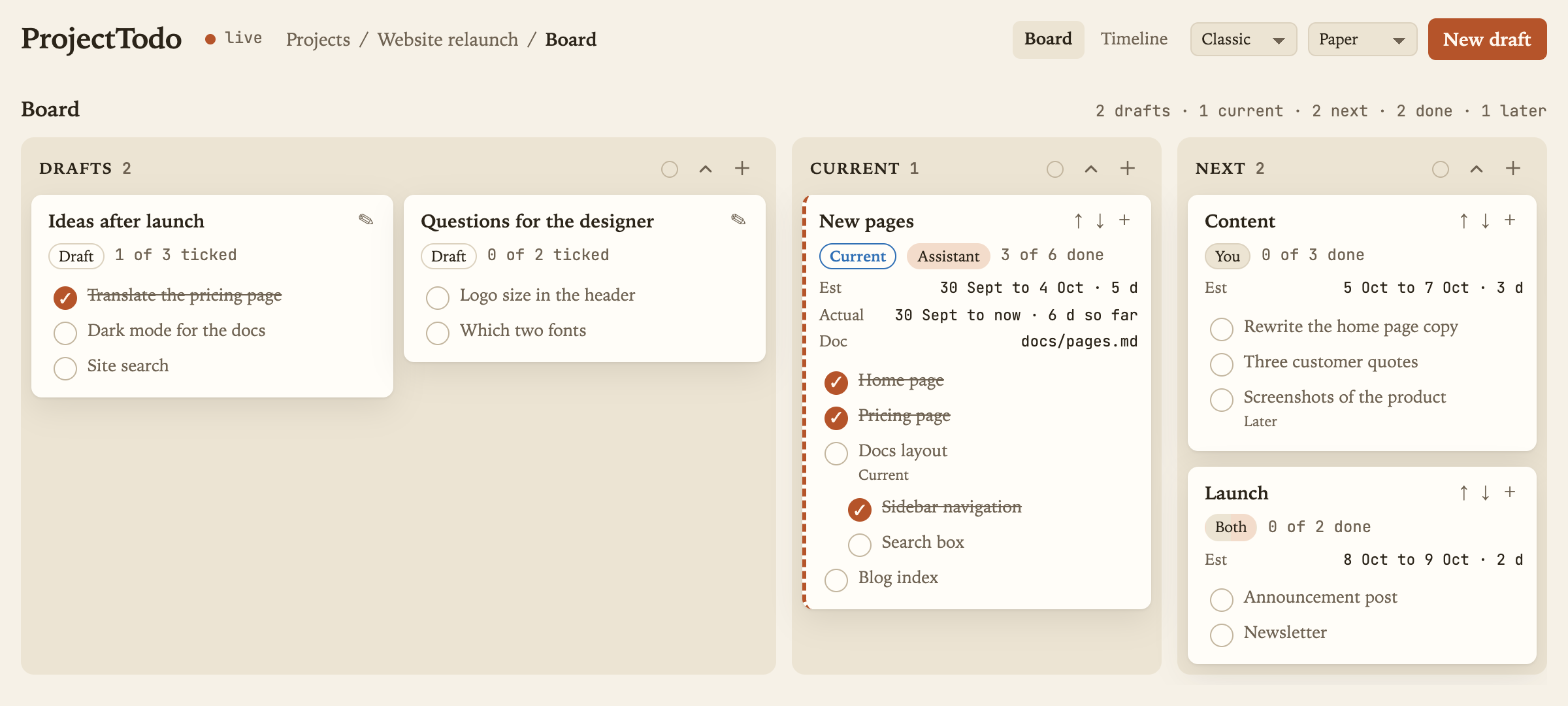 | 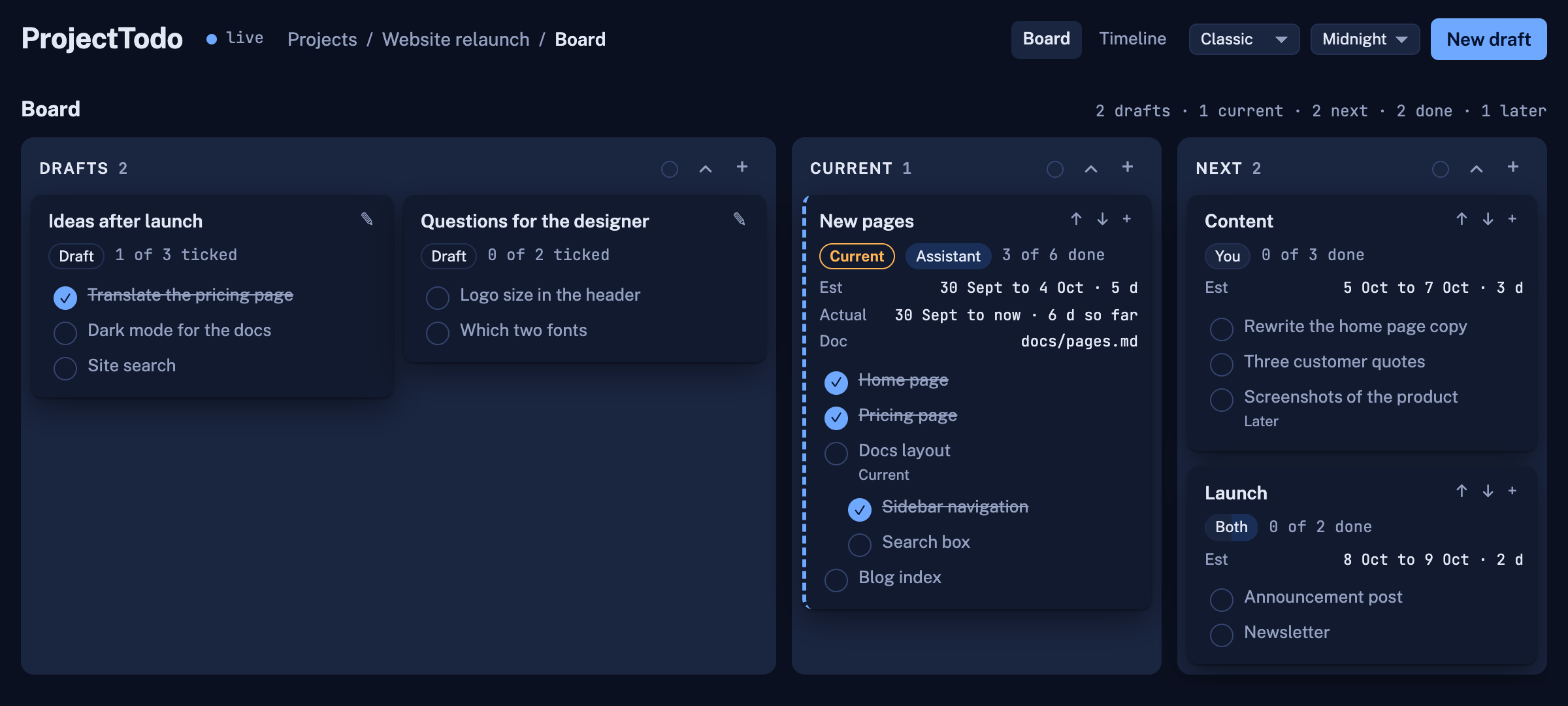 |
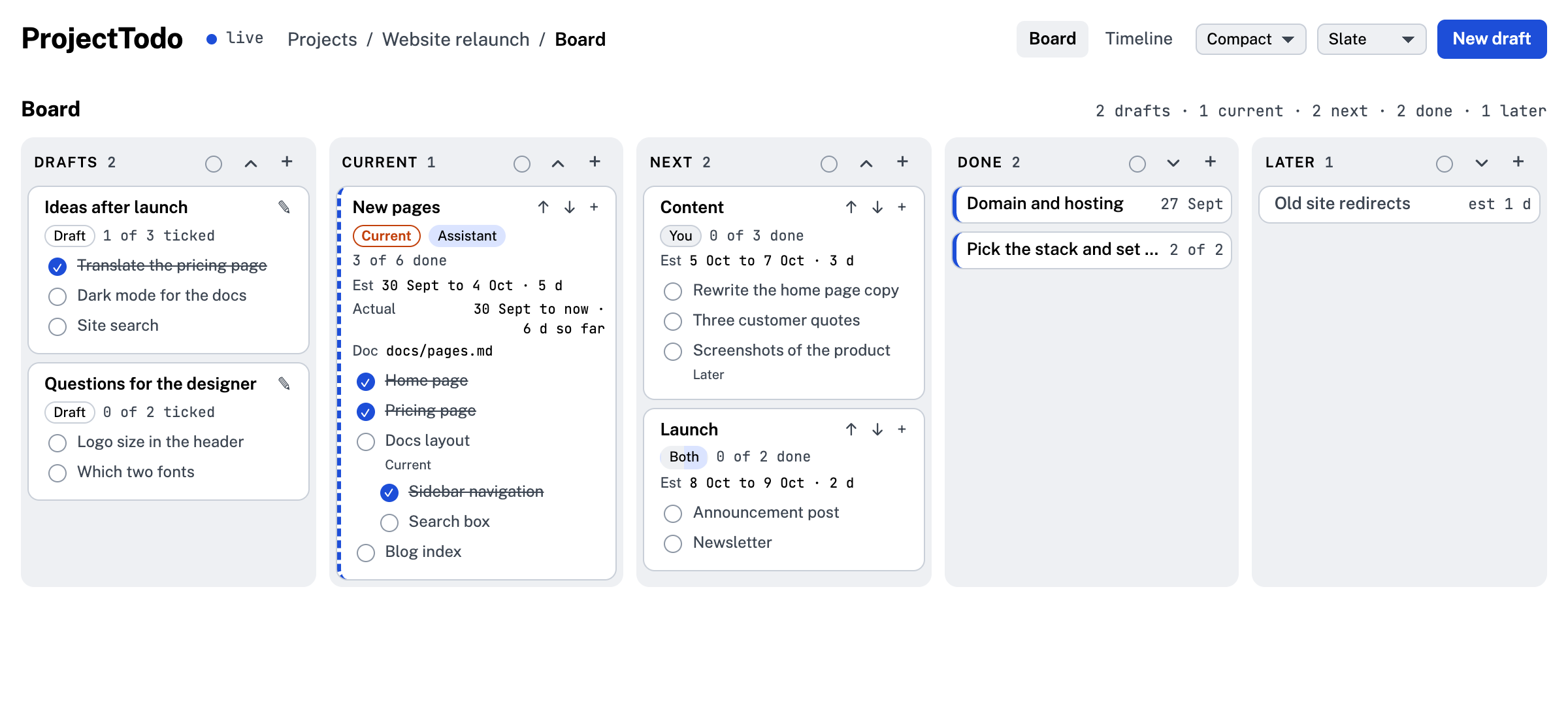
| Focus (Paper) | Wall (Midnight) |
|---|---|
 | 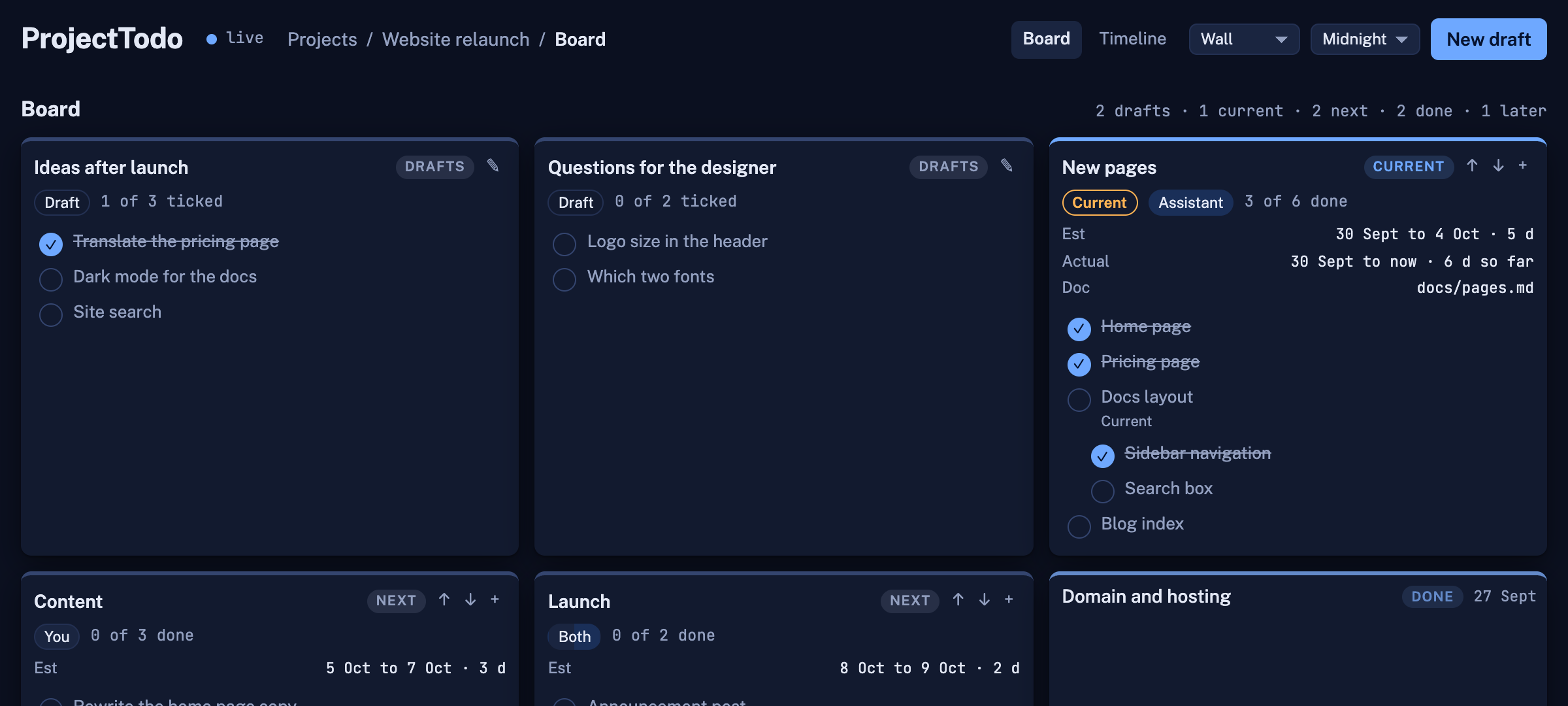 |
Run it
./start.sh                                        # http://localhost:3004
./start.sh --port 3010 --data ~/notes/todos --docs ~/notes
Needs Node 18 or newer. ./start.sh --help lists the flags; each one sets the
environment variable of the same meaning, so node server.mjs with the variables set
does the same. ./start.sh --dev restarts the server whenever server.mjs or anything
under public/ changes, and every open page reloads itself, so editing needs no
restarts by hand:
| Variable | Default | What |
|---|---|---|
PORT | 3004 | the port |
HOST | 127.0.0.1 | the address; 0.0.0.0 to reach it from other machines |
PROJECTTODO_DATA_DIR | ./data | where todos.json lives (commit it to your own repo if you like) |
PROJECTTODO_DOCS_DIR | the data dir's parent | a to-do's doc is a markdown file under this folder, shown in a drawer |
PROJECTTODO_DOC_WRITE_DIR | todos (inside the docs dir) | where the assistant's write_doc may create markdown files (--write-docs) |
PROJECTTODO_DEFAULT_PROJECT | My project | the project made for rows from before projects existed |
PROJECTTODO_DEV | unset | 1 watches the files and restarts (the --dev flag) |
Connect your assistant (MCP)
The server speaks MCP at POST /mcp (streamable HTTP, stateless), and mcp.mjs is a
stdio bridge for clients that start a command. The server has to be running.
Claude Code:
claude mcp add projecttodo -- node /path/to/projecttodo/mcp.mjs
# or over HTTP
claude mcp add --transport http projecttodo http://localhost:3004/mcp
Claude Desktop (claude_desktop_config.json):
{ "mcpServers": { "projecttodo": { "command": "node", "args": ["/path/to/projecttodo/mcp.mjs"] } } }
Any other MCP client: a stdio server node mcp.mjs (set PROJECTTODO_URL if the server
is not on http://localhost:3004), or the HTTP endpoint http://localhost:3004/mcp.
Clients that need a public HTTPS address (a hosted ChatGPT connector, for example) need
a tunnel in front of it; the server has no login, so keep it on your own machine or
behind one.
Tools: get_playbook, list_projects, create_project, update_project, list_todos, get_todo,
create_todo, update_todo, delete_todo, move_todo, set_current, add_draft, read_doc,
write_doc. Prompts (clients that list MCP prompts, such as Claude Desktop, offer them
as commands): review_drafts, submit_draft, plan_todo, daily_review.
Teach your assistant the workflow
Connecting the server tells an assistant what the tools are, not how you want the board
worked. That lives in one file, PLAYBOOK.md: the lanes, the rules (drafts
belong to the person; a to-do is done only when everything under it is done; no invented
estimates; a draft line is a to-do when it is a step of its own and goes into the notes or
the document when it is an instruction for the parent; a to-do is set done only when the
person confirms it), how to review draft groups one at a time, how to plan a to-do with a
document, and the document template. The server sends a summary when a client connects,
and the get_playbook tool returns the whole file, so every MCP client can read it.
-
Claude Code: install the skills once. The first makes Claude call
get_playbookwhenever the board comes up; the second is the/projecttodo-draft-submissioncommand, which takes one draft group and submits it as planned to-dos, writing the plan document when the playbook's rule calls for one (/projecttodo-draft-submission the first draft,/projecttodo-draft-submission "Board page updates", start it now):mkdir -p ~/.claude/skills && cp -r /path/to/projecttodo/skills/* ~/.claude/skills/(or copy them into a project's
.claude/skills/to keep them per repository). -
Claude Desktop: the summary arrives with the connection; the prompts above appear as commands.
-
Anything else (a ChatGPT connector, another agent): add one line to its instructions: Before working on the to-do board, call the projecttodo tool
get_playbookand follow it.
Plan documents are markdown files the assistant writes with write_doc into the write
folder (--write-docs, default todos/ under the docs folder; a project with its own
documents folder writes straight into it) and links through the to-do's doc field; the
page shows them in the drawer, and read_doc reads them back. Both tools take the
project_id, and list_projects tells an assistant each project's folders.
Edit the playbook to fit how you work; the assistant reads it fresh each time.
Rows
A project: id, name, description, parent_id (the project a module belongs to; null for a project), data_dir, docs_dir, lanes ({order, colors}), current_id, created_at, updated_at, version. data_dir and docs_dir are empty for the server's defaults (a module's for its
project's); the listing adds paths with the folders in use and status (a module's own:
doing, todo, deferred or done; new modules start as todo).
A to-do:
id, project_id, title, notes, parent_id (null = main to-do), next_id (the sibling after it),
order (10, 20, …), row (the timeline row a main to-do was dropped in; null = the first row
with room), status: draft | todo (Next) | doing (Current) | done | deferred (Later),
owner: user | assistant | both | null, doc (the plan), docs (further files, a list), estimate_days,
planned_start, planned_end (estimated start and end), actual_start, actual_done (actual start and end),
actual_start_time, actual_done_time (HH:MM, local; stamped by the server with the dates),
created_at (when it was added; the details view and the editor show it as Created), updated_at (ISO 8601),
version (kept by the server)
Estimates are days; under a day they show as hours at 8 hours a day, and the editor takes
"2 d", "3 h" or "90 m". A status change to Current or Done stamps the actual date and the
time of day, on the page and on the server, so a to-do that started at 12:43 and ended at
15:20 reads "4 Oct 12:43 to 15:20 · 2 h 37 m" on its card and sits by the hour on the
timeline. A to-do that finishes goes to the top of Done, above the ones finished before it (move it
afterwards if you like). A child that starts also starts its parents: a parent without an
actual start takes the child's. A dropped to-do lands where it was dropped, next links or not:
it leaves the chain it was in, and dropped between two linked to-dos it is linked between
them. Dropping a card in Current sets actual_start when empty; in Done sets actual_done (for a
main to-do, the end of its last finished child) and actual_start when empty; leaving
Done clears actual_done. A to-do can be set done only when everything under it is done:
the page checks this on drops, in the editor and on the ticks, and the server refuses such
a write with 409 children_open.
A main to-do dropped in Next or Current with no estimated dates
gets them: the day after the estimated end of the main to-do before it, lasting its
estimate in days (one day if none). Deleting a parent moves its children up one level.
API (JSON)
| Call | Body | Does |
|---|---|---|
GET /api/projects | {projects} with counts and the current main to-do | |
POST /api/projects | {data: {name, description, parent_id}} | makes a project, or a module inside the project parent_id names |
PATCH /api/projects/{id} | {if_version, data: {name, description, current_id, parent_id, status}} | changes it; setting current_id starts that main to-do today; status is a module's own lane |
DELETE /api/projects/{id} | {if_version} | removes it and its to-dos; 409 has_modules while it has modules |
GET /api/todos?project={id} | &modules=1 adds the rows of the project's modules | {todos} |
POST /api/todos/{id}/move | {if_version, data: {project_id}} | moves it, with everything under it, to that module or project; a child becomes a main to-do there |
POST /api/todos | {data: {id, project_id, title, …}} | creates a row (409 if the id exists) |
PATCH /api/todos/{id} | {if_version, data: {…}} | merges fields; 409 version_mismatch when the row changed meanwhile, 409 children_open when it would be done with open to-dos under it, 400 unknown_field for a field the row does not have |
DELETE /api/todos/{id} | {if_version} | removes a row |
POST /api/batch | {writes: [{op: set|update|delete, id, data, if_version}]} | all or nothing |
GET /api/doc?path=docs/x.md | {path, modified, content} for a markdown file under the docs folder | |
GET /api/events | server-sent change events | |
POST /mcp | JSON-RPC | the MCP endpoint |
License
MIT.
Similar repos


See what people are saying
README
ProjectTodo
A small to-do board for a person and their AI assistant, kept on your own machine. One page, a JSON file, no dependencies, and an MCP server so the assistant you already use (Claude Code, Claude Desktop, or anything that speaks MCP) can read and update the same to-dos you see.
- Projects on the first page, each a card. Open one for its board; the pencil on a card
edits its name, description and folders. A project can keep its to-dos in a folder of
its own (
todos.jsoninside it, so a repository can commit its own rows) and read and write its documents in its own folder; both are asked for when the project is made and default to the server's folders. The server reads and writes whichever folders you name, which is fine on your own machine and the reason it should stay there. - Modules: a project can be split into modules, each a project inside it with its own board, timeline, lanes, current to-do and documents (it uses the project's folders unless it sets its own). A module has a status of its own, like a card (Current, Next, Later or Done; new modules start in Next), whatever is inside it. The projects page lists a project's modules with that status, how many main to-dos are done and the current one; on the project's board a module is a card of its own in that lane, marked Module, which opens the module's board; drag the card to another lane to change its status; "+ Module" adds one. The header's breadcrumb reads Projects / project / module / Board or Timeline, each part a link, and the Board and Timeline switch sits at the right by the layout picker. The project's own timeline shows each module as a bar from its earliest start to its latest end, with a "Show all module to-dos" switch that hangs every to-do of every module under its bar, trees included. To move a to-do into a module, drop its card on the module's card; to move it back to the project or to another module, pick the place in the editor's In field; everything under it moves along.
- Board: lanes for Drafts, Current, Next, Done and Later. Press + on Drafts (or "New draft") and type a title and a list like a notepad: Enter for the next line, Tab for a child, Shift+Tab back out; the pad is one text field, so you can select across lines, copy the list, or paste a list in (each line becomes a line). "Add" makes one draft card with those lines; the title can wait, an untitled draft is a loose list the assistant groups and titles when it is submitted, and a to-do needs a title before it leaves Drafts. You go through the drafts with your assistant; it fills in the details and moves them on. A card is a main to-do; everything under it is listed inside the card, ticked when done. Drag cards between lanes. Click a card's header to fold it to one row or open it again (Done and Later cards start folded); click the card's body or a line to see that to-do's details, with an Edit button there; double-click the header to edit the main to-do straight away; click a line's circle to tick it done. The + on a card, or in the details view, opens the pad without a title field: its lines become to-dos under that one, in its lane, with Tab making a child of the line above. A card cannot go to Done until every line in it is ticked. Each lane's header has an arrow that folds or opens every card in it, and a colour dot that colours the lane; drag a lane's header to move the lane. Order and colours are kept on the project. Drafts is twice as wide as the other lanes; Done and Later sit past the right edge and scroll into view.
- Timeline: dates along the top. A main to-do (one without a parent) spans its days, and one with a start time begins at that time and ends at its end time or at now, kept at least as wide as its tree needs; one with only an end time ends at that time. The boxes pack to the top in the board's order, all lanes together, each in the first row with room for it; rows are one box tall and a tree takes several, so a box can sit under another box whose tree does not reach there. Drag a box to any row where nothing is in its way (a band shows the row, red where there is no room) and it stays there; nothing else moves. A main to-do that has not started can also be dragged along the days to move its estimated dates, or stretched at either edge to change its estimated start or end; its to-dos hang under it, siblings left to right, children below their parent, in as many columns as its days allow. A main to-do with no dates is shown at today, dashed, until it gets dates (dragging it sets them), so moving another to-do never moves it. The thin line under a main to-do is its estimate when the actual days differ. The project's current main to-do is outlined: setting it starts it today; when it is done, its end is the end of the last finished to-do under it. So by finishing things, every to-do ends up with its real dates. A main to-do dropped into an empty Current lane becomes the current one; dropped beside another it is a second card in progress; moved out of Current or finished, it stops being current. The timeline opens on today, a line walks across today's column with the time (hover it to read it), and the view zooms with the − and + buttons, Cmd and scroll, or Cmd and minus, plus and 0.
- Live: every change saves at once and shows up for everyone with the page open.
- On a phone: one lane at a time on the board, swiped sideways; dialogs open at the top so the keyboard does not cover them; the draft pad has ‹ › buttons for levels since a phone has no Tab key; touch targets are larger and hover-only controls are always shown.
- Themes: Auto (follows the system), Day, Night, Midnight, Forest, Ember, Paper, Rose and Slate, from the menu in the header; remembered per browser.
- Layouts, from the menu beside the theme; a layout changes the structure, a theme the colours, and changing one leaves the other as chosen. Classic is the board above. Compact (pictured in Slate): every lane one unit wide, tighter cards and smaller type, smaller boxes on the timeline. Focus (pictured in Paper): one column with Current first, a click shows a to-do's details docked on the right instead of a modal, and the timeline is an agenda, one row per day with what starts, runs or finishes on it, times included; board and agenda end at the bottom of the window and scroll inside themselves, the agenda opening on today. Wall (pictured in Midnight): a grid of equal cards with the lane as a tag on each, and the timeline is a month calendar, one month in view, moved with the arrows or a sideways scroll; here a to-do changes lane through its form.
| Projects | Draft pad |
|---|---|
| |
| A project's modules | The project's timeline with its modules |
|---|---|
| |
| Paper | Midnight |
|---|---|
| |
| Focus (Paper) | Wall (Midnight) |
|---|---|
| |
Run it
./start.sh                                        # http://localhost:3004
./start.sh --port 3010 --data ~/notes/todos --docs ~/notes
Needs Node 18 or newer. ./start.sh --help lists the flags; each one sets the
environment variable of the same meaning, so node server.mjs with the variables set
does the same. ./start.sh --dev restarts the server whenever server.mjs or anything
under public/ changes, and every open page reloads itself, so editing needs no
restarts by hand:
| Variable | Default | What |
|---|---|---|
PORT | 3004 | the port |
HOST | 127.0.0.1 | the address; 0.0.0.0 to reach it from other machines |
PROJECTTODO_DATA_DIR | ./data | where todos.json lives (commit it to your own repo if you like) |
PROJECTTODO_DOCS_DIR | the data dir's parent | a to-do's doc is a markdown file under this folder, shown in a drawer |
PROJECTTODO_DOC_WRITE_DIR | todos (inside the docs dir) | where the assistant's write_doc may create markdown files (--write-docs) |
PROJECTTODO_DEFAULT_PROJECT | My project | the project made for rows from before projects existed |
PROJECTTODO_DEV | unset | 1 watches the files and restarts (the --dev flag) |
Connect your assistant (MCP)
The server speaks MCP at POST /mcp (streamable HTTP, stateless), and mcp.mjs is a
stdio bridge for clients that start a command. The server has to be running.
Claude Code:
claude mcp add projecttodo -- node /path/to/projecttodo/mcp.mjs
# or over HTTP
claude mcp add --transport http projecttodo http://localhost:3004/mcp
Claude Desktop (claude_desktop_config.json):
{ "mcpServers": { "projecttodo": { "command": "node", "args": ["/path/to/projecttodo/mcp.mjs"] } } }
Any other MCP client: a stdio server node mcp.mjs (set PROJECTTODO_URL if the server
is not on http://localhost:3004), or the HTTP endpoint http://localhost:3004/mcp.
Clients that need a public HTTPS address (a hosted ChatGPT connector, for example) need
a tunnel in front of it; the server has no login, so keep it on your own machine or
behind one.
Tools: get_playbook, list_projects, create_project, update_project, list_todos, get_todo,
create_todo, update_todo, delete_todo, move_todo, set_current, add_draft, read_doc,
write_doc. Prompts (clients that list MCP prompts, such as Claude Desktop, offer them
as commands): review_drafts, submit_draft, plan_todo, daily_review.
Teach your assistant the workflow
Connecting the server tells an assistant what the tools are, not how you want the board
worked. That lives in one file, PLAYBOOK.md: the lanes, the rules (drafts
belong to the person; a to-do is done only when everything under it is done; no invented
estimates; a draft line is a to-do when it is a step of its own and goes into the notes or
the document when it is an instruction for the parent; a to-do is set done only when the
person confirms it), how to review draft groups one at a time, how to plan a to-do with a
document, and the document template. The server sends a summary when a client connects,
and the get_playbook tool returns the whole file, so every MCP client can read it.
-
Claude Code: install the skills once. The first makes Claude call
get_playbookwhenever the board comes up; the second is the/projecttodo-draft-submissioncommand, which takes one draft group and submits it as planned to-dos, writing the plan document when the playbook's rule calls for one (/projecttodo-draft-submission the first draft,/projecttodo-draft-submission "Board page updates", start it now):mkdir -p ~/.claude/skills && cp -r /path/to/projecttodo/skills/* ~/.claude/skills/(or copy them into a project's
.claude/skills/to keep them per repository). -
Claude Desktop: the summary arrives with the connection; the prompts above appear as commands.
-
Anything else (a ChatGPT connector, another agent): add one line to its instructions: Before working on the to-do board, call the projecttodo tool
get_playbookand follow it.
Plan documents are markdown files the assistant writes with write_doc into the write
folder (--write-docs, default todos/ under the docs folder; a project with its own
documents folder writes straight into it) and links through the to-do's doc field; the
page shows them in the drawer, and read_doc reads them back. Both tools take the
project_id, and list_projects tells an assistant each project's folders.
Edit the playbook to fit how you work; the assistant reads it fresh each time.
Rows
A project: id, name, description, parent_id (the project a module belongs to; null for a project), data_dir, docs_dir, lanes ({order, colors}), current_id, created_at, updated_at, version. data_dir and docs_dir are empty for the server's defaults (a module's for its
project's); the listing adds paths with the folders in use and status (a module's own:
doing, todo, deferred or done; new modules start as todo).
A to-do:
id, project_id, title, notes, parent_id (null = main to-do), next_id (the sibling after it),
order (10, 20, …), row (the timeline row a main to-do was dropped in; null = the first row
with room), status: draft | todo (Next) | doing (Current) | done | deferred (Later),
owner: user | assistant | both | null, doc (the plan), docs (further files, a list), estimate_days,
planned_start, planned_end (estimated start and end), actual_start, actual_done (actual start and end),
actual_start_time, actual_done_time (HH:MM, local; stamped by the server with the dates),
created_at (when it was added; the details view and the editor show it as Created), updated_at (ISO 8601),
version (kept by the server)
Estimates are days; under a day they show as hours at 8 hours a day, and the editor takes
"2 d", "3 h" or "90 m". A status change to Current or Done stamps the actual date and the
time of day, on the page and on the server, so a to-do that started at 12:43 and ended at
15:20 reads "4 Oct 12:43 to 15:20 · 2 h 37 m" on its card and sits by the hour on the
timeline. A to-do that finishes goes to the top of Done, above the ones finished before it (move it
afterwards if you like). A child that starts also starts its parents: a parent without an
actual start takes the child's. A dropped to-do lands where it was dropped, next links or not:
it leaves the chain it was in, and dropped between two linked to-dos it is linked between
them. Dropping a card in Current sets actual_start when empty; in Done sets actual_done (for a
main to-do, the end of its last finished child) and actual_start when empty; leaving
Done clears actual_done. A to-do can be set done only when everything under it is done:
the page checks this on drops, in the editor and on the ticks, and the server refuses such
a write with 409 children_open.
A main to-do dropped in Next or Current with no estimated dates
gets them: the day after the estimated end of the main to-do before it, lasting its
estimate in days (one day if none). Deleting a parent moves its children up one level.
API (JSON)
| Call | Body | Does |
|---|---|---|
GET /api/projects | {projects} with counts and the current main to-do | |
POST /api/projects | {data: {name, description, parent_id}} | makes a project, or a module inside the project parent_id names |
PATCH /api/projects/{id} | {if_version, data: {name, description, current_id, parent_id, status}} | changes it; setting current_id starts that main to-do today; status is a module's own lane |
DELETE /api/projects/{id} | {if_version} | removes it and its to-dos; 409 has_modules while it has modules |
GET /api/todos?project={id} | &modules=1 adds the rows of the project's modules | {todos} |
POST /api/todos/{id}/move | {if_version, data: {project_id}} | moves it, with everything under it, to that module or project; a child becomes a main to-do there |
POST /api/todos | {data: {id, project_id, title, …}} | creates a row (409 if the id exists) |
PATCH /api/todos/{id} | {if_version, data: {…}} | merges fields; 409 version_mismatch when the row changed meanwhile, 409 children_open when it would be done with open to-dos under it, 400 unknown_field for a field the row does not have |
DELETE /api/todos/{id} | {if_version} | removes a row |
POST /api/batch | {writes: [{op: set|update|delete, id, data, if_version}]} | all or nothing |
GET /api/doc?path=docs/x.md | {path, modified, content} for a markdown file under the docs folder | |
GET /api/events | server-sent change events | |
POST /mcp | JSON-RPC | the MCP endpoint |
License
MIT.