
Native macOS app that unifies web services into a single window with sandboxed sessions per account. WebKit-based Rambox/Franz alternative.
Swift
27
452 commits
updated Sep 30, 2026
See what people are saying
README
Chorus
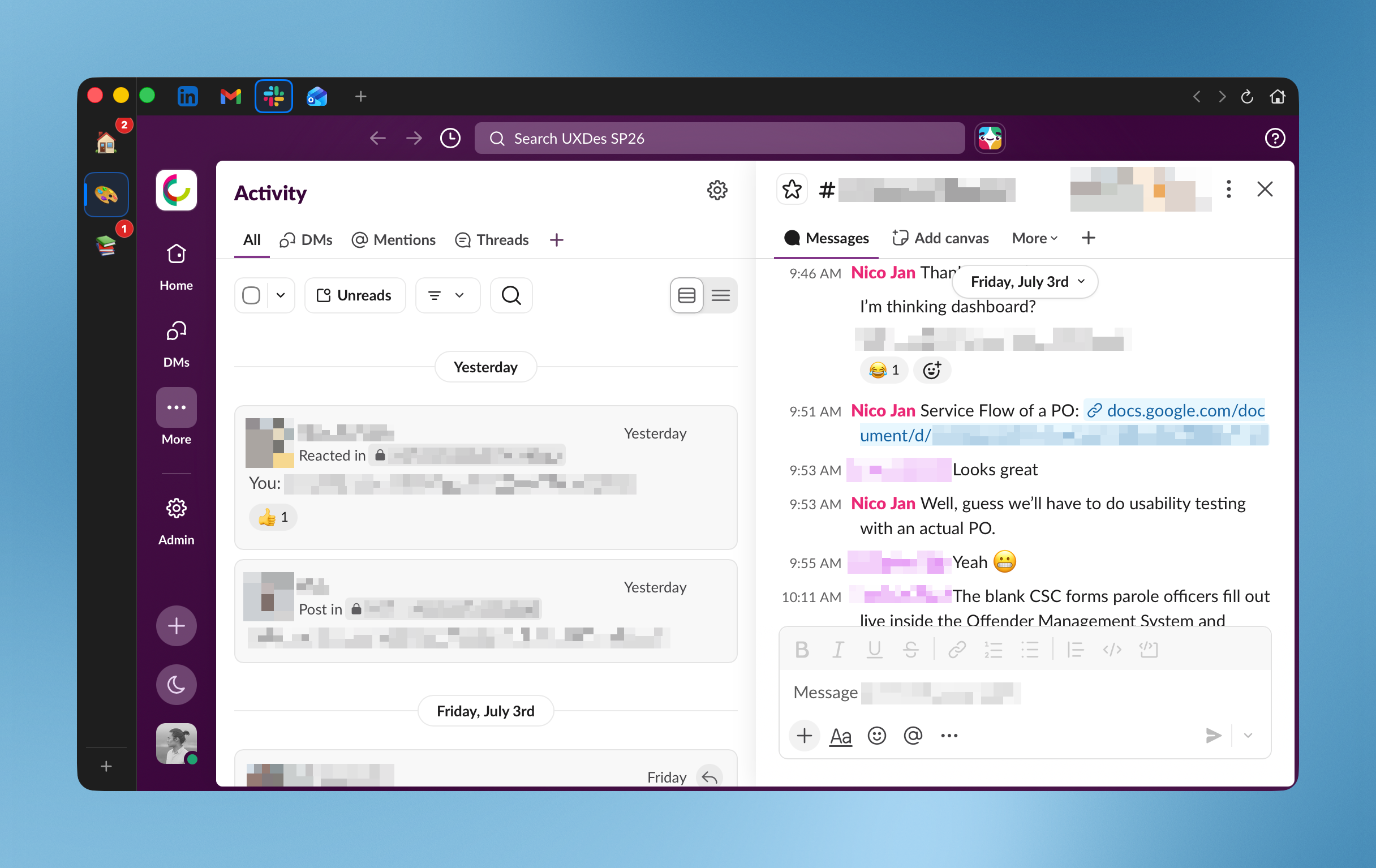
A native macOS app that unifies your web services (Gmail, Slack, Discord, Notion, ChatGPT, and more) into one window, each with its own fully isolated session. A lightweight, WebKit-based alternative to Chromium apps like Rambox and Franz, built for Apple Silicon.
Download the latest release (macOS 14 or later), or install it with Homebrew:
brew install --cask nicojan/tap/chorus
The build is signed, notarized, and updates itself via Sparkle. Homebrew installs from my own tap rather than the main homebrew/cask tap, which takes only projects with more stars than Chorus has so far.
Status: 1.5.17 is the current release. See CHANGELOG.md for what changed.
Features
- Isolated sessions per service. Each service gets its own
WKWebsiteDataStore, so you can stay signed into two Gmail accounts (or a personal and work Slack) side by side with no cookie leakage. - Spaces. Group services into spaces (e.g. 🏠 Personal, 💼 Work). A service can live in more than one space; sessions stay isolated per instance.
- Badges & notifications. Unread counts surface on the dock and per-space
chips via title/DOM polling and intercepted web
Notifications, and appear immediately on launch and after sign-in. Per-service control over badges and macOS notifications, per-service and per-space mute, plus global Do Not Disturb. - Memory-aware hibernation. Least-recently-used services hibernate to reclaim memory and wake instantly where you left off. Each service can also set its own policy: follow the global setting, hibernate when you switch to another service, hibernate after a set idle time, or never hibernate. Chat apps stay live whatever you pick, so their alerts still arrive.
- Quick switcher (
⌘K), find in page (⌘F), zoom (⌘+/⌘-/⌘0), reload (⌘R), and drag-to-reorder services and spaces. - Smart link routing. Cross-service links open in a matching Chorus service when one exists, otherwise in your default browser. Per service, you can instead have outside links open in a Chorus window.
- Ad & tracker blocking. Blocks known ad and tracking domains across your services with the HaGezi blocklist, on by default. It won't remove ads a site serves from its own domain, like YouTube.
- Camera and microphone. Video calls and voice work in the services that need
them, from Google Meet to Microsoft Teams. Each service asks the first time it
wants your camera or mic. You can set Allow, Ask, or Deny for a single service
or as the default for all of them, mute every microphone at once with
⇧⌘M, and see a dot on a service while its camera or mic is live. - Resilient. Pauses polling when offline or asleep, recovers from WebContent crashes with backoff, and never deletes your data without consent.
How Chorus compares
Chorus, Rambox, and Franz all put your web apps in one window. They differ in how they are built and what they cost. Rambox and Franz are Electron apps that bundle Chromium and run on Windows and Linux as well as macOS, and both charge for the full feature set. Franz's free tier stops at three services and one workspace. Chorus is a native macOS app. It uses the system's own WebKit instead of shipping a browser inside itself, so it stays lighter on memory, and every feature is free with the source open under the MIT license.
| Feature | Chorus | Rambox | Franz |
|---|---|---|---|
| Price | Free, every feature | Freemium | Freemium; free tier caps at 3 services |
| Open source | Yes (MIT) | No | No |
| Engine | Native WebKit | Electron | Electron |
| Platforms | macOS 14+ | Windows, macOS, Linux | Windows, macOS, Linux |
| Preset services | ~70, plus any URL | 700+ | 70+ |
| Isolated session per service | Yes | Yes | Yes |
| Spaces / workspaces | Unlimited | Yes | Free tier: 1 |
| Custom CSS per service | Yes, with presets | Yes | No |
| Dark mode for any service | Yes | Yes | No |
| Quiet-hours Do Not Disturb | Yes | Yes | No |
| App lock | Touch ID | Password | No |
| Cross-device sync | No | Yes | Yes |
Chorus makes two trades for staying native and free. It runs only on macOS, and it ships with more than seventy preset services where Rambox lists several hundred, though you can add any site by its URL. It also keeps your data on your Mac rather than syncing across devices.
What Chorus sends
Once a day Chorus asks updates.nicojan.com whether a new version is out. That request carries what any web request carries: your IP address, and a line naming the app and its version. I run that server, and I count those requests, because it is the only way I can tell how many people use Chorus.
What I keep is a number per day and a breakdown by version. I do not store your address. It goes into a hash along with the date and a secret, and I keep the result for two days so that one machine is not counted twice. The next day the same machine hashes to an unrelated value, which means the records cannot be joined into a history of one person. Everything else stays on your Mac: your accounts, the services you use, and what you do in the app.
To stop the daily check, turn off Automatically check for updates in Settings. Chorus then contacts that server only when you press the button yourself.
Requirements
- macOS 14 (Sonoma) or later
- Xcode 16+ / Swift 6
- XcodeGen (
brew install xcodegen). The Xcode project is generated fromproject.yml.
Build & run
# Regenerate the Xcode project after changing project.yml or adding files
xcodegen generate

# Build and run the test suite from the CLI
xcodebuild test -project Chorus.xcodeproj -scheme Chorus -destination 'platform=macOS'
Or open Chorus.xcodeproj in Xcode and run the Chorus scheme.
Project layout
| Path | What |
|---|---|
Chorus/App/ | App entry point and AppState (central coordinator) |
Chorus/Models/ | SwiftData models: ServiceInstance, Space, SpaceServiceLink, AppPreferences |
Chorus/Services/ | Badges, notifications, polling, data stores, catalog, networking |
Chorus/Views/ | SwiftUI views: main window, sidebar, web view pool, settings, sheets |
Chorus/Resources/ | Service catalog JSON and assets |
ChorusTests/ | Unit tests (pure logic: badges, validation, parsing, reordering, …) |
Architecture details live in docs/internal/chorus-architecture-v2.md.
Notes
- The app icon is a generated placeholder; replace the images in
Chorus/Resources/Assets.xcassets/AppIcon.appiconset/with custom artwork. - Shipping to the Mac App Store additionally requires code signing, a provisioning profile, and notarization. Those are outside the scope of this repo.
Contributing
Bug reports and pull requests are welcome. See CONTRIBUTING.md to get set up.
License
Chorus is available under the MIT License. See LICENSE.
Similar repos


Languages
Swift
77.9%
JavaScript
21.0%
Native macOS app that unifies web services into a single window with sandboxed sessions per account. WebKit-based Rambox/Franz alternative.
Swift
27
452 commits
updated Sep 30, 2026
See what people are saying
README
Chorus
A native macOS app that unifies your web services (Gmail, Slack, Discord, Notion, ChatGPT, and more) into one window, each with its own fully isolated session. A lightweight, WebKit-based alternative to Chromium apps like Rambox and Franz, built for Apple Silicon.
Download the latest release (macOS 14 or later), or install it with Homebrew:
brew install --cask nicojan/tap/chorus
The build is signed, notarized, and updates itself via Sparkle. Homebrew installs from my own tap rather than the main homebrew/cask tap, which takes only projects with more stars than Chorus has so far.
Status: 1.5.17 is the current release. See CHANGELOG.md for what changed.
Features
- Isolated sessions per service. Each service gets its own
WKWebsiteDataStore, so you can stay signed into two Gmail accounts (or a personal and work Slack) side by side with no cookie leakage. - Spaces. Group services into spaces (e.g. 🏠 Personal, 💼 Work). A service can live in more than one space; sessions stay isolated per instance.
- Badges & notifications. Unread counts surface on the dock and per-space
chips via title/DOM polling and intercepted web
Notifications, and appear immediately on launch and after sign-in. Per-service control over badges and macOS notifications, per-service and per-space mute, plus global Do Not Disturb. - Memory-aware hibernation. Least-recently-used services hibernate to reclaim memory and wake instantly where you left off. Each service can also set its own policy: follow the global setting, hibernate when you switch to another service, hibernate after a set idle time, or never hibernate. Chat apps stay live whatever you pick, so their alerts still arrive.
- Quick switcher (
⌘K), find in page (⌘F), zoom (⌘+/⌘-/⌘0), reload (⌘R), and drag-to-reorder services and spaces. - Smart link routing. Cross-service links open in a matching Chorus service when one exists, otherwise in your default browser. Per service, you can instead have outside links open in a Chorus window.
- Ad & tracker blocking. Blocks known ad and tracking domains across your services with the HaGezi blocklist, on by default. It won't remove ads a site serves from its own domain, like YouTube.
- Camera and microphone. Video calls and voice work in the services that need
them, from Google Meet to Microsoft Teams. Each service asks the first time it
wants your camera or mic. You can set Allow, Ask, or Deny for a single service
or as the default for all of them, mute every microphone at once with
⇧⌘M, and see a dot on a service while its camera or mic is live. - Resilient. Pauses polling when offline or asleep, recovers from WebContent crashes with backoff, and never deletes your data without consent.
How Chorus compares
Chorus, Rambox, and Franz all put your web apps in one window. They differ in how they are built and what they cost. Rambox and Franz are Electron apps that bundle Chromium and run on Windows and Linux as well as macOS, and both charge for the full feature set. Franz's free tier stops at three services and one workspace. Chorus is a native macOS app. It uses the system's own WebKit instead of shipping a browser inside itself, so it stays lighter on memory, and every feature is free with the source open under the MIT license.
| Feature | Chorus | Rambox | Franz |
|---|---|---|---|
| Price | Free, every feature | Freemium | Freemium; free tier caps at 3 services |
| Open source | Yes (MIT) | No | No |
| Engine | Native WebKit | Electron | Electron |
| Platforms | macOS 14+ | Windows, macOS, Linux | Windows, macOS, Linux |
| Preset services | ~70, plus any URL | 700+ | 70+ |
| Isolated session per service | Yes | Yes | Yes |
| Spaces / workspaces | Unlimited | Yes | Free tier: 1 |
| Custom CSS per service | Yes, with presets | Yes | No |
| Dark mode for any service | Yes | Yes | No |
| Quiet-hours Do Not Disturb | Yes | Yes | No |
| App lock | Touch ID | Password | No |
| Cross-device sync | No | Yes | Yes |
Chorus makes two trades for staying native and free. It runs only on macOS, and it ships with more than seventy preset services where Rambox lists several hundred, though you can add any site by its URL. It also keeps your data on your Mac rather than syncing across devices.
What Chorus sends
Once a day Chorus asks updates.nicojan.com whether a new version is out. That request carries what any web request carries: your IP address, and a line naming the app and its version. I run that server, and I count those requests, because it is the only way I can tell how many people use Chorus.
What I keep is a number per day and a breakdown by version. I do not store your address. It goes into a hash along with the date and a secret, and I keep the result for two days so that one machine is not counted twice. The next day the same machine hashes to an unrelated value, which means the records cannot be joined into a history of one person. Everything else stays on your Mac: your accounts, the services you use, and what you do in the app.
To stop the daily check, turn off Automatically check for updates in Settings. Chorus then contacts that server only when you press the button yourself.
Requirements
- macOS 14 (Sonoma) or later
- Xcode 16+ / Swift 6
- XcodeGen (
brew install xcodegen). The Xcode project is generated fromproject.yml.
Build & run
# Regenerate the Xcode project after changing project.yml or adding files
xcodegen generate

# Build and run the test suite from the CLI
xcodebuild test -project Chorus.xcodeproj -scheme Chorus -destination 'platform=macOS'
Or open Chorus.xcodeproj in Xcode and run the Chorus scheme.
Project layout
| Path | What |
|---|---|
Chorus/App/ | App entry point and AppState (central coordinator) |
Chorus/Models/ | SwiftData models: ServiceInstance, Space, SpaceServiceLink, AppPreferences |
Chorus/Services/ | Badges, notifications, polling, data stores, catalog, networking |
Chorus/Views/ | SwiftUI views: main window, sidebar, web view pool, settings, sheets |
Chorus/Resources/ | Service catalog JSON and assets |
ChorusTests/ | Unit tests (pure logic: badges, validation, parsing, reordering, …) |
Architecture details live in docs/internal/chorus-architecture-v2.md.
Notes
- The app icon is a generated placeholder; replace the images in
Chorus/Resources/Assets.xcassets/AppIcon.appiconset/with custom artwork. - Shipping to the Mac App Store additionally requires code signing, a provisioning profile, and notarization. Those are outside the scope of this repo.
Contributing
Bug reports and pull requests are welcome. See CONTRIBUTING.md to get set up.
License
Chorus is available under the MIT License. See LICENSE.
Similar repos
Languages
Swift
77.9%
JavaScript
21.0%