
A native macOS browser-profile manager with a floating tab bar and smart link routing.
Swift
0
15 commits
updated Sep 21, 2026
See what people are saying (1)
README
Transom
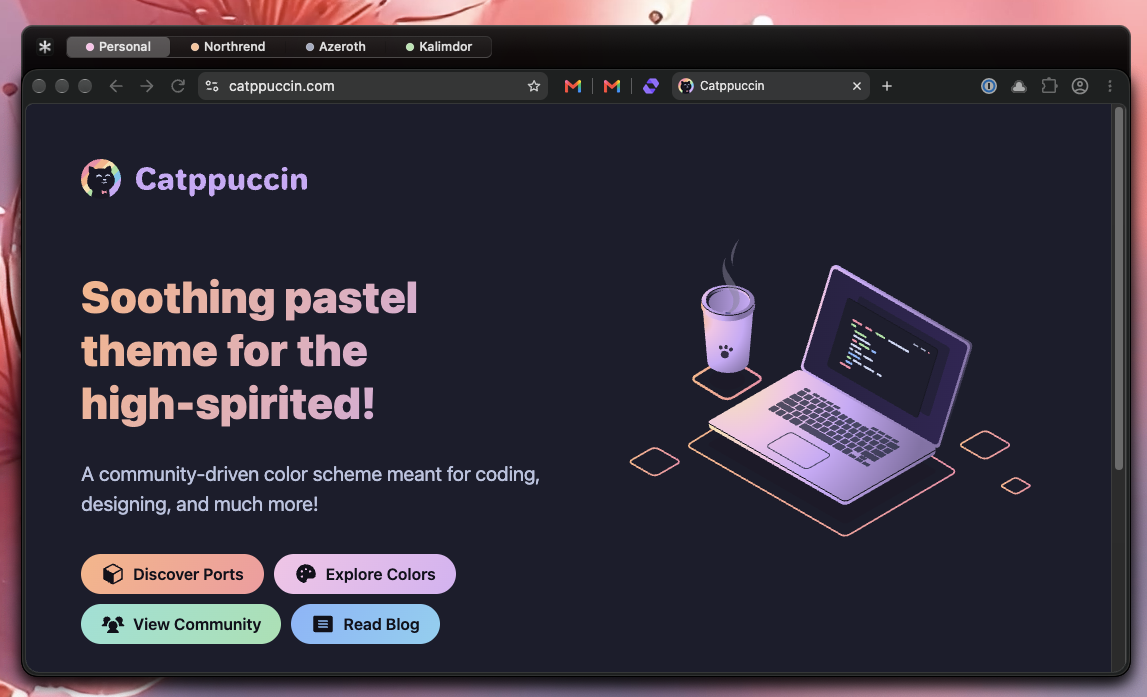
Transom is a native macOS browser-profile shell and web-link router. It groups windows from the same browser into a profile-oriented stack, adds a glass tab strip above the browser, and keeps grouped windows together when moved or resized.
Install
Requires macOS 13 or later on an Apple silicon Mac (M1 or newer). Current releases do not support Intel Macs.
- Open the latest release
and download
Transom-VERSION-arm64.dmgfrom Assets. - Open the DMG and drag Transom into Applications.
- Eject the disk image, then open Transom from Applications. It does not show a Dock icon. Right-click the browser overlay to open Settings… or quit Transom.
- Grant access in System Settings → Privacy & Security → Accessibility. Reopen Transom if the browser overlay does not appear after granting access.
- To route web links through the profile picker, open Settings… → Links, choose Make Transom Default Browser…, and confirm the system prompt.
Release downloads are Developer ID–signed and notarized by Apple.
To update, quit Transom from the overlay's right-click menu, download the latest DMG, and replace the existing app in Applications. Your settings remain in your user account.
Supported browsers
Transom discovers installed macOS versions of:
- Google Chrome
- Microsoft Edge
- Brave
- Vivaldi
- Opera
- Arc
- Chromium
- Helium
- Firefox
- Zen
Chromium-family profiles are read from Local State. Firefox and Zen
profiles are read from profiles.ini. Transom resolves profiles from
window titles and process arguments, retaining validated per-window
assignments while windows remain open. Ambiguous multi-profile Chromium
windows remain unidentified rather than being assigned the wrong
profile.
Window overlay
- one independent glass container per running browser
- native AppKit segmented tabs with profile-colored indicators
- stable tab order while native window stacking changes
- exact-window switching through Accessibility APIs
- synchronized movement and resizing for grouped windows
- normal macOS window layering, spaces, and fullscreen support
- menu-bar accessory operation with no Dock icon
Web-link routing
Transom registers http and https handlers and can be selected as the
default browser from Settings… → Links.
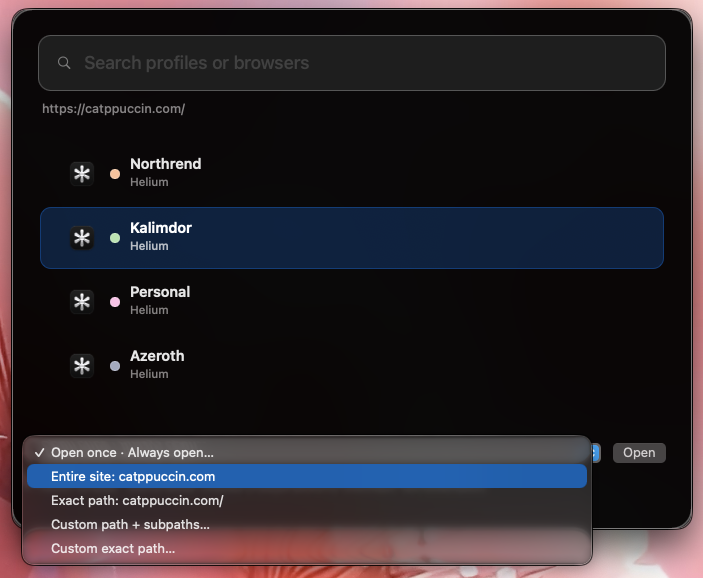
Unmatched links open a Spotlight-style profile picker with:
- browser and profile search
- keyboard navigation and Return/Escape handling
- browser icons and profile colors
- saved destinations for an entire site, a path and its subpaths, or an exact path, including custom paths
The Links section in Settings supports mappings using:
- host globs such as
*.example.com - host-scoped path prefixes and exact paths
- path regular expressions
- complete URL regular expressions
Regex rules take priority in list order. Site rules prefer the most specific matching path. Hold Option when opening a link to bypass automatic routing and choose a profile once.
Rules are stored at:
~/Library/Application Support/Transom/routing.json
Settings and themes
Open Settings… from the overlay’s native right-click menu. Settings include launch-at-login, window-manager compatibility, browser discovery, link routing, and overlay themes. Themes include Automatic, Light, Black, and all four Catppuccin flavors: Latte, Frappé, Macchiato, and Mocha. The URL opener follows the selected theme. Profile names and colors can be customized in Browsers. Turn off Show in picker beside a profile to hide it from the URL opener. Existing routing rules can still open that profile.
Build from source
mise run run
To run checks:
mise run check
mise run test
The built application is written to .build/Transom.app.
Linting and hooks
Install the pinned tools and local pre-commit hooks:
mise install
mise run hooks:install
The hooks check Swift formatting, shell scripts, GitHub workflows, property lists, Markdown, and spelling without modifying or staging files. Run all checks or apply formatting fixes explicitly:
mise run lint
mise run fmt:swift
mise run fmt:markdown
mise run lint:links
Link checks access the network and run separately in CI, not during commits. The generated changelog is excluded from formatting and spelling checks.
Contributors

15 commits
Similar repos


Languages
Swift
96.8%
Shell
2.6%
A native macOS browser-profile manager with a floating tab bar and smart link routing.
Swift
0
15 commits
updated Sep 21, 2026
See what people are saying (1)
README
Transom
Transom is a native macOS browser-profile shell and web-link router. It groups windows from the same browser into a profile-oriented stack, adds a glass tab strip above the browser, and keeps grouped windows together when moved or resized.
Install
Requires macOS 13 or later on an Apple silicon Mac (M1 or newer). Current releases do not support Intel Macs.
- Open the latest release
and download
Transom-VERSION-arm64.dmgfrom Assets. - Open the DMG and drag Transom into Applications.
- Eject the disk image, then open Transom from Applications. It does not show a Dock icon. Right-click the browser overlay to open Settings… or quit Transom.
- Grant access in System Settings → Privacy & Security → Accessibility. Reopen Transom if the browser overlay does not appear after granting access.
- To route web links through the profile picker, open Settings… → Links, choose Make Transom Default Browser…, and confirm the system prompt.
Release downloads are Developer ID–signed and notarized by Apple.
To update, quit Transom from the overlay's right-click menu, download the latest DMG, and replace the existing app in Applications. Your settings remain in your user account.
Supported browsers
Transom discovers installed macOS versions of:
- Google Chrome
- Microsoft Edge
- Brave
- Vivaldi
- Opera
- Arc
- Chromium
- Helium
- Firefox
- Zen
Chromium-family profiles are read from Local State. Firefox and Zen
profiles are read from profiles.ini. Transom resolves profiles from
window titles and process arguments, retaining validated per-window
assignments while windows remain open. Ambiguous multi-profile Chromium
windows remain unidentified rather than being assigned the wrong
profile.
Window overlay
- one independent glass container per running browser
- native AppKit segmented tabs with profile-colored indicators
- stable tab order while native window stacking changes
- exact-window switching through Accessibility APIs
- synchronized movement and resizing for grouped windows
- normal macOS window layering, spaces, and fullscreen support
- menu-bar accessory operation with no Dock icon
Web-link routing
Transom registers http and https handlers and can be selected as the
default browser from Settings… → Links.
Unmatched links open a Spotlight-style profile picker with:
- browser and profile search
- keyboard navigation and Return/Escape handling
- browser icons and profile colors
- saved destinations for an entire site, a path and its subpaths, or an exact path, including custom paths
The Links section in Settings supports mappings using:
- host globs such as
*.example.com - host-scoped path prefixes and exact paths
- path regular expressions
- complete URL regular expressions
Regex rules take priority in list order. Site rules prefer the most specific matching path. Hold Option when opening a link to bypass automatic routing and choose a profile once.
Rules are stored at:
~/Library/Application Support/Transom/routing.json
Settings and themes
Open Settings… from the overlay’s native right-click menu. Settings include launch-at-login, window-manager compatibility, browser discovery, link routing, and overlay themes. Themes include Automatic, Light, Black, and all four Catppuccin flavors: Latte, Frappé, Macchiato, and Mocha. The URL opener follows the selected theme. Profile names and colors can be customized in Browsers. Turn off Show in picker beside a profile to hide it from the URL opener. Existing routing rules can still open that profile.
Build from source
mise run run
To run checks:
mise run check
mise run test
The built application is written to .build/Transom.app.
Linting and hooks
Install the pinned tools and local pre-commit hooks:
mise install
mise run hooks:install
The hooks check Swift formatting, shell scripts, GitHub workflows, property lists, Markdown, and spelling without modifying or staging files. Run all checks or apply formatting fixes explicitly:
mise run lint
mise run fmt:swift
mise run fmt:markdown
mise run lint:links
Link checks access the network and run separately in CI, not during commits. The generated changelog is excluded from formatting and spelling checks.
Similar repos
Contributors
15 commits
Languages
Swift
96.8%
Shell
2.6%