
Instant default web browser switching right from your macOS menu bar.
Swift
0
11 commits
updated Sep 28, 2026
See what people are saying
README

DefaultBrowserChanger
Instant default web browser switching right from your macOS menu bar.





⚡ The Problem
On modern macOS, switching your default browser requires:
- Opening System Settings
- Navigating to Desktop & Dock
- Scrolling all the way down to find the Default web browser dropdown
- Selecting the browser and confirming macOS dialogs
If you frequently test web applications across Safari, Chrome, Arc, Brave, Firefox, Edge, or developer browsers, this workflow is slow and disruptive.
✨ The Solution
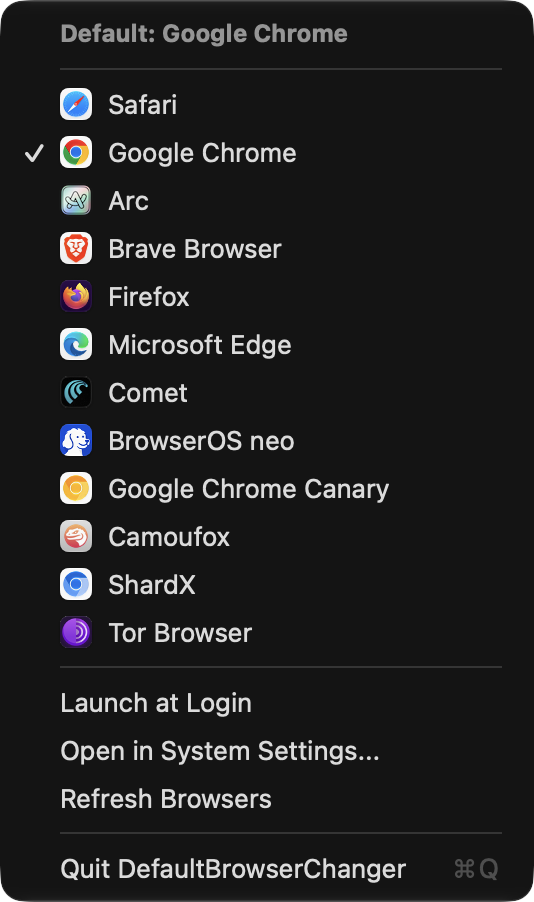
DefaultBrowserChanger lives quietly in your menu bar (tray) as an elegant Globe icon:
- 🎯 One-Click Switch: Click the Globe, choose any installed browser, done.
- 🎨 Native Colorful Icons: Real high-resolution app icons displayed beside each browser.
- ⚡ Seamless Auto-Confirmation: Automatically handles macOS security prompts in the background for a frictionless experience.
- 🚀 Launch at Login: Built-in
SMAppServicetoggle so it's always ready when you turn on your Mac. - 🪶 Zero Bloat: Pure native Swift with AppKit and LaunchServices. Consumes under 15MB RAM and 0% CPU.
- 🔒 100% Private & Offline: No network access, no telemetry, no tracking.
💡 Built for Modern Multi-Account & AI Workflows
Today's power users, developers, and AI practitioners rarely live in just one browser:
- 🏢 Work / Personal Profiles: Google Chrome for corporate Workspace accounts, Arc or Safari for personal browsing.
- 🤖 AI Agents & Sandboxes: Dedicated sessions in BrowserOS neo, Perplexity Comet, or Chrome Canary for AI agents, research, and prompt development.
- 🛡️ Privacy & Persona Testing: Brave or Firefox for ad-free environments or secondary testing personas.
The Problem: The "OAuth & Login Link" Nightmare
When clicking an email verification, a Slack link, or an app's "Sign in with Google / GitHub" button, macOS opens it blindly in your default browser. If your default browser isn't signed into the right account, you end up with:
- ❌ Logged into the wrong Google/GitHub account.
- ❌ Failed OAuth redirects and session mix-ups.
- ❌ Annoying manual URL copying and pasting between windows.
The Fix: Switch in 0.5 Seconds
With DefaultBrowserChanger, you click the Globe, select the browser where your active session lives, and click the link. The exact browser you want captures the authentication callback immediately — no profile switching, no URL copying, no friction.
📥 Installation
Option 1: Download from GitHub Releases (Recommended)
- Go to the Releases page.
- Download
DefaultBrowserChanger.zip. - Unzip and drag
DefaultBrowserChanger.appinto your/Applicationsfolder. - Open the app. The Globe icon will appear in your menu bar!
Option 2: Build & Install from Source
Ensure you have Xcode Command Line Tools installed (xcode-select --install).
git clone https://github.com/bsormagec/DefaultBrowserChanger.git
cd DefaultBrowserChanger

# Build and install directly to /Applications
./build.sh --install

# Launch the app
open /Applications/DefaultBrowserChanger.app
🖥️ Usage
- Click the Globe (🌐) icon in the top right menu bar.
- The current default browser is marked with a checkmark (
✓). - Click any browser in the list to switch immediately.
- You will receive a subtle macOS notification and sound feedback confirming the change.
Quick Actions Included:
- Launch at Login: Automatically launches on system startup.
- Open in System Settings...: Direct shortcut to Desktop & Dock preferences.
- Refresh Browsers: Rescans your system for newly installed browsers.
- Quit: Clean exit (
⌘Q).
🔒 Permissions & Security
macOS considers the default browser preference protected. DefaultBrowserChanger uses LaunchServices and background AppleScript via System Events to confirm the selection automatically.
- Upon the first switch, macOS may prompt: "DefaultBrowserChanger would like to control System Events".
- Click Allow to enable instant 1-click silent switching.
- If permission is denied, macOS will simply display its standard one-click confirmation dialog on screen.
🏗️ Architecture
DefaultBrowserChanger/
├── Sources/
│   ├── Models/
│   │   └── BrowserApp.swift          # Browser data model
│   ├── Services/
│   │   ├── BrowserManager.swift      # Discovery, filtering, & LaunchServices switcher
│   │   └── SystemHelper.swift        # Launch at Login, notifications, & sound
│   ├── UI/
│   │   └── MenuBarController.swift   # NSStatusItem, template icon, & dynamic NSMenu
│   ├── AppDelegate.swift             # App lifecycle & notification delegate
│   └── main.swift                    # NSApplication activation policy (.accessory)
├── Resources/
│   ├── Info.plist                    # LSUIElement = true (pure menu bar agent)
│   ├── AppIcon.icns                  # Multi-resolution macOS icon bundle
│   └── AppIcon.png                   # 1024x1024 Retina asset
├── Tests/
│   └── TestBrowserDetection.swift    # Verification suite
├── build.sh                          # Automated compilation and install script
└── docs/
    └── assets/                       # Screenshots and demo assets
🤝 Contributing
Contributions are welcome! Please read CONTRIBUTING.md for details on code style, build instructions, and the pull request process.
📄 License
This project is licensed under the MIT License - see the LICENSE file for details.
Similar repos


Languages
Swift
94.5%
Shell
5.5%
Instant default web browser switching right from your macOS menu bar.
Swift
0
11 commits
updated Sep 28, 2026
See what people are saying
README
DefaultBrowserChanger
Instant default web browser switching right from your macOS menu bar.
⚡ The Problem
On modern macOS, switching your default browser requires:
- Opening System Settings
- Navigating to Desktop & Dock
- Scrolling all the way down to find the Default web browser dropdown
- Selecting the browser and confirming macOS dialogs
If you frequently test web applications across Safari, Chrome, Arc, Brave, Firefox, Edge, or developer browsers, this workflow is slow and disruptive.
✨ The Solution
DefaultBrowserChanger lives quietly in your menu bar (tray) as an elegant Globe icon:
- 🎯 One-Click Switch: Click the Globe, choose any installed browser, done.
- 🎨 Native Colorful Icons: Real high-resolution app icons displayed beside each browser.
- ⚡ Seamless Auto-Confirmation: Automatically handles macOS security prompts in the background for a frictionless experience.
- 🚀 Launch at Login: Built-in
SMAppServicetoggle so it's always ready when you turn on your Mac. - 🪶 Zero Bloat: Pure native Swift with AppKit and LaunchServices. Consumes under 15MB RAM and 0% CPU.
- 🔒 100% Private & Offline: No network access, no telemetry, no tracking.
💡 Built for Modern Multi-Account & AI Workflows
Today's power users, developers, and AI practitioners rarely live in just one browser:
- 🏢 Work / Personal Profiles: Google Chrome for corporate Workspace accounts, Arc or Safari for personal browsing.
- 🤖 AI Agents & Sandboxes: Dedicated sessions in BrowserOS neo, Perplexity Comet, or Chrome Canary for AI agents, research, and prompt development.
- 🛡️ Privacy & Persona Testing: Brave or Firefox for ad-free environments or secondary testing personas.
The Problem: The "OAuth & Login Link" Nightmare
When clicking an email verification, a Slack link, or an app's "Sign in with Google / GitHub" button, macOS opens it blindly in your default browser. If your default browser isn't signed into the right account, you end up with:
- ❌ Logged into the wrong Google/GitHub account.
- ❌ Failed OAuth redirects and session mix-ups.
- ❌ Annoying manual URL copying and pasting between windows.
The Fix: Switch in 0.5 Seconds
With DefaultBrowserChanger, you click the Globe, select the browser where your active session lives, and click the link. The exact browser you want captures the authentication callback immediately — no profile switching, no URL copying, no friction.
📥 Installation
Option 1: Download from GitHub Releases (Recommended)
- Go to the Releases page.
- Download
DefaultBrowserChanger.zip. - Unzip and drag
DefaultBrowserChanger.appinto your/Applicationsfolder. - Open the app. The Globe icon will appear in your menu bar!
Option 2: Build & Install from Source
Ensure you have Xcode Command Line Tools installed (xcode-select --install).
git clone https://github.com/bsormagec/DefaultBrowserChanger.git
cd DefaultBrowserChanger

# Build and install directly to /Applications
./build.sh --install

# Launch the app
open /Applications/DefaultBrowserChanger.app
🖥️ Usage
- Click the Globe (🌐) icon in the top right menu bar.
- The current default browser is marked with a checkmark (
✓). - Click any browser in the list to switch immediately.
- You will receive a subtle macOS notification and sound feedback confirming the change.
Quick Actions Included:
- Launch at Login: Automatically launches on system startup.
- Open in System Settings...: Direct shortcut to Desktop & Dock preferences.
- Refresh Browsers: Rescans your system for newly installed browsers.
- Quit: Clean exit (
⌘Q).
🔒 Permissions & Security
macOS considers the default browser preference protected. DefaultBrowserChanger uses LaunchServices and background AppleScript via System Events to confirm the selection automatically.
- Upon the first switch, macOS may prompt: "DefaultBrowserChanger would like to control System Events".
- Click Allow to enable instant 1-click silent switching.
- If permission is denied, macOS will simply display its standard one-click confirmation dialog on screen.
🏗️ Architecture
DefaultBrowserChanger/
├── Sources/
│   ├── Models/
│   │   └── BrowserApp.swift          # Browser data model
│   ├── Services/
│   │   ├── BrowserManager.swift      # Discovery, filtering, & LaunchServices switcher
│   │   └── SystemHelper.swift        # Launch at Login, notifications, & sound
│   ├── UI/
│   │   └── MenuBarController.swift   # NSStatusItem, template icon, & dynamic NSMenu
│   ├── AppDelegate.swift             # App lifecycle & notification delegate
│   └── main.swift                    # NSApplication activation policy (.accessory)
├── Resources/
│   ├── Info.plist                    # LSUIElement = true (pure menu bar agent)
│   ├── AppIcon.icns                  # Multi-resolution macOS icon bundle
│   └── AppIcon.png                   # 1024x1024 Retina asset
├── Tests/
│   └── TestBrowserDetection.swift    # Verification suite
├── build.sh                          # Automated compilation and install script
└── docs/
    └── assets/                       # Screenshots and demo assets
🤝 Contributing
Contributions are welcome! Please read CONTRIBUTING.md for details on code style, build instructions, and the pull request process.
📄 License
This project is licensed under the MIT License - see the LICENSE file for details.
Similar repos
Languages
Swift
94.5%
Shell
5.5%