A computer vision project for local feature extraction, image matching, and geometric correspondence experiments.
Python
0
1 commits
updated Jun 13, 2026
Feature Matching provides one PyTorch interface for eight image matching pipelines. Each backend accepts image tensors and returns matched pixel coordinates, confidence scores, and batch indexes in the same format.
from feature_matching import match

result = match(image0, image1, method="LoFTR")
The package keeps large model dependencies optional, loads backends lazily, and checks local model caches before downloading pretrained weights.
match() function for all supported methods| Method | Backend | Matcher type |
|---|---|---|
LoFTR | Kornia | Detector-free |
SuperPoint + LightGlue | LightGlue | Sparse features |
DISK + LightGlue | Kornia and LightGlue | Sparse features |
ALIKED + LightGlue | LightGlue | Sparse features |
RoMa | romatch | Dense matching sampled to points |
EfficientLoFTR | Hugging Face Transformers | Detector-free |
XFeat + LightGlue | Official XFeat Torch Hub repository | Sparse features |
SIFT + AdaLAM | Kornia | Classical local features |
List the accepted method names programmatically:
from feature_matching import available_methods

print(available_methods())
Method names are normalized during lookup, so capitalization and punctuation
differences such as "loftr" are accepted.
The base package requires only PyTorch. Model libraries are optional and can be installed for the methods you need.
After cloning the repository, enter its directory and create an editable installation:
cd feature-matching
python -m pip install -e .
An editable installation links the active Python environment to the local
src/ directory. Source changes are available without reinstalling.
python -m pip install -e ".[loftr]"
python -m pip install -e ".[lightglue]"
python -m pip install -e ".[roma]"
python -m pip install -e ".[efficientloftr]"
python -m pip install -e ".[xfeat]"
python -m pip install -e ".[sift-adalam]"
The LightGlue extra installs the official source archive from GitHub because the official project is not distributed as a normal PyPI release.
python -m pip install -e ".[all,examples,test]"
This installs the model backends, YAML support, example dependencies, and pytest.
Always install and run with the same interpreter:
python -c "import feature_matching; print(feature_matching.available_methods())"
python -c "import torch; print(torch.__version__, torch.cuda.is_available())"
import torch

from feature_matching import match

image0 = torch.rand(1, 3, 480, 640)
image1 = torch.rand(1, 3, 480, 640)

result = match(image0, image1, method="LoFTR")

print(result["points0"].shape)
print(result["points1"].shape)
print(result["scores"].shape)
Inputs must be PyTorch tensors with one of these layouts:
[C, H, W]
[B, C, H, W]
Where:
B is the batch sizeC is 1 for grayscale or 3 for RGBH is image heightW is image widthFloating-point images should normally use values in [0, 1].
torch.uint8 images are automatically converted from [0, 255] to [0, 1].
Both input tensors must have the same batch size. Their spatial dimensions may differ unless an upstream backend has stricter requirements; adapters perform backend-specific resizing where needed.
import torch
from PIL import Image


def load_image(path: str) -> torch.Tensor:
    image = Image.open(path).convert("RGB")
    return (
        torch.frombuffer(bytearray(image.tobytes()), dtype=torch.uint8)
        .reshape(image.height, image.width, 3)
        .permute(2, 0, 1)
    )


image0 = load_image("image0.jpg")
image1 = load_image("image1.jpg")
The API will convert these uint8 tensors to floating point.
Every method returns:
{
    "points0": torch.Tensor,       # [N, 2]
    "points1": torch.Tensor,       # [N, 2]
    "scores": torch.Tensor,        # [N]
    "batch_indexes": torch.Tensor, # [N]
}
points0[i] is an (x, y) pixel coordinate in the first image.points1[i] is its matched coordinate in the second image.scores[i] is the backend confidence for that match.batch_indexes[i] identifies the image pair that produced the match.For batched input, select matches for one pair with:
pair_index = 1
mask = result["batch_indexes"] == pair_index

pair_points0 = result["points0"][mask]
pair_points1 = result["points1"][mask]
pair_scores = result["scores"][mask]
Confidence values are normalized only structurally, not statistically. Scores from different methods should not be assumed to have identical meanings.
Every method config defaults to:
{
  "device": "auto"
}
"auto" selects CUDA when torch.cuda.is_available() is true. Otherwise, it
uses the input tensor device.
Select a device explicitly:
result = match(image0, image1, method="LoFTR", device="cpu")
result = match(image0, image1, method="LoFTR", device="cuda")
result = match(image0, image1, method="LoFTR", device="cuda:0")
Or set it through a config override:
result = match(
    image0,
    image1,
    method="RoMa",
    config={"device": "cuda:0"},
)
The explicit device argument takes priority over the config value. Requesting
CUDA when CUDA is unavailable raises a clear error.
Default JSON files are stored in:
src/feature_matching/configs/
result = match(
    image0,
    image1,
    method="SuperPoint + LightGlue",
    config={
        "max_num_keypoints": 1024,
        "filter_threshold": 0.2,
    },
)
Overrides are merged with the method defaults, so omitted settings keep their default values.
{
  "device": "cpu",
  "max_num_keypoints": 1024,
  "filter_threshold": 0.2
}
result = match(
    image0,
    image1,
    method="DISK + LightGlue",
    config="my_config.json",
)
Install YAML support:
python -m pip install -e ".[config]"
Then pass a .yaml or .yml file:
result = match(
    image0,
    image1,
    method="LoFTR",
    config="my_config.yaml",
)
Common useful settings include:
| Method | Important settings |
|---|---|
| LoFTR | pretrained, device, cache_dir |
| LightGlue combinations | max_num_keypoints, filter_threshold, depth_confidence, width_confidence |
| RoMa | resolution, sample_threshold, max_num_matches, use_custom_corr |
| EfficientLoFTR | model_id, match_threshold, cache_dir |
| XFeat + LightGlue | max_num_keypoints, detection_threshold, filter_threshold |
| SIFT + AdaLAM | max_num_keypoints, rootsift, min_inliers, orientation and scale thresholds |
See the packaged JSON files for the complete defaults.
Weighted backends use cache-first loading:
The default Torch Hub locations are:
~/.cache/torch/hub/
~/.cache/torch/hub/checkpoints/
EfficientLoFTR uses the Hugging Face cache, normally:
~/.cache/huggingface/hub/
Set a custom cache root in a method override:
result = match(
    image0,
    image1,
    method="LoFTR",
    config={"cache_dir": "/data/model-cache"},
)
SIFT + AdaLAM does not require pretrained model weights.
Install example dependencies:
python -m pip install -e ".[examples]"
Run all eight methods:
python examples/basic.py --device auto
Run one method:
python examples/basic.py --method "RoMa" --device cpu
Useful options:
--device auto|cpu|cuda|cuda:N
--max-size 640
--max-lines 100
--method "Method Name"
The script downloads the LightGlue Sacré-Cœur image pair when it is not already available. It saves results under:
Result/
├── images/
│   ├── image0.jpg
│   └── image1.jpg
├── loftr.pt
├── loftr.png
├── ...
└── summary.json
.pt files contain the complete output dictionary..png files visualize the highest-confidence matches.summary.json records status, match count, and runtime.<method>_error.txt is created when one method fails.The runner handles each method independently, so one missing dependency does not prevent the remaining methods from running.
The following visualizations were generated by examples/basic.py. Colored
lines connect corresponding points in the two input images.
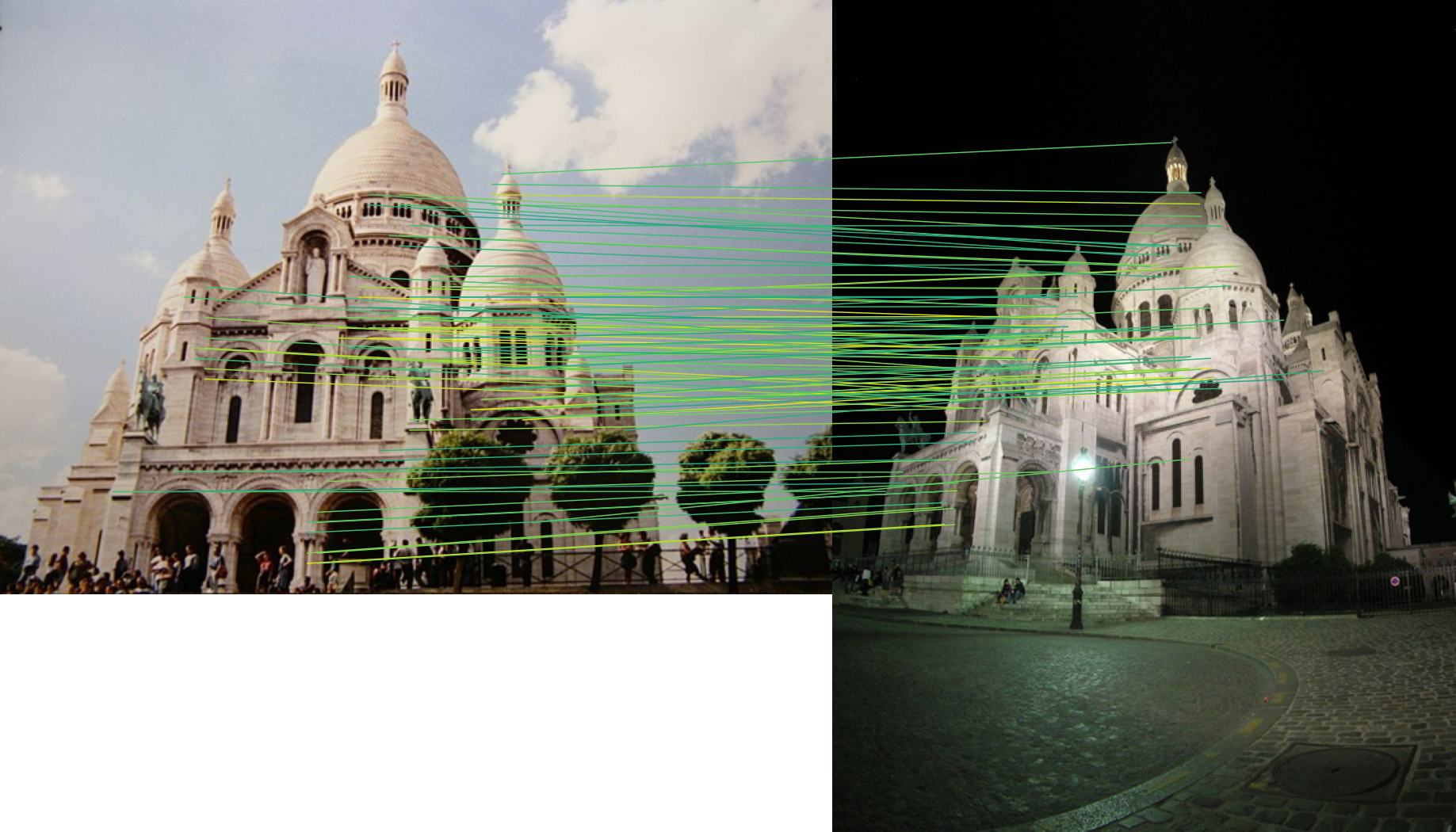
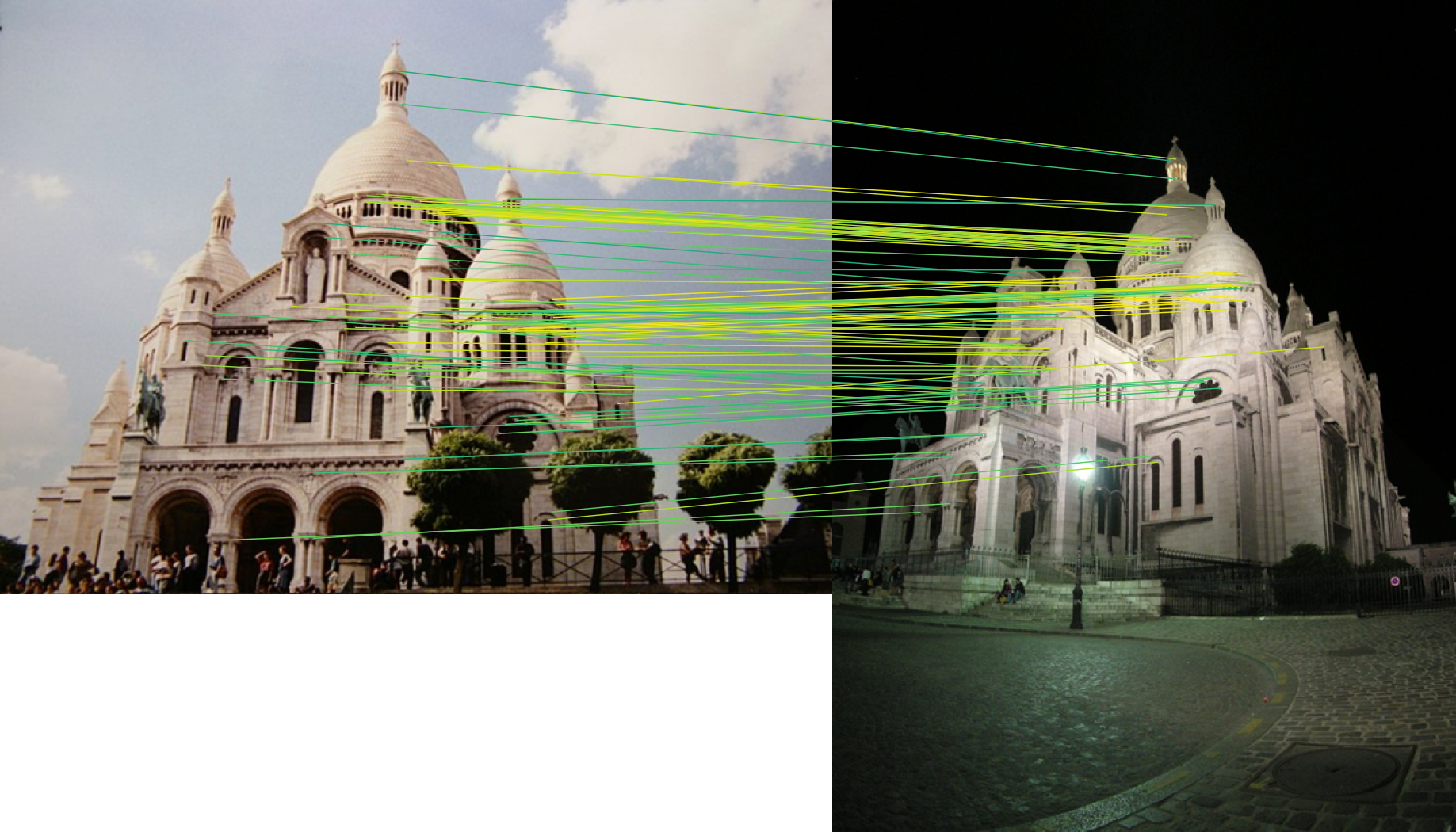
The included image pair was tested at a maximum image dimension of 640 pixels on CPU. These numbers are only a functional reference; runtimes and match counts vary by hardware, package version, configuration, and model weights.
| Method | Matches | Time |
|---|---|---|
| LoFTR | 311 | 3.50 s |
| SuperPoint + LightGlue | 96 | 3.60 s |
| DISK + LightGlue | 194 | 4.41 s |
| ALIKED + LightGlue | 196 | 2.85 s |
| SIFT + AdaLAM | 12 | 4.01 s |
| RoMa | 2000 | 16.91 s |
| EfficientLoFTR | 352 | 3.85 s |
| XFeat + LightGlue | 1 | 0.73 s |
Do not use this table as a quality ranking. Each method uses different confidence definitions, sampling limits, and matching strategies.
.
├── assets/
│   ├── aliked-lightglue-result.png
│   └── loftr-result.png
├── examples/
│   └── basic.py
├── src/
│   └── feature_matching/
│       ├── api.py
│       ├── base.py
│       ├── config.py
│       ├── registry.py
│       ├── types.py
│       ├── configs/
│       └── methods/
│           └── adapters.py
├── tests/
│   └── test_api.py
├── pyproject.toml
└── README.md
api.py: validates inputs, resolves the device, loads config, and runs the
selected adapter.registry.py: maps public method names to adapter classes and config files.methods/adapters.py: connects external model APIs to the common output
contract.configs/: stores packaged defaults for each method.tests/: verifies registration, validation, caching, and output conversion.examples/: runs real images and creates saved result artifacts.Install test dependencies:
python -m pip install -e ".[test]"
Run:
python -m pytest
The unit tests mock large external backends where appropriate. The example runner provides a separate pretrained integration check.
ModuleNotFoundError: feature_matchingInstall the local project into the interpreter used to run the script:
python -m pip install -e .
Check the interpreter:
which python
python -c "import sys; print(sys.executable)"
Install the corresponding extra, for example:
python -m pip install -e ".[lightglue]"
Retry when the network is available. Completed weights remain cached. Direct downloads use temporary files, so interrupted downloads are not treated as valid checkpoints.
Check:
python -c "import torch; print(torch.cuda.is_available())"
Use device="cpu" or install a CUDA-enabled PyTorch build compatible with the
system GPU and driver.
The first call may download weights and construct a large model. Later calls
reuse cached weights, but the current API still creates a new model instance
for each match() call.
SuperPoint + LightGlue as research-only unless its SuperPoint components
are separately cleared for commercial use.A computer vision project for local feature extraction, image matching, and geometric correspondence experiments.
Python
0
1 commits
updated Jun 13, 2026
Feature Matching provides one PyTorch interface for eight image matching pipelines. Each backend accepts image tensors and returns matched pixel coordinates, confidence scores, and batch indexes in the same format.
from feature_matching import match

result = match(image0, image1, method="LoFTR")
The package keeps large model dependencies optional, loads backends lazily, and checks local model caches before downloading pretrained weights.
match() function for all supported methods| Method | Backend | Matcher type |
|---|---|---|
LoFTR | Kornia | Detector-free |
SuperPoint + LightGlue | LightGlue | Sparse features |
DISK + LightGlue | Kornia and LightGlue | Sparse features |
ALIKED + LightGlue | LightGlue | Sparse features |
RoMa | romatch | Dense matching sampled to points |
EfficientLoFTR | Hugging Face Transformers | Detector-free |
XFeat + LightGlue | Official XFeat Torch Hub repository | Sparse features |
SIFT + AdaLAM | Kornia | Classical local features |
List the accepted method names programmatically:
from feature_matching import available_methods

print(available_methods())
Method names are normalized during lookup, so capitalization and punctuation
differences such as "loftr" are accepted.
The base package requires only PyTorch. Model libraries are optional and can be installed for the methods you need.
After cloning the repository, enter its directory and create an editable installation:
cd feature-matching
python -m pip install -e .
An editable installation links the active Python environment to the local
src/ directory. Source changes are available without reinstalling.
python -m pip install -e ".[loftr]"
python -m pip install -e ".[lightglue]"
python -m pip install -e ".[roma]"
python -m pip install -e ".[efficientloftr]"
python -m pip install -e ".[xfeat]"
python -m pip install -e ".[sift-adalam]"
The LightGlue extra installs the official source archive from GitHub because the official project is not distributed as a normal PyPI release.
python -m pip install -e ".[all,examples,test]"
This installs the model backends, YAML support, example dependencies, and pytest.
Always install and run with the same interpreter:
python -c "import feature_matching; print(feature_matching.available_methods())"
python -c "import torch; print(torch.__version__, torch.cuda.is_available())"
import torch

from feature_matching import match

image0 = torch.rand(1, 3, 480, 640)
image1 = torch.rand(1, 3, 480, 640)

result = match(image0, image1, method="LoFTR")

print(result["points0"].shape)
print(result["points1"].shape)
print(result["scores"].shape)
Inputs must be PyTorch tensors with one of these layouts:
[C, H, W]
[B, C, H, W]
Where:
B is the batch sizeC is 1 for grayscale or 3 for RGBH is image heightW is image widthFloating-point images should normally use values in [0, 1].
torch.uint8 images are automatically converted from [0, 255] to [0, 1].
Both input tensors must have the same batch size. Their spatial dimensions may differ unless an upstream backend has stricter requirements; adapters perform backend-specific resizing where needed.
import torch
from PIL import Image


def load_image(path: str) -> torch.Tensor:
    image = Image.open(path).convert("RGB")
    return (
        torch.frombuffer(bytearray(image.tobytes()), dtype=torch.uint8)
        .reshape(image.height, image.width, 3)
        .permute(2, 0, 1)
    )


image0 = load_image("image0.jpg")
image1 = load_image("image1.jpg")
The API will convert these uint8 tensors to floating point.
Every method returns:
{
    "points0": torch.Tensor,       # [N, 2]
    "points1": torch.Tensor,       # [N, 2]
    "scores": torch.Tensor,        # [N]
    "batch_indexes": torch.Tensor, # [N]
}
points0[i] is an (x, y) pixel coordinate in the first image.points1[i] is its matched coordinate in the second image.scores[i] is the backend confidence for that match.batch_indexes[i] identifies the image pair that produced the match.For batched input, select matches for one pair with:
pair_index = 1
mask = result["batch_indexes"] == pair_index

pair_points0 = result["points0"][mask]
pair_points1 = result["points1"][mask]
pair_scores = result["scores"][mask]
Confidence values are normalized only structurally, not statistically. Scores from different methods should not be assumed to have identical meanings.
Every method config defaults to:
{
  "device": "auto"
}
"auto" selects CUDA when torch.cuda.is_available() is true. Otherwise, it
uses the input tensor device.
Select a device explicitly:
result = match(image0, image1, method="LoFTR", device="cpu")
result = match(image0, image1, method="LoFTR", device="cuda")
result = match(image0, image1, method="LoFTR", device="cuda:0")
Or set it through a config override:
result = match(
    image0,
    image1,
    method="RoMa",
    config={"device": "cuda:0"},
)
The explicit device argument takes priority over the config value. Requesting
CUDA when CUDA is unavailable raises a clear error.
Default JSON files are stored in:
src/feature_matching/configs/
result = match(
    image0,
    image1,
    method="SuperPoint + LightGlue",
    config={
        "max_num_keypoints": 1024,
        "filter_threshold": 0.2,
    },
)
Overrides are merged with the method defaults, so omitted settings keep their default values.
{
  "device": "cpu",
  "max_num_keypoints": 1024,
  "filter_threshold": 0.2
}
result = match(
    image0,
    image1,
    method="DISK + LightGlue",
    config="my_config.json",
)
Install YAML support:
python -m pip install -e ".[config]"
Then pass a .yaml or .yml file:
result = match(
    image0,
    image1,
    method="LoFTR",
    config="my_config.yaml",
)
Common useful settings include:
| Method | Important settings |
|---|---|
| LoFTR | pretrained, device, cache_dir |
| LightGlue combinations | max_num_keypoints, filter_threshold, depth_confidence, width_confidence |
| RoMa | resolution, sample_threshold, max_num_matches, use_custom_corr |
| EfficientLoFTR | model_id, match_threshold, cache_dir |
| XFeat + LightGlue | max_num_keypoints, detection_threshold, filter_threshold |
| SIFT + AdaLAM | max_num_keypoints, rootsift, min_inliers, orientation and scale thresholds |
See the packaged JSON files for the complete defaults.
Weighted backends use cache-first loading:
The default Torch Hub locations are:
~/.cache/torch/hub/
~/.cache/torch/hub/checkpoints/
EfficientLoFTR uses the Hugging Face cache, normally:
~/.cache/huggingface/hub/
Set a custom cache root in a method override:
result = match(
    image0,
    image1,
    method="LoFTR",
    config={"cache_dir": "/data/model-cache"},
)
SIFT + AdaLAM does not require pretrained model weights.
Install example dependencies:
python -m pip install -e ".[examples]"
Run all eight methods:
python examples/basic.py --device auto
Run one method:
python examples/basic.py --method "RoMa" --device cpu
Useful options:
--device auto|cpu|cuda|cuda:N
--max-size 640
--max-lines 100
--method "Method Name"
The script downloads the LightGlue Sacré-Cœur image pair when it is not already available. It saves results under:
Result/
├── images/
│   ├── image0.jpg
│   └── image1.jpg
├── loftr.pt
├── loftr.png
├── ...
└── summary.json
.pt files contain the complete output dictionary..png files visualize the highest-confidence matches.summary.json records status, match count, and runtime.<method>_error.txt is created when one method fails.The runner handles each method independently, so one missing dependency does not prevent the remaining methods from running.
The following visualizations were generated by examples/basic.py. Colored
lines connect corresponding points in the two input images.
The included image pair was tested at a maximum image dimension of 640 pixels on CPU. These numbers are only a functional reference; runtimes and match counts vary by hardware, package version, configuration, and model weights.
| Method | Matches | Time |
|---|---|---|
| LoFTR | 311 | 3.50 s |
| SuperPoint + LightGlue | 96 | 3.60 s |
| DISK + LightGlue | 194 | 4.41 s |
| ALIKED + LightGlue | 196 | 2.85 s |
| SIFT + AdaLAM | 12 | 4.01 s |
| RoMa | 2000 | 16.91 s |
| EfficientLoFTR | 352 | 3.85 s |
| XFeat + LightGlue | 1 | 0.73 s |
Do not use this table as a quality ranking. Each method uses different confidence definitions, sampling limits, and matching strategies.
.
├── assets/
│   ├── aliked-lightglue-result.png
│   └── loftr-result.png
├── examples/
│   └── basic.py
├── src/
│   └── feature_matching/
│       ├── api.py
│       ├── base.py
│       ├── config.py
│       ├── registry.py
│       ├── types.py
│       ├── configs/
│       └── methods/
│           └── adapters.py
├── tests/
│   └── test_api.py
├── pyproject.toml
└── README.md
api.py: validates inputs, resolves the device, loads config, and runs the
selected adapter.registry.py: maps public method names to adapter classes and config files.methods/adapters.py: connects external model APIs to the common output
contract.configs/: stores packaged defaults for each method.tests/: verifies registration, validation, caching, and output conversion.examples/: runs real images and creates saved result artifacts.Install test dependencies:
python -m pip install -e ".[test]"
Run:
python -m pytest
The unit tests mock large external backends where appropriate. The example runner provides a separate pretrained integration check.
ModuleNotFoundError: feature_matchingInstall the local project into the interpreter used to run the script:
python -m pip install -e .
Check the interpreter:
which python
python -c "import sys; print(sys.executable)"
Install the corresponding extra, for example:
python -m pip install -e ".[lightglue]"
Retry when the network is available. Completed weights remain cached. Direct downloads use temporary files, so interrupted downloads are not treated as valid checkpoints.
Check:
python -c "import torch; print(torch.cuda.is_available())"
Use device="cpu" or install a CUDA-enabled PyTorch build compatible with the
system GPU and driver.
The first call may download weights and construct a large model. Later calls
reuse cached weights, but the current API still creates a new model instance
for each match() call.
SuperPoint + LightGlue as research-only unless its SuperPoint components
are separately cleared for commercial use.