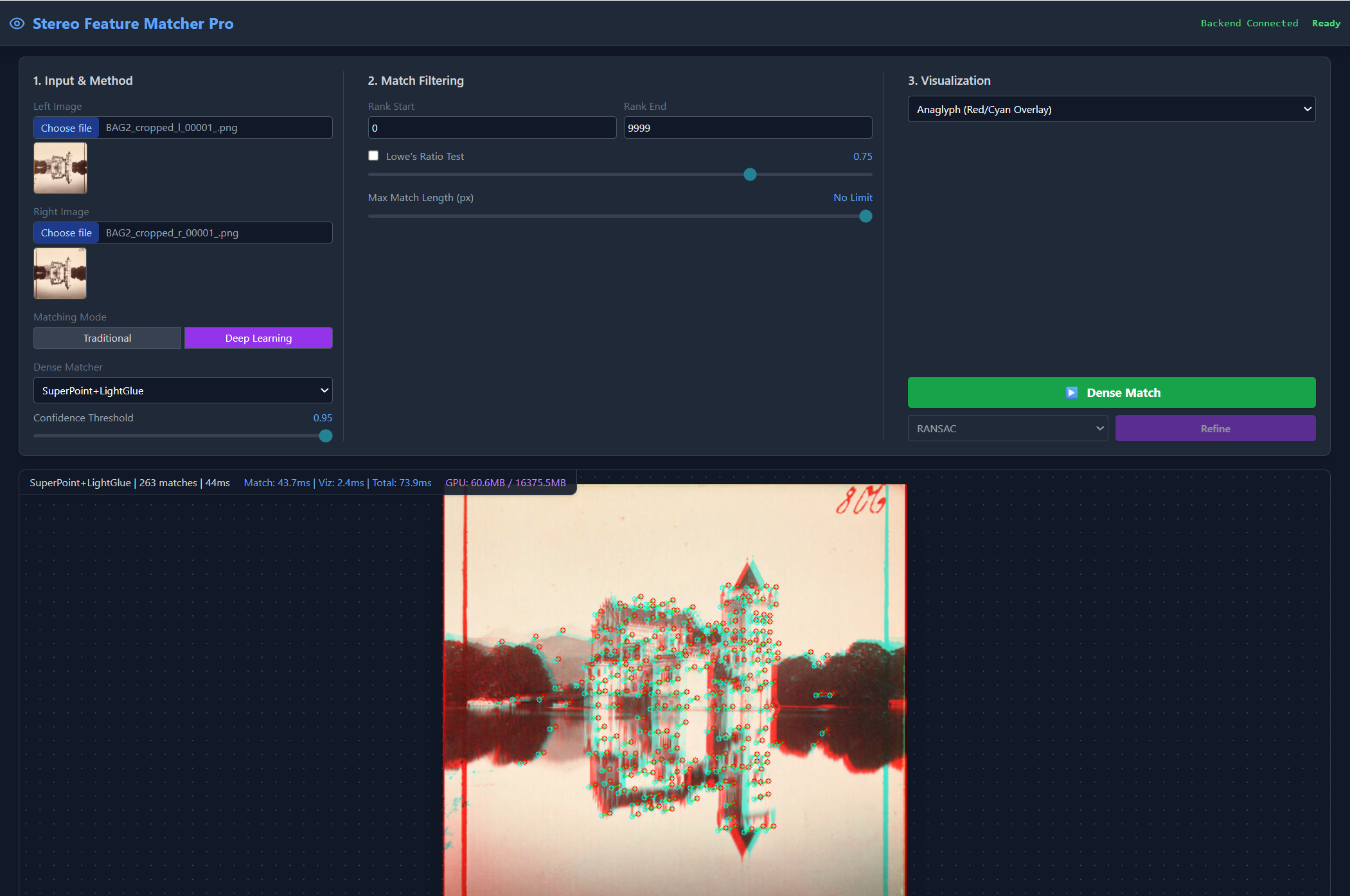
Made with Claude Opus 4.5 to experiment with feature matching for another project I am working on. As a tool its very useful so id like to share it with others who might benefit.
A comprehensive web-based testbed for experimenting with stereo feature detection and matching algorithms. Compare traditional OpenCV detectors against state-of-the-art deep learning matchers like SuperPoint+LightGlue and EfficientLoFTR.


git clone https://github.com/Dhruva-Storz/FeatureDetectorSandbox.git
cd "Test Feature Detectors"
python -m venv venv
Windows (PowerShell):
.\venv\Scripts\Activate.ps1
Windows (CMD):
.\venv\Scripts\activate.bat
Linux/macOS:
source venv/bin/activate
pip install -r requirements.txt
This installs the core dependencies for traditional detectors (ORB, AKAZE, BRISK, SIFT).
SURF requires opencv-contrib-python:
pip install opencv-contrib-python
For SuperPoint+LightGlue, DISK+LightGlue, and EfficientLoFTR:
First, install PyTorch matching your CUDA version. Visit https://pytorch.org/get-started/locally/ for the exact command.
CUDA 12.4:
pip install torch torchvision --index-url https://download.pytorch.org/whl/cu124
CUDA 12.1:
pip install torch torchvision --index-url https://download.pytorch.org/whl/cu121
CUDA 11.8:
pip install torch torchvision --index-url https://download.pytorch.org/whl/cu118
CPU only (no GPU):
pip install torch torchvision --index-url https://download.pytorch.org/whl/cpu
pip install transformers kornia pillow
Windows:
.\venv\Scripts\python.exe run.py
With venv activated:
python run.py
Alternative (direct uvicorn):
uvicorn backend.main:app --host 127.0.0.1 --port 8000
Open your browser and navigate to: http://127.0.0.1:8000
Test Feature Detectors/
├── backend/
│   ├── __init__.py
│   ├── main.py                  # FastAPI application & endpoints
│   ├── utils.py                 # Image encoding/decoding, visualization
│   ├── detectors/
│   │   ├── __init__.py          # Detector registry
│   │   ├── base.py              # BaseDetector abstract class
│   │   └── opencv_detectors.py  # ORB, AKAZE, BRISK, SIFT, SURF
│   ├── matchers/
│   │   ├── __init__.py          # Matcher registry
│   │   ├── base.py              # BaseMatcher abstract class
│   │   ├── opencv_matchers.py   # BFMatcher with filtering
│   │   └── robust_estimation.py # RANSAC, LMEDS, MAGSAC++
│   └── dense_matchers/
│       ├── __init__.py          # Dense matcher registry
│       ├── base.py              # BaseDenseMatcher abstract class
│       ├── lightglue_matcher.py # SuperPoint+LightGlue, DISK+LightGlue
│       └── efficientloftr_matcher.py  # EfficientLoFTR
├── frontend/
│   └── index.html               # Web UI (Tailwind CSS)
├── venv/                        # Python virtual environment
├── requirements.txt             # Python dependencies
├── run.py                       # Server startup script
├── CLAUDE.md                    # Development notes
└── README.md                    # This file
| Endpoint | Method | Description |
|---|---|---|
/ | GET | Serve frontend HTML |
/api/detectors | GET | List available traditional detectors |
/api/matchers | GET | List available matchers |
/api/dense-matchers | GET | List available deep learning matchers |
/api/robust-methods | GET | List robust estimation methods |
/api/match | POST | Compute matches (traditional pipeline) |
/api/dense-match | POST | Compute matches (deep learning) |
/api/refine | POST | Refine matches with robust estimation |
/api/health | GET | Health check |
Install PyTorch and transformers. See Step 5 above.
Install opencv-contrib-python:
pip install opencv-contrib-python
The first time you use a deep learning matcher, it downloads the model from HuggingFace. This is a one-time download.
Use Task Manager or:
taskkill /IM python.exe /F
backend/detectors/BaseDetectordetect_and_compute() methodbackend/detectors/__init__.pyfrom .base import BaseDetector, DetectionResult, KeyPoint
class MyDetector(BaseDetector):
name = "MyDetector"
description = "My custom detector"
def detect_and_compute(self, image, mask=None):
# Your detection logic here
keypoints = [...]
descriptors = np.array(...)
return DetectionResult(keypoints=keypoints, descriptors=descriptors)
def get_norm_type(self):
return "L2" # or "HAMMING" for binary descriptors
backend/dense_matchers/BaseDenseMatchermatch() methodbackend/dense_matchers/__init__.pyfrom .base import BaseDenseMatcher, DenseMatchResult
class MyDenseMatcher(BaseDenseMatcher):
name = "MyMatcher"
description = "My custom dense matcher"
def match(self, image1, image2, threshold=0.0):
# Your matching logic here
return DenseMatchResult(
keypoints1=kp1_array, # Nx2
keypoints2=kp2_array, # Nx2
scores=scores_array # N
)
MIT
Made with Claude Opus 4.5 to experiment with feature matching for another project I am working on. As a tool its very useful so id like to share it with others who might benefit.
A comprehensive web-based testbed for experimenting with stereo feature detection and matching algorithms. Compare traditional OpenCV detectors against state-of-the-art deep learning matchers like SuperPoint+LightGlue and EfficientLoFTR.
git clone https://github.com/Dhruva-Storz/FeatureDetectorSandbox.git
cd "Test Feature Detectors"
python -m venv venv
Windows (PowerShell):
.\venv\Scripts\Activate.ps1
Windows (CMD):
.\venv\Scripts\activate.bat
Linux/macOS:
source venv/bin/activate
pip install -r requirements.txt
This installs the core dependencies for traditional detectors (ORB, AKAZE, BRISK, SIFT).
SURF requires opencv-contrib-python:
pip install opencv-contrib-python
For SuperPoint+LightGlue, DISK+LightGlue, and EfficientLoFTR:
First, install PyTorch matching your CUDA version. Visit https://pytorch.org/get-started/locally/ for the exact command.
CUDA 12.4:
pip install torch torchvision --index-url https://download.pytorch.org/whl/cu124
CUDA 12.1:
pip install torch torchvision --index-url https://download.pytorch.org/whl/cu121
CUDA 11.8:
pip install torch torchvision --index-url https://download.pytorch.org/whl/cu118
CPU only (no GPU):
pip install torch torchvision --index-url https://download.pytorch.org/whl/cpu
pip install transformers kornia pillow
Windows:
.\venv\Scripts\python.exe run.py
With venv activated:
python run.py
Alternative (direct uvicorn):
uvicorn backend.main:app --host 127.0.0.1 --port 8000
Open your browser and navigate to: http://127.0.0.1:8000
Test Feature Detectors/
├── backend/
│   ├── __init__.py
│   ├── main.py                  # FastAPI application & endpoints
│   ├── utils.py                 # Image encoding/decoding, visualization
│   ├── detectors/
│   │   ├── __init__.py          # Detector registry
│   │   ├── base.py              # BaseDetector abstract class
│   │   └── opencv_detectors.py  # ORB, AKAZE, BRISK, SIFT, SURF
│   ├── matchers/
│   │   ├── __init__.py          # Matcher registry
│   │   ├── base.py              # BaseMatcher abstract class
│   │   ├── opencv_matchers.py   # BFMatcher with filtering
│   │   └── robust_estimation.py # RANSAC, LMEDS, MAGSAC++
│   └── dense_matchers/
│       ├── __init__.py          # Dense matcher registry
│       ├── base.py              # BaseDenseMatcher abstract class
│       ├── lightglue_matcher.py # SuperPoint+LightGlue, DISK+LightGlue
│       └── efficientloftr_matcher.py  # EfficientLoFTR
├── frontend/
│   └── index.html               # Web UI (Tailwind CSS)
├── venv/                        # Python virtual environment
├── requirements.txt             # Python dependencies
├── run.py                       # Server startup script
├── CLAUDE.md                    # Development notes
└── README.md                    # This file
| Endpoint | Method | Description |
|---|---|---|
/ | GET | Serve frontend HTML |
/api/detectors | GET | List available traditional detectors |
/api/matchers | GET | List available matchers |
/api/dense-matchers | GET | List available deep learning matchers |
/api/robust-methods | GET | List robust estimation methods |
/api/match | POST | Compute matches (traditional pipeline) |
/api/dense-match | POST | Compute matches (deep learning) |
/api/refine | POST | Refine matches with robust estimation |
/api/health | GET | Health check |
Install PyTorch and transformers. See Step 5 above.
Install opencv-contrib-python:
pip install opencv-contrib-python
The first time you use a deep learning matcher, it downloads the model from HuggingFace. This is a one-time download.
Use Task Manager or:
taskkill /IM python.exe /F
backend/detectors/BaseDetectordetect_and_compute() methodbackend/detectors/__init__.pyfrom .base import BaseDetector, DetectionResult, KeyPoint
class MyDetector(BaseDetector):
name = "MyDetector"
description = "My custom detector"
def detect_and_compute(self, image, mask=None):
# Your detection logic here
keypoints = [...]
descriptors = np.array(...)
return DetectionResult(keypoints=keypoints, descriptors=descriptors)
def get_norm_type(self):
return "L2" # or "HAMMING" for binary descriptors
backend/dense_matchers/BaseDenseMatchermatch() methodbackend/dense_matchers/__init__.pyfrom .base import BaseDenseMatcher, DenseMatchResult
class MyDenseMatcher(BaseDenseMatcher):
name = "MyMatcher"
description = "My custom dense matcher"
def match(self, image1, image2, threshold=0.0):
# Your matching logic here
return DenseMatchResult(
keypoints1=kp1_array, # Nx2
keypoints2=kp2_array, # Nx2
scores=scores_array # N
)
MIT