Multiview matching with deep-learning and hand-crafted local features for COLMAP and other SfM software. Supports high-resolution formats and images with rotations. Both CLI and GUI are supported.
See the code





| SIFT | DISK | IMAGES ORIENTATION | DENSE WITH ROMA |
|---|---|---|---|
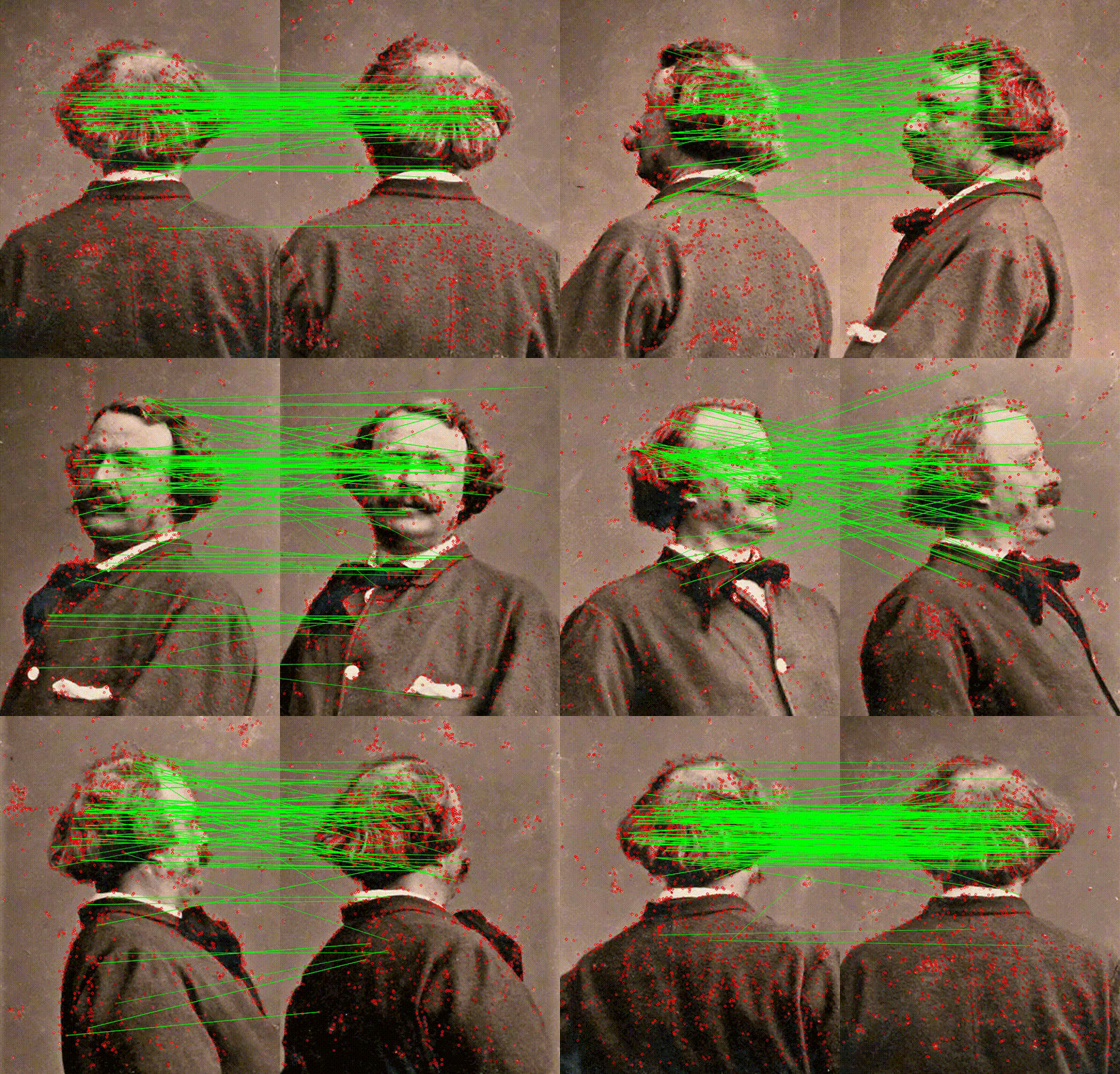 | 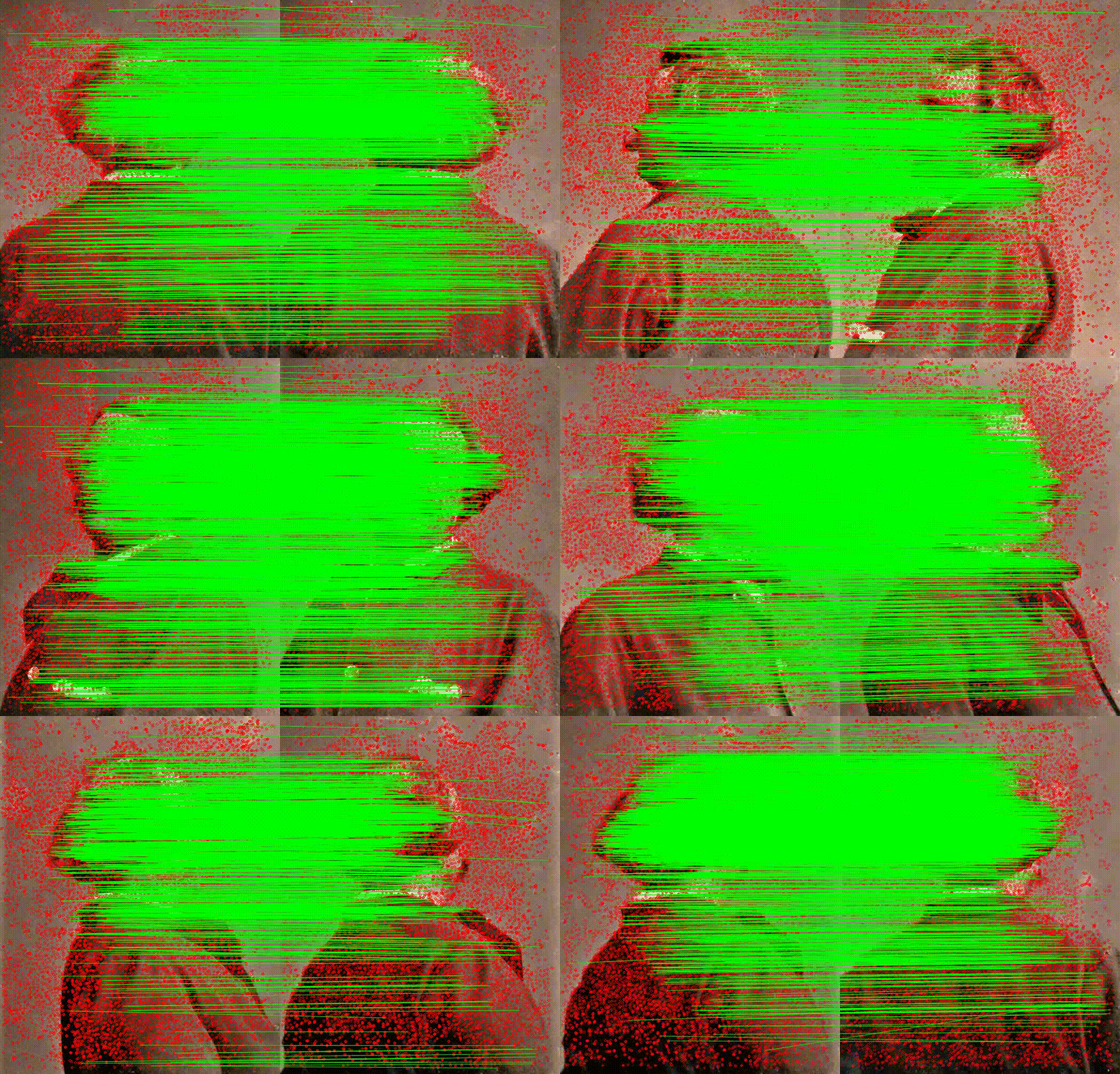 | 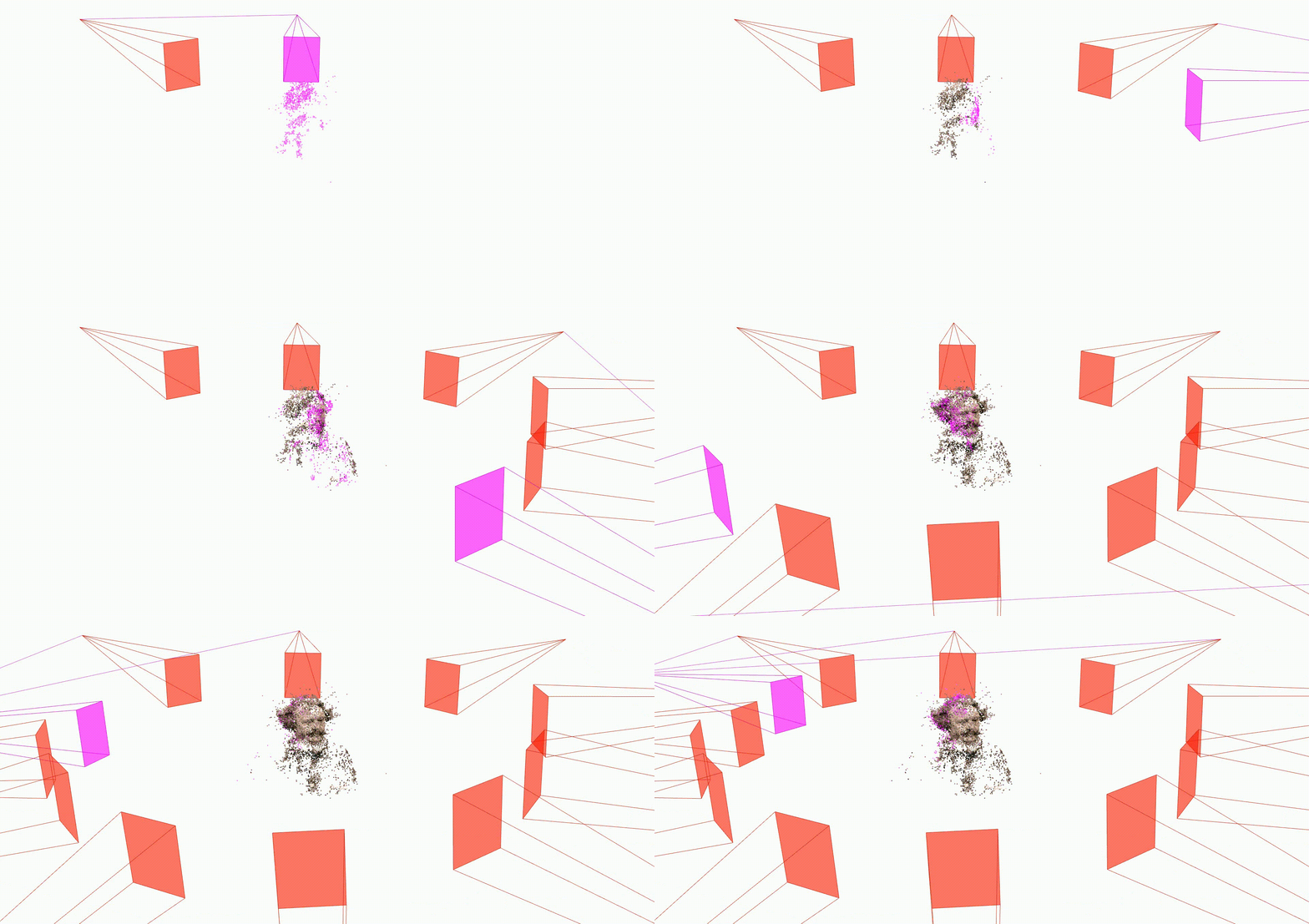 | 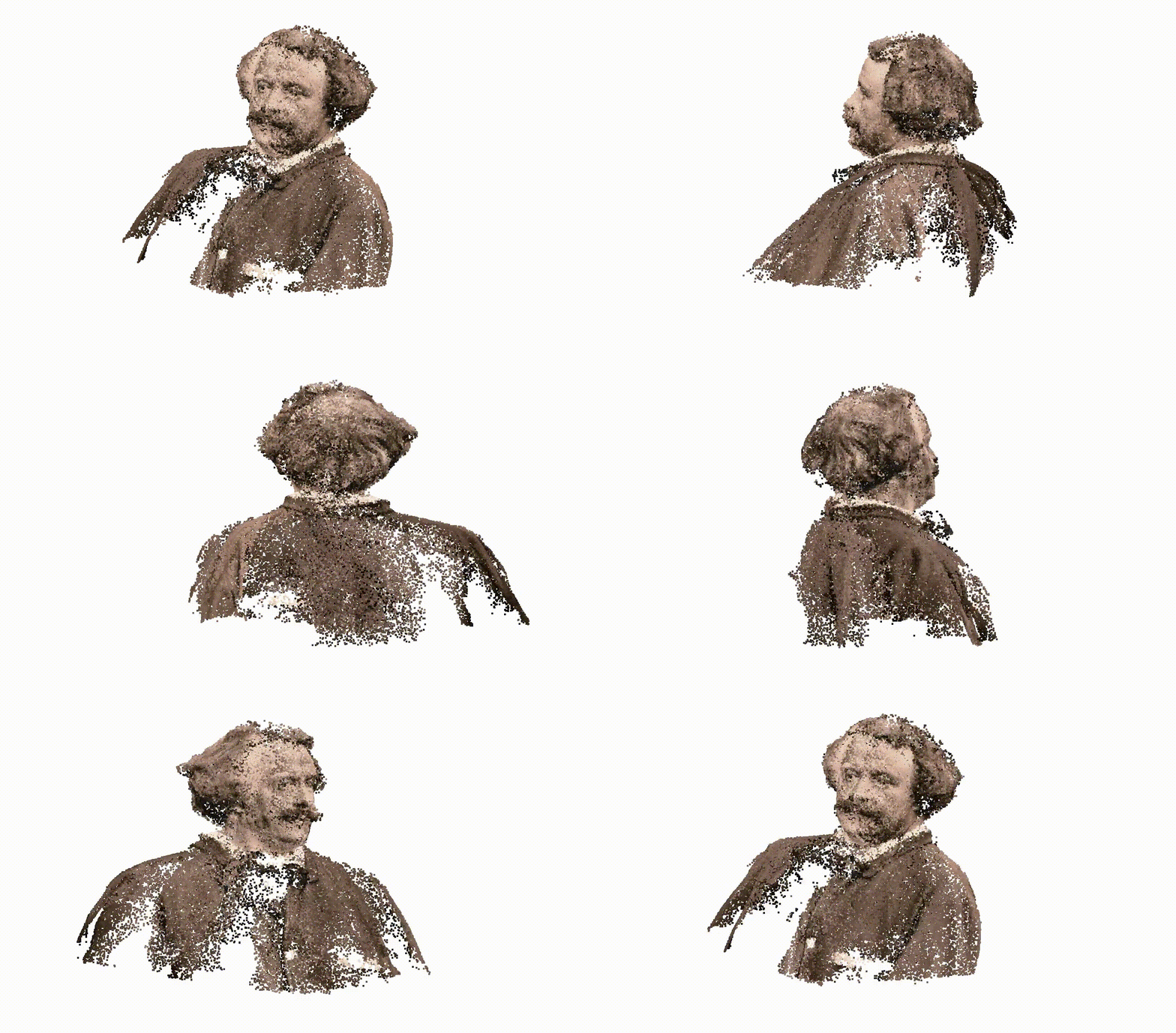 |
| SIFT | SUPERGLUE |
|---|---|
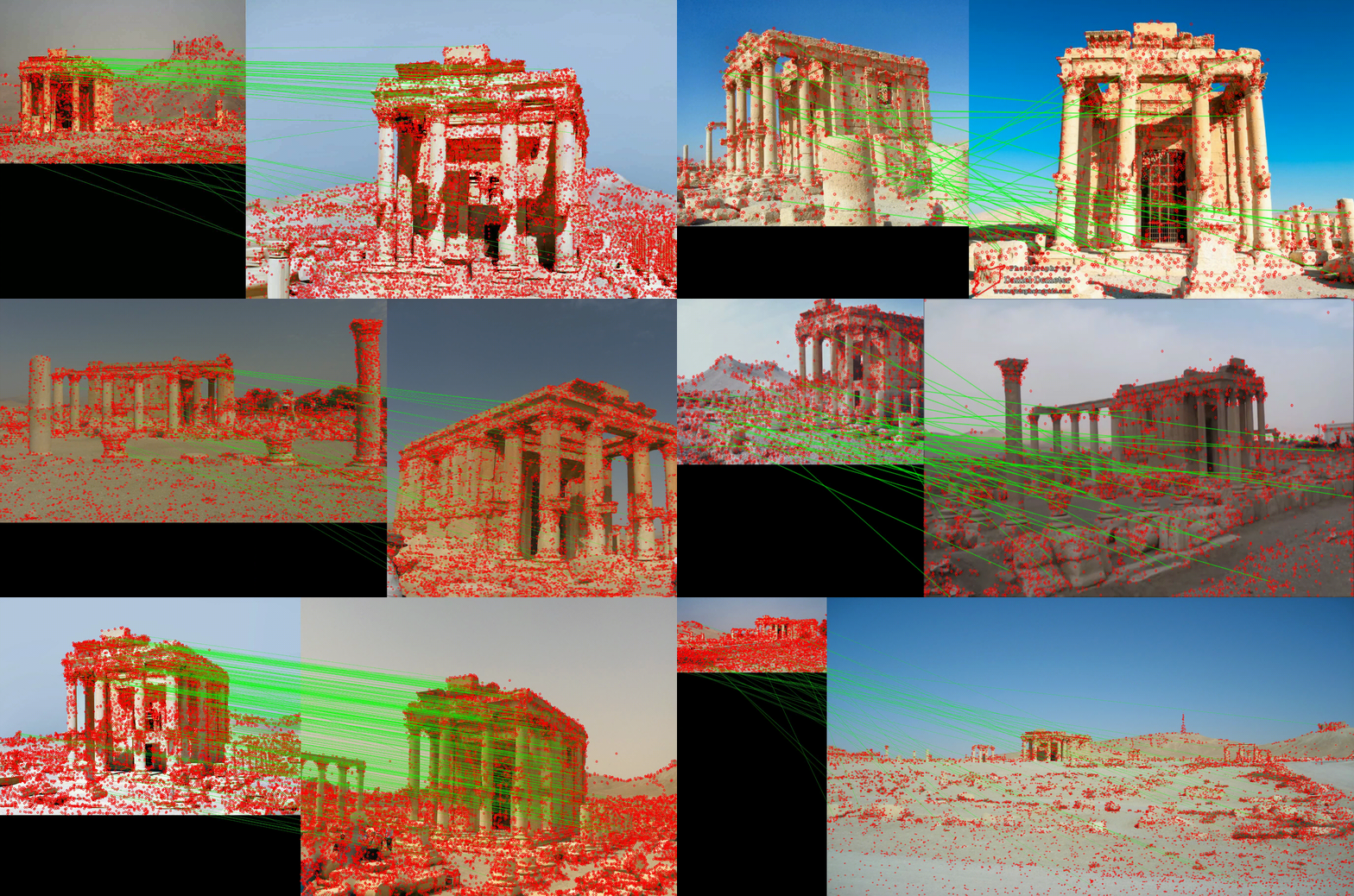 | 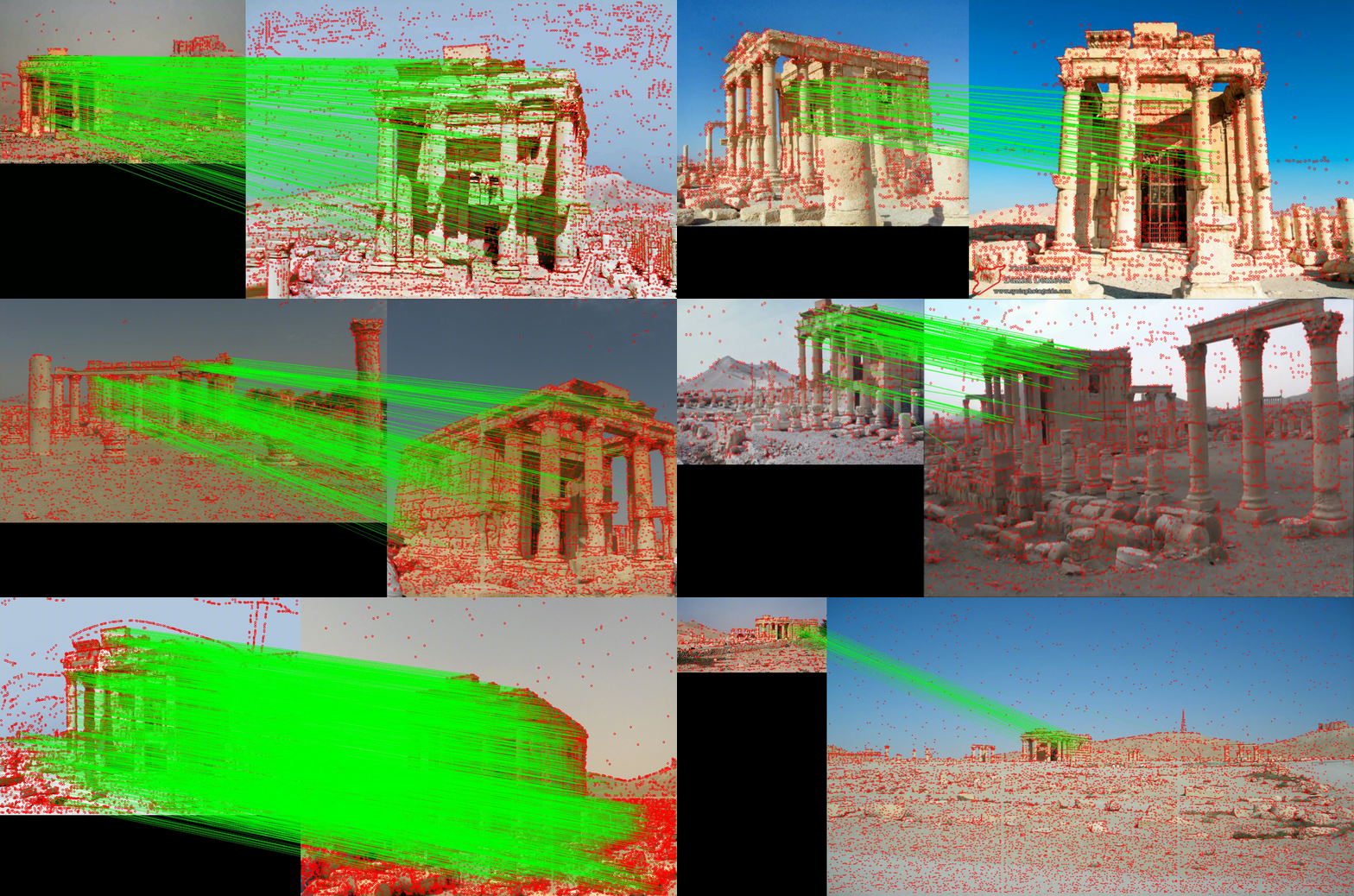 |
Multivew matcher for SfM software. Support both deep-learning based and hand-crafted local features and matchers and export keypoints and matches directly in a COLMAP database or to Agisoft Metashape by importing the reconstruction in Bundler format. Now, it supports both OpenMVG and MicMac. Feel free to collaborate!
For how to use DIM, check the Documentation (updated for the master branch).
Please, note that deep-image-matching is under active development and it is still in an experimental stage. If you find any bug, please open an issue. For the licence of individual local features and matchers please refer to the authors' original projects.
Key features:
| Algorithm | Year | Paper link | Github link | Notes |
|---|---|---|---|---|
| RIPE | 2025 | link | link | supported |
| RDD sparse | 2025 | link | link | supported |
| LiftFeat | 2025 | link | link | supported |
| XFeat | 2024 | link | link | supported |
| DeDoDe | 2024 | link | link | only GPU |
| ALIKED | 2023 | link | link | supported |
| SRIF | 2023 | link | link | supported |
| DISK | 2020 | link | link | supported |
| KeyNet | 2019 | link | link | supported |
| SuperPoint | 2018 | link | link | supported |
| Superpoint open | 2018 | link | link | supported |
| HardNet | 2017 | link | link | supported |
| ORB | 2011 | link | link | from OpenCV |
| SIFT | 2004 | link | link | from OpenCV |
| Algorithm | Year | Paper link | Github link | Notes |
|---|---|---|---|---|
| LightGlue | 2023 | link | link | with SuperPoint, DISK, and ALIKED |
| LighterGlue | 2023 | link | link | with XFeat |
| RoMa | 2023 | link | link | supported |
| SE2-LoFTR | 2022 | link | link | no tiling and only GPU |
| LoFTR | 2021 | link | link | only GPU |
| SuperGlue | 2020 | link | link | with SuperPoint |
| Nearest Neighbor | - | - | - | from KORNIA |
| ✓ COLMAP | | ✓ OpenMVG | | ✓ MICMAC | | ✓ Agisoft Metashape | | ✓ Software that supports bundler format |
Want to run on a sample dataset? ➡️ 
Want to run on your images? ➡️
DIM can also be utilized as a library instead of being executed through the Command Line Interface (refer to the Usage Instructions).
For quick examples, see:
demo.py - Simple script demonstrating the basic workflowdemo.ipynb - Interactive notebook version of the demonotebooks/sfm_pipeline.ipynb - Complete SfM pipeline with detailed explanationsFor installing deep-image-matching, we recommend using uv for fast and reliable package management:
# Install uv if you haven't already
curl -LsSf https://astral.sh/uv/install.sh | sh

# Create and activate a virtual environment
uv venv --python 3.9
source .venv/bin/activate  # On Windows: .venv\Scripts\activate
Then, you can install deep-image-matching using uv:
uv pip install -e .
This command will install the package in editable mode, allowing you to modify the source code and see changes immediately without needing to reinstall. If you want to use deep-image-matching as a non-editable library, you can also install it without the -e flag.
This will also install pycolmap as a dependency, which is required for running the 3D reconstruction.
If you have any issues with pycolmap, you can manually install it following the official instructions here.
To verify that deep-image-matching is correctly installed, you can try to import the package in a Python shell:
import deep_image_matching as dim
To test most of the functionality, run the tests to check if deep-image-matching is correctly installed, run:
uv run pytests
For more information, check the documentation.
This project has migrated from conda/pip to uv for dependency management. Benefits include:
uv.lock ensures reproducible installations across different environmentsIf you have any issue with uv, you prefer to have a global installation of DIM, or you have any other problem with the installation, you can use conda/manba to create an environment and install DIM from source using pip:
git clone https://github.com/3DOM-FBK/deep-image-matching.git
cd deep-image-matching

conda create -n deep-image-matching python=3.9
conda activate deep-image-matching
pip install -e .
For Docker installation, see the Docker Installation section in the documentation.
For a quick start, check out the demo.py script or demo.ipynb notebook that demonstrate basic usage with the example dataset:
python demo.py --dir assets/example_cyprus --pipeline superpoint+lightglue
The demo runs the complete pipeline from feature extraction to 3D reconstruction using the provided example dataset.
A similar demo example is also available as a notebook in demo.ipynb.
Use the following command to see all the available options from the CLI:
python -m deep_image_matching --help
For example, to run the matching with SuperPoint and LightGlue on the example_cyprus dataset:
python -m deep_image_matching --dir assets/example_cyprus --pipeline superpoint+lightglue
The --dir parameter defines the processing directory, where all the results will be saved. This directory must contain a subfolder named images with all the images to be processed.
Deep-image-matching can also be used as a Python library. For a comprehensive example showing the complete SfM pipeline, see notebooks/sfm_pipeline.ipynb.
For detailed usage instructions and configurations, refer to the documentation.
For advanced usage, please refer to the documentation and/or check the scripts directory.
To run the matching with different local features and/or matchers and marging together the results, you can use scripts in the ./scripts directory for merging the COLMAP databases.
python ./join_databases.py --help
python ./join_databases.py --input path/to/dir/with/databases --output path/to/output/dir
Suggested solution:
export_to_bundler.py from the scripts folder. It will create a fake bundler file. Then in Metashape import all the images you need, import camera poses using the bundler file, select all images and reset the alignment. Finally right click, align selected cameras (see issue).Other solutions:
To export the solution to Metashape, you can export the COLMAP database to Bundler format and then import it into Metashape. This can be done from Metashape GUI, by first importing the images and then use the function Import Cameras (File -> Import -> Import Cameras) to select Bundler file (e.g., bundler.out) and the image list file (e.g., bundler_list.txt).
Alternatevely, you can use the export_to_metashape.py script to automatically create a Metashape project from a reconstruction saved in Bundler format. The script export_to_metashape.py takes as input the solution in Bundler format and the images and it exports the solution to Metashape. It requires to install Metashape as a Python module in your environment and to have a valid license. Please, refer to the instructions at https://github.com/franioli/metashape.
Any contribution to this repo is really welcome! If you want to contribute to the project, please, check the contributing guidelines.
See the TODO list for the list of features and improvements that are planned for the future.
If you find the repository useful for your work consider citing the papers:
@article{morelli2024_deep_image_matching,
  AUTHOR = {Morelli, L. and Ioli, F. and Maiwald, F. and Mazzacca, G. and Menna, F. and Remondino, F.},
  TITLE = {DEEP-IMAGE-MATCHING: A TOOLBOX FOR MULTIVIEW IMAGE MATCHING OF COMPLEX SCENARIOS},
  JOURNAL = {The International Archives of the Photogrammetry, Remote Sensing and Spatial Information Sciences},
  VOLUME = {XLVIII-2/W4-2024},
  YEAR = {2024},
  PAGES = {309--316},
  DOI = {10.5194/isprs-archives-XLVIII-2-W4-2024-309-2024}
}
@article{morelli2022photogrammetry,
  title={PHOTOGRAMMETRY NOW AND THEN--FROM HAND-CRAFTED TO DEEP-LEARNING TIE POINTS--},
  author={Morelli, Luca and Bellavia, Fabio and Menna, Fabio and Remondino, Fabio},
  journal={The International Archives of the Photogrammetry, Remote Sensing and Spatial Information Sciences},
  volume={48},
  pages={163--170},
  year={2022},
  publisher={Copernicus GmbH}
}
@article{ioli2024,
  title={Deep Learning Low-cost Photogrammetry for 4D Short-term Glacier
Dynamics Monitoring},
  author={Ioli, Francesco and Dematteis, Nicolò and Giordan, Daniele and Nex, Francesco and Pinto Livio},
  journal={PFG – Journal of Photogrammetry, Remote Sensing and Geoinformation Science},
  year={2024},
  DOI = {10.1007/s41064-023-00272-w}
}
Depending on the options used, consider citing the corresponding work of:
501 followers · starred Nov 2023
69 followers · starred Jan 2024
33 followers · starred Feb 2024
116 followers · starred Oct 2024
Multiview matching with deep-learning and hand-crafted local features for COLMAP and other SfM software. Supports high-resolution formats and images with rotations. Both CLI and GUI are supported.
See the code
| SIFT | DISK | IMAGES ORIENTATION | DENSE WITH ROMA |
|---|---|---|---|
| | | |
| SIFT | SUPERGLUE |
|---|---|
| |
Multivew matcher for SfM software. Support both deep-learning based and hand-crafted local features and matchers and export keypoints and matches directly in a COLMAP database or to Agisoft Metashape by importing the reconstruction in Bundler format. Now, it supports both OpenMVG and MicMac. Feel free to collaborate!
For how to use DIM, check the Documentation (updated for the master branch).
Please, note that deep-image-matching is under active development and it is still in an experimental stage. If you find any bug, please open an issue. For the licence of individual local features and matchers please refer to the authors' original projects.
Key features:
| Algorithm | Year | Paper link | Github link | Notes |
|---|---|---|---|---|
| RIPE | 2025 | link | link | supported |
| RDD sparse | 2025 | link | link | supported |
| LiftFeat | 2025 | link | link | supported |
| XFeat | 2024 | link | link | supported |
| DeDoDe | 2024 | link | link | only GPU |
| ALIKED | 2023 | link | link | supported |
| SRIF | 2023 | link | link | supported |
| DISK | 2020 | link | link | supported |
| KeyNet | 2019 | link | link | supported |
| SuperPoint | 2018 | link | link | supported |
| Superpoint open | 2018 | link | link | supported |
| HardNet | 2017 | link | link | supported |
| ORB | 2011 | link | link | from OpenCV |
| SIFT | 2004 | link | link | from OpenCV |
| Algorithm | Year | Paper link | Github link | Notes |
|---|---|---|---|---|
| LightGlue | 2023 | link | link | with SuperPoint, DISK, and ALIKED |
| LighterGlue | 2023 | link | link | with XFeat |
| RoMa | 2023 | link | link | supported |
| SE2-LoFTR | 2022 | link | link | no tiling and only GPU |
| LoFTR | 2021 | link | link | only GPU |
| SuperGlue | 2020 | link | link | with SuperPoint |
| Nearest Neighbor | - | - | - | from KORNIA |
| ✓ COLMAP | | ✓ OpenMVG | | ✓ MICMAC | | ✓ Agisoft Metashape | | ✓ Software that supports bundler format |
Want to run on a sample dataset? ➡️
Want to run on your images? ➡️
DIM can also be utilized as a library instead of being executed through the Command Line Interface (refer to the Usage Instructions).
For quick examples, see:
demo.py - Simple script demonstrating the basic workflowdemo.ipynb - Interactive notebook version of the demonotebooks/sfm_pipeline.ipynb - Complete SfM pipeline with detailed explanationsFor installing deep-image-matching, we recommend using uv for fast and reliable package management:
# Install uv if you haven't already
curl -LsSf https://astral.sh/uv/install.sh | sh

# Create and activate a virtual environment
uv venv --python 3.9
source .venv/bin/activate  # On Windows: .venv\Scripts\activate
Then, you can install deep-image-matching using uv:
uv pip install -e .
This command will install the package in editable mode, allowing you to modify the source code and see changes immediately without needing to reinstall. If you want to use deep-image-matching as a non-editable library, you can also install it without the -e flag.
This will also install pycolmap as a dependency, which is required for running the 3D reconstruction.
If you have any issues with pycolmap, you can manually install it following the official instructions here.
To verify that deep-image-matching is correctly installed, you can try to import the package in a Python shell:
import deep_image_matching as dim
To test most of the functionality, run the tests to check if deep-image-matching is correctly installed, run:
uv run pytests
For more information, check the documentation.
This project has migrated from conda/pip to uv for dependency management. Benefits include:
uv.lock ensures reproducible installations across different environmentsIf you have any issue with uv, you prefer to have a global installation of DIM, or you have any other problem with the installation, you can use conda/manba to create an environment and install DIM from source using pip:
git clone https://github.com/3DOM-FBK/deep-image-matching.git
cd deep-image-matching

conda create -n deep-image-matching python=3.9
conda activate deep-image-matching
pip install -e .
For Docker installation, see the Docker Installation section in the documentation.
For a quick start, check out the demo.py script or demo.ipynb notebook that demonstrate basic usage with the example dataset:
python demo.py --dir assets/example_cyprus --pipeline superpoint+lightglue
The demo runs the complete pipeline from feature extraction to 3D reconstruction using the provided example dataset.
A similar demo example is also available as a notebook in demo.ipynb.
Use the following command to see all the available options from the CLI:
python -m deep_image_matching --help
For example, to run the matching with SuperPoint and LightGlue on the example_cyprus dataset:
python -m deep_image_matching --dir assets/example_cyprus --pipeline superpoint+lightglue
The --dir parameter defines the processing directory, where all the results will be saved. This directory must contain a subfolder named images with all the images to be processed.
Deep-image-matching can also be used as a Python library. For a comprehensive example showing the complete SfM pipeline, see notebooks/sfm_pipeline.ipynb.
For detailed usage instructions and configurations, refer to the documentation.
For advanced usage, please refer to the documentation and/or check the scripts directory.
To run the matching with different local features and/or matchers and marging together the results, you can use scripts in the ./scripts directory for merging the COLMAP databases.
python ./join_databases.py --help
python ./join_databases.py --input path/to/dir/with/databases --output path/to/output/dir
Suggested solution:
export_to_bundler.py from the scripts folder. It will create a fake bundler file. Then in Metashape import all the images you need, import camera poses using the bundler file, select all images and reset the alignment. Finally right click, align selected cameras (see issue).Other solutions:
To export the solution to Metashape, you can export the COLMAP database to Bundler format and then import it into Metashape. This can be done from Metashape GUI, by first importing the images and then use the function Import Cameras (File -> Import -> Import Cameras) to select Bundler file (e.g., bundler.out) and the image list file (e.g., bundler_list.txt).
Alternatevely, you can use the export_to_metashape.py script to automatically create a Metashape project from a reconstruction saved in Bundler format. The script export_to_metashape.py takes as input the solution in Bundler format and the images and it exports the solution to Metashape. It requires to install Metashape as a Python module in your environment and to have a valid license. Please, refer to the instructions at https://github.com/franioli/metashape.
Any contribution to this repo is really welcome! If you want to contribute to the project, please, check the contributing guidelines.
See the TODO list for the list of features and improvements that are planned for the future.
If you find the repository useful for your work consider citing the papers:
@article{morelli2024_deep_image_matching,
  AUTHOR = {Morelli, L. and Ioli, F. and Maiwald, F. and Mazzacca, G. and Menna, F. and Remondino, F.},
  TITLE = {DEEP-IMAGE-MATCHING: A TOOLBOX FOR MULTIVIEW IMAGE MATCHING OF COMPLEX SCENARIOS},
  JOURNAL = {The International Archives of the Photogrammetry, Remote Sensing and Spatial Information Sciences},
  VOLUME = {XLVIII-2/W4-2024},
  YEAR = {2024},
  PAGES = {309--316},
  DOI = {10.5194/isprs-archives-XLVIII-2-W4-2024-309-2024}
}
@article{morelli2022photogrammetry,
  title={PHOTOGRAMMETRY NOW AND THEN--FROM HAND-CRAFTED TO DEEP-LEARNING TIE POINTS--},
  author={Morelli, Luca and Bellavia, Fabio and Menna, Fabio and Remondino, Fabio},
  journal={The International Archives of the Photogrammetry, Remote Sensing and Spatial Information Sciences},
  volume={48},
  pages={163--170},
  year={2022},
  publisher={Copernicus GmbH}
}
@article{ioli2024,
  title={Deep Learning Low-cost Photogrammetry for 4D Short-term Glacier
Dynamics Monitoring},
  author={Ioli, Francesco and Dematteis, Nicolò and Giordan, Daniele and Nex, Francesco and Pinto Livio},
  journal={PFG – Journal of Photogrammetry, Remote Sensing and Geoinformation Science},
  year={2024},
  DOI = {10.1007/s41064-023-00272-w}
}
Depending on the options used, consider citing the corresponding work of:
501 followers · starred Nov 2023
69 followers · starred Jan 2024
33 followers · starred Feb 2024
116 followers · starred Oct 2024






