
See what people are saying
README
Clean Twitter
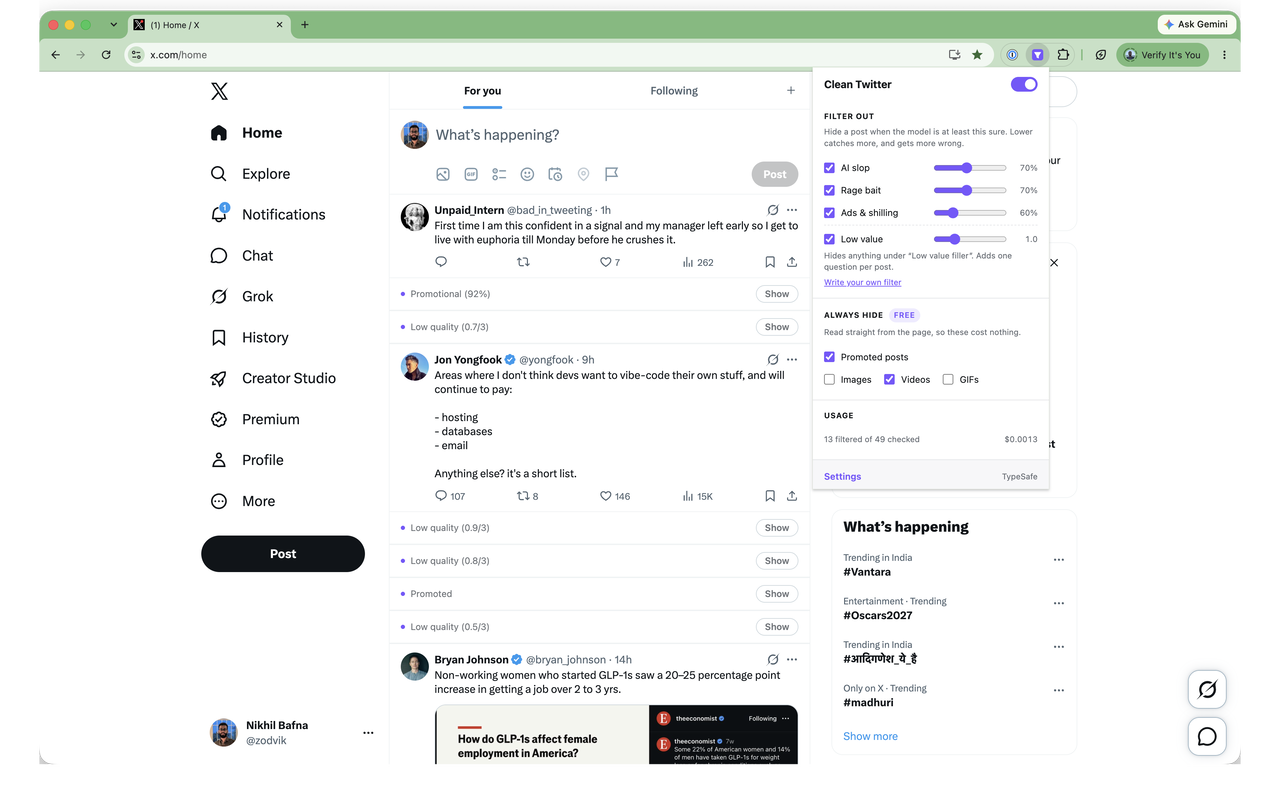
A browser extension that filters low-quality posts out of your X/Twitter timeline — AI slop, rage bait, and ads — plus optional media-only filtering. Built with WXT.
Classification runs on TypeSafe's Jev, a System One model that returns calibrated probabilities instead of prose. Bring your own key; nothing is proxied through a server of ours.
Why Jev rather than a chat model
Each post becomes one request carrying a few typed yes/no questions, answered in parallel against the same state:
POST https://api.typesafe.ai/v1/systemone
{
  "model": "jev-latest",
  "state": { "author_handle": "@someone", "text": "…" },
  "questions": {
    "slop":     { "type": "noul", "instructions": "…", "criteria": { "true": "…", "false": "…" } },
    "ragebait": { "type": "noul", "instructions": "…" },
    "ads":      { "type": "noul", "instructions": "…" }
  }
}
The answer is a probability per question, so the thresholds live in the extension where you can move them, and a post is never hidden on a coin flip. It answers in well under a second and costs about $0.03 per 1,000 posts, which is what makes per-post filtering practical at scroll speed.
Providers
Both routes run the same model and take an identical request body, so the only difference is which account gets billed.
| Endpoint | Model | Key | |
|---|---|---|---|
| TypeSafe (direct) | api.typesafe.ai/v1/systemone | jev-latest | console.typesafe.ai |
| OpenRouter | openrouter.ai/api/alpha/decisions | ~typesafe/jev-latest | openrouter.ai/keys |
Note that Jev is a decisions model on OpenRouter, not a chat model — it is
served from /api/alpha/decisions and rejected by /api/v1/chat/completions.
Install
git clone https://github.com/midplane/clean-twitter.git
cd clean-twitter
pnpm install
pnpm build
Then load it into Chrome: open chrome://extensions, turn on Developer mode,
choose Load unpacked, and pick .output/chrome-mv3. Firefox is
pnpm build:firefox and .output/firefox-mv2.
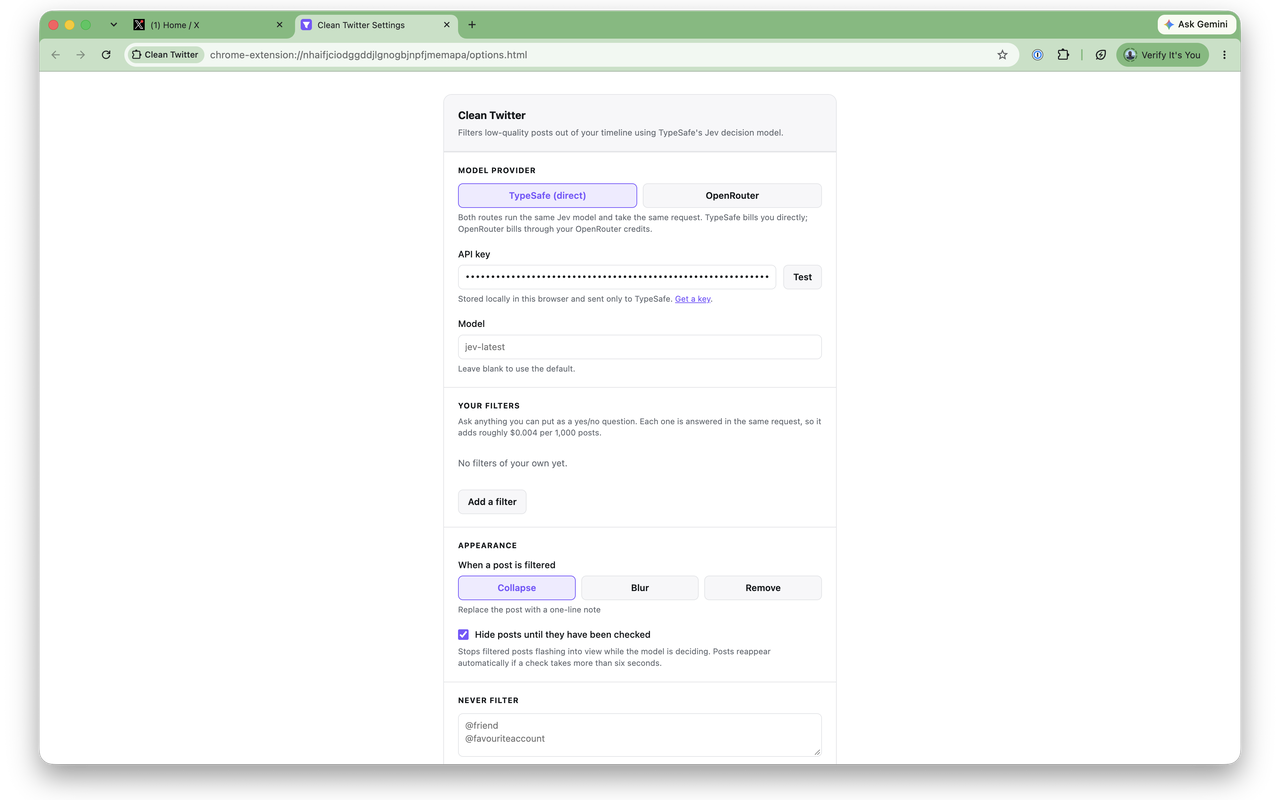
Open the extension's options page, pick a provider, paste your key, and hit Test.
Running it in dev
pnpm dev starts the dev server but deliberately does not launch its own
browser — a throwaway profile has no X session, which makes the extension
impossible to try. Load .output/chrome-mv3-dev unpacked in your normal Chrome
instead; WXT's reload client still connects, so saves apply automatically.
Chrome derives an unpacked extension's ID from its path, so the dev and production folders are two separate extensions with separate storage. Run one at a time or they will both filter the same timeline.
What gets filtered
Model-backed, each with its own confidence threshold you can drag:
- AI slop — thread-bait, hollow platitudes, listicles of truisms, machine-written filler
- Rage bait — engineered outrage, dunks, manufactured moral panic
- Ads & shilling — sales pitches, affiliate and dropshipping spam, crypto promos
Your own filters — ask anything you can phrase as a yes/no question about a post: "is this about crypto?", "is this a screenshot of another post?", "is this a subtweet about drama?" Write it in the options page, test it against a sample post, then tune its threshold like any built-in.
Every question is answered in the same request, so an extra filter costs only its own instruction text — measured at ~99 tokens, about $0.004 per 1,000 posts.
Free, no API call — these read the DOM directly:
- Promoted posts — X labels its own paid placements
- Images / videos / GIFs — for when you want a text-only timeline
Filtered posts can be collapsed to a one-line note, blurred, or removed outright. Collapse and blur leave a Show button, so nothing is unrecoverable.
Writing a good filter
The wording carries the accuracy, so two things matter:
- Phrase it as a statement about the post, not an instruction. "The post is about cryptocurrency" scores well; "hide crypto posts" does not — the model is answering how true the statement is, not taking an order.
- Pin down both ends. The optional looks like this / but not this pair is what separates "discusses token prices" from "mentions a bank". Filters with both sides filled score noticeably more reliably.
Try it scores your filter against a pasted post and tells you whether it would have been hidden, so you can check a question before it starts removing things from your timeline.
What leaves your browser
This extension sends the text of posts on your timeline to a third-party API in order to classify them. Specifically, for each post it has not already judged: the author's handle and display name, the post's text, the text of a quoted post if there is one, and whether it carries an image or video.
It never sends: your API key to anyone but the provider you selected, any post
on /messages or /settings (both routes are excluded outright), or anything
at all once a verdict is cached. Images themselves are never uploaded — Jev is
text-only, which is why promotion carried inside an image is invisible to the
model and caught only by X's own "Ad" label.
Your key is stored in extension storage, is never logged, and goes only to the provider you chose. There is no server in between — requests go straight from your browser to TypeSafe or OpenRouter.
Design notes
- One request per post. Jev evaluates every question against a single
state. Batching several posts into one state makes the questions ambiguous about which post they refer to — measurably so: three clearly different posts came back within 0.01 of each other. Per-post requests separate them cleanly. - Verdicts are cached by status id and survive restarts, so scrolling back up costs nothing. Each entry records the question set that produced it, so moving a threshold or restyling is free, while enabling a new signal re-checks only what it must.
- Promoted posts have no permalink. X puts the "Ad" label where the timestamp goes, so there is no status id to key on. Those fall back to a hash of the author and text — without it the extension was structurally blind to every ad on the timeline.
- It fails open. A network error, a bad key, or a slow response leaves the post visible. Posts masked while awaiting a verdict are revealed anyway after six seconds.
- Your key stays local. It lives in extension storage and is sent only to the provider you selected.
- Failures are visible. A revoked key or an outage would otherwise look exactly like a clean timeline, so errors surface in the popup rather than only in the console.
Development
pnpm test        # DOM extraction tests
pnpm compile     # typecheck
pnpm eval        # threshold tuning against labelled sample posts
pnpm eval runs the extension's real question set over a labelled set of posts
and prints how the current defaults classify each one — use it when changing
question wording or thresholds:
TYPESAFE_API_KEY=… pnpm eval
PROVIDER=openrouter OPENROUTER_API_KEY=… pnpm eval
Layout
lib/provider.ts    the two API routes, the questions, retry/backoff
lib/classifier.ts  cache, concurrency limit, threshold logic, usage counters
lib/extract.ts     reading posts out of X's DOM
lib/defaults.ts    settings defaults, free of extension imports
lib/settings.ts    storage-backed settings, serialised writes
lib/hash.ts        djb2, for cache keys and synthetic post ids
entrypoints/
  background.ts    holds the key, calls the API, owns the cache
  content/         observes the timeline, applies verdicts
  popup/           filter toggles and thresholds
  options/         provider, key, custom filters, hide style, allowlist
scripts/eval.ts    scores labelled sample posts for threshold tuning
X ships no stable class names, so lib/extract.ts leans on data-testid
attributes, which have been steady for years. If X changes them, that file is
the only one that needs updating.
Status
Working and in daily use. pnpm zip builds a store-ready package;
STORE.md has the listing copy, permission justifications and
data-use disclosures for Chrome Web Store submission.
Licence
MIT. Privacy policy: PRIVACY.md.
Contributors

10 commits
Similar repos


Languages
TypeScript
89.8%
CSS
9.5%
See what people are saying
README
Clean Twitter
A browser extension that filters low-quality posts out of your X/Twitter timeline — AI slop, rage bait, and ads — plus optional media-only filtering. Built with WXT.
Classification runs on TypeSafe's Jev, a System One model that returns calibrated probabilities instead of prose. Bring your own key; nothing is proxied through a server of ours.
Why Jev rather than a chat model
Each post becomes one request carrying a few typed yes/no questions, answered in parallel against the same state:
POST https://api.typesafe.ai/v1/systemone
{
  "model": "jev-latest",
  "state": { "author_handle": "@someone", "text": "…" },
  "questions": {
    "slop":     { "type": "noul", "instructions": "…", "criteria": { "true": "…", "false": "…" } },
    "ragebait": { "type": "noul", "instructions": "…" },
    "ads":      { "type": "noul", "instructions": "…" }
  }
}
The answer is a probability per question, so the thresholds live in the extension where you can move them, and a post is never hidden on a coin flip. It answers in well under a second and costs about $0.03 per 1,000 posts, which is what makes per-post filtering practical at scroll speed.
Providers
Both routes run the same model and take an identical request body, so the only difference is which account gets billed.
| Endpoint | Model | Key | |
|---|---|---|---|
| TypeSafe (direct) | api.typesafe.ai/v1/systemone | jev-latest | console.typesafe.ai |
| OpenRouter | openrouter.ai/api/alpha/decisions | ~typesafe/jev-latest | openrouter.ai/keys |
Note that Jev is a decisions model on OpenRouter, not a chat model — it is
served from /api/alpha/decisions and rejected by /api/v1/chat/completions.
Install
git clone https://github.com/midplane/clean-twitter.git
cd clean-twitter
pnpm install
pnpm build
Then load it into Chrome: open chrome://extensions, turn on Developer mode,
choose Load unpacked, and pick .output/chrome-mv3. Firefox is
pnpm build:firefox and .output/firefox-mv2.
Open the extension's options page, pick a provider, paste your key, and hit Test.
Running it in dev
pnpm dev starts the dev server but deliberately does not launch its own
browser — a throwaway profile has no X session, which makes the extension
impossible to try. Load .output/chrome-mv3-dev unpacked in your normal Chrome
instead; WXT's reload client still connects, so saves apply automatically.
Chrome derives an unpacked extension's ID from its path, so the dev and production folders are two separate extensions with separate storage. Run one at a time or they will both filter the same timeline.
What gets filtered
Model-backed, each with its own confidence threshold you can drag:
- AI slop — thread-bait, hollow platitudes, listicles of truisms, machine-written filler
- Rage bait — engineered outrage, dunks, manufactured moral panic
- Ads & shilling — sales pitches, affiliate and dropshipping spam, crypto promos
Your own filters — ask anything you can phrase as a yes/no question about a post: "is this about crypto?", "is this a screenshot of another post?", "is this a subtweet about drama?" Write it in the options page, test it against a sample post, then tune its threshold like any built-in.
Every question is answered in the same request, so an extra filter costs only its own instruction text — measured at ~99 tokens, about $0.004 per 1,000 posts.
Free, no API call — these read the DOM directly:
- Promoted posts — X labels its own paid placements
- Images / videos / GIFs — for when you want a text-only timeline
Filtered posts can be collapsed to a one-line note, blurred, or removed outright. Collapse and blur leave a Show button, so nothing is unrecoverable.
Writing a good filter
The wording carries the accuracy, so two things matter:
- Phrase it as a statement about the post, not an instruction. "The post is about cryptocurrency" scores well; "hide crypto posts" does not — the model is answering how true the statement is, not taking an order.
- Pin down both ends. The optional looks like this / but not this pair is what separates "discusses token prices" from "mentions a bank". Filters with both sides filled score noticeably more reliably.
Try it scores your filter against a pasted post and tells you whether it would have been hidden, so you can check a question before it starts removing things from your timeline.
What leaves your browser
This extension sends the text of posts on your timeline to a third-party API in order to classify them. Specifically, for each post it has not already judged: the author's handle and display name, the post's text, the text of a quoted post if there is one, and whether it carries an image or video.
It never sends: your API key to anyone but the provider you selected, any post
on /messages or /settings (both routes are excluded outright), or anything
at all once a verdict is cached. Images themselves are never uploaded — Jev is
text-only, which is why promotion carried inside an image is invisible to the
model and caught only by X's own "Ad" label.
Your key is stored in extension storage, is never logged, and goes only to the provider you chose. There is no server in between — requests go straight from your browser to TypeSafe or OpenRouter.
Design notes
- One request per post. Jev evaluates every question against a single
state. Batching several posts into one state makes the questions ambiguous about which post they refer to — measurably so: three clearly different posts came back within 0.01 of each other. Per-post requests separate them cleanly. - Verdicts are cached by status id and survive restarts, so scrolling back up costs nothing. Each entry records the question set that produced it, so moving a threshold or restyling is free, while enabling a new signal re-checks only what it must.
- Promoted posts have no permalink. X puts the "Ad" label where the timestamp goes, so there is no status id to key on. Those fall back to a hash of the author and text — without it the extension was structurally blind to every ad on the timeline.
- It fails open. A network error, a bad key, or a slow response leaves the post visible. Posts masked while awaiting a verdict are revealed anyway after six seconds.
- Your key stays local. It lives in extension storage and is sent only to the provider you selected.
- Failures are visible. A revoked key or an outage would otherwise look exactly like a clean timeline, so errors surface in the popup rather than only in the console.
Development
pnpm test        # DOM extraction tests
pnpm compile     # typecheck
pnpm eval        # threshold tuning against labelled sample posts
pnpm eval runs the extension's real question set over a labelled set of posts
and prints how the current defaults classify each one — use it when changing
question wording or thresholds:
TYPESAFE_API_KEY=… pnpm eval
PROVIDER=openrouter OPENROUTER_API_KEY=… pnpm eval
Layout
lib/provider.ts    the two API routes, the questions, retry/backoff
lib/classifier.ts  cache, concurrency limit, threshold logic, usage counters
lib/extract.ts     reading posts out of X's DOM
lib/defaults.ts    settings defaults, free of extension imports
lib/settings.ts    storage-backed settings, serialised writes
lib/hash.ts        djb2, for cache keys and synthetic post ids
entrypoints/
  background.ts    holds the key, calls the API, owns the cache
  content/         observes the timeline, applies verdicts
  popup/           filter toggles and thresholds
  options/         provider, key, custom filters, hide style, allowlist
scripts/eval.ts    scores labelled sample posts for threshold tuning
X ships no stable class names, so lib/extract.ts leans on data-testid
attributes, which have been steady for years. If X changes them, that file is
the only one that needs updating.
Status
Working and in daily use. pnpm zip builds a store-ready package;
STORE.md has the listing copy, permission justifications and
data-use disclosures for Chrome Web Store submission.
Licence
MIT. Privacy policy: PRIVACY.md.
Similar repos
Contributors
10 commits
Languages
TypeScript
89.8%
CSS
9.5%