
Jev Slop Guard — a Chrome extension that scores and stamps AI slop on your X and LinkedIn feeds as you scroll
JavaScript
2
76 commits
updated Sep 22, 2026
See what people are saying (1)
README




A Chrome extension that stands between you and the slop on X and LinkedIn.
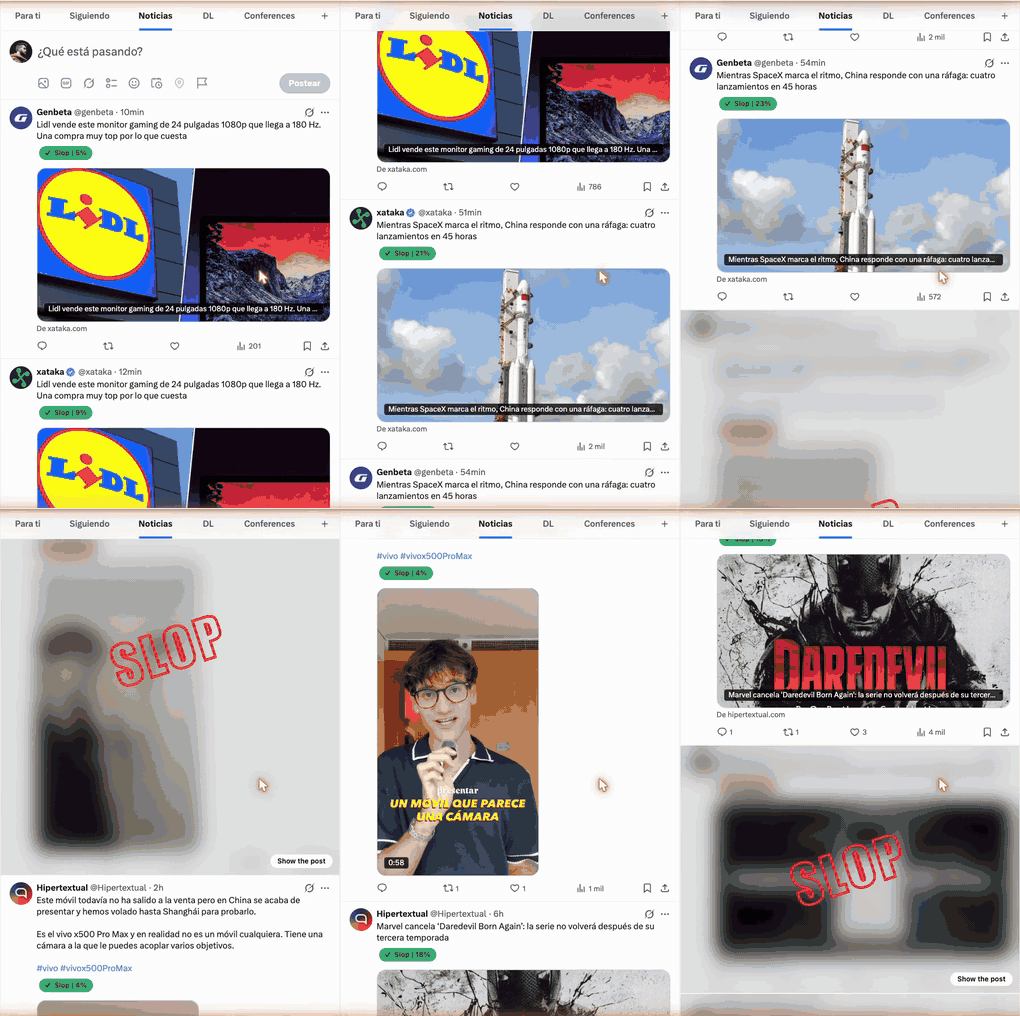
Every post gets a small pill with a slop probability. Posts over your threshold
get blurred and stamped SLOP, with a button to show them anyway. The verdict
comes from Jev, TypeSafe's System One model: one typed
{ slop, not_slop } choice per post, no free-form LLM text, and you bring your
own API key.
What it does · Requirements · Try it in your Chrome · Settings · Privacy · References
What it does
Works on x.com and linkedin.com.
- Every post gets a pill with its slop score: green Slop below your threshold, red Stop at or above it.
- At or above the threshold the post is also blurred and stamped SLOP. Show the post clears that for the current session.
- Scrolling is never blocked. Classification runs in the background with a small concurrency limit and a per-post cache, so a post is scored once.
- Promoted and sponsored posts and "Who to follow" widgets are skipped.
Requirements
- Chrome, or any browser that loads Manifest V3 extensions.
- An API key for one of the two providers. Every post is classified by
Jev on that account, so usage is billed to you.
- TypeSafe AI, the default provider.
- OpenRouter. Allow TypeSafe under OpenRouter Settings → Privacy, or the decisions endpoint refuses the call.
Try it in your Chrome
- Clone or download this repo. The built extension is in
chrome-mv3/. - Open
chrome://extensions. - Turn on Developer mode (top-right toggle).
- Click Load unpacked and pick the
chrome-mv3/folder. - Pin Jev Slop Guard in the toolbar, open the popup, paste your API key, click Save.
- Open x.com or linkedin.com/feed and scroll.
If you find this useful, consider dropping a ⭐.
Settings

Stored in chrome.storage.local only. Nothing leaves your browser except the
classification request described below.
| Control | Default | Effect |
|---|---|---|
| Pause / Start | running | Pause stops new classifications. Existing badges stay. |
| API key | empty | Your TypeSafe or OpenRouter key |
| Provider | TypeSafe | Switch to OpenRouter to use an OpenRouter key instead |
| Model | jev-latest | jev-1.13.0 pins a version |
| Slop threshold | 70% | Slop probability at or above this gets Stop, blur and stamp |
| Blur + SLOP stamp | on | Off keeps the pills but never covers a post |
| Show badge when under threshold | on | Off hides the green pill and marks only Stop |
Privacy
For each post the extension sends the post text and the author handle to the
provider you picked, and nothing else. Your key and settings stay in
chrome.storage.local. The extension asks for access to x.com
and linkedin.com to read posts and draw badges, and to
api.typesafe.ai and openrouter.ai to send the classification requests.
References
- Robin Bilgil's real-time slop detector demo, the idea this extension copies: a pill under the post, then blur and a SLOP stamp.
License
Contributors


Similar repos


Languages
JavaScript
47.4%
TypeScript
44.3%
CSS
6.0%
HTML
2.3%
Jev Slop Guard — a Chrome extension that scores and stamps AI slop on your X and LinkedIn feeds as you scroll
JavaScript
2
76 commits
updated Sep 22, 2026
See what people are saying (1)
README
A Chrome extension that stands between you and the slop on X and LinkedIn.
Every post gets a small pill with a slop probability. Posts over your threshold
get blurred and stamped SLOP, with a button to show them anyway. The verdict
comes from Jev, TypeSafe's System One model: one typed
{ slop, not_slop } choice per post, no free-form LLM text, and you bring your
own API key.
What it does · Requirements · Try it in your Chrome · Settings · Privacy · References
What it does
Works on x.com and linkedin.com.
- Every post gets a pill with its slop score: green Slop below your threshold, red Stop at or above it.
- At or above the threshold the post is also blurred and stamped SLOP. Show the post clears that for the current session.
- Scrolling is never blocked. Classification runs in the background with a small concurrency limit and a per-post cache, so a post is scored once.
- Promoted and sponsored posts and "Who to follow" widgets are skipped.
Requirements
- Chrome, or any browser that loads Manifest V3 extensions.
- An API key for one of the two providers. Every post is classified by
Jev on that account, so usage is billed to you.
- TypeSafe AI, the default provider.
- OpenRouter. Allow TypeSafe under OpenRouter Settings → Privacy, or the decisions endpoint refuses the call.
Try it in your Chrome
- Clone or download this repo. The built extension is in
chrome-mv3/. - Open
chrome://extensions. - Turn on Developer mode (top-right toggle).
- Click Load unpacked and pick the
chrome-mv3/folder. - Pin Jev Slop Guard in the toolbar, open the popup, paste your API key, click Save.
- Open x.com or linkedin.com/feed and scroll.
If you find this useful, consider dropping a ⭐.
Settings
Stored in chrome.storage.local only. Nothing leaves your browser except the
classification request described below.
| Control | Default | Effect |
|---|---|---|
| Pause / Start | running | Pause stops new classifications. Existing badges stay. |
| API key | empty | Your TypeSafe or OpenRouter key |
| Provider | TypeSafe | Switch to OpenRouter to use an OpenRouter key instead |
| Model | jev-latest | jev-1.13.0 pins a version |
| Slop threshold | 70% | Slop probability at or above this gets Stop, blur and stamp |
| Blur + SLOP stamp | on | Off keeps the pills but never covers a post |
| Show badge when under threshold | on | Off hides the green pill and marks only Stop |
Privacy
For each post the extension sends the post text and the author handle to the
provider you picked, and nothing else. Your key and settings stay in
chrome.storage.local. The extension asks for access to x.com
and linkedin.com to read posts and draw badges, and to
api.typesafe.ai and openrouter.ai to send the classification requests.
References
- Robin Bilgil's real-time slop detector demo, the idea this extension copies: a pill under the post, then blur and a SLOP stamp.
License
Similar repos
Contributors
Languages
JavaScript
47.4%
TypeScript
44.3%
CSS
6.0%
HTML
2.3%