
Chrome extension that hides AI-generated posts on X and LinkedIn. Scored by TypeSafe Jev. Reddit and YouTube next.
JavaScript
1
24 commits
updated Sep 20, 2026
See what people are saying (1)
README
Slop Filter
A Chrome extension that hides AI-generated posts. It works on X and LinkedIn today. Reddit and YouTube are next.
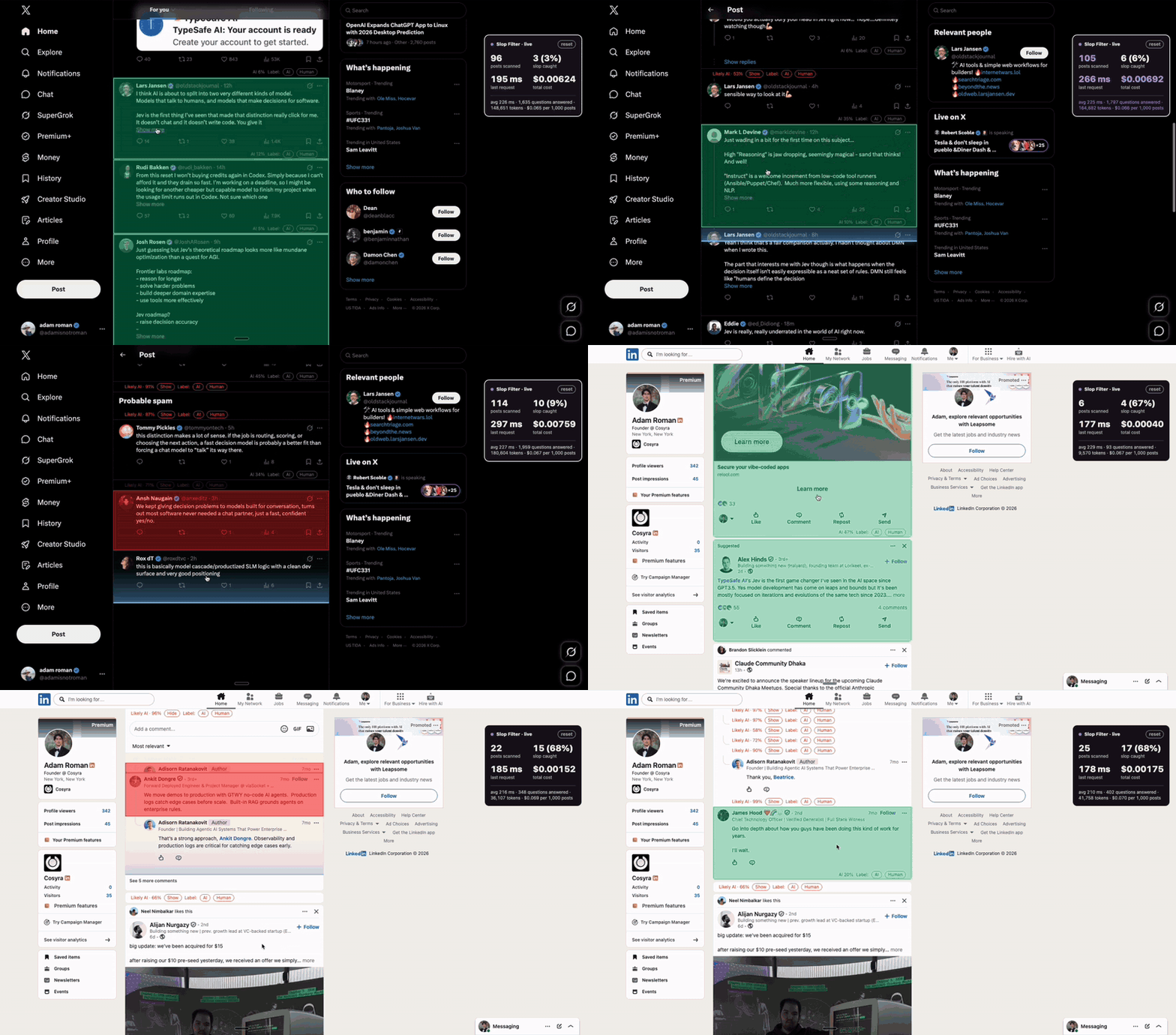
What it does
- Scores every post in your feed for how likely it is to be AI-written.
- Collapses the ones over your threshold. One click shows a post again.
- Animated mode lets you watch it work: a scan line runs over each post, then the post turns green and stays, or turns red and folds away.
- Can be tuned to your own judgment. Mark posts as
AIorHuman, then fit the weights from your labels.
How it does it
- It reads the text of each post as it nears your screen.
- It asks TypeSafe Jev about 18 narrow yes/no and rating questions about the text. Examples: does it use the "it's not X, it's Y" frame, does it open with praise, how generic is it, how much personal voice does it have.
- Jev answers each question with a probability. It writes no text and gives no opinions.
- The extension combines the answers into one score with weights. A small script fits those weights from the posts you labeled.
- Posts under 5 words are left alone. There is too little to judge.
You bring your own TypeSafe API key. It stays in your browser. Post text is sent to TypeSafe for scoring and nowhere else. 1,000 posts cost about 4 cents.
Install
Paste this into Claude Code, Codex, or any coding agent:
Read https://raw.githubusercontent.com/adamnroman/slop-filter/main/SKILL.md and follow it to install Slop Filter in my Chrome.
Your agent clones the repo and walks you through the few clicks Chrome requires. Your API key goes into the extension's options page, never into the chat.
Or do it by hand: clone this repo, open chrome://extensions, turn on Developer mode, click Load unpacked, pick the folder. Then open the extension's options and paste your TypeSafe API key.
Tune it and contribute
SKILL.md teaches your coding agent how to update it, add a tell you noticed, fit the weights from your labels, and add a site. docs/development.md has the full detail. To send a change back, see CONTRIBUTING.md.
Releases
See CHANGELOG.md and the releases page. Each release has the extension as a zip you can unpack and load.
Credits
Poop icons created by HideMaru - Flaticon
License
MIT for the code. The bundled Fredoka font is under the SIL Open Font License. The icon is under the Flaticon license with the credit above, not MIT. See assets/icons/ATTRIBUTION.txt.
Contributors

24 commits
Similar repos


Languages
JavaScript
79.9%
CSS
14.2%
HTML
5.8%
Chrome extension that hides AI-generated posts on X and LinkedIn. Scored by TypeSafe Jev. Reddit and YouTube next.
JavaScript
1
24 commits
updated Sep 20, 2026
See what people are saying (1)
README
Slop Filter
A Chrome extension that hides AI-generated posts. It works on X and LinkedIn today. Reddit and YouTube are next.
What it does
- Scores every post in your feed for how likely it is to be AI-written.
- Collapses the ones over your threshold. One click shows a post again.
- Animated mode lets you watch it work: a scan line runs over each post, then the post turns green and stays, or turns red and folds away.
- Can be tuned to your own judgment. Mark posts as
AIorHuman, then fit the weights from your labels.
How it does it
- It reads the text of each post as it nears your screen.
- It asks TypeSafe Jev about 18 narrow yes/no and rating questions about the text. Examples: does it use the "it's not X, it's Y" frame, does it open with praise, how generic is it, how much personal voice does it have.
- Jev answers each question with a probability. It writes no text and gives no opinions.
- The extension combines the answers into one score with weights. A small script fits those weights from the posts you labeled.
- Posts under 5 words are left alone. There is too little to judge.
You bring your own TypeSafe API key. It stays in your browser. Post text is sent to TypeSafe for scoring and nowhere else. 1,000 posts cost about 4 cents.
Install
Paste this into Claude Code, Codex, or any coding agent:
Read https://raw.githubusercontent.com/adamnroman/slop-filter/main/SKILL.md and follow it to install Slop Filter in my Chrome.
Your agent clones the repo and walks you through the few clicks Chrome requires. Your API key goes into the extension's options page, never into the chat.
Or do it by hand: clone this repo, open chrome://extensions, turn on Developer mode, click Load unpacked, pick the folder. Then open the extension's options and paste your TypeSafe API key.
Tune it and contribute
SKILL.md teaches your coding agent how to update it, add a tell you noticed, fit the weights from your labels, and add a site. docs/development.md has the full detail. To send a change back, see CONTRIBUTING.md.
Releases
See CHANGELOG.md and the releases page. Each release has the extension as a zip you can unpack and load.
Credits
Poop icons created by HideMaru - Flaticon
License
MIT for the code. The bundled Fredoka font is under the SIL Open Font License. The icon is under the Flaticon license with the credit above, not MIT. See assets/icons/ATTRIBUTION.txt.
Similar repos
Contributors
24 commits
Languages
JavaScript
79.9%
CSS
14.2%
HTML
5.8%