Self-hosted meeting transcription, speaker diarization, and audio archive
Ingests audio from Plaud hardware recorders, iOS Voice Memos, and browser uploads. Runs local or cloud transcription, matches speakers across meetings with neural voiceprints, and generates Markdown summaries from prompt templates.









| Feature | Description |
|---|---|
| Multi-source audio ingestion | Upload .m4a, .mp3, .wav, .aac, .ogg, .flac, .webm with SHA-256 deduplication and optional auto-transcription. |
| Plaud Note integration | OAuth 2.0 PKCE sync with Plaud Cloud. Polls in the background for recordings, transcripts, and AI notes. |
| Apple Voice Memos shortcut | One-tap iOS Share-Sheet shortcut to upload recordings directly from iPhone or iPad. |
| Dual transcription pipeline | Local neural STT (Cohere Transcribe 03-2026 INT8 ONNX + CTC forced alignment) or cloud Speechmatics. |
| Speaker diarization & voiceprints | Local pyannote.audio (speaker-diarization-community-1) + WeSpeaker ResNet293-LM 256-dim embeddings for cross-meeting speaker recognition. |
| Multi-provider LLM summaries | Powered by any-llm and the models.dev catalog. Works with Gemini, Claude, OpenAI, Groq, OpenRouter, Ollama, or custom OpenAI-compatible proxies. |
| Summary templates | Prompt templates (Executive Summary, 1-on-1 Catchup, Technical Architecture & Design Review, Action Items & Decisions) with {{title}}, {{date}}, {{speakers}}, and {{transcript}} variables. |
| System & job logs | Streaming log viewer with category filters, severity levels (DEBUG to ERROR), and JSON detail inspection. |
| Backup & restore | Single-click .tar.gz export and restore containing the SQLite snapshot, settings, speaker clips, transcripts, summaries, and raw audio files. |
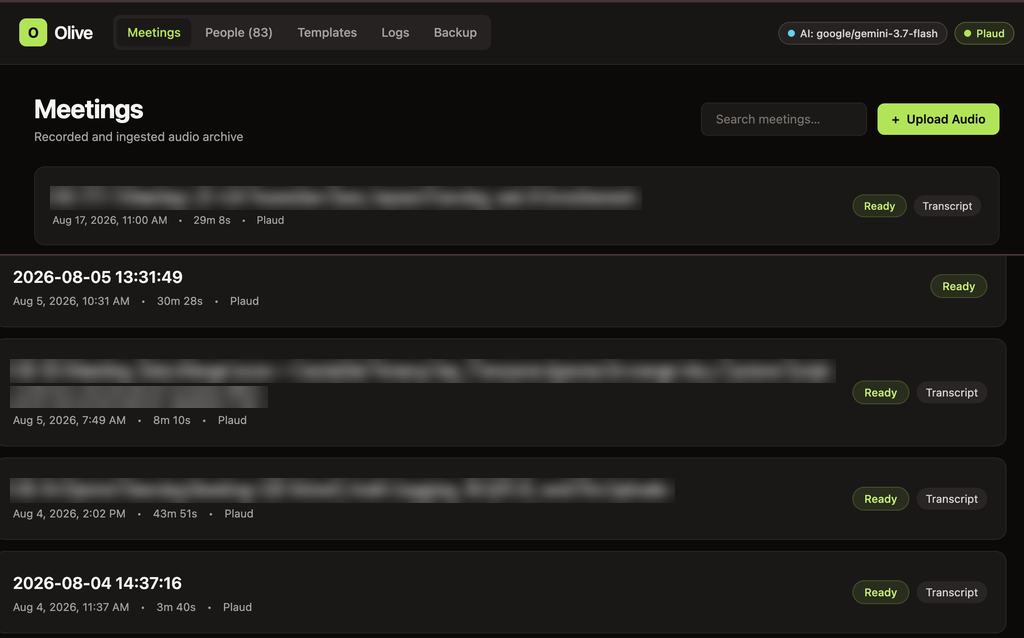
Meetings dashboard with full-text search across titles, tags, transcripts, and summaries.
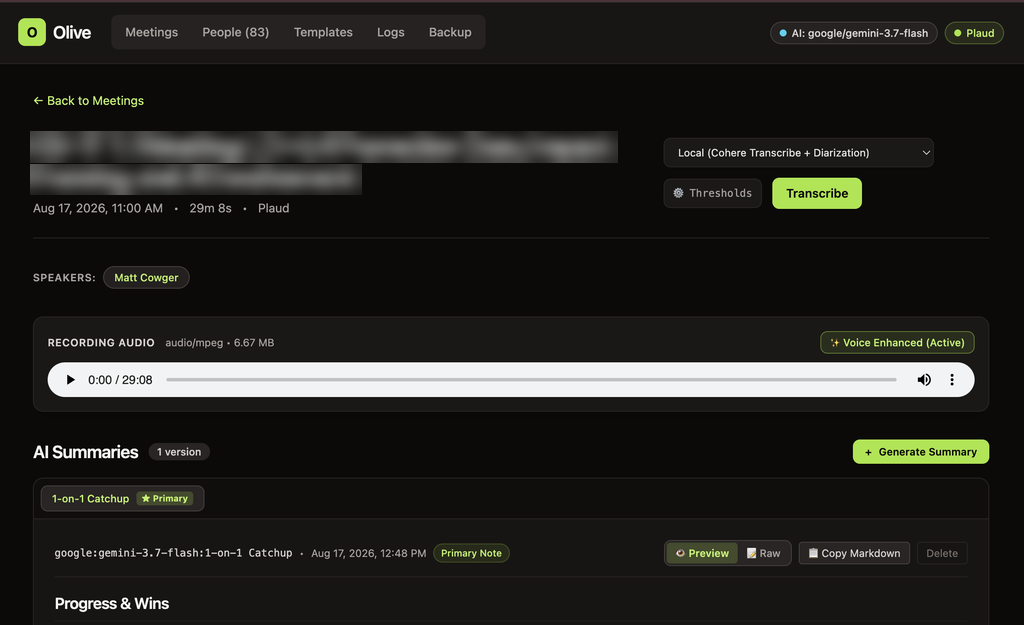
Meeting detail view with seekable audio player, speaker assignment pills, and Markdown summaries.
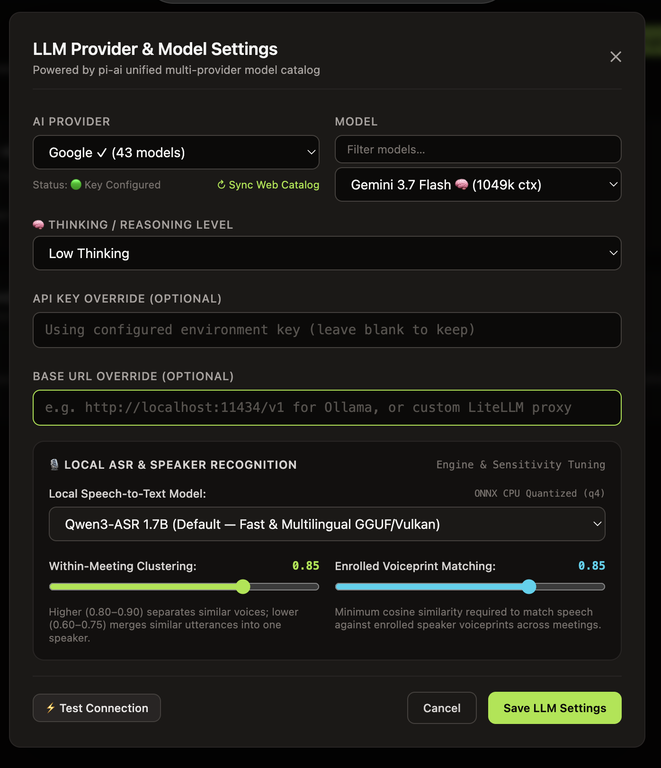
Model catalog, reasoning/thinking level config, Hugging Face token, and diarization/voiceprint thresholds.
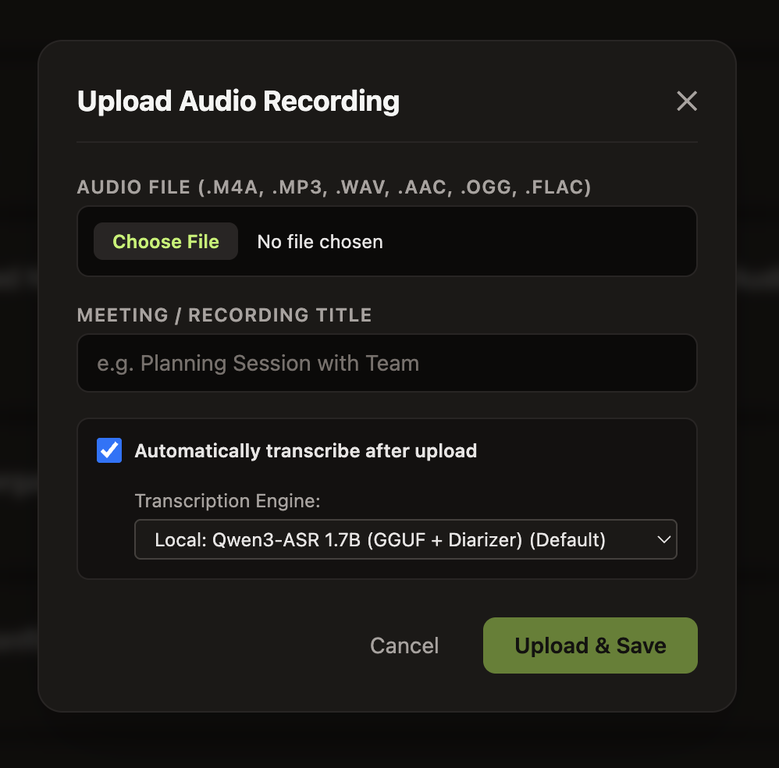
Direct audio upload with auto-transcribe toggle and engine selector. |
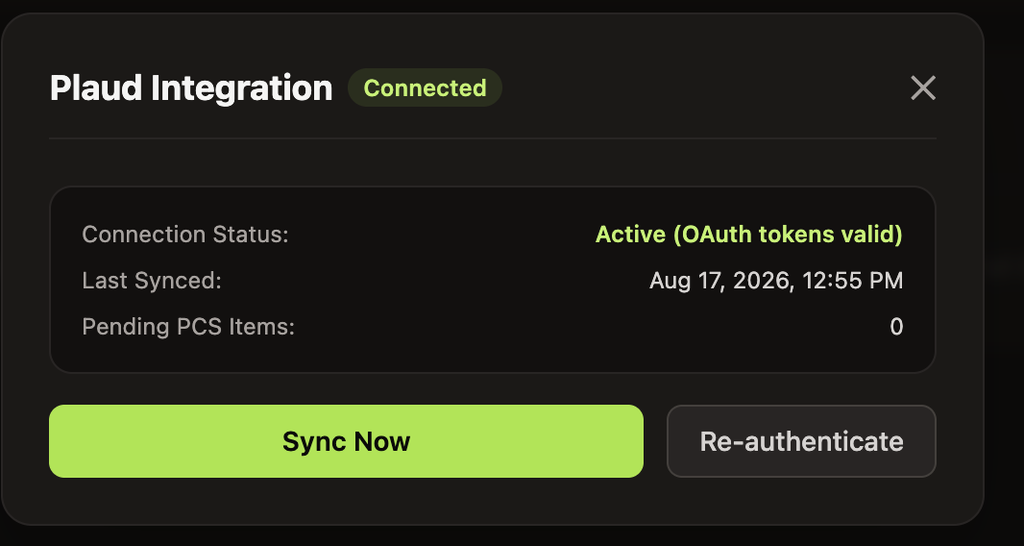
Plaud Cloud OAuth 2.0 PKCE login and background sync. |
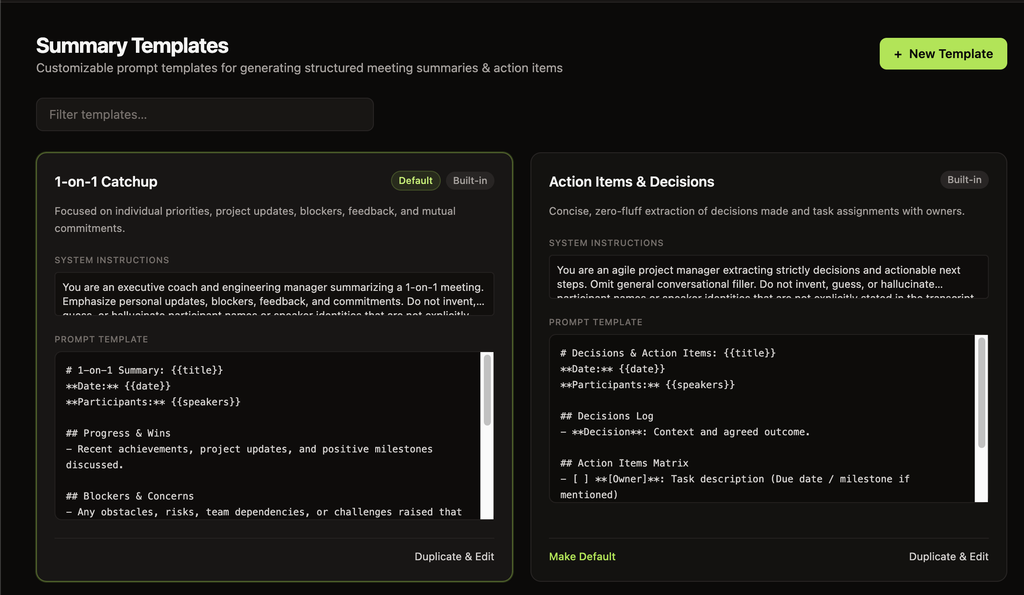
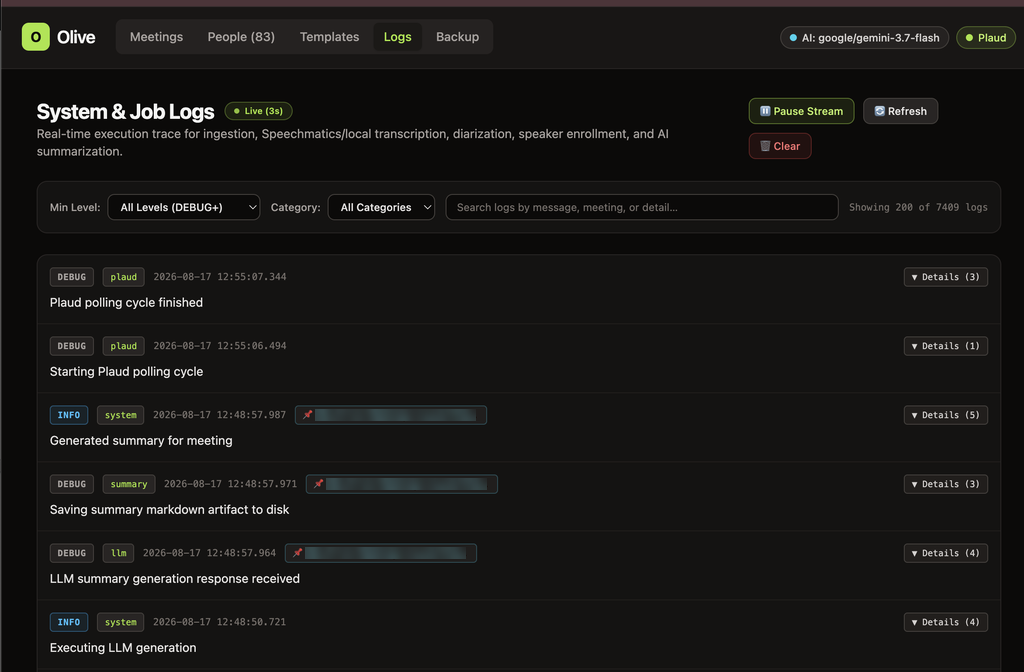
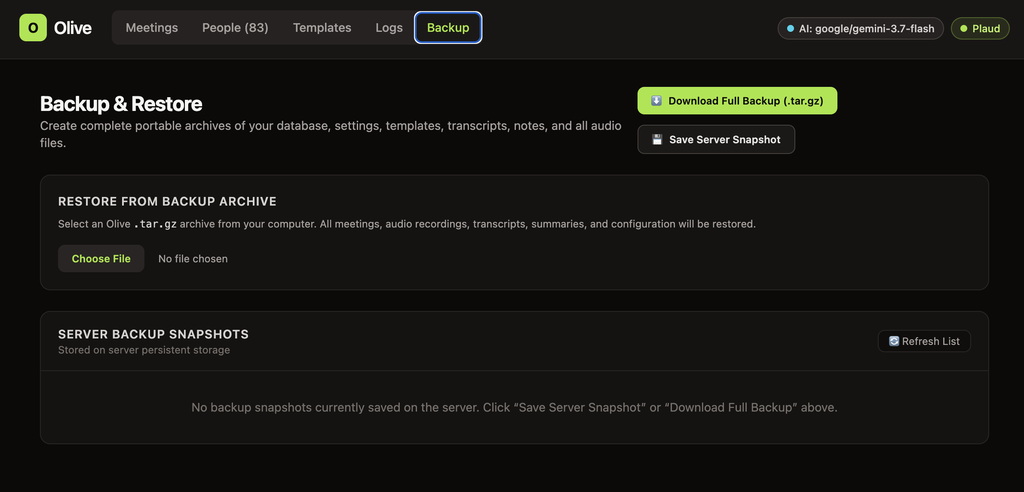
SOURCES                           PIPELINE & ARTIFACT STORE                       INTELLIGENCE & EXPORT
───────                           ─────────────────────────                       ─────────────────────

 [ Plaud Note AI ] ──(OAuth/PCS)─┐
                                 │      ┌─────────────────────────────┐
 [ iOS Shortcut ]  ──(Ingest)───┼────► │   Meeting Aggregate Root    │
                                 │      │  ─────────────────────────  │
 [ Web UI Upload ] ──(Upload)───┘      │  • sha256 deduplicated      │
                                        │  • audio/<id>.<ext>         │
                                        │  • SQLite metadata + WAL    │
                                        └──────────────┬──────────────┘
                                                       │
                                 ┌─────────────────────┴─────────────────────┐
                                 ▼                                           ▼
                    ┌─────────────────────────┐                 ┌─────────────────────────┐
                    │     Transcription &     │                 │   LLM Summarization &   │
                    │   Speaker Diarization   │                 │      Meeting Chat       │
                    │ ─────────────────────── │                 │ ─────────────────────── │
                    │ • Cohere Transcribe INT8│                 │ • any-llm + models.dev  │
                    │ • MMS CTC Forced Aligner│                 │ • Gemini / Claude / GPT │
                    │ • pyannote community-1  │                 │ • Local Ollama / vLLM   │
                    │ • WeSpeaker ResNet293   │                 │ • Structured Templates  │
                    │ • Cloud: Speechmatics   │                 │ • Read-only /mcp Server │
                    └─────────────────────────┘                 └─────────────────────────┘
                                 │                                           │
                                 └─────────────────────┬─────────────────────┘
                                                       │
                                                       ▼
                                        ┌─────────────────────────────┐
                                        │     React 19 + Vite SPA     │
                                        │  Markdown • Audio • Backup  │
                                        └─────────────────────────────┘
The multi-arch image (linux/amd64, linux/arm64) is the primary way to run Olive. On first start it downloads ~4.5 GB of local speech models (WeSpeaker, MMS aligner, pyannote diarization, Cohere Transcribe INT8) into a persistent models volume, then starts the server. Model downloads survive upgrades because they live on the volume, not in the image.
# Pull and start (mounts required: olive_data for meetings/DB, olive_models for ML models)
HF_TOKEN=hf_... OLIVE_MCP_TOKEN=... docker compose up -d

# Or with plain docker run:
docker run -d \
  --name olive \
  -p 4471:4470 \
  -e HF_TOKEN=hf_... \
  -e OLIVE_MCP_TOKEN=... \
  -v olive_data:/app/data \
  -v olive_models:/app/models \
  --restart unless-stopped \
  ghcr.io/mcowger/olive:latest
Open http://localhost:4471. Follow the logs on first start (docker logs -f olive) — model downloads take several minutes.
The server refuses to start if /app/models is not a mounted, writable volume, or if a model cannot be downloaded — the error message says why. Do not skip the olive_models mount: without it, every upgrade would re-download gigabytes of models.
Requires uv (Python 3.12+), pnpm (Node.js 22+), ffmpeg, and libsndfile1.
# 1. Clone the repository
git clone https://github.com/mcowger/olive.git
cd olive

# 2. Install Python backend dependencies
cd backend && uv sync && cd ..

# 3. Pre-download local speech, diarization, alignment & voiceprint models
cd backend && uv run olive models download && cd ..

# 4. Install and build the React frontend
cd frontend && pnpm install && pnpm run build && cd ..

# 5. Start the server
cd backend && uv run olive serve
Open http://localhost:4471.
Olive stores runtime settings in <configDir>/settings.json and accepts environment variables for bootstrap and secrets:
| Variable | Default | Description |
|---|---|---|
PORT / OLIVE_BIND_PORT | 4471 | HTTP server port |
OLIVE_BIND_HOST | 127.0.0.1 | Bind address (0.0.0.0 in Docker) |
OLIVE_CONFIG_DIR | ~/.config/olive | Directory for olive.sqlite, settings.json, and speaker clips (~/Library/Application Support/olive on macOS) |
OLIVE_MEETINGS_DIR | <configDir>/meetings | Storage directory for meeting folders (audio/, transcripts/, summaries/) |
OLIVE_MODELS_DIR | <configDir>/models (/app/models in Docker) | Cache directory for local Hugging Face and ONNX models. In Docker this must be a mounted persistent volume — the server exits if it isn't mounted or writable |
HF_TOKEN | (optional) | Hugging Face token for gated pyannote models (overrides hfToken in Settings UI) |
OLIVE_INGEST_TOKEN | (optional) | Bearer token required for POST /api/ingest |
OLIVE_MCP_TOKEN | (optional) | Bearer token for /mcp; falls back to OLIVE_INGEST_TOKEN and is required for non-loopback binds |
PLAUD_TOKEN_PATH | <configDir>/plaud-tokens.json | OAuth token file for Plaud Cloud (migrates ~/.plaud/tokens.json automatically if present) |
SPEECHMATICS_API_KEY | (optional) | API key for Speechmatics cloud batch transcription |
SPEECHMATICS_WEBHOOK_SECRET | (optional) | Shared secret for POST /api/webhooks/speechmatics |
Olive exposes a read-only Model Context Protocol server at /mcp on the main HTTP port (list_meetings, get_meeting, search_transcripts, get_action_items, list_speakers, get_speaker_profile).
Loopback clients can connect without a token. Set OLIVE_MCP_TOKEN (or OLIVE_INGEST_TOKEN) when binding to a non-loopback interface.
{
  "mcpServers": {
    "olive": {
      "url": "http://127.0.0.1:4471/mcp",
      "headers": {
        "Authorization": "Bearer ${OLIVE_MCP_TOKEN}"
      }
    }
  }
}
Audio and Files from the Share Sheet.https://<your-olive-host>/api/ingestPOSTAuthorization: Bearer <YOUR_OLIVE_INGEST_TOKEN>Form (file = Shortcut Input, autoTranscribe = true, source = ios-shortcut).tar.gz archive, save a snapshot on the server, or upload an archive to restore.cd backend && uv run olive backup ./my-backup.tar.gz
cd backend && uv run olive restore ./my-backup.tar.gz
# Start backend with live reload
cd backend && uv run uvicorn olive.main:app --reload --port 4471

# Start Vite dev server (proxies /api and /mcp to http://127.0.0.1:4471)
cd frontend && pnpm run dev

# Lint, typecheck, and run backend tests
cd backend && uv run ruff check src tests eval && uv run basedpyright && uv run pytest

# Export OpenAPI schema, regenerate frontend TS types, typecheck, and build
cd backend && uv run python -c "import json; from olive.app import export_openapi_schema; open('openapi.json', 'w').write(json.dumps(export_openapi_schema(), indent=2) + '\n')"
cd ../frontend && pnpm run generate:api && pnpm run typecheck && pnpm run build
MIT © Matt Cowger
Self-hosted meeting transcription, speaker diarization, and audio archive
Ingests audio from Plaud hardware recorders, iOS Voice Memos, and browser uploads. Runs local or cloud transcription, matches speakers across meetings with neural voiceprints, and generates Markdown summaries from prompt templates.
| Feature | Description |
|---|---|
| Multi-source audio ingestion | Upload .m4a, .mp3, .wav, .aac, .ogg, .flac, .webm with SHA-256 deduplication and optional auto-transcription. |
| Plaud Note integration | OAuth 2.0 PKCE sync with Plaud Cloud. Polls in the background for recordings, transcripts, and AI notes. |
| Apple Voice Memos shortcut | One-tap iOS Share-Sheet shortcut to upload recordings directly from iPhone or iPad. |
| Dual transcription pipeline | Local neural STT (Cohere Transcribe 03-2026 INT8 ONNX + CTC forced alignment) or cloud Speechmatics. |
| Speaker diarization & voiceprints | Local pyannote.audio (speaker-diarization-community-1) + WeSpeaker ResNet293-LM 256-dim embeddings for cross-meeting speaker recognition. |
| Multi-provider LLM summaries | Powered by any-llm and the models.dev catalog. Works with Gemini, Claude, OpenAI, Groq, OpenRouter, Ollama, or custom OpenAI-compatible proxies. |
| Summary templates | Prompt templates (Executive Summary, 1-on-1 Catchup, Technical Architecture & Design Review, Action Items & Decisions) with {{title}}, {{date}}, {{speakers}}, and {{transcript}} variables. |
| System & job logs | Streaming log viewer with category filters, severity levels (DEBUG to ERROR), and JSON detail inspection. |
| Backup & restore | Single-click .tar.gz export and restore containing the SQLite snapshot, settings, speaker clips, transcripts, summaries, and raw audio files. |
Meetings dashboard with full-text search across titles, tags, transcripts, and summaries.
Meeting detail view with seekable audio player, speaker assignment pills, and Markdown summaries.
Model catalog, reasoning/thinking level config, Hugging Face token, and diarization/voiceprint thresholds.
|
Direct audio upload with auto-transcribe toggle and engine selector. |
Plaud Cloud OAuth 2.0 PKCE login and background sync. |
SOURCES                           PIPELINE & ARTIFACT STORE                       INTELLIGENCE & EXPORT
───────                           ─────────────────────────                       ─────────────────────

 [ Plaud Note AI ] ──(OAuth/PCS)─┐
                                 │      ┌─────────────────────────────┐
 [ iOS Shortcut ]  ──(Ingest)───┼────► │   Meeting Aggregate Root    │
                                 │      │  ─────────────────────────  │
 [ Web UI Upload ] ──(Upload)───┘      │  • sha256 deduplicated      │
                                        │  • audio/<id>.<ext>         │
                                        │  • SQLite metadata + WAL    │
                                        └──────────────┬──────────────┘
                                                       │
                                 ┌─────────────────────┴─────────────────────┐
                                 ▼                                           ▼
                    ┌─────────────────────────┐                 ┌─────────────────────────┐
                    │     Transcription &     │                 │   LLM Summarization &   │
                    │   Speaker Diarization   │                 │      Meeting Chat       │
                    │ ─────────────────────── │                 │ ─────────────────────── │
                    │ • Cohere Transcribe INT8│                 │ • any-llm + models.dev  │
                    │ • MMS CTC Forced Aligner│                 │ • Gemini / Claude / GPT │
                    │ • pyannote community-1  │                 │ • Local Ollama / vLLM   │
                    │ • WeSpeaker ResNet293   │                 │ • Structured Templates  │
                    │ • Cloud: Speechmatics   │                 │ • Read-only /mcp Server │
                    └─────────────────────────┘                 └─────────────────────────┘
                                 │                                           │
                                 └─────────────────────┬─────────────────────┘
                                                       │
                                                       ▼
                                        ┌─────────────────────────────┐
                                        │     React 19 + Vite SPA     │
                                        │  Markdown • Audio • Backup  │
                                        └─────────────────────────────┘
The multi-arch image (linux/amd64, linux/arm64) is the primary way to run Olive. On first start it downloads ~4.5 GB of local speech models (WeSpeaker, MMS aligner, pyannote diarization, Cohere Transcribe INT8) into a persistent models volume, then starts the server. Model downloads survive upgrades because they live on the volume, not in the image.
# Pull and start (mounts required: olive_data for meetings/DB, olive_models for ML models)
HF_TOKEN=hf_... OLIVE_MCP_TOKEN=... docker compose up -d

# Or with plain docker run:
docker run -d \
  --name olive \
  -p 4471:4470 \
  -e HF_TOKEN=hf_... \
  -e OLIVE_MCP_TOKEN=... \
  -v olive_data:/app/data \
  -v olive_models:/app/models \
  --restart unless-stopped \
  ghcr.io/mcowger/olive:latest
Open http://localhost:4471. Follow the logs on first start (docker logs -f olive) — model downloads take several minutes.
The server refuses to start if /app/models is not a mounted, writable volume, or if a model cannot be downloaded — the error message says why. Do not skip the olive_models mount: without it, every upgrade would re-download gigabytes of models.
Requires uv (Python 3.12+), pnpm (Node.js 22+), ffmpeg, and libsndfile1.
# 1. Clone the repository
git clone https://github.com/mcowger/olive.git
cd olive

# 2. Install Python backend dependencies
cd backend && uv sync && cd ..

# 3. Pre-download local speech, diarization, alignment & voiceprint models
cd backend && uv run olive models download && cd ..

# 4. Install and build the React frontend
cd frontend && pnpm install && pnpm run build && cd ..

# 5. Start the server
cd backend && uv run olive serve
Open http://localhost:4471.
Olive stores runtime settings in <configDir>/settings.json and accepts environment variables for bootstrap and secrets:
| Variable | Default | Description |
|---|---|---|
PORT / OLIVE_BIND_PORT | 4471 | HTTP server port |
OLIVE_BIND_HOST | 127.0.0.1 | Bind address (0.0.0.0 in Docker) |
OLIVE_CONFIG_DIR | ~/.config/olive | Directory for olive.sqlite, settings.json, and speaker clips (~/Library/Application Support/olive on macOS) |
OLIVE_MEETINGS_DIR | <configDir>/meetings | Storage directory for meeting folders (audio/, transcripts/, summaries/) |
OLIVE_MODELS_DIR | <configDir>/models (/app/models in Docker) | Cache directory for local Hugging Face and ONNX models. In Docker this must be a mounted persistent volume — the server exits if it isn't mounted or writable |
HF_TOKEN | (optional) | Hugging Face token for gated pyannote models (overrides hfToken in Settings UI) |
OLIVE_INGEST_TOKEN | (optional) | Bearer token required for POST /api/ingest |
OLIVE_MCP_TOKEN | (optional) | Bearer token for /mcp; falls back to OLIVE_INGEST_TOKEN and is required for non-loopback binds |
PLAUD_TOKEN_PATH | <configDir>/plaud-tokens.json | OAuth token file for Plaud Cloud (migrates ~/.plaud/tokens.json automatically if present) |
SPEECHMATICS_API_KEY | (optional) | API key for Speechmatics cloud batch transcription |
SPEECHMATICS_WEBHOOK_SECRET | (optional) | Shared secret for POST /api/webhooks/speechmatics |
Olive exposes a read-only Model Context Protocol server at /mcp on the main HTTP port (list_meetings, get_meeting, search_transcripts, get_action_items, list_speakers, get_speaker_profile).
Loopback clients can connect without a token. Set OLIVE_MCP_TOKEN (or OLIVE_INGEST_TOKEN) when binding to a non-loopback interface.
{
  "mcpServers": {
    "olive": {
      "url": "http://127.0.0.1:4471/mcp",
      "headers": {
        "Authorization": "Bearer ${OLIVE_MCP_TOKEN}"
      }
    }
  }
}
Audio and Files from the Share Sheet.https://<your-olive-host>/api/ingestPOSTAuthorization: Bearer <YOUR_OLIVE_INGEST_TOKEN>Form (file = Shortcut Input, autoTranscribe = true, source = ios-shortcut).tar.gz archive, save a snapshot on the server, or upload an archive to restore.cd backend && uv run olive backup ./my-backup.tar.gz
cd backend && uv run olive restore ./my-backup.tar.gz
# Start backend with live reload
cd backend && uv run uvicorn olive.main:app --reload --port 4471

# Start Vite dev server (proxies /api and /mcp to http://127.0.0.1:4471)
cd frontend && pnpm run dev

# Lint, typecheck, and run backend tests
cd backend && uv run ruff check src tests eval && uv run basedpyright && uv run pytest

# Export OpenAPI schema, regenerate frontend TS types, typecheck, and build
cd backend && uv run python -c "import json; from olive.app import export_openapi_schema; open('openapi.json', 'w').write(json.dumps(export_openapi_schema(), indent=2) + '\n')"
cd ../frontend && pnpm run generate:api && pnpm run typecheck && pnpm run build
MIT © Matt Cowger





