Speakr is a personal, self-hosted web application designed for transcribing audio recordings
Python
4,083
1,442 commits
updated Oct 12, 2026

Self-hosted AI transcription and intelligent note-taking platform




Documentation • Quick Start • Screenshots • Docker Hub • Releases
Speakr transforms your audio recordings into organized, searchable, and intelligent notes. Built for privacy-conscious groups and individuals, it runs entirely on your own infrastructure, ensuring your sensitive conversations remain completely private.
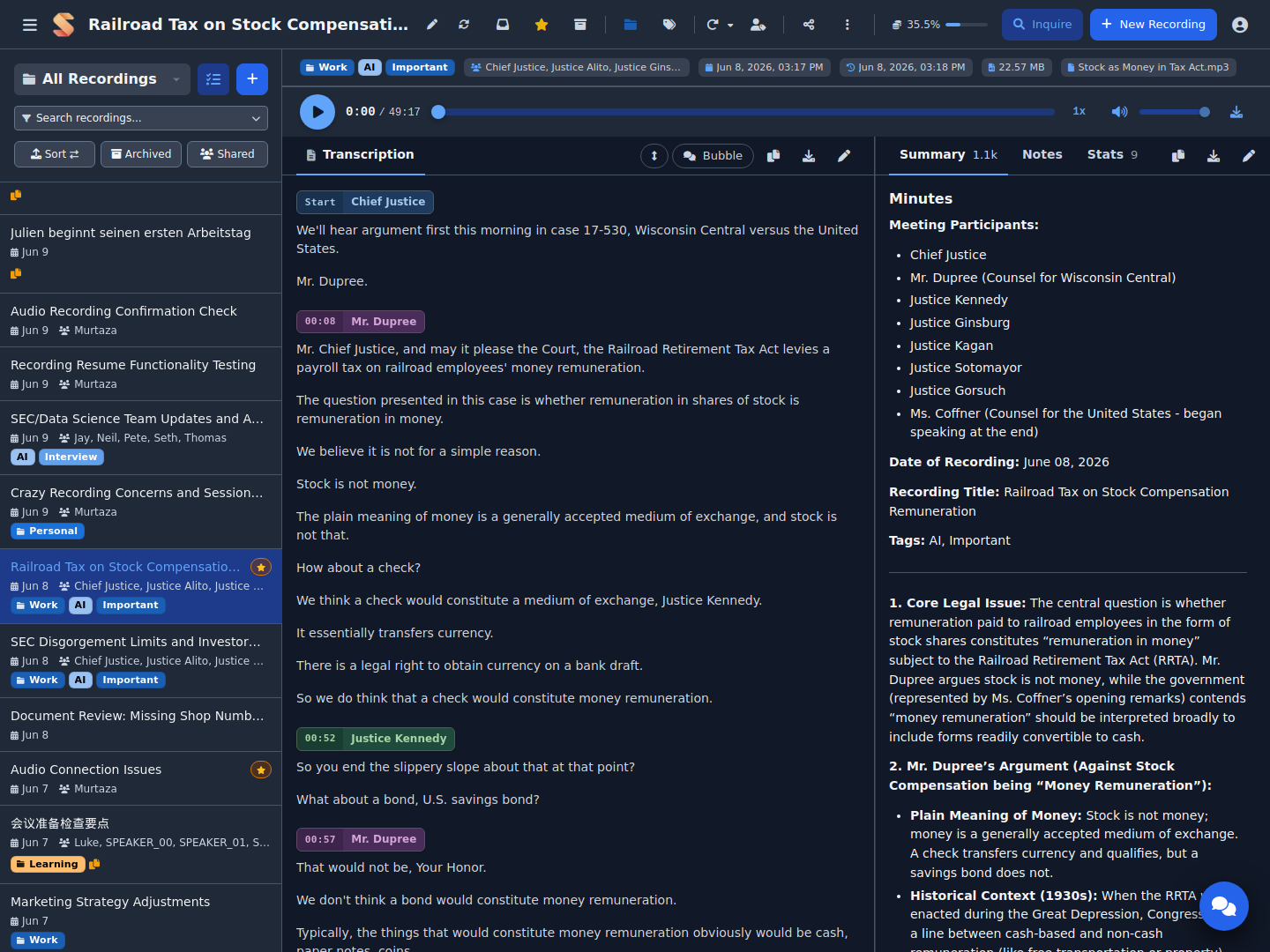
Speakr turns a recording into organized, searchable, shareable knowledge. Here is the pipeline:
Speakr is also an installable Progressive Web App - mobile-first, offline-capable, with a phone share-target - and ships light/dark themes, an incognito mode, a configurable Help Center link for your own documentation, and a UI translated into seven languages.
These apps were built by members of the community for use with your own Speakr server. They are maintained by their authors, not by this project, and I have not tested them myself.
| App | Platform | Description |
|---|---|---|
| Minutes for Speakr | Android, Windows | Recording on the device with upload to Speakr, including automatic recording and automatic folder uploads |
| MeetingRecorder | Windows | Tray app for recording both sides of a call, with upload to Speakr through an API token |
See Companion Apps in the documentation.
Different people use Speakr's collaboration and retention features in different ways:
| Use Case | Setup | What It Does |
|---|---|---|
| Family memories | Create "Family" group with protected tag | Everyone gets access to trips and events automatically, recordings preserved forever |
| Book club discussions | "Book Club" group, tag monthly meetings | All members auto-share discussions, can add personal notes about what resonated |
| Work project group | Share individually with 3 teammates | Temporary collaboration, easy to revoke when project ends |
| Daily group standups | Group tag with 14-day retention | Auto-share with group, auto-cleanup of routine meetings |
| Architecture decisions | Engineering group tag, protected from deletion | Technical discussions automatically shared, preserved permanently as reference |
| Client consultations | Individual share with view-only permission | Controlled external access, clients can't accidentally edit |
| Research interviews | Protected tag + Obsidian export | Preserve recordings indefinitely, transcripts auto-import to note-taking system |
| Legal consultations | Group tag with 7-year retention | Automatic sharing with legal group, compliance-based retention |
| Sales calls | Group tag with 1-year retention | Whole sales group learns from each call, cleanup after sales cycle |
Tags with custom prompts transform raw recordings into exactly what you need:
Stack multiple tags to layer instructions:
The order can matter - start with format tags, then add focus tags for best results.
# Create project directory
mkdir speakr && cd speakr

# Download docker-compose configuration:
wget https://raw.githubusercontent.com/murtaza-nasir/speakr/master/config/docker-compose.example.yml -O docker-compose.yml

# Download the environment template:
wget https://raw.githubusercontent.com/murtaza-nasir/speakr/master/config/env.transcription.example -O .env

# Configure your API keys and launch
nano .env
docker compose up -d

# Access at http://localhost:8899
Lightweight image: Use
learnedmachine/speakr:litefor a smaller image (~725MB vs ~4.4GB) that skips PyTorch. All features work normally — only Inquire Mode's semantic search falls back to basic text search.
Required API Keys:
TRANSCRIPTION_API_KEY - For speech-to-text (OpenAI) or ASR_BASE_URL for self-hostedTEXT_MODEL_API_KEY - For summaries, titles, and chat (OpenRouter or OpenAI)Speakr uses a connector-based architecture that auto-detects your transcription provider:
| Option | Setup | Speaker Diarization | Voice Profiles |
|---|---|---|---|
| OpenAI Transcribe | Just API key | Yes (gpt-4o-transcribe-diarize) | No |
| WhisperX ASR | GPU container | Yes (best quality) | Yes |
| Mistral Voxtral | Just API key | Yes (built-in) | No |
| VibeVoice ASR | Self-hosted (vLLM) | Yes (built-in) | No |
| MOSI/Mossland MOSS | Hosted API key | Yes (built-in) | No |
| AssemblyAI | Just API key | Yes (built-in) | No |
| OpenASR | Self-hosted server | Yes (built-in) | No |
| Alibaba FunASR | API key + OSS bucket | Yes (built-in) | No |
| Legacy Whisper | Just API key | No | No |
Simplest setup (OpenAI with diarization):
TRANSCRIPTION_API_KEY=sk-your-openai-key
TRANSCRIPTION_MODEL=gpt-4o-transcribe-diarize
Best quality (Self-hosted WhisperX):
ASR_BASE_URL=http://whisperx-asr:9000
ASR_RETURN_SPEAKER_EMBEDDINGS=true  # Enable voice profiles
Requires WhisperX ASR Service container with GPU.
Mistral Voxtral (cloud diarization):
TRANSCRIPTION_CONNECTOR=mistral
TRANSCRIPTION_API_KEY=your-mistral-key
TRANSCRIPTION_MODEL=voxtral-mini-latest
VibeVoice ASR (self-hosted, no cloud dependency):
TRANSCRIPTION_CONNECTOR=vibevoice
TRANSCRIPTION_BASE_URL=http://your-vllm-server:8000
TRANSCRIPTION_MODEL=vibevoice
Requires VibeVoice served via vLLM with GPU.
MOSI/Mossland MOSS (hosted multi-speaker transcription):
TRANSCRIPTION_CONNECTOR=mossland
TRANSCRIPTION_API_KEY=your-mosi-api-key
TRANSCRIPTION_MODEL=moss-transcribe-diarize
Create a key in the MOSI API Key console. The connector keeps long recordings in one provider task so speaker labels remain consistent, and it resumes stalled SSE jobs through task polling without submitting a duplicate. This connector uploads recordings to the third-party MOSI/Mossland service at api.mosi.cn; audio is not processed entirely on your self-hosted Speakr instance.
AssemblyAI (cloud diarization, long multi-speaker meetings):
TRANSCRIPTION_CONNECTOR=assemblyai
TRANSCRIPTION_API_KEY=your-assemblyai-key
Handles multi-hour, multi-speaker files in a single job. New accounts get free credits with no card required.
PyTorch 2.6 Users: If you encounter a "Weights only load failed" error with WhisperX, add
TORCH_FORCE_NO_WEIGHTS_ONLY_LOAD=trueto your ASR container. See troubleshooting for details.
View Full Installation Guide →
Complete documentation is available at murtaza-nasir.github.io/speakr
.env are sent to WhisperX (#415).recording.updated for edits made in the web app.Full release notes · All releases
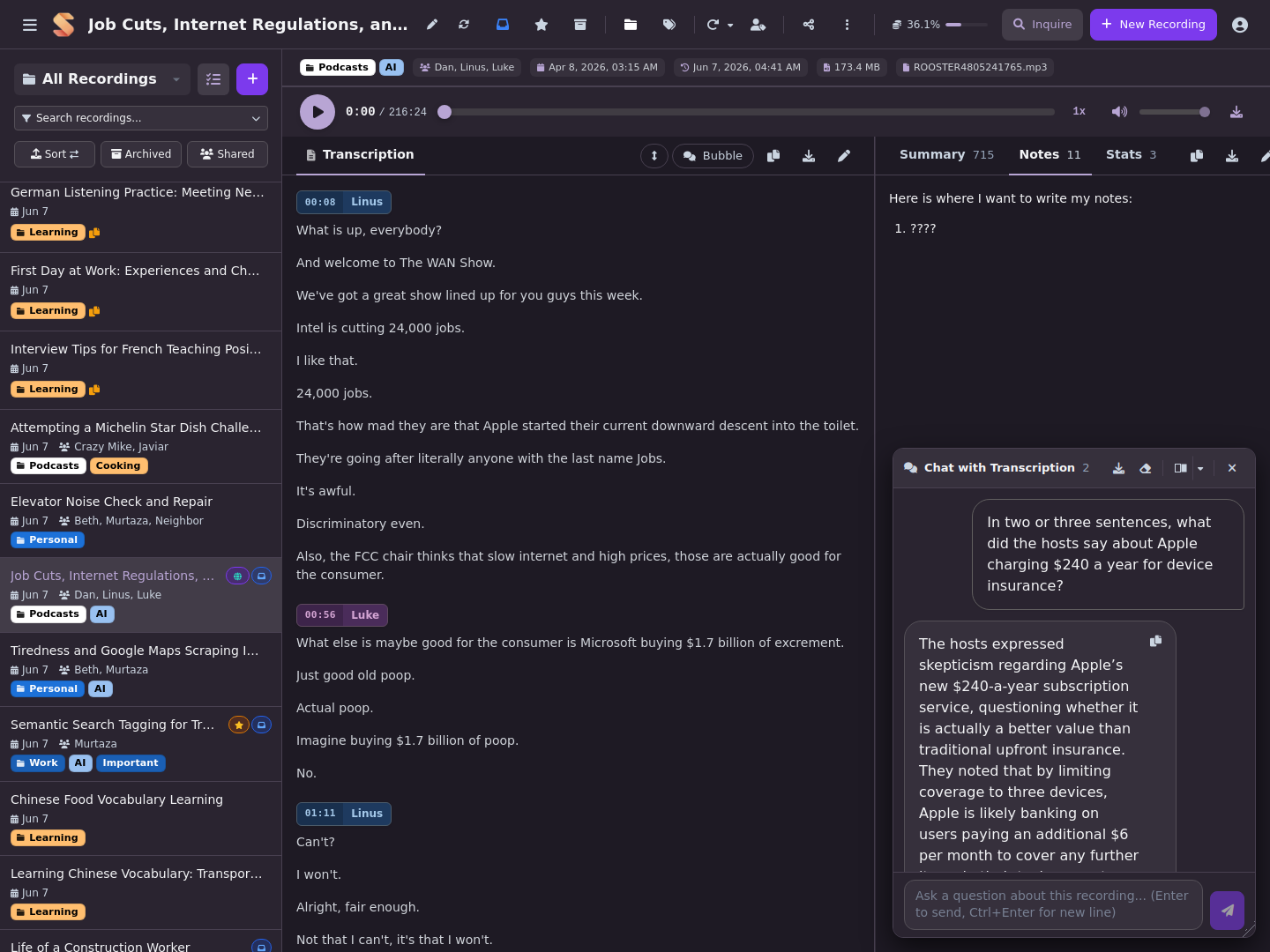
Main view with floating chat and notes |
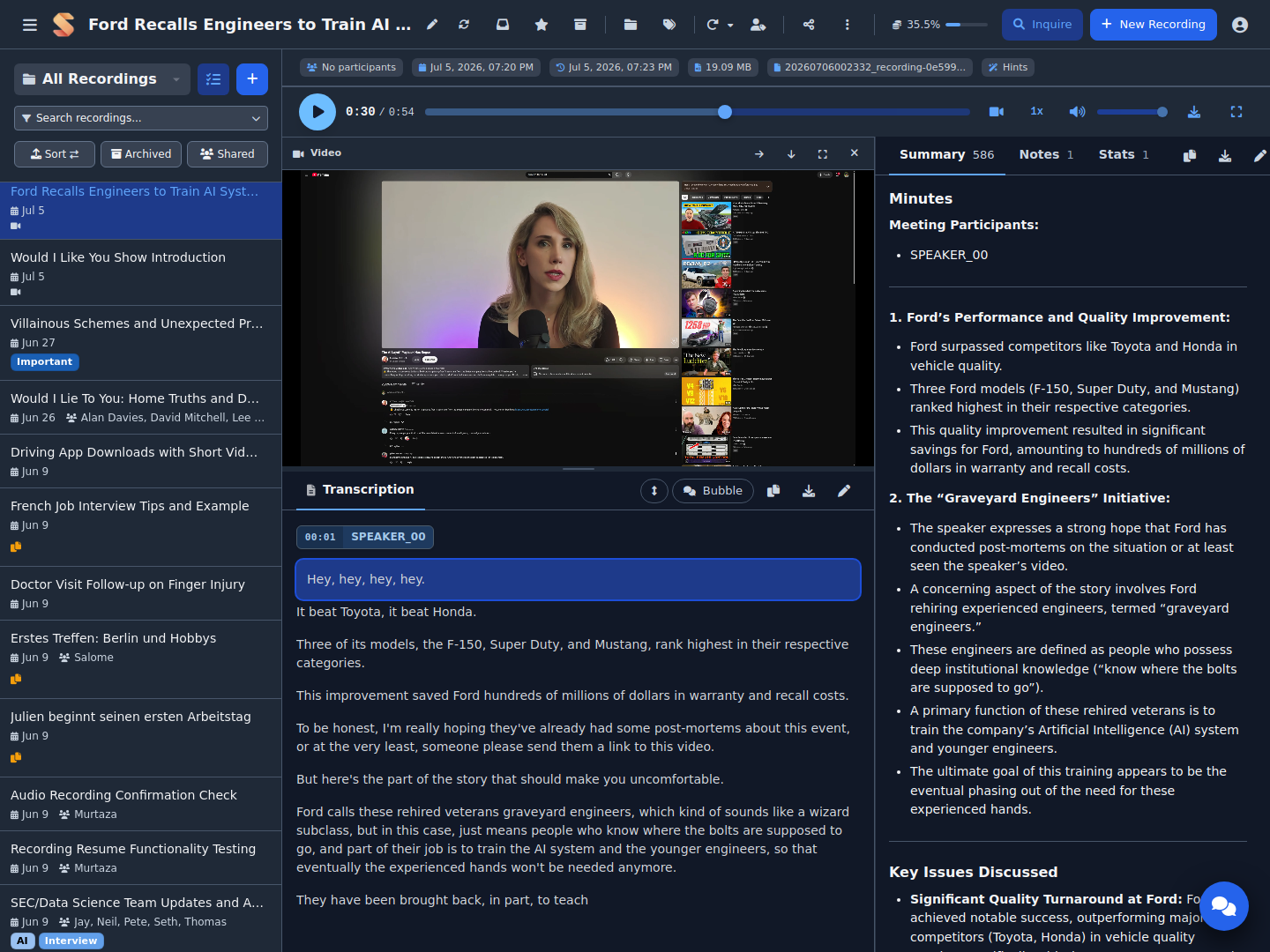
Video playback synced to the transcript |
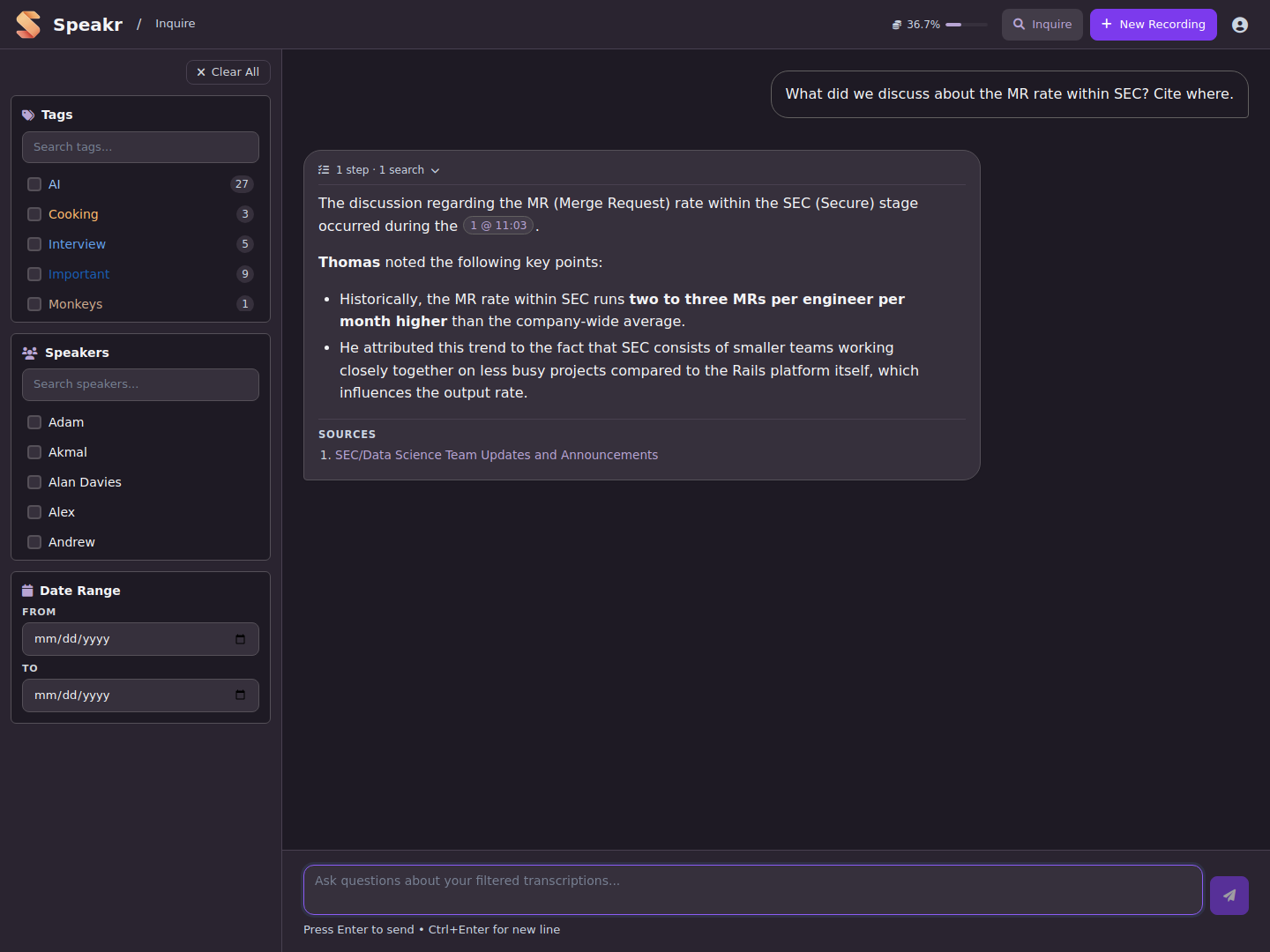
Ask questions across all your recordings |
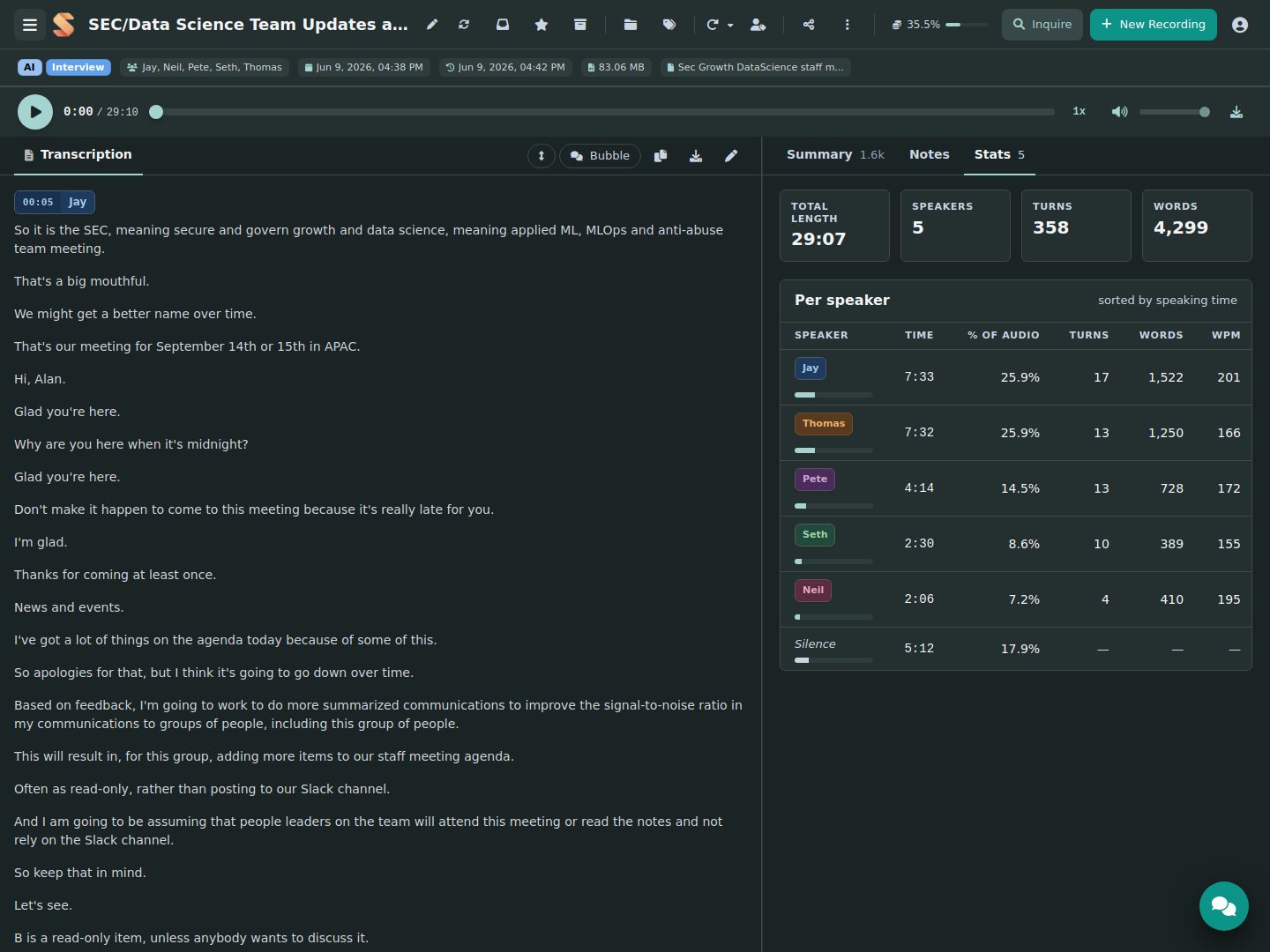
Per-recording stats and speaker breakdown |
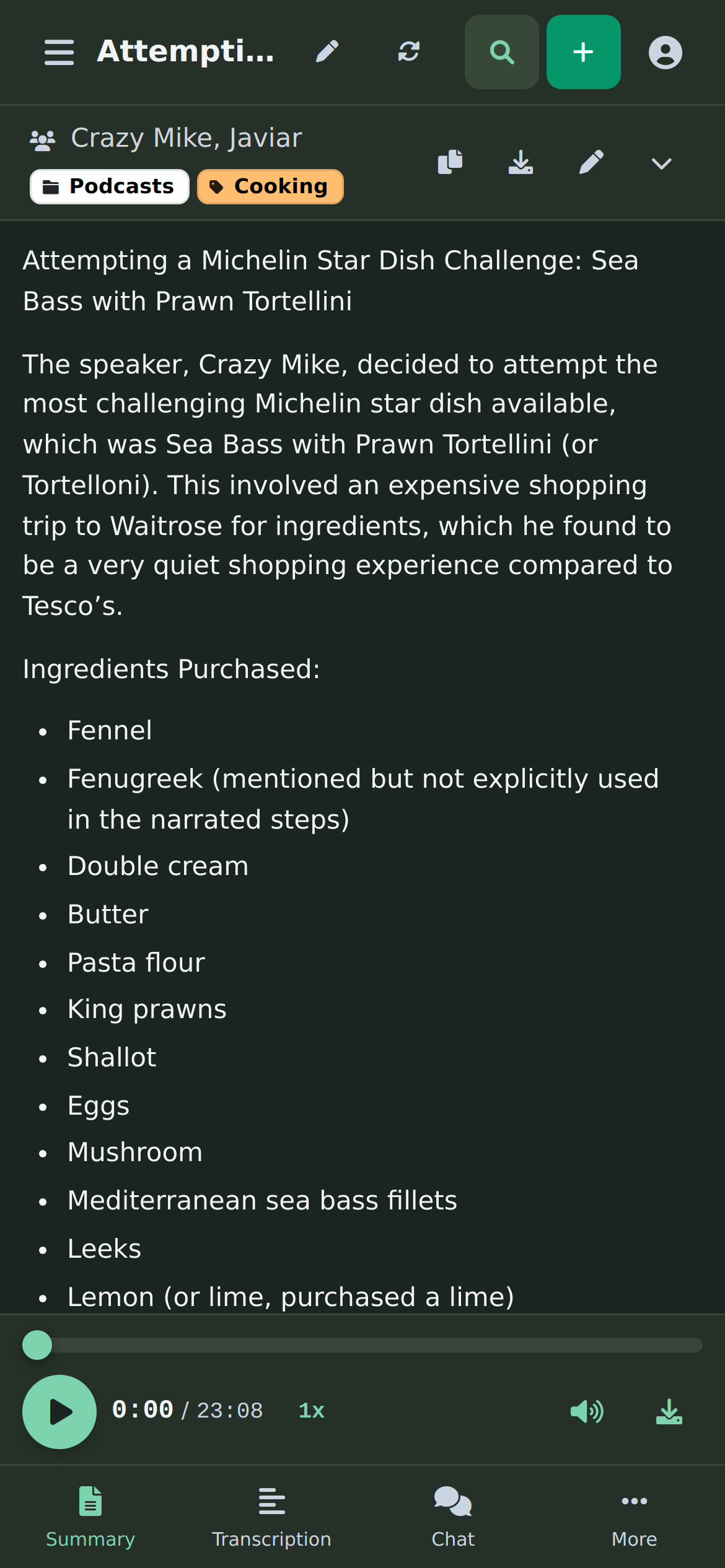
On mobile: summary with bottom navigation |
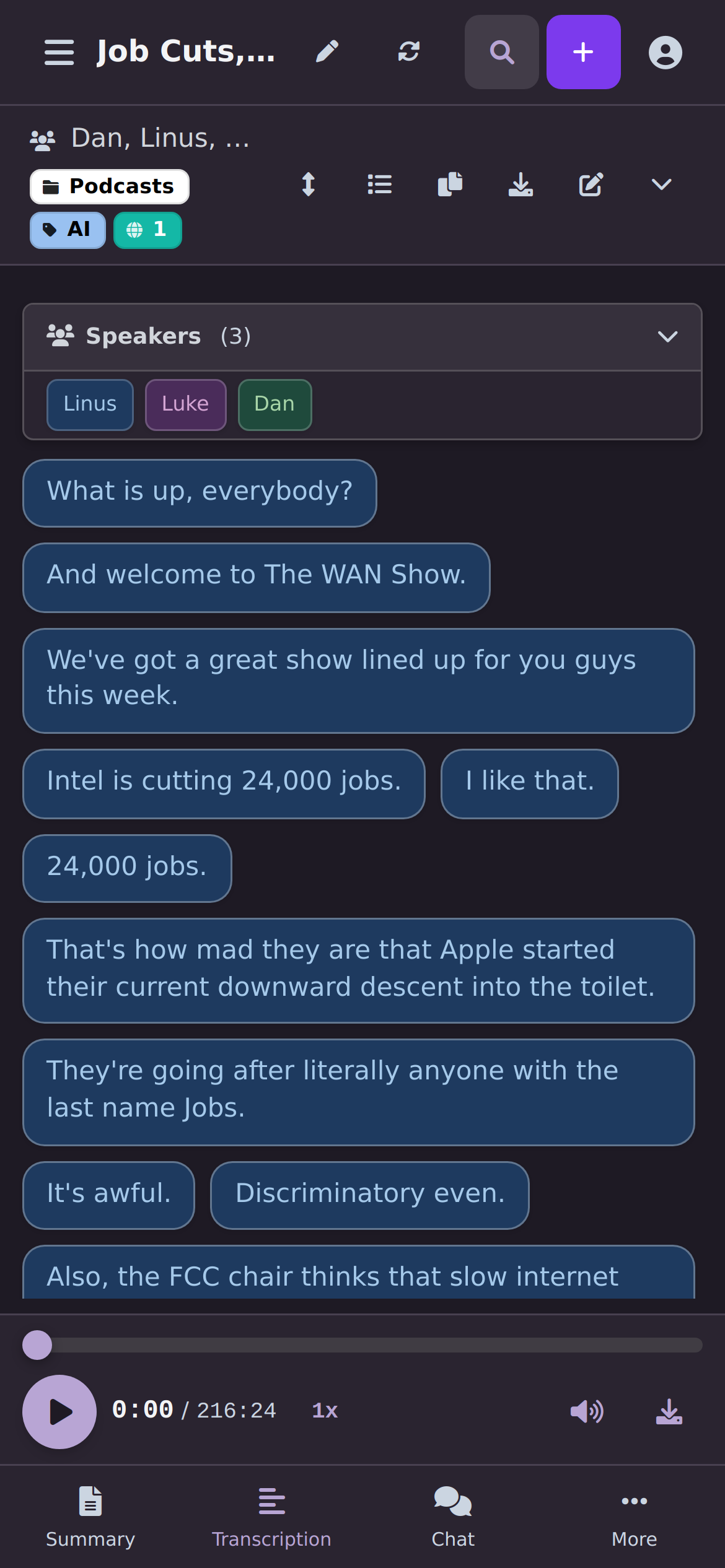
On mobile: transcript in bubble view |
View Full Screenshot Gallery →
This project is dual-licensed:
GNU Affero General Public License v3.0 (AGPLv3)
Speakr is offered under the AGPLv3 as its open-source license. You are free to use, modify, and distribute this software under the terms of the AGPLv3. A key condition of the AGPLv3 is that if you run a modified version on a network server and provide access to it for others, you must also make the source code of your modified version available to those users under the AGPLv3.
LICENSE (or COPYING) in the root of your repository and paste the full text of the GNU AGPLv3 license into it.Commercial License
For users or organizations who cannot or do not wish to comply with the terms of the AGPLv3 (for example, if you want to integrate Speakr into a proprietary commercial product or service without being obligated to share your modifications under AGPLv3), a separate commercial license is available.
Please contact speakr maintainers for details on obtaining a commercial license.
You must choose one of these licenses under which to use, modify, or distribute this software. If you are using or distributing the software without a commercial license agreement, you must adhere to the terms of the AGPLv3.
We welcome contributions to Speakr! There are many ways to help:
By submitting a pull request, you agree to our Contributor License Agreement (CLA). This ensures we can maintain our dual-license model (AGPLv3 and Commercial). You retain copyright ownership of your contribution — the CLA simply grants us permission to include it in both the open source and commercial versions of Speakr. Our bot will post a reminder when you open a PR.
See our Contributing Guide for complete details on:
16,681 followers · starred Aug 2026
275 followers · starred Jan 2026
123 followers · starred May 2026
133 followers · starred Jun 2026
Speakr is a personal, self-hosted web application designed for transcribing audio recordings
Python
4,083
1,442 commits
updated Oct 12, 2026
Self-hosted AI transcription and intelligent note-taking platform
Documentation • Quick Start • Screenshots • Docker Hub • Releases
Speakr transforms your audio recordings into organized, searchable, and intelligent notes. Built for privacy-conscious groups and individuals, it runs entirely on your own infrastructure, ensuring your sensitive conversations remain completely private.
Speakr turns a recording into organized, searchable, shareable knowledge. Here is the pipeline:
Speakr is also an installable Progressive Web App - mobile-first, offline-capable, with a phone share-target - and ships light/dark themes, an incognito mode, a configurable Help Center link for your own documentation, and a UI translated into seven languages.
These apps were built by members of the community for use with your own Speakr server. They are maintained by their authors, not by this project, and I have not tested them myself.
| App | Platform | Description |
|---|---|---|
| Minutes for Speakr | Android, Windows | Recording on the device with upload to Speakr, including automatic recording and automatic folder uploads |
| MeetingRecorder | Windows | Tray app for recording both sides of a call, with upload to Speakr through an API token |
See Companion Apps in the documentation.
Different people use Speakr's collaboration and retention features in different ways:
| Use Case | Setup | What It Does |
|---|---|---|
| Family memories | Create "Family" group with protected tag | Everyone gets access to trips and events automatically, recordings preserved forever |
| Book club discussions | "Book Club" group, tag monthly meetings | All members auto-share discussions, can add personal notes about what resonated |
| Work project group | Share individually with 3 teammates | Temporary collaboration, easy to revoke when project ends |
| Daily group standups | Group tag with 14-day retention | Auto-share with group, auto-cleanup of routine meetings |
| Architecture decisions | Engineering group tag, protected from deletion | Technical discussions automatically shared, preserved permanently as reference |
| Client consultations | Individual share with view-only permission | Controlled external access, clients can't accidentally edit |
| Research interviews | Protected tag + Obsidian export | Preserve recordings indefinitely, transcripts auto-import to note-taking system |
| Legal consultations | Group tag with 7-year retention | Automatic sharing with legal group, compliance-based retention |
| Sales calls | Group tag with 1-year retention | Whole sales group learns from each call, cleanup after sales cycle |
Tags with custom prompts transform raw recordings into exactly what you need:
Stack multiple tags to layer instructions:
The order can matter - start with format tags, then add focus tags for best results.
# Create project directory
mkdir speakr && cd speakr

# Download docker-compose configuration:
wget https://raw.githubusercontent.com/murtaza-nasir/speakr/master/config/docker-compose.example.yml -O docker-compose.yml

# Download the environment template:
wget https://raw.githubusercontent.com/murtaza-nasir/speakr/master/config/env.transcription.example -O .env

# Configure your API keys and launch
nano .env
docker compose up -d

# Access at http://localhost:8899
Lightweight image: Use
learnedmachine/speakr:litefor a smaller image (~725MB vs ~4.4GB) that skips PyTorch. All features work normally — only Inquire Mode's semantic search falls back to basic text search.
Required API Keys:
TRANSCRIPTION_API_KEY - For speech-to-text (OpenAI) or ASR_BASE_URL for self-hostedTEXT_MODEL_API_KEY - For summaries, titles, and chat (OpenRouter or OpenAI)Speakr uses a connector-based architecture that auto-detects your transcription provider:
| Option | Setup | Speaker Diarization | Voice Profiles |
|---|---|---|---|
| OpenAI Transcribe | Just API key | Yes (gpt-4o-transcribe-diarize) | No |
| WhisperX ASR | GPU container | Yes (best quality) | Yes |
| Mistral Voxtral | Just API key | Yes (built-in) | No |
| VibeVoice ASR | Self-hosted (vLLM) | Yes (built-in) | No |
| MOSI/Mossland MOSS | Hosted API key | Yes (built-in) | No |
| AssemblyAI | Just API key | Yes (built-in) | No |
| OpenASR | Self-hosted server | Yes (built-in) | No |
| Alibaba FunASR | API key + OSS bucket | Yes (built-in) | No |
| Legacy Whisper | Just API key | No | No |
Simplest setup (OpenAI with diarization):
TRANSCRIPTION_API_KEY=sk-your-openai-key
TRANSCRIPTION_MODEL=gpt-4o-transcribe-diarize
Best quality (Self-hosted WhisperX):
ASR_BASE_URL=http://whisperx-asr:9000
ASR_RETURN_SPEAKER_EMBEDDINGS=true  # Enable voice profiles
Requires WhisperX ASR Service container with GPU.
Mistral Voxtral (cloud diarization):
TRANSCRIPTION_CONNECTOR=mistral
TRANSCRIPTION_API_KEY=your-mistral-key
TRANSCRIPTION_MODEL=voxtral-mini-latest
VibeVoice ASR (self-hosted, no cloud dependency):
TRANSCRIPTION_CONNECTOR=vibevoice
TRANSCRIPTION_BASE_URL=http://your-vllm-server:8000
TRANSCRIPTION_MODEL=vibevoice
Requires VibeVoice served via vLLM with GPU.
MOSI/Mossland MOSS (hosted multi-speaker transcription):
TRANSCRIPTION_CONNECTOR=mossland
TRANSCRIPTION_API_KEY=your-mosi-api-key
TRANSCRIPTION_MODEL=moss-transcribe-diarize
Create a key in the MOSI API Key console. The connector keeps long recordings in one provider task so speaker labels remain consistent, and it resumes stalled SSE jobs through task polling without submitting a duplicate. This connector uploads recordings to the third-party MOSI/Mossland service at api.mosi.cn; audio is not processed entirely on your self-hosted Speakr instance.
AssemblyAI (cloud diarization, long multi-speaker meetings):
TRANSCRIPTION_CONNECTOR=assemblyai
TRANSCRIPTION_API_KEY=your-assemblyai-key
Handles multi-hour, multi-speaker files in a single job. New accounts get free credits with no card required.
PyTorch 2.6 Users: If you encounter a "Weights only load failed" error with WhisperX, add
TORCH_FORCE_NO_WEIGHTS_ONLY_LOAD=trueto your ASR container. See troubleshooting for details.
View Full Installation Guide →
Complete documentation is available at murtaza-nasir.github.io/speakr
.env are sent to WhisperX (#415).recording.updated for edits made in the web app.Full release notes · All releases
|
Main view with floating chat and notes |
Video playback synced to the transcript |
|
Ask questions across all your recordings |
Per-recording stats and speaker breakdown |
|
On mobile: summary with bottom navigation |
On mobile: transcript in bubble view |
View Full Screenshot Gallery →
This project is dual-licensed:
GNU Affero General Public License v3.0 (AGPLv3)
Speakr is offered under the AGPLv3 as its open-source license. You are free to use, modify, and distribute this software under the terms of the AGPLv3. A key condition of the AGPLv3 is that if you run a modified version on a network server and provide access to it for others, you must also make the source code of your modified version available to those users under the AGPLv3.
LICENSE (or COPYING) in the root of your repository and paste the full text of the GNU AGPLv3 license into it.Commercial License
For users or organizations who cannot or do not wish to comply with the terms of the AGPLv3 (for example, if you want to integrate Speakr into a proprietary commercial product or service without being obligated to share your modifications under AGPLv3), a separate commercial license is available.
Please contact speakr maintainers for details on obtaining a commercial license.
You must choose one of these licenses under which to use, modify, or distribute this software. If you are using or distributing the software without a commercial license agreement, you must adhere to the terms of the AGPLv3.
We welcome contributions to Speakr! There are many ways to help:
By submitting a pull request, you agree to our Contributor License Agreement (CLA). This ensures we can maintain our dual-license model (AGPLv3 and Commercial). You retain copyright ownership of your contribution — the CLA simply grants us permission to include it in both the open source and commercial versions of Speakr. Our bot will post a reminder when you open a PR.
See our Contributing Guide for complete details on:
16,681 followers · starred Aug 2026
275 followers · starred Jan 2026
123 followers · starred May 2026
133 followers · starred Jun 2026