
README
🫒 Olive
Self-Hosted AI Meeting Intelligence, Speaker Diarization & Audio Archive
A private, self-hosted system that ingests audio from hardware voice recorders, mobile voice memos, and browser uploads — automatically transcribing, diarizing with neural speaker identification, and generating structured AI summaries with customizable templates.








✨ Features at a Glance
| Feature | Description |
|---|---|
| 🎙️ Multi-Source Audio Ingestion | Upload .m4a, .mp3, .wav, .aac, .ogg, .flac, .webm with automatic SHA-256 deduplication and instant transcription. |
| 📲 Plaud Note Integration | Native OAuth 2.0 PKCE sync with official Plaud Cloud — automatically fetches recordings, transcripts, and AI notes. |
| 📱 Apple Voice Memos Shortcut | One-tap iOS Share-Sheet shortcut to send recordings directly to your Olive instance from iPhone or iPad. |
| 🧠 Dual Transcription Pipeline | Choose between fast Local Neural STT (Qwen3-ASR 1.7B GGUF / ONNX / Cohere / Granite) or cloud Speechmatics. |
| 👤 Neural Speaker Diarization | Local Sherpa-ONNX 3D-Speaker / ECAPA-TDNN neural embeddings for cross-meeting voiceprint matching and speaker recognition. |
| 🤖 Multi-Provider LLM Summaries | Powered by pi-ai model catalog. Connect to Google Gemini, Anthropic Claude, OpenAI, Ollama, LM Studio, or custom proxies. |
| 📝 Customizable Summary Templates | Parameterized prompt templates (1-on-1 Catchup, Action Items & Decisions, Sprint Retrospective) with live Markdown previews. |
| 📊 Real-Time System & Job Logs | Live 3-second streaming log viewer with category filters, severity levels (DEBUG+ to ERROR), and structured payload inspection. |
| 💾 Complete Backup & Disaster Recovery | Single-click .tar.gz export and restore containing database snapshots, configurations, prompt templates, and all audio files. |
📸 Application Showcase
Meeting Archive & Detail View
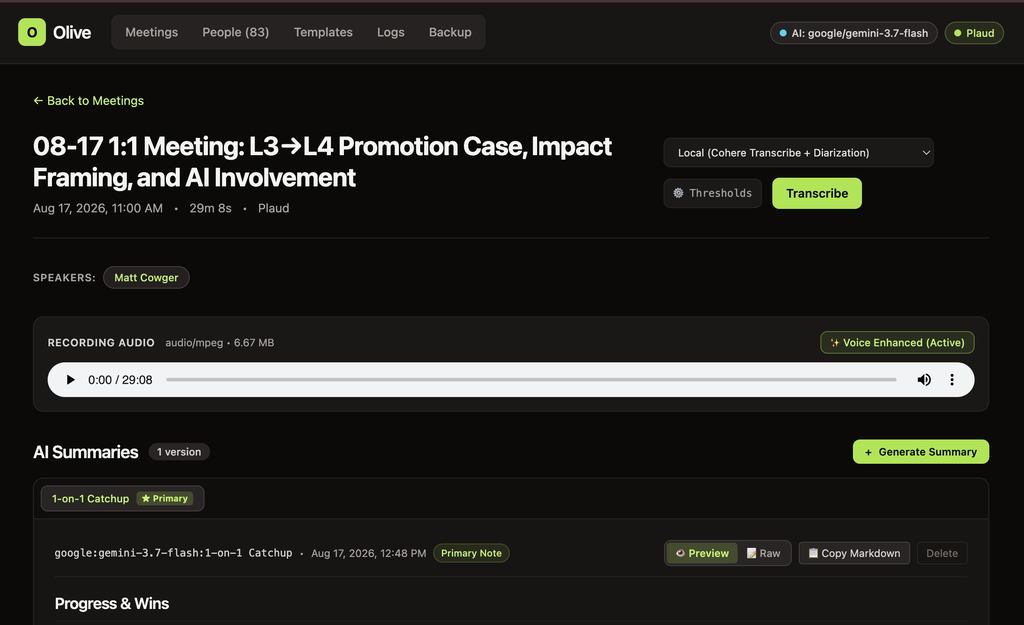
Review audio recordings with interactive seekbars, voice enhancement indicators, speaker identification, and multi-version AI summaries with raw markdown copy & preview.
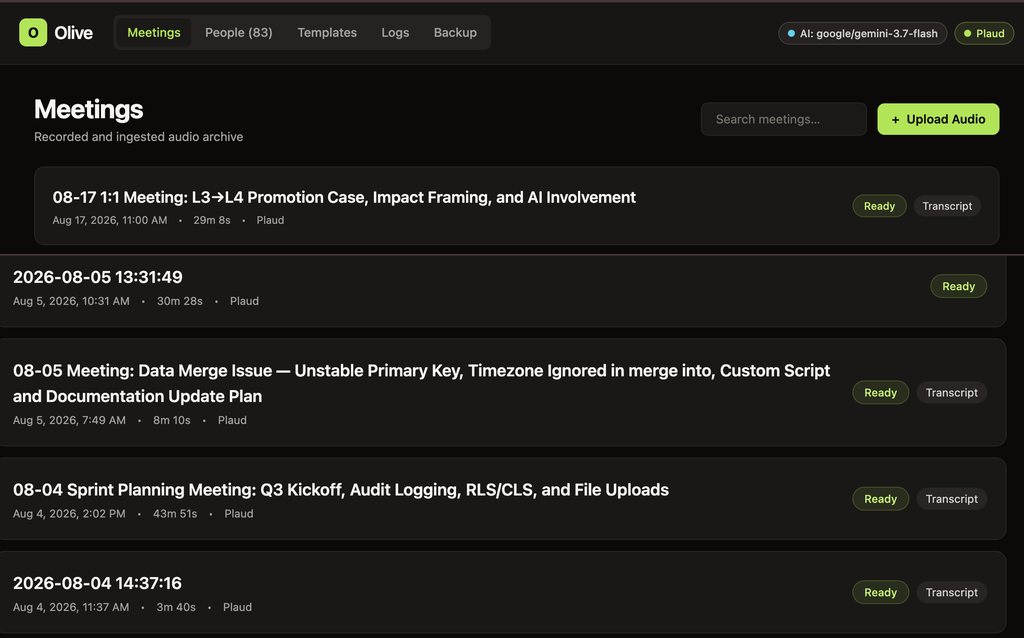
Meetings Archive Dashboard with instant search, duration metadata, and source tags.
Detailed Meeting View featuring HTML5 audio player, speaker pills, and rendered Markdown AI summaries.
LLM Provider & Neural ASR Settings
Switch between cloud and local AI providers on the fly with granular control over reasoning levels and diarization clustering sensitivities.
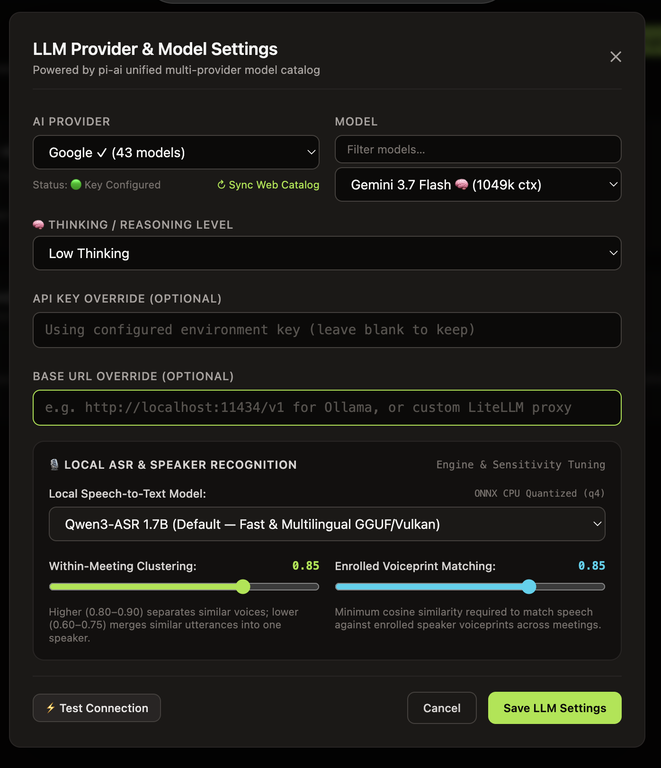
Unified model catalog, thinking / reasoning level configuration, and diarization sensitivity sliders.
Ingestion & Hardware Integration
Easily upload local audio files or connect Plaud hardware devices via automated OAuth token sync.
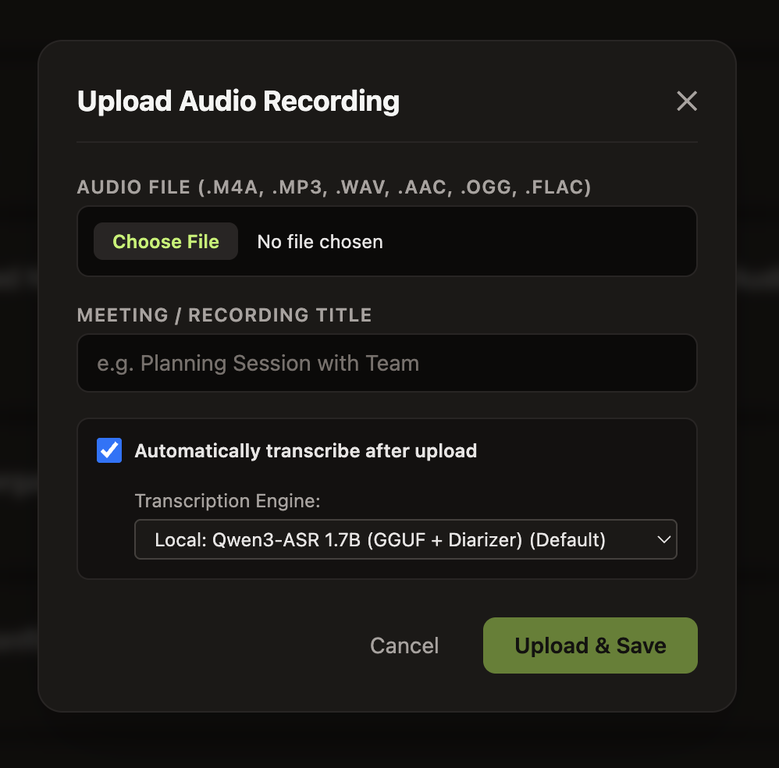
Direct audio file upload with auto-transcribe toggle and engine picker. |
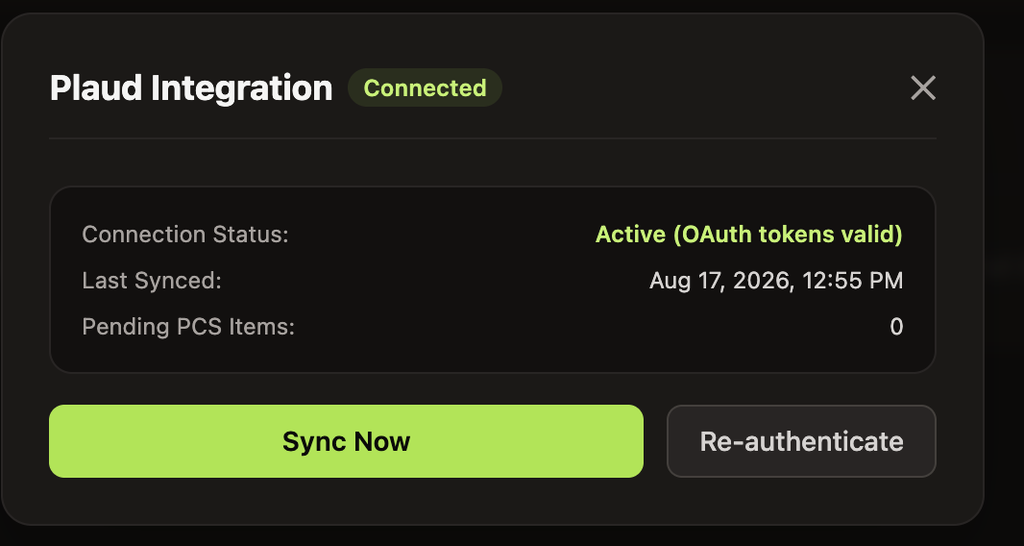
Plaud Cloud OAuth 2.0 integration with automatic recording & PCS sync. |
Customizable Summary Templates
Define structured summary formats tailored to specific meeting workflows (1-on-1s, Standups, Executive Briefs, Technical Architecture Reviews).
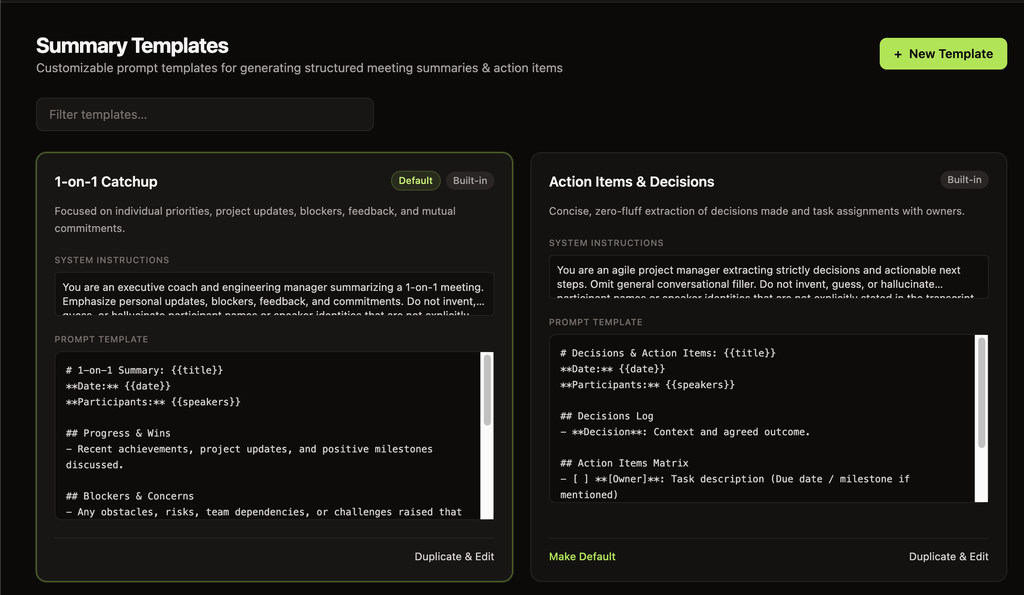
Customizable prompt templates with variable interpolation ({{title}}, {{date}}, {{speakers}}, {{transcript}}).
Real-Time Observability & System Logs
Monitor ingestion queues, diarization steps, model inference latency, and Plaud polling in real time with live streaming logs.
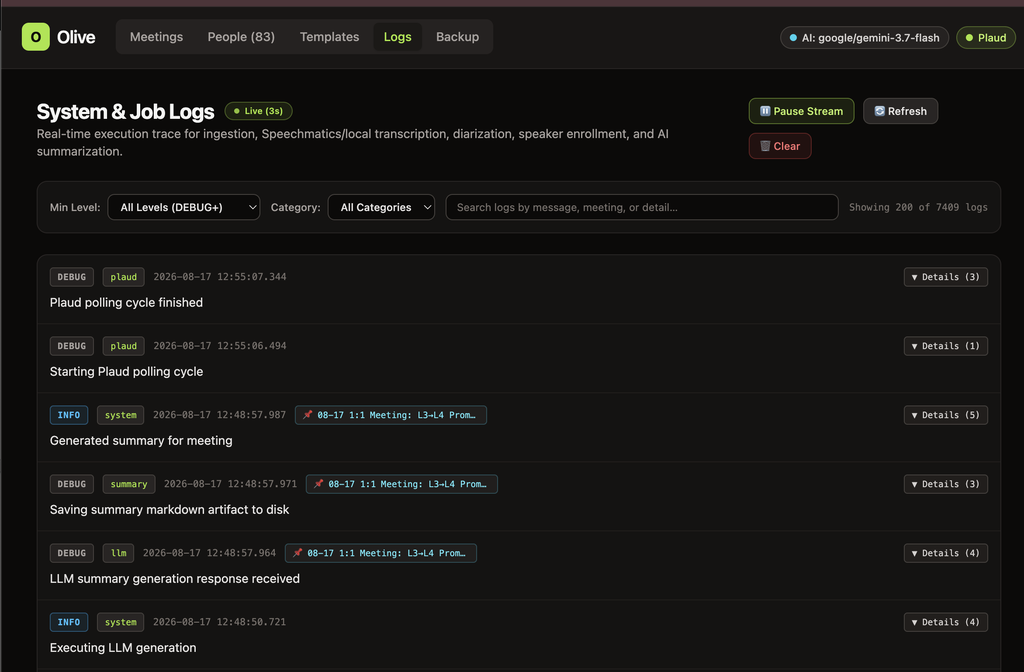
Live 3s streaming log console with category filters and structured execution metadata.
Full Backup & Disaster Recovery
Export and restore database snapshots, settings, templates, transcripts, notes, and raw audio files in a single self-contained archive.
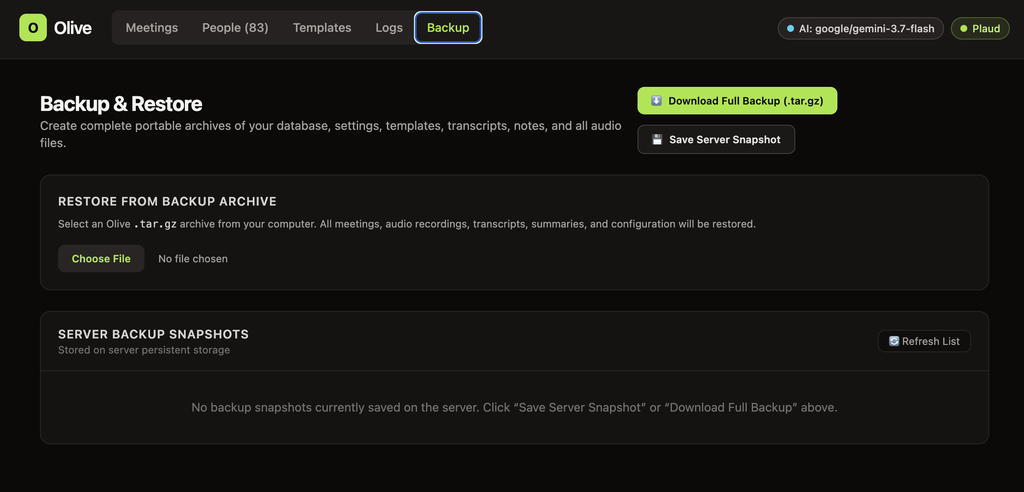
One-click full system backup export and archive restore manager.
🏗️ Architecture
SOURCES                           PIPELINE & ARTIFACT STORE                       INTELLIGENCE & EXPORT
───────                           ─────────────────────────                       ─────────────────────

 [ Plaud Note AI ] ──(OAuth/PCS)─┐
                                 │      ┌─────────────────────────────┐
 [ iOS Shortcut ]  ──(Ingest)───┼────► │   Meeting Aggregate Root    │
                                 │      │  ─────────────────────────  │
 [ Web UI Upload ] ──(Upload)───┘      │  • sha256 deduplicated      │
                                        │  • audio/<id>.<ext>         │
                                        │  • SQLite metadata + WAL    │
                                        └──────────────┬──────────────┘
                                                       │
                                 ┌─────────────────────┴─────────────────────┐
                                 ▼                                           ▼
                    ┌─────────────────────────┐                 ┌─────────────────────────┐
                    │     Transcription &     │                 │   LLM Summarization &   │
                    │   Speaker Diarization   │                 │    Action Item Engine   │
                    │ ─────────────────────── │                 │ ─────────────────────── │
                    │ • Local: Qwen3-ASR 1.7B │                 │ • pi-ai Unified Catalog │
                    │ • Sherpa-ONNX 3D-Spkr   │                 │ • Gemini / Claude / GPT │
                    │ • Cloud: Speechmatics   │                 │ • Local Ollama / vLLM   │
                    │ • Voiceprint Enrollment │                 │ • Structured Templates  │
                    └─────────────────────────┘                 └─────────────────────────┘
                                 │                                           │
                                 └─────────────────────┬─────────────────────┘
                                                       │
                                                       ▼
                                        ┌─────────────────────────────┐
                                        │     Interactive Web App     │
                                        │  Markdown • Audio • Backup  │
                                        └─────────────────────────────┘
🚀 Quickstart
Prerequisites
- Bun (v1.4+)
ffmpeg(for local audio decoding)- (Optional) Vulkan drivers / GPU for local ASR acceleration
Local Installation
# 1. Clone the repository
git clone https://github.com/mcowger/olive.git
cd olive

# 2. Install dependencies
bun install

# 3. Download local speech & diarization models (Qwen3-ASR & Sherpa-ONNX)
bun run scripts/download-models.ts

# 4. Build web frontend
bun run build

# 5. Start the server
bun run start
Visit http://localhost:4471 in your browser.
🐳 Docker Deployment
Olive includes a production-ready multi-stage Dockerfile with bundled llama.cpp Vulkan acceleration, sherpa-onnx, and ffmpeg.
# Build Docker image
docker build -t olive:latest .

# Run container with persistent data volume
docker run -d \
  --name olive \
  -p 4471:4470 \
  -v olive_data:/app/data \
  --restart unless-stopped \
  olive:latest
⚙️ Configuration & Environment Variables
Olive stores dynamic settings in <data>/config/settings.json, and accepts environment variables for bootstrap and secrets:
| Variable | Default | Description |
|---|---|---|
PORT / OLIVE_BIND_PORT | 4471 | Port for the HTTP server |
OLIVE_BIND_HOST | 127.0.0.1 | Network interface to bind (use 0.0.0.0 for Docker / LAN access) |
OLIVE_CONFIG_DIR | ~/.config/olive | Location for database, templates, and configuration |
OLIVE_MEETINGS_DIR | ~/.config/olive/meetings | Storage directory for raw audio files and artifacts |
OLIVE_MODELS_DIR | ~/.config/olive/models | Storage path for local ONNX/GGUF models |
OLIVE_INGEST_TOKEN | (optional) | Bearer token required for /api/ingest (used by iOS Shortcut) |
OLIVE_MCP_TOKEN | (optional) | Bearer token for /mcp; falls back to OLIVE_INGEST_TOKEN and is required for non-loopback binds |
PLAUD_TOKEN_PATH | ~/.plaud/tokens.json | Path to persistent OAuth credentials for Plaud Cloud |
SPEECHMATICS_API_KEY | (optional) | API key for Speechmatics cloud transcription & diarization |
SPEECHMATICS_WEBHOOK_SECRET | (optional) | Secret used to sign and verify Speechmatics webhook callbacks |
The default transcription engine is configured in LLM Provider & Model Settings → Automatic Transcription Engine. Local transcription is the default; choose Speechmatics there only when SPEECHMATICS_API_KEY is configured.
MCP integration
Olive exposes a read-only Model Context Protocol endpoint at /mcp on the main server port. It provides tools for listing meetings, retrieving meeting details, searching transcripts, extracting summary checklist items, and looking up speakers.
Local loopback clients can connect without a token. Set OLIVE_MCP_TOKEN to protect the endpoint; it falls back to OLIVE_INGEST_TOKEN. A token is required when OLIVE_BIND_HOST is not a loopback address.
Example client configuration:
{
  "mcpServers": {
    "olive": {
      "url": "http://127.0.0.1:4471/mcp",
      "headers": {
        "Authorization": "Bearer ${OLIVE_MCP_TOKEN}"
      }
    }
  }
}
📱 Integrations
1. Apple Voice Memos (iOS Share-Sheet Shortcut)
Upload voice memos directly from an iPhone or iPad to Olive in one tap:
- Open Shortcuts on iOS and create a new shortcut.
- Set Receive:
Audio & Filesfrom the Share Sheet. - Add action: Get Contents of URL
- URL:
https://<your-olive-instance>/api/ingest - Method:
POST - Headers:
Authorization: Bearer <YOUR_OLIVE_INGEST_TOKEN> - Request Body:
Formfile$\rightarrow$Shortcut InputautoTranscribe$\rightarrow$truesource$\rightarrow$ios-shortcut
- URL:
- Tap Share on any Voice Memo $\rightarrow$ select your shortcut.
2. Plaud Note & Plaud AI Cloud
- Click the Plaud button in the header.
- Complete OAuth authentication.
- Olive polls in the background, automatically pulling recordings, PCS transcripts, and summaries when ready.
💾 Backup & Disaster Recovery
Olive provides database-consistent snapshots combining SQLite data, configuration, templates, and raw audio files into a single .tar.gz archive.
Create a Backup
- Web UI: Navigate to the Backup tab $\rightarrow$ click Download Full Backup (.tar.gz) or Save Server Snapshot.
- CLI:
bun run scripts/backup.ts ./my-backup.tar.gz
Restore from Backup
- Web UI: Upload any Olive
.tar.gzarchive in the Backup tab. - CLI:
bun run scripts/restore.ts ./my-backup.tar.gz
🛠️ Development
# Start backend and web client concurrently with live watch and HMR
bun run dev

# Run only the backend API server with watch mode
bun run dev:server

# Run only the web frontend with Bun HMR
bun run dev:web

# Run full test suite
bun test

# Run TypeScript typechecks across all monorepo workspaces
bun run typecheck
📄 License
MIT © Matt Cowger
Contributors

57 commits
Similar repos


Languages
TypeScript
99.6%
README
🫒 Olive
Self-Hosted AI Meeting Intelligence, Speaker Diarization & Audio Archive
A private, self-hosted system that ingests audio from hardware voice recorders, mobile voice memos, and browser uploads — automatically transcribing, diarizing with neural speaker identification, and generating structured AI summaries with customizable templates.
✨ Features at a Glance
| Feature | Description |
|---|---|
| 🎙️ Multi-Source Audio Ingestion | Upload .m4a, .mp3, .wav, .aac, .ogg, .flac, .webm with automatic SHA-256 deduplication and instant transcription. |
| 📲 Plaud Note Integration | Native OAuth 2.0 PKCE sync with official Plaud Cloud — automatically fetches recordings, transcripts, and AI notes. |
| 📱 Apple Voice Memos Shortcut | One-tap iOS Share-Sheet shortcut to send recordings directly to your Olive instance from iPhone or iPad. |
| 🧠 Dual Transcription Pipeline | Choose between fast Local Neural STT (Qwen3-ASR 1.7B GGUF / ONNX / Cohere / Granite) or cloud Speechmatics. |
| 👤 Neural Speaker Diarization | Local Sherpa-ONNX 3D-Speaker / ECAPA-TDNN neural embeddings for cross-meeting voiceprint matching and speaker recognition. |
| 🤖 Multi-Provider LLM Summaries | Powered by pi-ai model catalog. Connect to Google Gemini, Anthropic Claude, OpenAI, Ollama, LM Studio, or custom proxies. |
| 📝 Customizable Summary Templates | Parameterized prompt templates (1-on-1 Catchup, Action Items & Decisions, Sprint Retrospective) with live Markdown previews. |
| 📊 Real-Time System & Job Logs | Live 3-second streaming log viewer with category filters, severity levels (DEBUG+ to ERROR), and structured payload inspection. |
| 💾 Complete Backup & Disaster Recovery | Single-click .tar.gz export and restore containing database snapshots, configurations, prompt templates, and all audio files. |
📸 Application Showcase
Meeting Archive & Detail View
Review audio recordings with interactive seekbars, voice enhancement indicators, speaker identification, and multi-version AI summaries with raw markdown copy & preview.
Meetings Archive Dashboard with instant search, duration metadata, and source tags.
Detailed Meeting View featuring HTML5 audio player, speaker pills, and rendered Markdown AI summaries.
LLM Provider & Neural ASR Settings
Switch between cloud and local AI providers on the fly with granular control over reasoning levels and diarization clustering sensitivities.
Unified model catalog, thinking / reasoning level configuration, and diarization sensitivity sliders.
Ingestion & Hardware Integration
Easily upload local audio files or connect Plaud hardware devices via automated OAuth token sync.
|
Direct audio file upload with auto-transcribe toggle and engine picker. |
Plaud Cloud OAuth 2.0 integration with automatic recording & PCS sync. |
Customizable Summary Templates
Define structured summary formats tailored to specific meeting workflows (1-on-1s, Standups, Executive Briefs, Technical Architecture Reviews).
Customizable prompt templates with variable interpolation ({{title}}, {{date}}, {{speakers}}, {{transcript}}).
Real-Time Observability & System Logs
Monitor ingestion queues, diarization steps, model inference latency, and Plaud polling in real time with live streaming logs.
Live 3s streaming log console with category filters and structured execution metadata.
Full Backup & Disaster Recovery
Export and restore database snapshots, settings, templates, transcripts, notes, and raw audio files in a single self-contained archive.
One-click full system backup export and archive restore manager.
🏗️ Architecture
SOURCES                           PIPELINE & ARTIFACT STORE                       INTELLIGENCE & EXPORT
───────                           ─────────────────────────                       ─────────────────────

 [ Plaud Note AI ] ──(OAuth/PCS)─┐
                                 │      ┌─────────────────────────────┐
 [ iOS Shortcut ]  ──(Ingest)───┼────► │   Meeting Aggregate Root    │
                                 │      │  ─────────────────────────  │
 [ Web UI Upload ] ──(Upload)───┘      │  • sha256 deduplicated      │
                                        │  • audio/<id>.<ext>         │
                                        │  • SQLite metadata + WAL    │
                                        └──────────────┬──────────────┘
                                                       │
                                 ┌─────────────────────┴─────────────────────┐
                                 ▼                                           ▼
                    ┌─────────────────────────┐                 ┌─────────────────────────┐
                    │     Transcription &     │                 │   LLM Summarization &   │
                    │   Speaker Diarization   │                 │    Action Item Engine   │
                    │ ─────────────────────── │                 │ ─────────────────────── │
                    │ • Local: Qwen3-ASR 1.7B │                 │ • pi-ai Unified Catalog │
                    │ • Sherpa-ONNX 3D-Spkr   │                 │ • Gemini / Claude / GPT │
                    │ • Cloud: Speechmatics   │                 │ • Local Ollama / vLLM   │
                    │ • Voiceprint Enrollment │                 │ • Structured Templates  │
                    └─────────────────────────┘                 └─────────────────────────┘
                                 │                                           │
                                 └─────────────────────┬─────────────────────┘
                                                       │
                                                       ▼
                                        ┌─────────────────────────────┐
                                        │     Interactive Web App     │
                                        │  Markdown • Audio • Backup  │
                                        └─────────────────────────────┘
🚀 Quickstart
Prerequisites
- Bun (v1.4+)
ffmpeg(for local audio decoding)- (Optional) Vulkan drivers / GPU for local ASR acceleration
Local Installation
# 1. Clone the repository
git clone https://github.com/mcowger/olive.git
cd olive

# 2. Install dependencies
bun install

# 3. Download local speech & diarization models (Qwen3-ASR & Sherpa-ONNX)
bun run scripts/download-models.ts

# 4. Build web frontend
bun run build

# 5. Start the server
bun run start
Visit http://localhost:4471 in your browser.
🐳 Docker Deployment
Olive includes a production-ready multi-stage Dockerfile with bundled llama.cpp Vulkan acceleration, sherpa-onnx, and ffmpeg.
# Build Docker image
docker build -t olive:latest .

# Run container with persistent data volume
docker run -d \
  --name olive \
  -p 4471:4470 \
  -v olive_data:/app/data \
  --restart unless-stopped \
  olive:latest
⚙️ Configuration & Environment Variables
Olive stores dynamic settings in <data>/config/settings.json, and accepts environment variables for bootstrap and secrets:
| Variable | Default | Description |
|---|---|---|
PORT / OLIVE_BIND_PORT | 4471 | Port for the HTTP server |
OLIVE_BIND_HOST | 127.0.0.1 | Network interface to bind (use 0.0.0.0 for Docker / LAN access) |
OLIVE_CONFIG_DIR | ~/.config/olive | Location for database, templates, and configuration |
OLIVE_MEETINGS_DIR | ~/.config/olive/meetings | Storage directory for raw audio files and artifacts |
OLIVE_MODELS_DIR | ~/.config/olive/models | Storage path for local ONNX/GGUF models |
OLIVE_INGEST_TOKEN | (optional) | Bearer token required for /api/ingest (used by iOS Shortcut) |
OLIVE_MCP_TOKEN | (optional) | Bearer token for /mcp; falls back to OLIVE_INGEST_TOKEN and is required for non-loopback binds |
PLAUD_TOKEN_PATH | ~/.plaud/tokens.json | Path to persistent OAuth credentials for Plaud Cloud |
SPEECHMATICS_API_KEY | (optional) | API key for Speechmatics cloud transcription & diarization |
SPEECHMATICS_WEBHOOK_SECRET | (optional) | Secret used to sign and verify Speechmatics webhook callbacks |
The default transcription engine is configured in LLM Provider & Model Settings → Automatic Transcription Engine. Local transcription is the default; choose Speechmatics there only when SPEECHMATICS_API_KEY is configured.
MCP integration
Olive exposes a read-only Model Context Protocol endpoint at /mcp on the main server port. It provides tools for listing meetings, retrieving meeting details, searching transcripts, extracting summary checklist items, and looking up speakers.
Local loopback clients can connect without a token. Set OLIVE_MCP_TOKEN to protect the endpoint; it falls back to OLIVE_INGEST_TOKEN. A token is required when OLIVE_BIND_HOST is not a loopback address.
Example client configuration:
{
  "mcpServers": {
    "olive": {
      "url": "http://127.0.0.1:4471/mcp",
      "headers": {
        "Authorization": "Bearer ${OLIVE_MCP_TOKEN}"
      }
    }
  }
}
📱 Integrations
1. Apple Voice Memos (iOS Share-Sheet Shortcut)
Upload voice memos directly from an iPhone or iPad to Olive in one tap:
- Open Shortcuts on iOS and create a new shortcut.
- Set Receive:
Audio & Filesfrom the Share Sheet. - Add action: Get Contents of URL
- URL:
https://<your-olive-instance>/api/ingest - Method:
POST - Headers:
Authorization: Bearer <YOUR_OLIVE_INGEST_TOKEN> - Request Body:
Formfile$\rightarrow$Shortcut InputautoTranscribe$\rightarrow$truesource$\rightarrow$ios-shortcut
- URL:
- Tap Share on any Voice Memo $\rightarrow$ select your shortcut.
2. Plaud Note & Plaud AI Cloud
- Click the Plaud button in the header.
- Complete OAuth authentication.
- Olive polls in the background, automatically pulling recordings, PCS transcripts, and summaries when ready.
💾 Backup & Disaster Recovery
Olive provides database-consistent snapshots combining SQLite data, configuration, templates, and raw audio files into a single .tar.gz archive.
Create a Backup
- Web UI: Navigate to the Backup tab $\rightarrow$ click Download Full Backup (.tar.gz) or Save Server Snapshot.
- CLI:
bun run scripts/backup.ts ./my-backup.tar.gz
Restore from Backup
- Web UI: Upload any Olive
.tar.gzarchive in the Backup tab. - CLI:
bun run scripts/restore.ts ./my-backup.tar.gz
🛠️ Development
# Start backend and web client concurrently with live watch and HMR
bun run dev

# Run only the backend API server with watch mode
bun run dev:server

# Run only the web frontend with Bun HMR
bun run dev:web

# Run full test suite
bun test

# Run TypeScript typechecks across all monorepo workspaces
bun run typecheck
📄 License
MIT © Matt Cowger
Similar repos
Contributors
57 commits
Languages
TypeScript
99.6%