
Open-source macOS menu bar and desktop analytics for Codex and Claude Code.
See the codeSee what people are saying
README
Maxxit
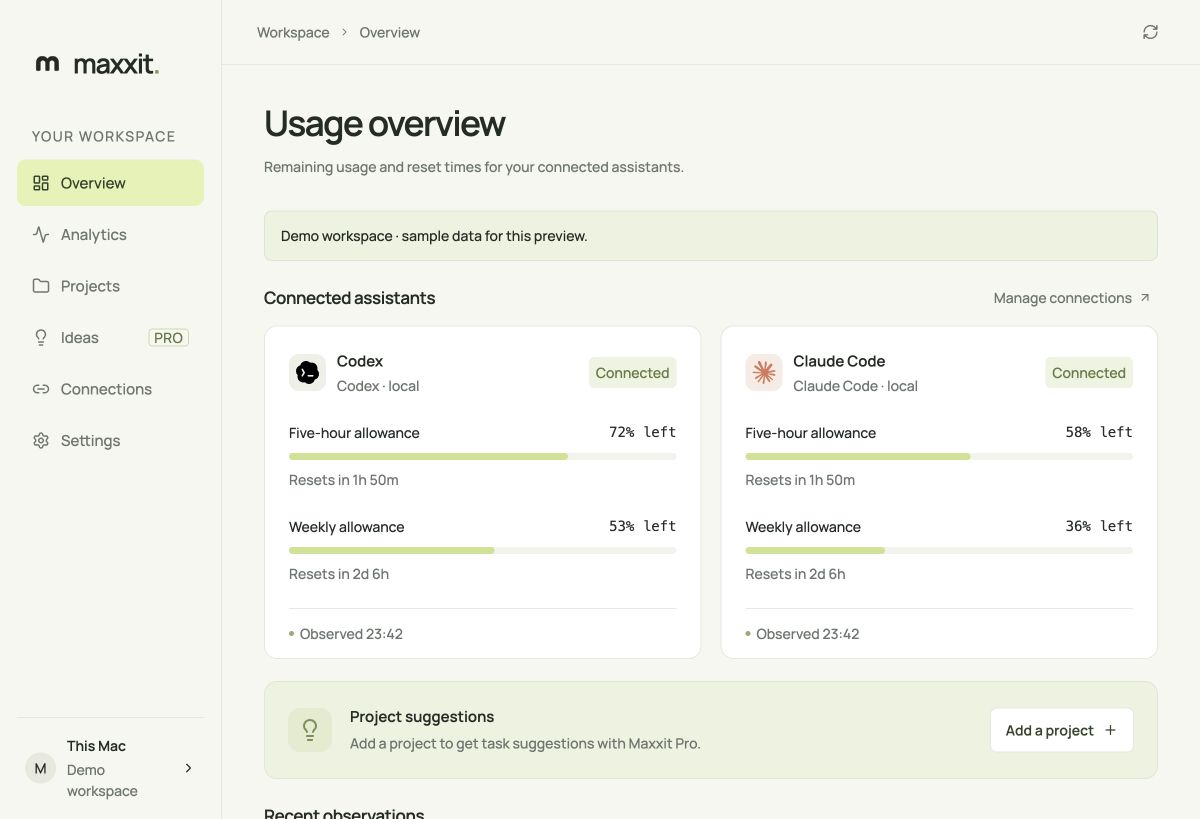
Track Codex and Claude Code usage and reset times on your Mac. The app includes daily Codex token charts, a menu bar usage panel, and a project list.
Built with Tauri 2, React, and Rust. Local analytics are free and work without a Maxxit account. Maxxit Pro adds project ideas and reset emails for $9.99/month after service setup is complete.
Installation
macOS 14 or later, Apple silicon or Intel.
Get the app from maxxit.app/download. Open the DMG, drag Maxxit into Applications, then launch it from Applications. See the Mac installation guide for setup, updates, and uninstall.
Maxxit checks for updates on launch and hourly while the window is visible. When a newer release is available, an update button appears above your workspace. Download and install it there, then restart when you're ready. You can also check manually in Settings. Updates use Tauri's signature verification.
The optional installer verifies the released DMG and installs under ~/Applications. It fails on download or verification errors. Explicit source builds are documented in CONTRIBUTING.md.
Connect your assistants
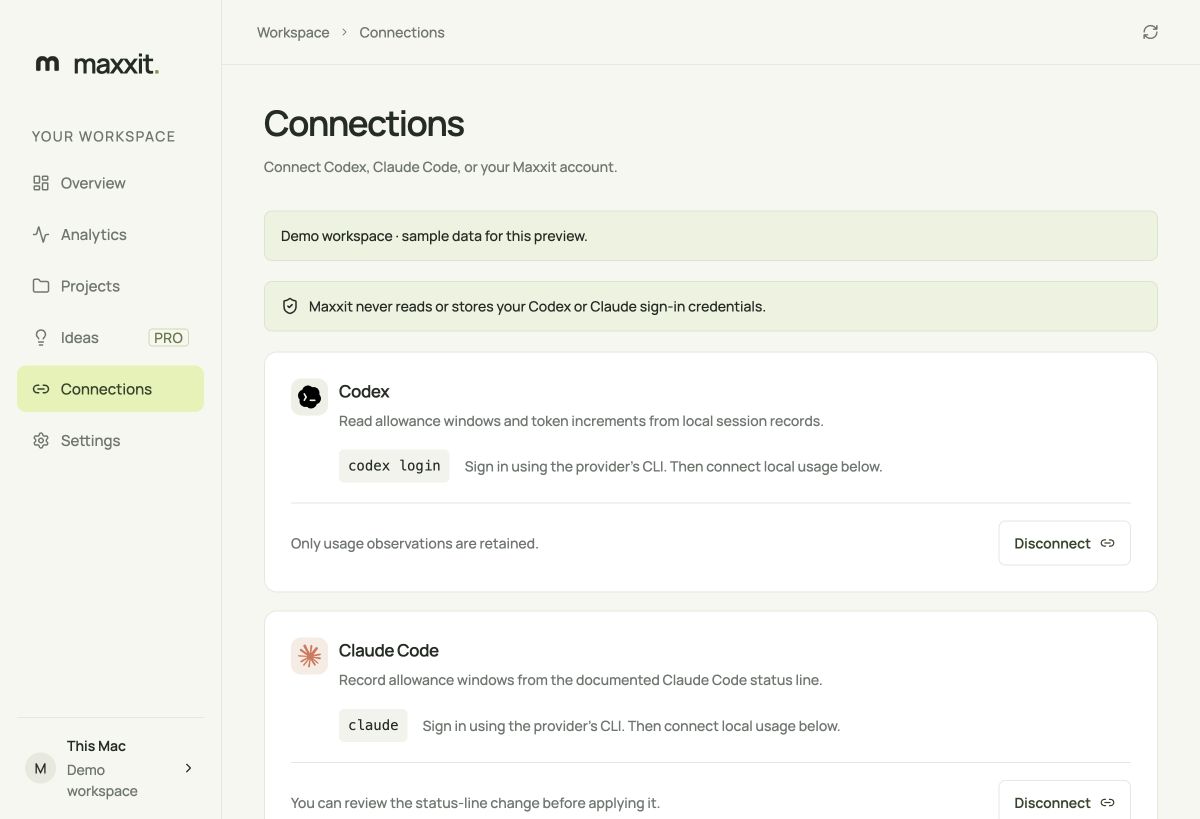
- Sign in through the official CLI:
codex loginorclaude. - Open Connections in Maxxit.
- Select Connect local usage for the provider you use. Claude shows the proposed status-line change before applying it; existing output is preserved.
- Use the assistant. Maxxit refreshes once a minute, including while its window is closed.
Click the menu bar icon for a compact usage panel. It shows every reported allowance window, reset countdowns, freshness, observed Codex token activity, and reset reminder status. Hover over a reset or chart bar for its exact time or token count. Click outside or press Escape to close the panel. You can also open it from View > Show usage panel with Cmd+Shift+U. Right-click the icon for the basic Open, Refresh, and Quit menu.
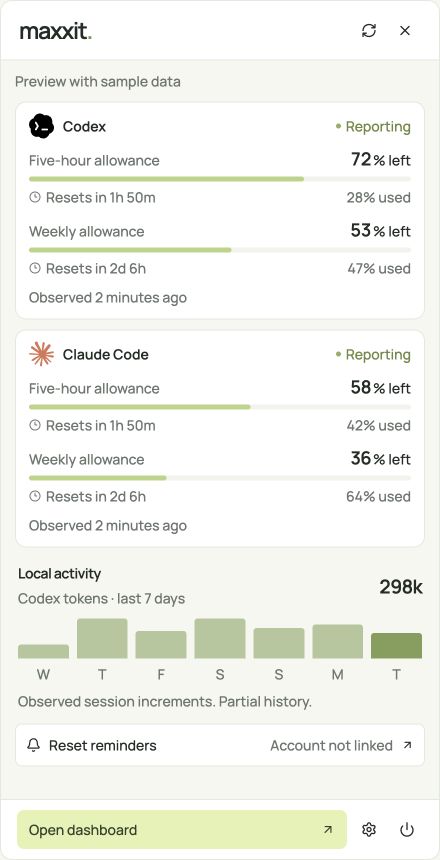
These screenshots show the actual interface with labeled sample data. Direct third-party provider OAuth is not available. Maxxit does not read provider token files, browser sessions, or passwords. Codex usage comes from local session records; Claude allowance comes from its documented status line. Claude may omit allowance until its next API response.
Missing, expired, or observations older than two hours are shown as unavailable. Token charts contain observed local session increments and are explicitly partial. Percentages describe allowance windows, not billing credits or the cost of a task.
Usage analytics
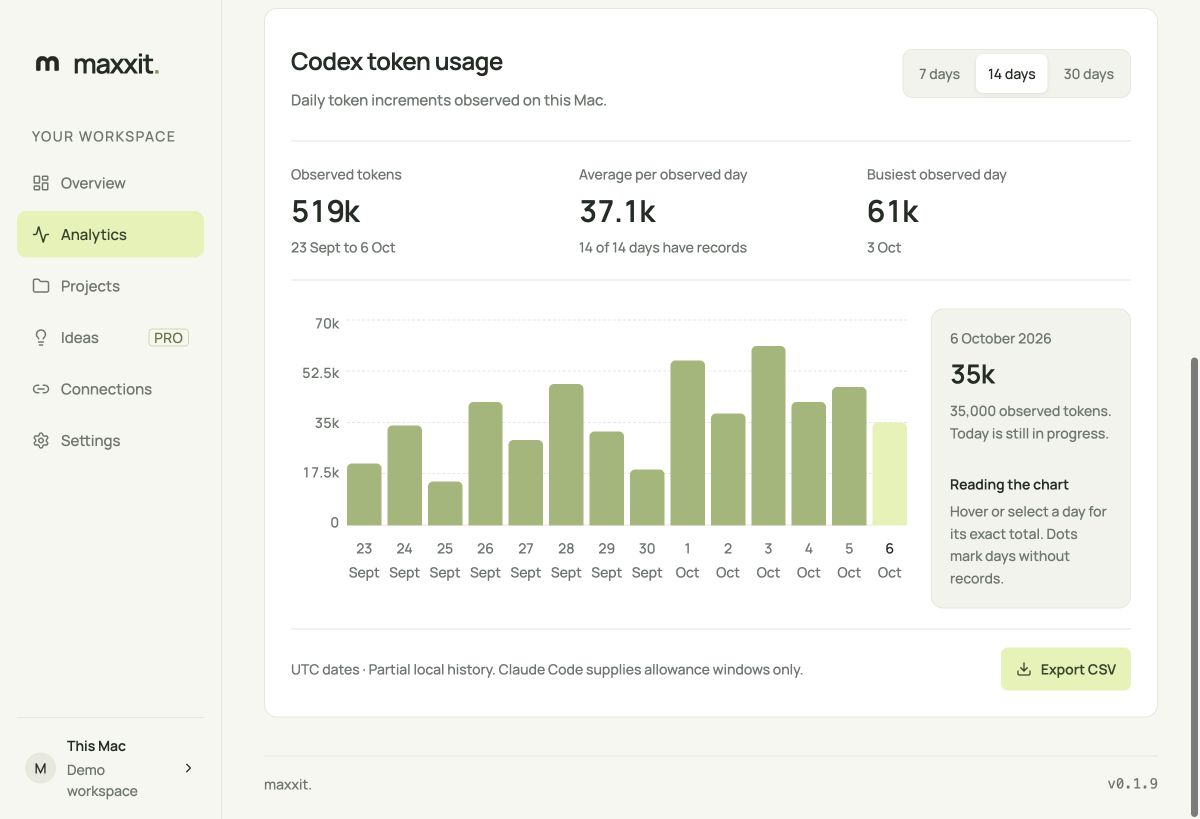
Choose 7, 14, or 30 days in Analytics. The chart shows a continuous UTC timeline with a token scale, period total, average per observed day, and busiest observed day. Select a bar with the mouse or keyboard for its exact total. Dots mark dates without records, which are excluded from the average. Today is still in progress. Export CSV saves the selected period with blank totals for unknown dates.
Optional cloud features
Connect a Maxxit account in Connections, approve the one-time code in the website, and choose usage and project sharing separately. The device credential stays in Mac Keychain. Usage sync sends allowance fields; project sharing sends only the descriptions you write. Conversation content, full paths, and provider credentials are excluded.
Pro checkout opens Polar in your browser. After paying, enable project sharing for ideas and verify your email in website settings for reset emails. Billing and email remain unavailable until the owner supplies credentials. Ideas never run automatically.
Development and contributions
Read CONTRIBUTING.md for pinned tools, unsigned builds, and PRs. Run pnpm check for lint, formatting, TypeScript, frontend/tooling tests, and Rust checks. Use pnpm dev at http://127.0.0.1:1420/?demo for the isolated browser preview.
See architecture, privacy, provider support, and support.
Uninstall
Disconnect Claude first to restore its previous status-line command. Disconnect your Maxxit account to revoke the device credential. Quit from the menu bar, then move Maxxit.app from its installation location to Trash. DMG installs use /Applications; the script uses ~/Applications. Local data is in ~/Library/Application Support/app.maxxit.desktop; delete that folder only if you want to remove local preferences, projects, and observations.
Security and trademarks
Report vulnerabilities privately to contact@maxxit.app. See SECURITY.md. MIT license applies to Maxxit code. Provider names and marks belong to their owners and do not imply endorsement; asset attribution. Manrope is licensed under the included SIL Open Font License.
Releases
The latest stable release has a universal macOS DMG and a separately signed Tauri update archive. Maintainers follow the release runbook and release checklist. CHANGELOG.md records user-visible changes. Release signing keys never belong in this repository.
Similar repos


Open-source macOS menu bar and desktop analytics for Codex and Claude Code.
See the codeSee what people are saying
README
Maxxit
Track Codex and Claude Code usage and reset times on your Mac. The app includes daily Codex token charts, a menu bar usage panel, and a project list.
Built with Tauri 2, React, and Rust. Local analytics are free and work without a Maxxit account. Maxxit Pro adds project ideas and reset emails for $9.99/month after service setup is complete.
Installation
macOS 14 or later, Apple silicon or Intel.
Get the app from maxxit.app/download. Open the DMG, drag Maxxit into Applications, then launch it from Applications. See the Mac installation guide for setup, updates, and uninstall.
Maxxit checks for updates on launch and hourly while the window is visible. When a newer release is available, an update button appears above your workspace. Download and install it there, then restart when you're ready. You can also check manually in Settings. Updates use Tauri's signature verification.
The optional installer verifies the released DMG and installs under ~/Applications. It fails on download or verification errors. Explicit source builds are documented in CONTRIBUTING.md.
Connect your assistants
- Sign in through the official CLI:
codex loginorclaude. - Open Connections in Maxxit.
- Select Connect local usage for the provider you use. Claude shows the proposed status-line change before applying it; existing output is preserved.
- Use the assistant. Maxxit refreshes once a minute, including while its window is closed.
Click the menu bar icon for a compact usage panel. It shows every reported allowance window, reset countdowns, freshness, observed Codex token activity, and reset reminder status. Hover over a reset or chart bar for its exact time or token count. Click outside or press Escape to close the panel. You can also open it from View > Show usage panel with Cmd+Shift+U. Right-click the icon for the basic Open, Refresh, and Quit menu.
These screenshots show the actual interface with labeled sample data. Direct third-party provider OAuth is not available. Maxxit does not read provider token files, browser sessions, or passwords. Codex usage comes from local session records; Claude allowance comes from its documented status line. Claude may omit allowance until its next API response.
Missing, expired, or observations older than two hours are shown as unavailable. Token charts contain observed local session increments and are explicitly partial. Percentages describe allowance windows, not billing credits or the cost of a task.
Usage analytics
Choose 7, 14, or 30 days in Analytics. The chart shows a continuous UTC timeline with a token scale, period total, average per observed day, and busiest observed day. Select a bar with the mouse or keyboard for its exact total. Dots mark dates without records, which are excluded from the average. Today is still in progress. Export CSV saves the selected period with blank totals for unknown dates.
Optional cloud features
Connect a Maxxit account in Connections, approve the one-time code in the website, and choose usage and project sharing separately. The device credential stays in Mac Keychain. Usage sync sends allowance fields; project sharing sends only the descriptions you write. Conversation content, full paths, and provider credentials are excluded.
Pro checkout opens Polar in your browser. After paying, enable project sharing for ideas and verify your email in website settings for reset emails. Billing and email remain unavailable until the owner supplies credentials. Ideas never run automatically.
Development and contributions
Read CONTRIBUTING.md for pinned tools, unsigned builds, and PRs. Run pnpm check for lint, formatting, TypeScript, frontend/tooling tests, and Rust checks. Use pnpm dev at http://127.0.0.1:1420/?demo for the isolated browser preview.
See architecture, privacy, provider support, and support.
Uninstall
Disconnect Claude first to restore its previous status-line command. Disconnect your Maxxit account to revoke the device credential. Quit from the menu bar, then move Maxxit.app from its installation location to Trash. DMG installs use /Applications; the script uses ~/Applications. Local data is in ~/Library/Application Support/app.maxxit.desktop; delete that folder only if you want to remove local preferences, projects, and observations.
Security and trademarks
Report vulnerabilities privately to contact@maxxit.app. See SECURITY.md. MIT license applies to Maxxit code. Provider names and marks belong to their owners and do not imply endorsement; asset attribution. Manrope is licensed under the included SIL Open Font License.
Releases
The latest stable release has a universal macOS DMG and a separately signed Tauri update archive. Maintainers follow the release runbook and release checklist. CHANGELOG.md records user-visible changes. Release signing keys never belong in this repository.