nwipe is a fork of the dwipe command originally used by Darik's Boot and Nuke (DBAN).
It was created to run the DBAN erase engine on any Linux distribution, with better and more modern hardware support.
nwipe securely erases the entire contents of block devices. It can wipe a single drive or multiple disks in parallel, either:
[!WARNING] For some of nwipe’s features such as SMART data in the PDF certificate, HPA/DCO detection and other functions, nwipe uses external tools: smartmontools and hdparm. Both
hdparmandsmartmontoolsare mandatory if you want all nwipe features to be fully available. If they are not installed at runtime, nwipe will log a warning and continue, but many important features will not work as intended.

The animation above shows six drives being erased in parallel. The view jumps to the completion of all six wipes and shows five drives successfully wiped and one that failed due to an I/O error. The failing drive would typically be physically destroyed. Drives that complete with zero errors can be safely redeployed.
The screenshot above shows nwipe’s three–page PDF certificate. Drive-identifying data such as serial numbers has been anonymised using the -q / --quiet option.
Refer to our CHANGELOG document to see exactly what's changed.
The user can select from a variety of recognised secure erase methods, including:
Fill With Zeros
Fills the device with zeros (0x00).
Fill With Ones
Fills the device with ones (0xFF).
RCMP TSSIT OPS-II
Royal Canadian Mounted Police Technical Security Standard, OPS-II.
DoD 5220.22-M (Short)
U.S. Department of Defense 5220.22-M short 3-pass wipe (passes 1, 2 & 7).
DoD 5220.22-M (Full)
U.S. Department of Defense 5220.22-M full 7-pass wipe.
Gutmann Wipe
Peter Gutmann's 35-pass method (“Secure Deletion of Data from Magnetic and Solid-State Memory”).
PRNG Stream
Fills the device with a stream generated by the selected PRNG engine.
Verify Zeros
Reads the device and verifies it is filled with zeros (0x00).
Verify Ones
Reads the device and verifies it is filled with ones (0xFF).
HMG IS5 Enhanced
UK HMG IS5 (Enhanced) sanitisation method for protectively marked or sensitive information.
Schneier Wipe
Bruce Schneier's 7-pass mixed–pattern algorithm.
BMB21-2019 (new in v0.40)
Chinese State Secrets Bureau BMB21-2019 technical requirement for data sanitisation.
Standalone Secure Erase (Block, Crypto Scramble, Overwrite) (new in v0.43)
Performs interactive, standalone, hardware-native drive sanitization—utilizing the drive's native ATA/NVMe block erase, cryptographic scramble, or pattern overwriting directly from nwipe's GUI.
nwipe includes multiple pseudorandom number generators (PRNGs) for methods that require random data:
XORoshiro-256
Very fast, high–quality non-cryptographic generator, suitable for high–volume random wiping where a CSPRNG is not strictly required.
Additive Lagged Fibonacci Generator Implementation of the Additive Lagged Fibonacci Generator (ALFG).
ISAAC-64 (CSPRNG)
Cryptographically secure, (Indirection, Shift, Accumulate, Add, and Count) generators (64 bit variant).
ISAAC (CSPRNG)
Cryptographically secure, (Indirection, Shift, Accumulate, Add, and Count) generators (32 bit variant).
Mersenne Twister
Well-known high–period PRNG.
AES-256-CTR (CSPRNG) (new in v0.40)
Cryptographically secure, high–throughput counter-mode stream cipher, using hardware AES-NI where available.
SplitMix64 (new in v0.41)
General-purpose non-cryptographic generator, optimized for 64-bit architectures.
ChaCha20 (CSPRNG) (new in v0.41)
Cryptographically secure, no special hardware requirements, as used worldwide in TLS and SSH.
These PRNGs can be selected at runtime (see the man page for the exact CLI options) and are used by any wipe method that requires random patterns (for example PRNG Stream, Schneier or BMB21 random passes).
Starting with v0.40 the nwipe I/O layer has been significantly modernised:
nwipe now uses large, aligned multi-megabyte buffers when reading and writing:
read() / write() calls.You can now explicitly control how nwipe accesses the device:
--io-mode=auto      # default
--io-mode=direct    # equivalent to --directio
--io-mode=cached    # equivalent to --cachedio

--directio          # force O_DIRECT (no fallback)
--cachedio          # force kernel cached I/O only
auto
Try to open the device with O_DIRECT. If the kernel or filesystem does not support it (EINVAL/EOPNOTSUPP), nwipe falls back to cached I/O and logs a warning.
direct / --directio
Force Direct I/O. If O_DIRECT is not supported for the device, opening the device fails and the wipe will not proceed. This is useful for strict testing and benchmarking.
cached / --cachedio
Always use kernel buffered I/O. O_DIRECT is never attempted. This is closest to the behaviour of older nwipe releases.
The --sync option controls how often nwipe performs fdatasync() when using cached I/O:
The value represents the number of device hardware blocks (typically 512 or 4096 bytes) between syncs.
Internally this value is scaled to match nwipe’s large I/O buffer size so that the effective bytes between syncs remain in a reasonable range (tens to hundreds of MB, depending on the default and device).
This ensures:
In Direct I/O mode (--directio / --io-mode=direct), periodic sync is disabled: write errors are reported immediately by write(), so fdatasync() provides no additional safety.
See the nwipe(8) man page for detailed --sync semantics and examples.
The v0.43 release introduces several major improvements.
Nwipe is now able to sanitize ATA and NVMe devices using native hardware capabilities.
A regular wipe was often not enough for flash storage devices:
For secure flash storage sanitization, the firmware can implement native secure erase methods.
These hardware methods ensure that even such non-accessible parts of a device are safely erased.
Nwipe is now able to detect these and will offer to utilize secure erase methods from within the GUI:
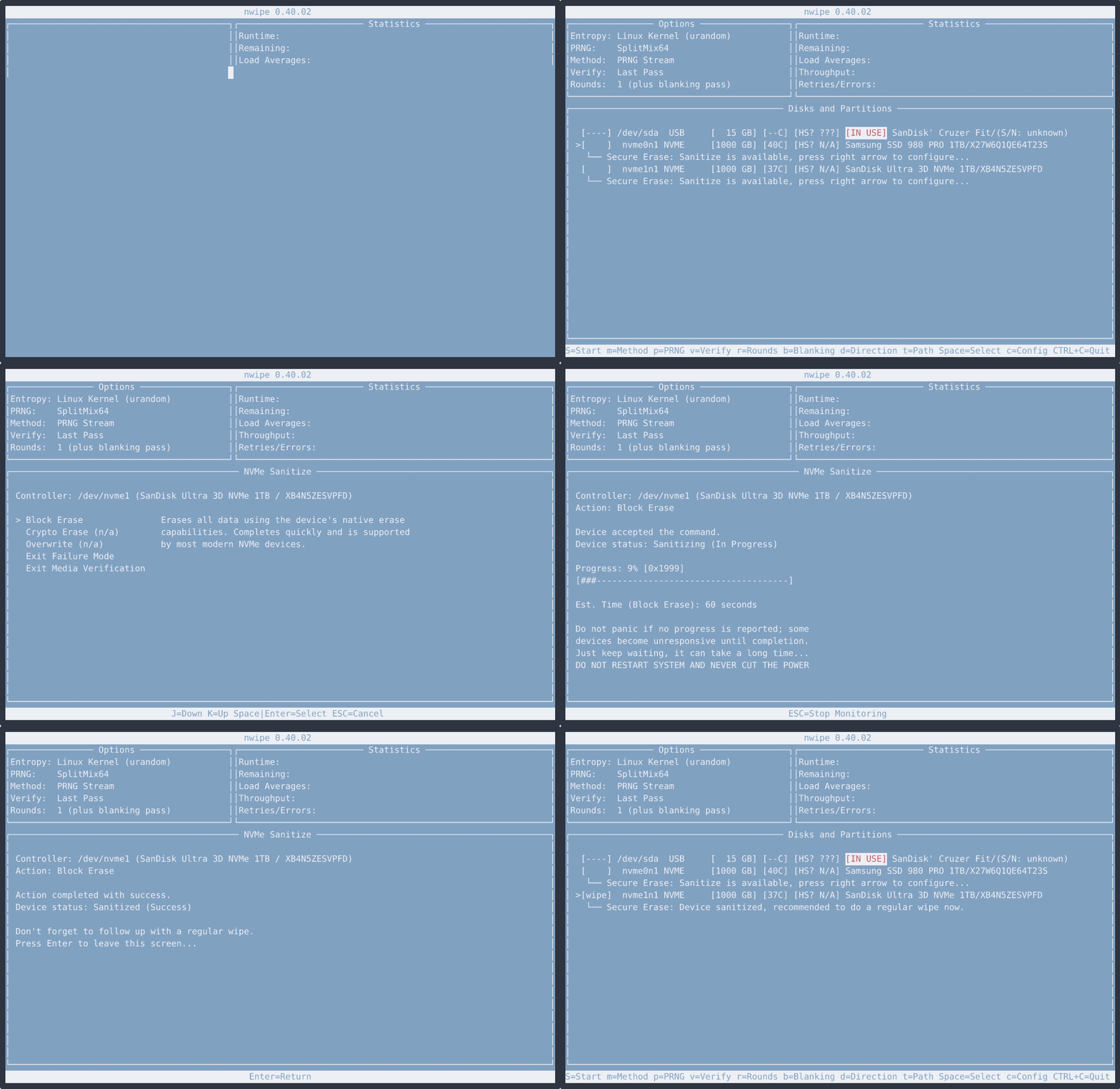
It is strongly recommended to sanitize devices using the available secure erase methods, and then always follow up with at least one full regular PRNG wipe afterwards (both are possible in the GUI).
If no secure erase methods are offered for your device, try connecting it directly to the motherboard. This is especially true for ATA devices (watch out for bad sense data errors in the logs), which benefit greatly from not having to talk to Nwipe through cheap or generic USB/SATA/RAID controllers.
For devices that cannot be detected or as an alternative, the previous guidance is still valid:
Use nwipe / ShredOS in combination with vendor-specific tools, for example:
Independently validate the result, comparing drive contents before and after sanitisation where feasible.
A list of common SSD vendor tools and guidance can be found in the separate SSD Guide.
For development work, see the Hacking section below. For a bootable image with the latest nwipe master that you can write to a USB stick or CD/DVD, see Quick & easy, USB bootable version.
nwipe requires at compile-time the following libraries:
ncursespthreadspartedlibconfiglibnvmenwipe requires at runtime and will abort with a warning if not found:
The following auxiliary tools are optional but strongly recommended:
dmidecodecoreutils (for readlink)smartmontoolsThese tools enable features such as:
--nousbIf you are compiling nwipe from source on Debian & Ubuntu:
sudo apt install \
  build-essential \
  pkg-config \
  automake \
  libncurses5-dev \
  autotools-dev \
  libparted-dev \
  libconfig-dev \
  libconfig++-dev \
  dmidecode \
  coreutils \
  smartmontools \
  hdparm \
  libnvme-dev
If you are compiling nwipe from source on Fedora / RHEL / CentOS:
sudo bash
sudo dnf update -y
sudo dnf groupinstall -y "Development Tools" "C Development Tools and Libraries"
sudo dnf install -y \
  ncurses-devel \
  parted-devel \
  libconfig-devel \
  libconfig++-devel \
  dmidecode \
  coreutils \
  smartmontools \
  hdparm \
  libnvme-devel
If you are compiling nwipe from source on Arch Linux / Manjaro:
sudo pacman -Syu --needed \
  base-devel \
  ncurses \
  parted \
  libconfig \
  dmidecode \
  coreutils \
  smartmontools \
  hdparm \
  libnvme
If you are compiling nwipe from source on openSUSE:
sudo zypper refresh
sudo zypper install -y \
  gcc \
  make \
  automake \
  autoconf \
  libtool \
  ncurses-devel \
  libparted-devel \
  libconfig-devel \
  libconfig++-devel \
  dmidecode \
  coreutils \
  smartmontools \
  hdparm \
  libnvme-devel
[!WARNING] Nwipe was specifically tested against libnvme versions 1.16.1+.
Outdated libnvme versions may have bugs and produce unexpected behavior.
We use the libnvme (>= 1.0) library to handle secure erase for NVMe devices:
https://github.com/linux-nvme/libnvme
It can be installed through your distribution's package manager (see further above). However, the NVMe standard is actively evolving, and many package managers ship relatively outdated versions of the library.
You can build the recommended version from source instead:
wget https://github.com/linux-nvme/libnvme/archive/refs/tags/v1.16.1.tar.gz
tar xvfz v1.16.1.tar.gz
cd libnvme-1.16.1
meson setup .build
meson compile -C .build
sudo meson install -C .build
sudo ldconfig
Generate the autoconf files:
./autogen.sh
Then configure, build and install:
./configure
make format    # only required if you intend to submit pull requests
make
sudo make install
Run nwipe:
cd src
sudo ./nwipe
or simply:
sudo nwipe
If you intend to submit patches or pull requests, we recommend enabling full warnings in your development build.
For a debug–friendly build:
./configure --prefix=/usr CFLAGS='-O0 -g -Wall -Wextra'
make format      # necessary if submitting pull requests
make
sudo make install
-O0 -g
Disables optimisation and includes debug symbols. This is important if you are debugging with gdb or an IDE (e.g. KDevelop), and want accurate stepping and variable inspection.
-Wall -Wextra
Enables most useful compiler warnings. Please submit code with zero warnings.
The code style is defined via .clang-format. Before submitting:
make format
You will need clang-format installed for this step.
To rebuild a "release-like" binary with normal optimisations after development:
./configure --prefix=/usr
make
sudo make install
Below is a convenience script that:
~/nwipe_masterIt does not overwrite any nwipe installed from your distribution’s repository.
Save the following as buildnwipe, then make it executable with chmod +x buildnwipe:
#!/bin/bash
cd "$HOME"
nwipe_directory="nwipe_master"
mkdir -p "$nwipe_directory"
cd "$nwipe_directory"

apt update

sudo apt install -y \
  build-essential \
  pkg-config \
  automake \
  libncurses5-dev \
  autotools-dev \
  libparted-dev \
  libconfig-dev \
  libconfig++-dev \
  dmidecode \
  coreutils \
  smartmontools \
  hdparm \
  git \
  libnvme-dev

rm -rf nwipe
git clone https://github.com/martijnvanbrummelen/nwipe.git
cd nwipe
./autogen.sh
./configure
make

cd src
sudo ./nwipe
To run the latest master later on:
sudo ~/nwipe_master/nwipe/src/nwipe
If you already have nwipe from your distro’s repo installed, remember:
nwipe → runs the packaged version in your $PATH./nwipe in ~/nwipe_master/nwipe/src → runs the freshly built masterIf you prefer a bootable image containing the latest nwipe master, use ShredOS:
ShredOS:
It is provided as:
.img (USB bootable image), and.iso (for CD/DVD/USB bootable image).See the ShredOS README for detailed instructions on downloading and writing the image.
You can see an overview at:
Distributions known to include nwipe:
If you know of other distributions that ship nwipe, please let us know or send a PR updating this README.
Bugs, feature requests, and pull requests are welcome on GitHub:
Please include:
nwipe is licensed under the GNU General Public License v2.0.
See the LICENSE file for details.
413 followers · starred May 2023
133 followers · starred Oct 2026
197 followers · starred Dec 2025
106 followers · starred Sep 2025
nwipe is a fork of the dwipe command originally used by Darik's Boot and Nuke (DBAN).
It was created to run the DBAN erase engine on any Linux distribution, with better and more modern hardware support.
nwipe securely erases the entire contents of block devices. It can wipe a single drive or multiple disks in parallel, either:
[!WARNING] For some of nwipe’s features such as SMART data in the PDF certificate, HPA/DCO detection and other functions, nwipe uses external tools: smartmontools and hdparm. Both
hdparmandsmartmontoolsare mandatory if you want all nwipe features to be fully available. If they are not installed at runtime, nwipe will log a warning and continue, but many important features will not work as intended.
The animation above shows six drives being erased in parallel. The view jumps to the completion of all six wipes and shows five drives successfully wiped and one that failed due to an I/O error. The failing drive would typically be physically destroyed. Drives that complete with zero errors can be safely redeployed.
The screenshot above shows nwipe’s three–page PDF certificate. Drive-identifying data such as serial numbers has been anonymised using the -q / --quiet option.
Refer to our CHANGELOG document to see exactly what's changed.
The user can select from a variety of recognised secure erase methods, including:
Fill With Zeros
Fills the device with zeros (0x00).
Fill With Ones
Fills the device with ones (0xFF).
RCMP TSSIT OPS-II
Royal Canadian Mounted Police Technical Security Standard, OPS-II.
DoD 5220.22-M (Short)
U.S. Department of Defense 5220.22-M short 3-pass wipe (passes 1, 2 & 7).
DoD 5220.22-M (Full)
U.S. Department of Defense 5220.22-M full 7-pass wipe.
Gutmann Wipe
Peter Gutmann's 35-pass method (“Secure Deletion of Data from Magnetic and Solid-State Memory”).
PRNG Stream
Fills the device with a stream generated by the selected PRNG engine.
Verify Zeros
Reads the device and verifies it is filled with zeros (0x00).
Verify Ones
Reads the device and verifies it is filled with ones (0xFF).
HMG IS5 Enhanced
UK HMG IS5 (Enhanced) sanitisation method for protectively marked or sensitive information.
Schneier Wipe
Bruce Schneier's 7-pass mixed–pattern algorithm.
BMB21-2019 (new in v0.40)
Chinese State Secrets Bureau BMB21-2019 technical requirement for data sanitisation.
Standalone Secure Erase (Block, Crypto Scramble, Overwrite) (new in v0.43)
Performs interactive, standalone, hardware-native drive sanitization—utilizing the drive's native ATA/NVMe block erase, cryptographic scramble, or pattern overwriting directly from nwipe's GUI.
nwipe includes multiple pseudorandom number generators (PRNGs) for methods that require random data:
XORoshiro-256
Very fast, high–quality non-cryptographic generator, suitable for high–volume random wiping where a CSPRNG is not strictly required.
Additive Lagged Fibonacci Generator Implementation of the Additive Lagged Fibonacci Generator (ALFG).
ISAAC-64 (CSPRNG)
Cryptographically secure, (Indirection, Shift, Accumulate, Add, and Count) generators (64 bit variant).
ISAAC (CSPRNG)
Cryptographically secure, (Indirection, Shift, Accumulate, Add, and Count) generators (32 bit variant).
Mersenne Twister
Well-known high–period PRNG.
AES-256-CTR (CSPRNG) (new in v0.40)
Cryptographically secure, high–throughput counter-mode stream cipher, using hardware AES-NI where available.
SplitMix64 (new in v0.41)
General-purpose non-cryptographic generator, optimized for 64-bit architectures.
ChaCha20 (CSPRNG) (new in v0.41)
Cryptographically secure, no special hardware requirements, as used worldwide in TLS and SSH.
These PRNGs can be selected at runtime (see the man page for the exact CLI options) and are used by any wipe method that requires random patterns (for example PRNG Stream, Schneier or BMB21 random passes).
Starting with v0.40 the nwipe I/O layer has been significantly modernised:
nwipe now uses large, aligned multi-megabyte buffers when reading and writing:
read() / write() calls.You can now explicitly control how nwipe accesses the device:
--io-mode=auto      # default
--io-mode=direct    # equivalent to --directio
--io-mode=cached    # equivalent to --cachedio

--directio          # force O_DIRECT (no fallback)
--cachedio          # force kernel cached I/O only
auto
Try to open the device with O_DIRECT. If the kernel or filesystem does not support it (EINVAL/EOPNOTSUPP), nwipe falls back to cached I/O and logs a warning.
direct / --directio
Force Direct I/O. If O_DIRECT is not supported for the device, opening the device fails and the wipe will not proceed. This is useful for strict testing and benchmarking.
cached / --cachedio
Always use kernel buffered I/O. O_DIRECT is never attempted. This is closest to the behaviour of older nwipe releases.
The --sync option controls how often nwipe performs fdatasync() when using cached I/O:
The value represents the number of device hardware blocks (typically 512 or 4096 bytes) between syncs.
Internally this value is scaled to match nwipe’s large I/O buffer size so that the effective bytes between syncs remain in a reasonable range (tens to hundreds of MB, depending on the default and device).
This ensures:
In Direct I/O mode (--directio / --io-mode=direct), periodic sync is disabled: write errors are reported immediately by write(), so fdatasync() provides no additional safety.
See the nwipe(8) man page for detailed --sync semantics and examples.
The v0.43 release introduces several major improvements.
Nwipe is now able to sanitize ATA and NVMe devices using native hardware capabilities.
A regular wipe was often not enough for flash storage devices:
For secure flash storage sanitization, the firmware can implement native secure erase methods.
These hardware methods ensure that even such non-accessible parts of a device are safely erased.
Nwipe is now able to detect these and will offer to utilize secure erase methods from within the GUI:
It is strongly recommended to sanitize devices using the available secure erase methods, and then always follow up with at least one full regular PRNG wipe afterwards (both are possible in the GUI).
If no secure erase methods are offered for your device, try connecting it directly to the motherboard. This is especially true for ATA devices (watch out for bad sense data errors in the logs), which benefit greatly from not having to talk to Nwipe through cheap or generic USB/SATA/RAID controllers.
For devices that cannot be detected or as an alternative, the previous guidance is still valid:
Use nwipe / ShredOS in combination with vendor-specific tools, for example:
Independently validate the result, comparing drive contents before and after sanitisation where feasible.
A list of common SSD vendor tools and guidance can be found in the separate SSD Guide.
For development work, see the Hacking section below. For a bootable image with the latest nwipe master that you can write to a USB stick or CD/DVD, see Quick & easy, USB bootable version.
nwipe requires at compile-time the following libraries:
ncursespthreadspartedlibconfiglibnvmenwipe requires at runtime and will abort with a warning if not found:
The following auxiliary tools are optional but strongly recommended:
dmidecodecoreutils (for readlink)smartmontoolsThese tools enable features such as:
--nousbIf you are compiling nwipe from source on Debian & Ubuntu:
sudo apt install \
  build-essential \
  pkg-config \
  automake \
  libncurses5-dev \
  autotools-dev \
  libparted-dev \
  libconfig-dev \
  libconfig++-dev \
  dmidecode \
  coreutils \
  smartmontools \
  hdparm \
  libnvme-dev
If you are compiling nwipe from source on Fedora / RHEL / CentOS:
sudo bash
sudo dnf update -y
sudo dnf groupinstall -y "Development Tools" "C Development Tools and Libraries"
sudo dnf install -y \
  ncurses-devel \
  parted-devel \
  libconfig-devel \
  libconfig++-devel \
  dmidecode \
  coreutils \
  smartmontools \
  hdparm \
  libnvme-devel
If you are compiling nwipe from source on Arch Linux / Manjaro:
sudo pacman -Syu --needed \
  base-devel \
  ncurses \
  parted \
  libconfig \
  dmidecode \
  coreutils \
  smartmontools \
  hdparm \
  libnvme
If you are compiling nwipe from source on openSUSE:
sudo zypper refresh
sudo zypper install -y \
  gcc \
  make \
  automake \
  autoconf \
  libtool \
  ncurses-devel \
  libparted-devel \
  libconfig-devel \
  libconfig++-devel \
  dmidecode \
  coreutils \
  smartmontools \
  hdparm \
  libnvme-devel
[!WARNING] Nwipe was specifically tested against libnvme versions 1.16.1+.
Outdated libnvme versions may have bugs and produce unexpected behavior.
We use the libnvme (>= 1.0) library to handle secure erase for NVMe devices:
https://github.com/linux-nvme/libnvme
It can be installed through your distribution's package manager (see further above). However, the NVMe standard is actively evolving, and many package managers ship relatively outdated versions of the library.
You can build the recommended version from source instead:
wget https://github.com/linux-nvme/libnvme/archive/refs/tags/v1.16.1.tar.gz
tar xvfz v1.16.1.tar.gz
cd libnvme-1.16.1
meson setup .build
meson compile -C .build
sudo meson install -C .build
sudo ldconfig
Generate the autoconf files:
./autogen.sh
Then configure, build and install:
./configure
make format    # only required if you intend to submit pull requests
make
sudo make install
Run nwipe:
cd src
sudo ./nwipe
or simply:
sudo nwipe
If you intend to submit patches or pull requests, we recommend enabling full warnings in your development build.
For a debug–friendly build:
./configure --prefix=/usr CFLAGS='-O0 -g -Wall -Wextra'
make format      # necessary if submitting pull requests
make
sudo make install
-O0 -g
Disables optimisation and includes debug symbols. This is important if you are debugging with gdb or an IDE (e.g. KDevelop), and want accurate stepping and variable inspection.
-Wall -Wextra
Enables most useful compiler warnings. Please submit code with zero warnings.
The code style is defined via .clang-format. Before submitting:
make format
You will need clang-format installed for this step.
To rebuild a "release-like" binary with normal optimisations after development:
./configure --prefix=/usr
make
sudo make install
Below is a convenience script that:
~/nwipe_masterIt does not overwrite any nwipe installed from your distribution’s repository.
Save the following as buildnwipe, then make it executable with chmod +x buildnwipe:
#!/bin/bash
cd "$HOME"
nwipe_directory="nwipe_master"
mkdir -p "$nwipe_directory"
cd "$nwipe_directory"

apt update

sudo apt install -y \
  build-essential \
  pkg-config \
  automake \
  libncurses5-dev \
  autotools-dev \
  libparted-dev \
  libconfig-dev \
  libconfig++-dev \
  dmidecode \
  coreutils \
  smartmontools \
  hdparm \
  git \
  libnvme-dev

rm -rf nwipe
git clone https://github.com/martijnvanbrummelen/nwipe.git
cd nwipe
./autogen.sh
./configure
make

cd src
sudo ./nwipe
To run the latest master later on:
sudo ~/nwipe_master/nwipe/src/nwipe
If you already have nwipe from your distro’s repo installed, remember:
nwipe → runs the packaged version in your $PATH./nwipe in ~/nwipe_master/nwipe/src → runs the freshly built masterIf you prefer a bootable image containing the latest nwipe master, use ShredOS:
ShredOS:
It is provided as:
.img (USB bootable image), and.iso (for CD/DVD/USB bootable image).See the ShredOS README for detailed instructions on downloading and writing the image.
You can see an overview at:
Distributions known to include nwipe:
If you know of other distributions that ship nwipe, please let us know or send a PR updating this README.
Bugs, feature requests, and pull requests are welcome on GitHub:
Please include:
nwipe is licensed under the GNU General Public License v2.0.
See the LICENSE file for details.
413 followers · starred May 2023
133 followers · starred Oct 2026
197 followers · starred Dec 2025
106 followers · starred Sep 2025