
See what people are saying
README
Rufux — a Rufus-style bootable USB creator for Linux
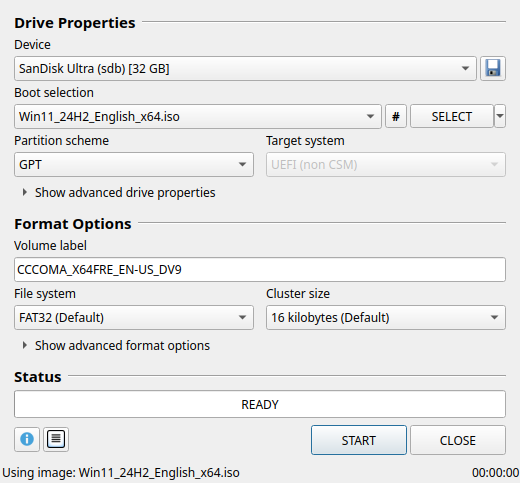
Rufux brings the Rufus workflow to Linux: pick a drive and an image, check the options, and press START. It writes Linux ISOs, builds Windows 10/11 installation drives, and formats USB sticks and SD cards. It runs on any modern Linux distribution.
Rufux is an independent project inspired by Rufus. It is not affiliated with Rufus or its author.
Features
- Rufus layout and defaults. Device, Boot selection, Partition scheme, Target system, Volume label, File system and Cluster size (using Rufus' cluster-size tables), advanced options, a status bar and a log window.
- Linux images (Ubuntu, Fedora, Debian, Linux Mint, openSUSE, Arch, …)
- DD image mode, the default for ISOHybrid images: a raw copy, followed by a read-back verification.
- ISO image mode (file copy): creates a normal FAT32/NTFS drive, patches boot-loader volume labels the way Rufus does, and supports a persistent partition for Ubuntu (casper) and Debian (live-boot) images.
- Compressed images:
.img.xz,.gz,.bz2,.zst,.zipand raw.img.
- Windows 10/11 installation drives
- GPT + UEFI, or MBR + "BIOS or UEFI" (legacy BIOS boot uses GRUB to chainload
bootmgr). - FAT32 with automatic
install.wimsplitting (via wimlib) when the image has a file over 4 GB. This uses Windows' own signed boot files, so Secure Boot keeps working. - Or NTFS/exFAT + UEFI:NTFS, the same approach Rufus uses (a small FAT partition at the end of the drive holds Pete Batard's UEFI:NTFS driver).
- The Windows User Experience dialog (same options as Rufus): remove the 4GB+ RAM, Secure Boot and TPM 2.0 requirements, remove the online Microsoft account requirement, create a local account, skip the privacy questions, copy your regional settings, and disable BitLocker automatic encryption.
- GPT + UEFI, or MBR + "BIOS or UEFI" (legacy BIOS boot uses GRUB to chainload
- Non-bootable formatting: FAT, FAT32 (including "Large FAT32"), NTFS, exFAT, UDF,
ext2/3/4, on MBR or GPT, with an optional quick format and extended label (
autorun.inf+ icon). - Bad blocks and counterfeit-drive check (1–4 passes). Every block is tagged with its own index, so fake-capacity drives that wrap around are detected.
- Save drive to image (the 💾 button) and checksums (MD5/SHA1/SHA256/SHA512, with a "compare" box).
- Safety first
- Only USB drives and SD cards are listed. Internal disks and anything that hosts
/,/boot,/home, swap and so on are never shown. USB hard disks are hidden unless you tick List USB Hard Drives. - Before writing, the helper re-checks that the device path still refers to the same drive (size, serial, model) you selected.
- It refuses to overwrite the drive that holds the image, unmounts the drive's partitions, and stops the desktop from auto-mounting it while writing.
- Only USB drives and SD cards are listed. Internal disks and anything that hosts
Installation
Rufux needs:
- Python 3.10 or newer, with PyQt6 or PySide6 (either one works)
- polkit (
pkexec), which every desktop has, to ask for your password when writing - util-linux (
lsblk,sfdisk,wipefs), dosfstools and e2fsprogs
Recommended extras: wimlib (lets Windows images with an install.wim over 4 GB stay on
FAT32), ntfs-3g (NTFS) and exfatprogs (exFAT).
Follow the section for your distribution: install the dependencies, download the source, then
install. Every method except the Arch package installs under /usr/local.
Debian, Ubuntu, Linux Mint, Pop!_OS, Zorin OS, elementary OS
sudo apt install git make python3-pyqt6 pkexec dosfstools fdisk e2fsprogs
sudo apt install ntfs-3g exfatprogs wimtools    # recommended
git clone https://github.com/oreo1298/WindowsUSBLinux.git
cd WindowsUSBLinux
make uefi-ntfs.img                              # optional, see below
sudo make install
On older releases (Ubuntu 22.04, Debian 11) the pkexec package is called policykit-1. If
python3-pyqt6 doesn't exist on your release, see Without a packaged Qt binding.
Fedora
sudo dnf install git make python3-pyqt6 polkit dosfstools util-linux e2fsprogs
sudo dnf install ntfs-3g ntfsprogs exfatprogs wimlib-utils    # recommended
git clone https://github.com/oreo1298/WindowsUSBLinux.git
cd WindowsUSBLinux
make uefi-ntfs.img                                            # optional, see below
sudo make install
openSUSE (Tumbleweed and Leap)
sudo zypper install git make python3-PyQt6 polkit dosfstools util-linux e2fsprogs
sudo zypper install ntfs-3g ntfsprogs exfatprogs wimtools    # recommended
git clone https://github.com/oreo1298/WindowsUSBLinux.git
cd WindowsUSBLinux
make uefi-ntfs.img                                           # optional, see below
sudo make install
Arch Linux, CachyOS, EndeavourOS, Manjaro and other Arch-based distributions
The repository includes a PKGBUILD, so Rufux installs as a normal pacman package (with the UEFI:NTFS image included):
sudo pacman -S --needed git base-devel
sudo pacman -S --needed ntfs-3g exfatprogs wimlib    # recommended
git clone https://github.com/oreo1298/WindowsUSBLinux.git
cd WindowsUSBLinux
makepkg -si
Other distributions
Install the requirements listed above (plus git and make) with your package manager, then:
git clone https://github.com/oreo1298/WindowsUSBLinux.git
cd WindowsUSBLinux
sudo make install
Without a packaged Qt binding
If your distribution has neither PyQt6 nor PySide6, install PySide6 from PyPI into a private
virtual environment and point the installed launcher at it (run this in the repository folder,
instead of the plain sudo make install):
python3 -m venv ~/.local/share/rufux-venv
~/.local/share/rufux-venv/bin/pip install PySide6-Essentials
sudo make PYTHON_GUI=$HOME/.local/share/rufux-venv/bin/python install
Notes for every distribution
-
make uefi-ntfs.imgdownloads the UEFI:NTFS boot image from the Rufus v4.15 release (withcurlorwget) and checks its SHA-256, somake installcan bundle it. It's only needed for NTFS/exFAT boot drives. If you skip it, Rufux offers to download it the first time you need it. -
Legacy BIOS boot for Windows drives (MBR → "BIOS or UEFI") needs GRUB's BIOS modules:
Distribution family Packages Debian / Ubuntu grub-pc-bin grub2-commonFedora grub2-pc-modules grub2-toolsopenSUSE grub2-i386-pcArch-based grubInstalling these does not change your own boot loader. Rufux only runs
grub-installagainst the USB drive. -
UDF formatting needs
udftools(same name everywhere). -
Package names for Debian/Ubuntu were checked on Ubuntu 24.04. The Fedora and openSUSE names are the usual ones for those distributions; if one isn't found, search for it with
dnf searchorzypper search. -
When a tool is missing, Rufux tells you which package to install, using your distribution's package manager.
Starting and updating
Start Rufux from your application menu, or run rufux (optionally rufux some-image.iso).
To update, run git pull in the repository folder, then repeat the install command you used
(sudo make install or makepkg -si).
Running from source without installing
With the requirements installed, you can also run it straight from the repository:
./bin/rufux
Polkit then asks for your password to run bin/rufux-helper. Without the installed polkit
policy, the prompt shows the helper's full path instead of a friendly message.
Uninstalling
Use the command that matches how you installed Rufux:
| Installed with | Remove with |
|---|---|
sudo make install | sudo make uninstall (run it from the repository folder) |
makepkg -si (Arch-based) | sudo pacman -Rns rufux |
sudo make install with the PySide6 virtual environment | sudo make uninstall, then rm -rf ~/.local/share/rufux-venv |
Then remove your personal settings, the UEFI:NTFS download cache (only present if Rufux downloaded it), and the repository folder:
rm -rf ~/.config/rufux ~/.cache/rufux
rm -rf ~/WindowsUSBLinux    # or wherever you cloned it
Packages you installed yourself (such as wimlib, ntfs-3g, exfatprogs or GRUB) stay
installed; remove them with your package manager if nothing else needs them. Don't remove
GRUB if your computer boots with it.
Using it
- Device: plug in the USB stick. It appears within a couple of seconds.
- Boot selection: click SELECT (or drag and drop an image onto the window). Rufux analyzes the image and fills in the rest, the same way Rufus does. The ▾ next to SELECT has links to the official download pages of common distributions and Windows.
- Image option (shown for ISOHybrid Linux images): DD Image mode is recommended. Choose ISO Image mode if you want a persistent partition or a drive that keeps a normal file system.
- Check the partition scheme, target system, file system and label. The defaults are sensible.
- Press START. For Windows images, the Windows User Experience dialog appears first. After
that you get the usual
ALL DATA ON DEVICE … WILL BE DESTROYEDconfirmation, then a polkit password prompt. - When the bar shows READY, the drive is done (and verified, unless you turned that off under Show advanced format options).
Windows notes
- The default is GPT / UEFI (non CSM) / FAT32. If
install.wimis larger than 4 GB, it is split intoinstall.swm+install2.swm… (Windows Setup supports this natively). Ifwimlibis missing, or the image uses a solid-compressedinstall.esdlarger than 4 GB, pick NTFS instead. - NTFS/exFAT drives boot through UEFI:NTFS. Its loader and file system drivers are signed, so they also start with Secure Boot enabled. If a particular PC still refuses the drive, use FAT32 or temporarily disable Secure Boot.
- For old BIOS-only PCs, choose MBR and BIOS or UEFI (needs
grub). - The customization options are written to
autounattend.xmlat the root of the drive. If you only chose options that apply after installation, they go tosources/$OEM$/$$/Panther/unattend.xmlinstead, which is the same split Rufus uses. With the requirement bypass enabled,sources/appraiserres.dllis also neutralized for in-place upgrades.
Linux notes
- For ISOHybrid images (most Linux ISOs, such as Ubuntu, Fedora, Debian or Arch), DD mode is the right choice. It is a byte-for-byte copy, so both BIOS and UEFI boot work exactly as designed.
- ISO mode copies the files onto FAT32 and patches the boot configuration to use the USB volume label. It boots on UEFI systems only.
How it works
- The GUI (Python + Qt 6, through PyQt6 or PySide6) runs as your normal user. It enumerates drives with
lsblkand reads images with a built-in ISO 9660 / Joliet / Rock Ridge / UDF reader, the way Rufus uses libcdio. - Writing needs root. A small helper (
<prefix>/lib/rufux/bin/rufux-helper) is started through pkexec. Polkit caches the authorization for a few minutes. The helper reads one JSON job, reports progress as JSON lines, and can be cancelled at any time. - The helper opens your image with your permissions, not root's. It re-validates the target
drive, then uses standard tools:
wipefs,sfdisk,mkfs.*,mount,wimlib-imagexandgrub-install. - Partition layouts follow Rufus. The main partition starts at 1 MiB (Main Data Partition),
followed by optional persistence and, at the end of the disk, a UEFI:NTFS partition
(a Microsoft basic data partition with the "no drive letter" attribute on GPT, type
0xEFon MBR).
Differences from Rufus
Not implemented: Windows To Go, FreeDOS, installing Syslinux/GRUB for Linux ISO mode (use DD mode), and the built-in Windows ISO downloader (Fido). The ▾ menu next to SELECT links to the official download pages instead.
Additions: verification of written data in both modes, compressed-image writing with progress, a checksum compare box, and a Safely remove the drive when finished option.
Troubleshooting
- "Authorization failed or was cancelled": a polkit authentication agent must be running.
KDE Plasma and GNOME include one. On minimal window managers, start e.g.
polkit-kde-agentorlxqt-policykit. - My drive is not listed: large or rotational USB disks count as USB Hard Drives. Tick that box under Show advanced drive properties. Internal disks are never listed.
- "Could not unmount … the drive is in use": close any file manager window or terminal that has the drive open, then retry.
- The log window (📄 button) shows every command that was run. Save it when reporting a problem.
Development
The tests use pytest (python3-pytest on Debian/Ubuntu and Fedora, python-pytest on Arch):
make test         # unit tests; the end-to-end tests also need root and loop devices
sudo make test    # runs everything, including real partition/format/copy tests on loop devices
tests/vm/run.sh is an optional full-system test. It starts your own system in a VM (with
virtme-ng) with 8 virtual USB sticks attached. It runs
the helper against them with the real kernel file system drivers, then boots each resulting stick
in QEMU with UEFI (OVMF) and legacy BIOS to check that the expected boot loader really starts.
This covers Windows FAT32/NTFS/exFAT, GPT/MBR, UEFI:NTFS and BIOS boot through GRUB, hybrid DD
images, and Linux ISO mode with label patching:
sudo tests/vm/run.sh # uses the running kernel; set KERNEL=/path/to/vmlinuz to pick another
Code layout:
rufux/core/: Qt-free logic. The image reader (isofs.py), image analysis (image.py), drive enumeration (blockdevs.py), file system rules (fsdefs.py), UI decisions (plan.py) and the Windows answer file generator (unattend.py).rufux/helper/: the privileged helper. DD writing, ISO mode, partitioning, formatting, bad blocks, and saving a drive.rufux/ui/: the Qt interface.
License
GPL-3.0-or-later, see LICENSE. The UEFI:NTFS boot image is © Pete Batard and licensed under the GPLv2+. It is downloaded from the Rufus repository when the package is built.
Similar repos


Languages
Python
96.6%
Shell
2.2%
See what people are saying
README
Rufux — a Rufus-style bootable USB creator for Linux
Rufux brings the Rufus workflow to Linux: pick a drive and an image, check the options, and press START. It writes Linux ISOs, builds Windows 10/11 installation drives, and formats USB sticks and SD cards. It runs on any modern Linux distribution.
Rufux is an independent project inspired by Rufus. It is not affiliated with Rufus or its author.
Features
- Rufus layout and defaults. Device, Boot selection, Partition scheme, Target system, Volume label, File system and Cluster size (using Rufus' cluster-size tables), advanced options, a status bar and a log window.
- Linux images (Ubuntu, Fedora, Debian, Linux Mint, openSUSE, Arch, …)
- DD image mode, the default for ISOHybrid images: a raw copy, followed by a read-back verification.
- ISO image mode (file copy): creates a normal FAT32/NTFS drive, patches boot-loader volume labels the way Rufus does, and supports a persistent partition for Ubuntu (casper) and Debian (live-boot) images.
- Compressed images:
.img.xz,.gz,.bz2,.zst,.zipand raw.img.
- Windows 10/11 installation drives
- GPT + UEFI, or MBR + "BIOS or UEFI" (legacy BIOS boot uses GRUB to chainload
bootmgr). - FAT32 with automatic
install.wimsplitting (via wimlib) when the image has a file over 4 GB. This uses Windows' own signed boot files, so Secure Boot keeps working. - Or NTFS/exFAT + UEFI:NTFS, the same approach Rufus uses (a small FAT partition at the end of the drive holds Pete Batard's UEFI:NTFS driver).
- The Windows User Experience dialog (same options as Rufus): remove the 4GB+ RAM, Secure Boot and TPM 2.0 requirements, remove the online Microsoft account requirement, create a local account, skip the privacy questions, copy your regional settings, and disable BitLocker automatic encryption.
- GPT + UEFI, or MBR + "BIOS or UEFI" (legacy BIOS boot uses GRUB to chainload
- Non-bootable formatting: FAT, FAT32 (including "Large FAT32"), NTFS, exFAT, UDF,
ext2/3/4, on MBR or GPT, with an optional quick format and extended label (
autorun.inf+ icon). - Bad blocks and counterfeit-drive check (1–4 passes). Every block is tagged with its own index, so fake-capacity drives that wrap around are detected.
- Save drive to image (the 💾 button) and checksums (MD5/SHA1/SHA256/SHA512, with a "compare" box).
- Safety first
- Only USB drives and SD cards are listed. Internal disks and anything that hosts
/,/boot,/home, swap and so on are never shown. USB hard disks are hidden unless you tick List USB Hard Drives. - Before writing, the helper re-checks that the device path still refers to the same drive (size, serial, model) you selected.
- It refuses to overwrite the drive that holds the image, unmounts the drive's partitions, and stops the desktop from auto-mounting it while writing.
- Only USB drives and SD cards are listed. Internal disks and anything that hosts
Installation
Rufux needs:
- Python 3.10 or newer, with PyQt6 or PySide6 (either one works)
- polkit (
pkexec), which every desktop has, to ask for your password when writing - util-linux (
lsblk,sfdisk,wipefs), dosfstools and e2fsprogs
Recommended extras: wimlib (lets Windows images with an install.wim over 4 GB stay on
FAT32), ntfs-3g (NTFS) and exfatprogs (exFAT).
Follow the section for your distribution: install the dependencies, download the source, then
install. Every method except the Arch package installs under /usr/local.
Debian, Ubuntu, Linux Mint, Pop!_OS, Zorin OS, elementary OS
sudo apt install git make python3-pyqt6 pkexec dosfstools fdisk e2fsprogs
sudo apt install ntfs-3g exfatprogs wimtools    # recommended
git clone https://github.com/oreo1298/WindowsUSBLinux.git
cd WindowsUSBLinux
make uefi-ntfs.img                              # optional, see below
sudo make install
On older releases (Ubuntu 22.04, Debian 11) the pkexec package is called policykit-1. If
python3-pyqt6 doesn't exist on your release, see Without a packaged Qt binding.
Fedora
sudo dnf install git make python3-pyqt6 polkit dosfstools util-linux e2fsprogs
sudo dnf install ntfs-3g ntfsprogs exfatprogs wimlib-utils    # recommended
git clone https://github.com/oreo1298/WindowsUSBLinux.git
cd WindowsUSBLinux
make uefi-ntfs.img                                            # optional, see below
sudo make install
openSUSE (Tumbleweed and Leap)
sudo zypper install git make python3-PyQt6 polkit dosfstools util-linux e2fsprogs
sudo zypper install ntfs-3g ntfsprogs exfatprogs wimtools    # recommended
git clone https://github.com/oreo1298/WindowsUSBLinux.git
cd WindowsUSBLinux
make uefi-ntfs.img                                           # optional, see below
sudo make install
Arch Linux, CachyOS, EndeavourOS, Manjaro and other Arch-based distributions
The repository includes a PKGBUILD, so Rufux installs as a normal pacman package (with the UEFI:NTFS image included):
sudo pacman -S --needed git base-devel
sudo pacman -S --needed ntfs-3g exfatprogs wimlib    # recommended
git clone https://github.com/oreo1298/WindowsUSBLinux.git
cd WindowsUSBLinux
makepkg -si
Other distributions
Install the requirements listed above (plus git and make) with your package manager, then:
git clone https://github.com/oreo1298/WindowsUSBLinux.git
cd WindowsUSBLinux
sudo make install
Without a packaged Qt binding
If your distribution has neither PyQt6 nor PySide6, install PySide6 from PyPI into a private
virtual environment and point the installed launcher at it (run this in the repository folder,
instead of the plain sudo make install):
python3 -m venv ~/.local/share/rufux-venv
~/.local/share/rufux-venv/bin/pip install PySide6-Essentials
sudo make PYTHON_GUI=$HOME/.local/share/rufux-venv/bin/python install
Notes for every distribution
-
make uefi-ntfs.imgdownloads the UEFI:NTFS boot image from the Rufus v4.15 release (withcurlorwget) and checks its SHA-256, somake installcan bundle it. It's only needed for NTFS/exFAT boot drives. If you skip it, Rufux offers to download it the first time you need it. -
Legacy BIOS boot for Windows drives (MBR → "BIOS or UEFI") needs GRUB's BIOS modules:
Distribution family Packages Debian / Ubuntu grub-pc-bin grub2-commonFedora grub2-pc-modules grub2-toolsopenSUSE grub2-i386-pcArch-based grubInstalling these does not change your own boot loader. Rufux only runs
grub-installagainst the USB drive. -
UDF formatting needs
udftools(same name everywhere). -
Package names for Debian/Ubuntu were checked on Ubuntu 24.04. The Fedora and openSUSE names are the usual ones for those distributions; if one isn't found, search for it with
dnf searchorzypper search. -
When a tool is missing, Rufux tells you which package to install, using your distribution's package manager.
Starting and updating
Start Rufux from your application menu, or run rufux (optionally rufux some-image.iso).
To update, run git pull in the repository folder, then repeat the install command you used
(sudo make install or makepkg -si).
Running from source without installing
With the requirements installed, you can also run it straight from the repository:
./bin/rufux
Polkit then asks for your password to run bin/rufux-helper. Without the installed polkit
policy, the prompt shows the helper's full path instead of a friendly message.
Uninstalling
Use the command that matches how you installed Rufux:
| Installed with | Remove with |
|---|---|
sudo make install | sudo make uninstall (run it from the repository folder) |
makepkg -si (Arch-based) | sudo pacman -Rns rufux |
sudo make install with the PySide6 virtual environment | sudo make uninstall, then rm -rf ~/.local/share/rufux-venv |
Then remove your personal settings, the UEFI:NTFS download cache (only present if Rufux downloaded it), and the repository folder:
rm -rf ~/.config/rufux ~/.cache/rufux
rm -rf ~/WindowsUSBLinux    # or wherever you cloned it
Packages you installed yourself (such as wimlib, ntfs-3g, exfatprogs or GRUB) stay
installed; remove them with your package manager if nothing else needs them. Don't remove
GRUB if your computer boots with it.
Using it
- Device: plug in the USB stick. It appears within a couple of seconds.
- Boot selection: click SELECT (or drag and drop an image onto the window). Rufux analyzes the image and fills in the rest, the same way Rufus does. The ▾ next to SELECT has links to the official download pages of common distributions and Windows.
- Image option (shown for ISOHybrid Linux images): DD Image mode is recommended. Choose ISO Image mode if you want a persistent partition or a drive that keeps a normal file system.
- Check the partition scheme, target system, file system and label. The defaults are sensible.
- Press START. For Windows images, the Windows User Experience dialog appears first. After
that you get the usual
ALL DATA ON DEVICE … WILL BE DESTROYEDconfirmation, then a polkit password prompt. - When the bar shows READY, the drive is done (and verified, unless you turned that off under Show advanced format options).
Windows notes
- The default is GPT / UEFI (non CSM) / FAT32. If
install.wimis larger than 4 GB, it is split intoinstall.swm+install2.swm… (Windows Setup supports this natively). Ifwimlibis missing, or the image uses a solid-compressedinstall.esdlarger than 4 GB, pick NTFS instead. - NTFS/exFAT drives boot through UEFI:NTFS. Its loader and file system drivers are signed, so they also start with Secure Boot enabled. If a particular PC still refuses the drive, use FAT32 or temporarily disable Secure Boot.
- For old BIOS-only PCs, choose MBR and BIOS or UEFI (needs
grub). - The customization options are written to
autounattend.xmlat the root of the drive. If you only chose options that apply after installation, they go tosources/$OEM$/$$/Panther/unattend.xmlinstead, which is the same split Rufus uses. With the requirement bypass enabled,sources/appraiserres.dllis also neutralized for in-place upgrades.
Linux notes
- For ISOHybrid images (most Linux ISOs, such as Ubuntu, Fedora, Debian or Arch), DD mode is the right choice. It is a byte-for-byte copy, so both BIOS and UEFI boot work exactly as designed.
- ISO mode copies the files onto FAT32 and patches the boot configuration to use the USB volume label. It boots on UEFI systems only.
How it works
- The GUI (Python + Qt 6, through PyQt6 or PySide6) runs as your normal user. It enumerates drives with
lsblkand reads images with a built-in ISO 9660 / Joliet / Rock Ridge / UDF reader, the way Rufus uses libcdio. - Writing needs root. A small helper (
<prefix>/lib/rufux/bin/rufux-helper) is started through pkexec. Polkit caches the authorization for a few minutes. The helper reads one JSON job, reports progress as JSON lines, and can be cancelled at any time. - The helper opens your image with your permissions, not root's. It re-validates the target
drive, then uses standard tools:
wipefs,sfdisk,mkfs.*,mount,wimlib-imagexandgrub-install. - Partition layouts follow Rufus. The main partition starts at 1 MiB (Main Data Partition),
followed by optional persistence and, at the end of the disk, a UEFI:NTFS partition
(a Microsoft basic data partition with the "no drive letter" attribute on GPT, type
0xEFon MBR).
Differences from Rufus
Not implemented: Windows To Go, FreeDOS, installing Syslinux/GRUB for Linux ISO mode (use DD mode), and the built-in Windows ISO downloader (Fido). The ▾ menu next to SELECT links to the official download pages instead.
Additions: verification of written data in both modes, compressed-image writing with progress, a checksum compare box, and a Safely remove the drive when finished option.
Troubleshooting
- "Authorization failed or was cancelled": a polkit authentication agent must be running.
KDE Plasma and GNOME include one. On minimal window managers, start e.g.
polkit-kde-agentorlxqt-policykit. - My drive is not listed: large or rotational USB disks count as USB Hard Drives. Tick that box under Show advanced drive properties. Internal disks are never listed.
- "Could not unmount … the drive is in use": close any file manager window or terminal that has the drive open, then retry.
- The log window (📄 button) shows every command that was run. Save it when reporting a problem.
Development
The tests use pytest (python3-pytest on Debian/Ubuntu and Fedora, python-pytest on Arch):
make test         # unit tests; the end-to-end tests also need root and loop devices
sudo make test    # runs everything, including real partition/format/copy tests on loop devices
tests/vm/run.sh is an optional full-system test. It starts your own system in a VM (with
virtme-ng) with 8 virtual USB sticks attached. It runs
the helper against them with the real kernel file system drivers, then boots each resulting stick
in QEMU with UEFI (OVMF) and legacy BIOS to check that the expected boot loader really starts.
This covers Windows FAT32/NTFS/exFAT, GPT/MBR, UEFI:NTFS and BIOS boot through GRUB, hybrid DD
images, and Linux ISO mode with label patching:
sudo tests/vm/run.sh # uses the running kernel; set KERNEL=/path/to/vmlinuz to pick another
Code layout:
rufux/core/: Qt-free logic. The image reader (isofs.py), image analysis (image.py), drive enumeration (blockdevs.py), file system rules (fsdefs.py), UI decisions (plan.py) and the Windows answer file generator (unattend.py).rufux/helper/: the privileged helper. DD writing, ISO mode, partitioning, formatting, bad blocks, and saving a drive.rufux/ui/: the Qt interface.
License
GPL-3.0-or-later, see LICENSE. The UEFI:NTFS boot image is © Pete Batard and licensed under the GPLv2+. It is downloaded from the Rufus repository when the package is built.
Similar repos
Languages
Python
96.6%
Shell
2.2%