Private voice dictation for Windows, macOS and Linux. Hold a shortcut, talk, and Lipwise types what you meant into any app: speech recognition runs on your computer, and an AI editor understands "scratch that", lists and rewrites. Works with local AI, Claude or OpenAI.
Rust
24
6 commits
updated Oct 13, 2026
Speak naturally. Lipwise types what you meant.
Private voice dictation for every app on your computer, with an AI editor that understands “scratch that”.




Download · What it does · Features · Screenshots · FAQ · Build from source
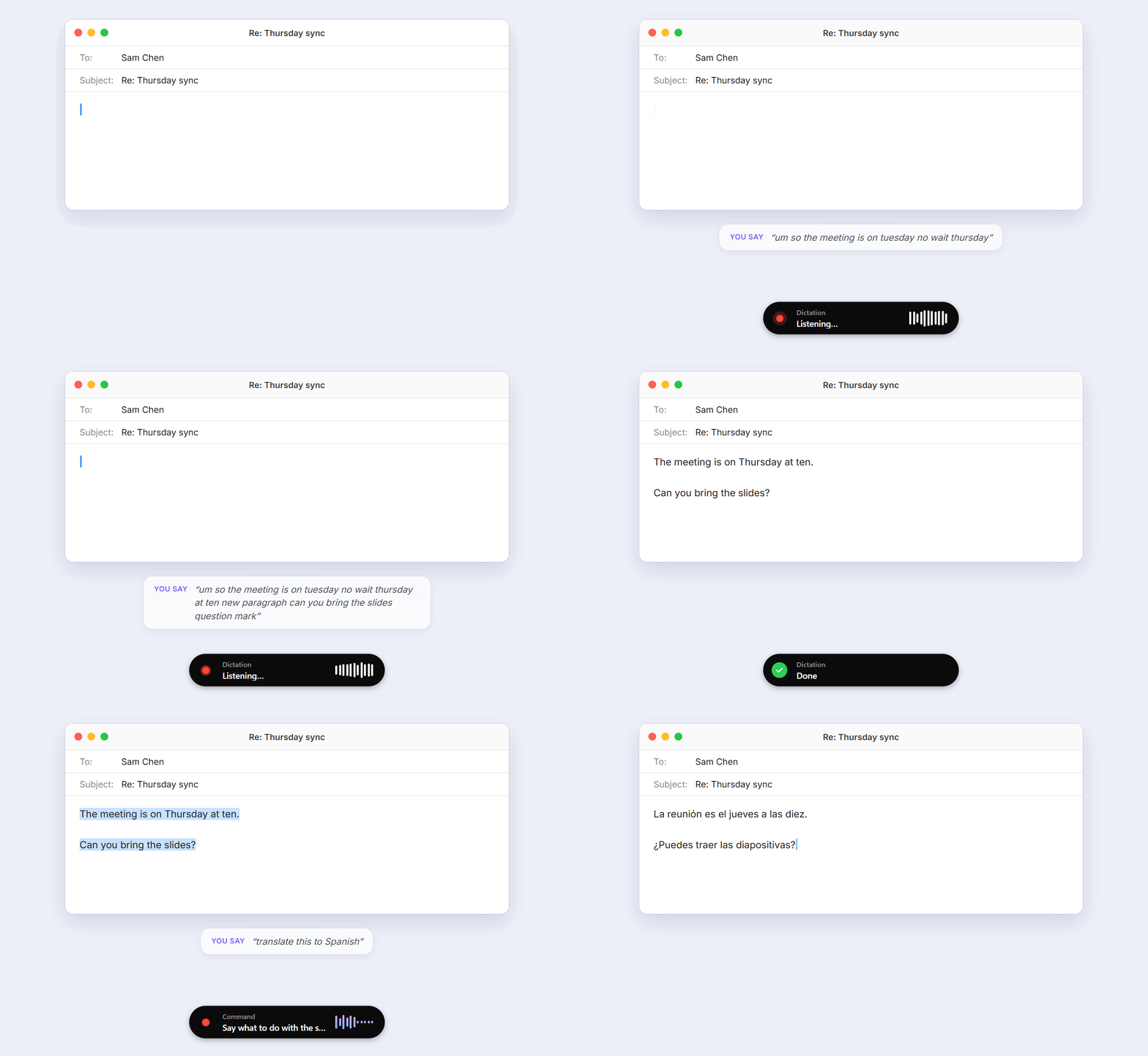
Hold a shortcut, talk, let go. Lipwise transcribes your voice on your own computer and types the result wherever your cursor is: email, Slack, your editor, a browser form. Before it types, an AI editor cleans up what you said and carries out the instructions you gave along the way. Fillers disappear, corrections stick, and “new paragraph” starts a new paragraph.
| You say | Lipwise types |
|---|---|
| “Let's meet on Tuesday, no wait, Wednesday at three” | Let's meet on Wednesday at three. |
| “Shopping list new line milk new line eggs make it a list” | Shopping list: - Milk - Eggs |
| “hey can you send the report scratch that please send the report by Friday make it formal” | Could you please send the report by Friday? |
| (text selected) “translate this to German” | The selection, in German |
| (text selected) “reply saying yes but not before Monday” | A reply, written for you |
Three shortcuts cover everything:
| Windows & Linux | macOS | What it's for | |
|---|---|---|---|
| Dictate | Ctrl+Shift+Space | ⌥⇧Space | Talk, with commands mixed in. The AI applies them and tidies the text. |
| Command | Ctrl+Alt+Space | ⌃⌥Space | Select text anywhere and say what to do with it: shorten, fix, translate, reply. |
| Plain | Ctrl+Alt+Shift+Space | ⌃⌥⇧Space | Exactly what you said, no AI. Ideal for code, names and anything verbatim. |
Hold to talk, or tap once to go hands-free until you tap again. Esc cancels. All shortcuts can be changed.


History: what you said next to what was typed |

Speech Models: pick by speed, accuracy and language |

AI Editor: on your computer, or the provider you choose |

Voice Commands: built in, plus your own |
Get the latest version from the Releases page.
| Platform | File | Notes |
|---|---|---|
| Windows | …_x64-setup.exe | Installs for your user, no admin needed. If SmartScreen warns about a new app, choose More info → Run anyway. |
| macOS Apple Silicon | …_aarch64.dmg | Signed and notarized. On first use, allow Microphone and Accessibility (needed to type into other apps). |
| Linux | .AppImage, .deb or .rpm | Works best on X11. On Wayland, global shortcuts and typing depend on your compositor. |
Then:
Ctrl+Shift+Space (⌥⇧Space on a Mac) in any app and start talking.ANTHROPIC_API_KEY / OPENAI_API_KEY.Choose AI Editor → On This Computer → Set Up Local AI, and Lipwise does the rest: it detects your GPU and memory, downloads a matching llama.cpp build and model (checksums verified), and runs it hidden in the background.
| Model | Download | Good for |
|---|---|---|
| Standard: Qwen3.5 4B | 2.7 GB | Every kind of spoken edit, including style rewrites like “make it formal”. Quick on a graphics card or Apple Silicon. |
| Best: Qwen3.5 9B | 5.7 GB | The most accurate rewrites and translations, for computers with a graphics card or plenty of unified memory. |
It uses Metal on Apple Silicon, Vulkan on any GPU with 2 GB or more of its own memory (NVIDIA, AMD or Intel), and the CPU otherwise. The model starts with Lipwise, stops when you quit, and Remove Local AI deletes everything it downloaded.
 shortcut ──► microphone ──► speech model ──► AI editor ──► typed into your app
                             (on device)          │
                                                  └─ AI off or unreachable? The raw transcript is typed instead.
| Layer | Built with |
|---|---|
| App | Tauri 2 (Rust) with a React + TypeScript interface |
| Speech to text | transcribe.cpp (ggml): CPU everywhere, Metal on macOS, optional Vulkan and CUDA |
| Audio | cpal, resampled to 16 kHz with rubato |
| Typing | The clipboard plus a synthetic paste (arboard + enigo), then your clipboard is restored |
| AI | Claude through the Messages API; everything else through any OpenAI-compatible /chat/completions endpoint |
Handy is excellent local dictation, and Lipwise builds on its model catalog. Lipwise adds the AI editing step: spoken corrections, formatting, rewrites, command mode on selected text, and custom voice commands. Plain dictation still works exactly like Handy, and the default shortcuts differ so both apps can run side by side.
Yes. Once a speech model is downloaded, transcription is entirely offline. With the local AI editor (or AI turned off), the whole pipeline runs without an internet connection.
For privacy, use On This Computer. The 4B model handles every built-in command and is quick on a GPU or Apple Silicon. For the best results on long rewrites and translations, use Claude or the 9B local model. Any model that follows instructions well will work.
Use Plain dictation for anything that must be verbatim. To stop ordinary sentences being read as commands, set a wake word in Voice Commands; only speech that starts with it is treated as an instruction. Every dictation in History shows what was heard next to what was typed.
Lipwise checks GitHub Releases now and then, downloads new versions in the background, and installs them the next time it restarts. You can turn this off in Settings → Updates.
Bug reports, model results on your hardware, and pull requests are very welcome. See CONTRIBUTING.md for building from source, running the tests and the project layout.
The speech model catalog and the transcribe.cpp integration approach come from Handy by CJ Pais (MIT). Local AI runs on llama.cpp and the Qwen3.5 models.
Private voice dictation for Windows, macOS and Linux. Hold a shortcut, talk, and Lipwise types what you meant into any app: speech recognition runs on your computer, and an AI editor understands "scratch that", lists and rewrites. Works with local AI, Claude or OpenAI.
Rust
24
6 commits
updated Oct 13, 2026
Speak naturally. Lipwise types what you meant.
Private voice dictation for every app on your computer, with an AI editor that understands “scratch that”.
Download · What it does · Features · Screenshots · FAQ · Build from source
Hold a shortcut, talk, let go. Lipwise transcribes your voice on your own computer and types the result wherever your cursor is: email, Slack, your editor, a browser form. Before it types, an AI editor cleans up what you said and carries out the instructions you gave along the way. Fillers disappear, corrections stick, and “new paragraph” starts a new paragraph.
| You say | Lipwise types |
|---|---|
| “Let's meet on Tuesday, no wait, Wednesday at three” | Let's meet on Wednesday at three. |
| “Shopping list new line milk new line eggs make it a list” | Shopping list: - Milk - Eggs |
| “hey can you send the report scratch that please send the report by Friday make it formal” | Could you please send the report by Friday? |
| (text selected) “translate this to German” | The selection, in German |
| (text selected) “reply saying yes but not before Monday” | A reply, written for you |
Three shortcuts cover everything:
| Windows & Linux | macOS | What it's for | |
|---|---|---|---|
| Dictate | Ctrl+Shift+Space | ⌥⇧Space | Talk, with commands mixed in. The AI applies them and tidies the text. |
| Command | Ctrl+Alt+Space | ⌃⌥Space | Select text anywhere and say what to do with it: shorten, fix, translate, reply. |
| Plain | Ctrl+Alt+Shift+Space | ⌃⌥⇧Space | Exactly what you said, no AI. Ideal for code, names and anything verbatim. |
Hold to talk, or tap once to go hands-free until you tap again. Esc cancels. All shortcuts can be changed.
|
History: what you said next to what was typed |
Speech Models: pick by speed, accuracy and language |
|
AI Editor: on your computer, or the provider you choose |
Voice Commands: built in, plus your own |
Get the latest version from the Releases page.
| Platform | File | Notes |
|---|---|---|
| Windows | …_x64-setup.exe | Installs for your user, no admin needed. If SmartScreen warns about a new app, choose More info → Run anyway. |
| macOS Apple Silicon | …_aarch64.dmg | Signed and notarized. On first use, allow Microphone and Accessibility (needed to type into other apps). |
| Linux | .AppImage, .deb or .rpm | Works best on X11. On Wayland, global shortcuts and typing depend on your compositor. |
Then:
Ctrl+Shift+Space (⌥⇧Space on a Mac) in any app and start talking.ANTHROPIC_API_KEY / OPENAI_API_KEY.Choose AI Editor → On This Computer → Set Up Local AI, and Lipwise does the rest: it detects your GPU and memory, downloads a matching llama.cpp build and model (checksums verified), and runs it hidden in the background.
| Model | Download | Good for |
|---|---|---|
| Standard: Qwen3.5 4B | 2.7 GB | Every kind of spoken edit, including style rewrites like “make it formal”. Quick on a graphics card or Apple Silicon. |
| Best: Qwen3.5 9B | 5.7 GB | The most accurate rewrites and translations, for computers with a graphics card or plenty of unified memory. |
It uses Metal on Apple Silicon, Vulkan on any GPU with 2 GB or more of its own memory (NVIDIA, AMD or Intel), and the CPU otherwise. The model starts with Lipwise, stops when you quit, and Remove Local AI deletes everything it downloaded.
 shortcut ──► microphone ──► speech model ──► AI editor ──► typed into your app
                             (on device)          │
                                                  └─ AI off or unreachable? The raw transcript is typed instead.
| Layer | Built with |
|---|---|
| App | Tauri 2 (Rust) with a React + TypeScript interface |
| Speech to text | transcribe.cpp (ggml): CPU everywhere, Metal on macOS, optional Vulkan and CUDA |
| Audio | cpal, resampled to 16 kHz with rubato |
| Typing | The clipboard plus a synthetic paste (arboard + enigo), then your clipboard is restored |
| AI | Claude through the Messages API; everything else through any OpenAI-compatible /chat/completions endpoint |
Handy is excellent local dictation, and Lipwise builds on its model catalog. Lipwise adds the AI editing step: spoken corrections, formatting, rewrites, command mode on selected text, and custom voice commands. Plain dictation still works exactly like Handy, and the default shortcuts differ so both apps can run side by side.
Yes. Once a speech model is downloaded, transcription is entirely offline. With the local AI editor (or AI turned off), the whole pipeline runs without an internet connection.
For privacy, use On This Computer. The 4B model handles every built-in command and is quick on a GPU or Apple Silicon. For the best results on long rewrites and translations, use Claude or the 9B local model. Any model that follows instructions well will work.
Use Plain dictation for anything that must be verbatim. To stop ordinary sentences being read as commands, set a wake word in Voice Commands; only speech that starts with it is treated as an instruction. Every dictation in History shows what was heard next to what was typed.
Lipwise checks GitHub Releases now and then, downloads new versions in the background, and installs them the next time it restarts. You can turn this off in Settings → Updates.
Bug reports, model results on your hardware, and pull requests are very welcome. See CONTRIBUTING.md for building from source, running the tests and the project layout.
The speech model catalog and the transcribe.cpp integration approach come from Handy by CJ Pais (MIT). Local AI runs on llama.cpp and the Qwen3.5 models.



