
Local inference stack manager for llama.cpp, stable-diffusion.cpp, vLLM and other model servers running side by side, with readable launch commands, live GPU telemetry, swappable skins and a CLI for agents.
See the codeSee what people are saying
README
KLIF

Koksny.com LOCAL INFERENCE FORNICATOR
AMD optimized frontend for transformers and DiT.






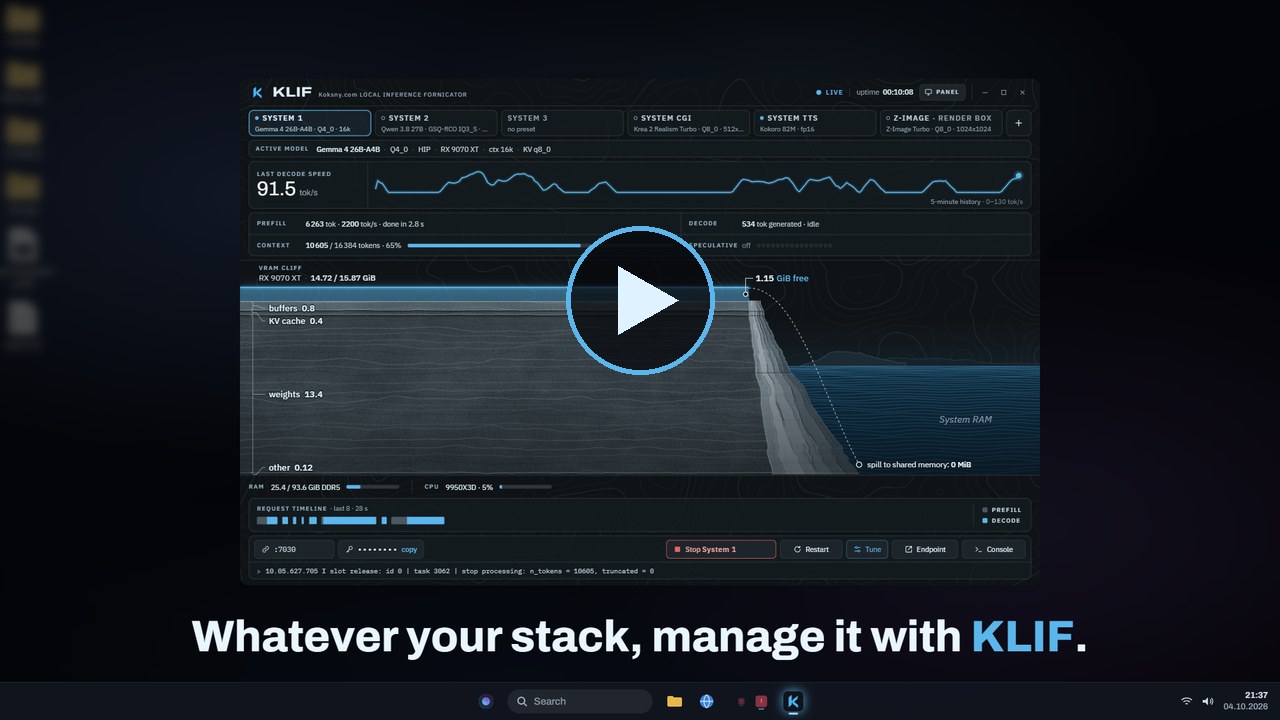
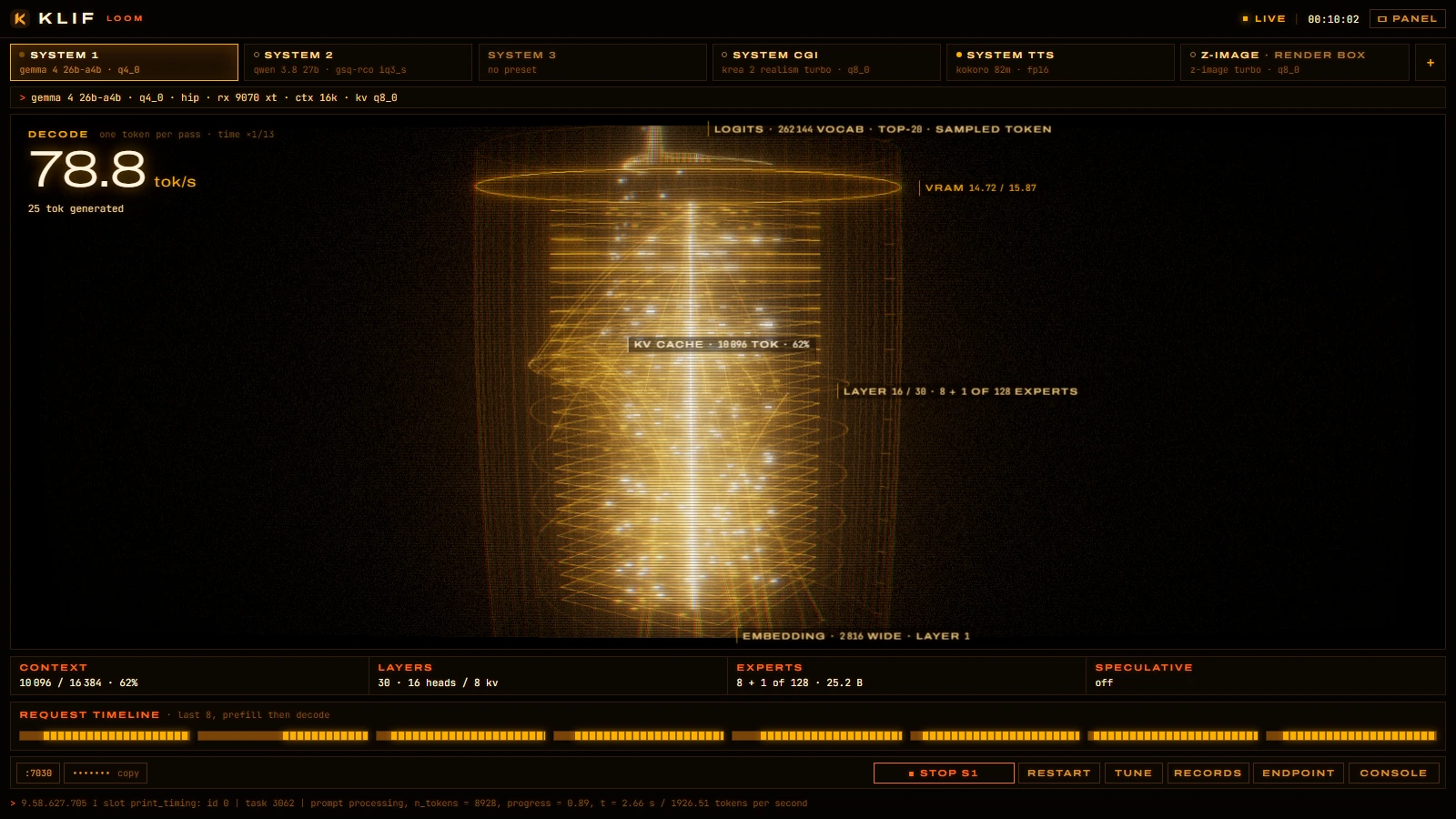
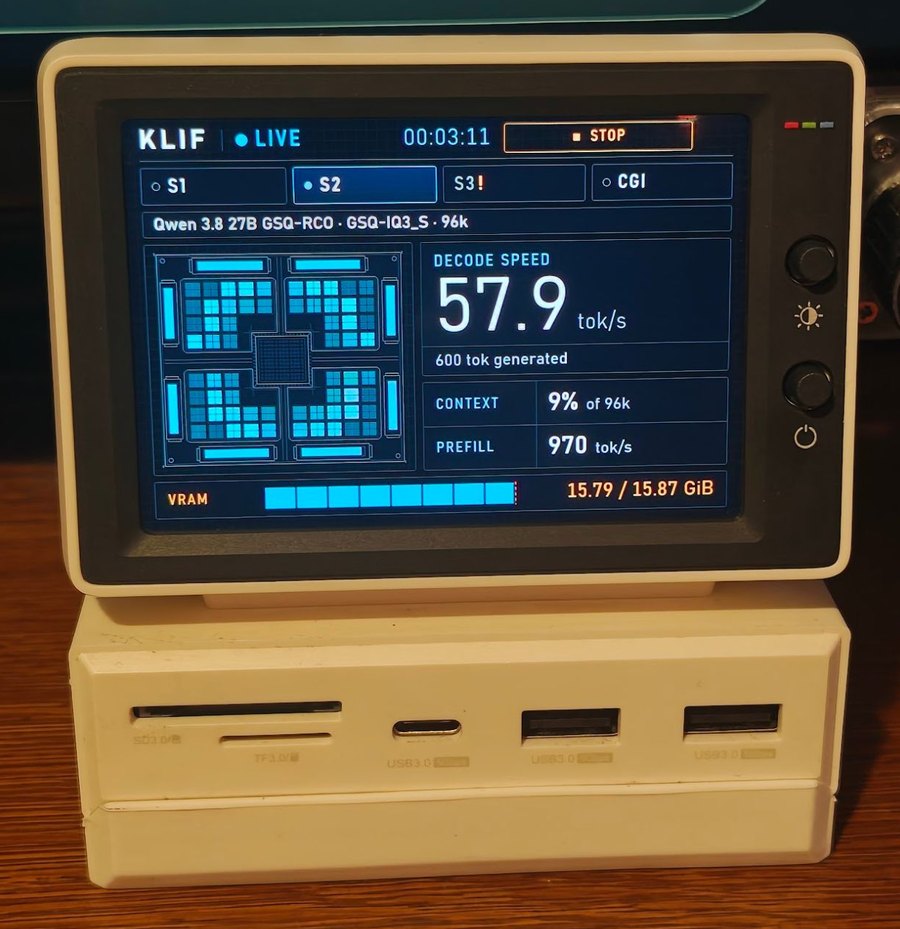
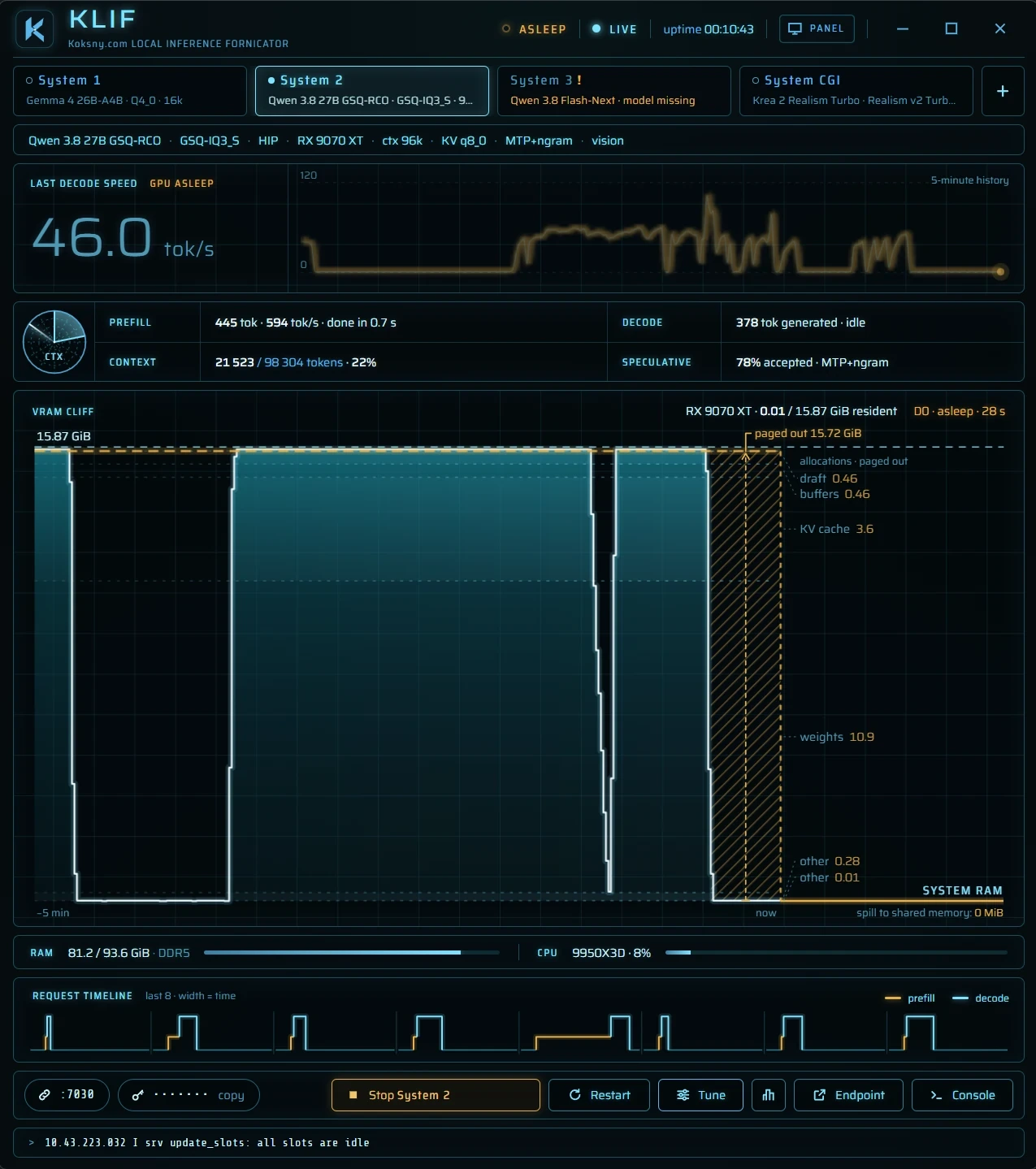
The mock engine in the Loom skin · the 960×640 panel on a desk · a real session, the GPU asleep between requests
KLIF manages a local inference stack from one window: the language-model, image, speech, transcription, music and
video servers you already run, on one machine or several. Each server is a System: a tab with a live status, the
exact command line that starts it, and what it is doing to your GPU right now. klif-cli does the same from a
terminal or a coding agent, and klif-webui from a phone.
KLIF runs on Windows, where it is built and tuned for AMD GPUs, on macOS with Apple silicon, and on Linux. One machine can launch and stop Systems on another, a Mac on a Windows desktop and the other way round.
KLIF is not a model zoo and not an inference runtime. llama.cpp, stable-diffusion.cpp, vLLM and the rest are separate projects you install yourself; KLIF starts them, watches them and stops them. No weights are shipped.
Why KLIF exists
KLIF was built for daily work with local models on one desk, and that is still what it is for.
Running a local stack by hand ends as a folder of launch scripts, quants that behave differently under HIP and under Vulkan, and a coding agent that has to guess which script is the current one and why the other file is the one that actually works. KLIF replaces that with one source of truth: every server's command line, visible and editable in one place, started and stopped from one window, next to the state of the GPU it runs on.
It is published because it works and holds up in daily use. It is not a product with a roadmap for everybody: features land when they solve a real problem in that daily work.
Why a GUI?
If you are happy driving your models from a terminal, keep doing that. There are thirty kinds of terminals, and a launcher script of your own is a weekend's work.
KLIF is for the other case: several servers at once, one glance to see what each of them is doing, no hunting for
the right script. Everything the window does is also in klif-cli, so scripts and agents are covered as well.
Skins
Nine looks over the same data. Every skin has a full window and a 960×640 layout for a small status screen, such as a 3.5-inch USB display next to the monitor. Pick one in Tune (Skin, at the bottom), from the tray's Skin menu, or with F2 (Shift+F2 back) and Ctrl+1..9.
Live decode, a language model answering requests. Top row: the full window. Bottom row: the 3.5-inch panel. Left to right: Cliff, Silicon, Instrument, Phosphor, Decode, Loom, Ether, Rings, Spirit.

Prefill, image generation, startup
Prefill, a long prompt being read in:

Image generation, a diffusion job stepping through its schedule:

Startup, a System loading its model:

The animations come from the browser mock engine with recorded timings, the same data in every skin.
What it does
- Systems as tabs. You define the Systems you have: "System 1", "System 2", "System CGI", "System TTS", or
anything else. Kinds are
llm,image,tts,sttandvideo. Each tab shows online, busy, starting, offline, not set, invalid, fault or unreachable. docs/systems.md - Several at once. Every System has its own server, session, logs and telemetry. Before a launch KLIF checks for
port clashes, an
exclusiveSystem on the same GPU and free VRAM, and names what would have to stop. It never kills a process it does not own. - Other machines and servers you do not start. A System can be an external server that KLIF only watches, or live on another computer running KLIF (a remote node, opt-in, token-authenticated). docs/nodes.md
- Commands you can read. A preset is the launch command: program, argument list, working folder, environment.
The Tune drawer,
klif-cli planandklif.tomlshow the same thing, and what you see is what runs. Presets can declare independent params (reasoning on or off, image size) instead of one preset per combination. docs/presets.md - Adapters, not a fixed list.
llama.cpp,sd.cpp,vllm,openai(any OpenAI-compatible server) andgeneric(any program that listens on a port). The adapter decides defaults and which log lines and endpoints KLIF reads for telemetry. - klif-cli. Status, plan, launch, stop, presets, params, bench, downloads, keys and nodes, with
--jsonand a stableschemaVersion. docs/cli.md - klif-webui. An opt-in page for a phone or a browser on your network: every System's status, with launch, stop, restart, preset and params. Devices pair with a QR code; it is off by default and plain HTTP, so use it on a network you trust. docs/webui.md
- Models that fit this machine. KLIF knows every GPU and the CPU, their theoretical FP32 TFLOPS and the VRAM
and RAM they add up to, and suggests a model from its embedded pool for each System: quant, context and KV type
sized to the memory that System may use. It downloads from huggingface.co only when you ask. The suggestions are
estimates; benchmark and calibrate on your machine (
klif-cli bench <system>). Each model keeps its own license. - Records. The best decode and prefill speed, time to first token and time per image that each model file reached on each backend, from everyday use, on a Records screen with cards you can share as images. Every skin celebrates a new one.
Requirements
- Windows 10 or 11, 64-bit, with the Microsoft Edge WebView2 runtime (part of Windows 11 and of most up-to-date Windows 10 installs).
- Or macOS 13 or later on Apple silicon (M1 or newer): tested on an M4 with a Metal build of llama.cpp. KLIF reads the GPU through Metal and the IORegistry; nothing needs administrator rights. docs/platforms.md
- Or Linux x86_64 with WebKitGTK 4.1 (tested on Ubuntu 24.04 in WSL2; GPU memory readings are untested so far). docs/platforms.md
- An AMD GPU is the first-class target: the tested setups run HIP (ROCm) and Vulkan builds of llama.cpp and stable-diffusion.cpp. GPU memory is read through DXGI and Windows performance counters, which are not AMD-specific, but nothing else is tested. docs/platforms.md
- The servers you want to run and their model files, in folders you choose. KLIF starts them; it does not install them.
Quick start
-
Get KLIF. Download
KLIF-<version>.zip(Windows),KLIF-<version>-macos-arm64.zip(macOS) orKLIF-<version>-linux-x86_64.tar.gz(Linux) from Releases, unpack it anywhere and compare the SHA-256 with the one on the release page:Get-FileHash -Algorithm SHA256 .\klif.exeon Windows,shasum -a 256 <file>on a Mac,sha256sum <file>on Linux.Or build it: Rust 1.90+ (MSVC toolchain), Node.js 20.19+ or 22.12+ with npm, then from a clone
.\scripts\Build-Release.ps1which puts
klif.exeandklif-cli.exeintodist\KLIF\and prints their SHA-256. On a Mac (Xcode Command Line Tools, Rust, Node.js):./scripts/build-release.shputs
KLIF.appandklif-cliintodist/KLIF/, zips the folder and prints the SHA-256 of each. An unsigned build from someone else is stopped by Gatekeeper the first time: docs/platforms.md. On Linux (the packages in docs/platforms.md),./scripts/build-release-linux.shputsklifandklif-cliintodist/KLIF/and packs a tar.gz. -
Configure. Start KLIF (
klif.exe,KLIF.appon a Mac,klifon Linux) with no configuration and use Add a System, or copy config/klif.example.toml to%APPDATA%\KLIF\klif.toml(macOS:~/Library/Application Support/KLIF/klif.toml, Linux:~/.config/klif/klif.toml) and replace the fictional paths (D:\llama.cpp,D:\models,192.0.2.x) with yours.klif-clireads the same file;KLIF_CONFIGpoints it at another one. -
Look before you launch.
klif-cli status klif-cli plan s1planprints the program, arguments, working folder and environment that Launch would use, secrets masked. -
Launch. Select a tab and press Launch, or
klif-cli launch s1 --yes --wait. Closing KLIF does not stop the servers; the next KLIF adopts them. Stop them from KLIF or withklif-cli stop --all --yes. -
Models. Set
[paths] models_dir, then use Recommended in the Tune drawer, orklif-cli models listandklif-cli models download <id> --yes.
A second computer running KLIF can offer its Systems to this one. Read docs/nodes.md before you enable it: a default install opens no network port.
Windows Defender or SmartScreen may flag an executable that starts other programs and has no reputation yet. docs/windows-defender.md explains what KLIF does to avoid that, how to verify a build, and how to report a false positive.
For coding agents
KLIF is meant to be driven by agents as much as by hand. AGENTS.md is the briefing: the repo map, the
klif.toml schema, the klif-cli JSON contract, the bench-and-calibrate loop, and the safety rules. An Agent Skill,
skills/klif/SKILL.md, ships in the release folder too: klif-cli help --json lists every
command, klif-cli schema gives the JSON Schema of every output, and klif-cli watch replaces polling loops.
Good jobs for an agent:
- tune and calibrate an installed KLIF for your hardware with
klif-cli bench; - write presets for models other than the defaults;
- port KLIF to another GPU vendor or OS, along the seams in docs/platforms.md.
Anything an agent sends back as a pull request meets the same bar as a human's, below.
Changelog in screenshots
The full notes are in CHANGELOG.md.
| Version | Screenshot | What it was |
|---|---|---|
| indev | 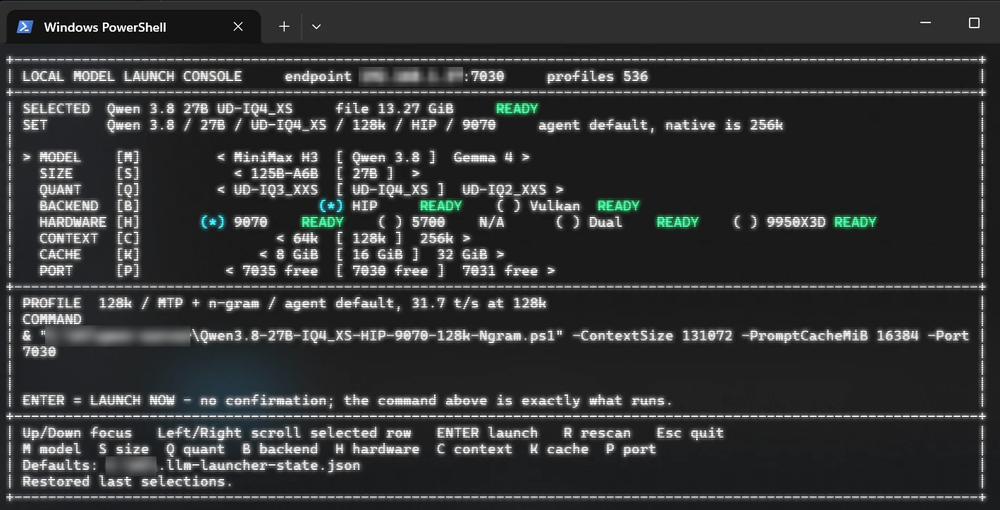 | A PowerShell menu: pick a model, size, quant, backend, GPU, context and port, see the exact command, press Enter. One machine, one server at a time. |
| 0.1 | 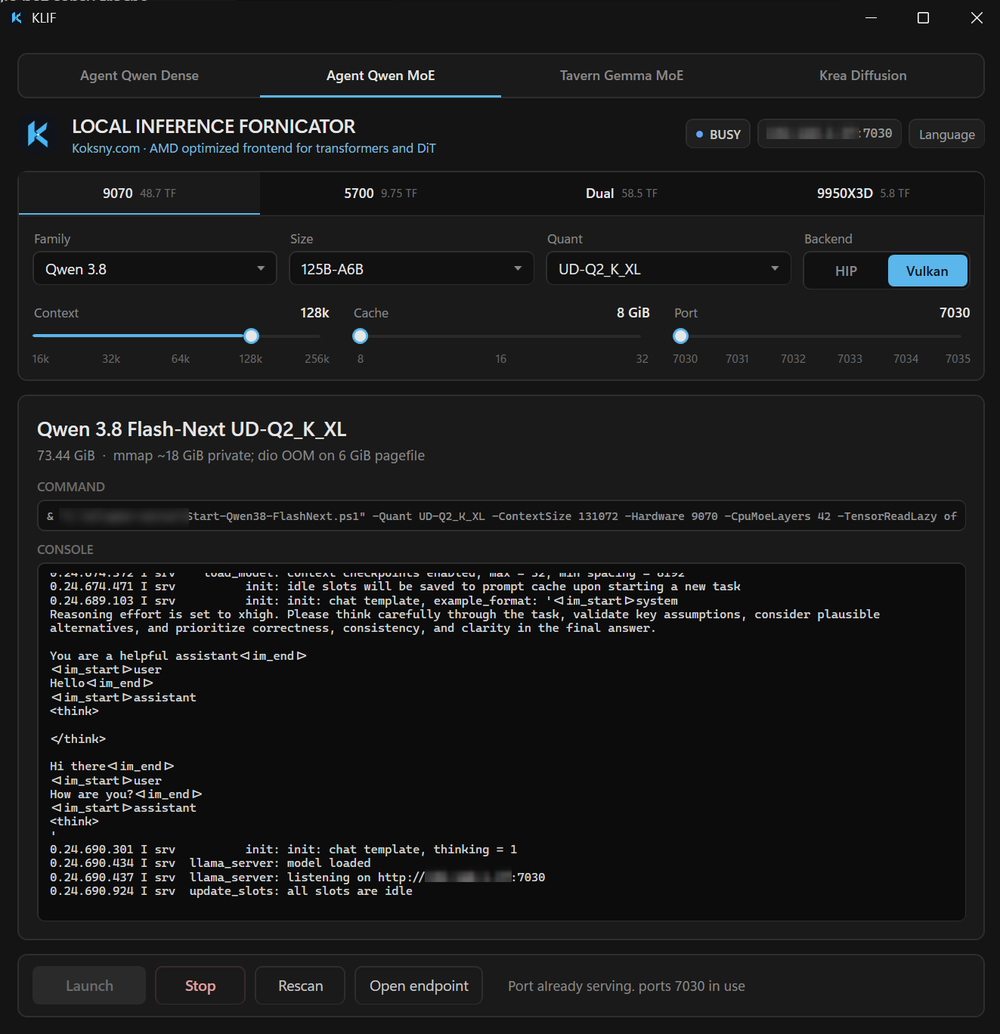 | The same idea in a window: one tab per model tier, the command and the live console, Launch and Stop. It lived in a private workshop; the public 0.1 tag set up the name, the mark and the license. |
| 0.2 | 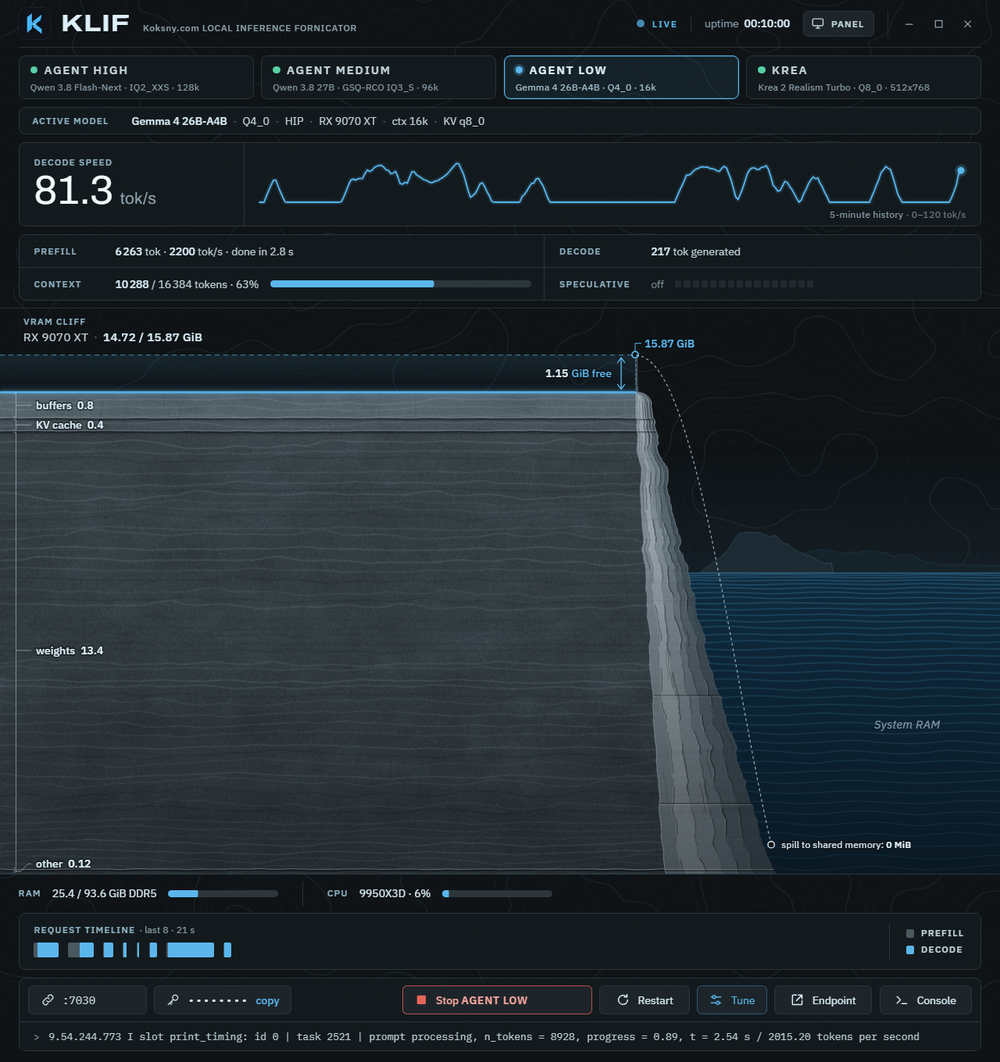 | The first version with running code: a native core and klif-cli, a Tauri shell, model tiers as tabs, live GPU memory and telemetry, a panel mode for a 3.5-inch screen, and skins (four, then nine). |
| 0.3 | 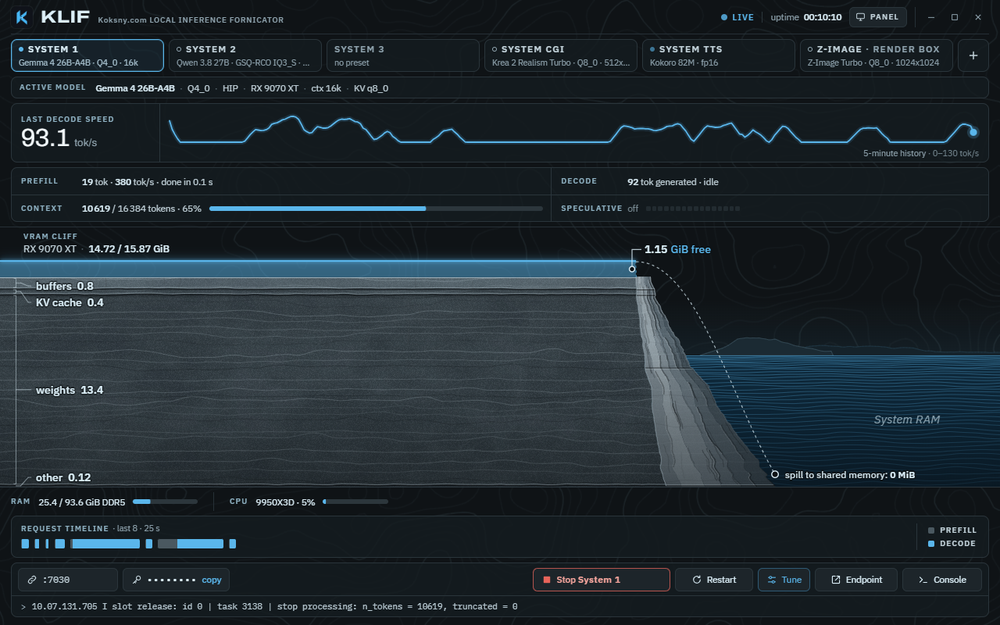 | A manager for the whole stack: any number of Systems side by side, other machines and external servers, editable commands, recommendations and downloads, and a CLI built for agents. |
Contributing
KLIF is maintained for its author's daily use, with the author's time and tokens. A pull request is welcome when it meets both of these:
- Quality. Work at the level of a frontier coding model at its best (Opus 5.5 class or better), verified three times: it builds and passes the checks; an independent review (a session or model that did not write it) found nothing left to fix; and it was run on real hardware, with the evidence in the PR.
- Use. It fixes a real bug, or it adds something that makes daily work with local models better for the maintainer as well. A feature nobody here needs is better kept in a fork, and that is fine.
The checklists, the privacy rules and the development setup are in CONTRIBUTING.md. Pull requests that miss the bar are closed without a long discussion. That is about time, not about you.
Docs
- Overview: how the pieces fit, files, ports
- Systems: kinds, statuses, conflicts, external servers
- Presets: launch commands, placeholders, params, adapters, recommendations
- klif-cli: every command and the JSON contract
- Nodes: several machines, rights, the security model
- klif-webui: the control page for a phone, pairing, the security model, the API
- Platforms: Windows with AMD, macOS with Apple silicon, Linux, what each tests; other GPUs and systems through pull requests
- Windows Defender and SmartScreen
- Brand, Publishing, Changelog, Security
License
MIT, see LICENSE. Model weights you load through KLIF keep their own licenses, and so do the runtimes (llama.cpp, stable-diffusion.cpp, vLLM, ComfyUI and others).
AMD, Radeon, ROCm, NVIDIA, CUDA, Hugging Face and other names are trademarks of their owners. KLIF is an independent project, not affiliated with or endorsed by any of them.
Similar repos


Local inference stack manager for llama.cpp, stable-diffusion.cpp, vLLM and other model servers running side by side, with readable launch commands, live GPU telemetry, swappable skins and a CLI for agents.
See the codeSee what people are saying
README
KLIF
Koksny.com LOCAL INFERENCE FORNICATOR
AMD optimized frontend for transformers and DiT.
The mock engine in the Loom skin · the 960×640 panel on a desk · a real session, the GPU asleep between requests
KLIF manages a local inference stack from one window: the language-model, image, speech, transcription, music and
video servers you already run, on one machine or several. Each server is a System: a tab with a live status, the
exact command line that starts it, and what it is doing to your GPU right now. klif-cli does the same from a
terminal or a coding agent, and klif-webui from a phone.
KLIF runs on Windows, where it is built and tuned for AMD GPUs, on macOS with Apple silicon, and on Linux. One machine can launch and stop Systems on another, a Mac on a Windows desktop and the other way round.
KLIF is not a model zoo and not an inference runtime. llama.cpp, stable-diffusion.cpp, vLLM and the rest are separate projects you install yourself; KLIF starts them, watches them and stops them. No weights are shipped.
Why KLIF exists
KLIF was built for daily work with local models on one desk, and that is still what it is for.
Running a local stack by hand ends as a folder of launch scripts, quants that behave differently under HIP and under Vulkan, and a coding agent that has to guess which script is the current one and why the other file is the one that actually works. KLIF replaces that with one source of truth: every server's command line, visible and editable in one place, started and stopped from one window, next to the state of the GPU it runs on.
It is published because it works and holds up in daily use. It is not a product with a roadmap for everybody: features land when they solve a real problem in that daily work.
Why a GUI?
If you are happy driving your models from a terminal, keep doing that. There are thirty kinds of terminals, and a launcher script of your own is a weekend's work.
KLIF is for the other case: several servers at once, one glance to see what each of them is doing, no hunting for
the right script. Everything the window does is also in klif-cli, so scripts and agents are covered as well.
Skins
Nine looks over the same data. Every skin has a full window and a 960×640 layout for a small status screen, such as a 3.5-inch USB display next to the monitor. Pick one in Tune (Skin, at the bottom), from the tray's Skin menu, or with F2 (Shift+F2 back) and Ctrl+1..9.
Live decode, a language model answering requests. Top row: the full window. Bottom row: the 3.5-inch panel. Left to right: Cliff, Silicon, Instrument, Phosphor, Decode, Loom, Ether, Rings, Spirit.
Prefill, image generation, startup
Prefill, a long prompt being read in:
Image generation, a diffusion job stepping through its schedule:
Startup, a System loading its model:
The animations come from the browser mock engine with recorded timings, the same data in every skin.
What it does
- Systems as tabs. You define the Systems you have: "System 1", "System 2", "System CGI", "System TTS", or
anything else. Kinds are
llm,image,tts,sttandvideo. Each tab shows online, busy, starting, offline, not set, invalid, fault or unreachable. docs/systems.md - Several at once. Every System has its own server, session, logs and telemetry. Before a launch KLIF checks for
port clashes, an
exclusiveSystem on the same GPU and free VRAM, and names what would have to stop. It never kills a process it does not own. - Other machines and servers you do not start. A System can be an external server that KLIF only watches, or live on another computer running KLIF (a remote node, opt-in, token-authenticated). docs/nodes.md
- Commands you can read. A preset is the launch command: program, argument list, working folder, environment.
The Tune drawer,
klif-cli planandklif.tomlshow the same thing, and what you see is what runs. Presets can declare independent params (reasoning on or off, image size) instead of one preset per combination. docs/presets.md - Adapters, not a fixed list.
llama.cpp,sd.cpp,vllm,openai(any OpenAI-compatible server) andgeneric(any program that listens on a port). The adapter decides defaults and which log lines and endpoints KLIF reads for telemetry. - klif-cli. Status, plan, launch, stop, presets, params, bench, downloads, keys and nodes, with
--jsonand a stableschemaVersion. docs/cli.md - klif-webui. An opt-in page for a phone or a browser on your network: every System's status, with launch, stop, restart, preset and params. Devices pair with a QR code; it is off by default and plain HTTP, so use it on a network you trust. docs/webui.md
- Models that fit this machine. KLIF knows every GPU and the CPU, their theoretical FP32 TFLOPS and the VRAM
and RAM they add up to, and suggests a model from its embedded pool for each System: quant, context and KV type
sized to the memory that System may use. It downloads from huggingface.co only when you ask. The suggestions are
estimates; benchmark and calibrate on your machine (
klif-cli bench <system>). Each model keeps its own license. - Records. The best decode and prefill speed, time to first token and time per image that each model file reached on each backend, from everyday use, on a Records screen with cards you can share as images. Every skin celebrates a new one.
Requirements
- Windows 10 or 11, 64-bit, with the Microsoft Edge WebView2 runtime (part of Windows 11 and of most up-to-date Windows 10 installs).
- Or macOS 13 or later on Apple silicon (M1 or newer): tested on an M4 with a Metal build of llama.cpp. KLIF reads the GPU through Metal and the IORegistry; nothing needs administrator rights. docs/platforms.md
- Or Linux x86_64 with WebKitGTK 4.1 (tested on Ubuntu 24.04 in WSL2; GPU memory readings are untested so far). docs/platforms.md
- An AMD GPU is the first-class target: the tested setups run HIP (ROCm) and Vulkan builds of llama.cpp and stable-diffusion.cpp. GPU memory is read through DXGI and Windows performance counters, which are not AMD-specific, but nothing else is tested. docs/platforms.md
- The servers you want to run and their model files, in folders you choose. KLIF starts them; it does not install them.
Quick start
-
Get KLIF. Download
KLIF-<version>.zip(Windows),KLIF-<version>-macos-arm64.zip(macOS) orKLIF-<version>-linux-x86_64.tar.gz(Linux) from Releases, unpack it anywhere and compare the SHA-256 with the one on the release page:Get-FileHash -Algorithm SHA256 .\klif.exeon Windows,shasum -a 256 <file>on a Mac,sha256sum <file>on Linux.Or build it: Rust 1.90+ (MSVC toolchain), Node.js 20.19+ or 22.12+ with npm, then from a clone
.\scripts\Build-Release.ps1which puts
klif.exeandklif-cli.exeintodist\KLIF\and prints their SHA-256. On a Mac (Xcode Command Line Tools, Rust, Node.js):./scripts/build-release.shputs
KLIF.appandklif-cliintodist/KLIF/, zips the folder and prints the SHA-256 of each. An unsigned build from someone else is stopped by Gatekeeper the first time: docs/platforms.md. On Linux (the packages in docs/platforms.md),./scripts/build-release-linux.shputsklifandklif-cliintodist/KLIF/and packs a tar.gz. -
Configure. Start KLIF (
klif.exe,KLIF.appon a Mac,klifon Linux) with no configuration and use Add a System, or copy config/klif.example.toml to%APPDATA%\KLIF\klif.toml(macOS:~/Library/Application Support/KLIF/klif.toml, Linux:~/.config/klif/klif.toml) and replace the fictional paths (D:\llama.cpp,D:\models,192.0.2.x) with yours.klif-clireads the same file;KLIF_CONFIGpoints it at another one. -
Look before you launch.
klif-cli status klif-cli plan s1planprints the program, arguments, working folder and environment that Launch would use, secrets masked. -
Launch. Select a tab and press Launch, or
klif-cli launch s1 --yes --wait. Closing KLIF does not stop the servers; the next KLIF adopts them. Stop them from KLIF or withklif-cli stop --all --yes. -
Models. Set
[paths] models_dir, then use Recommended in the Tune drawer, orklif-cli models listandklif-cli models download <id> --yes.
A second computer running KLIF can offer its Systems to this one. Read docs/nodes.md before you enable it: a default install opens no network port.
Windows Defender or SmartScreen may flag an executable that starts other programs and has no reputation yet. docs/windows-defender.md explains what KLIF does to avoid that, how to verify a build, and how to report a false positive.
For coding agents
KLIF is meant to be driven by agents as much as by hand. AGENTS.md is the briefing: the repo map, the
klif.toml schema, the klif-cli JSON contract, the bench-and-calibrate loop, and the safety rules. An Agent Skill,
skills/klif/SKILL.md, ships in the release folder too: klif-cli help --json lists every
command, klif-cli schema gives the JSON Schema of every output, and klif-cli watch replaces polling loops.
Good jobs for an agent:
- tune and calibrate an installed KLIF for your hardware with
klif-cli bench; - write presets for models other than the defaults;
- port KLIF to another GPU vendor or OS, along the seams in docs/platforms.md.
Anything an agent sends back as a pull request meets the same bar as a human's, below.
Changelog in screenshots
The full notes are in CHANGELOG.md.
| Version | Screenshot | What it was |
|---|---|---|
| indev | | A PowerShell menu: pick a model, size, quant, backend, GPU, context and port, see the exact command, press Enter. One machine, one server at a time. |
| 0.1 | | The same idea in a window: one tab per model tier, the command and the live console, Launch and Stop. It lived in a private workshop; the public 0.1 tag set up the name, the mark and the license. |
| 0.2 | | The first version with running code: a native core and klif-cli, a Tauri shell, model tiers as tabs, live GPU memory and telemetry, a panel mode for a 3.5-inch screen, and skins (four, then nine). |
| 0.3 | | A manager for the whole stack: any number of Systems side by side, other machines and external servers, editable commands, recommendations and downloads, and a CLI built for agents. |
Contributing
KLIF is maintained for its author's daily use, with the author's time and tokens. A pull request is welcome when it meets both of these:
- Quality. Work at the level of a frontier coding model at its best (Opus 5.5 class or better), verified three times: it builds and passes the checks; an independent review (a session or model that did not write it) found nothing left to fix; and it was run on real hardware, with the evidence in the PR.
- Use. It fixes a real bug, or it adds something that makes daily work with local models better for the maintainer as well. A feature nobody here needs is better kept in a fork, and that is fine.
The checklists, the privacy rules and the development setup are in CONTRIBUTING.md. Pull requests that miss the bar are closed without a long discussion. That is about time, not about you.
Docs
- Overview: how the pieces fit, files, ports
- Systems: kinds, statuses, conflicts, external servers
- Presets: launch commands, placeholders, params, adapters, recommendations
- klif-cli: every command and the JSON contract
- Nodes: several machines, rights, the security model
- klif-webui: the control page for a phone, pairing, the security model, the API
- Platforms: Windows with AMD, macOS with Apple silicon, Linux, what each tests; other GPUs and systems through pull requests
- Windows Defender and SmartScreen
- Brand, Publishing, Changelog, Security
License
MIT, see LICENSE. Model weights you load through KLIF keep their own licenses, and so do the runtimes (llama.cpp, stable-diffusion.cpp, vLLM, ComfyUI and others).
AMD, Radeon, ROCm, NVIDIA, CUDA, Hugging Face and other names are trademarks of their owners. KLIF is an independent project, not affiliated with or endorsed by any of them.