Self-hosted home surveillance system powered by Go, C++, WebRTC
TypeScript
3
26 commits
updated Oct 14, 2026
A self-hosted camera server for RTSP/USB cameras.
/dev/shm/roost_<camera-id>)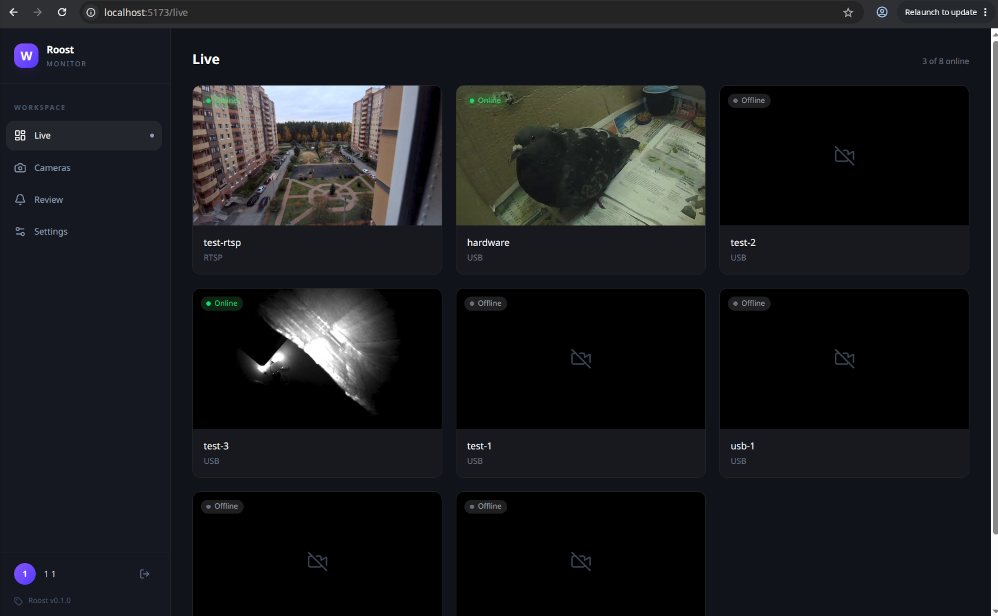
Roost is a work in progress. This is what exists today:
| Works | Not there yet |
|---|---|
| USB (V4L2) and RTSP cameras | Object detection (the pipeline has a branch for it, nothing consumes it) |
| Live view in the browser over WebRTC, several viewers per camera | Recording and playback |
| Add, pause, resume and delete cameras from the dashboard | Snapshots and live events |
| Per-camera mode: always on, or on demand | A tested production deployment |
| Cameras that die are detected and retried automatically | |
| Login through Keycloak |
Development and testing so far has been on Linux (Ubuntu) only.
flowchart LR
    Cam[USB / RTSP cameras]

    subgraph Vision["vision (C++)"]
        Gst[GStreamer pipeline]
    end

    subgraph Gateway["gateway (Go)"]
        Loop[Camera control loop]
        Pump[Frame pump]
        Hub[WebRTC hub]
        API[REST / gRPC API]
    end

    DB[(Postgres)]
    Web[web dashboard]

    Cam --> Gst
    Loop -->|gRPC: start / stop stream| Gst
    Gst -->|H.264 frames, POSIX shared memory| Pump
    Pump --> Hub
    Hub -->|WebRTC video| Web
    Web -->|REST| API
    API --> DB
    Loop --> DB
Vision and gateway exchange frames through shared memory, so they must run on the same machine.
A camera can also be paused, which keeps it stopped whatever its mode.
api/            Protobuf definitions and buf config (source of all generated code)
apps/gateway/   Go gateway, DB migrations, compose files, Keycloak realm
apps/vision/    C++ vision service
apps/web/       React dashboard
scripts/        Build helpers (gRPC for the C++ side)
sudo apt-get update
sudo apt-get install -y \
    libgstreamer1.0-dev \
    libgstreamer-plugins-base1.0-dev \
    libgstreamer-plugins-bad1.0-dev \
    gstreamer1.0-plugins-good \
    gstreamer1.0-plugins-bad \
    gstreamer1.0-plugins-ugly \
    gstreamer1.0-libav \
    gstreamer1.0-tools
gRPC and spdlog are vendored as submodules, so the clone needs --recurse-submodules:
git clone https://github.com/khomin/roost.git --recurse-submodules
cd roost
The vision service links against a local gRPC build in .lib_pack/, which is not in the repository. Build it once, from the repository root, before building vision:
./scripts/build_grpc.sh
This compiles gRPC and its dependencies from source into .lib_pack/grpc and takes a while.
The generated Go, TypeScript and C++ code is not committed. Generate it after cloning and again after any change under api/:
cd api
buf dep update
buf generate --include-imports
cd ..
The dev compose file starts Postgres, Keycloak, Redis, RabbitMQ, Prometheus and Grafana:
cd apps/gateway
cp .env.dev.example .env    # then fill in the values
docker compose -f compose.dev.yml up -d
Keycloak comes up on http://localhost:8081 with the roost realm imported. Create a user there to log in to the dashboard.
Only
compose.dev.ymlhas been tested.compose.prod.ymland the manifests inapps/gateway/k8s/are untested; treat them as a starting point.
cd apps/vision
cmake -S . -B build
cmake --build build
./build/roost_vision --port 50052
Run it from apps/gateway, because it loads .env, config.yaml and the migrations relative to that directory:
cd apps/gateway
go run .
The gateway applies database migrations on startup. The REST API listens on port 8080 and gRPC on 50051.
cd apps/web
npm install
npm run dev
Open http://localhost:5173, log in, and add a camera on the Cameras page:
| Type | Source example |
|---|---|
| USB | /dev/video0 |
| RTSP | rtsp://user:[email protected]:554/stream |
The gateway migrates on startup, so this is only needed to roll back or inspect:
go install -tags 'postgres' github.com/golang-migrate/migrate/v4/cmd/migrate@latest

migrate -path $PWD/apps/gateway/internal/db/migrations \
    -database "postgres://USER:PASSWORD@localhost:5432/DBNAME?sslmode=disable" up
apps/gateway/tools/index.html is a single-file viewer for one camera. It is useful for checking the stream without the dashboard; set the camera ID in the file.
| Service | Port |
|---|---|
| Dashboard (Vite dev server) | 5173 |
| Gateway REST | 8080 |
| Gateway gRPC | 50051 |
| Vision gRPC | 50052 |
| Keycloak | 8081 |
| Postgres | 5432 |
| Grafana | 3000 |
| Prometheus | 9091 |
| Redis | 6379 |
Self-hosted home surveillance system powered by Go, C++, WebRTC
TypeScript
3
26 commits
updated Oct 14, 2026
A self-hosted camera server for RTSP/USB cameras.
/dev/shm/roost_<camera-id>)
Roost is a work in progress. This is what exists today:
| Works | Not there yet |
|---|---|
| USB (V4L2) and RTSP cameras | Object detection (the pipeline has a branch for it, nothing consumes it) |
| Live view in the browser over WebRTC, several viewers per camera | Recording and playback |
| Add, pause, resume and delete cameras from the dashboard | Snapshots and live events |
| Per-camera mode: always on, or on demand | A tested production deployment |
| Cameras that die are detected and retried automatically | |
| Login through Keycloak |
Development and testing so far has been on Linux (Ubuntu) only.
flowchart LR
    Cam[USB / RTSP cameras]

    subgraph Vision["vision (C++)"]
        Gst[GStreamer pipeline]
    end

    subgraph Gateway["gateway (Go)"]
        Loop[Camera control loop]
        Pump[Frame pump]
        Hub[WebRTC hub]
        API[REST / gRPC API]
    end

    DB[(Postgres)]
    Web[web dashboard]

    Cam --> Gst
    Loop -->|gRPC: start / stop stream| Gst
    Gst -->|H.264 frames, POSIX shared memory| Pump
    Pump --> Hub
    Hub -->|WebRTC video| Web
    Web -->|REST| API
    API --> DB
    Loop --> DB
Vision and gateway exchange frames through shared memory, so they must run on the same machine.
A camera can also be paused, which keeps it stopped whatever its mode.
api/            Protobuf definitions and buf config (source of all generated code)
apps/gateway/   Go gateway, DB migrations, compose files, Keycloak realm
apps/vision/    C++ vision service
apps/web/       React dashboard
scripts/        Build helpers (gRPC for the C++ side)
sudo apt-get update
sudo apt-get install -y \
    libgstreamer1.0-dev \
    libgstreamer-plugins-base1.0-dev \
    libgstreamer-plugins-bad1.0-dev \
    gstreamer1.0-plugins-good \
    gstreamer1.0-plugins-bad \
    gstreamer1.0-plugins-ugly \
    gstreamer1.0-libav \
    gstreamer1.0-tools
gRPC and spdlog are vendored as submodules, so the clone needs --recurse-submodules:
git clone https://github.com/khomin/roost.git --recurse-submodules
cd roost
The vision service links against a local gRPC build in .lib_pack/, which is not in the repository. Build it once, from the repository root, before building vision:
./scripts/build_grpc.sh
This compiles gRPC and its dependencies from source into .lib_pack/grpc and takes a while.
The generated Go, TypeScript and C++ code is not committed. Generate it after cloning and again after any change under api/:
cd api
buf dep update
buf generate --include-imports
cd ..
The dev compose file starts Postgres, Keycloak, Redis, RabbitMQ, Prometheus and Grafana:
cd apps/gateway
cp .env.dev.example .env    # then fill in the values
docker compose -f compose.dev.yml up -d
Keycloak comes up on http://localhost:8081 with the roost realm imported. Create a user there to log in to the dashboard.
Only
compose.dev.ymlhas been tested.compose.prod.ymland the manifests inapps/gateway/k8s/are untested; treat them as a starting point.
cd apps/vision
cmake -S . -B build
cmake --build build
./build/roost_vision --port 50052
Run it from apps/gateway, because it loads .env, config.yaml and the migrations relative to that directory:
cd apps/gateway
go run .
The gateway applies database migrations on startup. The REST API listens on port 8080 and gRPC on 50051.
cd apps/web
npm install
npm run dev
Open http://localhost:5173, log in, and add a camera on the Cameras page:
| Type | Source example |
|---|---|
| USB | /dev/video0 |
| RTSP | rtsp://user:[email protected]:554/stream |
The gateway migrates on startup, so this is only needed to roll back or inspect:
go install -tags 'postgres' github.com/golang-migrate/migrate/v4/cmd/migrate@latest

migrate -path $PWD/apps/gateway/internal/db/migrations \
    -database "postgres://USER:PASSWORD@localhost:5432/DBNAME?sslmode=disable" up
apps/gateway/tools/index.html is a single-file viewer for one camera. It is useful for checking the stream without the dashboard; set the camera ID in the file.
| Service | Port |
|---|---|
| Dashboard (Vite dev server) | 5173 |
| Gateway REST | 8080 |
| Gateway gRPC | 50051 |
| Vision gRPC | 50052 |
| Keycloak | 8081 |
| Postgres | 5432 |
| Grafana | 3000 |
| Prometheus | 9091 |
| Redis | 6379 |



