
A road to cameras you cannot otherwise reach. VPN and SSH tunnelling, live WebRTC preview, and recordings that survive a dropped link.
Python
0
45 commits
updated Sep 20, 2026
See what people are saying
README

Causeway
A road to cameras you cannot otherwise reach.
Watch them live, record them, and know which hop failed when one does.




Cameras on a customer's private network are behind a VPN, then behind a jump host, then on an address only that jump host can route to. Getting a picture out of one is a chain of four or five hops, any of which can fail, and when it does the usual answer is "it isn't working" with no indication of which hop.
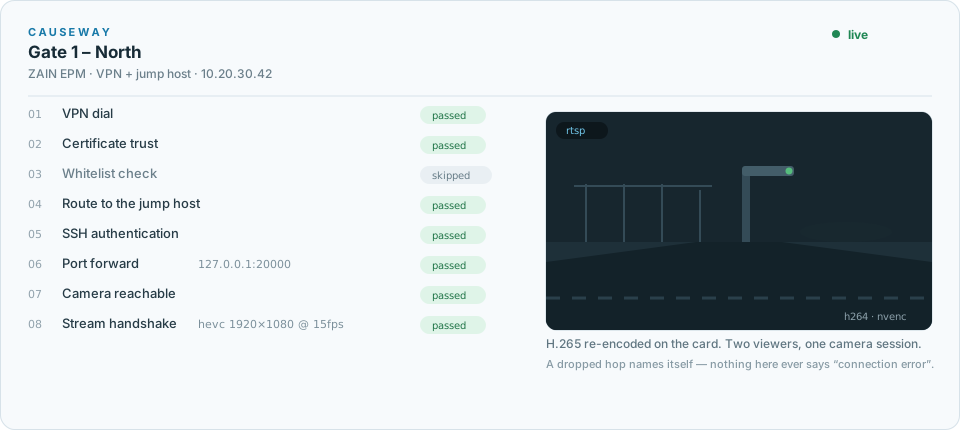
Causeway is the road laid across that gap. The chain becomes a first-class thing: eight named gates, walked in order, each reporting for itself. A hop a profile does not use is shown as skipped, not hidden, so not needed never looks like never checked.
  VPN dial → certificate trust → whitelist → route to jump host
     → SSH auth → port forward → camera reachable → stream handshake
What it does
- Connects — Fortinet, GlobalProtect/Palo Alto, WireGuard, or nothing at all when the cameras are already reachable. One network namespace per profile, so three teams can hold three VPNs on one host and a dropped tunnel takes its own traffic down and nobody else's.
- Watches — live preview uses WebRTC when the direct low-latency path is reachable and automatically falls back to low-latency HLS over HTTPS on mobile, CGNAT, and restrictive corporate networks. Two people watching one camera cost one camera session, because cameras cap those hard.
- Records — RTSP and the inferred HLS feed at once, into sealed segments that survive a mid-write outage, uploaded to S3-compatible storage. A recording that lost thirty seconds says so, and says why, in a sidecar that travels with the file.
- Compares — the raw feed and the inferred feed side by side on one transport, aligned on wall-clock time so a gap in one does not silently shift the other.
Three ideas worth knowing
The kill switch is a routing fact, not a policy. Inside a profile's namespace the default route belongs to the tunnel. When the VPN drops there is no route for camera traffic to fall back to, so it fails instead of quietly leaving by the host's normal egress. Control-plane traffic reaches Postgres and Redis over a more specific route that survives the default being replaced.
Segments are MPEG-TS, not MP4. An MP4 becomes readable when its moov atom
is written, which happens when the muxer exits cleanly — exactly what does not
happen when a tunnel dies mid-write. Whatever reached the disk as TS plays. The
session is concatenated to MP4 at the end, where there is a clean exit to rely
on.
A failure names the hop that failed. Not "connection error". The database password, the missing kernel module, the camera that authenticated and then refused the stream — each arrives as the sentence an operator can act on. Most of the tests in this repo exist to keep it that way.
See it work
The animation above is the real sequence, at real proportions: eight gates in order, one of them skipped because this profile has no whitelist endpoint, and the picture arriving after the last one passes. The whole thing takes about five seconds against a camera behind a VPN and a jump host.
What it does not show, because a still cannot: when a hop fails, the ladder
stops at that hop and says why. The gateway refused the connection - check the username and password on gate 1 is a different afternoon from 127.0.0.1:20000 forwards to 10.20.30.42:554 on gate 6, and the product's job is to tell you
which one you are having.
Quick start
git clone https://github.com/Zafeeruddin/causeway && cd causeway
cp .env.example .env          # then edit: secrets, storage, PREVIEW_HOST
docker compose up -d --build
docker compose exec api cam init-db
docker compose exec api cam create-admin you@example.com
The dashboard is on :3000, the API on :8000. For a real deployment —
nginx, TLS, a domain, GPU passthrough, and the resource numbers behind the
sizing — see deploy/production.md.
Roles
| Superadmin | Admin | Viewer | Demo | |
|---|---|---|---|---|
| Teams | all, can create | own only | own only | own only |
| Connection profiles | all | own teams | section not shown | section not shown |
| Cameras | all | add, remove, test | see, preview, record, download | see, preview |
| Accounts | any role | viewers, own teams | — | — |
| Own password | change | change | change | cannot |
Viewers are not shown the plumbing and then stopped at the door — the sections are absent. Most people using this want to watch a camera and take a clip away, and a menu full of gateways and storage thresholds is a usability problem for them, not a security one. The server enforces the same boundary either way.
Demo is the tier for a login you intend to publish. It watches and changes nothing — not a camera, not a recording, not its own password. That last one is the point of it: a shared login the first visitor can change is a login you have given away, and a login that can add a camera can point one at any address the server can reach.
Getting back in
An administrator issues a one-time reset link from the Admin page and hands it
over — which works on a network with no outbound mail, where "check your inbox"
is a dead end. Set SMTP_HOST and SMTP_FROM and the self-service form starts
working as well; there is no second switch.
The link is stateless and carries a fingerprint of the password hash it was
issued against, so redeeming it invalidates it, and any other password change
invalidates every link outstanding. Issuing one changes nothing by itself, so an
administrator cannot lock somebody out by pressing the button. When nobody can
get in at all, cam reset-link and cam set-password work from the machine.
Sign-ins are rate limited per address and per account. Behind a proxy this needs
TRUSTED_PROXY_HOPS set, or every caller looks like nginx and shares one limit —
see deploy/production.md.
What it costs to run
Measured, not estimated — full numbers in deploy/production.md.
| CPU | Memory | |
|---|---|---|
| Idle, whole stack | ~5% of one core | ~275 MB |
| Preview, H.264 (stream copy) | 3% of one core | 46 MB |
| Preview, H.265 (transcoded) | 55% of one core, or a fraction on NVENC | 222 MB |
| Recording, any codec | 1% of one core | 43 MB |
A configured camera costs nothing. Cost arrives when somebody watches or records. H.265 previews are the only expensive thing here, because no mainstream browser decodes H.265 over WebRTC — those and only those are re-encoded, on an NVIDIA card when there is one, and the machine refuses a stream past its budget rather than admitting it and juddering across every stream at once.
Layout
backend/app/
  net/          namespaces, ssh, vpn drivers, process runners
  gates/        the eight-rung ladder
  recorder/     ffmpeg argv, session supervisor, shipper, accelerators
  services/     connections, preview, playback, camera import
  storage/      object store, key layout, retention
  api/routes/   auth, profiles, cameras, recordings, admin
  security/     secrets sealing, redaction, sign-in limits, reset tokens
frontend/src/   Next.js dashboard
site/           the landing page, static and self-contained
deploy/         Dockerfiles, production compose, runbooks
make test · make lint · make up
Documentation
- deploy/production.md — deploying, sizing, nginx, and the things that fail silently if you skip them
- deploy/versity-setup.md — the storage gateway
- ROADMAP.md — deferred work, each entry with what would trigger it and what would have to change
- CHANGELOG.md — what shipped when
Status
0.3.0 — running in production for its first customer.
Still 0.x on purpose: the schema has no migrations yet
(ROADMAP entry 10), so a release can still require a rebuild
rather than an upgrade. 1.0.0 is the version that promises otherwise.
License
Not yet licensed for redistribution. An open-source license is planned; until one is added here, all rights are reserved.
Similar repos


Languages
Python
74.7%
TypeScript
21.1%
HTML
3.1%
A road to cameras you cannot otherwise reach. VPN and SSH tunnelling, live WebRTC preview, and recordings that survive a dropped link.
Python
0
45 commits
updated Sep 20, 2026
See what people are saying
README
Causeway
A road to cameras you cannot otherwise reach.
Watch them live, record them, and know which hop failed when one does.
Cameras on a customer's private network are behind a VPN, then behind a jump host, then on an address only that jump host can route to. Getting a picture out of one is a chain of four or five hops, any of which can fail, and when it does the usual answer is "it isn't working" with no indication of which hop.
Causeway is the road laid across that gap. The chain becomes a first-class thing: eight named gates, walked in order, each reporting for itself. A hop a profile does not use is shown as skipped, not hidden, so not needed never looks like never checked.
  VPN dial → certificate trust → whitelist → route to jump host
     → SSH auth → port forward → camera reachable → stream handshake
What it does
- Connects — Fortinet, GlobalProtect/Palo Alto, WireGuard, or nothing at all when the cameras are already reachable. One network namespace per profile, so three teams can hold three VPNs on one host and a dropped tunnel takes its own traffic down and nobody else's.
- Watches — live preview uses WebRTC when the direct low-latency path is reachable and automatically falls back to low-latency HLS over HTTPS on mobile, CGNAT, and restrictive corporate networks. Two people watching one camera cost one camera session, because cameras cap those hard.
- Records — RTSP and the inferred HLS feed at once, into sealed segments that survive a mid-write outage, uploaded to S3-compatible storage. A recording that lost thirty seconds says so, and says why, in a sidecar that travels with the file.
- Compares — the raw feed and the inferred feed side by side on one transport, aligned on wall-clock time so a gap in one does not silently shift the other.
Three ideas worth knowing
The kill switch is a routing fact, not a policy. Inside a profile's namespace the default route belongs to the tunnel. When the VPN drops there is no route for camera traffic to fall back to, so it fails instead of quietly leaving by the host's normal egress. Control-plane traffic reaches Postgres and Redis over a more specific route that survives the default being replaced.
Segments are MPEG-TS, not MP4. An MP4 becomes readable when its moov atom
is written, which happens when the muxer exits cleanly — exactly what does not
happen when a tunnel dies mid-write. Whatever reached the disk as TS plays. The
session is concatenated to MP4 at the end, where there is a clean exit to rely
on.
A failure names the hop that failed. Not "connection error". The database password, the missing kernel module, the camera that authenticated and then refused the stream — each arrives as the sentence an operator can act on. Most of the tests in this repo exist to keep it that way.
See it work
The animation above is the real sequence, at real proportions: eight gates in order, one of them skipped because this profile has no whitelist endpoint, and the picture arriving after the last one passes. The whole thing takes about five seconds against a camera behind a VPN and a jump host.
What it does not show, because a still cannot: when a hop fails, the ladder
stops at that hop and says why. The gateway refused the connection - check the username and password on gate 1 is a different afternoon from 127.0.0.1:20000 forwards to 10.20.30.42:554 on gate 6, and the product's job is to tell you
which one you are having.
Quick start
git clone https://github.com/Zafeeruddin/causeway && cd causeway
cp .env.example .env          # then edit: secrets, storage, PREVIEW_HOST
docker compose up -d --build
docker compose exec api cam init-db
docker compose exec api cam create-admin you@example.com
The dashboard is on :3000, the API on :8000. For a real deployment —
nginx, TLS, a domain, GPU passthrough, and the resource numbers behind the
sizing — see deploy/production.md.
Roles
| Superadmin | Admin | Viewer | Demo | |
|---|---|---|---|---|
| Teams | all, can create | own only | own only | own only |
| Connection profiles | all | own teams | section not shown | section not shown |
| Cameras | all | add, remove, test | see, preview, record, download | see, preview |
| Accounts | any role | viewers, own teams | — | — |
| Own password | change | change | change | cannot |
Viewers are not shown the plumbing and then stopped at the door — the sections are absent. Most people using this want to watch a camera and take a clip away, and a menu full of gateways and storage thresholds is a usability problem for them, not a security one. The server enforces the same boundary either way.
Demo is the tier for a login you intend to publish. It watches and changes nothing — not a camera, not a recording, not its own password. That last one is the point of it: a shared login the first visitor can change is a login you have given away, and a login that can add a camera can point one at any address the server can reach.
Getting back in
An administrator issues a one-time reset link from the Admin page and hands it
over — which works on a network with no outbound mail, where "check your inbox"
is a dead end. Set SMTP_HOST and SMTP_FROM and the self-service form starts
working as well; there is no second switch.
The link is stateless and carries a fingerprint of the password hash it was
issued against, so redeeming it invalidates it, and any other password change
invalidates every link outstanding. Issuing one changes nothing by itself, so an
administrator cannot lock somebody out by pressing the button. When nobody can
get in at all, cam reset-link and cam set-password work from the machine.
Sign-ins are rate limited per address and per account. Behind a proxy this needs
TRUSTED_PROXY_HOPS set, or every caller looks like nginx and shares one limit —
see deploy/production.md.
What it costs to run
Measured, not estimated — full numbers in deploy/production.md.
| CPU | Memory | |
|---|---|---|
| Idle, whole stack | ~5% of one core | ~275 MB |
| Preview, H.264 (stream copy) | 3% of one core | 46 MB |
| Preview, H.265 (transcoded) | 55% of one core, or a fraction on NVENC | 222 MB |
| Recording, any codec | 1% of one core | 43 MB |
A configured camera costs nothing. Cost arrives when somebody watches or records. H.265 previews are the only expensive thing here, because no mainstream browser decodes H.265 over WebRTC — those and only those are re-encoded, on an NVIDIA card when there is one, and the machine refuses a stream past its budget rather than admitting it and juddering across every stream at once.
Layout
backend/app/
  net/          namespaces, ssh, vpn drivers, process runners
  gates/        the eight-rung ladder
  recorder/     ffmpeg argv, session supervisor, shipper, accelerators
  services/     connections, preview, playback, camera import
  storage/      object store, key layout, retention
  api/routes/   auth, profiles, cameras, recordings, admin
  security/     secrets sealing, redaction, sign-in limits, reset tokens
frontend/src/   Next.js dashboard
site/           the landing page, static and self-contained
deploy/         Dockerfiles, production compose, runbooks
make test · make lint · make up
Documentation
- deploy/production.md — deploying, sizing, nginx, and the things that fail silently if you skip them
- deploy/versity-setup.md — the storage gateway
- ROADMAP.md — deferred work, each entry with what would trigger it and what would have to change
- CHANGELOG.md — what shipped when
Status
0.3.0 — running in production for its first customer.
Still 0.x on purpose: the schema has no migrations yet
(ROADMAP entry 10), so a release can still require a rebuild
rather than an upgrade. 1.0.0 is the version that promises otherwise.
License
Not yet licensed for redistribution. An open-source license is planned; until one is added here, all rights are reserved.
Similar repos
Languages
Python
74.7%
TypeScript
21.1%
HTML
3.1%