The fully OSS lightweight network video recorder system witten in C with modern js frontend
See the code



LightNVR is a tiny, memory-optimized Network Video Recorder software written in C. While originally designed for resource-constrained devices like the Ingenic A1 SoC with only 256MB of RAM, it can run on any Linux system.
Free to use does not mean free to build. About $10,000 of the maintainer's own money has gone into lightNVR's development and operation over roughly two years. If lightNVR saves you money, supports your customers, or creates value for your business, please help sustain the work through the lightNVR $10K Sustainability Drive or sponsor directly on GitHub.
LightNVR provides a lightweight yet powerful solution for recording and managing IP camera streams. It's designed to run efficiently on low-power, memory-constrained devices while still providing essential NVR functionality with a modern, responsive web interface.
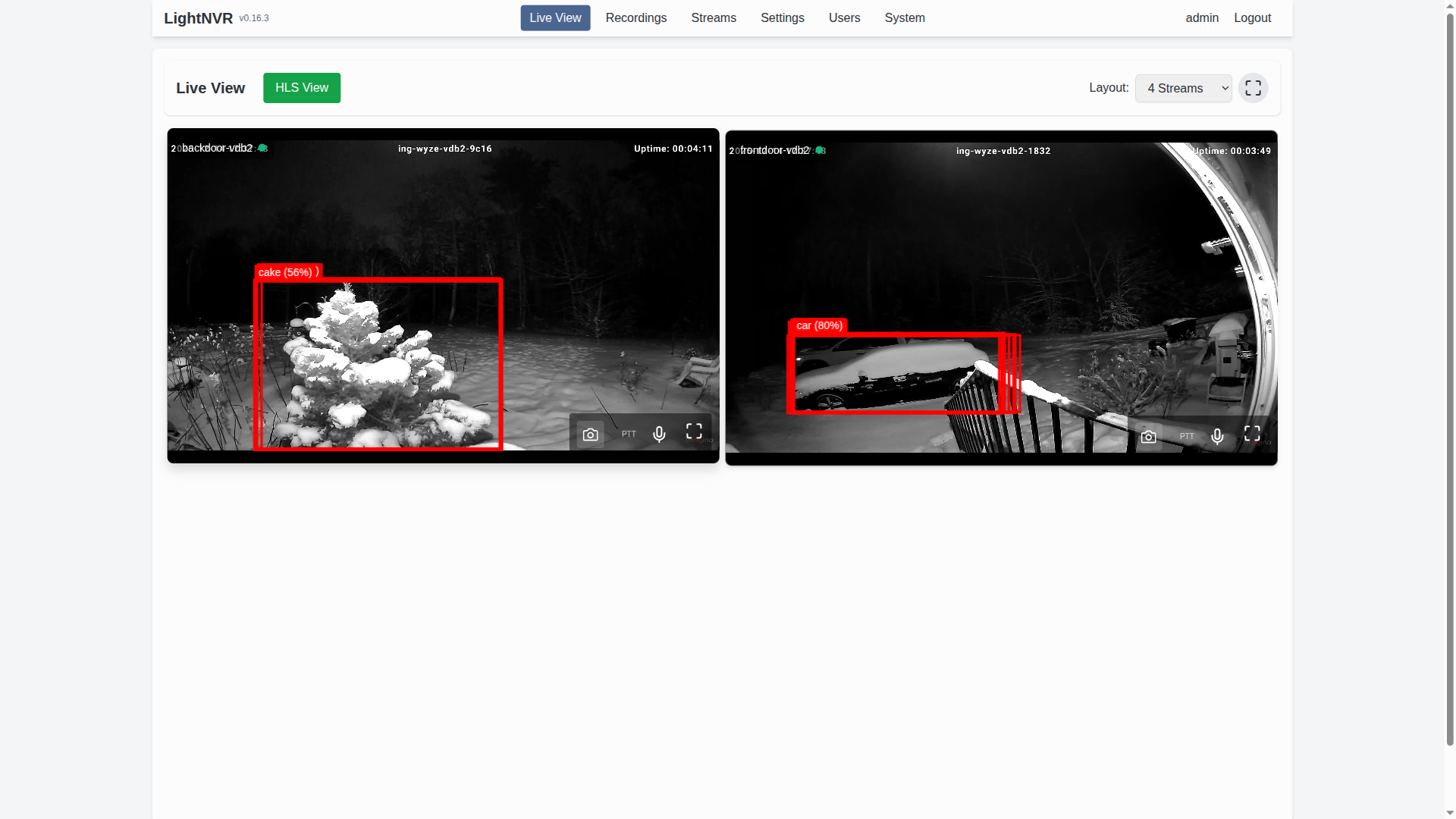
✨ New Features: Detection zones with visual polygon editor, customizable themes, enhanced light-object-detect integration, and ultra-low-latency WebRTC streaming!
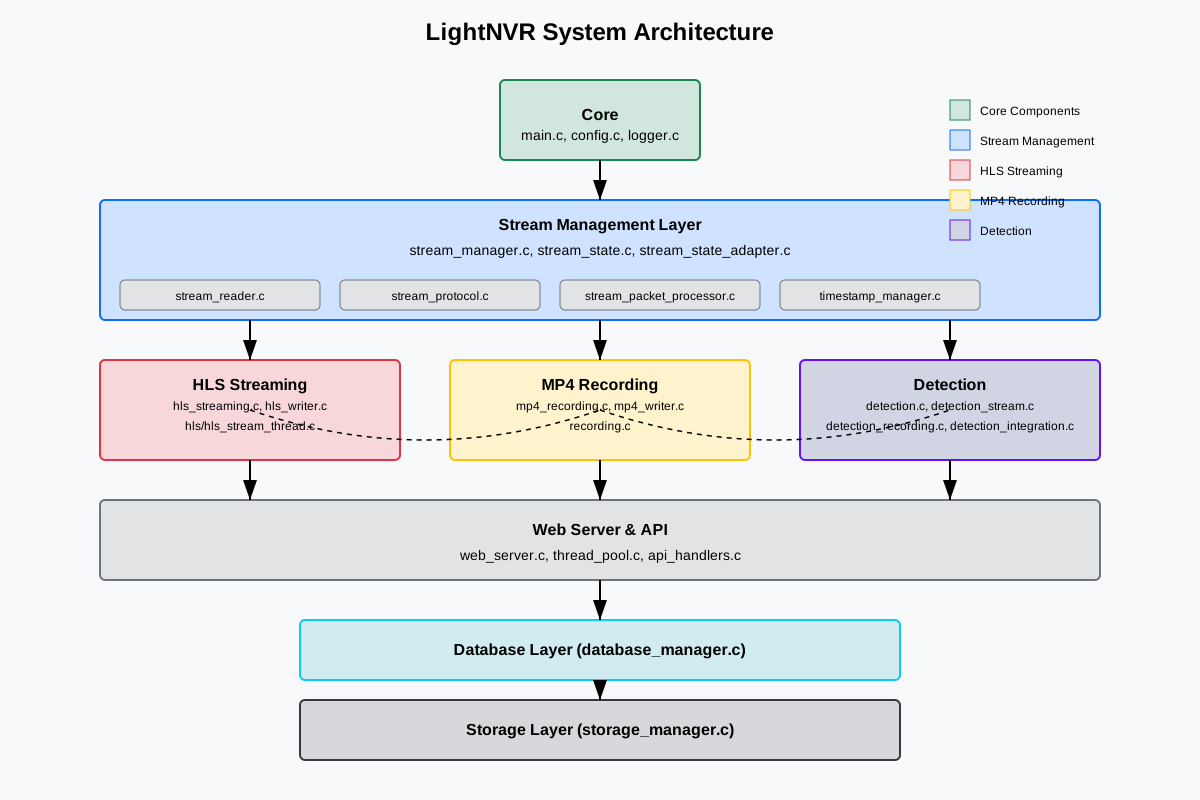
LightNVR is built as a small, C-based core service with a modern Preact/Tailwind web UI and go2rtc as the streaming backbone. Object detection is handled by an external detection API (typically light-object-detect).
 |
|---|
| High-level architecture: web UI, API, core, go2rtc, and detection service |
At a high level:
/api/webrtc and snapshot (/api/frame.jpeg) calls.light-object-detect) that receives frames from go2rtc and returns object detections which LightNVR stores and overlays.For more detail, the repository also includes:
docs/images/arch-state.svg – high-level state machine for streams/recordingsdocs/images/arch-thread.svg – thread and worker layout for the core serviceMigrated from Mongoose to libuv + llhttp for the HTTP server, improving performance and reliability.
Optional TOTP-based MFA for securing the web interface with authenticator apps.
Publish detection events to an MQTT broker for integration with Home Assistant and other automation platforms.
Built-in demo mode with virtual test streams for development and evaluation without real cameras.
Users live in the database and are managed from the Users page, not the config file. The first run creates an admin account with the password admin — change it immediately.
LightNVR is perfect for:
| Feature | LightNVR | Traditional NVR | Cloud Solutions |
|---|---|---|---|
| Memory Footprint | 256MB minimum | 2GB+ typical | N/A (cloud-based) |
| Detection Zones | ✅ Visual polygon editor | ❌ Usually grid-based or none | ✅ Varies by provider |
| Custom Themes | ✅ 8 themes + intensity control | ❌ Fixed UI | ⚠️ Limited options |
| WebRTC Streaming | ✅ Sub-second latency | ⚠️ Often RTSP only | ✅ Usually supported |
| Object Detection | ✅ ONNX/TFLite/SOD support | ⚠️ Proprietary or limited | ✅ Usually included |
| Privacy | ✅ 100% local, no cloud | ✅ Local | ❌ Data sent to cloud |
| Cost | ✅ Free & open-source | 💰 $200-2000+ | 💰 $10-50/month per camera |
| Customization | ✅ Full source code access | ❌ Closed source | ❌ Limited to API |
| Resource Usage | ✅ Optimized for SBCs | ⚠️ Requires dedicated hardware | N/A |
| API Integration | ✅ RESTful API + WebSocket | ⚠️ Varies | ✅ Usually available |
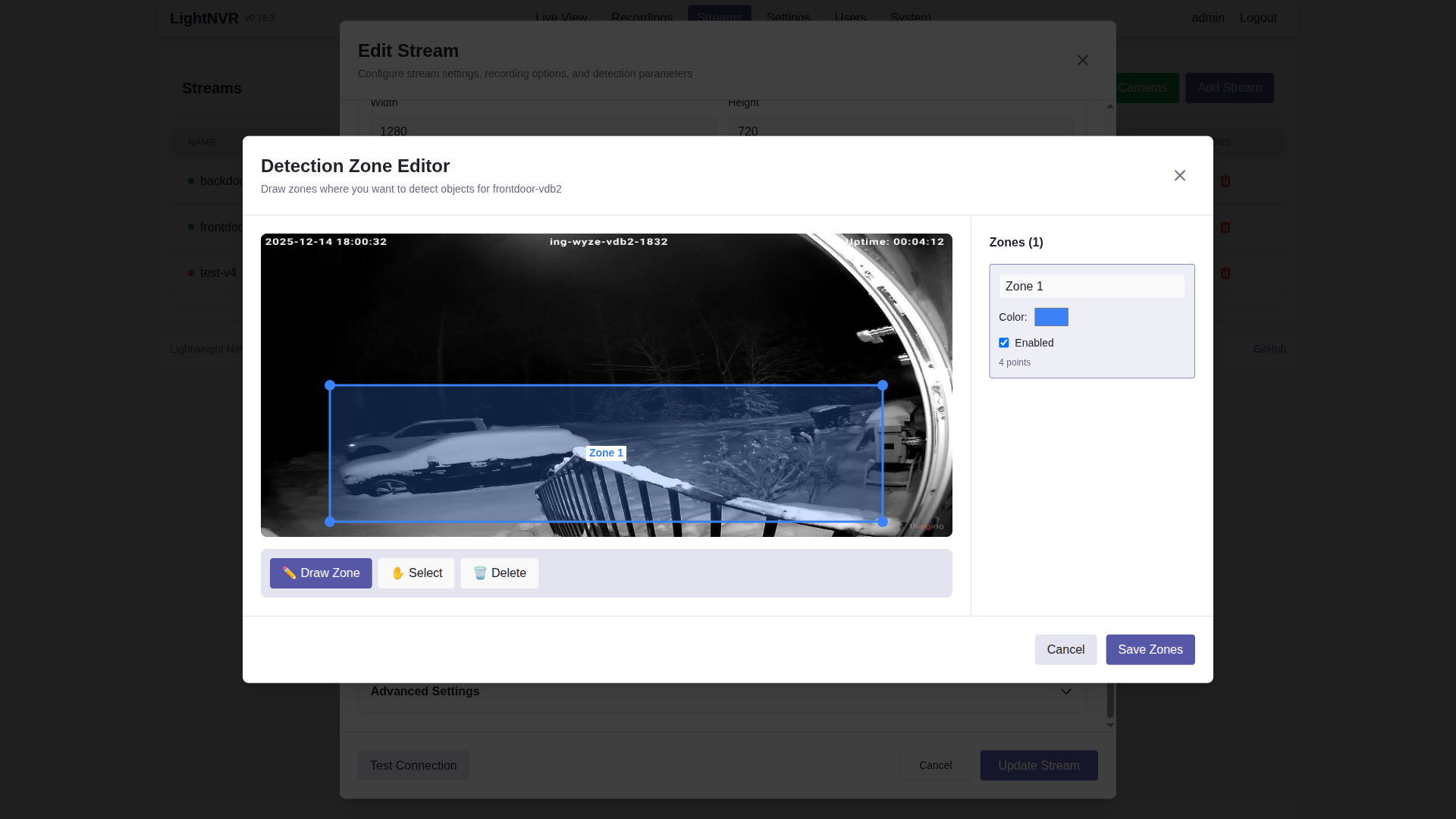
Define custom detection zones with a visual polygon editor. Perfect for monitoring specific areas like doorways, parking spots, or restricted zones while ignoring irrelevant motion.
 |
|---|
| Interactive zone editor with driveway detection zone drawn |
 |
|---|
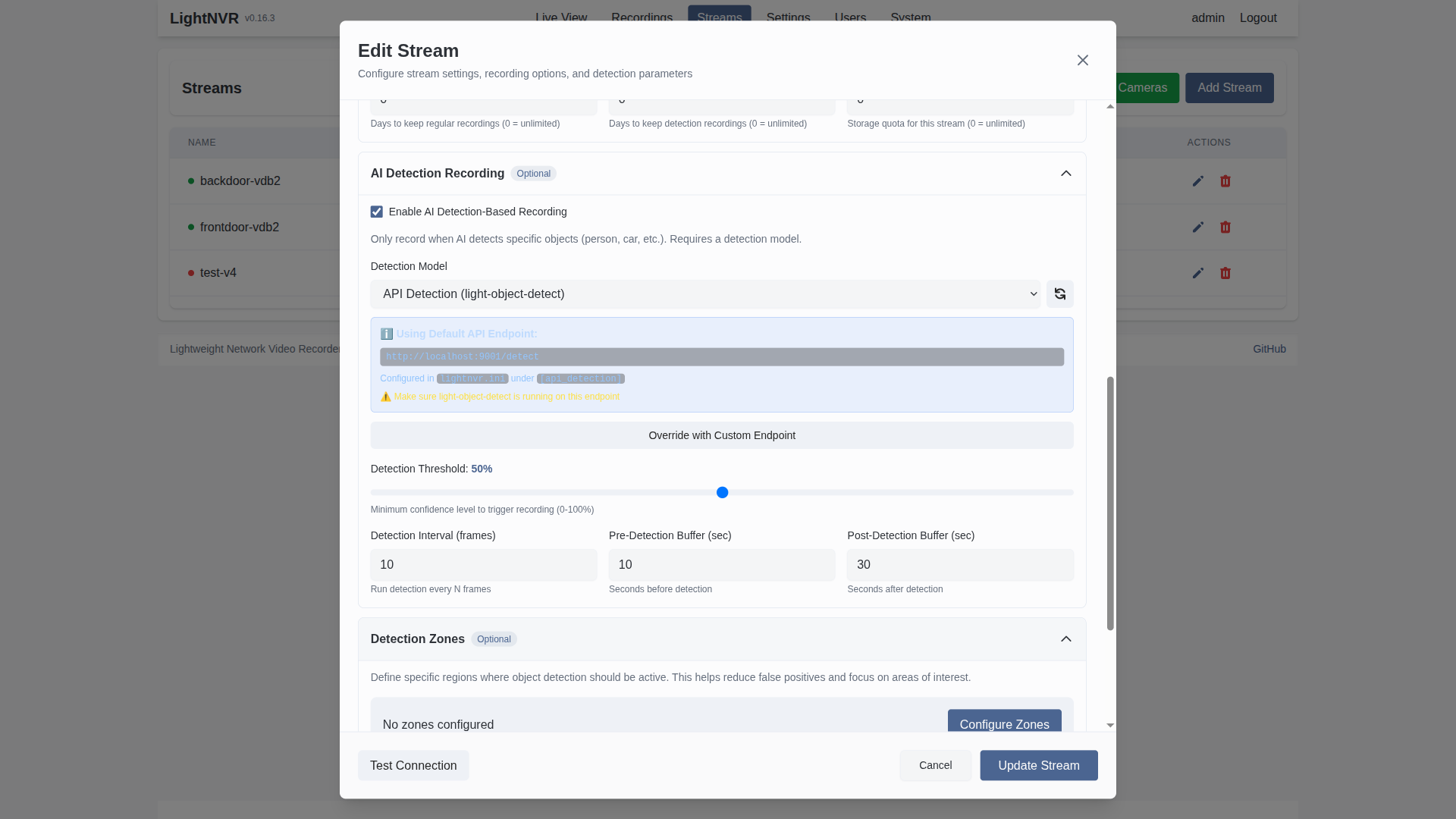
| Detection Zones section in stream configuration |
Key capabilities:
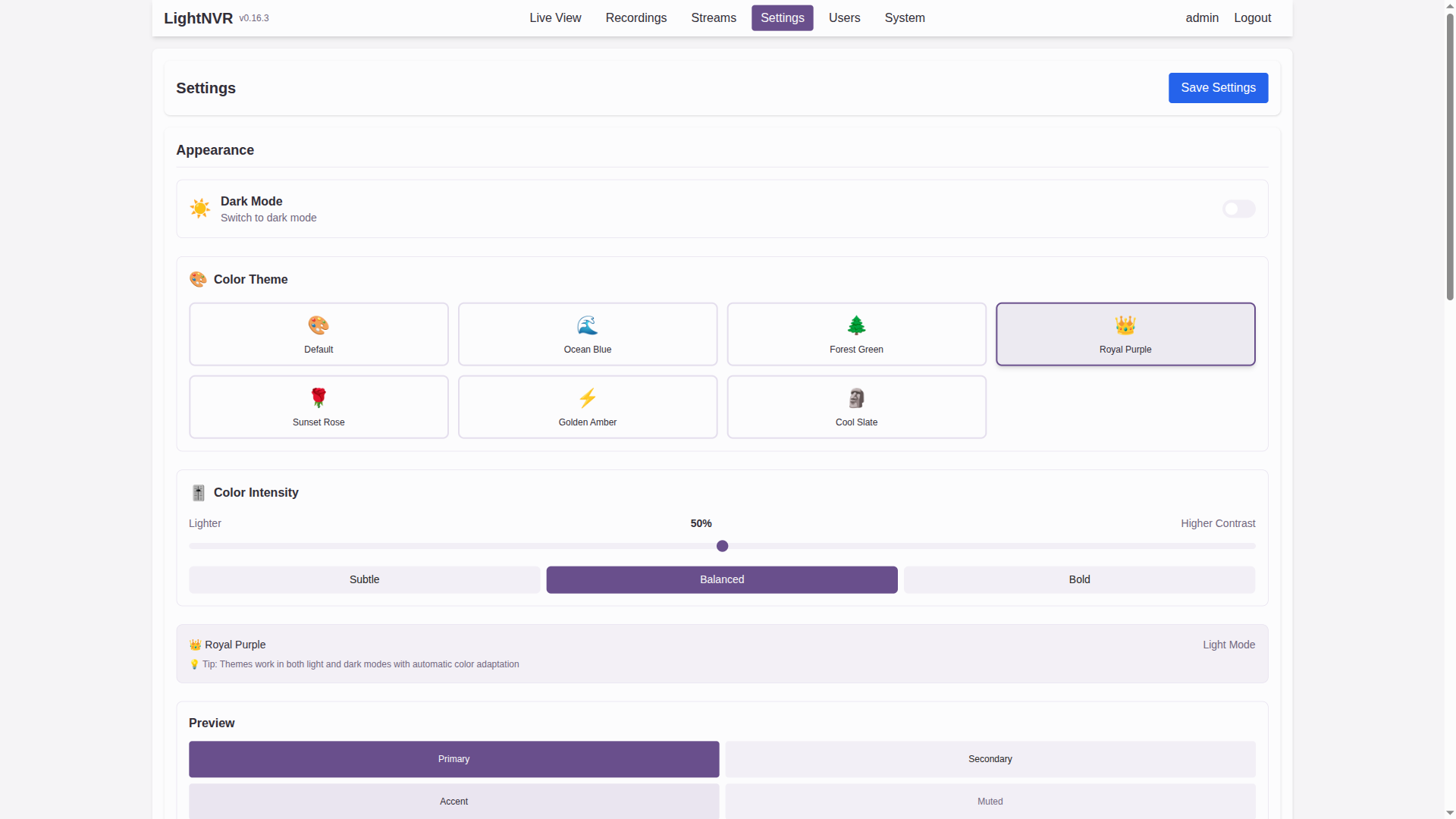
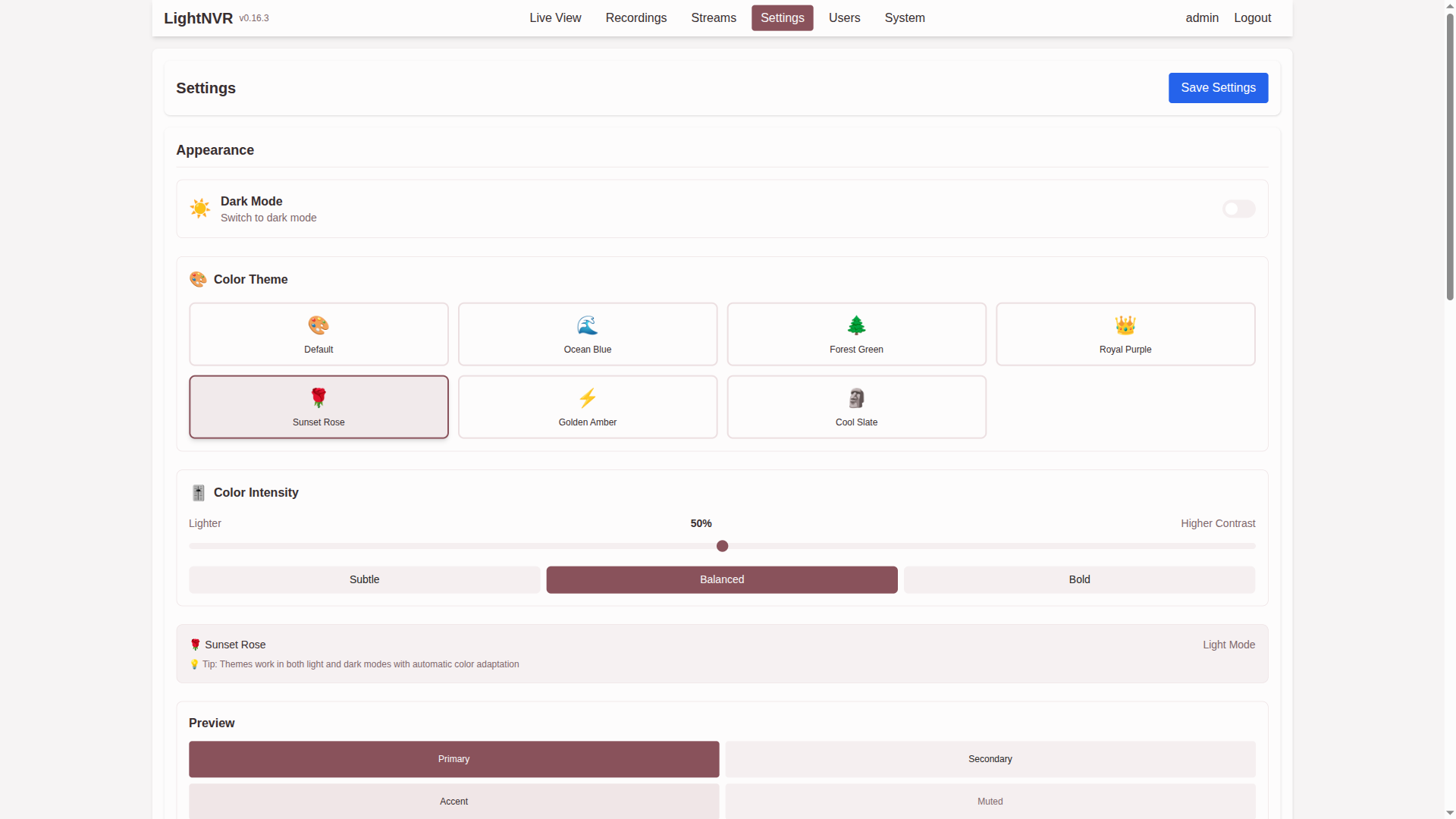
Choose from 8 professionally designed color themes and fine-tune the intensity to match your environment and preferences.
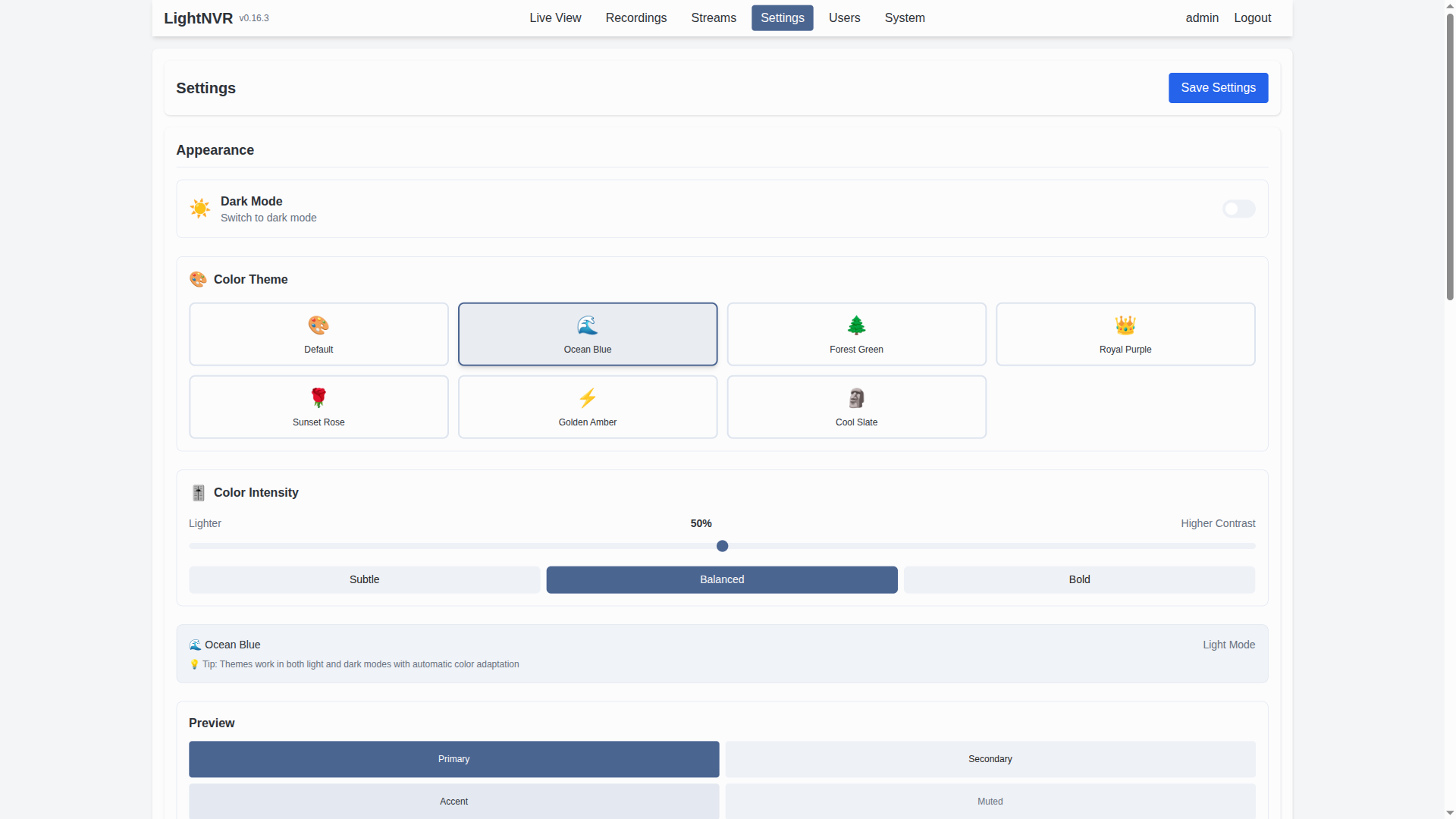 | 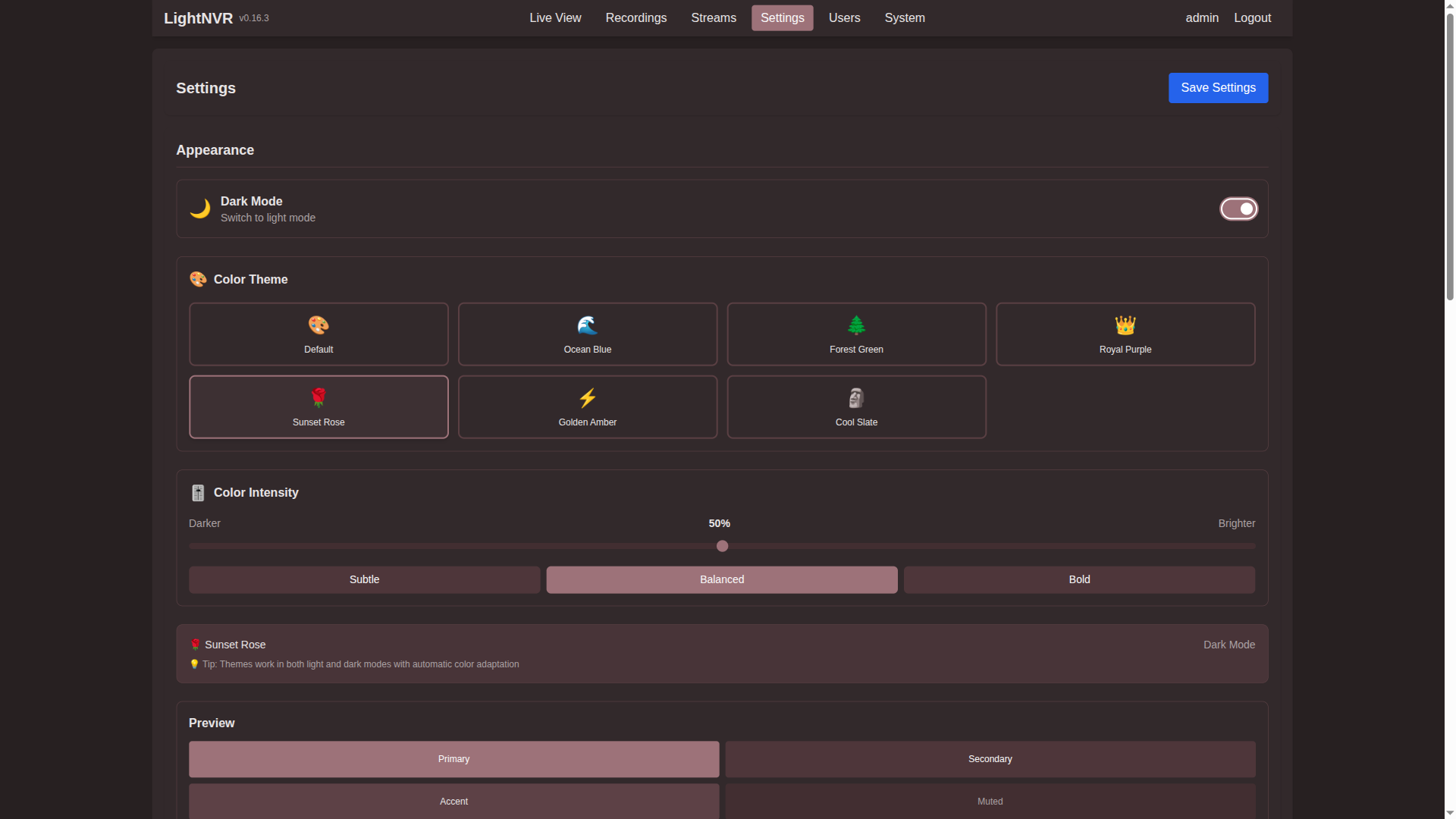 |
|---|---|
| Theme selector in light mode | Theme selector in dark mode |
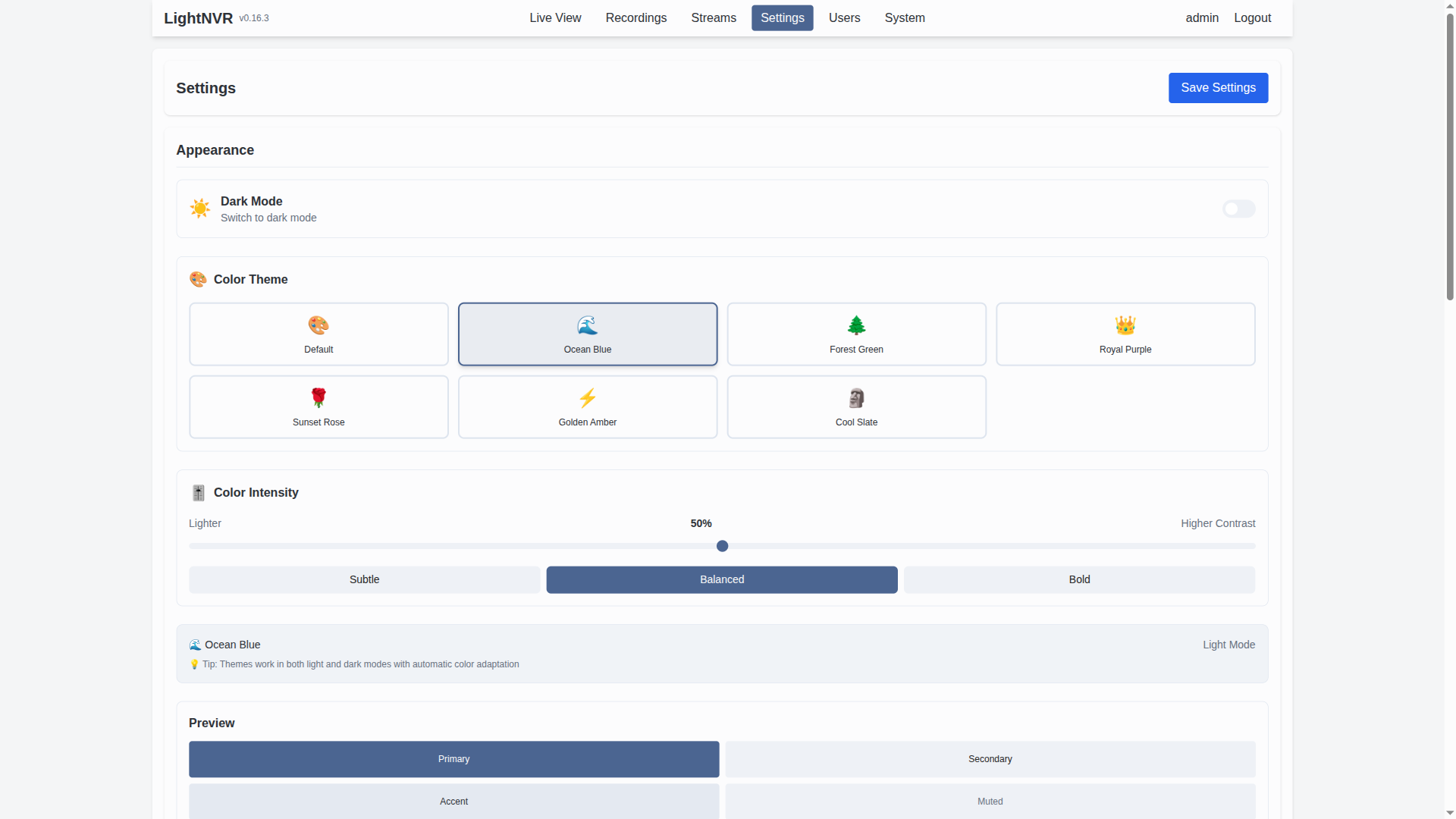 | 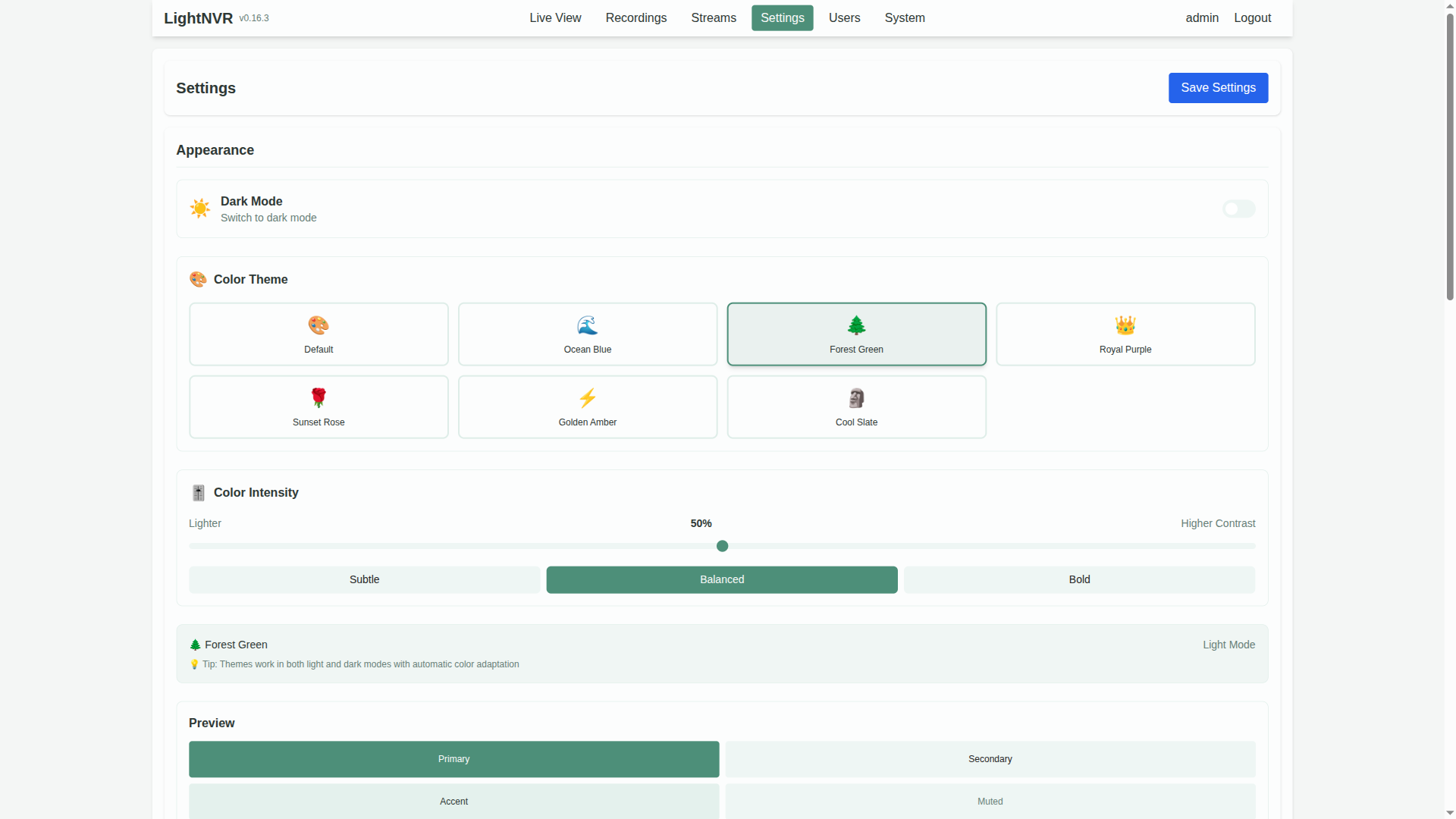 |  |  |
|---|---|---|---|
| Ocean Blue | Forest/Emerald Green | Royal Purple | Sunset Rose |
Available themes:
Each theme supports both light and dark modes with adjustable color intensity (0-100%).
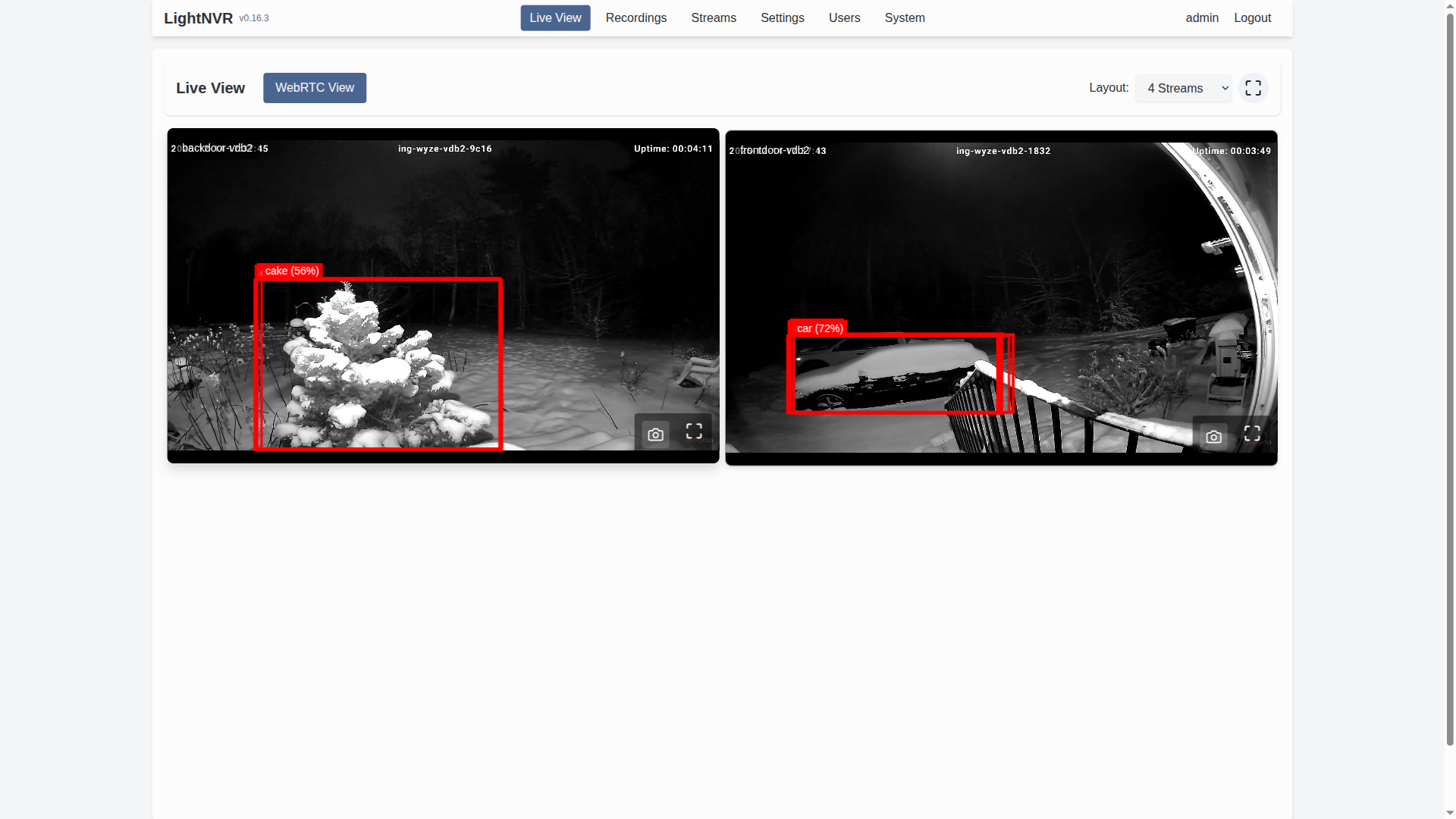
Experience real-time camera feeds with sub-second latency using WebRTC technology. Automatic NAT traversal ensures it works even behind firewalls.
|  |
|---|---|
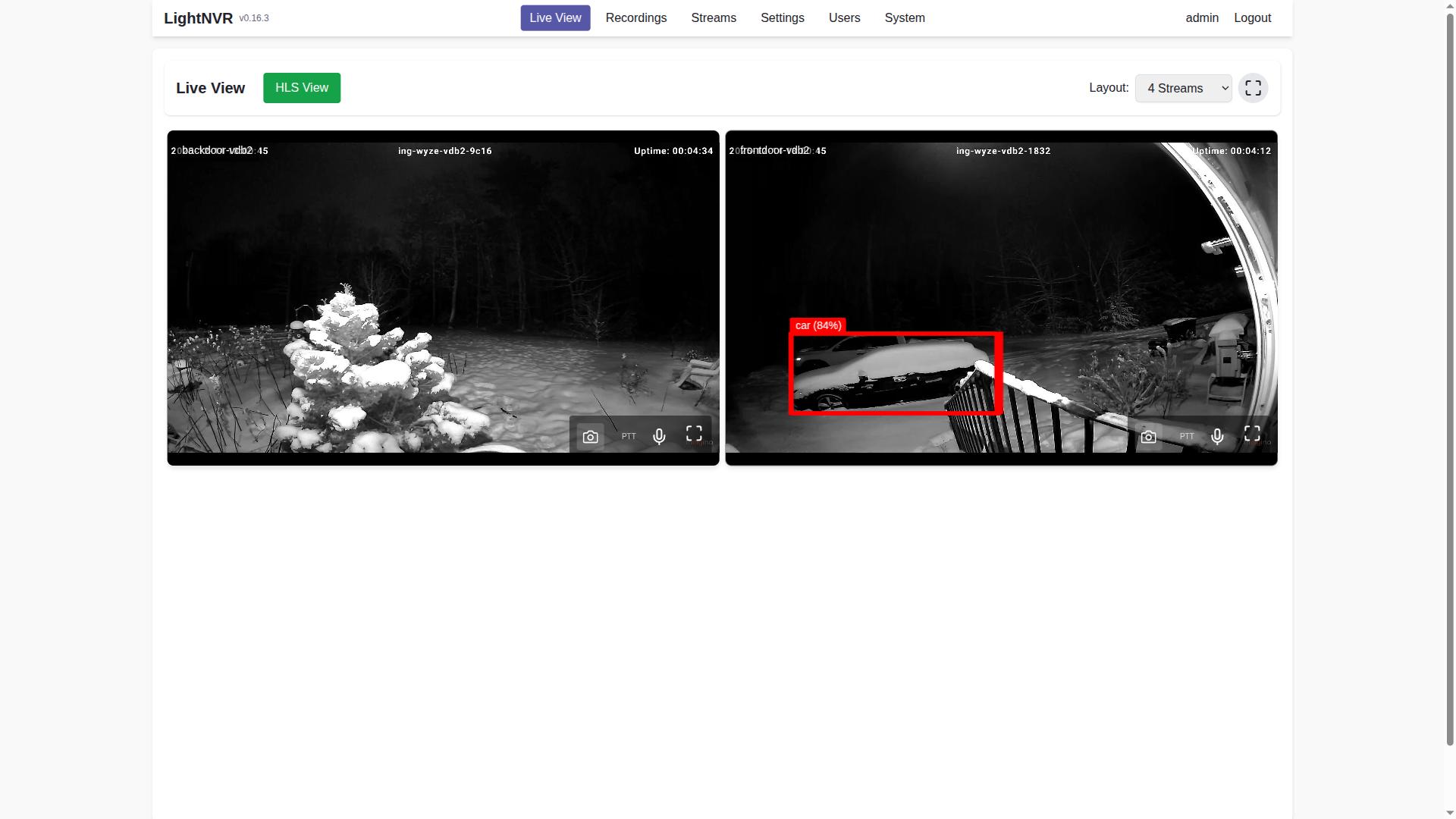
| WebRTC live view with ultra-low latency | HLS-based live view for compatibility |
 |
|---|
| Real-time detection overlays with bounding boxes |
Features:
Powerful object detection using modern ONNX and TFLite models with zone-aware filtering.
Integration features:
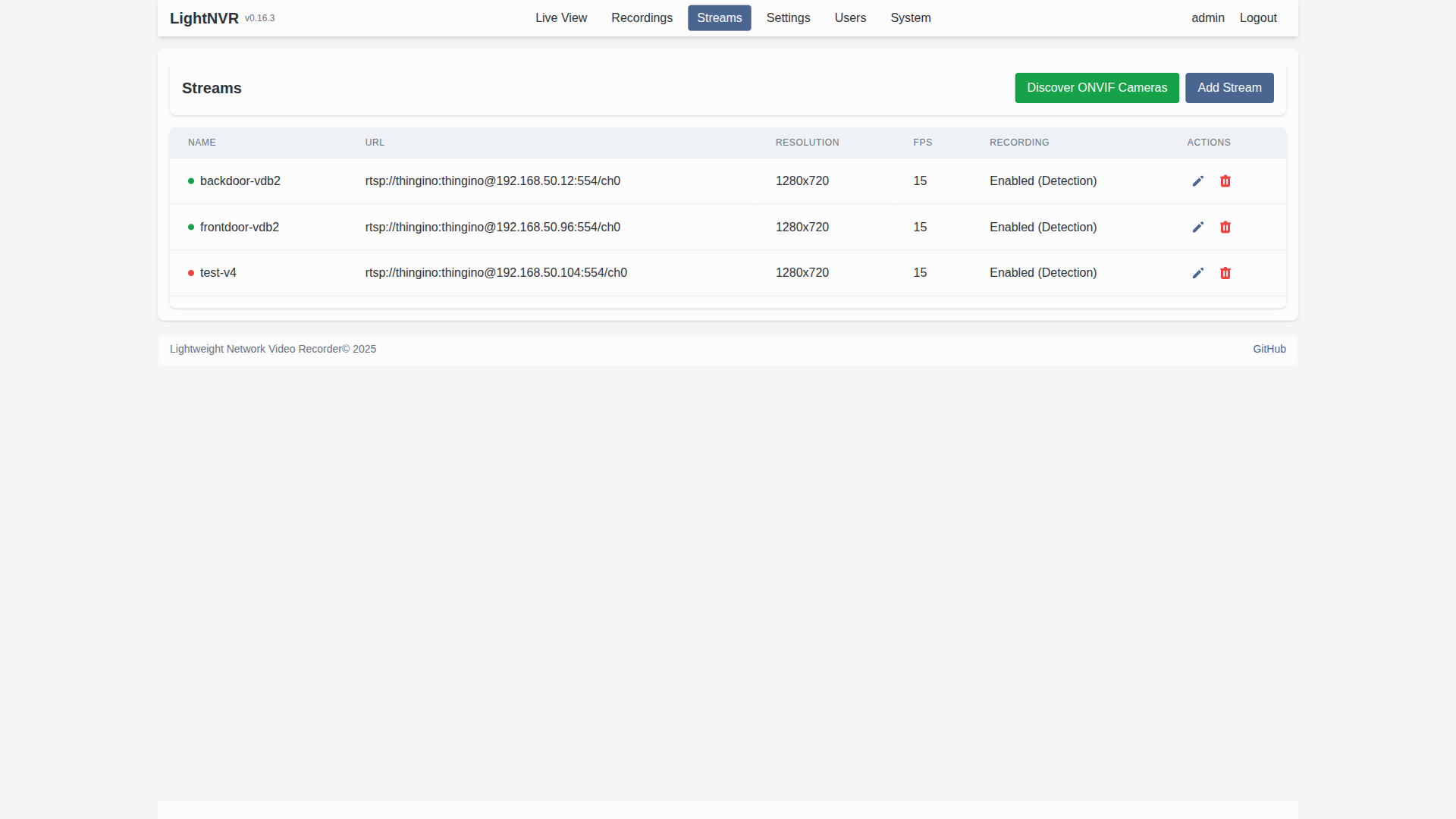 | 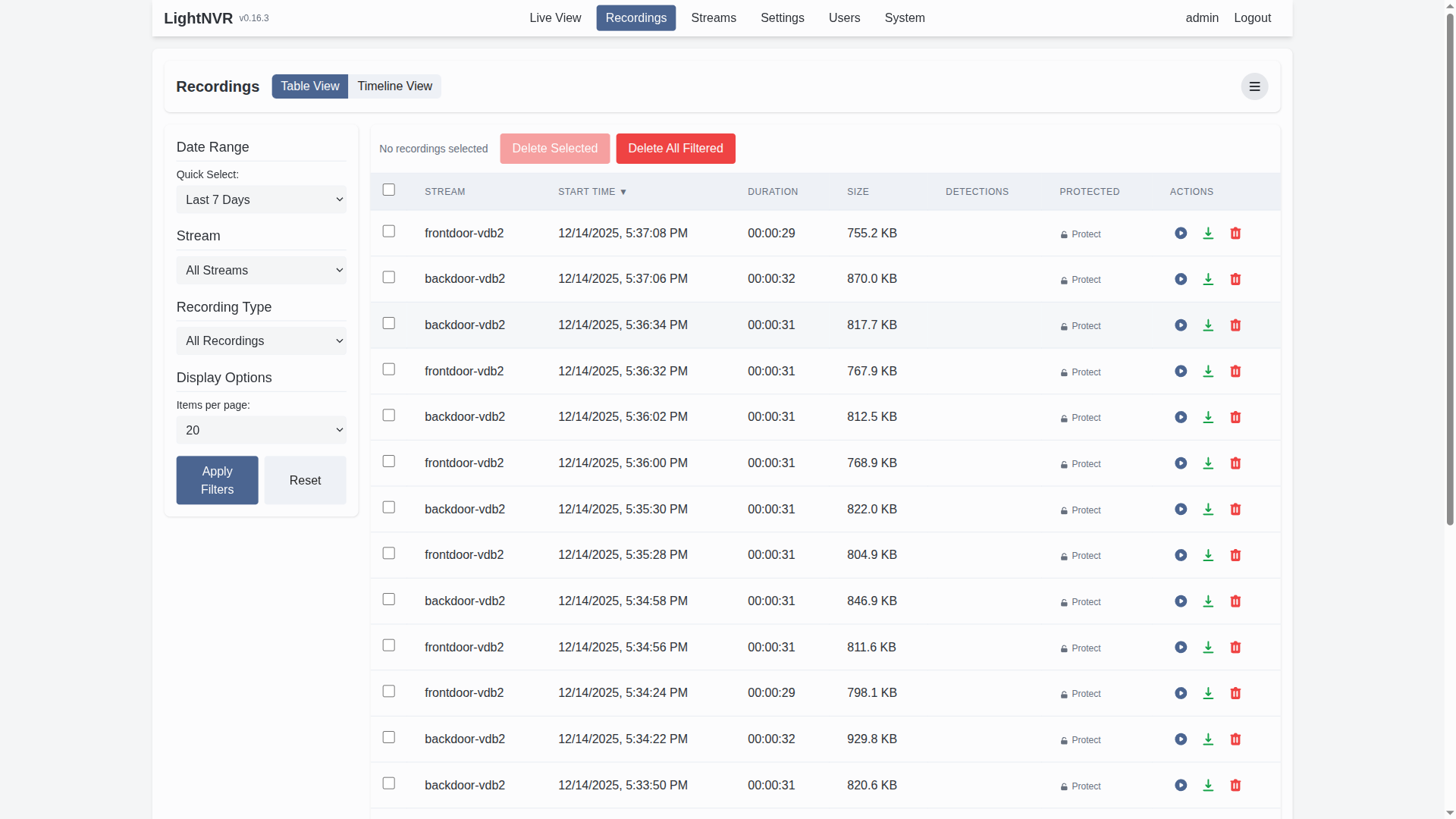 |
|---|---|
| Stream Management | Recording Management |
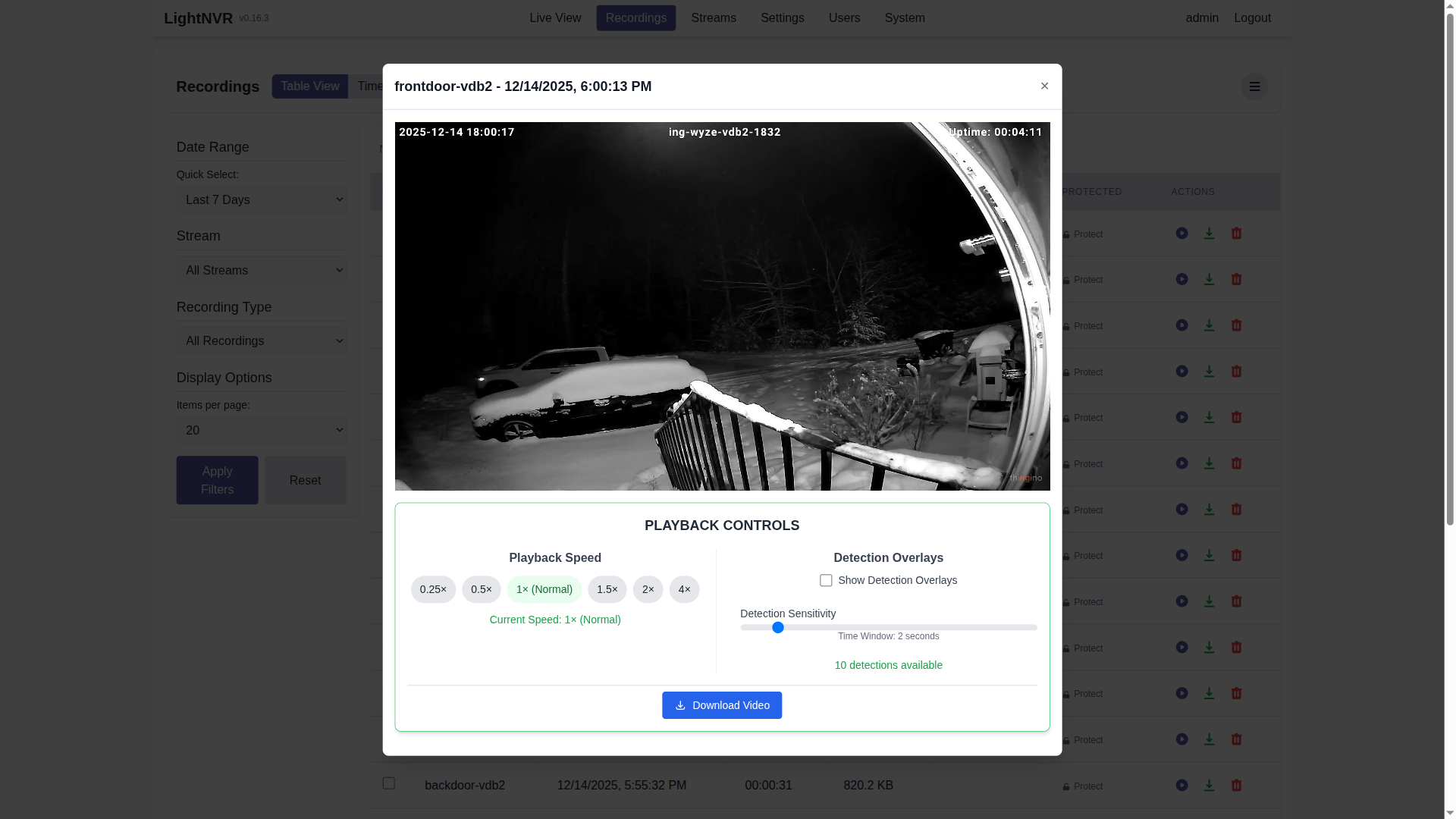 |
|---|
| Recording Playback with video player modal |
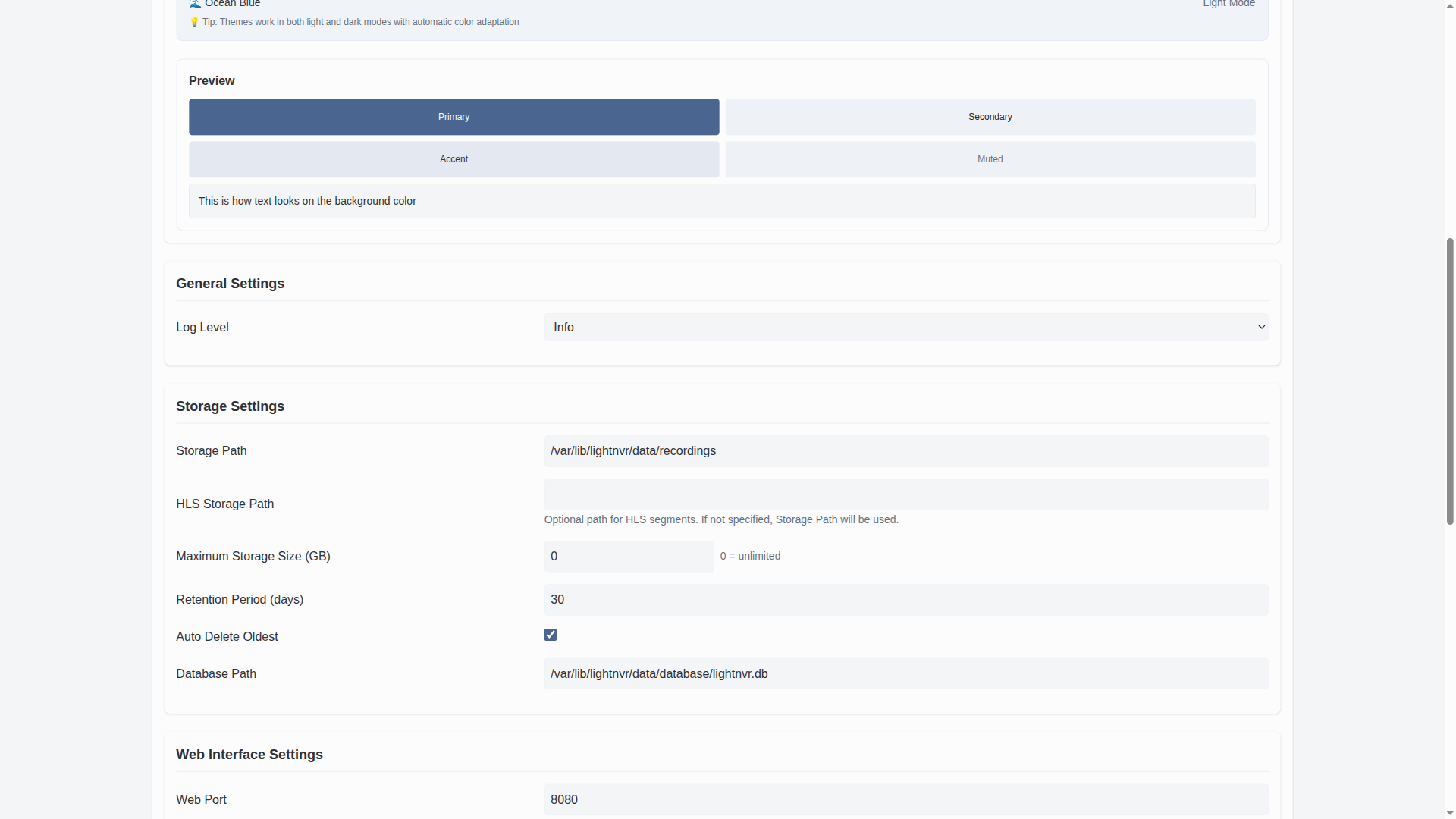 |  |
|---|---|
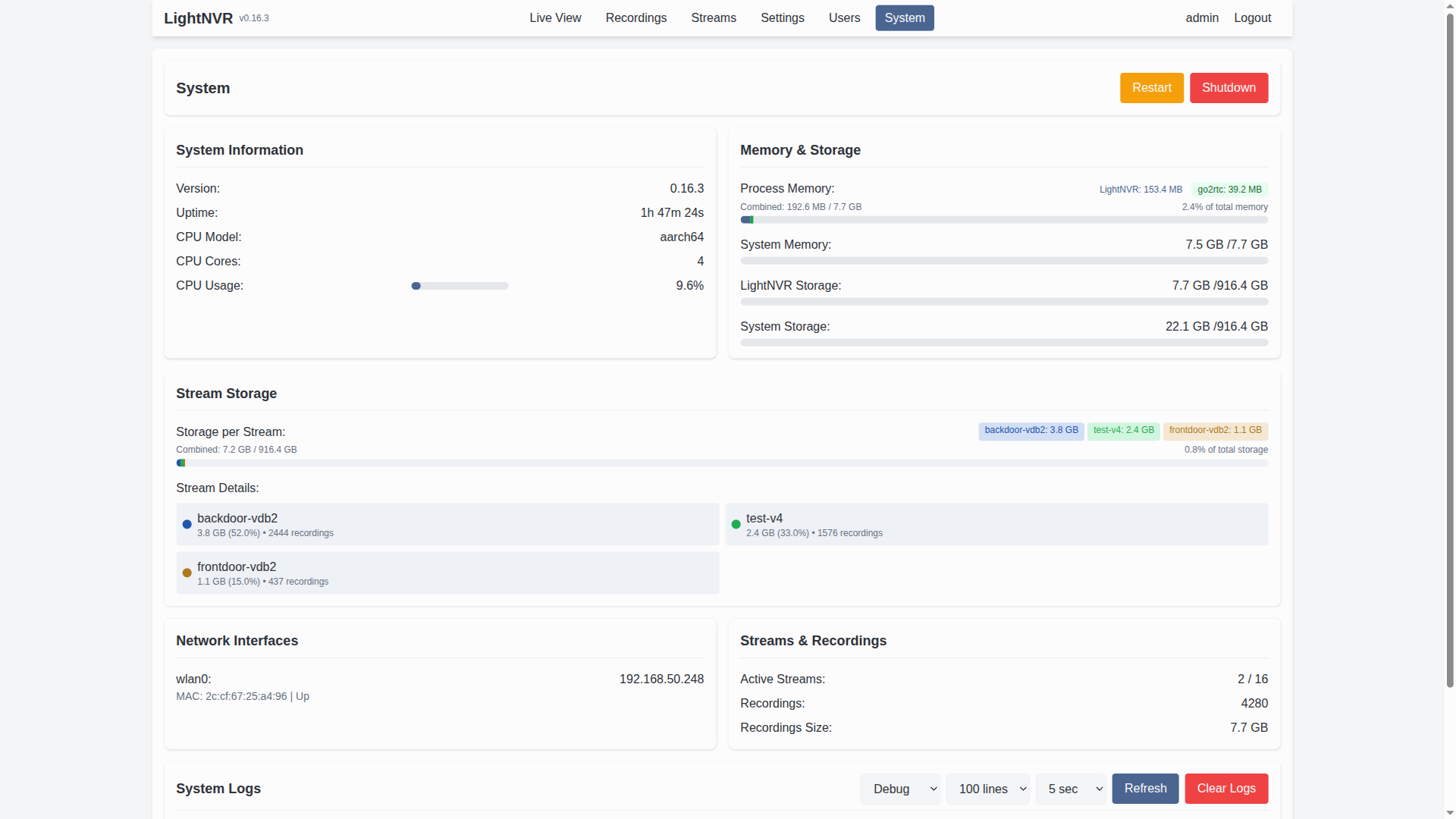
| Settings Management | System Information |
🏠 Running Home Assistant? Install LightNVR straight from the add-on store — no Docker or command line needed. Add the repository opensensor/lightnvr-hassio-addons under Settings → Add-ons → Add-on Store → ⋮ → Repositories, then install LightNVR. See that repo's README for one-click setup.
Build from source:
Prerequisites (in addition to build-essential, cmake, pkg-config):
libavcodec ≥ 61, libavformat ≥ 61, libavutil ≥ 59,
libswscale ≥ 8, libswresample ≥ 5). Debian 12 (bookworm) and Ubuntu
22.04 ship FFmpeg 5.x/6.x, which is too old — build FFmpeg from source or
use a newer distro release (Debian 13 / Ubuntu 24.04+ ship a compatible
version)..nvmrc; distribution packages may be older, so install Node 24 via
NodeSource or
nvm when needed.libsqlite3-dev (not pulled in automatically by any of the above).# Clone the repository
git clone https://github.com/opensensor/lightnvr.git
cd lightnvr
# Initialize submodules (required for go2rtc)
git submodule update --init --recursive
# Build web assets (requires Node.js >= 24.11 and < 25 -- see above).
# Use this script rather than running: cd web && npm install && npm run build
# It also runs scripts/extract_version.js first, which generates web/js/version.js
# from CMakeLists.txt. Skipping that step fails the Vite build with:
# "Could not resolve '../../version.js'" in Header.jsx.
./scripts/build_web_vite.sh
# Build the software
./scripts/build.sh --release
# Install (requires root)
sudo ./scripts/install.sh
Configure:
# Edit the configuration file
sudo nano /etc/lightnvr/lightnvr.ini
Start the service:
sudo systemctl start lightnvr
sudo systemctl enable lightnvr
Access the web interface:
Open a web browser and navigate to http://your-device-ip:8080
See First login — the default credentials are admin / admin and you should change them before anything else.
(Optional) Set up object detection:
For advanced object detection with zone filtering, integrate with light-object-detect:
# Install light-object-detect (requires Python 3.8+)
pip install light-object-detect

# Start the detection API server (default port 9001)
light-object-detect --host 0.0.0.0 --port 9001
Then configure detection in LightNVR:
http://localhost:9001/api/v1/detectonnx (recommended), tflite, or opencv/detect endpoint (see API Detection Settings)See Zone Configuration Guide for detailed zone setup instructions.
⚠️ LightNVR ships with the credentials
admin/admin, and the web server listens on0.0.0.0by default. Until you change the password, anyone who can reach port 8080 can reach your cameras and recordings. Change it before you expose the port to anything.
Log in at http://your-device-ip:8080 with admin / admin. LightNVR immediately
opens a blocking password-change screen; the initial session cannot use the rest of the
UI or protected password-authenticated APIs. After replacing the password, sign in again
with the new credential. MFA, when enabled, is evaluated on that next sign-in.
You can also pre-set the password before the first start, which avoids the default ever
being valid: set password in the [web] section of lightnvr.ini and start LightNVR.
The first run creates the admin account with that password instead. The setting is only
read when the account is created — after that, users live in the database and are managed
from the Users page.
Upgrades do not mark existing accounts for a forced password change. The gate is set only
when LightNVR creates a new administrator with the fallback admin password. API-key
authentication and demo mode are not restricted by this first-login UI flow.
Forgot the password? There is no reset flag. Stop LightNVR, delete the account row, and restart — it will be recreated from the same rules as a first run:
sudo systemctl stop lightnvr
sqlite3 /var/lib/lightnvr/data/database/lightnvr.db "DELETE FROM users WHERE username = 'admin';"
sudo systemctl start lightnvr
If you see a blank page after installation:
For Docker users:
# Check if you mounted /var/lib/lightnvr directly (this overwrites web assets)
docker inspect lightnvr | grep -A 5 Mounts

# Fix: Update docker-compose.yml to mount /var/lib/lightnvr/data instead
# Then recreate the container:
docker compose down
docker compose up -d
For native installation:
# Install/reinstall web assets (requires source directory)
sudo ./scripts/install_web_assets.sh

# Restart service
sudo systemctl restart lightnvr
See Web Interface Troubleshooting Guide for detailed instructions.
If live streams fail with ICE connection errors, set your machine's local IP as external_ip in lightnvr.ini:
[go2rtc]
external_ip = 192.168.1.100  ; Replace with your machine's local IP
To find your local IP:
# Linux
hostname -I | awk '{print $1}'

# macOS
ipconfig getifaddr en0    # or en1 for Wi-Fi
Then restart LightNVR (or docker compose restart for Docker). See the Docker Deployment Guide for more WebRTC troubleshooting.
For other issues, see the General Troubleshooting Guide.
No clone or build required — docker-compose.yml pulls the published image:
# Download the compose file into an empty directory
curl -LO https://raw.githubusercontent.com/opensensor/lightNVR/main/docker-compose.yml

# Pull the image and start the container
docker compose up -d

# View logs
docker compose logs -f
To build the image from source instead, clone the repository, run git submodule update --init --recursive, and switch the image: line in docker-compose.yml to the commented-out build: block.
The container will automatically:
./config./data/databaseAccess the web UI at http://localhost:8080. The default credentials are admin / admin — see First login.
Images are published to GHCR on every tagged release, for linux/amd64, linux/arm64, and linux/arm/v7:
docker pull ghcr.io/opensensor/lightnvr:latest
docker run -d \
  --name lightnvr \
  --restart unless-stopped \
  -p 8080:8080 \
  -p 8554:8554 \
  -p 8555:8555 \
  -p 8555:8555/udp \
  -p 1984:1984 \
  -v ./config:/etc/lightnvr \
  -v ./data:/var/lib/lightnvr/data \
  -e TZ=America/New_York \
  ghcr.io/opensensor/lightnvr:latest
The container uses two volume mounts for persistence:
/etc/lightnvr - Configuration files
lightnvr.ini - Main configurationgo2rtc/go2rtc.yaml - go2rtc WebRTC/RTSP configuration/var/lib/lightnvr/data - Persistent data
database/ - SQLite databaserecordings/ - Video recordings (HLS and MP4)models/ - Object detection models⚠️ Important: Do NOT mount /var/lib/lightnvr directly as it will overwrite web assets!
TZ - Timezone (default: UTC)GO2RTC_CONFIG_PERSIST - Persist go2rtc config across restarts (default: true)LIGHTNVR_ONVIF_NETWORK - Camera network to scan for ONVIF discovery, in CIDR formSee Docker Deployment for the full list.
On first run, the container will:
/etc/lightnvr/var/lib/lightnvr/www/var/lib/lightnvr/data/database/var/lib/lightnvr/data/modelsThe go2rtc configuration includes STUN servers for WebRTC NAT traversal, so WebRTC streaming should work out-of-the-box in most network environments.
After first run, you can customize the configuration:
# Edit main configuration
nano ./config/lightnvr.ini

# Edit go2rtc configuration (WebRTC, RTSP settings)
nano ./config/go2rtc/go2rtc.yaml

# Restart to apply changes
docker compose restart
The configuration files will persist across container restarts and updates.
📖 Full documentation index — grouped by task, with a getting-started path from install to first recording.
src/ - C source code
core/ - Core system componentsvideo/ - Video processing and stream handlingstorage/ - Storage managementweb/ - HTTP server and API handlersdatabase/ - Database operations and migrationsutils/ - Utility functionsinclude/ - Header filesweb/ - Web frontend (Vite + Preact + Tailwind CSS)
js/ - Preact components and pagescss/ - Tailwind CSS stylesheets*.html - HTML entry pointsdb/migrations/ - SQLite schema migrationsscripts/ - Build, install, and utility scriptsconfig/ - Configuration templatesdocs/ - Documentationtests/ - Integration and Playwright testsLightNVR is specifically designed for memory-constrained environments:
Contributions are welcome! Please feel free to submit a Pull Request.
git checkout -b feature/amazing-feature)git commit -m 'Add some amazing feature')git push origin feature/amazing-feature)Note: By contributing to this project, you agree to sign our Contributor License Agreement (CLA). The CLA bot will guide you through the process on your first pull request.
This project is licensed under the GNU General Public License v3.0 - see the LICENSE file for details.
For organizations that need to integrate lightNVR into proprietary products or cannot comply with GPL requirements, commercial licenses are available from OpenSensor Engineering. See Commercial Licensing & Professional Support for details.
LightNVR is built on the shoulders of giants. Special thanks to:
71 followers · starred Sep 2026
91 followers · starred May 2026
The fully OSS lightweight network video recorder system witten in C with modern js frontend
See the code
LightNVR is a tiny, memory-optimized Network Video Recorder software written in C. While originally designed for resource-constrained devices like the Ingenic A1 SoC with only 256MB of RAM, it can run on any Linux system.
Free to use does not mean free to build. About $10,000 of the maintainer's own money has gone into lightNVR's development and operation over roughly two years. If lightNVR saves you money, supports your customers, or creates value for your business, please help sustain the work through the lightNVR $10K Sustainability Drive or sponsor directly on GitHub.
LightNVR provides a lightweight yet powerful solution for recording and managing IP camera streams. It's designed to run efficiently on low-power, memory-constrained devices while still providing essential NVR functionality with a modern, responsive web interface.
✨ New Features: Detection zones with visual polygon editor, customizable themes, enhanced light-object-detect integration, and ultra-low-latency WebRTC streaming!
LightNVR is built as a small, C-based core service with a modern Preact/Tailwind web UI and go2rtc as the streaming backbone. Object detection is handled by an external detection API (typically light-object-detect).
|
|---|
| High-level architecture: web UI, API, core, go2rtc, and detection service |
At a high level:
/api/webrtc and snapshot (/api/frame.jpeg) calls.light-object-detect) that receives frames from go2rtc and returns object detections which LightNVR stores and overlays.For more detail, the repository also includes:
docs/images/arch-state.svg – high-level state machine for streams/recordingsdocs/images/arch-thread.svg – thread and worker layout for the core serviceMigrated from Mongoose to libuv + llhttp for the HTTP server, improving performance and reliability.
Optional TOTP-based MFA for securing the web interface with authenticator apps.
Publish detection events to an MQTT broker for integration with Home Assistant and other automation platforms.
Built-in demo mode with virtual test streams for development and evaluation without real cameras.
Users live in the database and are managed from the Users page, not the config file. The first run creates an admin account with the password admin — change it immediately.
LightNVR is perfect for:
| Feature | LightNVR | Traditional NVR | Cloud Solutions |
|---|---|---|---|
| Memory Footprint | 256MB minimum | 2GB+ typical | N/A (cloud-based) |
| Detection Zones | ✅ Visual polygon editor | ❌ Usually grid-based or none | ✅ Varies by provider |
| Custom Themes | ✅ 8 themes + intensity control | ❌ Fixed UI | ⚠️ Limited options |
| WebRTC Streaming | ✅ Sub-second latency | ⚠️ Often RTSP only | ✅ Usually supported |
| Object Detection | ✅ ONNX/TFLite/SOD support | ⚠️ Proprietary or limited | ✅ Usually included |
| Privacy | ✅ 100% local, no cloud | ✅ Local | ❌ Data sent to cloud |
| Cost | ✅ Free & open-source | 💰 $200-2000+ | 💰 $10-50/month per camera |
| Customization | ✅ Full source code access | ❌ Closed source | ❌ Limited to API |
| Resource Usage | ✅ Optimized for SBCs | ⚠️ Requires dedicated hardware | N/A |
| API Integration | ✅ RESTful API + WebSocket | ⚠️ Varies | ✅ Usually available |
Define custom detection zones with a visual polygon editor. Perfect for monitoring specific areas like doorways, parking spots, or restricted zones while ignoring irrelevant motion.
|
|---|
| Interactive zone editor with driveway detection zone drawn |
|
|---|
| Detection Zones section in stream configuration |
Key capabilities:
Choose from 8 professionally designed color themes and fine-tune the intensity to match your environment and preferences.
| |
|---|---|
| Theme selector in light mode | Theme selector in dark mode |
| | | |
|---|---|---|---|
| Ocean Blue | Forest/Emerald Green | Royal Purple | Sunset Rose |
Available themes:
Each theme supports both light and dark modes with adjustable color intensity (0-100%).
Experience real-time camera feeds with sub-second latency using WebRTC technology. Automatic NAT traversal ensures it works even behind firewalls.
| |
|---|---|
| WebRTC live view with ultra-low latency | HLS-based live view for compatibility |
|
|---|
| Real-time detection overlays with bounding boxes |
Features:
Powerful object detection using modern ONNX and TFLite models with zone-aware filtering.
Integration features:
| |
|---|---|
| Stream Management | Recording Management |
|
|---|
| Recording Playback with video player modal |
| |
|---|---|
| Settings Management | System Information |
🏠 Running Home Assistant? Install LightNVR straight from the add-on store — no Docker or command line needed. Add the repository opensensor/lightnvr-hassio-addons under Settings → Add-ons → Add-on Store → ⋮ → Repositories, then install LightNVR. See that repo's README for one-click setup.
Build from source:
Prerequisites (in addition to build-essential, cmake, pkg-config):
libavcodec ≥ 61, libavformat ≥ 61, libavutil ≥ 59,
libswscale ≥ 8, libswresample ≥ 5). Debian 12 (bookworm) and Ubuntu
22.04 ship FFmpeg 5.x/6.x, which is too old — build FFmpeg from source or
use a newer distro release (Debian 13 / Ubuntu 24.04+ ship a compatible
version)..nvmrc; distribution packages may be older, so install Node 24 via
NodeSource or
nvm when needed.libsqlite3-dev (not pulled in automatically by any of the above).# Clone the repository
git clone https://github.com/opensensor/lightnvr.git
cd lightnvr
# Initialize submodules (required for go2rtc)
git submodule update --init --recursive
# Build web assets (requires Node.js >= 24.11 and < 25 -- see above).
# Use this script rather than running: cd web && npm install && npm run build
# It also runs scripts/extract_version.js first, which generates web/js/version.js
# from CMakeLists.txt. Skipping that step fails the Vite build with:
# "Could not resolve '../../version.js'" in Header.jsx.
./scripts/build_web_vite.sh
# Build the software
./scripts/build.sh --release
# Install (requires root)
sudo ./scripts/install.sh
Configure:
# Edit the configuration file
sudo nano /etc/lightnvr/lightnvr.ini
Start the service:
sudo systemctl start lightnvr
sudo systemctl enable lightnvr
Access the web interface:
Open a web browser and navigate to http://your-device-ip:8080
See First login — the default credentials are admin / admin and you should change them before anything else.
(Optional) Set up object detection:
For advanced object detection with zone filtering, integrate with light-object-detect:
# Install light-object-detect (requires Python 3.8+)
pip install light-object-detect

# Start the detection API server (default port 9001)
light-object-detect --host 0.0.0.0 --port 9001
Then configure detection in LightNVR:
http://localhost:9001/api/v1/detectonnx (recommended), tflite, or opencv/detect endpoint (see API Detection Settings)See Zone Configuration Guide for detailed zone setup instructions.
⚠️ LightNVR ships with the credentials
admin/admin, and the web server listens on0.0.0.0by default. Until you change the password, anyone who can reach port 8080 can reach your cameras and recordings. Change it before you expose the port to anything.
Log in at http://your-device-ip:8080 with admin / admin. LightNVR immediately
opens a blocking password-change screen; the initial session cannot use the rest of the
UI or protected password-authenticated APIs. After replacing the password, sign in again
with the new credential. MFA, when enabled, is evaluated on that next sign-in.
You can also pre-set the password before the first start, which avoids the default ever
being valid: set password in the [web] section of lightnvr.ini and start LightNVR.
The first run creates the admin account with that password instead. The setting is only
read when the account is created — after that, users live in the database and are managed
from the Users page.
Upgrades do not mark existing accounts for a forced password change. The gate is set only
when LightNVR creates a new administrator with the fallback admin password. API-key
authentication and demo mode are not restricted by this first-login UI flow.
Forgot the password? There is no reset flag. Stop LightNVR, delete the account row, and restart — it will be recreated from the same rules as a first run:
sudo systemctl stop lightnvr
sqlite3 /var/lib/lightnvr/data/database/lightnvr.db "DELETE FROM users WHERE username = 'admin';"
sudo systemctl start lightnvr
If you see a blank page after installation:
For Docker users:
# Check if you mounted /var/lib/lightnvr directly (this overwrites web assets)
docker inspect lightnvr | grep -A 5 Mounts

# Fix: Update docker-compose.yml to mount /var/lib/lightnvr/data instead
# Then recreate the container:
docker compose down
docker compose up -d
For native installation:
# Install/reinstall web assets (requires source directory)
sudo ./scripts/install_web_assets.sh

# Restart service
sudo systemctl restart lightnvr
See Web Interface Troubleshooting Guide for detailed instructions.
If live streams fail with ICE connection errors, set your machine's local IP as external_ip in lightnvr.ini:
[go2rtc]
external_ip = 192.168.1.100  ; Replace with your machine's local IP
To find your local IP:
# Linux
hostname -I | awk '{print $1}'

# macOS
ipconfig getifaddr en0    # or en1 for Wi-Fi
Then restart LightNVR (or docker compose restart for Docker). See the Docker Deployment Guide for more WebRTC troubleshooting.
For other issues, see the General Troubleshooting Guide.
No clone or build required — docker-compose.yml pulls the published image:
# Download the compose file into an empty directory
curl -LO https://raw.githubusercontent.com/opensensor/lightNVR/main/docker-compose.yml

# Pull the image and start the container
docker compose up -d

# View logs
docker compose logs -f
To build the image from source instead, clone the repository, run git submodule update --init --recursive, and switch the image: line in docker-compose.yml to the commented-out build: block.
The container will automatically:
./config./data/databaseAccess the web UI at http://localhost:8080. The default credentials are admin / admin — see First login.
Images are published to GHCR on every tagged release, for linux/amd64, linux/arm64, and linux/arm/v7:
docker pull ghcr.io/opensensor/lightnvr:latest
docker run -d \
  --name lightnvr \
  --restart unless-stopped \
  -p 8080:8080 \
  -p 8554:8554 \
  -p 8555:8555 \
  -p 8555:8555/udp \
  -p 1984:1984 \
  -v ./config:/etc/lightnvr \
  -v ./data:/var/lib/lightnvr/data \
  -e TZ=America/New_York \
  ghcr.io/opensensor/lightnvr:latest
The container uses two volume mounts for persistence:
/etc/lightnvr - Configuration files
lightnvr.ini - Main configurationgo2rtc/go2rtc.yaml - go2rtc WebRTC/RTSP configuration/var/lib/lightnvr/data - Persistent data
database/ - SQLite databaserecordings/ - Video recordings (HLS and MP4)models/ - Object detection models⚠️ Important: Do NOT mount /var/lib/lightnvr directly as it will overwrite web assets!
TZ - Timezone (default: UTC)GO2RTC_CONFIG_PERSIST - Persist go2rtc config across restarts (default: true)LIGHTNVR_ONVIF_NETWORK - Camera network to scan for ONVIF discovery, in CIDR formSee Docker Deployment for the full list.
On first run, the container will:
/etc/lightnvr/var/lib/lightnvr/www/var/lib/lightnvr/data/database/var/lib/lightnvr/data/modelsThe go2rtc configuration includes STUN servers for WebRTC NAT traversal, so WebRTC streaming should work out-of-the-box in most network environments.
After first run, you can customize the configuration:
# Edit main configuration
nano ./config/lightnvr.ini

# Edit go2rtc configuration (WebRTC, RTSP settings)
nano ./config/go2rtc/go2rtc.yaml

# Restart to apply changes
docker compose restart
The configuration files will persist across container restarts and updates.
📖 Full documentation index — grouped by task, with a getting-started path from install to first recording.
src/ - C source code
core/ - Core system componentsvideo/ - Video processing and stream handlingstorage/ - Storage managementweb/ - HTTP server and API handlersdatabase/ - Database operations and migrationsutils/ - Utility functionsinclude/ - Header filesweb/ - Web frontend (Vite + Preact + Tailwind CSS)
js/ - Preact components and pagescss/ - Tailwind CSS stylesheets*.html - HTML entry pointsdb/migrations/ - SQLite schema migrationsscripts/ - Build, install, and utility scriptsconfig/ - Configuration templatesdocs/ - Documentationtests/ - Integration and Playwright testsLightNVR is specifically designed for memory-constrained environments:
Contributions are welcome! Please feel free to submit a Pull Request.
git checkout -b feature/amazing-feature)git commit -m 'Add some amazing feature')git push origin feature/amazing-feature)Note: By contributing to this project, you agree to sign our Contributor License Agreement (CLA). The CLA bot will guide you through the process on your first pull request.
This project is licensed under the GNU General Public License v3.0 - see the LICENSE file for details.
For organizations that need to integrate lightNVR into proprietary products or cannot comply with GPL requirements, commercial licenses are available from OpenSensor Engineering. See Commercial Licensing & Professional Support for details.
LightNVR is built on the shoulders of giants. Special thanks to:
71 followers · starred Sep 2026
91 followers · starred May 2026



