tool to explore research trends across organizations, universities, and neolabs
Python
0
50 commits
updated Sep 3, 2026
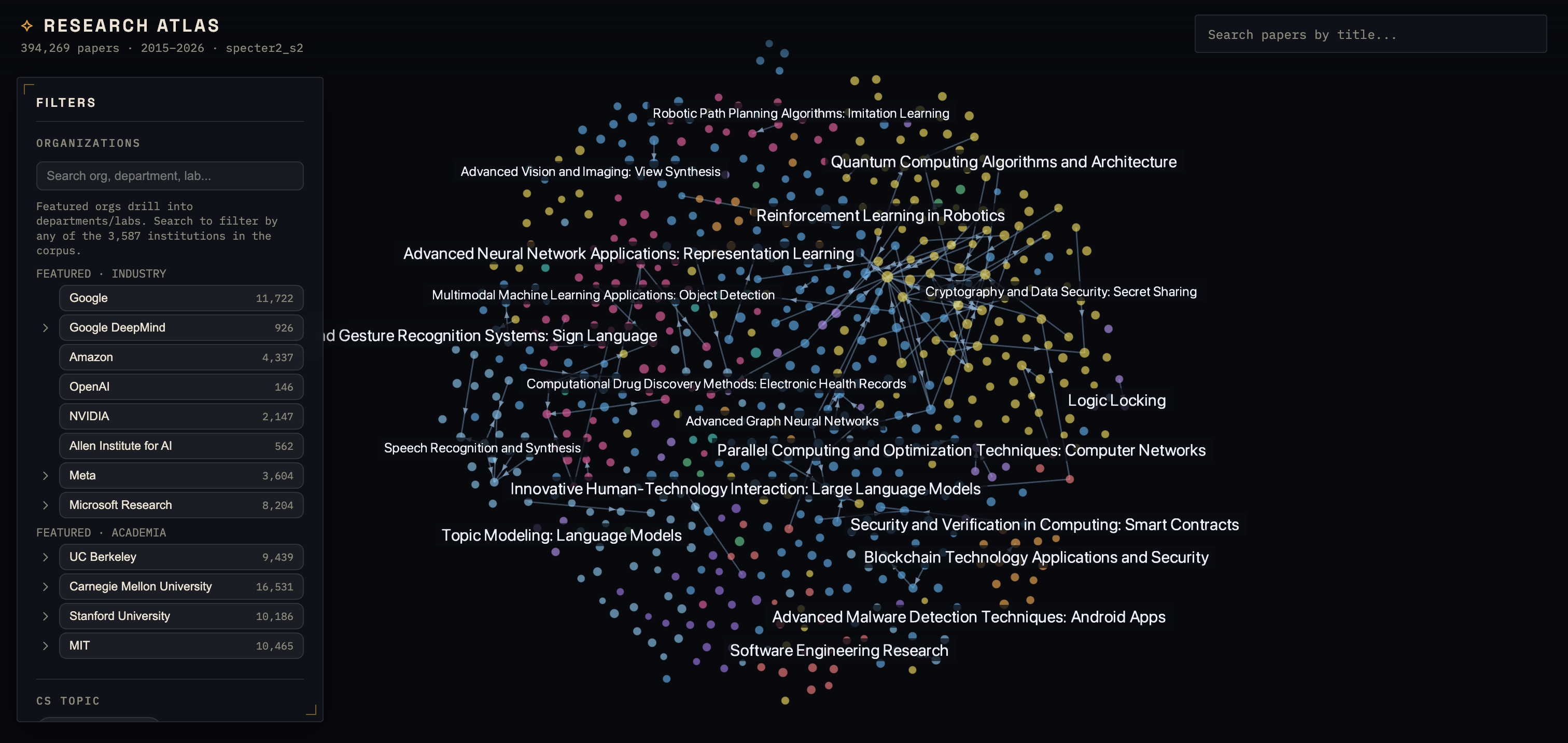
A 2D map of CS/AI research papers. Each paper is a point, papers with similar titles/abstracts sit near each other, and citations are drawn as directed edges. Zooming works like a map: broad fields when zoomed out, specific topics in the middle, and micro-clusters of a few papers at the deepest zoom.
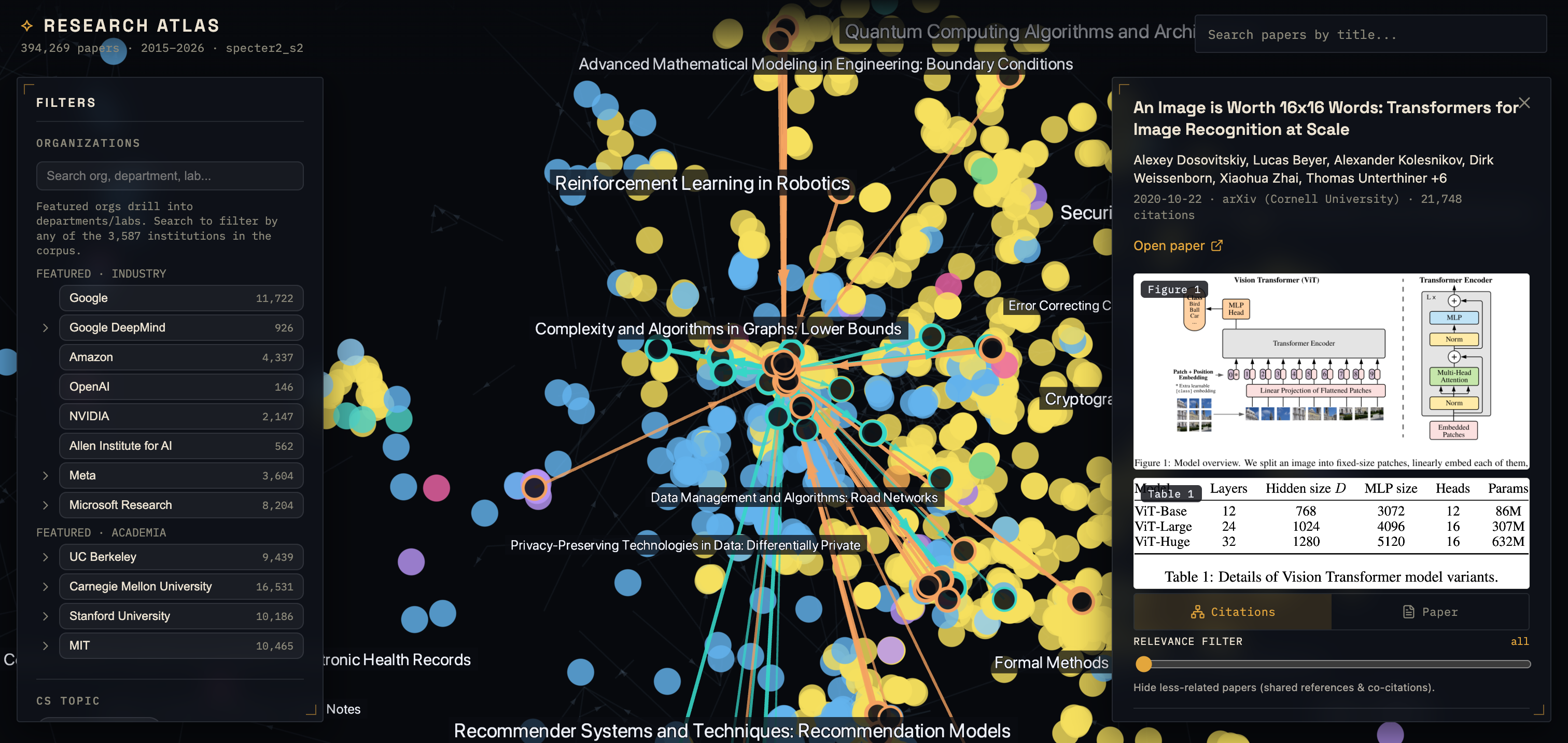
Select a paper to see its citation network, related work, and — for arXiv papers — its Figure 1 and Table 1 pulled straight from the PDF. A slider filters the network down to the most related papers.
Being a good researcher means having good "research taste", a set of good intuitions and judgements for tackling questions that are both interesting to you and worthwhile.
This includes the ability to scope the bigger picture of a field: what problems are important, what approaches have been tried? While we can automate research experiments, taste is something unique to yourself and not something AI can do well.
The ability to build a Strategic Big Picture is the purpose of this project.
See (usecases.md)
Understanding Individual Researchers (advisors, recruitment, etc): It allows one to view the research interest of a singular researchers at specific company, organization, neolab, or university by filtering across time periods and viewing all their published research, as well as the specific topics that research centers around.
Organization Research Trends: It allows one to understand the general research trends of groups of reserachers in specific time periods (10 years ago or contemporary day) by visualizing what topics their published work centers around. By groups this includes groups of researchers in any granularity. This includes - Universities (Berkeley), University Departments (CMU's MLD or RI) and individual Research Labs/Groups within (Berkley's BAIR, CMU's BIG lab, Biorobotics lab) - Companies (Amazon, Google) and individual research Groups (FAIR, Meta Superintelligence, Amazon FAR, Amazon AGI, Google Deepmind, Google Brain, etc) - NeoLabs (Redwood Research, Anthropic, OpenAI, Deepseek, Kimi, Minimax).
Finding similar work: We can visualize the relations and similarities given a specific research work to other research works based on the topic and semantic similarity of written content.
Visualizing how fields evolve: By clustering groups of related research work together into common labels, we can view from different time periods what topic were relevant in what times and how they evolved.
See (docs/prior_websites)
Requires Python 3.11 (via uv).
uv venv --python 3.11
uv pip install -r pipeline/requirements.txt
# optional local embedding fallback (pulls torch):
uv pip install "sentence-transformers>=3.0" "torch>=2.2"

cp .env.example .env          # set OPENALEX_MAILTO; OPENALEX_API_KEY recommended

uv run python -m pipeline.run_all              # full run
uv run python -m pipeline.run_all --from s04   # resume from a stage
uv run python -m pipeline.run_all --only s06,s07
config.yaml holds everything configurable (corpus scope, date range, embedding backend,
zoom bands, figure baking). Output lands in web/public/data/.
cd web
npm install
npm run dev        # http://localhost:5173
A fresh clone has no data bundle (it's gitignored — it's large and regenerable), so run the pipeline once first, or the app shows "Failed to load data."
Import your library and the map filters to the papers you have actually read, so the areas you have worked through — and the ones you never have — become visible. Any CSL JSON export works (Zotero, Mendeley and Paperpile all offer one), as does BibTeX. To keep your Zotero collection names as separate toggles:
# reads a local Zotero database, or Zotero 7's local API, or the hosted API with a read-only key
python3 tools/zotero_export.py --list                      # what collections can I see?
python3 tools/zotero_export.py -o reading-list.json        # default: "1. Finished", "2. Understood"
ZOTERO_API_KEY=... python3 tools/zotero_export.py -o reading-list.json   # library on another machine
Then Filters → Reading list → Import. Matching runs entirely in the browser (arXiv id, then DOI, then title), so your reading history never leaves your machine, and the panel reports how many entries matched rather than quietly dropping the rest.
| Stage | Does |
|---|---|
| s00 | resolve org names → OpenAlex institution ids |
| s01 | fetch CS works (field × dates, optionally org-gated) |
| s02 | reconstruct abstracts, dedupe, assign node ids, arXiv-preferred dates |
| s03 | embed (SPECTER2 via Semantic Scholar, SciNCL fallback) |
| s04 | openTSNE 768→2D, freeze the projector |
| s05 | UMAP→10D + HDBSCAN clustering |
| s09 / s08 | citation edges / fused semantic + citation neighbor graph |
| s06 / s07 | nested Leiden communities / topic + phrase labels |
| s12 | reveal levels for overlap-free zoom + on-demand tiles |
| s10 | org / author / topic indexes |
| s13 | (optional) bake Figure 1 crops from arXiv PDFs |
| s11 | assemble the static bundle + manifest |
config.yaml            # single source of truth for the pipeline
pipeline/
  run_all.py           # stage orchestrator (typer CLI)
  common/              # artifact schema, abstract reconstruction, OpenAlex client, figure extract
  embedding/           # swappable backends (specter2_s2, scincl_local)
  directory/           # curated org/department/lab units
  stages/              # s00 … s16
  tests/               # pytest
tools/
  zotero_export.py     # export your Zotero collections to an importable reading list
web/
  src/
    data/              # artifact loader + TS types (mirror of schema.py)
    state/             # zustand store
    map/               # deck.gl MapView + layers (points, edges, labels) + relevance/scores
    filters/           # org / author / topic / date / reading list + GPU filter mask
    panels/            # details, citations, figure/table, arXiv preview, related works
  public/data/         # ← pipeline output (gitignored)
uv run pytest                    # pipeline unit tests
cd web && npx tsc -b             # frontend typecheck
cd web && npm run test:e2e       # Playwright (desktop + mobile)
Papers, citations, and topics come from OpenAlex (CC0); SPECTER2
embeddings from Semantic Scholar; figure/table crops and
dates from arXiv under its API terms. This project is MIT-licensed (see
LICENSE); the offline figure stage uses PyMuPDF (AGPL-3.0) — see
NOTICE.md for what that means.
The checked-in config builds a demonstrator. Known limitations and next work are tracked in
docs/TODO.md and docs/ROADMAP.md; if you're picking the
project up, start with docs/HANDOFF.md.
tool to explore research trends across organizations, universities, and neolabs
Python
0
50 commits
updated Sep 3, 2026
A 2D map of CS/AI research papers. Each paper is a point, papers with similar titles/abstracts sit near each other, and citations are drawn as directed edges. Zooming works like a map: broad fields when zoomed out, specific topics in the middle, and micro-clusters of a few papers at the deepest zoom.
Select a paper to see its citation network, related work, and — for arXiv papers — its Figure 1 and Table 1 pulled straight from the PDF. A slider filters the network down to the most related papers.
Being a good researcher means having good "research taste", a set of good intuitions and judgements for tackling questions that are both interesting to you and worthwhile.
This includes the ability to scope the bigger picture of a field: what problems are important, what approaches have been tried? While we can automate research experiments, taste is something unique to yourself and not something AI can do well.
The ability to build a Strategic Big Picture is the purpose of this project.
See (usecases.md)
Understanding Individual Researchers (advisors, recruitment, etc): It allows one to view the research interest of a singular researchers at specific company, organization, neolab, or university by filtering across time periods and viewing all their published research, as well as the specific topics that research centers around.
Organization Research Trends: It allows one to understand the general research trends of groups of reserachers in specific time periods (10 years ago or contemporary day) by visualizing what topics their published work centers around. By groups this includes groups of researchers in any granularity. This includes - Universities (Berkeley), University Departments (CMU's MLD or RI) and individual Research Labs/Groups within (Berkley's BAIR, CMU's BIG lab, Biorobotics lab) - Companies (Amazon, Google) and individual research Groups (FAIR, Meta Superintelligence, Amazon FAR, Amazon AGI, Google Deepmind, Google Brain, etc) - NeoLabs (Redwood Research, Anthropic, OpenAI, Deepseek, Kimi, Minimax).
Finding similar work: We can visualize the relations and similarities given a specific research work to other research works based on the topic and semantic similarity of written content.
Visualizing how fields evolve: By clustering groups of related research work together into common labels, we can view from different time periods what topic were relevant in what times and how they evolved.
See (docs/prior_websites)
Requires Python 3.11 (via uv).
uv venv --python 3.11
uv pip install -r pipeline/requirements.txt
# optional local embedding fallback (pulls torch):
uv pip install "sentence-transformers>=3.0" "torch>=2.2"

cp .env.example .env          # set OPENALEX_MAILTO; OPENALEX_API_KEY recommended

uv run python -m pipeline.run_all              # full run
uv run python -m pipeline.run_all --from s04   # resume from a stage
uv run python -m pipeline.run_all --only s06,s07
config.yaml holds everything configurable (corpus scope, date range, embedding backend,
zoom bands, figure baking). Output lands in web/public/data/.
cd web
npm install
npm run dev        # http://localhost:5173
A fresh clone has no data bundle (it's gitignored — it's large and regenerable), so run the pipeline once first, or the app shows "Failed to load data."
Import your library and the map filters to the papers you have actually read, so the areas you have worked through — and the ones you never have — become visible. Any CSL JSON export works (Zotero, Mendeley and Paperpile all offer one), as does BibTeX. To keep your Zotero collection names as separate toggles:
# reads a local Zotero database, or Zotero 7's local API, or the hosted API with a read-only key
python3 tools/zotero_export.py --list                      # what collections can I see?
python3 tools/zotero_export.py -o reading-list.json        # default: "1. Finished", "2. Understood"
ZOTERO_API_KEY=... python3 tools/zotero_export.py -o reading-list.json   # library on another machine
Then Filters → Reading list → Import. Matching runs entirely in the browser (arXiv id, then DOI, then title), so your reading history never leaves your machine, and the panel reports how many entries matched rather than quietly dropping the rest.
| Stage | Does |
|---|---|
| s00 | resolve org names → OpenAlex institution ids |
| s01 | fetch CS works (field × dates, optionally org-gated) |
| s02 | reconstruct abstracts, dedupe, assign node ids, arXiv-preferred dates |
| s03 | embed (SPECTER2 via Semantic Scholar, SciNCL fallback) |
| s04 | openTSNE 768→2D, freeze the projector |
| s05 | UMAP→10D + HDBSCAN clustering |
| s09 / s08 | citation edges / fused semantic + citation neighbor graph |
| s06 / s07 | nested Leiden communities / topic + phrase labels |
| s12 | reveal levels for overlap-free zoom + on-demand tiles |
| s10 | org / author / topic indexes |
| s13 | (optional) bake Figure 1 crops from arXiv PDFs |
| s11 | assemble the static bundle + manifest |
config.yaml            # single source of truth for the pipeline
pipeline/
  run_all.py           # stage orchestrator (typer CLI)
  common/              # artifact schema, abstract reconstruction, OpenAlex client, figure extract
  embedding/           # swappable backends (specter2_s2, scincl_local)
  directory/           # curated org/department/lab units
  stages/              # s00 … s16
  tests/               # pytest
tools/
  zotero_export.py     # export your Zotero collections to an importable reading list
web/
  src/
    data/              # artifact loader + TS types (mirror of schema.py)
    state/             # zustand store
    map/               # deck.gl MapView + layers (points, edges, labels) + relevance/scores
    filters/           # org / author / topic / date / reading list + GPU filter mask
    panels/            # details, citations, figure/table, arXiv preview, related works
  public/data/         # ← pipeline output (gitignored)
uv run pytest                    # pipeline unit tests
cd web && npx tsc -b             # frontend typecheck
cd web && npm run test:e2e       # Playwright (desktop + mobile)
Papers, citations, and topics come from OpenAlex (CC0); SPECTER2
embeddings from Semantic Scholar; figure/table crops and
dates from arXiv under its API terms. This project is MIT-licensed (see
LICENSE); the offline figure stage uses PyMuPDF (AGPL-3.0) — see
NOTICE.md for what that means.
The checked-in config builds a demonstrator. Known limitations and next work are tracked in
docs/TODO.md and docs/ROADMAP.md; if you're picking the
project up, start with docs/HANDOFF.md.



