
Local text-to-speech app for windows + mac
See the codeREADME
Atten
Natural text-to-speech that runs entirely on your computer.
No cloud. No subscription. No API key.
Download for Mac · Download for Windows · Website · Command line

Free and open source · macOS 14+ Apple Silicon · Windows x64 preview
Local speech, without the setup
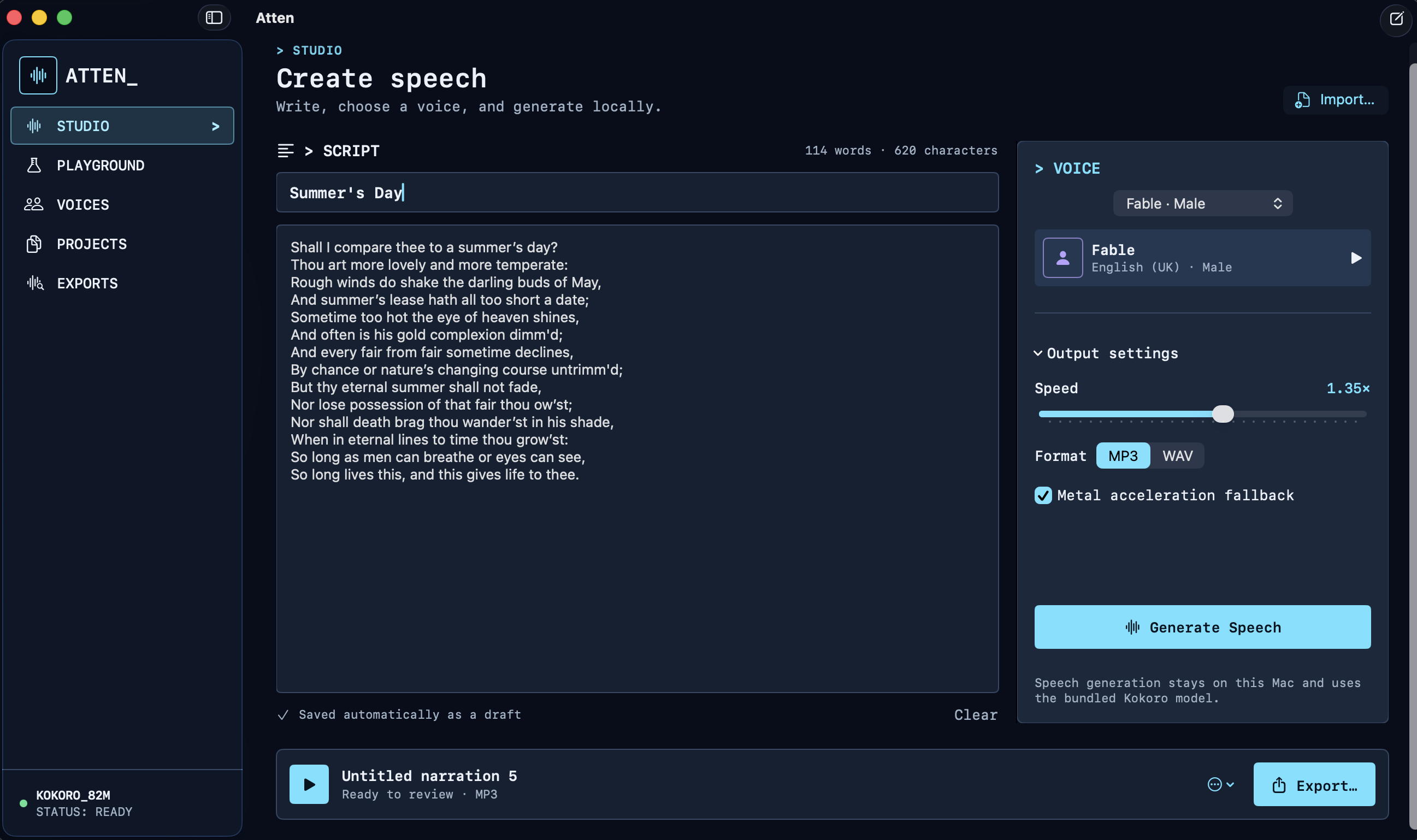
Atten is a Mac reading and listening app powered by the bundled Kokoro 82M model. Your documents and audio stay on your computer, and the bundled speech engine works offline.
- Add a book or document to Library, read it, and prepare its complete narration
- Resume interrupted preparation without losing completed chapters
- Listen with chapter navigation, seeking, and independent playback speed
- Return to your listening position without automatic playback
- Use Create for text-to-audio drafts, voice previews, saved projects, and exports
- Export prepared books as M4A, and create MP3 or WAV audio with 37 bundled voices
- Use the compatible CLI for scripts and automation
The Mac overhaul is an unpublished release candidate. See the acceptance report for verified behavior and remaining release checks; Windows retains its existing interface.
Install
macOS
- Download the latest DMG.
- Open it and drag Atten into Applications.
- Launch Atten and add a document to Library—everything required is included.
Atten currently requires an Apple Silicon Mac running macOS 14 or newer. Previously published releases are ad-hoc signed and not yet notarized, so macOS blocks the first launch with "Apple could not verify Atten is free of malware". To open it: double-click Atten and dismiss the warning, then open System Settings → Privacy & Security, scroll to Security, and choose Open Anyway next to Atten. You do this once. See the installation notes for download verification.
Windows
- Download the Windows x64 installer.
- Run the installer and review its system-requirements screen.
- Choose an install location, then launch Atten from the Finish screen or Start menu.
Atten requires 64-bit Windows 10 version 1809 or newer (or Windows 11), 8 GB
RAM, and 4 GB of free disk space. The installer checks these before copying
files and warns when less than 4 GB RAM is currently free for model loading.
It includes the CPU speech engine, Kokoro model, Python runtime, .NET runtime,
and Windows App SDK: there is no separate runtime, Python, model download, or
internet requirement after download. CUDA-aware backend support remains
available for maintainers through scripts/build-windows.ps1 -BackendFlavor cuda.
Command line
The original local commands remain available for automation:
bin/tts "Living the dream"
bin/tts -f README.md -v bf_emma -s 1.1 --format wav --play
bin/tts "Hello" --filename greeting --silent
bin/play --latest
Machine-readable output is supported too:
bin/tts --list-voices --json
bin/tts --backend-info --device auto --json
bin/tts "Hello" --device cpu --json
bin/tts "Hello" --device auto --json
--device auto selects Metal/MPS on macOS when available, CUDA on Windows/Linux
when PyTorch can use it, and CPU otherwise. Explicit --device cuda and
--device mps fail loudly if the requested accelerator is unavailable.
Run bin/tts --help for every option, or browse the voice catalog.
Develop locally
macOS app
You will need an Apple Silicon Mac with macOS 14+, Xcode 16 with Swift 6,
Python 3.12, and uv.
bin/setup-macos
bin/atten
The development setup downloads roughly 350 MB of model weights. Published DMGs already include the pinned model and do not require Python or Homebrew.
Build and open a development app bundle:
scripts/build-app-macos
open .build/Atten.app
Or work on the Swift package directly:
swift build
swift run Atten
The development app uses the repository's backend environment. To use a
backend elsewhere, set ATTEN_BACKEND_ROOT=/path/to/offline-tts.
Windows app
You will need Windows 10 1809+ or Windows 11 x64, Visual Studio 2022 with
Windows App SDK tooling, .NET 8 SDK, Python 3.12, uv, and PyInstaller.
uv sync --frozen --group release --no-editable
dotnet build apps/windows/Atten.Windows/Atten.Windows.csproj -c Debug -r win-x64
Build a Windows installer on Windows (Inno Setup 6 is required for the final installer step):
scripts/build-windows.ps1 -BackendFlavor cpu
scripts/build-windows.ps1 -BackendFlavor cuda
See Windows port notes for packaging status and remaining production-release work.
Test
swift test
python3 -m unittest discover -s tests -v
swift build -c release
Privacy and storage
- Synthesis is local and requires no account, credentials, or internet access.
- macOS project metadata lives in
~/Library/Application Support/Atten. - Windows project metadata lives in
%LOCALAPPDATA%\Atten. - Generated audio defaults to the
Exportsfolder inside the platform app-data directory. - Existing audio under the repository's
outputs/folder is discovered in place.
See the architecture notes for implementation details and deployment guide for release packaging and verification.
License
Atten is available under the GNU GPL v3 or later.
Similar repos


Languages
Swift
81.4%
Python
7.5%
C#
6.8%
TypeScript
2.3%
Shell
1.1%
Local text-to-speech app for windows + mac
See the codeREADME
Atten
Natural text-to-speech that runs entirely on your computer.
No cloud. No subscription. No API key.
Download for Mac · Download for Windows · Website · Command line
Free and open source · macOS 14+ Apple Silicon · Windows x64 preview
Local speech, without the setup
Atten is a Mac reading and listening app powered by the bundled Kokoro 82M model. Your documents and audio stay on your computer, and the bundled speech engine works offline.
- Add a book or document to Library, read it, and prepare its complete narration
- Resume interrupted preparation without losing completed chapters
- Listen with chapter navigation, seeking, and independent playback speed
- Return to your listening position without automatic playback
- Use Create for text-to-audio drafts, voice previews, saved projects, and exports
- Export prepared books as M4A, and create MP3 or WAV audio with 37 bundled voices
- Use the compatible CLI for scripts and automation
The Mac overhaul is an unpublished release candidate. See the acceptance report for verified behavior and remaining release checks; Windows retains its existing interface.
Install
macOS
- Download the latest DMG.
- Open it and drag Atten into Applications.
- Launch Atten and add a document to Library—everything required is included.
Atten currently requires an Apple Silicon Mac running macOS 14 or newer. Previously published releases are ad-hoc signed and not yet notarized, so macOS blocks the first launch with "Apple could not verify Atten is free of malware". To open it: double-click Atten and dismiss the warning, then open System Settings → Privacy & Security, scroll to Security, and choose Open Anyway next to Atten. You do this once. See the installation notes for download verification.
Windows
- Download the Windows x64 installer.
- Run the installer and review its system-requirements screen.
- Choose an install location, then launch Atten from the Finish screen or Start menu.
Atten requires 64-bit Windows 10 version 1809 or newer (or Windows 11), 8 GB
RAM, and 4 GB of free disk space. The installer checks these before copying
files and warns when less than 4 GB RAM is currently free for model loading.
It includes the CPU speech engine, Kokoro model, Python runtime, .NET runtime,
and Windows App SDK: there is no separate runtime, Python, model download, or
internet requirement after download. CUDA-aware backend support remains
available for maintainers through scripts/build-windows.ps1 -BackendFlavor cuda.
Command line
The original local commands remain available for automation:
bin/tts "Living the dream"
bin/tts -f README.md -v bf_emma -s 1.1 --format wav --play
bin/tts "Hello" --filename greeting --silent
bin/play --latest
Machine-readable output is supported too:
bin/tts --list-voices --json
bin/tts --backend-info --device auto --json
bin/tts "Hello" --device cpu --json
bin/tts "Hello" --device auto --json
--device auto selects Metal/MPS on macOS when available, CUDA on Windows/Linux
when PyTorch can use it, and CPU otherwise. Explicit --device cuda and
--device mps fail loudly if the requested accelerator is unavailable.
Run bin/tts --help for every option, or browse the voice catalog.
Develop locally
macOS app
You will need an Apple Silicon Mac with macOS 14+, Xcode 16 with Swift 6,
Python 3.12, and uv.
bin/setup-macos
bin/atten
The development setup downloads roughly 350 MB of model weights. Published DMGs already include the pinned model and do not require Python or Homebrew.
Build and open a development app bundle:
scripts/build-app-macos
open .build/Atten.app
Or work on the Swift package directly:
swift build
swift run Atten
The development app uses the repository's backend environment. To use a
backend elsewhere, set ATTEN_BACKEND_ROOT=/path/to/offline-tts.
Windows app
You will need Windows 10 1809+ or Windows 11 x64, Visual Studio 2022 with
Windows App SDK tooling, .NET 8 SDK, Python 3.12, uv, and PyInstaller.
uv sync --frozen --group release --no-editable
dotnet build apps/windows/Atten.Windows/Atten.Windows.csproj -c Debug -r win-x64
Build a Windows installer on Windows (Inno Setup 6 is required for the final installer step):
scripts/build-windows.ps1 -BackendFlavor cpu
scripts/build-windows.ps1 -BackendFlavor cuda
See Windows port notes for packaging status and remaining production-release work.
Test
swift test
python3 -m unittest discover -s tests -v
swift build -c release
Privacy and storage
- Synthesis is local and requires no account, credentials, or internet access.
- macOS project metadata lives in
~/Library/Application Support/Atten. - Windows project metadata lives in
%LOCALAPPDATA%\Atten. - Generated audio defaults to the
Exportsfolder inside the platform app-data directory. - Existing audio under the repository's
outputs/folder is discovered in place.
See the architecture notes for implementation details and deployment guide for release packaging and verification.
License
Atten is available under the GNU GPL v3 or later.
Similar repos
Languages
Swift
81.4%
Python
7.5%
C#
6.8%
TypeScript
2.3%
Shell
1.1%