
add Mod Manager function
See the codeREADME
StS2 Launcher Mod Manager
English | 한국어
An Android launcher + mod manager for Slay the Spire 2, built on a custom Godot 4.5.1 engine with .NET/Mono and Harmony runtime patching. Log in with Steam, download the game, browse the Steam Workshop, and play with mods — all on your phone.
Current release: v0.4.1
📖 사용설명서 (한국어) — 설치부터 모드/세이브 관리까지 스크린샷과 함께 설명하는 단계별 가이드: docs/USER_GUIDE.md
Fork notice — This is a community fork of Ekyso/StS2-Launcher. The upstream launcher's mod loader stopped working with newer game builds; this fork keeps mod loading compatible with each game update and adds Workshop support, save-data safety features, and mobile-UX improvements. See Differences from upstream.
Disclaimer — Unofficial community project. Slay the Spire 2 is developed and published by Mega Crit Games. A valid Steam account that owns Slay the Spire 2 is required; game files are downloaded directly from Steam after authentication. No game assets are included in this repository.
Getting started (players)
- Download the latest
StS2Launcher-vX.Y.Z.apkfrom the Releases page and install it. - Launch, grant "All files access", and log in with your Steam account (Steam Guard 2FA supported).
- Pick a Steam branch and download the game (~3 GB), then tap PLAY.
Full walkthrough with screenshots: 사용설명서 (USER_GUIDE.md). Upgrading between fork versions is a drop-in APK install — saves, login, and the game payload are preserved.
Differences from upstream
The fork diverged from Ekyso/StS2-Launcher in April 2026. Everything below is fork-added; per-version details live on the Releases page.
Mod loading that tracks game updates
- The upstream reflection-based mod loader crashes on current game builds (renamed private fields). Replaced with a Harmony IL transpiler that redirects the game's own mod scanner to
/storage/emulated/0/StS2LauncherMM/Mods/. - Kept compatible through breaking game updates since then: v0.107 async-lowering changes (issue #47), v0.108
ModelDbcontract change (issue #53), the v0.108 save-path helper signature change, and a general fix for init-setter properties under runtime IL re-emit that unblocked BaseLib 3.3.x (issue #55). tools/memberref-auditstatically audits our IL patches against a new game build before it ships, so signature breaks are caught before users hit them.
Steam Workshop support (Mod Hub)
Added in v0.3.34 (issue #58) — the MOD MANAGER button opens a full in-app Mod Hub:
- WORKSHOP tab — browse/search the Workshop with sorting, tag filters, and infinite scroll; paste a Workshop URL/ID to find unlisted items; item detail pages with description, Steam change notes, discussions, and comments.
- SUBSCRIBED tab — subscriptions sync with your Steam account; downloads, update detection, and dependency prompts are automatic. Unsubscribing removes the mod from the device.
- Mod stash (DISABLE) — hide a mod from the game without deleting it (moved to
ModsDisabled/, restored instantly with ENABLE, no re-download). - Downloads use SteamKit2
PublishedFileRPC + Steam depot CDN — no PC or Steamworks SDK involved.
Save-data safety
- Cloud-save destruction fix (issue #4) — the upstream launcher could silently overwrite real Steam Cloud progress with fresh-default saves when the cloud file cache wasn't loaded yet. The cloud store now blocks until the cache is ready and falls back to local-only mode when it isn't.
- Save Manager (issues #4/#7) — explicit conflict-resolution dialog replaces silent timestamp-based sync: side-by-side local/cloud summary cards (including the in-progress run) with an explicit Keep Local / Keep Cloud choice, on every PLAY and on demand via the SAVE MANAGER button.
- Cloud write guard + Local Backup (issue #36) — empty/abnormal writes are blocked at the single cloud-upload funnel, and full-tree save snapshots are taken manually (LOCAL BACKUP button, kept indefinitely) and automatically before every cloud handshake (FIFO-capped), so a wrong sync choice is recoverable.
Launcher quality-of-life
- Self-update (issue #12) — separate
CHECK GAME UPDATE/CHECK LAUNCHER UPDATEbuttons, automatic update check on boot, and an in-app APK download + install flow. - Steam branch picker — choose
public,public-beta, etc. per download; switching branches forces a clean re-download to avoid delta corruption. - Mobile UX — sensor-based landscape rotation, layout reflow across fold/unfold, split-screen, portrait-aspect windows, and 21:9 displays, rewritten touch scrolling with fling, back-button guard, and virtual-keyboard-aware panels.
- Diagnostics without adb — persistent Debug toggle captures logcat to
StS2LauncherMM/Logs/(auto-rotated) so users can attach logs to issues.
Mod-compatibility shims
- BaseLib — v3.x used to hard-crash the game on Android with a black screen (issues #8/#32/#55). Current builds load and run BaseLib and its dependents, with one remaining trade-off: BaseLib's async hook system (
AfterCardPlayedetc.) is intentionally no-op'd on mobile because its state-machine IL surgery corrupts memory on Mono Android. Mods that add content through BaseLib's non-hook APIs work normally; mods that rely on async hooks load but those triggers never fire. release_info.jsonon Android (issue #9) — fixes the????main-menu build label and LAN version-mismatch handshake failures.- LAN multiplayer fixes — 4-player sessions (issue #18), persistent client netId (issue #26), and cloud "zombie run" cleanup (issue #31).
Separate app identity
Package id is com.game.sts2launcher.modmanager and external storage lives under /storage/emulated/0/StS2LauncherMM/ — the fork installs alongside the upstream APK without sharing data, and the app label is "StS2 Launcher Mod".
Features
- Steam authentication — SteamKit2 login with Steam Guard 2FA; refresh tokens encrypted at rest via Android Keystore (AES-256-GCM, hardware-backed TEE).
- Game download — Steam depot download with update checking and branch selection.
- Steam Workshop — in-app browse, subscribe, auto-download/update, and mod enable/disable.
- Cloud saves — full Steam Cloud sync via SteamKit2's CCloud API with an explicit conflict-resolution UI and destructive-write guards.
- Local backup — manual and automatic full-tree save snapshots to external storage.
- Launcher self-update — in-app update check and APK install flow.
- Mobile adaptation — touch input, UI scaling, foldable/rotation layout handling, and app lifecycle handling via Harmony runtime patches.
- LAN multiplayer — UDP broadcast discovery and manual IP join (see LAN Multiplayer).
- Shader warmup — Vulkan pipeline cache persistence and canvas ubershaders to eliminate first-encounter stutters.
Installing mods
Workshop (recommended) — tap MOD MANAGER on the launch screen, browse or search the WORKSHOP tab, and subscribe. Download, installation, and updates are automatic. See the 사용설명서 for details.
Manual install — for mods not on the Workshop, drop each mod as its own subfolder under /storage/emulated/0/StS2LauncherMM/Mods/ using any file manager. A valid mod folder contains the mod's .dll, optional .pck, and a <ModId>.json manifest at its root — the same layout PC users put in Steam\steamapps\common\Slay the Spire 2\mods\.
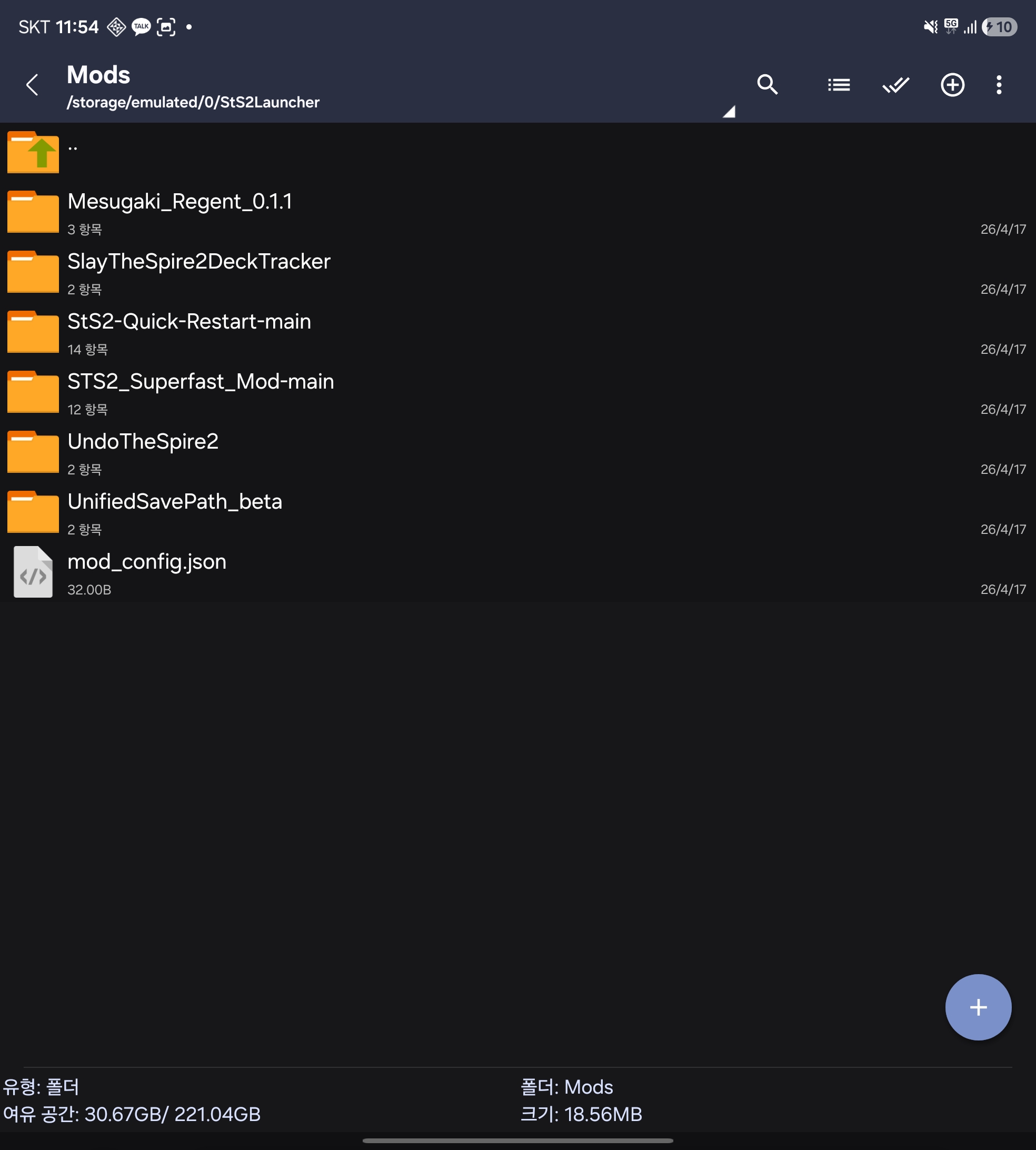
Launch the game and tap PLAY; accept the game's built-in "Load mods?" dialog and the game restarts once through the launcher with mods loaded. If mods don't appear, turn on the Debug toggle and check the log for [Mods] lines.
Known incompatibilities
Mods that import Steamworks.NET directly (e.g. QuickReload) crash on PLAY — Valve does not ship the Steamworks SDK native library for Android, and the launcher's stub libsteam_api.so only satisfies the linker. Several Steamworks API surfaces (SteamID, auth tickets, achievements/stats, cloud, UGC, leaderboards) can in principle be bridged through SteamKit2 and may be shimmed per-mod — file an issue if a specific mod needs one. Genuinely unbridgeable: SteamNetworkingSockets P2P, the Steam overlay, and SteamInput.
Release history
Per-version changelogs (in Korean, with technical notes) are on the Releases page. Fork-change details for 0.2.x–0.3.11 that used to live in this README are preserved in the git history.
Development
How it works
At startup, STS2Mobile.dll is loaded via coreclr_create_delegate and applies Harmony patches to adapt the desktop game for mobile. The launcher intercepts GameStartupWrapper() to present a Steam login screen before the game starts.
- Launcher-only mode — with no game files present, a minimal
bootstrap.pckprovides the launcher UI for Steam login and game download. - Normal mode — with game files downloaded, all patches apply against
sts2.dlland the game runs natively after authentication.
Engine patches
Custom patches to the Godot 4.5.1 engine source for Android-specific issues:
- Vulkan pipeline cache persistence — saves compiled pipelines when the app loses focus, preventing recompilation after Android kills the process.
- Canvas ubershaders — ubershader fallback for 2D rendering, eliminating first-encounter VFX stutters from blocking pipeline compilation.
Project structure
src/STS2Mobile/
  ModEntry.cs              # Entry point ([UnmanagedCallersOnly] Apply())
  PatchHelper.cs           # Shared patch utility + logging
  Patches/                 # Harmony patches (one file per concern)
  Launcher/                # Programmatic Godot UI (MVC) incl. Mod Hub / Workshop
  Steam/                   # SteamKit2 login, depot download, cloud saves, Workshop
src/stubs/                 # Native library stubs (Steam API, Sentry)
android/                   # Godot Android gradle project
  src/.../GodotApp.java    # Activity, assembly setup, Keystore encryption
  assets/bootstrap.pck     # Minimal PCK for launcher-only mode
tools/memberref-audit/     # Static IL audit of patches vs. a new game build
scripts/                   # Build and tooling scripts
docs/                      # User guide (Korean) + images
Prerequisites
- .NET 9 SDK
- Android SDK + NDK (see
android/config.gradlefor versions) - Python 3 (for
make-bootstrap-pck.pyand SCons) - Original game files in
upstream/godot-export/ - Custom Godot engine build (see
scripts/build-godot.sh) - FMOD SDK in
vendor/fmod-sdk/
Building
Note: the build requires binaries that are not in this repository. The custom Godot engine is based on godotengine/godot and Harmony on Ekyso/Harmony (compiled for .NET 9) — see the upstream project for engine details. FMOD and Spine cannot be redistributed for licensing reasons; see THIRD_PARTY_LICENSES.md.
bash scripts/build.sh
This runs the full pipeline: dotnet publish the patcher → copy published DLLs to android/assets/dotnet_bcl/ → copy the Android crypto native lib to JNI libs → bump the version in gradle.properties → build the APK via ./gradlew assembleMonoRelease.
Output: android/build/outputs/apk/mono/release/StS2Launcher-v<version>.apk
# Install to a device
adb install -r android/build/outputs/apk/mono/release/StS2Launcher-v*.apk

# Fresh install (clear saved credentials + cached assemblies)
adb shell pm clear com.game.sts2launcher.modmanager

# Regenerate bootstrap PCK (only if project.godot changes)
python3 scripts/make-bootstrap-pck.py

# Rebuild Godot engine (only if engine source changes)
bash scripts/build-godot.sh

# Rebuild native stubs (requires Android NDK)
bash src/stubs/build_stubs.sh
Technical notes
- Native library stubs (
src/stubs/) provide no-op.sofiles for desktop-only libraries (Steamworks SDK, Sentry) so the linker is satisfied at runtime. - The bootstrap PCK is a minimal
project.godotwrapper that enables .NET module initialization without game files. - The game's Sentry plugin has no
android.arm64build, so it's disabled via PCK patching and Harmony patches. - GodotSharp interop is manually bootstrapped in
ModEntry.cssince the Godot SDK source generators aren't available.
LAN Multiplayer
Both devices must be on the same local network. The mobile app discovers nearby games via UDP broadcast, or you can enter the PC's IP address manually.
On the PC, add --fastmp to the Steam launch options: Steam > Slay the Spire 2 > Properties > Launch Options → --fastmp. This enables the fast multiplayer mode the mobile client expects.
Keep PC and mobile on the same Steam branch — cloud saves uploaded from one branch are not readable by a client on another, and Steam shows a generic sync conflict with no auto-recovery.
License
This project is licensed under the MIT License. See THIRD_PARTY_LICENSES.md for third-party dependency licenses. FMOD requires a commercial license if your project generates revenue; Spine Runtimes require a valid Spine Editor license.
Similar repos


Languages
C#
89.7%
C
5.9%
Java
3.3%
add Mod Manager function
See the codeREADME
StS2 Launcher Mod Manager
English | 한국어
An Android launcher + mod manager for Slay the Spire 2, built on a custom Godot 4.5.1 engine with .NET/Mono and Harmony runtime patching. Log in with Steam, download the game, browse the Steam Workshop, and play with mods — all on your phone.
Current release: v0.4.1
📖 사용설명서 (한국어) — 설치부터 모드/세이브 관리까지 스크린샷과 함께 설명하는 단계별 가이드: docs/USER_GUIDE.md
Fork notice — This is a community fork of Ekyso/StS2-Launcher. The upstream launcher's mod loader stopped working with newer game builds; this fork keeps mod loading compatible with each game update and adds Workshop support, save-data safety features, and mobile-UX improvements. See Differences from upstream.
Disclaimer — Unofficial community project. Slay the Spire 2 is developed and published by Mega Crit Games. A valid Steam account that owns Slay the Spire 2 is required; game files are downloaded directly from Steam after authentication. No game assets are included in this repository.
Getting started (players)
- Download the latest
StS2Launcher-vX.Y.Z.apkfrom the Releases page and install it. - Launch, grant "All files access", and log in with your Steam account (Steam Guard 2FA supported).
- Pick a Steam branch and download the game (~3 GB), then tap PLAY.
Full walkthrough with screenshots: 사용설명서 (USER_GUIDE.md). Upgrading between fork versions is a drop-in APK install — saves, login, and the game payload are preserved.
Differences from upstream
The fork diverged from Ekyso/StS2-Launcher in April 2026. Everything below is fork-added; per-version details live on the Releases page.
Mod loading that tracks game updates
- The upstream reflection-based mod loader crashes on current game builds (renamed private fields). Replaced with a Harmony IL transpiler that redirects the game's own mod scanner to
/storage/emulated/0/StS2LauncherMM/Mods/. - Kept compatible through breaking game updates since then: v0.107 async-lowering changes (issue #47), v0.108
ModelDbcontract change (issue #53), the v0.108 save-path helper signature change, and a general fix for init-setter properties under runtime IL re-emit that unblocked BaseLib 3.3.x (issue #55). tools/memberref-auditstatically audits our IL patches against a new game build before it ships, so signature breaks are caught before users hit them.
Steam Workshop support (Mod Hub)
Added in v0.3.34 (issue #58) — the MOD MANAGER button opens a full in-app Mod Hub:
- WORKSHOP tab — browse/search the Workshop with sorting, tag filters, and infinite scroll; paste a Workshop URL/ID to find unlisted items; item detail pages with description, Steam change notes, discussions, and comments.
- SUBSCRIBED tab — subscriptions sync with your Steam account; downloads, update detection, and dependency prompts are automatic. Unsubscribing removes the mod from the device.
- Mod stash (DISABLE) — hide a mod from the game without deleting it (moved to
ModsDisabled/, restored instantly with ENABLE, no re-download). - Downloads use SteamKit2
PublishedFileRPC + Steam depot CDN — no PC or Steamworks SDK involved.
Save-data safety
- Cloud-save destruction fix (issue #4) — the upstream launcher could silently overwrite real Steam Cloud progress with fresh-default saves when the cloud file cache wasn't loaded yet. The cloud store now blocks until the cache is ready and falls back to local-only mode when it isn't.
- Save Manager (issues #4/#7) — explicit conflict-resolution dialog replaces silent timestamp-based sync: side-by-side local/cloud summary cards (including the in-progress run) with an explicit Keep Local / Keep Cloud choice, on every PLAY and on demand via the SAVE MANAGER button.
- Cloud write guard + Local Backup (issue #36) — empty/abnormal writes are blocked at the single cloud-upload funnel, and full-tree save snapshots are taken manually (LOCAL BACKUP button, kept indefinitely) and automatically before every cloud handshake (FIFO-capped), so a wrong sync choice is recoverable.
Launcher quality-of-life
- Self-update (issue #12) — separate
CHECK GAME UPDATE/CHECK LAUNCHER UPDATEbuttons, automatic update check on boot, and an in-app APK download + install flow. - Steam branch picker — choose
public,public-beta, etc. per download; switching branches forces a clean re-download to avoid delta corruption. - Mobile UX — sensor-based landscape rotation, layout reflow across fold/unfold, split-screen, portrait-aspect windows, and 21:9 displays, rewritten touch scrolling with fling, back-button guard, and virtual-keyboard-aware panels.
- Diagnostics without adb — persistent Debug toggle captures logcat to
StS2LauncherMM/Logs/(auto-rotated) so users can attach logs to issues.
Mod-compatibility shims
- BaseLib — v3.x used to hard-crash the game on Android with a black screen (issues #8/#32/#55). Current builds load and run BaseLib and its dependents, with one remaining trade-off: BaseLib's async hook system (
AfterCardPlayedetc.) is intentionally no-op'd on mobile because its state-machine IL surgery corrupts memory on Mono Android. Mods that add content through BaseLib's non-hook APIs work normally; mods that rely on async hooks load but those triggers never fire. release_info.jsonon Android (issue #9) — fixes the????main-menu build label and LAN version-mismatch handshake failures.- LAN multiplayer fixes — 4-player sessions (issue #18), persistent client netId (issue #26), and cloud "zombie run" cleanup (issue #31).
Separate app identity
Package id is com.game.sts2launcher.modmanager and external storage lives under /storage/emulated/0/StS2LauncherMM/ — the fork installs alongside the upstream APK without sharing data, and the app label is "StS2 Launcher Mod".
Features
- Steam authentication — SteamKit2 login with Steam Guard 2FA; refresh tokens encrypted at rest via Android Keystore (AES-256-GCM, hardware-backed TEE).
- Game download — Steam depot download with update checking and branch selection.
- Steam Workshop — in-app browse, subscribe, auto-download/update, and mod enable/disable.
- Cloud saves — full Steam Cloud sync via SteamKit2's CCloud API with an explicit conflict-resolution UI and destructive-write guards.
- Local backup — manual and automatic full-tree save snapshots to external storage.
- Launcher self-update — in-app update check and APK install flow.
- Mobile adaptation — touch input, UI scaling, foldable/rotation layout handling, and app lifecycle handling via Harmony runtime patches.
- LAN multiplayer — UDP broadcast discovery and manual IP join (see LAN Multiplayer).
- Shader warmup — Vulkan pipeline cache persistence and canvas ubershaders to eliminate first-encounter stutters.
Installing mods
Workshop (recommended) — tap MOD MANAGER on the launch screen, browse or search the WORKSHOP tab, and subscribe. Download, installation, and updates are automatic. See the 사용설명서 for details.
Manual install — for mods not on the Workshop, drop each mod as its own subfolder under /storage/emulated/0/StS2LauncherMM/Mods/ using any file manager. A valid mod folder contains the mod's .dll, optional .pck, and a <ModId>.json manifest at its root — the same layout PC users put in Steam\steamapps\common\Slay the Spire 2\mods\.
Launch the game and tap PLAY; accept the game's built-in "Load mods?" dialog and the game restarts once through the launcher with mods loaded. If mods don't appear, turn on the Debug toggle and check the log for [Mods] lines.
Known incompatibilities
Mods that import Steamworks.NET directly (e.g. QuickReload) crash on PLAY — Valve does not ship the Steamworks SDK native library for Android, and the launcher's stub libsteam_api.so only satisfies the linker. Several Steamworks API surfaces (SteamID, auth tickets, achievements/stats, cloud, UGC, leaderboards) can in principle be bridged through SteamKit2 and may be shimmed per-mod — file an issue if a specific mod needs one. Genuinely unbridgeable: SteamNetworkingSockets P2P, the Steam overlay, and SteamInput.
Release history
Per-version changelogs (in Korean, with technical notes) are on the Releases page. Fork-change details for 0.2.x–0.3.11 that used to live in this README are preserved in the git history.
Development
How it works
At startup, STS2Mobile.dll is loaded via coreclr_create_delegate and applies Harmony patches to adapt the desktop game for mobile. The launcher intercepts GameStartupWrapper() to present a Steam login screen before the game starts.
- Launcher-only mode — with no game files present, a minimal
bootstrap.pckprovides the launcher UI for Steam login and game download. - Normal mode — with game files downloaded, all patches apply against
sts2.dlland the game runs natively after authentication.
Engine patches
Custom patches to the Godot 4.5.1 engine source for Android-specific issues:
- Vulkan pipeline cache persistence — saves compiled pipelines when the app loses focus, preventing recompilation after Android kills the process.
- Canvas ubershaders — ubershader fallback for 2D rendering, eliminating first-encounter VFX stutters from blocking pipeline compilation.
Project structure
src/STS2Mobile/
  ModEntry.cs              # Entry point ([UnmanagedCallersOnly] Apply())
  PatchHelper.cs           # Shared patch utility + logging
  Patches/                 # Harmony patches (one file per concern)
  Launcher/                # Programmatic Godot UI (MVC) incl. Mod Hub / Workshop
  Steam/                   # SteamKit2 login, depot download, cloud saves, Workshop
src/stubs/                 # Native library stubs (Steam API, Sentry)
android/                   # Godot Android gradle project
  src/.../GodotApp.java    # Activity, assembly setup, Keystore encryption
  assets/bootstrap.pck     # Minimal PCK for launcher-only mode
tools/memberref-audit/     # Static IL audit of patches vs. a new game build
scripts/                   # Build and tooling scripts
docs/                      # User guide (Korean) + images
Prerequisites
- .NET 9 SDK
- Android SDK + NDK (see
android/config.gradlefor versions) - Python 3 (for
make-bootstrap-pck.pyand SCons) - Original game files in
upstream/godot-export/ - Custom Godot engine build (see
scripts/build-godot.sh) - FMOD SDK in
vendor/fmod-sdk/
Building
Note: the build requires binaries that are not in this repository. The custom Godot engine is based on godotengine/godot and Harmony on Ekyso/Harmony (compiled for .NET 9) — see the upstream project for engine details. FMOD and Spine cannot be redistributed for licensing reasons; see THIRD_PARTY_LICENSES.md.
bash scripts/build.sh
This runs the full pipeline: dotnet publish the patcher → copy published DLLs to android/assets/dotnet_bcl/ → copy the Android crypto native lib to JNI libs → bump the version in gradle.properties → build the APK via ./gradlew assembleMonoRelease.
Output: android/build/outputs/apk/mono/release/StS2Launcher-v<version>.apk
# Install to a device
adb install -r android/build/outputs/apk/mono/release/StS2Launcher-v*.apk

# Fresh install (clear saved credentials + cached assemblies)
adb shell pm clear com.game.sts2launcher.modmanager

# Regenerate bootstrap PCK (only if project.godot changes)
python3 scripts/make-bootstrap-pck.py

# Rebuild Godot engine (only if engine source changes)
bash scripts/build-godot.sh

# Rebuild native stubs (requires Android NDK)
bash src/stubs/build_stubs.sh
Technical notes
- Native library stubs (
src/stubs/) provide no-op.sofiles for desktop-only libraries (Steamworks SDK, Sentry) so the linker is satisfied at runtime. - The bootstrap PCK is a minimal
project.godotwrapper that enables .NET module initialization without game files. - The game's Sentry plugin has no
android.arm64build, so it's disabled via PCK patching and Harmony patches. - GodotSharp interop is manually bootstrapped in
ModEntry.cssince the Godot SDK source generators aren't available.
LAN Multiplayer
Both devices must be on the same local network. The mobile app discovers nearby games via UDP broadcast, or you can enter the PC's IP address manually.
On the PC, add --fastmp to the Steam launch options: Steam > Slay the Spire 2 > Properties > Launch Options → --fastmp. This enables the fast multiplayer mode the mobile client expects.
Keep PC and mobile on the same Steam branch — cloud saves uploaded from one branch are not readable by a client on another, and Steam shows a generic sync conflict with no auto-recovery.
License
This project is licensed under the MIT License. See THIRD_PARTY_LICENSES.md for third-party dependency licenses. FMOD requires a commercial license if your project generates revenue; Spine Runtimes require a valid Spine Editor license.
Similar repos
Languages
C#
89.7%
C
5.9%
Java
3.3%