The Bloomberg Terminal for CLI Agents, its Maestro Baby!
TypeScript
1,180
229 commits
updated Apr 19, 2026
Orchestrate multiple AI coding assistants in parallel
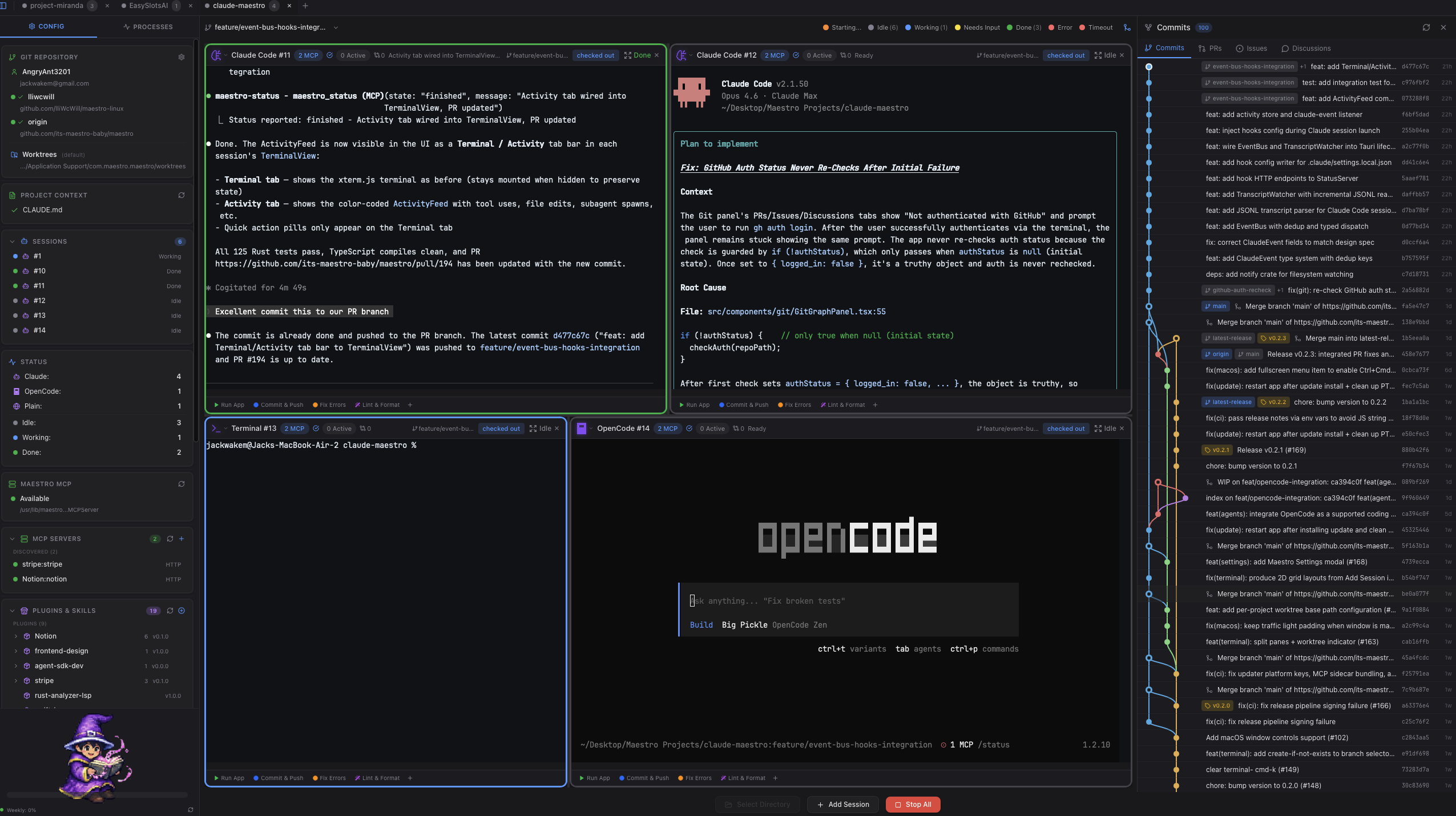
A cross-platform desktop application that lets you run 1-6 Claude Code (or other AI CLI) sessions simultaneously, each in its own isolated git worktree.






Star us on GitHub — your support motivates us a lot!
The Problem: AI coding assistants work on one task at a time. While Claude works on Feature A, you wait. Then you start Feature B. Then you wait again. Context switching is expensive, and your development velocity is bottlenecked by serial execution.
The Solution: Run multiple AI sessions in parallel. Each session gets its own:
| Principle | Description |
|---|---|
| Parallel Development | Launch 1-6 AI sessions simultaneously. Work on feature branches, bug fixes, and refactoring all at once. |
| True Isolation | Each session operates in its own git worktree. No merge conflicts, no stepping on each other's changes. |
| AI-Native Workflow | Built specifically for Claude Code, Gemini CLI, OpenAI Codex, and other AI coding assistants. |
| Cross-Platform | Runs on macOS, Windows, and Linux with native performance. |
~/.claude-maestro/worktrees/maestro_status tool for state communication| Shortcut | Action |
|---|---|
| Cmd+T | Add new terminal session |
| Cmd+D | Split pane vertically |
| Cmd+Shift+D | Split pane horizontally |
| Cmd+W | Close focused pane |
| Cmd+1-9 | Jump to terminal 1-9 |
| Cmd+[ / Cmd+] | Cycle previous / next terminal |
| Cmd+K | Clear terminal scrollback |
| Cmd+C | Copy selection (SIGINT if no selection) |
| Cmd+= / Cmd+- | Zoom in / out |
| Cmd+0 | Reset zoom |
| Shift+Enter | Newline without executing |
| Cmd+Left / Cmd+Right | Jump to line start / end |
| Cmd+Backspace | Delete to line start |
| Escape | Exit zoom mode |
Note: Cmd = Ctrl on Windows/Linux
┌─────────────────────────────────────────────────────────────────┐
│                    Claude Maestro (Tauri)                       │
│                                                                 │
│  ┌──────────────┐  ┌──────────────┐  ┌──────────────┐          │
│  │  Session 1   │  │  Session 2   │  │  Session 3   │   ...    │
│  │ Claude Code  │  │ Gemini CLI   │  │  Terminal    │          │
│  │ feature/auth │  │ fix/bug-123  │  │    main      │          │
│  └──────┬───────┘  └──────┬───────┘  └──────┬───────┘          │
│         │                 │                 │                   │
│  ┌──────▼─────────────────▼─────────────────▼───────┐          │
│  │              ProcessManager (Rust)               │          │
│  │     ~/.claude-maestro/worktrees/{repo}/{branch}  │          │
│  └──────────────────────────────────────────────────┘          │
│                                                                 │
│  Frontend: React + TypeScript + Tailwind CSS                    │
│  Backend: Rust + Tauri                                          │
└─────────────────────────────────────────────────────────────────┘
                              │
                              │ MCP Protocol (stdio)
                              ▼
┌─────────────────────────────────────────────────────────────────┐
│                    MCP Server (Rust)                            │
│                                                                 │
│  ┌─────────────────────────────────────────────────────────────┐│
│  │                     StatusManager                           ││
│  │  maestro_status tool - agents report their current state    ││
│  │  (idle, working, needs_input, finished, error)              ││
│  └─────────────────────────────────────────────────────────────┘│
└─────────────────────────────────────────────────────────────────┘
| Component | Technology |
|---|---|
| Desktop App | Tauri 2.0, Rust |
| Frontend | React, TypeScript, Tailwind CSS |
| Terminal Emulator | xterm.js |
| MCP Server | Rust |
| Git Operations | Native git CLI |
macOS (13 Ventura or later):
# Install Xcode Command Line Tools
xcode-select --install
Windows (10 or later):
Linux (Ubuntu 24.04 LTS / Debian):
# Install Rust via rustup (Ubuntu 24.04's apt packages ship Rust 1.75, which is too old)
curl --proto '=https' --tlsv1.2 -sSf https://sh.rustup.rs | sh
source "$HOME/.cargo/env"

# Install required system dependencies
sudo apt-get update
sudo apt-get install -y build-essential pkg-config libssl-dev \
  libwebkit2gtk-4.1-dev libayatana-appindicator3-dev librsvg2-dev \
  libfontconfig1-dev patchelf
Note: On Ubuntu 24.04, use
libayatana-appindicator3-devinstead oflibappindicator3-devto avoid package conflicts.
Linux (Fedora):
sudo dnf install gcc-c++ pkg-config openssl-devel \
  webkit2gtk4.1-devel libappindicator-gtk3-devel librsvg2-devel
Linux (Arch):
sudo pacman -S base-devel pkgconf openssl \
  webkit2gtk-4.1 libappindicator-gtk3 librsvg
Clone the repository:
git clone https://github.com/its-maestro-baby/maestro.git
cd maestro
Install npm dependencies:
npm install
Build the MCP server:
cargo build --release -p maestro-mcp-server
This builds the Rust MCP server binary that Tauri bundles with the application.
Run in development mode:
npm run tauri dev
Build for production:
npm run tauri build
The built application will be in src-tauri/target/release/bundle/.
# Claude Code (recommended)
npm install -g @anthropic-ai/claude-code

# Gemini CLI
npm install -g @google/gemini-cli

# OpenAI Codex
npm install -g @openai/codex
+ button× on the session headerWhen you assign a branch to a session:
~/.claude-maestro/worktrees/{repo-hash}/{branch}Each session can have quick action buttons:
Copy the example configuration and update paths:
cp .mcp.json.example .mcp.json
Edit .mcp.json to configure the MCP server for agent status reporting.
The Claude CLI must be installed globally and in your PATH:
npm install -g @anthropic-ai/claude-code
which claude  # Should show the path
If worktrees get into a bad state:
# List all worktrees
git worktree list

# Remove a specific worktree
git worktree remove /path/to/worktree --force

# Prune stale worktree entries
git worktree prune
If you encounter build issues:
# Clear all Rust build caches
rm -rf src-tauri/target
rm -rf maestro-mcp-server/target

# Clear node modules and reinstall
rm -rf node_modules
npm install

# Rebuild MCP server first, then Tauri app
cargo build --release -p maestro-mcp-server
npm run tauri build
npm installcargo build --release -p maestro-mcp-servernpm run tauri devmaestro/
├── src/ # React/TypeScript frontend
│ ├── components/ # UI components
│ ├── lib/ # Utility libraries
│ └── App.tsx # Main application
├── src-tauri/ # Tauri Rust backend
│ ├── src/
│ │ ├── commands/ # Tauri command handlers
│ │ ├── core/ # Core business logic
│ │ └── lib.rs # Main Rust entry point
│ ├── Cargo.toml # Rust dependencies
│ └── tauri.conf.json # Tauri configuration
├── maestro-mcp-server/ # Rust MCP server (bundled with app)
│ ├── src/
│ │ └── main.rs # MCP server entry point
│ └── Cargo.toml # MCP server dependencies
├── Cargo.toml # Workspace configuration
├── package.json # Node.js dependencies
└── README.md
MIT License - see LICENSE for details.
Built with Love by Jack
67 followers · starred Feb 2026
480 followers · starred Apr 2026
609 followers · starred Apr 2026
178 followers · starred Jan 2026
The Bloomberg Terminal for CLI Agents, its Maestro Baby!
TypeScript
1,180
229 commits
updated Apr 19, 2026
Orchestrate multiple AI coding assistants in parallel
A cross-platform desktop application that lets you run 1-6 Claude Code (or other AI CLI) sessions simultaneously, each in its own isolated git worktree.
Star us on GitHub — your support motivates us a lot!
The Problem: AI coding assistants work on one task at a time. While Claude works on Feature A, you wait. Then you start Feature B. Then you wait again. Context switching is expensive, and your development velocity is bottlenecked by serial execution.
The Solution: Run multiple AI sessions in parallel. Each session gets its own:
| Principle | Description |
|---|---|
| Parallel Development | Launch 1-6 AI sessions simultaneously. Work on feature branches, bug fixes, and refactoring all at once. |
| True Isolation | Each session operates in its own git worktree. No merge conflicts, no stepping on each other's changes. |
| AI-Native Workflow | Built specifically for Claude Code, Gemini CLI, OpenAI Codex, and other AI coding assistants. |
| Cross-Platform | Runs on macOS, Windows, and Linux with native performance. |
~/.claude-maestro/worktrees/maestro_status tool for state communication| Shortcut | Action |
|---|---|
| Cmd+T | Add new terminal session |
| Cmd+D | Split pane vertically |
| Cmd+Shift+D | Split pane horizontally |
| Cmd+W | Close focused pane |
| Cmd+1-9 | Jump to terminal 1-9 |
| Cmd+[ / Cmd+] | Cycle previous / next terminal |
| Cmd+K | Clear terminal scrollback |
| Cmd+C | Copy selection (SIGINT if no selection) |
| Cmd+= / Cmd+- | Zoom in / out |
| Cmd+0 | Reset zoom |
| Shift+Enter | Newline without executing |
| Cmd+Left / Cmd+Right | Jump to line start / end |
| Cmd+Backspace | Delete to line start |
| Escape | Exit zoom mode |
Note: Cmd = Ctrl on Windows/Linux
┌─────────────────────────────────────────────────────────────────┐
│                    Claude Maestro (Tauri)                       │
│                                                                 │
│  ┌──────────────┐  ┌──────────────┐  ┌──────────────┐          │
│  │  Session 1   │  │  Session 2   │  │  Session 3   │   ...    │
│  │ Claude Code  │  │ Gemini CLI   │  │  Terminal    │          │
│  │ feature/auth │  │ fix/bug-123  │  │    main      │          │
│  └──────┬───────┘  └──────┬───────┘  └──────┬───────┘          │
│         │                 │                 │                   │
│  ┌──────▼─────────────────▼─────────────────▼───────┐          │
│  │              ProcessManager (Rust)               │          │
│  │     ~/.claude-maestro/worktrees/{repo}/{branch}  │          │
│  └──────────────────────────────────────────────────┘          │
│                                                                 │
│  Frontend: React + TypeScript + Tailwind CSS                    │
│  Backend: Rust + Tauri                                          │
└─────────────────────────────────────────────────────────────────┘
                              │
                              │ MCP Protocol (stdio)
                              ▼
┌─────────────────────────────────────────────────────────────────┐
│                    MCP Server (Rust)                            │
│                                                                 │
│  ┌─────────────────────────────────────────────────────────────┐│
│  │                     StatusManager                           ││
│  │  maestro_status tool - agents report their current state    ││
│  │  (idle, working, needs_input, finished, error)              ││
│  └─────────────────────────────────────────────────────────────┘│
└─────────────────────────────────────────────────────────────────┘
| Component | Technology |
|---|---|
| Desktop App | Tauri 2.0, Rust |
| Frontend | React, TypeScript, Tailwind CSS |
| Terminal Emulator | xterm.js |
| MCP Server | Rust |
| Git Operations | Native git CLI |
macOS (13 Ventura or later):
# Install Xcode Command Line Tools
xcode-select --install
Windows (10 or later):
Linux (Ubuntu 24.04 LTS / Debian):
# Install Rust via rustup (Ubuntu 24.04's apt packages ship Rust 1.75, which is too old)
curl --proto '=https' --tlsv1.2 -sSf https://sh.rustup.rs | sh
source "$HOME/.cargo/env"

# Install required system dependencies
sudo apt-get update
sudo apt-get install -y build-essential pkg-config libssl-dev \
  libwebkit2gtk-4.1-dev libayatana-appindicator3-dev librsvg2-dev \
  libfontconfig1-dev patchelf
Note: On Ubuntu 24.04, use
libayatana-appindicator3-devinstead oflibappindicator3-devto avoid package conflicts.
Linux (Fedora):
sudo dnf install gcc-c++ pkg-config openssl-devel \
  webkit2gtk4.1-devel libappindicator-gtk3-devel librsvg2-devel
Linux (Arch):
sudo pacman -S base-devel pkgconf openssl \
  webkit2gtk-4.1 libappindicator-gtk3 librsvg
Clone the repository:
git clone https://github.com/its-maestro-baby/maestro.git
cd maestro
Install npm dependencies:
npm install
Build the MCP server:
cargo build --release -p maestro-mcp-server
This builds the Rust MCP server binary that Tauri bundles with the application.
Run in development mode:
npm run tauri dev
Build for production:
npm run tauri build
The built application will be in src-tauri/target/release/bundle/.
# Claude Code (recommended)
npm install -g @anthropic-ai/claude-code

# Gemini CLI
npm install -g @google/gemini-cli

# OpenAI Codex
npm install -g @openai/codex
+ button× on the session headerWhen you assign a branch to a session:
~/.claude-maestro/worktrees/{repo-hash}/{branch}Each session can have quick action buttons:
Copy the example configuration and update paths:
cp .mcp.json.example .mcp.json
Edit .mcp.json to configure the MCP server for agent status reporting.
The Claude CLI must be installed globally and in your PATH:
npm install -g @anthropic-ai/claude-code
which claude  # Should show the path
If worktrees get into a bad state:
# List all worktrees
git worktree list

# Remove a specific worktree
git worktree remove /path/to/worktree --force

# Prune stale worktree entries
git worktree prune
If you encounter build issues:
# Clear all Rust build caches
rm -rf src-tauri/target
rm -rf maestro-mcp-server/target

# Clear node modules and reinstall
rm -rf node_modules
npm install

# Rebuild MCP server first, then Tauri app
cargo build --release -p maestro-mcp-server
npm run tauri build
npm installcargo build --release -p maestro-mcp-servernpm run tauri devmaestro/
├── src/ # React/TypeScript frontend
│ ├── components/ # UI components
│ ├── lib/ # Utility libraries
│ └── App.tsx # Main application
├── src-tauri/ # Tauri Rust backend
│ ├── src/
│ │ ├── commands/ # Tauri command handlers
│ │ ├── core/ # Core business logic
│ │ └── lib.rs # Main Rust entry point
│ ├── Cargo.toml # Rust dependencies
│ └── tauri.conf.json # Tauri configuration
├── maestro-mcp-server/ # Rust MCP server (bundled with app)
│ ├── src/
│ │ └── main.rs # MCP server entry point
│ └── Cargo.toml # MCP server dependencies
├── Cargo.toml # Workspace configuration
├── package.json # Node.js dependencies
└── README.md
MIT License - see LICENSE for details.
Built with Love by Jack
67 followers · starred Feb 2026
480 followers · starred Apr 2026
609 followers · starred Apr 2026
178 followers · starred Jan 2026