Run Claude Code, Codex, and Gemini side by side — each in its own git worktree
See the code

Ten agents.
Ten branches.
One afternoon.
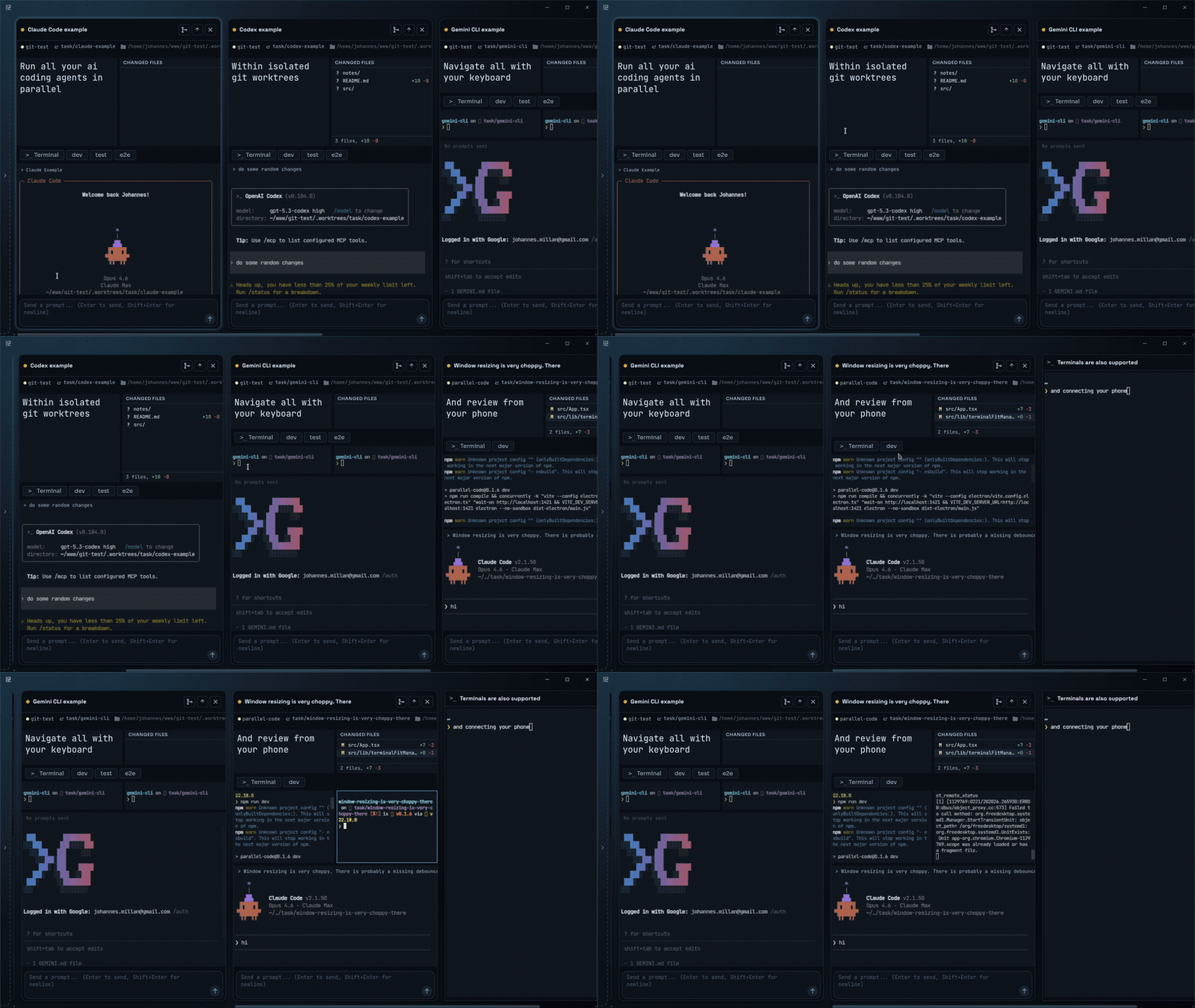
Dispatch AI coding agents in parallel, each in its own worktree.
Review the diffs, merge the wins, toss the rest.
Works with Claude Code, Codex, and Gemini · Every change isolated in its own git worktree · Free, open source, no extra platform fee





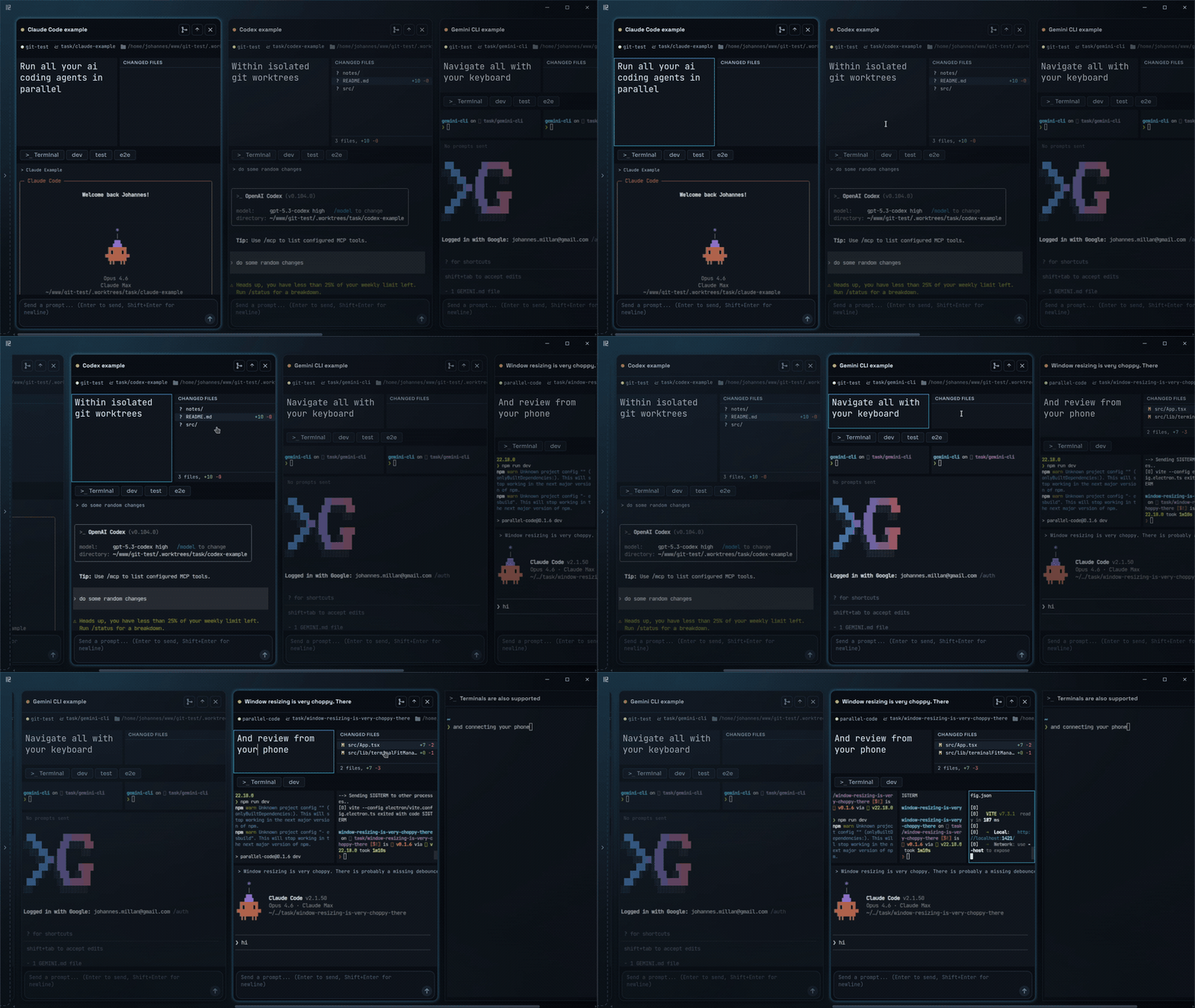
| Multiple agents in parallel | Focused view on a single task |
|---|---|
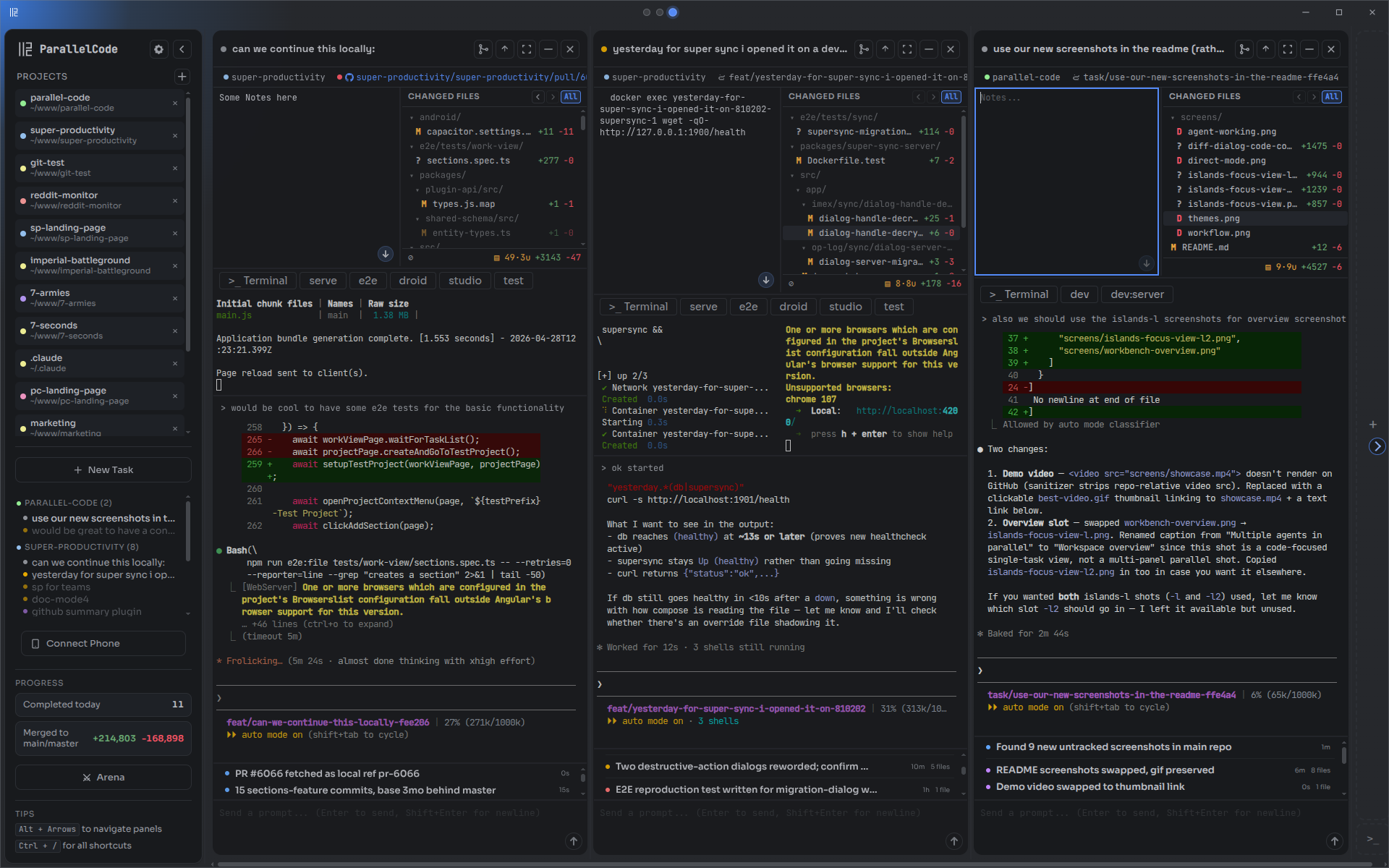 | 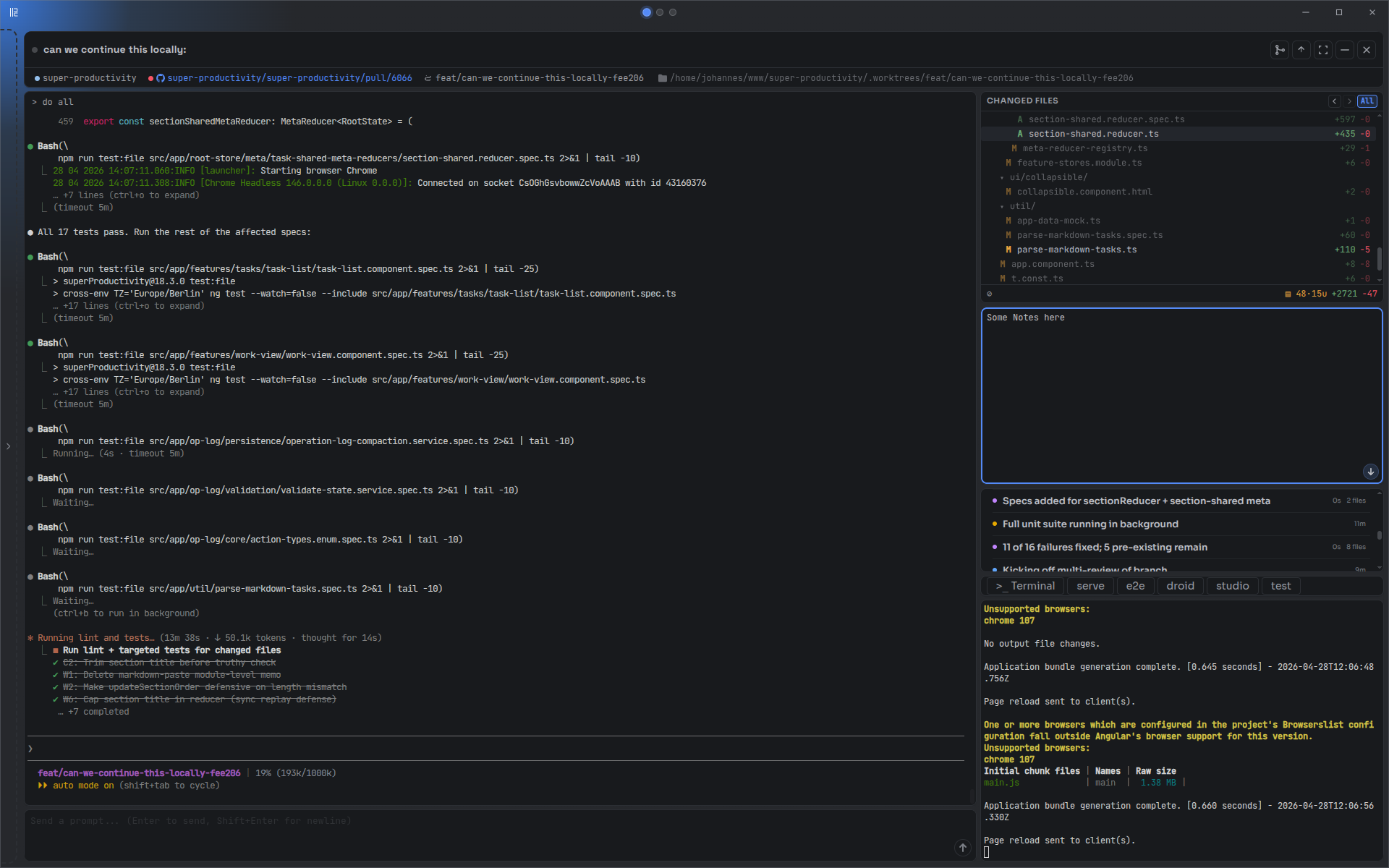 |
| Diff review with inline comments | AI Arena — race agents head-to-head |
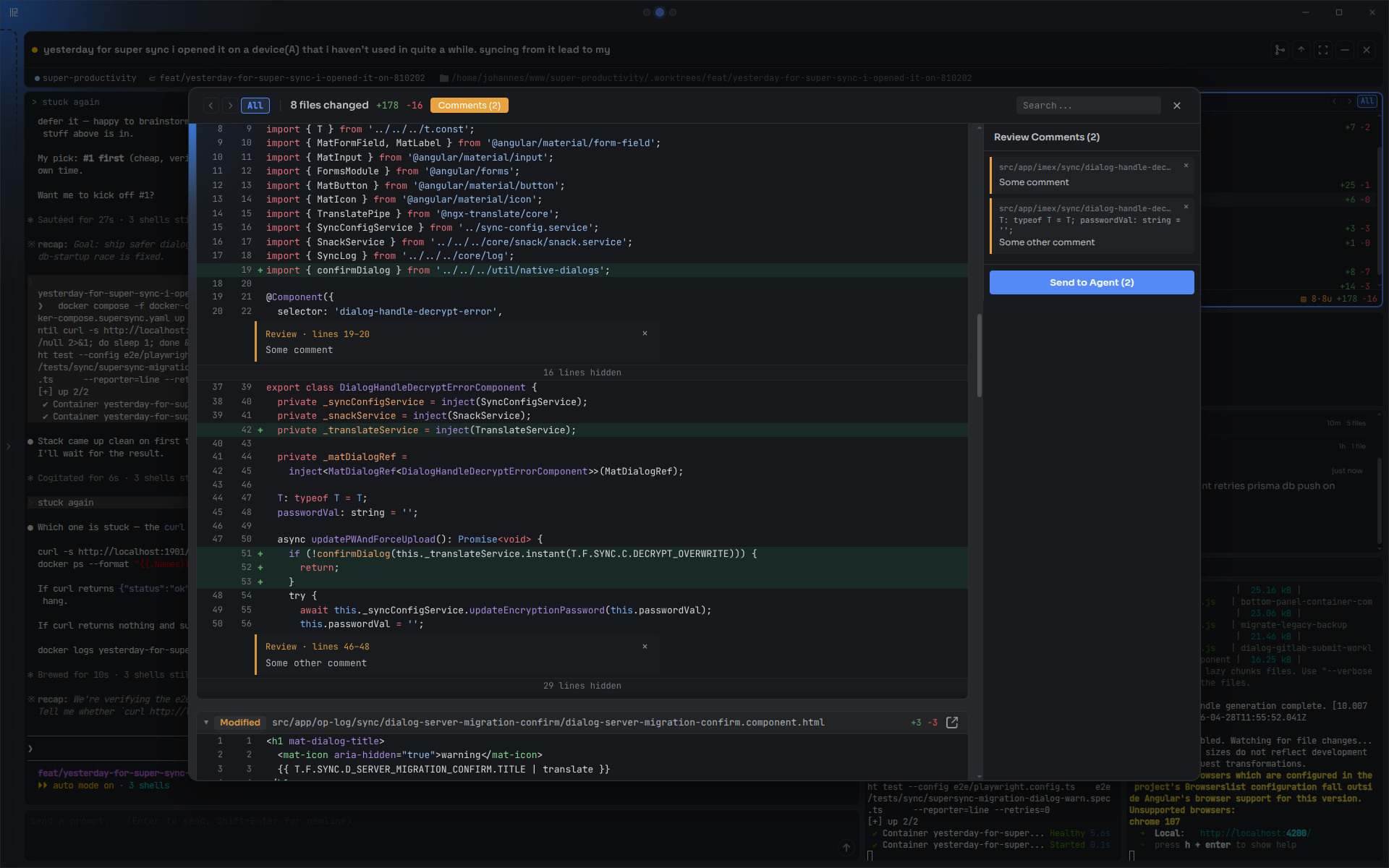 | 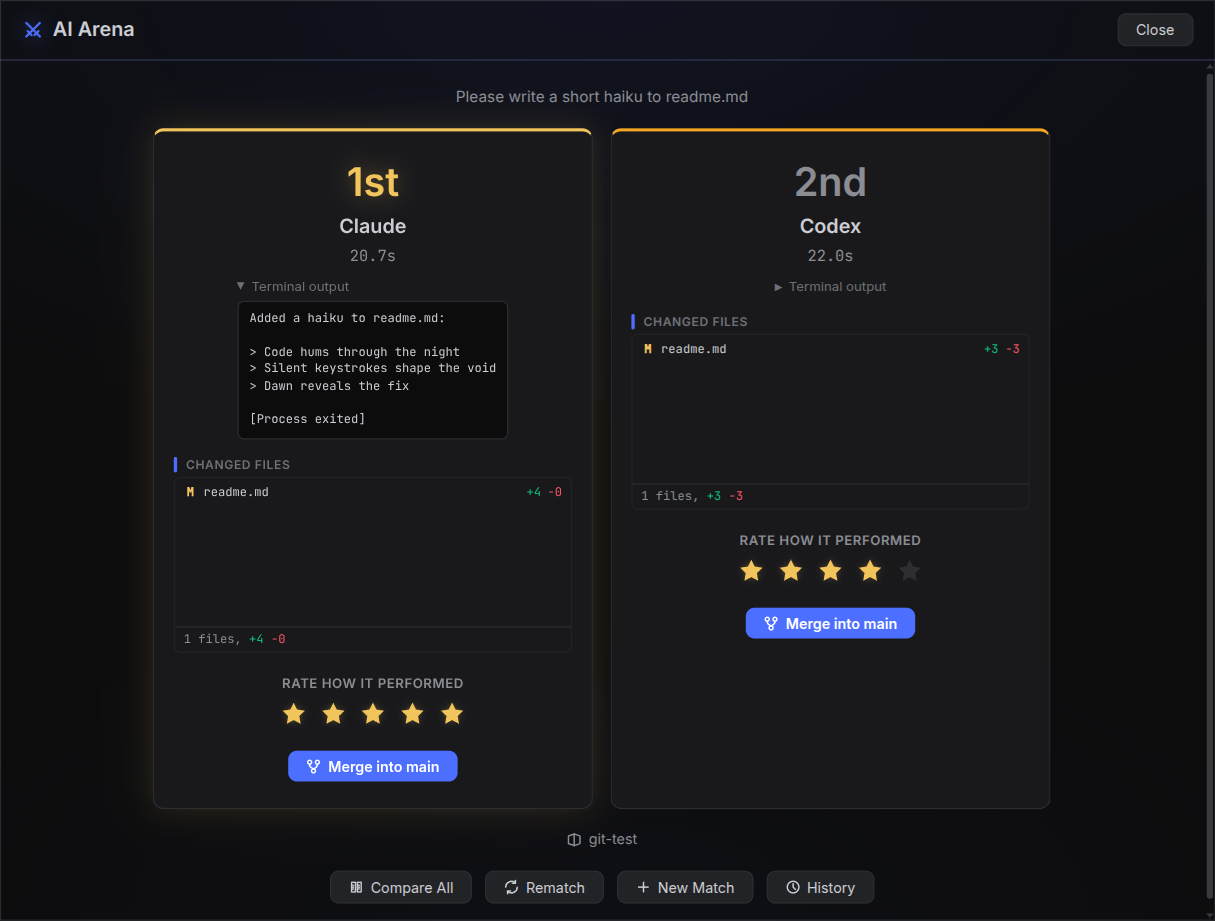 |
| Approach | What's missing |
|---|---|
| Multiple terminal windows / tmux | No GUI, no automatic git isolation — you manage worktrees, branches, and merges by hand |
| VS Code extensions (Kilo Code, Roo Code, etc.) | Tied to VS Code; no true parallel worktree isolation between agents |
| Running agents sequentially | One task at a time — blocks your workflow while each agent finishes |
When you create a task, Parallel Code:
node_modules and other gitignored directories into the worktreeWhen you're happy with the result, merge the branch back to main from the sidebar.
Ctrl+Shift+F)main, master, and develop, it includes only uncommitted changes. Choose Current diff to explicitly use the commit selector (All, Uncommitted, or a single commit). Uncaptured context stays omitted when reading a captured tour. Hover or focus the button for an explanation and the configured provider/model. The button shows a spinner and progress, then a green checkmark and Start tour when ready. Click Start tour to open the diff captured for the tour; it never opens automatically. Completed tours remain available when you close and reopen the tour; clicking the loading button cancels generation. Uses your configured code Q&A provider, aiming for 4–6 concise stops in one request with a dedicated 500,000-character prompt budget; inline Q&A keeps its 50,000-character limit. This is an app guard, not an exact token limit—provider context limits still apply. Larger diffs use compact excerpts and a five-minute timeout per part. Claude tour prompts are piped through stdin to avoid command-line size limits. Verbose logs include request sizes, time to first output, and total request duration, without code or response contents. Tours describe the supplied diff and do not verify test execution. Each stop is a card with a role label and a tone that flags risky or uncertain changes; Ask and Go deeper answer follow-ups under a stop with the diff as context. Jump between stops from the progress strip, or with the arrow keys and Home/End while the tour has focus. The button shows Resume tour when you left midway.confidence_publish MCP tool. Scores are named by whoever rates (one plain score or your own dimensions), low ones are highlighted, and a rating is marked out of date once the code changes after it. Point the prompt at your own rating skill in Settings.deb (an AppImage only handles it if it was integrated into your desktop)..parallel-code/Dockerfile into the project and tasks run inside it
Download the latest release for your platform from the releases page:
.dmg (universal).AppImage or .debInstall at least one AI coding CLI: Claude Code, Codex CLI, Gemini CLI, Antigravity CLI, or Copilot CLI
Open Parallel Code, point it at a git repo, and start dispatching tasks.
Antigravity (agy) signs in interactively and caches credentials in your OS keyring (Keychain/libsecret). The keyring cannot be reached from inside a Linux container — it needs a secret-service daemon the agent container doesn't run — and agy has no API-key fallback, so Docker-isolated Antigravity tasks cannot authenticate. Run Antigravity as a native (non-Docker) task.
The bundled image still ships the agy binary, and ~/.gemini/antigravity-cli (settings/plugins) is shared when "Share agent auth" is enabled, so Docker support is forward-compatible if a file-based or API-key auth path appears later.
git clone https://github.com/johannesjo/parallel-code.git
cd parallel-code
npm install
npm run dev
Requires Node.js v18+.
Phone access uses port 8777 in development (npm run dev) and 7777 in the installed app, so both can run together. Run npm run build:remote after changing the mobile UI, then use Connect Phone in the development app to get its connection link or QR code.
The phone UI works in any mobile browser. On Android, the native app adds agent notifications that need no HTTPS setup, a home-screen widget, and voice input.
parallel-code-phone-*.apk.The app is not in the Play Store yet. It checks GitHub for a newer release once a day and offers the download; you can turn that off under Settings → About. Obtainium can also install and update it: add https://github.com/johannesjo/parallel-code and filter release titles by Android.
Its notifications come from your computer over the same connection as the app, so the phone has to be able to reach your computer, on the same Wi-Fi or through Tailscale. Turning them on keeps a quiet notification visible while the app watches in the background.
Paired phones can receive a notification when a running task changes to Needs input, including while the phone is locked or the phone app is closed. Tap the notification to open that task. Parallel Code must remain running on your computer with phone access enabled, and both devices need internet access for push delivery.
tailscale serve --bg http://127.0.0.1:7777 on your computer (use the port shown in Connect Phone, normally 8777 in development). Follow Tailscale's HTTPS setup prompts.http://IP:PORT part with the HTTPS address printed by Serve, keeping ?token=…. Open that link on your phone and authorize it with the desktop PIN. Choose Keep this device authenticated to retain notifications across computer restarts.Notifications show the task name and a request for input; terminal output and connection credentials are not included. Opening a task still requires a connection to your computer. A different HTTPS proxy can also be used at the origin root; it must preserve the original Host header and forward WebSockets.
Ctrl = Cmd on macOS.
| Shortcut | Action |
|---|---|
| Tasks | |
Ctrl+N | New task |
Ctrl+Shift+A | New task (alternative) |
Ctrl+Enter | Send prompt |
Ctrl+Shift+M | Finish task (merge or push) |
Ctrl+W | Close focused panel or file |
Ctrl+Shift+W | Close active task |
| Navigation | |
Alt+Arrows | Focus pane/task in arrow direction |
Alt+Shift+Left/Right | Move task (macOS: Ctrl+Shift) |
Ctrl+B | Toggle sidebar |
Ctrl+Shift+F | Toggle focus mode |
| Terminals | |
Ctrl+Shift+T | New shell terminal |
Ctrl+Shift+D | New standalone terminal |
| App | |
Ctrl+, | Open settings |
Ctrl+/ or F1 | Show all shortcuts |
Ctrl+0 | Reset zoom |
Ctrl+Scroll | Adjust zoom |
Escape | Close dialog |
If Parallel Code saves you time, consider giving it a star on GitHub. It helps others find the project.
MIT
122 followers · starred Feb 2026
282 followers · starred Feb 2026
4,155 followers · starred Apr 2026
122 followers · starred Jun 2026
Run Claude Code, Codex, and Gemini side by side — each in its own git worktree
See the code
Ten agents.
Ten branches.
One afternoon.
Dispatch AI coding agents in parallel, each in its own worktree.
Review the diffs, merge the wins, toss the rest.
Works with Claude Code, Codex, and Gemini · Every change isolated in its own git worktree · Free, open source, no extra platform fee
| Multiple agents in parallel | Focused view on a single task |
|---|---|
| |
| Diff review with inline comments | AI Arena — race agents head-to-head |
| |
| Approach | What's missing |
|---|---|
| Multiple terminal windows / tmux | No GUI, no automatic git isolation — you manage worktrees, branches, and merges by hand |
| VS Code extensions (Kilo Code, Roo Code, etc.) | Tied to VS Code; no true parallel worktree isolation between agents |
| Running agents sequentially | One task at a time — blocks your workflow while each agent finishes |
When you create a task, Parallel Code:
node_modules and other gitignored directories into the worktreeWhen you're happy with the result, merge the branch back to main from the sidebar.
Ctrl+Shift+F)main, master, and develop, it includes only uncommitted changes. Choose Current diff to explicitly use the commit selector (All, Uncommitted, or a single commit). Uncaptured context stays omitted when reading a captured tour. Hover or focus the button for an explanation and the configured provider/model. The button shows a spinner and progress, then a green checkmark and Start tour when ready. Click Start tour to open the diff captured for the tour; it never opens automatically. Completed tours remain available when you close and reopen the tour; clicking the loading button cancels generation. Uses your configured code Q&A provider, aiming for 4–6 concise stops in one request with a dedicated 500,000-character prompt budget; inline Q&A keeps its 50,000-character limit. This is an app guard, not an exact token limit—provider context limits still apply. Larger diffs use compact excerpts and a five-minute timeout per part. Claude tour prompts are piped through stdin to avoid command-line size limits. Verbose logs include request sizes, time to first output, and total request duration, without code or response contents. Tours describe the supplied diff and do not verify test execution. Each stop is a card with a role label and a tone that flags risky or uncertain changes; Ask and Go deeper answer follow-ups under a stop with the diff as context. Jump between stops from the progress strip, or with the arrow keys and Home/End while the tour has focus. The button shows Resume tour when you left midway.confidence_publish MCP tool. Scores are named by whoever rates (one plain score or your own dimensions), low ones are highlighted, and a rating is marked out of date once the code changes after it. Point the prompt at your own rating skill in Settings.deb (an AppImage only handles it if it was integrated into your desktop)..parallel-code/Dockerfile into the project and tasks run inside it
Download the latest release for your platform from the releases page:
.dmg (universal).AppImage or .debInstall at least one AI coding CLI: Claude Code, Codex CLI, Gemini CLI, Antigravity CLI, or Copilot CLI
Open Parallel Code, point it at a git repo, and start dispatching tasks.
Antigravity (agy) signs in interactively and caches credentials in your OS keyring (Keychain/libsecret). The keyring cannot be reached from inside a Linux container — it needs a secret-service daemon the agent container doesn't run — and agy has no API-key fallback, so Docker-isolated Antigravity tasks cannot authenticate. Run Antigravity as a native (non-Docker) task.
The bundled image still ships the agy binary, and ~/.gemini/antigravity-cli (settings/plugins) is shared when "Share agent auth" is enabled, so Docker support is forward-compatible if a file-based or API-key auth path appears later.
git clone https://github.com/johannesjo/parallel-code.git
cd parallel-code
npm install
npm run dev
Requires Node.js v18+.
Phone access uses port 8777 in development (npm run dev) and 7777 in the installed app, so both can run together. Run npm run build:remote after changing the mobile UI, then use Connect Phone in the development app to get its connection link or QR code.
The phone UI works in any mobile browser. On Android, the native app adds agent notifications that need no HTTPS setup, a home-screen widget, and voice input.
parallel-code-phone-*.apk.The app is not in the Play Store yet. It checks GitHub for a newer release once a day and offers the download; you can turn that off under Settings → About. Obtainium can also install and update it: add https://github.com/johannesjo/parallel-code and filter release titles by Android.
Its notifications come from your computer over the same connection as the app, so the phone has to be able to reach your computer, on the same Wi-Fi or through Tailscale. Turning them on keeps a quiet notification visible while the app watches in the background.
Paired phones can receive a notification when a running task changes to Needs input, including while the phone is locked or the phone app is closed. Tap the notification to open that task. Parallel Code must remain running on your computer with phone access enabled, and both devices need internet access for push delivery.
tailscale serve --bg http://127.0.0.1:7777 on your computer (use the port shown in Connect Phone, normally 8777 in development). Follow Tailscale's HTTPS setup prompts.http://IP:PORT part with the HTTPS address printed by Serve, keeping ?token=…. Open that link on your phone and authorize it with the desktop PIN. Choose Keep this device authenticated to retain notifications across computer restarts.Notifications show the task name and a request for input; terminal output and connection credentials are not included. Opening a task still requires a connection to your computer. A different HTTPS proxy can also be used at the origin root; it must preserve the original Host header and forward WebSockets.
Ctrl = Cmd on macOS.
| Shortcut | Action |
|---|---|
| Tasks | |
Ctrl+N | New task |
Ctrl+Shift+A | New task (alternative) |
Ctrl+Enter | Send prompt |
Ctrl+Shift+M | Finish task (merge or push) |
Ctrl+W | Close focused panel or file |
Ctrl+Shift+W | Close active task |
| Navigation | |
Alt+Arrows | Focus pane/task in arrow direction |
Alt+Shift+Left/Right | Move task (macOS: Ctrl+Shift) |
Ctrl+B | Toggle sidebar |
Ctrl+Shift+F | Toggle focus mode |
| Terminals | |
Ctrl+Shift+T | New shell terminal |
Ctrl+Shift+D | New standalone terminal |
| App | |
Ctrl+, | Open settings |
Ctrl+/ or F1 | Show all shortcuts |
Ctrl+0 | Reset zoom |
Ctrl+Scroll | Adjust zoom |
Escape | Close dialog |
If Parallel Code saves you time, consider giving it a star on GitHub. It helps others find the project.
MIT
122 followers · starred Feb 2026
282 followers · starred Feb 2026
4,155 followers · starred Apr 2026
122 followers · starred Jun 2026