
Multi-Workspace IDE for Parallel AI Agent Development
20
stars
1,311
commits
TypeScript
primary language
Sep 12, 2026
updated
README

CodeHydra
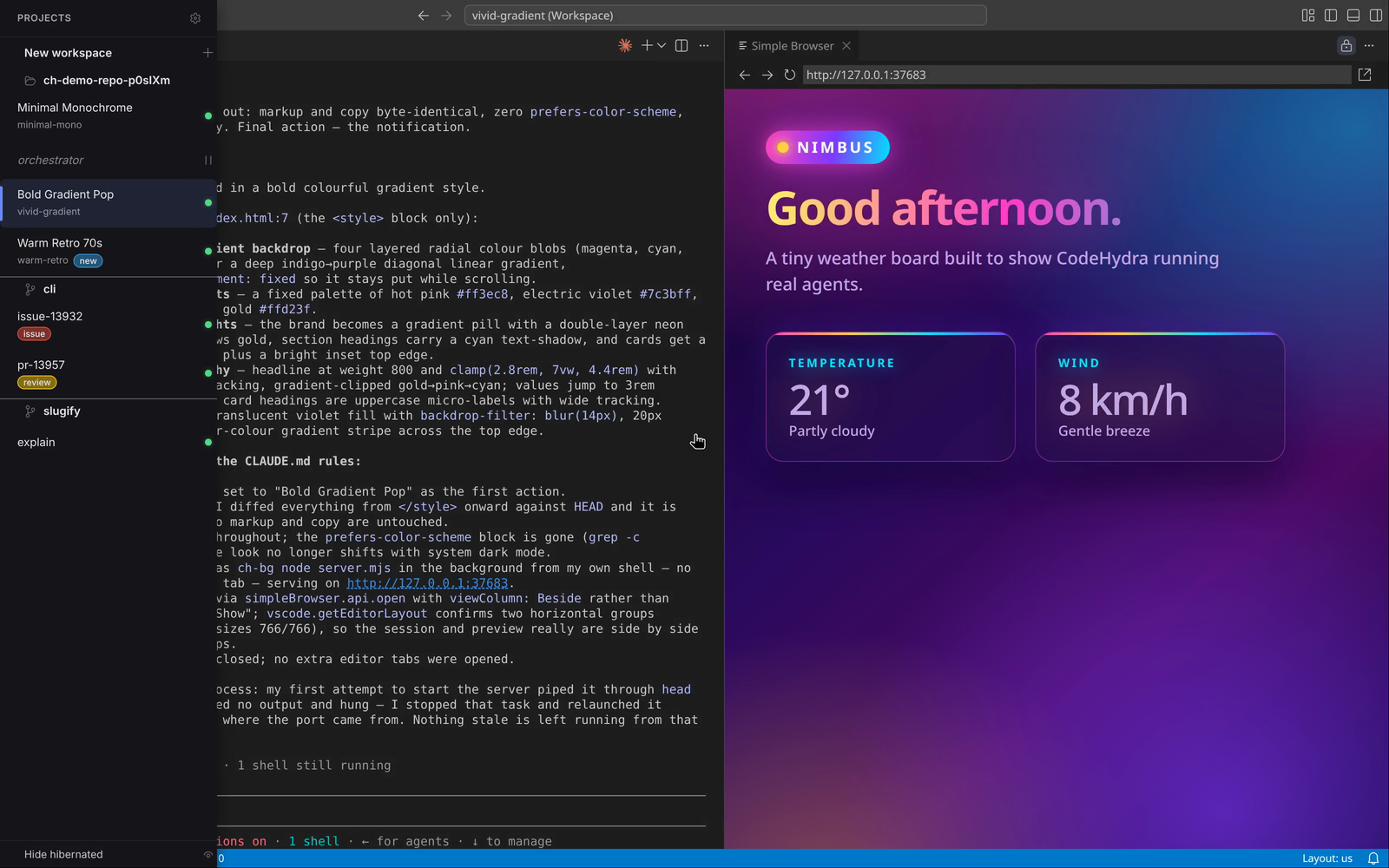
Multi-workspace IDE for parallel AI agent development





Run multiple AI coding assistants simultaneously in isolated git worktrees with real-time status monitoring.
Requirements
- Git
- A Claude Code or OpenCode account
Installation
# Using Node.js
npx codehydra@latest

# Using Python
uvx --refresh codehydra
Or download directly from GitHub Releases.
Features
- Parallel Workspaces - Run Claude Code or OpenCode in several workspaces at once
- Git Worktrees - Each workspace is a worktree with its own branch, not a separate clone
- Built-in Agents - Claude Code and OpenCode ship with CodeHydra; choose one globally or per workspace
- Real-time Status - Monitor agent status across all workspaces, mirrored on the app badge
- Keyboard Driven - Alt+X shortcut mode for fast workspace navigation
- VS Code Powered - A full VSCodium editor per workspace, with your extensions, themes and settings
- Agent-Driven Editor - Agents can run any VS Code command, including ones your installed extensions register: open files, run tasks, drive the UI
- Cross-platform - Linux, macOS, and Windows
Also included: hibernation, repository hooks, workspace tags, and auto-workspaces (experimental) for GitHub pull requests and YouTrack issues.
How It Works
CodeHydra uses git worktrees to create isolated workspaces from a single repository:
| Concept | Description |
|---|---|
| Project | A git repository - a local path, or cloned from a git URL |
| Workspace | A git worktree with its own branch, running its own AI agent |
| Hibernation | Park a workspace to free resources; its worktree stays on disk |
| Agent status | none, idle or busy - shown per workspace and on the app badge |
Every workspace opens in a full VSCodium editor with your extensions, themes and settings, and runs its own AI agent independently. Switch between workspaces instantly while each agent continues working.
Keyboard Shortcuts
Hold Alt and tap X to enter shortcut mode. While still holding Alt:
| Key | Action |
|---|---|
↑ / ↓ | Navigate workspaces |
← / → | Jump to the next idle workspace (busy if none idle) |
1 - 0 | Jump to a workspace by position |
Enter | New workspace |
Delete | Remove the active workspace |
h | Hibernate or wake the active workspace |
s | Open settings |
b | Report a bug |
Escape | Exit shortcut mode |
Releasing Alt also exits shortcut mode.
MCP Integration
Every workspace's agent is automatically connected to CodeHydra's codehydra MCP
server - there is nothing to configure. Through it, an agent can:
| Group | Tools |
|---|---|
| Workspace lifecycle | workspace_create (optionally with a prompt), workspace_delete, workspace_hibernate, workspace_wake, workspace_restart_agent_server |
| Status and metadata | workspace_get_status, workspace_get_metadata, workspace_set_metadata, workspace_get_agent_session, project_list |
| Editor and UI | workspace_execute_command, ui_show_message, log |
| Diagnostics | report_bug |
workspace_execute_command accepts any VS Code command identifier, so an agent can
drive the editor the same way you do - including commands contributed by your own
extensions.
Development
Prerequisites
- Node.js 24+
- pnpm 10
- Git
Commands
| Command | Description |
|---|---|
pnpm bootstrap | Install dependencies and build |
pnpm dev | Start in development mode |
pnpm build | Build for production |
pnpm test | Run all tests |
pnpm test:integration | Run integration tests |
pnpm validate:fix | Fix lint/format issues and run tests |
pnpm dist | Create distributable for current OS |
Releases
CodeHydra uses calendar versioning (YYYY.MM.DD). See docs/RELEASE.md.
License
MIT - 2025-2026 CodeHydra
Contributors


See what people are saying
Similar repos


Languages
TypeScript
93.8%
Svelte
5.0%
Multi-Workspace IDE for Parallel AI Agent Development
20
stars
1,311
commits
TypeScript
primary language
Sep 12, 2026
updated
README
CodeHydra
Multi-workspace IDE for parallel AI agent development
Run multiple AI coding assistants simultaneously in isolated git worktrees with real-time status monitoring.
Requirements
- Git
- A Claude Code or OpenCode account
Installation
# Using Node.js
npx codehydra@latest

# Using Python
uvx --refresh codehydra
Or download directly from GitHub Releases.
Features
- Parallel Workspaces - Run Claude Code or OpenCode in several workspaces at once
- Git Worktrees - Each workspace is a worktree with its own branch, not a separate clone
- Built-in Agents - Claude Code and OpenCode ship with CodeHydra; choose one globally or per workspace
- Real-time Status - Monitor agent status across all workspaces, mirrored on the app badge
- Keyboard Driven - Alt+X shortcut mode for fast workspace navigation
- VS Code Powered - A full VSCodium editor per workspace, with your extensions, themes and settings
- Agent-Driven Editor - Agents can run any VS Code command, including ones your installed extensions register: open files, run tasks, drive the UI
- Cross-platform - Linux, macOS, and Windows
Also included: hibernation, repository hooks, workspace tags, and auto-workspaces (experimental) for GitHub pull requests and YouTrack issues.
How It Works
CodeHydra uses git worktrees to create isolated workspaces from a single repository:
| Concept | Description |
|---|---|
| Project | A git repository - a local path, or cloned from a git URL |
| Workspace | A git worktree with its own branch, running its own AI agent |
| Hibernation | Park a workspace to free resources; its worktree stays on disk |
| Agent status | none, idle or busy - shown per workspace and on the app badge |
Every workspace opens in a full VSCodium editor with your extensions, themes and settings, and runs its own AI agent independently. Switch between workspaces instantly while each agent continues working.
Keyboard Shortcuts
Hold Alt and tap X to enter shortcut mode. While still holding Alt:
| Key | Action |
|---|---|
↑ / ↓ | Navigate workspaces |
← / → | Jump to the next idle workspace (busy if none idle) |
1 - 0 | Jump to a workspace by position |
Enter | New workspace |
Delete | Remove the active workspace |
h | Hibernate or wake the active workspace |
s | Open settings |
b | Report a bug |
Escape | Exit shortcut mode |
Releasing Alt also exits shortcut mode.
MCP Integration
Every workspace's agent is automatically connected to CodeHydra's codehydra MCP
server - there is nothing to configure. Through it, an agent can:
| Group | Tools |
|---|---|
| Workspace lifecycle | workspace_create (optionally with a prompt), workspace_delete, workspace_hibernate, workspace_wake, workspace_restart_agent_server |
| Status and metadata | workspace_get_status, workspace_get_metadata, workspace_set_metadata, workspace_get_agent_session, project_list |
| Editor and UI | workspace_execute_command, ui_show_message, log |
| Diagnostics | report_bug |
workspace_execute_command accepts any VS Code command identifier, so an agent can
drive the editor the same way you do - including commands contributed by your own
extensions.
Development
Prerequisites
- Node.js 24+
- pnpm 10
- Git
Commands
| Command | Description |
|---|---|
pnpm bootstrap | Install dependencies and build |
pnpm dev | Start in development mode |
pnpm build | Build for production |
pnpm test | Run all tests |
pnpm test:integration | Run integration tests |
pnpm validate:fix | Fix lint/format issues and run tests |
pnpm dist | Create distributable for current OS |
Releases
CodeHydra uses calendar versioning (YYYY.MM.DD). See docs/RELEASE.md.
License
MIT - 2025-2026 CodeHydra
See what people are saying
Similar repos
Contributors
Languages
TypeScript
93.8%
Svelte
5.0%