A modern multi-system emulator and debugger written in Rust. Supports Windows, Linux, macOS, browsers and mobile phones!
See the codeSly is a cross-platform, multi-system emulator for players, homebrew developers and emulator developers alike. It combines a beautiful debugger with a unique take on the classic emulation experience!
Official website · Try the debugger in your browser
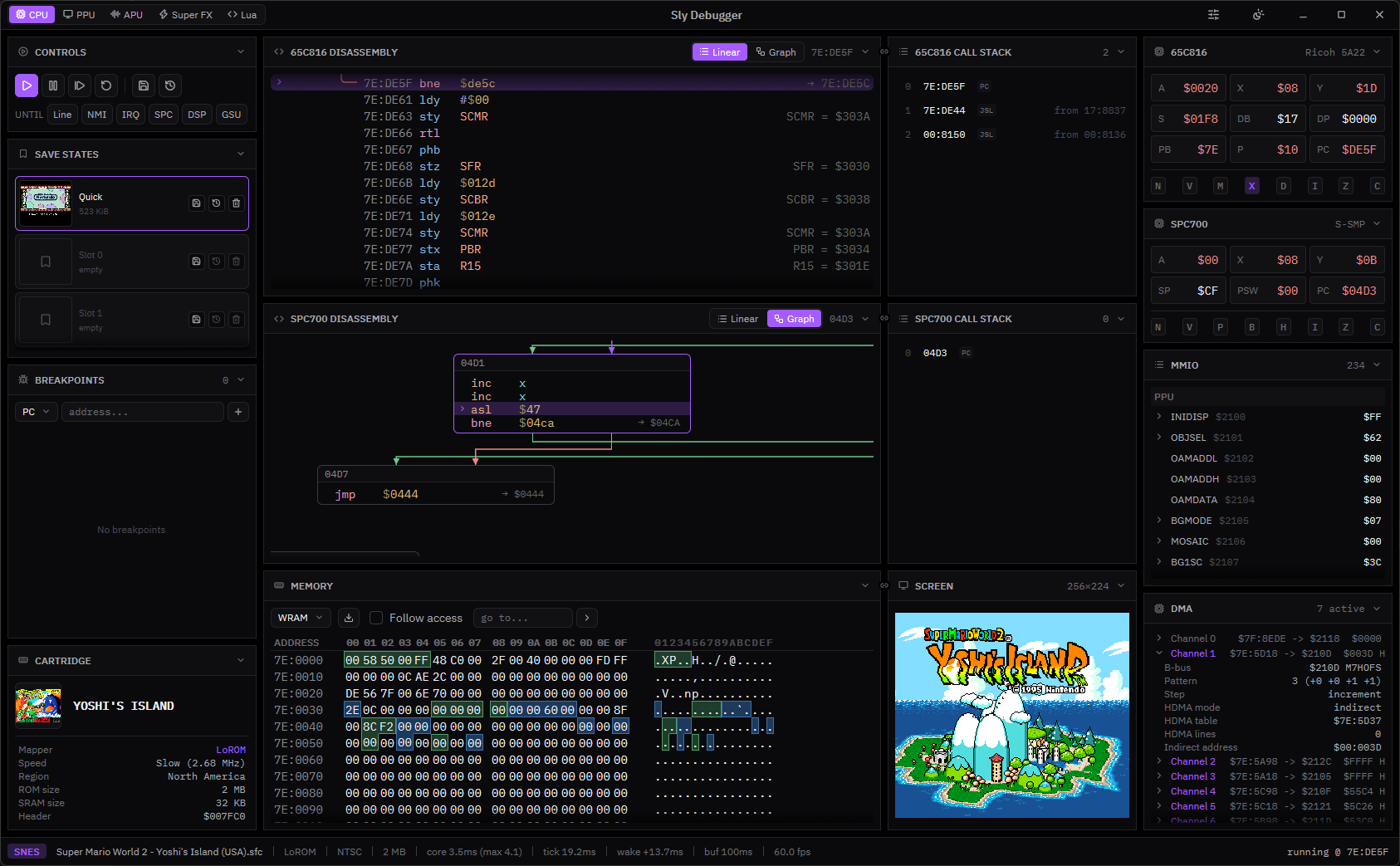
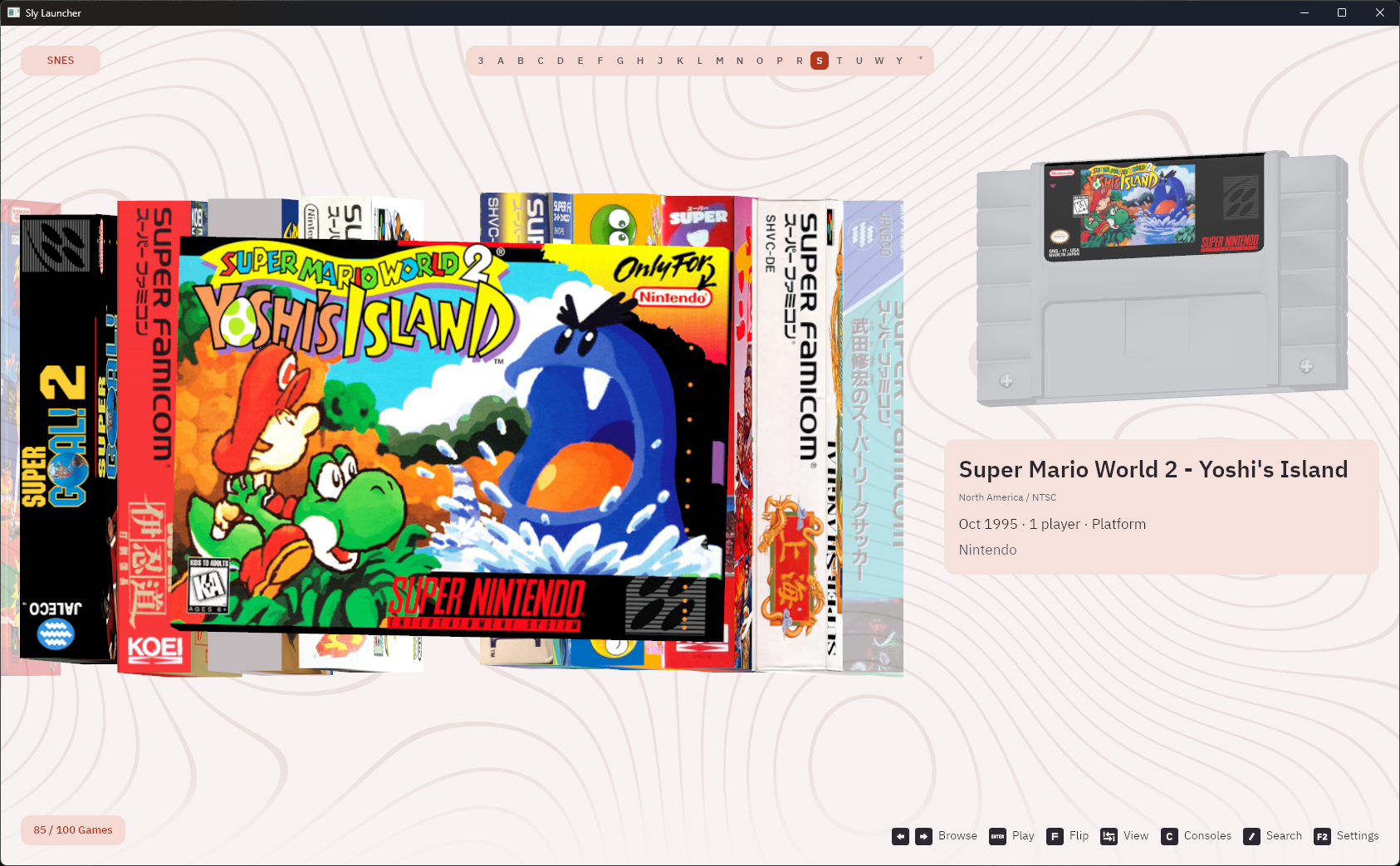
Sly has three main desktop frontends, alongside its mobile apps:
Supported platforms:
Get the latest release:
sly-launcher, sly-classic and sly-debugger.sly-ios-arm64-unsigned.ipa. It's unsigned, so you need to sideload it (for example with AltStore or SideStore).For the newest changes, try the nightly build. It's rebuilt from the dev branch once a day and may be unstable.
Color means playable or work-in-progress. Click on a logo to see the respective compatibility database.
 |  |  |  |
 |  |  |  |
 |  |  |  |
Sly Launcher
Sly Classic
Sly Debugger
| System | File types |
|---|---|
| SNES | .sfc, .smc |
| GBA | .gba |
How you load games depends on the frontend:
roms/{system}/ in the working directory.roms/{system}/ folders using the Files app.From the command line:
sly-launcher path/to/roms/
sly-debugger path/to/game.sfc
Box art and covers come from art.layle.dev. This works without an account, but anonymous access has lower rate limits. For higher limits, log in at art.layle.dev/account, generate an API key and paste it into the settings of any frontend:
The key is stored in settings.toml in Sly's data folder (for example %APPDATA%\sly on Windows), which all desktop frontends share.
These are Sly Launcher's defaults. All of them can be remapped in settings (gamepads are supported too).
Keys are matched by position, so the labels below are for a US QWERTY keyboard. On other layouts, press the key in the same place (for example, Z is Y on a German keyboard).
Library
| Action | Key |
|---|---|
| Browse | Arrow keys / WASD |
| Play | Enter / Space |
| Flip box | F |
| Change view | Tab |
| Search | / |
| Previous / next letter | Q / E |
| Console list | C |
| Previous / next console | Page Up / Down |
| Settings | F2 |
| Fullscreen | F11 |
In game
| Control | Key |
|---|---|
| D-pad | Arrow keys |
| B / A | Z / X |
| Y / X (SNES) | A / S |
| L / R | Q / W |
| Start / Select | Enter / Backspace |
| Save / load state | F5 / F8 |
| Pause | P |
| Back to library | Esc |
| Fullscreen | F11 |
See the build workflow for platform dependencies, including Linux audio and windowing libraries. Run everything from the repository root.
Sly Launcher and Sly Debugger
git submodule update --init --recursive
cargo run --locked -p modern-launcher -- roms/
cargo run --locked -p debugger -- path/to/game.sfc
This should work for most of the Rust crates.
Sly Classic also needs:
cargo install naga-cli --version 29.0.4 --locked)-DSLY_ENABLE_GAMEPAD=OFF)qt-cmake -S frontends/desktop-qt -B build/desktop-qt -G Ninja \
-DCMAKE_BUILD_TYPE=Release -DSLY_CARGO_PROFILE=release
cmake --build build/desktop-qt
iOS needs a Mac with Xcode 26. Open frontends/ios/Sly.xcodeproj, choose your signing team and run the Sly scheme.
Emulated hardware lives in crates/cores/, the shared interfaces in crates/models/ and the frontends in frontends/. If you want to add a system, the GBA core is the easiest one to read. The SNES core is a good example of multiple CPUs and cartridge coprocessors.
The crates you'll touch most:
Core trait every system implements for playback (frames, audio, input, save states).DebugCore, which adds registers, disassembly, stepping, breakpoints and memory access on top of Core.crates/cores/<system>/ and add it to the workspace. Copy the setup from the GBA Cargo.toml if you want debugger support behind a debug feature.core_model::Core for your machine. Only reset, step and run_frame are required. Everything else has a default, so you can add video, audio, input and save states as you go.core_model::System and to the save-state tags in state.rs. Don't change the existing tags.identity, inspect, load, and load_debug once the debugger works.While you're working on a new core, the runner is handy. It's a tiny SDL app that just loads a ROM and plays it, so there's much less in the way than with the other frontends. It only needs cartridge_info and frame_interval on top of the basics.
cargo run -p runner -- path/to/game.gba
Wrap your machine in a debug type that implements both Core and DebugCore, like GbaDebug or SnesDebug. Start with CPUs, registers, disassembly, memory regions and stepping. Call stacks, event stepping and scripting can come later.
A few things to keep in mind:
gba.arm7tdmi and gba.bus). Breakpoints and views refer to them.peek_memory must not change the machine's state. read_bus / write_bus go through the bus with all side effects and patch_memory edits memory directly.manifest gives you the standard panels. Override it to add your own workspaces, like the SNES core does for its coprocessors and call ComponentManifest::validate() to check it.cargo fmt --all --check
cargo clippy -p gba -p snes --features gba/debug,snes/debug
cargo test -p gba -p snes --features gba/debug,snes/debug
CPU tests run against the SSTs in submodules/:
cargo run --release -p testrunner -- snes
cargo run --release -p testrunner -- gba
cargo run --release -p testrunner -- spc700 --opcodes 00 --limit 100
New CPUs can be registered in testrunner.
Contributions are welcome, whether it's a game compatibility fix, a new debugger feature or a whole new core. For bigger changes, open an issue first so we can talk about it before you sink time into it.
Sly also needs more than code! If you have design experience, help with app icons, UI and UX, box art and cartridge models or other visual assets would be very welcome. Open an issue to share your ideas or work.
For pull requests:
dev and open your PR against it.cargo fmt --all and make sure the checks under Testing pass.You may use LLMs to help write your code, but I strongly recommend against it. Either way, you're expected to understand every change you submit and be able to explain it yourself. Don't act as a proxy for an LLM. Issues, PR descriptions and discussions must be written by you. LLM usage must be disclosed.
Sly is not affiliated with Nintendo or other console manufacturers. Game titles, artwork and trademarks belong to their respective owners.
14 followers · starred Oct 2026
A modern multi-system emulator and debugger written in Rust. Supports Windows, Linux, macOS, browsers and mobile phones!
See the codeSly is a cross-platform, multi-system emulator for players, homebrew developers and emulator developers alike. It combines a beautiful debugger with a unique take on the classic emulation experience!
Official website · Try the debugger in your browser
Sly has three main desktop frontends, alongside its mobile apps:
Supported platforms:
Get the latest release:
sly-launcher, sly-classic and sly-debugger.sly-ios-arm64-unsigned.ipa. It's unsigned, so you need to sideload it (for example with AltStore or SideStore).For the newest changes, try the nightly build. It's rebuilt from the dev branch once a day and may be unstable.
Color means playable or work-in-progress. Click on a logo to see the respective compatibility database.
| | | |
| | | |
| | | |
Sly Launcher
Sly Classic
Sly Debugger
| System | File types |
|---|---|
| SNES | .sfc, .smc |
| GBA | .gba |
How you load games depends on the frontend:
roms/{system}/ in the working directory.roms/{system}/ folders using the Files app.From the command line:
sly-launcher path/to/roms/
sly-debugger path/to/game.sfc
Box art and covers come from art.layle.dev. This works without an account, but anonymous access has lower rate limits. For higher limits, log in at art.layle.dev/account, generate an API key and paste it into the settings of any frontend:
The key is stored in settings.toml in Sly's data folder (for example %APPDATA%\sly on Windows), which all desktop frontends share.
These are Sly Launcher's defaults. All of them can be remapped in settings (gamepads are supported too).
Keys are matched by position, so the labels below are for a US QWERTY keyboard. On other layouts, press the key in the same place (for example, Z is Y on a German keyboard).
Library
| Action | Key |
|---|---|
| Browse | Arrow keys / WASD |
| Play | Enter / Space |
| Flip box | F |
| Change view | Tab |
| Search | / |
| Previous / next letter | Q / E |
| Console list | C |
| Previous / next console | Page Up / Down |
| Settings | F2 |
| Fullscreen | F11 |
In game
| Control | Key |
|---|---|
| D-pad | Arrow keys |
| B / A | Z / X |
| Y / X (SNES) | A / S |
| L / R | Q / W |
| Start / Select | Enter / Backspace |
| Save / load state | F5 / F8 |
| Pause | P |
| Back to library | Esc |
| Fullscreen | F11 |
See the build workflow for platform dependencies, including Linux audio and windowing libraries. Run everything from the repository root.
Sly Launcher and Sly Debugger
git submodule update --init --recursive
cargo run --locked -p modern-launcher -- roms/
cargo run --locked -p debugger -- path/to/game.sfc
This should work for most of the Rust crates.
Sly Classic also needs:
cargo install naga-cli --version 29.0.4 --locked)-DSLY_ENABLE_GAMEPAD=OFF)qt-cmake -S frontends/desktop-qt -B build/desktop-qt -G Ninja \
-DCMAKE_BUILD_TYPE=Release -DSLY_CARGO_PROFILE=release
cmake --build build/desktop-qt
iOS needs a Mac with Xcode 26. Open frontends/ios/Sly.xcodeproj, choose your signing team and run the Sly scheme.
Emulated hardware lives in crates/cores/, the shared interfaces in crates/models/ and the frontends in frontends/. If you want to add a system, the GBA core is the easiest one to read. The SNES core is a good example of multiple CPUs and cartridge coprocessors.
The crates you'll touch most:
Core trait every system implements for playback (frames, audio, input, save states).DebugCore, which adds registers, disassembly, stepping, breakpoints and memory access on top of Core.crates/cores/<system>/ and add it to the workspace. Copy the setup from the GBA Cargo.toml if you want debugger support behind a debug feature.core_model::Core for your machine. Only reset, step and run_frame are required. Everything else has a default, so you can add video, audio, input and save states as you go.core_model::System and to the save-state tags in state.rs. Don't change the existing tags.identity, inspect, load, and load_debug once the debugger works.While you're working on a new core, the runner is handy. It's a tiny SDL app that just loads a ROM and plays it, so there's much less in the way than with the other frontends. It only needs cartridge_info and frame_interval on top of the basics.
cargo run -p runner -- path/to/game.gba
Wrap your machine in a debug type that implements both Core and DebugCore, like GbaDebug or SnesDebug. Start with CPUs, registers, disassembly, memory regions and stepping. Call stacks, event stepping and scripting can come later.
A few things to keep in mind:
gba.arm7tdmi and gba.bus). Breakpoints and views refer to them.peek_memory must not change the machine's state. read_bus / write_bus go through the bus with all side effects and patch_memory edits memory directly.manifest gives you the standard panels. Override it to add your own workspaces, like the SNES core does for its coprocessors and call ComponentManifest::validate() to check it.cargo fmt --all --check
cargo clippy -p gba -p snes --features gba/debug,snes/debug
cargo test -p gba -p snes --features gba/debug,snes/debug
CPU tests run against the SSTs in submodules/:
cargo run --release -p testrunner -- snes
cargo run --release -p testrunner -- gba
cargo run --release -p testrunner -- spc700 --opcodes 00 --limit 100
New CPUs can be registered in testrunner.
Contributions are welcome, whether it's a game compatibility fix, a new debugger feature or a whole new core. For bigger changes, open an issue first so we can talk about it before you sink time into it.
Sly also needs more than code! If you have design experience, help with app icons, UI and UX, box art and cartridge models or other visual assets would be very welcome. Open an issue to share your ideas or work.
For pull requests:
dev and open your PR against it.cargo fmt --all and make sure the checks under Testing pass.You may use LLMs to help write your code, but I strongly recommend against it. Either way, you're expected to understand every change you submit and be able to explain it yourself. Don't act as a proxy for an LLM. Issues, PR descriptions and discussions must be written by you. LLM usage must be disclosed.
Sly is not affiliated with Nintendo or other console manufacturers. Game titles, artwork and trademarks belong to their respective owners.
14 followers · starred Oct 2026



