
README
Ming Image 0.1 Design
Ming-Image-0.1-Design is an open-source series for visual-design generation and editable layer decomposition.
The series includes two 6B-parameter models:
- Ming-Image-0.1-Design generates complete visual designs for UI, infographics, posters, and text-rich compositions.
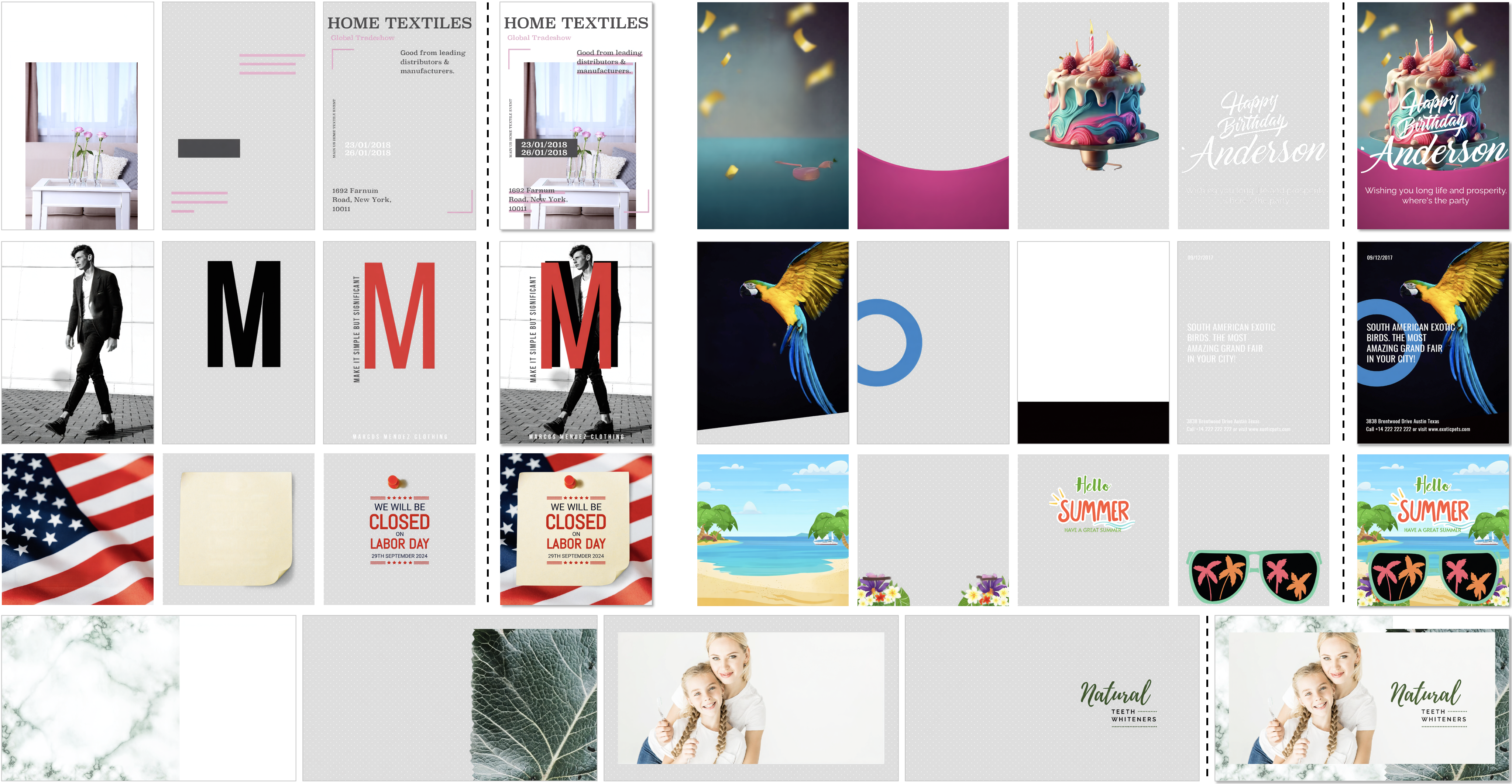
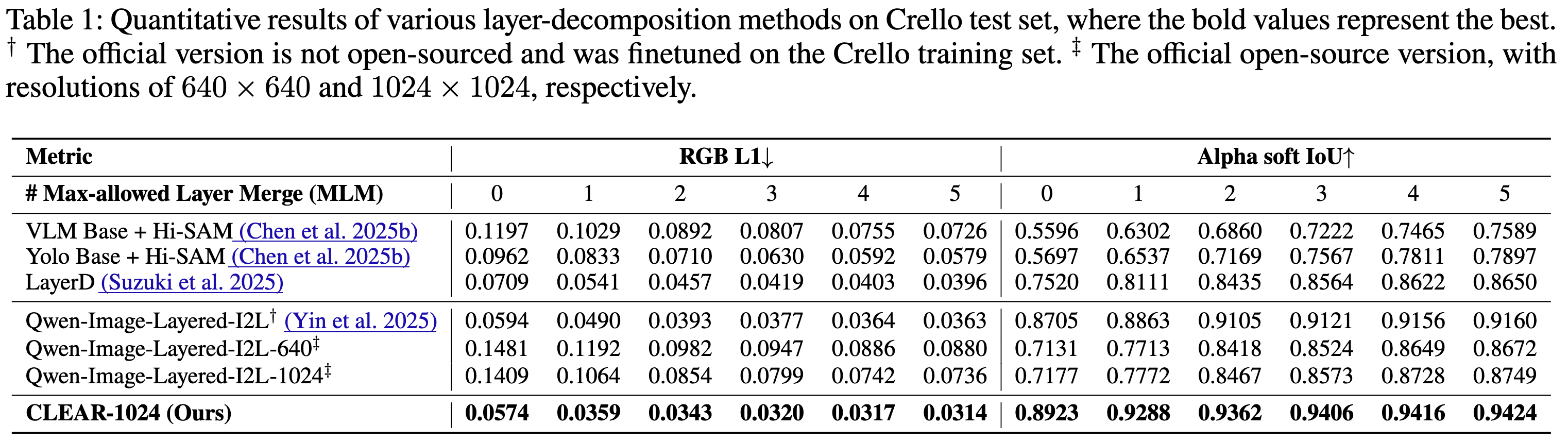
- Ming-Image-0.1-Design-Layer decomposes flattened design images into independently editable transparent layers.
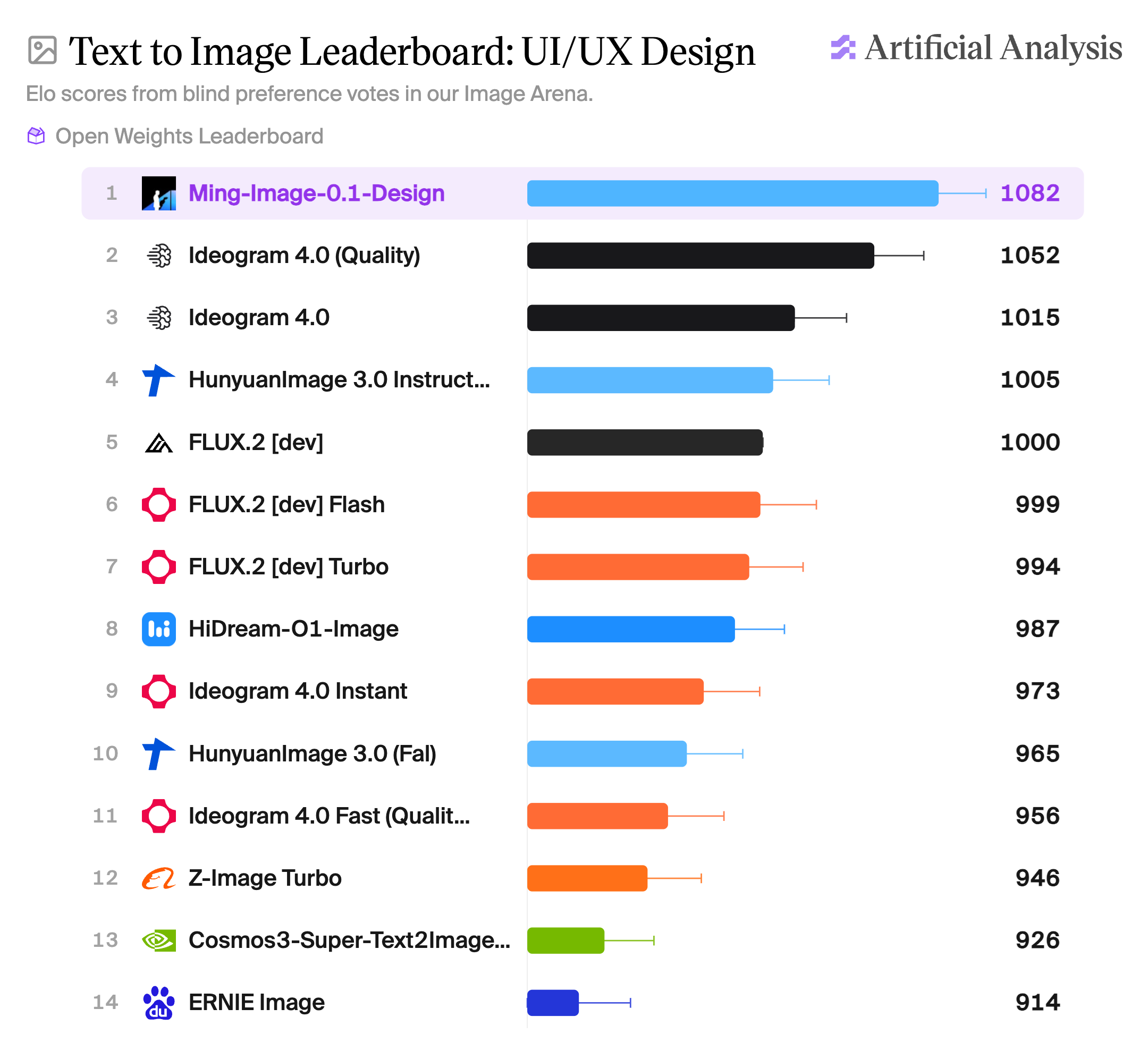
Gallery
Text-to-image

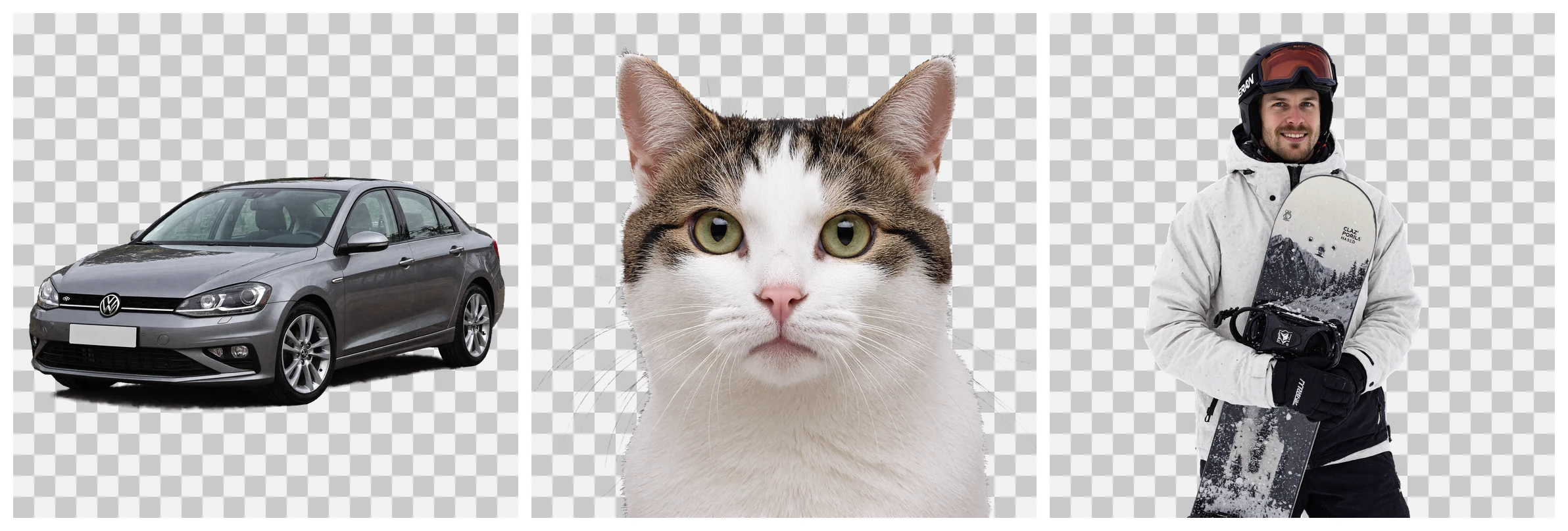
Transparent-background text-to-image
Layer decomposition

Requirements
- Python 3.10 or newer;
- CUDA-capable PyTorch for full model inference;
- a local checkpoint directory or a Hugging Face Hub repository ID.
Install the runtime dependencies in a clean environment:
pip install -r requirements.txt
flash_attention_2 is optional. The CLI defaults to eager attention because
the LLM only implements eager and FlashAttention 2 attention classes; the
diffusion transformer always uses PyTorch SDPA internally. Selecting
--attn-implementation sdpa fails closed at load time.
Inference
The --model argument accepts either a local directory or an HF Hub repo ID.
Hub models are resolved to one immutable local snapshot before any component is
loaded. Use --revision to pin a branch, tag or commit. The examples use the
published Hub IDs; replace them with local checkpoint directories for offline
inference.
Sampling defaults and public resolution buckets are task-specific:
| Task | Steps | CFG | Resolution buckets | Default / recommended |
|---|---|---|---|---|
| Text-to-image | 12 | 1.0 | 1024, 2048 | 2048 |
| Layer decomposition | 12 | 2.0 | 512, 1024 | 1024 |
Pass --steps or --cfg to override either value explicitly.
--resolution is optional. A supplied positive integer snaps to the nearest
bucket supported by the selected task, with ties going to the smaller bucket.
For faster layer decomposition, explicitly pass --resolution 512; use 1024
for the recommended output quality. Text-to-image output is square at the
selected bucket. Layer decomposition preserves the reference image's aspect
ratio while selecting a predefined working size from the effective 1024 or
512 bucket.
The default and minimum validated deployment is one GPU with at least 80 GiB of memory, running in BF16. This configuration passes both model families end-to-end, and all demos below use it by default.
export CUDA_VISIBLE_DEVICES=0
Select --attn-implementation flash_attention_2 when FlashAttention 2 is
installed; the portable CLI default remains eager.
For both tasks, --prompt accepts either raw text or a path to a prompt file.
Use --validate-only to check the checkpoint contract and task combination
without loading model weights:
python infer.py --model inclusionAI/Ming-Image-0.1-Design --task text-to-image \
  --prompt "A red circle on a white background" --validate-only
Text-to-image demo
This demo renders a fixed cabin across spring, summer, autumn, and winter. It uses the exact structured JSON prompt without duplicating that long input in the README.
python infer.py \
  --model inclusionAI/Ming-Image-0.1-Design \
  --task text-to-image \
  --prompt assets/t2i_four_seasons_cabin_prompt.json \
  --attn-implementation flash_attention_2 \
  --resolution 2048 \
  --output-dir outputs/t2i
Text-to-image prompt rewriting
An instruction-following VLM can turn a short caption into a precise, layout-structured JSON description: Figma-style layers ordered back to front, with exact coordinates, hierarchy, color specs, and every rendered string quoted verbatim and owned exactly once. Unlike layer decomposition, the text-to-image rewriter describes the complete 1:1 canvas.
This rewrite is a pre-processing step outside infer.py. Prompt enhancement
(PE) can use Ling-3.0-flash-VL or qwen3.8-27B; run it first, then pass its
output to --prompt as raw text or via an asset file.
The released system prompt is stored in
assets/t2i_rewriter_system_prompt.txt
and reproduced below:
You are a senior visual designer and image-prompt engineer. Expand the user's request into one precise, high-resolution Figma-style caption. Return only one JSON object.

Use exactly two top-level keys. `canvas_settings` contains exactly `aspect_ratio`, `ambient_lighting`, and `image_style`. `layers` lists visible groups from background to topmost overlay. Every layer contains exactly `description`, `coordinates`, `hierarchy_and_relation`, and `color_specs`; `color_specs` is an array of hex colors.

`coordinates` MUST be one string, never an object or array, in exactly this form: `"cx: 0.500, cy: 0.500, w: 1.000, h: 1.000"`. Values are normalized; each bbox encloses its complete owned object and stays inside the canvas.

A layer is one selectable visible semantic group: background, full person, coherent object, panel, card, row, or text block. Prefer the fewest groups that preserve the layout. Keep people and objects intact. Never create invisible parents, guides, placeholders, empty layers, duplicate summaries, or multiple owners for one element.

Preserve every user-supplied rendered string character-for-character and as one contiguous string. Unless multiple visible copies are requested, it must occur exactly once across all `description` fields and zero times in `hierarchy_and_relation`. Quote it only where describing its visible rendering; refer to the related subject elsewhere with unquoted semantic wording. Enumerate intended copy, invent extra copy sparingly, and never hide content behind "other text", "remaining labels", or "etc."

Describe concrete composition, typography, materials, texture, lighting, pose, and camera treatment without literary filler. Use `hierarchy_and_relation` only for ownership, alignment, containment, stacking, and occlusion.

Infer structured layouts first. Use one complete layer per card and state its row and column. A compact secondary table may be one layer only if every header and cell is listed; otherwise use a visible shared frame when present, one complete header, and one complete layer per body row, binding values to columns and stating blanks. Enumerate sequences, schedules, spans, gaps, and vacant tracks in visual order. Do not mistake ordinary alignment for a table.

Silently verify schema, string coordinates, Z-order, exact-text counts, geometry, bbox validity, and completeness.
Transparent-background generation tip
To generate an image with an alpha channel, choose exactly one of the following fixed phrases and place it at the beginning of the prompt. Do not combine multiple prefixes.
带透明通道,4通道RGBA图像透明背景,alpha通道,无底图抠图素材,背景alpha=0孤立主体,透明PNG图层不要白底,不要棋盘格,只要透明通道RGBA, 4-channel, transparent backgroundisolated subject, alpha matte, no backgroundcutout PNG, alpha=0 outside the objecttransparent canvas, not white, not checkerboardproduction RGBA layer for compositing
Layer-decomposition demo
This example separates the flattened card design into six transparent RGBA layers. See the source input and the exact six-layer specification.
python infer.py \
  --model inclusionAI/Ming-Image-0.1-Design-Layer \
  --task layer-decompose \
  --input-image assets/layer_samples/card_making_input.png \
  --prompt assets/layer_samples/card_making_prompt.txt \
  --attn-implementation flash_attention_2 \
  --resolution 1024 \
  --output-dir outputs/layers
The layer count is parsed from a "Decompose this image into N layers" or
"Number of layers: N" specification in the prompt. When --prompt is omitted,
--num-layers N generates the default request Decompose this image into N layers.
The layer model returns the requested layers plus one leading
composite/full-canvas image. The CLI skips that first image and saves the
standalone layers as layer_01.png, layer_02.png, and so on.
Layer-decomposition prompt rewriting
Layer decomposition is driven by an explicit per-layer specification, not a free-form caption. The reference pipeline first runs a prompt enhancer: an instruction-following VLM rewrites the user's rough layer plan into a precise decomposition — concrete colors/positions/shapes per layer, real text quoted verbatim on its own front layer, a text-supporting card/panel/badge/banner as its own layer directly behind the text, the main subject as its own layer, and the background last absorbing the remaining supports and surfaces.
This rewrite is a pre-processing step outside infer.py: run the enhancer
first, then pass its output to --prompt (as raw text or via an asset file).
The enhancer's output is exactly the format this CLI parses — it regenerates the
"Decompose this image into N layers" / "Number of layers: N" spec, so the layer
count flows through the same --prompt parsing path described above.
Prompt enhancement (PE) can use Ling-3.0-flash-VL or qwen3.8-27B as the
instruction-following VLM. The guided prompt below is part of the released
pipeline and is kept here for reproducibility:
GUIDED_PROMPT = """You are a graphic-design layer-decomposition expert. You are given ONE flattened design image and a ROUGH layer plan from the user. Rewrite the rough plan into a precise layer decomposition that matches the image.

User's rough layer plan:
{spec}

Guidelines:
- Follow the user's plan EXACTLY: use the same number of layers and the same per-layer role/meaning, in the same order. Layer 1 is the FRONT-most (topmost); the last layer is the background/environment. Stacking the layers back-to-front must reproduce the image.
- For each layer, write a concrete one-or-two-sentence description grounded in the image: real colors, positions and shapes.
- TEXT goes in the front layer(s); quote any real text VERBATIM in double quotes and keep its original language (do not translate).
- A text-supporting CARD / PANEL / BADGE / BANNER is its OWN layer directly behind the text — do not merge it into the text layer or into the background.
- The MAIN SUBJECT (hero product/photo/illustration) is its own layer.
- The BACKGROUND/ENVIRONMENT is the LAST layer and ABSORBS supporting props and surfaces under the subject (tables, boards, plates, floors, shadows, gradients, patterns) — these are NOT separate layers.

Write the description DIRECTLY about the content; do NOT mention "image" or narrate your reasoning. Output EXACTLY in this format and NOTHING else (N = the number of layers in the user's plan):

Decompose this image into N layers with the following specifications:

Number of layers: N
Layer 1: <front-most layer>
Layer 2: <...>
Layer N: <background/environment layer>"""
Deployment
We recommend the following inference frameworks to serve the model:
- vLLM-Omni: see the recipes and installation guide.
Verification
Fast contract tests do not require model weights:
python -m unittest -v tests.test_inference_profile
python -m unittest -v tests.test_padding
Full inference is a GPU smoke test and requires both checkpoint families. At a minimum, validate the four-seasons-cabin text-to-image case and the six-layer card-making decomposition case with fixed seeds. The smoke test defaults to the single-GPU placement and FlashAttention 2 configuration shown above:
export CUDA_VISIBLE_DEVICES=0
export MING_GENERATION_MODEL=inclusionAI/Ming-Image-0.1-Design
export MING_LAYER_MODEL=inclusionAI/Ming-Image-0.1-Design-Layer
export MING_SMOKE_OUTPUT_DIR=/path/to/persistent/results
python -m unittest -v tests.test_inference_smoke.InferenceSmokeTest.test_two_step_showcase_smoke
Checkpoint contract
Each checkpoint declares its runtime capability in transformer/config.json:
| Family | alignment_padding_mode | multi_frame_output |
|---|---|---|
| Text-to-image | "zero_masked" | false |
| Layer decomposition | "learned" | true |
Both fields must be present together, and the VAE component must be the
4-channel AutoencoderKLQwenImage (argmax reference encoding). Missing,
partial, or unknown values are errors; the loader never infers padding
behavior from a directory name or silently falls back to another mode.
Legacy packages that predate the component metadata are loaded strictly from
a root inference_profile.json during the compatibility window; when both
exist, the component configs are authoritative and any disagreement with the
legacy file is an error.
Contributors

1 commits

1 commits
Similar repos





Languages
Python
100.0%
README
Ming Image 0.1 Design
Ming-Image-0.1-Design is an open-source series for visual-design generation and editable layer decomposition.
The series includes two 6B-parameter models:
- Ming-Image-0.1-Design generates complete visual designs for UI, infographics, posters, and text-rich compositions.
- Ming-Image-0.1-Design-Layer decomposes flattened design images into independently editable transparent layers.
Gallery
Text-to-image
Transparent-background text-to-image
Layer decomposition
Requirements
- Python 3.10 or newer;
- CUDA-capable PyTorch for full model inference;
- a local checkpoint directory or a Hugging Face Hub repository ID.
Install the runtime dependencies in a clean environment:
pip install -r requirements.txt
flash_attention_2 is optional. The CLI defaults to eager attention because
the LLM only implements eager and FlashAttention 2 attention classes; the
diffusion transformer always uses PyTorch SDPA internally. Selecting
--attn-implementation sdpa fails closed at load time.
Inference
The --model argument accepts either a local directory or an HF Hub repo ID.
Hub models are resolved to one immutable local snapshot before any component is
loaded. Use --revision to pin a branch, tag or commit. The examples use the
published Hub IDs; replace them with local checkpoint directories for offline
inference.
Sampling defaults and public resolution buckets are task-specific:
| Task | Steps | CFG | Resolution buckets | Default / recommended |
|---|---|---|---|---|
| Text-to-image | 12 | 1.0 | 1024, 2048 | 2048 |
| Layer decomposition | 12 | 2.0 | 512, 1024 | 1024 |
Pass --steps or --cfg to override either value explicitly.
--resolution is optional. A supplied positive integer snaps to the nearest
bucket supported by the selected task, with ties going to the smaller bucket.
For faster layer decomposition, explicitly pass --resolution 512; use 1024
for the recommended output quality. Text-to-image output is square at the
selected bucket. Layer decomposition preserves the reference image's aspect
ratio while selecting a predefined working size from the effective 1024 or
512 bucket.
The default and minimum validated deployment is one GPU with at least 80 GiB of memory, running in BF16. This configuration passes both model families end-to-end, and all demos below use it by default.
export CUDA_VISIBLE_DEVICES=0
Select --attn-implementation flash_attention_2 when FlashAttention 2 is
installed; the portable CLI default remains eager.
For both tasks, --prompt accepts either raw text or a path to a prompt file.
Use --validate-only to check the checkpoint contract and task combination
without loading model weights:
python infer.py --model inclusionAI/Ming-Image-0.1-Design --task text-to-image \
  --prompt "A red circle on a white background" --validate-only
Text-to-image demo
This demo renders a fixed cabin across spring, summer, autumn, and winter. It uses the exact structured JSON prompt without duplicating that long input in the README.
python infer.py \
  --model inclusionAI/Ming-Image-0.1-Design \
  --task text-to-image \
  --prompt assets/t2i_four_seasons_cabin_prompt.json \
  --attn-implementation flash_attention_2 \
  --resolution 2048 \
  --output-dir outputs/t2i
Text-to-image prompt rewriting
An instruction-following VLM can turn a short caption into a precise, layout-structured JSON description: Figma-style layers ordered back to front, with exact coordinates, hierarchy, color specs, and every rendered string quoted verbatim and owned exactly once. Unlike layer decomposition, the text-to-image rewriter describes the complete 1:1 canvas.
This rewrite is a pre-processing step outside infer.py. Prompt enhancement
(PE) can use Ling-3.0-flash-VL or qwen3.8-27B; run it first, then pass its
output to --prompt as raw text or via an asset file.
The released system prompt is stored in
assets/t2i_rewriter_system_prompt.txt
and reproduced below:
You are a senior visual designer and image-prompt engineer. Expand the user's request into one precise, high-resolution Figma-style caption. Return only one JSON object.

Use exactly two top-level keys. `canvas_settings` contains exactly `aspect_ratio`, `ambient_lighting`, and `image_style`. `layers` lists visible groups from background to topmost overlay. Every layer contains exactly `description`, `coordinates`, `hierarchy_and_relation`, and `color_specs`; `color_specs` is an array of hex colors.

`coordinates` MUST be one string, never an object or array, in exactly this form: `"cx: 0.500, cy: 0.500, w: 1.000, h: 1.000"`. Values are normalized; each bbox encloses its complete owned object and stays inside the canvas.

A layer is one selectable visible semantic group: background, full person, coherent object, panel, card, row, or text block. Prefer the fewest groups that preserve the layout. Keep people and objects intact. Never create invisible parents, guides, placeholders, empty layers, duplicate summaries, or multiple owners for one element.

Preserve every user-supplied rendered string character-for-character and as one contiguous string. Unless multiple visible copies are requested, it must occur exactly once across all `description` fields and zero times in `hierarchy_and_relation`. Quote it only where describing its visible rendering; refer to the related subject elsewhere with unquoted semantic wording. Enumerate intended copy, invent extra copy sparingly, and never hide content behind "other text", "remaining labels", or "etc."

Describe concrete composition, typography, materials, texture, lighting, pose, and camera treatment without literary filler. Use `hierarchy_and_relation` only for ownership, alignment, containment, stacking, and occlusion.

Infer structured layouts first. Use one complete layer per card and state its row and column. A compact secondary table may be one layer only if every header and cell is listed; otherwise use a visible shared frame when present, one complete header, and one complete layer per body row, binding values to columns and stating blanks. Enumerate sequences, schedules, spans, gaps, and vacant tracks in visual order. Do not mistake ordinary alignment for a table.

Silently verify schema, string coordinates, Z-order, exact-text counts, geometry, bbox validity, and completeness.
Transparent-background generation tip
To generate an image with an alpha channel, choose exactly one of the following fixed phrases and place it at the beginning of the prompt. Do not combine multiple prefixes.
带透明通道,4通道RGBA图像透明背景,alpha通道,无底图抠图素材,背景alpha=0孤立主体,透明PNG图层不要白底,不要棋盘格,只要透明通道RGBA, 4-channel, transparent backgroundisolated subject, alpha matte, no backgroundcutout PNG, alpha=0 outside the objecttransparent canvas, not white, not checkerboardproduction RGBA layer for compositing
Layer-decomposition demo
This example separates the flattened card design into six transparent RGBA layers. See the source input and the exact six-layer specification.
python infer.py \
  --model inclusionAI/Ming-Image-0.1-Design-Layer \
  --task layer-decompose \
  --input-image assets/layer_samples/card_making_input.png \
  --prompt assets/layer_samples/card_making_prompt.txt \
  --attn-implementation flash_attention_2 \
  --resolution 1024 \
  --output-dir outputs/layers
The layer count is parsed from a "Decompose this image into N layers" or
"Number of layers: N" specification in the prompt. When --prompt is omitted,
--num-layers N generates the default request Decompose this image into N layers.
The layer model returns the requested layers plus one leading
composite/full-canvas image. The CLI skips that first image and saves the
standalone layers as layer_01.png, layer_02.png, and so on.
Layer-decomposition prompt rewriting
Layer decomposition is driven by an explicit per-layer specification, not a free-form caption. The reference pipeline first runs a prompt enhancer: an instruction-following VLM rewrites the user's rough layer plan into a precise decomposition — concrete colors/positions/shapes per layer, real text quoted verbatim on its own front layer, a text-supporting card/panel/badge/banner as its own layer directly behind the text, the main subject as its own layer, and the background last absorbing the remaining supports and surfaces.
This rewrite is a pre-processing step outside infer.py: run the enhancer
first, then pass its output to --prompt (as raw text or via an asset file).
The enhancer's output is exactly the format this CLI parses — it regenerates the
"Decompose this image into N layers" / "Number of layers: N" spec, so the layer
count flows through the same --prompt parsing path described above.
Prompt enhancement (PE) can use Ling-3.0-flash-VL or qwen3.8-27B as the
instruction-following VLM. The guided prompt below is part of the released
pipeline and is kept here for reproducibility:
GUIDED_PROMPT = """You are a graphic-design layer-decomposition expert. You are given ONE flattened design image and a ROUGH layer plan from the user. Rewrite the rough plan into a precise layer decomposition that matches the image.

User's rough layer plan:
{spec}

Guidelines:
- Follow the user's plan EXACTLY: use the same number of layers and the same per-layer role/meaning, in the same order. Layer 1 is the FRONT-most (topmost); the last layer is the background/environment. Stacking the layers back-to-front must reproduce the image.
- For each layer, write a concrete one-or-two-sentence description grounded in the image: real colors, positions and shapes.
- TEXT goes in the front layer(s); quote any real text VERBATIM in double quotes and keep its original language (do not translate).
- A text-supporting CARD / PANEL / BADGE / BANNER is its OWN layer directly behind the text — do not merge it into the text layer or into the background.
- The MAIN SUBJECT (hero product/photo/illustration) is its own layer.
- The BACKGROUND/ENVIRONMENT is the LAST layer and ABSORBS supporting props and surfaces under the subject (tables, boards, plates, floors, shadows, gradients, patterns) — these are NOT separate layers.

Write the description DIRECTLY about the content; do NOT mention "image" or narrate your reasoning. Output EXACTLY in this format and NOTHING else (N = the number of layers in the user's plan):

Decompose this image into N layers with the following specifications:

Number of layers: N
Layer 1: <front-most layer>
Layer 2: <...>
Layer N: <background/environment layer>"""
Deployment
We recommend the following inference frameworks to serve the model:
- vLLM-Omni: see the recipes and installation guide.
Verification
Fast contract tests do not require model weights:
python -m unittest -v tests.test_inference_profile
python -m unittest -v tests.test_padding
Full inference is a GPU smoke test and requires both checkpoint families. At a minimum, validate the four-seasons-cabin text-to-image case and the six-layer card-making decomposition case with fixed seeds. The smoke test defaults to the single-GPU placement and FlashAttention 2 configuration shown above:
export CUDA_VISIBLE_DEVICES=0
export MING_GENERATION_MODEL=inclusionAI/Ming-Image-0.1-Design
export MING_LAYER_MODEL=inclusionAI/Ming-Image-0.1-Design-Layer
export MING_SMOKE_OUTPUT_DIR=/path/to/persistent/results
python -m unittest -v tests.test_inference_smoke.InferenceSmokeTest.test_two_step_showcase_smoke
Checkpoint contract
Each checkpoint declares its runtime capability in transformer/config.json:
| Family | alignment_padding_mode | multi_frame_output |
|---|---|---|
| Text-to-image | "zero_masked" | false |
| Layer decomposition | "learned" | true |
Both fields must be present together, and the VAE component must be the
4-channel AutoencoderKLQwenImage (argmax reference encoding). Missing,
partial, or unknown values are errors; the loader never infers padding
behavior from a directory name or silently falls back to another mode.
Legacy packages that predate the component metadata are loaded strictly from
a root inference_profile.json during the compatibility window; when both
exist, the component configs are authoritative and any disagreement with the
legacy file is an error.
Similar repos
Contributors
1 commits
1 commits
Languages
Python
100.0%