
Unity framework for safely integrating local LLMs like llama.cpp.
C#
5
317 commits
updated Sep 22, 2026
README
AIDrivenFramework 🚀
Unity × Local LLM Safe Framework
A setup & execution framework for safely integrating local LLMs into Unity.



🎥 Introduction Video
🇯🇵 日本語READMEはこちら
🎞 Demo
Model Setup Demo

🛠 System Architecture
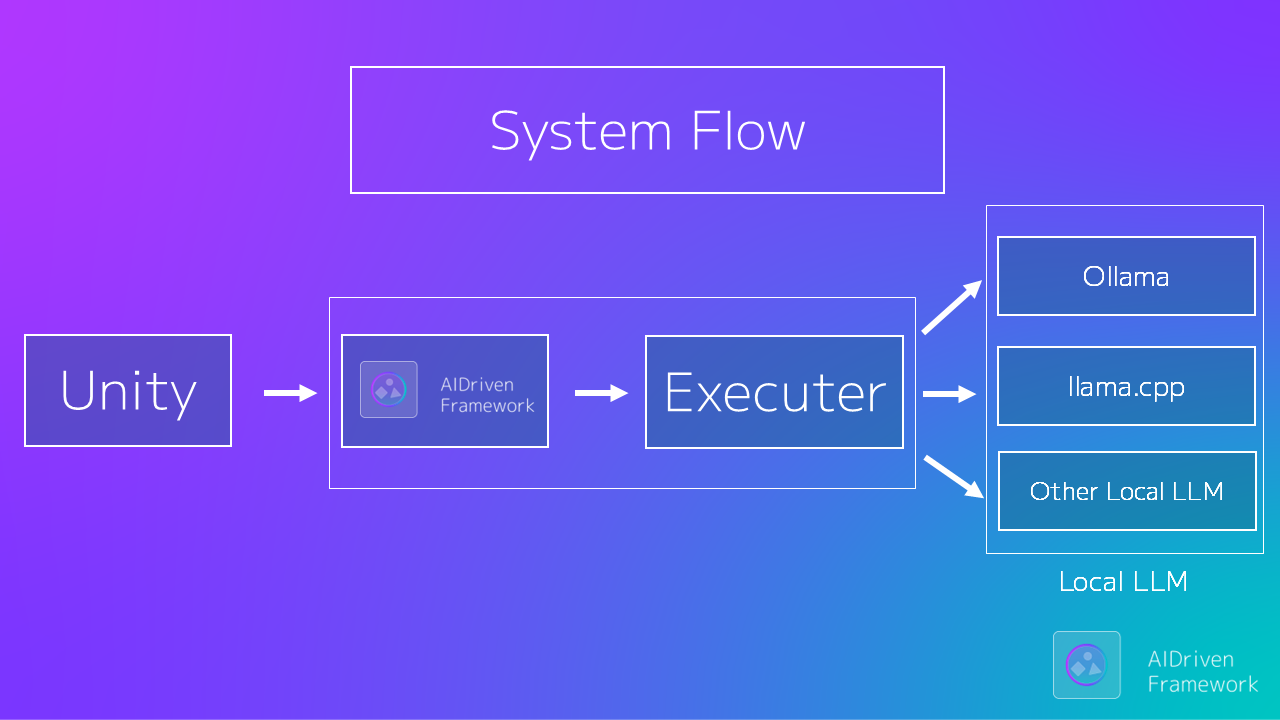
AIDrivenFramework connects Unity games with Local LLM environments through a flexible Executor architecture.
✨ Main Features
- 🎯 Designed for Unity: Seamlessly integrates into games with full support for Play Mode and builds
- 🧠 Simple Integration: Embed a local LLM into your game with just three lines of code
- 💬 Streaming Generation Support: Receive and display generated text in real time, ideal for chat and interactive experiences
- 🔁 Automatic Retry Mechanism: Automatically retries up to three times if generation fails
- 🛠 Integrated Setup Wizard: Easy GUI-based setup with no need for Ollama
- 🚀 Automatic Setup Launch: If AISetup is present, setup starts automatically on first run
- 🔒 Safe-by-Design: Prevents generation before the model is fully ready
- ⚡ Automatic Initialization: Prepares the LLM environment automatically when Play begins
- 🧩 Modular Execution Framework: Flexibly switch between CLI, HTTP, and custom execution backends
- 🧼 Clean & Stable Execution: Eliminates CLI noise and returns only pure responses
Unity interacts only with a minimal, clean API.
⚡ Quick Start
1️⃣ Install
OpenUPM is the recommended installation path:
openupm add com.hatomaru.ai.framework
Alternatively, add the package through Unity Package Manager using the Git URL:
https://github.com/hatomaru/AIDrivenFramework.git?path=src/AIDrivenFramework
[!IMPORTANT] When installing from the Git URL, make sure the required dependencies listed below are available in the project first. They are not bundled in this repository.
2️⃣ Prepare Local LLM (If not using Ollama)
Download separately:
llama.cpp.ggufmodel file
(Not included in this repository)
[!TIP] Use pre-built llama.cpp binaries from https://github.com/ggerganov/llama.cpp/releases
Recommended starting model: Llama-3-ELYZA-JP-8B-GGUF
3️⃣ Initialization
If the environment is not set up:
- The setup scene will open automatically
- The optional AISetup component is required
[!TIP]
IsPrepared()accepts an optionalGenAIinstance.Passing an existing instance prevents the LLM process from shutting down after a health check,
avoids reloading the model twice, and improves startup performance.
4️⃣ Generation
using AIDrivenFW.API;

var genAI = new GenAI();
var result = await genAI.Generate("Hello AI");
Debug.Log(result);
You're all set 🎉
Supported LLM runtimes
- Ollama (HTTP)
- llama.cpp CLI (default Executor)
- llama.cpp server (HTTP)
🧙 Setup Wizard (AISetup Component)
The optional AISetup package provides a setup wizard for beginners.
- Automatic detection of unconfigured states
- llama.cpp executable selection GUI
- .gguf model file selection GUI
[!TIP] Installation of the optional sample scenes
Manual launch from the menu:
Tools > AIDrivenFW > Optional Packages
It can be installed from the setup window (optional dependency).
This greatly simplifies the initial setup, especially recommended for beginners.
🎮 Sample Games
Two sample games are currently included in the optional Example package.
To install them, open Tools > AIDrivenFW > Optional Packages, select both Example Scene and AISetup, and click Install Selected. The current samples reference components from AISetup and will not compile if Example Scene is installed by itself.
| Sample | Name | Overview | Executor used by the sample |
|---|---|---|---|
| 1 | AI NPC Roleplay Chat | Freely talk with an AI NPC while maintaining its personality and conversation history | OllamaHTTPExecutor |
| 2 | Guess the Topic | Ask questions and guess the hidden topic selected by the game | LlamaHTTPExecutor |
Planned, not currently included: Dialogue Battle and AI Story Generator.
🎯 Primary Public API (V1)
using AIDrivenFW.API;
using AIDrivenFW.Config;
using UnityEngine;

public sealed class AIExample : MonoBehaviour
{
    private async void Start()
    {
        var genAI = new GenAI();
        var config = ScriptableObject.CreateInstance<GenAIConfig>();
        config.sysPrompt = "You are a helpful NPC.";

        var isPrepared = await AIDrivenInitializer.Initialize(defaultGenAI: genAI);
        if (!isPrepared) return;

        var result = await genAI.Generate("Hello AI", config);
        Debug.Log(result);
    }
}
These are the recommended entry points. Advanced Executor implementations are also public and may evolve as the framework develops.
🧠 Why AIDrivenFramework?
Unlike simple wrappers, this framework:
- Prevents generation before model load
- Prevents missing process startup
- Guarantees execution safety at API level
- Supports Executor replacement
Designed for long-term Unity × AI architecture, not just quick calls.
🔁 Executor Replacement (Advanced)
You can replace the execution layer:
var genAI = new GenAI();
genAI.SetExecutor(customExecutor);
Default implementation:
LlamaCliExecutor
This allows HTTP executors or custom process handlers.
🔧 Required Dependencies
The following packages are required:
🖥 System Requirements
Minimum
- Unity 6 (6000.0) or later, matching the current package manifest
- Windows 10 / 11 (64-bit) or macOS
- RAM: 8 GB or more
Earlier Unity versions have not been validated against the current package manifest.
Recommended
- RAM: 16 GB or more
- GPU VRAM: 8 GB or more (depending on the AI model used)
💬 Community
Questions? Experiments? Unity × Local LLM discussion?
👉 Join CommunityGuild
https://discord.gg/dfzwqCHSW2
⚖ License
- Framework core: MIT License
- Models & runtimes: Not included
- Follow each official distribution license
🎮 Target Users
- Unity developers exploring local LLM
- Developers concerned about execution safety
- Experimental AI × Game creators
- OSS contributors
✍ From the Author
AIDrivenFramework was created to provide
a safe entry point for local LLM integration in Unity.
Issues, PRs, and feedback are welcome.
Similar repos


Unity framework for safely integrating local LLMs like llama.cpp.
C#
5
317 commits
updated Sep 22, 2026
README
AIDrivenFramework 🚀
Unity × Local LLM Safe Framework
A setup & execution framework for safely integrating local LLMs into Unity.
🎥 Introduction Video
🇯🇵 日本語READMEはこちら
🎞 Demo
Model Setup Demo
🛠 System Architecture
AIDrivenFramework connects Unity games with Local LLM environments through a flexible Executor architecture.
✨ Main Features
- 🎯 Designed for Unity: Seamlessly integrates into games with full support for Play Mode and builds
- 🧠 Simple Integration: Embed a local LLM into your game with just three lines of code
- 💬 Streaming Generation Support: Receive and display generated text in real time, ideal for chat and interactive experiences
- 🔁 Automatic Retry Mechanism: Automatically retries up to three times if generation fails
- 🛠 Integrated Setup Wizard: Easy GUI-based setup with no need for Ollama
- 🚀 Automatic Setup Launch: If AISetup is present, setup starts automatically on first run
- 🔒 Safe-by-Design: Prevents generation before the model is fully ready
- ⚡ Automatic Initialization: Prepares the LLM environment automatically when Play begins
- 🧩 Modular Execution Framework: Flexibly switch between CLI, HTTP, and custom execution backends
- 🧼 Clean & Stable Execution: Eliminates CLI noise and returns only pure responses
Unity interacts only with a minimal, clean API.
⚡ Quick Start
1️⃣ Install
OpenUPM is the recommended installation path:
openupm add com.hatomaru.ai.framework
Alternatively, add the package through Unity Package Manager using the Git URL:
https://github.com/hatomaru/AIDrivenFramework.git?path=src/AIDrivenFramework
[!IMPORTANT] When installing from the Git URL, make sure the required dependencies listed below are available in the project first. They are not bundled in this repository.
2️⃣ Prepare Local LLM (If not using Ollama)
Download separately:
llama.cpp.ggufmodel file
(Not included in this repository)
[!TIP] Use pre-built llama.cpp binaries from https://github.com/ggerganov/llama.cpp/releases
Recommended starting model: Llama-3-ELYZA-JP-8B-GGUF
3️⃣ Initialization
If the environment is not set up:
- The setup scene will open automatically
- The optional AISetup component is required
[!TIP]
IsPrepared()accepts an optionalGenAIinstance.Passing an existing instance prevents the LLM process from shutting down after a health check,
avoids reloading the model twice, and improves startup performance.
4️⃣ Generation
using AIDrivenFW.API;

var genAI = new GenAI();
var result = await genAI.Generate("Hello AI");
Debug.Log(result);
You're all set 🎉
Supported LLM runtimes
- Ollama (HTTP)
- llama.cpp CLI (default Executor)
- llama.cpp server (HTTP)
🧙 Setup Wizard (AISetup Component)
The optional AISetup package provides a setup wizard for beginners.
- Automatic detection of unconfigured states
- llama.cpp executable selection GUI
- .gguf model file selection GUI
[!TIP] Installation of the optional sample scenes
Manual launch from the menu:
Tools > AIDrivenFW > Optional Packages
It can be installed from the setup window (optional dependency).
This greatly simplifies the initial setup, especially recommended for beginners.
🎮 Sample Games
Two sample games are currently included in the optional Example package.
To install them, open Tools > AIDrivenFW > Optional Packages, select both Example Scene and AISetup, and click Install Selected. The current samples reference components from AISetup and will not compile if Example Scene is installed by itself.
| Sample | Name | Overview | Executor used by the sample |
|---|---|---|---|
| 1 | AI NPC Roleplay Chat | Freely talk with an AI NPC while maintaining its personality and conversation history | OllamaHTTPExecutor |
| 2 | Guess the Topic | Ask questions and guess the hidden topic selected by the game | LlamaHTTPExecutor |
Planned, not currently included: Dialogue Battle and AI Story Generator.
🎯 Primary Public API (V1)
using AIDrivenFW.API;
using AIDrivenFW.Config;
using UnityEngine;

public sealed class AIExample : MonoBehaviour
{
    private async void Start()
    {
        var genAI = new GenAI();
        var config = ScriptableObject.CreateInstance<GenAIConfig>();
        config.sysPrompt = "You are a helpful NPC.";

        var isPrepared = await AIDrivenInitializer.Initialize(defaultGenAI: genAI);
        if (!isPrepared) return;

        var result = await genAI.Generate("Hello AI", config);
        Debug.Log(result);
    }
}
These are the recommended entry points. Advanced Executor implementations are also public and may evolve as the framework develops.
🧠 Why AIDrivenFramework?
Unlike simple wrappers, this framework:
- Prevents generation before model load
- Prevents missing process startup
- Guarantees execution safety at API level
- Supports Executor replacement
Designed for long-term Unity × AI architecture, not just quick calls.
🔁 Executor Replacement (Advanced)
You can replace the execution layer:
var genAI = new GenAI();
genAI.SetExecutor(customExecutor);
Default implementation:
LlamaCliExecutor
This allows HTTP executors or custom process handlers.
🔧 Required Dependencies
The following packages are required:
🖥 System Requirements
Minimum
- Unity 6 (6000.0) or later, matching the current package manifest
- Windows 10 / 11 (64-bit) or macOS
- RAM: 8 GB or more
Earlier Unity versions have not been validated against the current package manifest.
Recommended
- RAM: 16 GB or more
- GPU VRAM: 8 GB or more (depending on the AI model used)
💬 Community
Questions? Experiments? Unity × Local LLM discussion?
👉 Join CommunityGuild
https://discord.gg/dfzwqCHSW2
⚖ License
- Framework core: MIT License
- Models & runtimes: Not included
- Follow each official distribution license
🎮 Target Users
- Unity developers exploring local LLM
- Developers concerned about execution safety
- Experimental AI × Game creators
- OSS contributors
✍ From the Author
AIDrivenFramework was created to provide
a safe entry point for local LLM integration in Unity.
Issues, PRs, and feedback are welcome.