Render Mermaid diagrams in your terminal or Python app
See the codeRender Mermaid diagrams in your terminal or Python app.
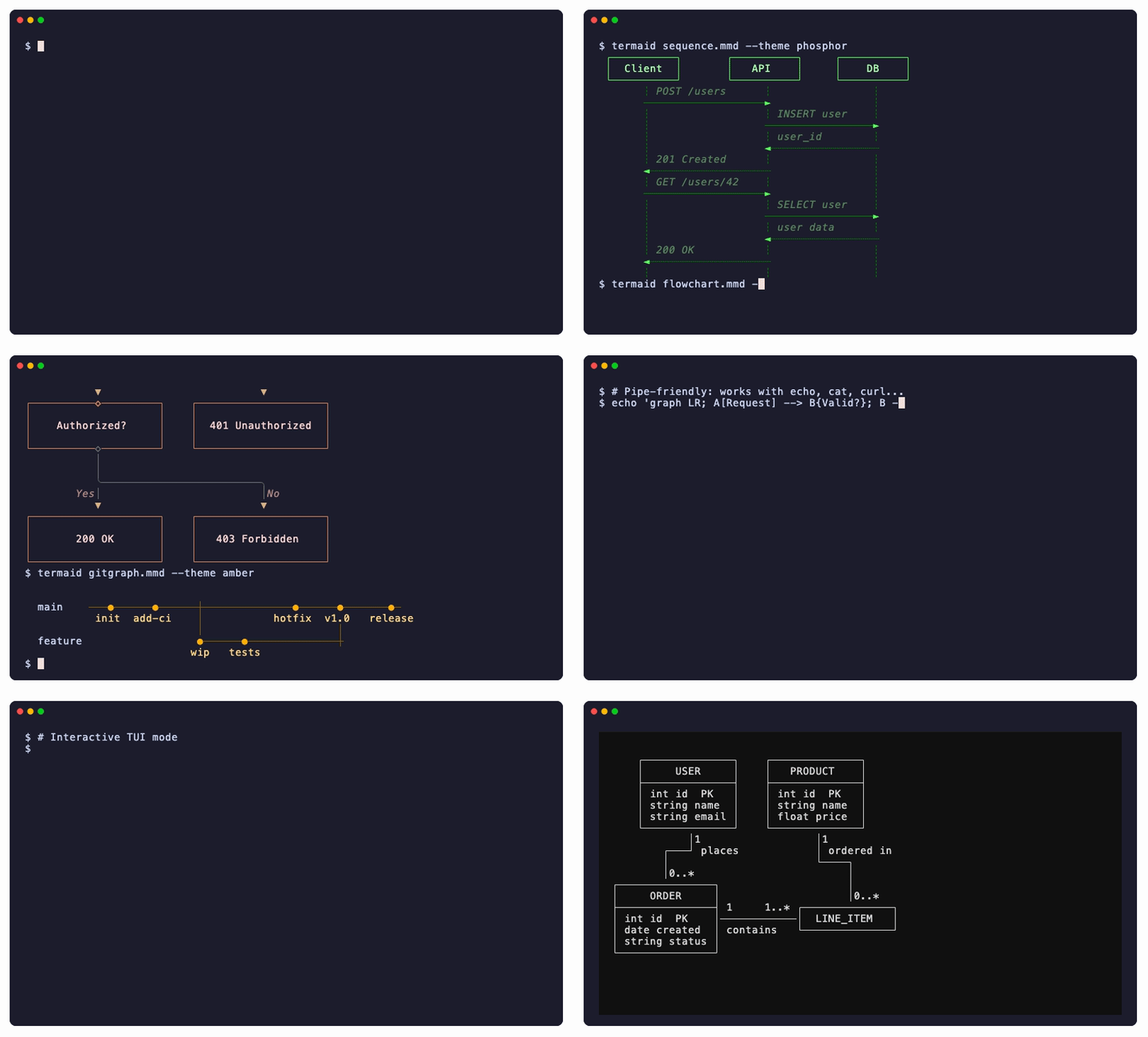
cat diagram.mmd | termaid just worksMermaid is great for documentation, but rendering it usually means spinning up a browser or calling an external service. termaid lets you render diagrams over SSH, in CI logs, inside TUI apps, or anywhere you have a Python environment. It was built because the existing tools in this space, like mermaid-ascii (Go) and beautiful-mermaid (TypeScript), don't offer a native Python library you can import and call directly.
pip install termaid
brew install termaid
Or try it without installing:
uvx termaid diagram.mmd
termaid diagram.mmd
echo "graph LR; A-->B-->C" | termaid
termaid diagram.mmd --theme neon
termaid diagram.mmd --ascii
termaid --markdown README.md          # draw every ```mermaid block in a document
gh pr view 42 | termaid --markdown
from termaid import render

print(render("graph LR\n  A --> B --> C"))
# Colored output (requires: pip install termaid[rich])
from termaid import render_rich
from rich import print as rprint

rprint(render_rich("graph LR\n  A --> B", theme="terra"))
# Textual TUI widget (requires: pip install termaid[textual])
from termaid import MermaidWidget

widget = MermaidWidget("graph LR\n  A --> B")
All directions supported: LR, RL, TD/TB, BT.
graph TD
    A[Start] --> B{Is valid?}
    B -->|Yes| C(Process)
    C --> D([Done])
    B -->|No| E[Error]
┌─────────────┐
│             │
│    Start    │
│             │
└──────┬──────┘
       │
       │
       ▼
┌──────◇──────┐
│             │
│  Is valid?  │
│             │
└──────◇──────┘
       │
       │
       ╰──────────────────╮
    Yes│                  │No
       ▼                  ▼
╭─────────────╮    ┌─────────────┐
│             │    │             │
│   Process   │    │    Error    │
│             │    │             │
╰──────┬──────╯    └─────────────┘
       │
       │
       ▼
╭─────────────╮
(             )
(    Done     )
(             )
╰─────────────╯
Node shapes: rectangle [text], rounded (text), diamond {text}, stadium ([text]), subroutine [[text]], circle ((text)), double circle (((text))), hexagon {{text}}, cylinder [(text)], asymmetric >text], parallelogram [/text/], trapezoid [/text\], and @{shape} syntax
Edge styles: solid -->, dotted -.->, thick ==>, bidirectional <-->, circle endpoint --o, cross endpoint --x, labeled -->|text|, variable length --->, ---->
Styling: classDef, style, linkStyle directives, :::className suffix
Subgraphs: nesting, cross-boundary edges, per-subgraph direction override
Other: %% comments, ; line separators, Markdown labels "`**bold** *italic*`", & operator (A & B --> C)
sequenceDiagram
    Alice->>Bob: Hello Bob
    Bob-->>Alice: Hi Alice
    Alice->>Bob: How are you?
    Bob-->>Alice: Great!
 ┌──────────┐      ┌──────────┐
 │  Alice   │      │   Bob    │
 └──────────┘      └──────────┘
       ┆ Hello Bob       ┆
       ──────────────────►
       ┆ Hi Alice        ┆
       ◄┄┄┄┄┄┄┄┄┄┄┄┄┄┄┄┄┄┄
       ┆ How are you?    ┆
       ──────────────────►
       ┆ Great!          ┆
       ◄┄┄┄┄┄┄┄┄┄┄┄┄┄┄┄┄┄┄
       ┆                 ┆
Message types: solid arrow ->>, dashed arrow -->>, solid line ->, dashed line -->
Participants: participant, actor, aliases
classDiagram
    class Animal {
        +String name
        +int age
        +makeSound()
    }
    class Dog {
        +String breed
        +fetch()
    }
    Animal <|-- Dog
  ┌──────────────┐
  │    Animal    │
  ├──────────────┤
  │ +String name │
  │ +int age     │
  ├──────────────┤
  │ +makeSound() │
  └──────────────┘
          △
          │
          │
          │
  ┌───────────────┐
  │      Dog      │
  ├───────────────┤
  │ +String breed │
  ├───────────────┤
  │ +fetch()      │
  └───────────────┘
Relationships: inheritance <|--, composition *--, aggregation o--, association --, dependency ..>, realization ..|>
Members: attributes and methods with visibility (+ public, - private, # protected, ~ package)
erDiagram
    CUSTOMER ||--o{ ORDER : places
    ORDER ||--|{ LINE-ITEM : contains
  ┌──────────────┐
  │   CUSTOMER   │
  └──────────────┘
          │1
          │ places
          │
          │0..*
  ┌──────────────┐
  │    ORDER     │
  └──────────────┘
          │1
          │ contains
          │
          │1..*
  ┌──────────────┐
  │  LINE-ITEM   │
  └──────────────┘
Cardinality: || (exactly one), o| (zero or one), }| (one or more), o{ (zero or more)
Line styles: solid --, dashed ..
Attributes: type, name, keys (PK, FK, UK), comments
stateDiagram-v2
    [*] --> Idle
    Idle --> Processing : start
    Processing --> Done : complete
    Done --> [*]
╭───────◯──────╮
│              │
│      ●       │
│              │
╰───────◯──────╯
        │
        │
        ▼
╭──────────────╮
│              │
│     Idle     │
│              │
╰───────┬──────╯
        │
   start│
        ▼
╭──────────────╮
│              │
│  Processing  │
│              │
╰───────┬──────╯
        │
complete│
        ▼
╭──────────────╮
│              │
│     Done     │
│              │
╰───────┬──────╯
        │
        │
        ▼
╭───────◯──────╮
│              │
│      ◉       │
│              │
╰───────◯──────╯
Features: [*] start/end states, transition labels, state "name" as alias, composite states (state Parent { }), stereotypes (<<choice>>, <<fork>>, <<join>>)
block-beta
    columns 3
    A["Frontend"] B["API"] C["Database"]
  ┌──────────┐    ┌──────────┐    ┌──────────┐
  │          │    │          │    │          │
  │ Frontend │    │   API    │    │ Database │
  │          │    │          │    │          │
  └──────────┘    └──────────┘    └──────────┘
Features: columns N, column spanning (blockname:N), links between blocks, nested blocks
gitGraph
   commit id: "init"
   commit id: "feat"
   branch develop
   commit id: "dev-1"
   commit id: "dev-2"
   checkout main
   commit id: "fix"
   merge develop id: "merge"
  main    ───●─────●──────┼──────────────●──────●─
           init  feat     │             fix   merge
                          │                     │
  develop                 ●───────●─────────────┼
                        dev-1   dev-2
Directions: LR (default), TB, BT
Commands: commit (with id:, type:, tag:), branch (with order:), checkout/switch, merge, cherry-pick
Commit types: NORMAL (●), REVERSE (✖), HIGHLIGHT (■)
Config: %%{init: {"gitGraph": {"mainBranchName": "master"}}}%%
Yes, the syntax says pie. No, we don't draw a circle. I know. Have you ever tried to read a pie chart made of █ and ▓? Exactly. We render them as horizontal bar charts instead.
pie title Pets adopted by volunteers
    "Dogs" : 386
    "Cats" : 85
    "Rats" : 15
  Dogs┃████████████████████████████████  79.4%
  Cats┃▓▓▓▓▓▓▓  17.5%
  Rats┃░   3.1%
Features: title, showData (display raw values), %% comments
treemap-beta
    "Frontend"
        "React": 40
        "CSS": 15
    "Backend"
        "API": 35
        "Auth": 10
┌┄┄┄┄┄┄┄┄┄┄┄┄┄┄┄┄┄┄┄┄┄┄┄┄┄┄┄┄┄┄┄┄┄┄┄┐ ┌┄┄┄┄┄┄┄┄┄┄┄┄┄┄┄┄┄┄┄┄┄┄┄┄┄┄┄┄┐
┆             Frontend              ┆ ┆          Backend           ┆
┆┌───────────────────────┐ ┌───────┐┆ ┆┌───────────────────┐ ┌────┐┆
┆│         React         │ │  CSS  │┆ ┆│        API        │ │Auth│┆
┆│          40           │ │  15   │┆ ┆│        35         │ │ 10 │┆
┆│                       │ │       │┆ ┆│                   │ │    │┆
┆└───────────────────────┘ └───────┘┆ ┆└───────────────────┘ └────┘┆
└┄┄┄┄┄┄┄┄┄┄┄┄┄┄┄┄┄┄┄┄┄┄┄┄┄┄┄┄┄┄┄┄┄┄┄┘ └┄┄┄┄┄┄┄┄┄┄┄┄┄┄┄┄┄┄┄┄┄┄┄┄┄┄┄┄┘
Features: nested sections via indentation, "label": value syntax, proportional sizing, %% comments
mindmap
  Project
    Design
      Wireframes
      Mockups
    Development
      Frontend
      Backend
    Testing
          ╭─ Design ──╭─ Wireframes
          │           ╰─ Mockups
Project ──├─ Development ──╭─ Frontend
          │                ╰─ Backend
          ╰─ Testing
Features: indentation-based nesting, automatic overflow to the left when many children, rounded/sharp/ASCII branch characters, Mermaid shape markers stripped ((round), [square], {{hexagon}}, )cloud()
xychart-beta
    title "Monthly Revenue"
    x-axis [Jan, Feb, Mar, Apr, May, Jun]
    bar [12, 18, 25, 20, 30, 35]
                 Monthly Revenue

     35 │                              ████
        │                              ████
        │                        ▄▄▄▄  ████
     28 │                        ████  ████
        │            ▄▄▄▄        ████  ████
        │            ████        ████  ████
     21 │            ████  ▄▄▄▄  ████  ████
        │      ▄▄▄▄  ████  ████  ████  ████
        │      ████  ████  ████  ████  ████
     14 │      ████  ████  ████  ████  ████
        │████  ████  ████  ████  ████  ████
        │████  ████  ████  ████  ████  ████
      7 │████  ████  ████  ████  ████  ████
        │████  ████  ████  ████  ████  ████
        │████  ████  ████  ████  ████  ████
      0 └──┬─────┬─────┬─────┬─────┬─────┬─
          Jan   Feb   Mar   Apr   May   Jun
Features: bar charts, line charts, bar+line combos, horizontal orientation (xychart horizontal), axis labels, xychart and xychart-beta keywords, rounded/sharp line corners, JSON ingest
journey
    title My working day
    section Go to work
        Make tea: 5: Me
        Go upstairs: 3: Me
        Do work: 1: Me, Cat
    section Go home
        Go downstairs: 5: Me
        Sit down: 5: Me
  My working day

  ● Cat
  ◆ Me

  ╭───────────── Go to work ──────────────╮   ╭───────── Go home ───────────╮

  ╭◆─────────╮ ╭◆────────────╮ ╭●◆───────╮    ╭◆──────────────╮ ╭◆─────────╮
 ─│ Make tea │─│ Go upstairs │─│ Do work │────│ Go downstairs │─│ Sit down │────►
  ╰──────────╯ ╰─────────────╯ ╰─────────╯    ╰───────────────╯ ╰──────────╯
       😄            😐            😞                😄              😄
Features: sections, satisfaction scores (😞-😄), multi-actor support with distinct symbols (●◆■▲), rounded/sharp/ASCII corners
packet
    0-15: "Source Port"
    16-31: "Destination Port"
    32-63: "Sequence Number"
    64-95: "Acknowledgment Number"
 0                                             15 16                                           31
 ╭───────────────────────────────────────────────┬───────────────────────────────────────────────╮
 │                 Source Port                   │               Destination Port                │
 ╰───────────────────────────────────────────────┴───────────────────────────────────────────────╯
 32                                                                                            63
 ╭───────────────────────────────────────────────────────────────────────────────────────────────╮
 │                                       Sequence Number                                         │
 ╰───────────────────────────────────────────────────────────────────────────────────────────────╯
 64                                                                                            95
 ╭───────────────────────────────────────────────────────────────────────────────────────────────╮
 │                                    Acknowledgment Number                                      │
 ╰───────────────────────────────────────────────────────────────────────────────────────────────╯
Features: bit-aligned field layouts, boundary numbers, auto-increment (+N) syntax, separated boxes per row, truncated label legend with bit ranges, packet and packet-beta keywords
| Flag | Description |
|---|---|
--ascii | ASCII-only output (no Unicode box-drawing) |
--theme NAME | Color theme (requires pip install termaid[rich]). Use --themes to list |
--themes | List all available color themes |
--demo [TYPE] | Render sample diagrams (all, flowchart, sequence, mindmap, etc.) |
--padding-x N | Horizontal padding inside boxes (default: 4) |
--padding-y N | Vertical padding inside boxes (default: 2) |
--gap N | Space between nodes (default: 4). Use 1 or 2 for compact diagrams |
--inline-edge-labels | Attach flowchart labels directly to their edges |
--width N | Max output width. Re-renders with smaller gap/padding if exceeded |
--no-auto-fit | Disable automatic compaction when diagram exceeds terminal width |
--sharp-edges | Sharp corners on edge turns instead of rounded |
-o FILE | Write output to file instead of stdout |
--show-ids | Show node IDs alongside labels for debugging (e.g. myId: My Label) |
--json TYPE | Pipe JSON/tabular data and render as treemap, pie, mindmap, flowchart, or xychart |
--markdown | Read a Markdown document and draw each mermaid code block in place; other text passes through. A block that cannot be drawn is kept as source, with a warning |
--tui | Interactive TUI viewer (requires pip install termaid[tui]) |
render(source, ...) -> strRender a Mermaid diagram as a plain text string. Auto-detects diagram type.
render_rich(source, ..., theme="default") -> rich.text.TextRender as a Rich Text object with colors. Requires pip install termaid[rich].
MermaidWidgetA Textual widget with a reactive source attribute. Requires pip install termaid[textual]. Updates live when you change the source property.
from termaid import MermaidWidget

class MyApp(App):
    def compose(self):
        yield MermaidWidget("graph LR\n  A --> B")
11 built-in themes for --theme / render_rich(). Run termaid --themes to list them.
Text themes (foreground colors only):
| Theme | Colors | Description |
|---|---|---|
default |    | Cyan nodes, yellow arrows, white labels |
terra |    | Warm earth tones (browns, oranges) |
neon |   | Magenta nodes, green arrows, cyan edges |
mono |   | White/gray monochrome |
amber |    | Amber/gold CRT-style |
phosphor |    | Green phosphor terminal-style |
Solid themes (filled backgrounds with foreground colors):
| Theme | Colors | Description |
|---|---|---|
gruvbox |    | Gruvbox dark palette |
monokai |    | Monokai dark with pink/green accents |
dracula |    | Dracula purple/pink/green palette |
nord |    | Nord muted blue/cyan arctic palette |
solarized |    | Solarized dark blue/yellow/cyan |
pip install termaid[rich]      # Colored terminal output
pip install termaid[textual]   # Textual TUI widget
--width N, --gap 1, or pipe through less -S.See the examples page for rendered examples of all 18 supported diagram types.
Inspired by mermaid-ascii by Alexander Grooff and beautiful-mermaid by Lukilabs.
MIT
615 followers · starred Oct 2026
119 followers · starred Sep 2026
625 followers · starred Apr 2026
31 followers · starred Apr 2026
Render Mermaid diagrams in your terminal or Python app
See the codeRender Mermaid diagrams in your terminal or Python app.
cat diagram.mmd | termaid just worksMermaid is great for documentation, but rendering it usually means spinning up a browser or calling an external service. termaid lets you render diagrams over SSH, in CI logs, inside TUI apps, or anywhere you have a Python environment. It was built because the existing tools in this space, like mermaid-ascii (Go) and beautiful-mermaid (TypeScript), don't offer a native Python library you can import and call directly.
pip install termaid
brew install termaid
Or try it without installing:
uvx termaid diagram.mmd
termaid diagram.mmd
echo "graph LR; A-->B-->C" | termaid
termaid diagram.mmd --theme neon
termaid diagram.mmd --ascii
termaid --markdown README.md          # draw every ```mermaid block in a document
gh pr view 42 | termaid --markdown
from termaid import render

print(render("graph LR\n  A --> B --> C"))
# Colored output (requires: pip install termaid[rich])
from termaid import render_rich
from rich import print as rprint

rprint(render_rich("graph LR\n  A --> B", theme="terra"))
# Textual TUI widget (requires: pip install termaid[textual])
from termaid import MermaidWidget

widget = MermaidWidget("graph LR\n  A --> B")
All directions supported: LR, RL, TD/TB, BT.
graph TD
    A[Start] --> B{Is valid?}
    B -->|Yes| C(Process)
    C --> D([Done])
    B -->|No| E[Error]
┌─────────────┐
│             │
│    Start    │
│             │
└──────┬──────┘
       │
       │
       ▼
┌──────◇──────┐
│             │
│  Is valid?  │
│             │
└──────◇──────┘
       │
       │
       ╰──────────────────╮
    Yes│                  │No
       ▼                  ▼
╭─────────────╮    ┌─────────────┐
│             │    │             │
│   Process   │    │    Error    │
│             │    │             │
╰──────┬──────╯    └─────────────┘
       │
       │
       ▼
╭─────────────╮
(             )
(    Done     )
(             )
╰─────────────╯
Node shapes: rectangle [text], rounded (text), diamond {text}, stadium ([text]), subroutine [[text]], circle ((text)), double circle (((text))), hexagon {{text}}, cylinder [(text)], asymmetric >text], parallelogram [/text/], trapezoid [/text\], and @{shape} syntax
Edge styles: solid -->, dotted -.->, thick ==>, bidirectional <-->, circle endpoint --o, cross endpoint --x, labeled -->|text|, variable length --->, ---->
Styling: classDef, style, linkStyle directives, :::className suffix
Subgraphs: nesting, cross-boundary edges, per-subgraph direction override
Other: %% comments, ; line separators, Markdown labels "`**bold** *italic*`", & operator (A & B --> C)
sequenceDiagram
    Alice->>Bob: Hello Bob
    Bob-->>Alice: Hi Alice
    Alice->>Bob: How are you?
    Bob-->>Alice: Great!
 ┌──────────┐      ┌──────────┐
 │  Alice   │      │   Bob    │
 └──────────┘      └──────────┘
       ┆ Hello Bob       ┆
       ──────────────────►
       ┆ Hi Alice        ┆
       ◄┄┄┄┄┄┄┄┄┄┄┄┄┄┄┄┄┄┄
       ┆ How are you?    ┆
       ──────────────────►
       ┆ Great!          ┆
       ◄┄┄┄┄┄┄┄┄┄┄┄┄┄┄┄┄┄┄
       ┆                 ┆
Message types: solid arrow ->>, dashed arrow -->>, solid line ->, dashed line -->
Participants: participant, actor, aliases
classDiagram
    class Animal {
        +String name
        +int age
        +makeSound()
    }
    class Dog {
        +String breed
        +fetch()
    }
    Animal <|-- Dog
  ┌──────────────┐
  │    Animal    │
  ├──────────────┤
  │ +String name │
  │ +int age     │
  ├──────────────┤
  │ +makeSound() │
  └──────────────┘
          △
          │
          │
          │
  ┌───────────────┐
  │      Dog      │
  ├───────────────┤
  │ +String breed │
  ├───────────────┤
  │ +fetch()      │
  └───────────────┘
Relationships: inheritance <|--, composition *--, aggregation o--, association --, dependency ..>, realization ..|>
Members: attributes and methods with visibility (+ public, - private, # protected, ~ package)
erDiagram
    CUSTOMER ||--o{ ORDER : places
    ORDER ||--|{ LINE-ITEM : contains
  ┌──────────────┐
  │   CUSTOMER   │
  └──────────────┘
          │1
          │ places
          │
          │0..*
  ┌──────────────┐
  │    ORDER     │
  └──────────────┘
          │1
          │ contains
          │
          │1..*
  ┌──────────────┐
  │  LINE-ITEM   │
  └──────────────┘
Cardinality: || (exactly one), o| (zero or one), }| (one or more), o{ (zero or more)
Line styles: solid --, dashed ..
Attributes: type, name, keys (PK, FK, UK), comments
stateDiagram-v2
    [*] --> Idle
    Idle --> Processing : start
    Processing --> Done : complete
    Done --> [*]
╭───────◯──────╮
│              │
│      ●       │
│              │
╰───────◯──────╯
        │
        │
        ▼
╭──────────────╮
│              │
│     Idle     │
│              │
╰───────┬──────╯
        │
   start│
        ▼
╭──────────────╮
│              │
│  Processing  │
│              │
╰───────┬──────╯
        │
complete│
        ▼
╭──────────────╮
│              │
│     Done     │
│              │
╰───────┬──────╯
        │
        │
        ▼
╭───────◯──────╮
│              │
│      ◉       │
│              │
╰───────◯──────╯
Features: [*] start/end states, transition labels, state "name" as alias, composite states (state Parent { }), stereotypes (<<choice>>, <<fork>>, <<join>>)
block-beta
    columns 3
    A["Frontend"] B["API"] C["Database"]
  ┌──────────┐    ┌──────────┐    ┌──────────┐
  │          │    │          │    │          │
  │ Frontend │    │   API    │    │ Database │
  │          │    │          │    │          │
  └──────────┘    └──────────┘    └──────────┘
Features: columns N, column spanning (blockname:N), links between blocks, nested blocks
gitGraph
   commit id: "init"
   commit id: "feat"
   branch develop
   commit id: "dev-1"
   commit id: "dev-2"
   checkout main
   commit id: "fix"
   merge develop id: "merge"
  main    ───●─────●──────┼──────────────●──────●─
           init  feat     │             fix   merge
                          │                     │
  develop                 ●───────●─────────────┼
                        dev-1   dev-2
Directions: LR (default), TB, BT
Commands: commit (with id:, type:, tag:), branch (with order:), checkout/switch, merge, cherry-pick
Commit types: NORMAL (●), REVERSE (✖), HIGHLIGHT (■)
Config: %%{init: {"gitGraph": {"mainBranchName": "master"}}}%%
Yes, the syntax says pie. No, we don't draw a circle. I know. Have you ever tried to read a pie chart made of █ and ▓? Exactly. We render them as horizontal bar charts instead.
pie title Pets adopted by volunteers
    "Dogs" : 386
    "Cats" : 85
    "Rats" : 15
  Dogs┃████████████████████████████████  79.4%
  Cats┃▓▓▓▓▓▓▓  17.5%
  Rats┃░   3.1%
Features: title, showData (display raw values), %% comments
treemap-beta
    "Frontend"
        "React": 40
        "CSS": 15
    "Backend"
        "API": 35
        "Auth": 10
┌┄┄┄┄┄┄┄┄┄┄┄┄┄┄┄┄┄┄┄┄┄┄┄┄┄┄┄┄┄┄┄┄┄┄┄┐ ┌┄┄┄┄┄┄┄┄┄┄┄┄┄┄┄┄┄┄┄┄┄┄┄┄┄┄┄┄┐
┆             Frontend              ┆ ┆          Backend           ┆
┆┌───────────────────────┐ ┌───────┐┆ ┆┌───────────────────┐ ┌────┐┆
┆│         React         │ │  CSS  │┆ ┆│        API        │ │Auth│┆
┆│          40           │ │  15   │┆ ┆│        35         │ │ 10 │┆
┆│                       │ │       │┆ ┆│                   │ │    │┆
┆└───────────────────────┘ └───────┘┆ ┆└───────────────────┘ └────┘┆
└┄┄┄┄┄┄┄┄┄┄┄┄┄┄┄┄┄┄┄┄┄┄┄┄┄┄┄┄┄┄┄┄┄┄┄┘ └┄┄┄┄┄┄┄┄┄┄┄┄┄┄┄┄┄┄┄┄┄┄┄┄┄┄┄┄┘
Features: nested sections via indentation, "label": value syntax, proportional sizing, %% comments
mindmap
  Project
    Design
      Wireframes
      Mockups
    Development
      Frontend
      Backend
    Testing
          ╭─ Design ──╭─ Wireframes
          │           ╰─ Mockups
Project ──├─ Development ──╭─ Frontend
          │                ╰─ Backend
          ╰─ Testing
Features: indentation-based nesting, automatic overflow to the left when many children, rounded/sharp/ASCII branch characters, Mermaid shape markers stripped ((round), [square], {{hexagon}}, )cloud()
xychart-beta
    title "Monthly Revenue"
    x-axis [Jan, Feb, Mar, Apr, May, Jun]
    bar [12, 18, 25, 20, 30, 35]
                 Monthly Revenue

     35 │                              ████
        │                              ████
        │                        ▄▄▄▄  ████
     28 │                        ████  ████
        │            ▄▄▄▄        ████  ████
        │            ████        ████  ████
     21 │            ████  ▄▄▄▄  ████  ████
        │      ▄▄▄▄  ████  ████  ████  ████
        │      ████  ████  ████  ████  ████
     14 │      ████  ████  ████  ████  ████
        │████  ████  ████  ████  ████  ████
        │████  ████  ████  ████  ████  ████
      7 │████  ████  ████  ████  ████  ████
        │████  ████  ████  ████  ████  ████
        │████  ████  ████  ████  ████  ████
      0 └──┬─────┬─────┬─────┬─────┬─────┬─
          Jan   Feb   Mar   Apr   May   Jun
Features: bar charts, line charts, bar+line combos, horizontal orientation (xychart horizontal), axis labels, xychart and xychart-beta keywords, rounded/sharp line corners, JSON ingest
journey
    title My working day
    section Go to work
        Make tea: 5: Me
        Go upstairs: 3: Me
        Do work: 1: Me, Cat
    section Go home
        Go downstairs: 5: Me
        Sit down: 5: Me
  My working day

  ● Cat
  ◆ Me

  ╭───────────── Go to work ──────────────╮   ╭───────── Go home ───────────╮

  ╭◆─────────╮ ╭◆────────────╮ ╭●◆───────╮    ╭◆──────────────╮ ╭◆─────────╮
 ─│ Make tea │─│ Go upstairs │─│ Do work │────│ Go downstairs │─│ Sit down │────►
  ╰──────────╯ ╰─────────────╯ ╰─────────╯    ╰───────────────╯ ╰──────────╯
       😄            😐            😞                😄              😄
Features: sections, satisfaction scores (😞-😄), multi-actor support with distinct symbols (●◆■▲), rounded/sharp/ASCII corners
packet
    0-15: "Source Port"
    16-31: "Destination Port"
    32-63: "Sequence Number"
    64-95: "Acknowledgment Number"
 0                                             15 16                                           31
 ╭───────────────────────────────────────────────┬───────────────────────────────────────────────╮
 │                 Source Port                   │               Destination Port                │
 ╰───────────────────────────────────────────────┴───────────────────────────────────────────────╯
 32                                                                                            63
 ╭───────────────────────────────────────────────────────────────────────────────────────────────╮
 │                                       Sequence Number                                         │
 ╰───────────────────────────────────────────────────────────────────────────────────────────────╯
 64                                                                                            95
 ╭───────────────────────────────────────────────────────────────────────────────────────────────╮
 │                                    Acknowledgment Number                                      │
 ╰───────────────────────────────────────────────────────────────────────────────────────────────╯
Features: bit-aligned field layouts, boundary numbers, auto-increment (+N) syntax, separated boxes per row, truncated label legend with bit ranges, packet and packet-beta keywords
| Flag | Description |
|---|---|
--ascii | ASCII-only output (no Unicode box-drawing) |
--theme NAME | Color theme (requires pip install termaid[rich]). Use --themes to list |
--themes | List all available color themes |
--demo [TYPE] | Render sample diagrams (all, flowchart, sequence, mindmap, etc.) |
--padding-x N | Horizontal padding inside boxes (default: 4) |
--padding-y N | Vertical padding inside boxes (default: 2) |
--gap N | Space between nodes (default: 4). Use 1 or 2 for compact diagrams |
--inline-edge-labels | Attach flowchart labels directly to their edges |
--width N | Max output width. Re-renders with smaller gap/padding if exceeded |
--no-auto-fit | Disable automatic compaction when diagram exceeds terminal width |
--sharp-edges | Sharp corners on edge turns instead of rounded |
-o FILE | Write output to file instead of stdout |
--show-ids | Show node IDs alongside labels for debugging (e.g. myId: My Label) |
--json TYPE | Pipe JSON/tabular data and render as treemap, pie, mindmap, flowchart, or xychart |
--markdown | Read a Markdown document and draw each mermaid code block in place; other text passes through. A block that cannot be drawn is kept as source, with a warning |
--tui | Interactive TUI viewer (requires pip install termaid[tui]) |
render(source, ...) -> strRender a Mermaid diagram as a plain text string. Auto-detects diagram type.
render_rich(source, ..., theme="default") -> rich.text.TextRender as a Rich Text object with colors. Requires pip install termaid[rich].
MermaidWidgetA Textual widget with a reactive source attribute. Requires pip install termaid[textual]. Updates live when you change the source property.
from termaid import MermaidWidget

class MyApp(App):
    def compose(self):
        yield MermaidWidget("graph LR\n  A --> B")
11 built-in themes for --theme / render_rich(). Run termaid --themes to list them.
Text themes (foreground colors only):
| Theme | Colors | Description |
|---|---|---|
default | | Cyan nodes, yellow arrows, white labels |
terra | | Warm earth tones (browns, oranges) |
neon | | Magenta nodes, green arrows, cyan edges |
mono | | White/gray monochrome |
amber | | Amber/gold CRT-style |
phosphor | | Green phosphor terminal-style |
Solid themes (filled backgrounds with foreground colors):
| Theme | Colors | Description |
|---|---|---|
gruvbox | | Gruvbox dark palette |
monokai | | Monokai dark with pink/green accents |
dracula | | Dracula purple/pink/green palette |
nord | | Nord muted blue/cyan arctic palette |
solarized | | Solarized dark blue/yellow/cyan |
pip install termaid[rich]      # Colored terminal output
pip install termaid[textual]   # Textual TUI widget
--width N, --gap 1, or pipe through less -S.See the examples page for rendered examples of all 18 supported diagram types.
Inspired by mermaid-ascii by Alexander Grooff and beautiful-mermaid by Lukilabs.
MIT
615 followers · starred Oct 2026
119 followers · starred Sep 2026
625 followers · starred Apr 2026
31 followers · starred Apr 2026



