Render Mermaid graphs inside your terminal
See the codeRender mermaid diagrams in your terminal:
You can download the binary from Github releases:
# Get the latest release
$ curl -s https://api.github.com/repos/AlexanderGrooff/mermaid-ascii/releases/latest | grep "browser_download_url.*mermaid-ascii" | grep "$(uname)_$(uname -m)" | cut -d: -f2,3 | tr -d \" | wget -qi -
# Unzip it
$ tar xvzf mermaid-ascii_*.tar.gz
$ ./mermaid-ascii --help
You can also build it yourself:
$ git clone
$ cd mermaid-ascii
$ go build
$ mermaid-ascii --help
Or using Nix:
$ git clone
$ cd mermaid-ascii
$ nix build
$ ./result/bin/mermaid-ascii --help
You can render graphs directly from the command line or start a web interface to render them interactively.
$ cat test.mermaid
graph LR
A --> B & C
B --> C & D
D --> C
$ mermaid-ascii --file test.mermaid
┌───┐     ┌───┐     ┌───┐
│   │     │   │     │   │
│ A ├────►│ B ├────►│ D │
│   │     │   │     │   │
└─┬─┘     └─┬─┘     └─┬─┘
  │         │         │
  │         │         │
  │         │         │
  │         │         │
  │         ▼         │
  │       ┌───┐       │
  │       │   │       │
  └──────►│ C │◄──────┘
          │   │
          └───┘

# Increase horizontal spacing
$ mermaid-ascii --file test.mermaid -x 8
┌───┐        ┌───┐        ┌───┐
│   │        │   │        │   │
│ A ├───────►│ B ├───────►│ D │
│   │        │   │        │   │
└─┬─┘        └─┬─┘        └─┬─┘
  │            │            │
  │            │            │
  │            │            │
  │            │            │
  │            ▼            │
  │          ┌───┐          │
  │          │   │          │
  └─────────►│ C │◄─────────┘
             │   │
             └───┘

# Increase box padding
$ mermaid-ascii -f ./test.mermaid -p 3
┌───────┐     ┌───────┐     ┌───────┐
│       │     │       │     │       │
│       │     │       │     │       │
│       │     │       │     │       │
│   A   ├────►│   B   ├────►│   D   │
│       │     │       │     │       │
│       │     │       │     │       │
│       │     │       │     │       │
└───┬───┘     └───┬───┘     └───┬───┘
    │             │             │
    │             │             │
    │             │             │
    │             │             │
    │             ▼             │
    │         ┌───────┐         │
    │         │       │         │
    │         │       │         │
    │         │       │         │
    └────────►│   C   │◄────────┘
              │       │
              │       │
              │       │
              └───────┘

# Labeled edges
$ cat test.mermaid
graph LR
A --> B
A --> C
B --> C
B -->|example| D
D --> C
$ mermaid-ascii -f ./test.mermaid
┌───┐     ┌───┐         ┌───┐
│   │     │   │         │   │
│ A ├────►│ B ├─example►│ D │
│   │     │   │         │   │
└─┬─┘     └─┬─┘         └─┬─┘
  │         │             │
  │         │             │
  │         │             │
  │         │             │
  │         ▼             │
  │       ┌───┐           │
  │       │   │           │
  └──────►│ C │◄──────────┘
          │   │
          └───┘

# Top-down layout
$ cat test.mermaid
graph TD
A --> B
A --> C
B --> C
B -->|example| D
D --> C
$ mermaid-ascii -f ./test.mermaid
┌─────────┐
│         │
│    A    ├───────┐
│         │       │
└────┬────┘       │
     │            │
     │            │
     │            │
     │            │
     ▼            ▼
┌─────────┐     ┌───┐
│         │     │   │
│    B    ├────►│ C │
│         │     │   │
└────┬────┘     └───┘
     │            ▲
     │            │
  example         │
     │            │
     ▼            │
┌─────────┐       │
│         │       │
│    D    ├───────┘
│         │
└─────────┘

# Other edge types
Besides the default `-->` arrow, flowchart edges also accept `-.->` (dotted), `==>` (thick), `---` (open, no arrowhead), `--o` (circle head), and `--x` (cross head):
$ cat test.mermaid
graph TD
A -.-> B
A ==> C
B --- C
B --o|example| D
D --x C
$ mermaid-ascii -f ./test.mermaid
┌──────────┐
│          │
│    A     │━━━━━━━┓
│          │       ┃
└─────┬────┘       ┃
      ┆            ┃
      ┆            ┃
      ┆            ┃
      ┆            ┃
      ▼            ▼
┌──────────┐     ┌───┐
│          │     │   │
│    B     ├─────┤ C │
│          │     │   │
└─────┬────┘     └───┘
      │            ✕
      │            │
   example         │
      │            │
      ●            │
┌──────────┐       │
│          │       │
│    D     ├───────┘
│          │
└──────────┘

# Limit graph output to terminal columns
$ mermaid-ascii --file test.mermaid --max-width 30
# Use the detected width when stdout is an interactive terminal
$ mermaid-ascii --file test.mermaid --max-width auto

`--max-width` accepts a positive terminal-column number or `auto`. `auto`
detects stdout's terminal width and requires an interactive terminal; invalid
and non-positive values are rejected. If a graph exceeds the limit, rendering
retries with compact spacing (`paddingX=1` and `paddingY=1`). Content is never
wrapped, truncated, cropped, or removed. The CLI notes when compact spacing
fits and warns when it does not. The flag affects only graph and flowchart
diagrams.

# Read from stdin
$ cat test.mermaid | mermaid-ascii
┌───┐     ┌───┐     ┌───┐
│   │     │   │     │   │
│ A ├────►│ B ├────►│ D │
│   │     │   │     │   │
└─┬─┘     └─┬─┘     └─┬─┘
  │         │         │
  │         │         │
  │         │         │
  │         │         │
  │         ▼         │
  │       ┌───┐       │
  │       │   │       │
  └──────►│ C │◄──────┘
          │   │
          └───┘

# Only ASCII
$ cat test.mermaid | mermaid-ascii --ascii
+---+     +---+     +---+
|   |     |   |     |   |
| A |---->| B |---->| D |
|   |     |   |     |   |
+---+     +---+     +---+
  |         |         |
  |         |         |
  |         |         |
  |         |         |
  |         v         |
  |       +---+       |
  |       |   |       |
  ------->| C |<-------
          |   |
          +---+

# Using Docker
$ docker build -t mermaid-ascii .
$ echo 'sequenceDiagram
Alice->>Bob: Hello
Bob-->>Alice: Hi' | docker run -i mermaid-ascii -f -
┌───────┐     ┌─────┐
│ Alice │     │ Bob │
└───┬───┘     └──┬──┘
    │            │
    │ Hello      │
    ├───────────►│
    │            │
    │ Hi         │
    │◄┈┈┈┈┈┈┈┈┈┈┈┤
    │            │

# Graph diagrams work too
$ echo 'graph LR
A-->B-->C' | docker run -i mermaid-ascii -f -
┌───┐     ┌───┐     ┌───┐
│   │     │   │     │   │
│ A ├────►│ B ├────►│ C │
│   │     │   │     │   │
└───┘     └───┘     └───┘

# Run web interface
$ docker run -p 3001:3001 mermaid-ascii web --port 3001
# Then visit http://localhost:3001
Sequence diagrams are also fully supported! They visualize message flows between participants over time.
# Simple sequence diagram
$ cat sequence.mermaid
sequenceDiagram
Alice->>Bob: Hello Bob!
Bob-->>Alice: Hi Alice!
$ mermaid-ascii -f sequence.mermaid
┌───────┐     ┌─────┐
│ Alice │     │ Bob │
└───┬───┘     └──┬──┘
    │            │
    │ Hello Bob! │
    ├───────────►│
    │            │
    │ Hi Alice!  │
    │◄┈┈┈┈┈┈┈┈┈┈┈┤
    │            │

# Solid arrows (->>) and dotted arrows (-->>)
$ cat sequence.mermaid
sequenceDiagram
Client->>Server: Request
Server-->>Client: Response
$ mermaid-ascii -f sequence.mermaid
┌────────┐     ┌────────┐
│ Client │     │ Server │
└───┬────┘     └───┬────┘
    │              │
    │   Request    │
    ├─────────────►│
    │              │
    │   Response   │
    │◄┈┈┈┈┈┈┈┈┈┈┈┈┈┤
    │              │

# Multiple participants
$ cat sequence.mermaid
sequenceDiagram
Alice->>Bob: Hello!
Bob->>Charlie: Forward message
Charlie-->>Alice: Got it!
$ mermaid-ascii -f sequence.mermaid
┌───────┐     ┌─────┐     ┌─────────┐
│ Alice │     │ Bob │     │ Charlie │
└───┬───┘     └──┬──┘     └────┬────┘
    │            │              │
    │   Hello!   │              │
    ├───────────►│              │
    │            │              │
    │            │ Forward message
    │            ├─────────────►│
    │            │              │
    │         Got it!           │
    │◄┈┈┈┈┈┈┈┈┈┈┈┈┈┈┈┈┈┈┈┈┈┈┈┈┈┈┤
    │            │              │

# Self-messages
$ cat sequence.mermaid
sequenceDiagram
Alice->>Alice: Think
Alice->>Bob: Hello
$ mermaid-ascii -f sequence.mermaid
┌───────┐     ┌─────┐
│ Alice │     │ Bob │
└───┬───┘     └──┬──┘
    │            │
    │ Think      │
    ├──┐         │
    │  │         │
    │◄─┘         │
    │            │
    │ Hello      │
    ├───────────►│
    │            │

# Explicit participant declarations with aliases
$ cat sequence.mermaid
sequenceDiagram
participant A as Alice
participant B as Bob
A->>B: Message from Alice
B-->>A: Reply to Alice
$ mermaid-ascii -f sequence.mermaid
┌───────┐     ┌─────┐
│ Alice │     │ Bob │
└───┬───┘     └──┬──┘
    │            │
    │ Message from Alice
    ├───────────►│
    │            │
    │ Reply to Alice
    │◄┈┈┈┈┈┈┈┈┈┈┈┤
    │            │

# Loop and opt blocks are drawn as labelled frames (and can be nested)
$ cat sequence.mermaid
sequenceDiagram
Alice->>Bob: Hello
loop every minute
Alice->>Bob: Ping
Bob-->>Alice: Pong
end
$ mermaid-ascii -f sequence.mermaid
┌───────┐     ┌─────┐
│ Alice │     │ Bob │
└───┬───┘     └──┬──┘
    │            │
    │ Hello      │
    ├───────────►│
  ┌─[loop every minute]─┐
  │ │            │      │
  │ │ Ping       │      │
  │ ├───────────►│      │
  │ │            │      │
  │ │ Pong       │      │
  │ │◄┈┈┈┈┈┈┈┈┈┈┈┤      │
  │ │            │      │
  └─────────────────────┘
    │            │

# ASCII mode for sequence diagrams
$ cat sequence.mermaid | mermaid-ascii --ascii
+-------+     +-----+
| Alice |     | Bob |
+---+---+     +--+--+
    |            |
    | Hello Bob! |
    +----------->|
    |            |
    | Hi Alice!  |
    |<...........+
    |            |
Entity relationship diagrams render entities as tables and relationships as crow's-foot connectors, with each relationship label on its own line so they never collide.
# Relationships with cardinality and labels
$ cat er.mermaid
erDiagram
    CUSTOMER ||--o{ ORDER : places
    ORDER ||--|{ LINE_ITEM : contains
    CUSTOMER }|..|{ DELIVERY_ADDRESS : uses
$ mermaid-ascii -f er.mermaid
┌──────────┐                 ┌───────┐
│ CUSTOMER │                 │ ORDER │
└───┬───┬──┘                 └──┬───┬┘
    └||─┼──────places─────────o{┘   │
       ┌}|────────contains────────||┘
       │└}|┈┈┈┈┈┈┈┈┈┈┈uses┈┈┈┈┈┈┈┈┈┈┈|{┐
┌──────┴────┐                ┌─────────┴────────┐
│ LINE_ITEM │                │ DELIVERY_ADDRESS │
└───────────┘                └──────────────────┘

# Entities with typed attributes, keys and comments
$ cat er.mermaid
erDiagram
    CUSTOMER {
        string name PK
        string email
        int loyaltyPoints
    }
    ORDER {
        int id PK
        decimal(10,2) total
    }
    CUSTOMER ||--o{ ORDER : places
$ mermaid-ascii -f er.mermaid
┌─────────────────────────────┐            ┌────────────────────────────┐
│          CUSTOMER           │            │           ORDER            │
├────────┬───────────────┬────┤            ├───────────────┬───────┬────┤
│ string │ name          │ PK │            │ int           │ id    │ PK │
│ string │ email         │    │            │ decimal(10,2) │ total │    │
│ int    │ loyaltyPoints │    │            └──────────────┬┴───────┴────┘
└────────┴──────┬────────┴────┘                           │
                └||───────────────places────────────────o{┘
Identifying relationships (--) are drawn solid, non-identifying ones (..) dashed. All crow's-foot cardinalities are supported (||, |o, }o, }| on either side), as well as the numeric (1, 0+, 1+) and word (only one, zero or more, …) forms.
$ mermaid-ascii --help
Generate ASCII diagrams from mermaid code.

Usage:
  mermaid-ascii [flags]
  mermaid-ascii [command]

Available Commands:
  completion  Generate the autocompletion script for the specified shell
  help        Help about any command
  web         HTTP server for rendering mermaid diagrams.

Flags:
  -p, --borderPadding int   Padding between text and border (default 1)
      --max-width string    Maximum graph width in terminal columns (positive number or auto)
  -c, --coords              Show coordinates
  -f, --file string         Mermaid file to parse
  -h, --help                help for mermaid-ascii
  -x, --paddingX int        Horizontal space between nodes (default 5)
  -y, --paddingY int        Vertical space between nodes (default 5)
  -v, --verbose             Verbose output

Use "mermaid-ascii [command] --help" for more information about a command.

# And some ridiculous example
$ mermaid-ascii -f complex.mermaid
┌───┐     ┌───┐     ┌───┐     ┌───┐     ┌───┐     ┌───┐
│   │     │   │     │   │     │   │     │   │     │   │
│ A ├────►│ B ├──┬─►│ E ├──┬─►│ M ├──┬─►│ U ├──┬─►│ W │
│   │     │   │  │  │   │  │  │   │  │  │   │  │  │   │
└─┬─┘     └─┬─┘  │  └─┬─┘  │  └─┬─┘  │  └─┬─┘  │  └─┬─┘
  │         │    │    │    │    │    │    ▲    │    │
  │         │    │    │    │    │    │    │    │    │
  │    ┌────┘    ├────┘    │    ├────┘    ├────┼────┘
  │    │         │         │    │         │    │
  │    │         │         │    ▼         ▼    │
  │    │  ┌───┐  │  ┌───┐  │  ┌─┴─┐     ┌───┐  │  ┌───┐
  │    │  │   │  │  │   │  │  │   │     │   │  │  │   │
  ├────┼─►│ C ├──┼─►│ F │  ├─►│ Q ├────►│ Y │◄─┼─►│ V │
  │    │  │   │  │  │   │  │  │   │     │   │  │  │   │
  │    │  └─┬─┘  │  └─┬─┘  │  └───┘     └───┘  │  └─┬─┘
  │    │    │    │    │    │                   │    ▲
  │    │    │    │    │    │                   │    │
  │    └────┼────┤    └────┤                   │    │
  │         │    │         │                   │    │
  │         ▼    │         │                   │    │
  │       ┌─┴─┐  │  ┌───┐  │  ┌───┐     ┌───┐  │    │
  │       │   │  │  │   │  │  │   │     │   │  │    │
  └──────►│ D │  ├─►│ G │  ├─►│ L ├──┬─►│ T ├──┼────┤
          │   │  │  │   │  │  │   │  │  │   │  │    │
          └─┬─┘  │  └─┬─┘  │  └─┬─┘  │  └─┬─┘  │    │
            │    │    │    │    │    │    ▲    │    │
            │    │    │    │    │    │    │    │    │
            │    │    ├────┼────┘    │    ├────┤    │
            │    │    │    │         │    │    │    │
            │    │    ▼    │         │    ▼    │    │
            │    │  ┌─┴─┐  │  ┌───┐  │  ┌───┐  │    │
            │    │  │   │  │  │   │  │  │   │  │    │
            │    ├─►│ H │  ├─►│ J │  ├─►│ X │◄─┼────┤
            │    │  │   │  │  │   │  │  │   │  │    │
            │    │  └─┬─┘  │  └─┬─┘  │  └───┘  │    │
            │    │    │    │    │    │         │    │
            │    │    │    │    │    │         │    │
            │    └────┼────┤    └────┤    ┌────┤    │
            │         │    │         │    │    │    │
            │         ▼    │         │    │    │    │
            │       ┌─┴─┐  │  ┌───┐  │  ┌─┴─┐  │    │
            │       │   │  │  │   │  │  │   │  │    │
            └──────►│ I │  ├─►│ K │  ├─►│ R ├──┼────┘
                    │   │  │  │   │  │  │   │  │
                    └───┘  │  └─┬─┘  │  └───┘  │
                           │    │    │         │
                           │    │    │         │
                           │    ├────┼────┬────┤
                           │    │    │    │    │
                           │    ▼    │    │    │
                           │  ┌─┴─┐  │  ┌─┴─┐  │
                           │  │   │  │  │   │  │
                           ├─►│ N │  ├─►│ O │  │
                           │  │   │  │  │   │  │
                           │  └───┘  │  └─┬─┘  │
                           │         │    │    │
                           │         │    │    │
                           ├────┬────┤    ├────┘
                           │    │    │    │
                           │    ▼    │    ▼
                           │  ┌─┴─┐  │  ┌─┴─┐
                           │  │   │  │  │   │
                           └─►│ P │  └─►│ S │
                              │   │     │   │
                              └───┘     └───┘
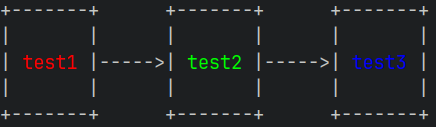
Colored output is also supported (given that your terminal supports it) using the classDef syntax:
graph LR
classDef example1 color:#ff0000
classDef example2 color:#00ff00
classDef example3 color:#0000ff
test1:::example1 --> test2
test2:::example2 --> test3:::example3
This results in the following graph:
We parse a mermaid file into basic components in order to render a grid. The grid is used for mapping purposes, which is eventually converted to a drawing. The grid looks a bit like this:
There are three grid-points per node, and one in-between nodes.
These coords don't have to be the same size, as long as they
can be used for pathing purposes where we convert them to drawing
coordinates.
This allows us to navigate edges between nodes, like the arrow in this
drawing taking the path [(2,1), (3,1), (3,5), (4,5)].
    0      1      2  3  4      5      6
    |      |      |  |  |      |      |
    v      v      v  v  v      v      v

0-> +-------------+     +-------------+
    |             |     |             |
1-> |  Some text  |---  |  Some text  |
    |             |  |  |             |
2-> +-------------+  |  +-------------+
                     |
3->                  |
                     |
4-> +-------------+  |  +-------------+
    |             |  |  |             |
5-> |  Some text  |  -->|  Some text  |
    |             |     |             |
6-> +-------------+     +-------------+
You can show these coords in your graph by enabling the --coords flag:
$ mermaid-ascii -f ./test.mermaid --coords
   01  23    45  67  89       0
   0123456789012345678901234567
0 0+---+     +---+   +--------+
  1|   |     |   |   |        |
1 2| A |-123>| B |-->|   D    |
  3|   |     |   |   |        |
2 4+---+     +---+   +--------+
  5  |         |          |
3 6  |         2          |
  7  |         v       123456
4 8  |       +---+        |
  9  |       |   |        |
510  ------->| C |<--------
 11          |   |
612          +---+
Note that with --coords enabled, the grid-coords shown show the starting location of the coord, not the center of the coord. This is why (1,0) is next to (0,0) instead of in the center of the A node.
graph LR and graph TD)A -->|label| B)A --> B --> C)A & B syntaxclassDef and class for colored outputsubgraph layout, including edge-less declared members in distinct framesA->>B: message)->>, -->>, ->, -->)-x, --x), async point (-), --)) and bidirectional (<<->>, <<-->>) arrowsA ()->>() B) on any arrow typecron job->>customer-notifier)A->>A: think)participant Alice)participant A as Alice)loop and opt blocks (incl. nesting)autonumberNote over A, Note over A,B, Note left of A, Note right of A)alt/else blocks (incl. multiple else, nesting)par/and, critical/option, break, rect blocks||--o{, }|..|{, …)1, 0+, 1+) and word (one or more, zero or one, …) cardinalitiesCUSTOMER c {, CUSTOMER["Customer"])EMPLOYEE ||--o{ EMPLOYEE : manages)MD_PARENT (u--) cardinalitystyle / classDef styling directives (parsed and ignored)The baseline components for Mermaid work, but there are a lot of things that are not supported yet. Here's a list of things that are not yet supported:
A -->|label| B)graph LR and graph TDclassDef and classA & BA --> B --> C)subgraph layout, including edge-less declared members in distinct frames--max-widthNote over/left of/right of)loop and opt blocksalt/else blockspar, critical, break, and rect blocks(top 24 of 50)
3,417 followers · starred Jul 2026
9,480 followers · starred Jan 2026
1,185 followers · starred Sep 2026
13,355 followers · starred Feb 2026
Render Mermaid graphs inside your terminal
See the codeRender mermaid diagrams in your terminal:
You can download the binary from Github releases:
# Get the latest release
$ curl -s https://api.github.com/repos/AlexanderGrooff/mermaid-ascii/releases/latest | grep "browser_download_url.*mermaid-ascii" | grep "$(uname)_$(uname -m)" | cut -d: -f2,3 | tr -d \" | wget -qi -
# Unzip it
$ tar xvzf mermaid-ascii_*.tar.gz
$ ./mermaid-ascii --help
You can also build it yourself:
$ git clone
$ cd mermaid-ascii
$ go build
$ mermaid-ascii --help
Or using Nix:
$ git clone
$ cd mermaid-ascii
$ nix build
$ ./result/bin/mermaid-ascii --help
You can render graphs directly from the command line or start a web interface to render them interactively.
$ cat test.mermaid
graph LR
A --> B & C
B --> C & D
D --> C
$ mermaid-ascii --file test.mermaid
┌───┐     ┌───┐     ┌───┐
│   │     │   │     │   │
│ A ├────►│ B ├────►│ D │
│   │     │   │     │   │
└─┬─┘     └─┬─┘     └─┬─┘
  │         │         │
  │         │         │
  │         │         │
  │         │         │
  │         ▼         │
  │       ┌───┐       │
  │       │   │       │
  └──────►│ C │◄──────┘
          │   │
          └───┘

# Increase horizontal spacing
$ mermaid-ascii --file test.mermaid -x 8
┌───┐        ┌───┐        ┌───┐
│   │        │   │        │   │
│ A ├───────►│ B ├───────►│ D │
│   │        │   │        │   │
└─┬─┘        └─┬─┘        └─┬─┘
  │            │            │
  │            │            │
  │            │            │
  │            │            │
  │            ▼            │
  │          ┌───┐          │
  │          │   │          │
  └─────────►│ C │◄─────────┘
             │   │
             └───┘

# Increase box padding
$ mermaid-ascii -f ./test.mermaid -p 3
┌───────┐     ┌───────┐     ┌───────┐
│       │     │       │     │       │
│       │     │       │     │       │
│       │     │       │     │       │
│   A   ├────►│   B   ├────►│   D   │
│       │     │       │     │       │
│       │     │       │     │       │
│       │     │       │     │       │
└───┬───┘     └───┬───┘     └───┬───┘
    │             │             │
    │             │             │
    │             │             │
    │             │             │
    │             ▼             │
    │         ┌───────┐         │
    │         │       │         │
    │         │       │         │
    │         │       │         │
    └────────►│   C   │◄────────┘
              │       │
              │       │
              │       │
              └───────┘

# Labeled edges
$ cat test.mermaid
graph LR
A --> B
A --> C
B --> C
B -->|example| D
D --> C
$ mermaid-ascii -f ./test.mermaid
┌───┐     ┌───┐         ┌───┐
│   │     │   │         │   │
│ A ├────►│ B ├─example►│ D │
│   │     │   │         │   │
└─┬─┘     └─┬─┘         └─┬─┘
  │         │             │
  │         │             │
  │         │             │
  │         │             │
  │         ▼             │
  │       ┌───┐           │
  │       │   │           │
  └──────►│ C │◄──────────┘
          │   │
          └───┘

# Top-down layout
$ cat test.mermaid
graph TD
A --> B
A --> C
B --> C
B -->|example| D
D --> C
$ mermaid-ascii -f ./test.mermaid
┌─────────┐
│         │
│    A    ├───────┐
│         │       │
└────┬────┘       │
     │            │
     │            │
     │            │
     │            │
     ▼            ▼
┌─────────┐     ┌───┐
│         │     │   │
│    B    ├────►│ C │
│         │     │   │
└────┬────┘     └───┘
     │            ▲
     │            │
  example         │
     │            │
     ▼            │
┌─────────┐       │
│         │       │
│    D    ├───────┘
│         │
└─────────┘

# Other edge types
Besides the default `-->` arrow, flowchart edges also accept `-.->` (dotted), `==>` (thick), `---` (open, no arrowhead), `--o` (circle head), and `--x` (cross head):
$ cat test.mermaid
graph TD
A -.-> B
A ==> C
B --- C
B --o|example| D
D --x C
$ mermaid-ascii -f ./test.mermaid
┌──────────┐
│          │
│    A     │━━━━━━━┓
│          │       ┃
└─────┬────┘       ┃
      ┆            ┃
      ┆            ┃
      ┆            ┃
      ┆            ┃
      ▼            ▼
┌──────────┐     ┌───┐
│          │     │   │
│    B     ├─────┤ C │
│          │     │   │
└─────┬────┘     └───┘
      │            ✕
      │            │
   example         │
      │            │
      ●            │
┌──────────┐       │
│          │       │
│    D     ├───────┘
│          │
└──────────┘

# Limit graph output to terminal columns
$ mermaid-ascii --file test.mermaid --max-width 30
# Use the detected width when stdout is an interactive terminal
$ mermaid-ascii --file test.mermaid --max-width auto

`--max-width` accepts a positive terminal-column number or `auto`. `auto`
detects stdout's terminal width and requires an interactive terminal; invalid
and non-positive values are rejected. If a graph exceeds the limit, rendering
retries with compact spacing (`paddingX=1` and `paddingY=1`). Content is never
wrapped, truncated, cropped, or removed. The CLI notes when compact spacing
fits and warns when it does not. The flag affects only graph and flowchart
diagrams.

# Read from stdin
$ cat test.mermaid | mermaid-ascii
┌───┐     ┌───┐     ┌───┐
│   │     │   │     │   │
│ A ├────►│ B ├────►│ D │
│   │     │   │     │   │
└─┬─┘     └─┬─┘     └─┬─┘
  │         │         │
  │         │         │
  │         │         │
  │         │         │
  │         ▼         │
  │       ┌───┐       │
  │       │   │       │
  └──────►│ C │◄──────┘
          │   │
          └───┘

# Only ASCII
$ cat test.mermaid | mermaid-ascii --ascii
+---+     +---+     +---+
|   |     |   |     |   |
| A |---->| B |---->| D |
|   |     |   |     |   |
+---+     +---+     +---+
  |         |         |
  |         |         |
  |         |         |
  |         |         |
  |         v         |
  |       +---+       |
  |       |   |       |
  ------->| C |<-------
          |   |
          +---+

# Using Docker
$ docker build -t mermaid-ascii .
$ echo 'sequenceDiagram
Alice->>Bob: Hello
Bob-->>Alice: Hi' | docker run -i mermaid-ascii -f -
┌───────┐     ┌─────┐
│ Alice │     │ Bob │
└───┬───┘     └──┬──┘
    │            │
    │ Hello      │
    ├───────────►│
    │            │
    │ Hi         │
    │◄┈┈┈┈┈┈┈┈┈┈┈┤
    │            │

# Graph diagrams work too
$ echo 'graph LR
A-->B-->C' | docker run -i mermaid-ascii -f -
┌───┐     ┌───┐     ┌───┐
│   │     │   │     │   │
│ A ├────►│ B ├────►│ C │
│   │     │   │     │   │
└───┘     └───┘     └───┘

# Run web interface
$ docker run -p 3001:3001 mermaid-ascii web --port 3001
# Then visit http://localhost:3001
Sequence diagrams are also fully supported! They visualize message flows between participants over time.
# Simple sequence diagram
$ cat sequence.mermaid
sequenceDiagram
Alice->>Bob: Hello Bob!
Bob-->>Alice: Hi Alice!
$ mermaid-ascii -f sequence.mermaid
┌───────┐     ┌─────┐
│ Alice │     │ Bob │
└───┬───┘     └──┬──┘
    │            │
    │ Hello Bob! │
    ├───────────►│
    │            │
    │ Hi Alice!  │
    │◄┈┈┈┈┈┈┈┈┈┈┈┤
    │            │

# Solid arrows (->>) and dotted arrows (-->>)
$ cat sequence.mermaid
sequenceDiagram
Client->>Server: Request
Server-->>Client: Response
$ mermaid-ascii -f sequence.mermaid
┌────────┐     ┌────────┐
│ Client │     │ Server │
└───┬────┘     └───┬────┘
    │              │
    │   Request    │
    ├─────────────►│
    │              │
    │   Response   │
    │◄┈┈┈┈┈┈┈┈┈┈┈┈┈┤
    │              │

# Multiple participants
$ cat sequence.mermaid
sequenceDiagram
Alice->>Bob: Hello!
Bob->>Charlie: Forward message
Charlie-->>Alice: Got it!
$ mermaid-ascii -f sequence.mermaid
┌───────┐     ┌─────┐     ┌─────────┐
│ Alice │     │ Bob │     │ Charlie │
└───┬───┘     └──┬──┘     └────┬────┘
    │            │              │
    │   Hello!   │              │
    ├───────────►│              │
    │            │              │
    │            │ Forward message
    │            ├─────────────►│
    │            │              │
    │         Got it!           │
    │◄┈┈┈┈┈┈┈┈┈┈┈┈┈┈┈┈┈┈┈┈┈┈┈┈┈┈┤
    │            │              │

# Self-messages
$ cat sequence.mermaid
sequenceDiagram
Alice->>Alice: Think
Alice->>Bob: Hello
$ mermaid-ascii -f sequence.mermaid
┌───────┐     ┌─────┐
│ Alice │     │ Bob │
└───┬───┘     └──┬──┘
    │            │
    │ Think      │
    ├──┐         │
    │  │         │
    │◄─┘         │
    │            │
    │ Hello      │
    ├───────────►│
    │            │

# Explicit participant declarations with aliases
$ cat sequence.mermaid
sequenceDiagram
participant A as Alice
participant B as Bob
A->>B: Message from Alice
B-->>A: Reply to Alice
$ mermaid-ascii -f sequence.mermaid
┌───────┐     ┌─────┐
│ Alice │     │ Bob │
└───┬───┘     └──┬──┘
    │            │
    │ Message from Alice
    ├───────────►│
    │            │
    │ Reply to Alice
    │◄┈┈┈┈┈┈┈┈┈┈┈┤
    │            │

# Loop and opt blocks are drawn as labelled frames (and can be nested)
$ cat sequence.mermaid
sequenceDiagram
Alice->>Bob: Hello
loop every minute
Alice->>Bob: Ping
Bob-->>Alice: Pong
end
$ mermaid-ascii -f sequence.mermaid
┌───────┐     ┌─────┐
│ Alice │     │ Bob │
└───┬───┘     └──┬──┘
    │            │
    │ Hello      │
    ├───────────►│
  ┌─[loop every minute]─┐
  │ │            │      │
  │ │ Ping       │      │
  │ ├───────────►│      │
  │ │            │      │
  │ │ Pong       │      │
  │ │◄┈┈┈┈┈┈┈┈┈┈┈┤      │
  │ │            │      │
  └─────────────────────┘
    │            │

# ASCII mode for sequence diagrams
$ cat sequence.mermaid | mermaid-ascii --ascii
+-------+     +-----+
| Alice |     | Bob |
+---+---+     +--+--+
    |            |
    | Hello Bob! |
    +----------->|
    |            |
    | Hi Alice!  |
    |<...........+
    |            |
Entity relationship diagrams render entities as tables and relationships as crow's-foot connectors, with each relationship label on its own line so they never collide.
# Relationships with cardinality and labels
$ cat er.mermaid
erDiagram
    CUSTOMER ||--o{ ORDER : places
    ORDER ||--|{ LINE_ITEM : contains
    CUSTOMER }|..|{ DELIVERY_ADDRESS : uses
$ mermaid-ascii -f er.mermaid
┌──────────┐                 ┌───────┐
│ CUSTOMER │                 │ ORDER │
└───┬───┬──┘                 └──┬───┬┘
    └||─┼──────places─────────o{┘   │
       ┌}|────────contains────────||┘
       │└}|┈┈┈┈┈┈┈┈┈┈┈uses┈┈┈┈┈┈┈┈┈┈┈|{┐
┌──────┴────┐                ┌─────────┴────────┐
│ LINE_ITEM │                │ DELIVERY_ADDRESS │
└───────────┘                └──────────────────┘

# Entities with typed attributes, keys and comments
$ cat er.mermaid
erDiagram
    CUSTOMER {
        string name PK
        string email
        int loyaltyPoints
    }
    ORDER {
        int id PK
        decimal(10,2) total
    }
    CUSTOMER ||--o{ ORDER : places
$ mermaid-ascii -f er.mermaid
┌─────────────────────────────┐            ┌────────────────────────────┐
│          CUSTOMER           │            │           ORDER            │
├────────┬───────────────┬────┤            ├───────────────┬───────┬────┤
│ string │ name          │ PK │            │ int           │ id    │ PK │
│ string │ email         │    │            │ decimal(10,2) │ total │    │
│ int    │ loyaltyPoints │    │            └──────────────┬┴───────┴────┘
└────────┴──────┬────────┴────┘                           │
                └||───────────────places────────────────o{┘
Identifying relationships (--) are drawn solid, non-identifying ones (..) dashed. All crow's-foot cardinalities are supported (||, |o, }o, }| on either side), as well as the numeric (1, 0+, 1+) and word (only one, zero or more, …) forms.
$ mermaid-ascii --help
Generate ASCII diagrams from mermaid code.

Usage:
  mermaid-ascii [flags]
  mermaid-ascii [command]

Available Commands:
  completion  Generate the autocompletion script for the specified shell
  help        Help about any command
  web         HTTP server for rendering mermaid diagrams.

Flags:
  -p, --borderPadding int   Padding between text and border (default 1)
      --max-width string    Maximum graph width in terminal columns (positive number or auto)
  -c, --coords              Show coordinates
  -f, --file string         Mermaid file to parse
  -h, --help                help for mermaid-ascii
  -x, --paddingX int        Horizontal space between nodes (default 5)
  -y, --paddingY int        Vertical space between nodes (default 5)
  -v, --verbose             Verbose output

Use "mermaid-ascii [command] --help" for more information about a command.

# And some ridiculous example
$ mermaid-ascii -f complex.mermaid
┌───┐     ┌───┐     ┌───┐     ┌───┐     ┌───┐     ┌───┐
│   │     │   │     │   │     │   │     │   │     │   │
│ A ├────►│ B ├──┬─►│ E ├──┬─►│ M ├──┬─►│ U ├──┬─►│ W │
│   │     │   │  │  │   │  │  │   │  │  │   │  │  │   │
└─┬─┘     └─┬─┘  │  └─┬─┘  │  └─┬─┘  │  └─┬─┘  │  └─┬─┘
  │         │    │    │    │    │    │    ▲    │    │
  │         │    │    │    │    │    │    │    │    │
  │    ┌────┘    ├────┘    │    ├────┘    ├────┼────┘
  │    │         │         │    │         │    │
  │    │         │         │    ▼         ▼    │
  │    │  ┌───┐  │  ┌───┐  │  ┌─┴─┐     ┌───┐  │  ┌───┐
  │    │  │   │  │  │   │  │  │   │     │   │  │  │   │
  ├────┼─►│ C ├──┼─►│ F │  ├─►│ Q ├────►│ Y │◄─┼─►│ V │
  │    │  │   │  │  │   │  │  │   │     │   │  │  │   │
  │    │  └─┬─┘  │  └─┬─┘  │  └───┘     └───┘  │  └─┬─┘
  │    │    │    │    │    │                   │    ▲
  │    │    │    │    │    │                   │    │
  │    └────┼────┤    └────┤                   │    │
  │         │    │         │                   │    │
  │         ▼    │         │                   │    │
  │       ┌─┴─┐  │  ┌───┐  │  ┌───┐     ┌───┐  │    │
  │       │   │  │  │   │  │  │   │     │   │  │    │
  └──────►│ D │  ├─►│ G │  ├─►│ L ├──┬─►│ T ├──┼────┤
          │   │  │  │   │  │  │   │  │  │   │  │    │
          └─┬─┘  │  └─┬─┘  │  └─┬─┘  │  └─┬─┘  │    │
            │    │    │    │    │    │    ▲    │    │
            │    │    │    │    │    │    │    │    │
            │    │    ├────┼────┘    │    ├────┤    │
            │    │    │    │         │    │    │    │
            │    │    ▼    │         │    ▼    │    │
            │    │  ┌─┴─┐  │  ┌───┐  │  ┌───┐  │    │
            │    │  │   │  │  │   │  │  │   │  │    │
            │    ├─►│ H │  ├─►│ J │  ├─►│ X │◄─┼────┤
            │    │  │   │  │  │   │  │  │   │  │    │
            │    │  └─┬─┘  │  └─┬─┘  │  └───┘  │    │
            │    │    │    │    │    │         │    │
            │    │    │    │    │    │         │    │
            │    └────┼────┤    └────┤    ┌────┤    │
            │         │    │         │    │    │    │
            │         ▼    │         │    │    │    │
            │       ┌─┴─┐  │  ┌───┐  │  ┌─┴─┐  │    │
            │       │   │  │  │   │  │  │   │  │    │
            └──────►│ I │  ├─►│ K │  ├─►│ R ├──┼────┘
                    │   │  │  │   │  │  │   │  │
                    └───┘  │  └─┬─┘  │  └───┘  │
                           │    │    │         │
                           │    │    │         │
                           │    ├────┼────┬────┤
                           │    │    │    │    │
                           │    ▼    │    │    │
                           │  ┌─┴─┐  │  ┌─┴─┐  │
                           │  │   │  │  │   │  │
                           ├─►│ N │  ├─►│ O │  │
                           │  │   │  │  │   │  │
                           │  └───┘  │  └─┬─┘  │
                           │         │    │    │
                           │         │    │    │
                           ├────┬────┤    ├────┘
                           │    │    │    │
                           │    ▼    │    ▼
                           │  ┌─┴─┐  │  ┌─┴─┐
                           │  │   │  │  │   │
                           └─►│ P │  └─►│ S │
                              │   │     │   │
                              └───┘     └───┘
Colored output is also supported (given that your terminal supports it) using the classDef syntax:
graph LR
classDef example1 color:#ff0000
classDef example2 color:#00ff00
classDef example3 color:#0000ff
test1:::example1 --> test2
test2:::example2 --> test3:::example3
This results in the following graph:
We parse a mermaid file into basic components in order to render a grid. The grid is used for mapping purposes, which is eventually converted to a drawing. The grid looks a bit like this:
There are three grid-points per node, and one in-between nodes.
These coords don't have to be the same size, as long as they
can be used for pathing purposes where we convert them to drawing
coordinates.
This allows us to navigate edges between nodes, like the arrow in this
drawing taking the path [(2,1), (3,1), (3,5), (4,5)].
    0      1      2  3  4      5      6
    |      |      |  |  |      |      |
    v      v      v  v  v      v      v

0-> +-------------+     +-------------+
    |             |     |             |
1-> |  Some text  |---  |  Some text  |
    |             |  |  |             |
2-> +-------------+  |  +-------------+
                     |
3->                  |
                     |
4-> +-------------+  |  +-------------+
    |             |  |  |             |
5-> |  Some text  |  -->|  Some text  |
    |             |     |             |
6-> +-------------+     +-------------+
You can show these coords in your graph by enabling the --coords flag:
$ mermaid-ascii -f ./test.mermaid --coords
   01  23    45  67  89       0
   0123456789012345678901234567
0 0+---+     +---+   +--------+
  1|   |     |   |   |        |
1 2| A |-123>| B |-->|   D    |
  3|   |     |   |   |        |
2 4+---+     +---+   +--------+
  5  |         |          |
3 6  |         2          |
  7  |         v       123456
4 8  |       +---+        |
  9  |       |   |        |
510  ------->| C |<--------
 11          |   |
612          +---+
Note that with --coords enabled, the grid-coords shown show the starting location of the coord, not the center of the coord. This is why (1,0) is next to (0,0) instead of in the center of the A node.
graph LR and graph TD)A -->|label| B)A --> B --> C)A & B syntaxclassDef and class for colored outputsubgraph layout, including edge-less declared members in distinct framesA->>B: message)->>, -->>, ->, -->)-x, --x), async point (-), --)) and bidirectional (<<->>, <<-->>) arrowsA ()->>() B) on any arrow typecron job->>customer-notifier)A->>A: think)participant Alice)participant A as Alice)loop and opt blocks (incl. nesting)autonumberNote over A, Note over A,B, Note left of A, Note right of A)alt/else blocks (incl. multiple else, nesting)par/and, critical/option, break, rect blocks||--o{, }|..|{, …)1, 0+, 1+) and word (one or more, zero or one, …) cardinalitiesCUSTOMER c {, CUSTOMER["Customer"])EMPLOYEE ||--o{ EMPLOYEE : manages)MD_PARENT (u--) cardinalitystyle / classDef styling directives (parsed and ignored)The baseline components for Mermaid work, but there are a lot of things that are not supported yet. Here's a list of things that are not yet supported:
A -->|label| B)graph LR and graph TDclassDef and classA & BA --> B --> C)subgraph layout, including edge-less declared members in distinct frames--max-widthNote over/left of/right of)loop and opt blocksalt/else blockspar, critical, break, and rect blocks(top 24 of 50)
3,417 followers · starred Jul 2026
9,480 followers · starred Jan 2026
1,185 followers · starred Sep 2026
13,355 followers · starred Feb 2026