KiCad libraries for Espressif SoCs, modules, and DevKits.
Python
1,407
148 commits
updated Jul 28, 2026


Notice: A major update from version 1.0.1 was made to be compliant to the KLC. Please consider updating your library and checking the symbols and footprints.
From the version 2.0.0, the library installation process is done by the PCM.
This repository contains the Symbols, Footprint, and 3D Models for the Espressif SoC and Modules family.
The libraries in this repository are intended to be used with KiCad version 10
Each footprint library is stored as a directory with the .pretty suffix. The footprint files are .kicad_mod files within.
Before designing your hardware, be sure to check all recommendations at:
All footprints were designed according to the Recommended PCB Land Pattern section present on each module datasheet.
The following SoC are included in this library
Please note: The footprints in this table are only available when the official KiCad library is installed as the symbols rely on its footprints.
| SoC | Symbol | Footprint | Resource |
|---|---|---|---|
| ESP32 | Yes | Yes | Datasheet |
| ESP32-PICO-V3 | Yes | Yes | Datasheet |
| ESP32-S2 | Yes | Yes | Datasheet |
| ESP32-S3 | Yes | Yes | Datasheet |
| ESP8684 (ESP32-C2) | Yes | Yes | Datasheet |
| ESP32-C3 | Yes | Yes | Datasheet |
| ESP8685 | Yes | Yes | Datasheet |
| ESP32-C6 | Yes | Yes | Datasheet |
| ESP32-H2 | Yes | Yes | Datasheet |
| ESP8286 | Yes | Yes | Datasheet |
| ESP8285 | Yes | Yes | Datasheet |
| ESP32-P4 (EOL) | Yes | Yes | |
| ESP32-P4X | Yes | Yes | Datasheet |
| Module | Symbol | Footprint | Resource |
|---|---|---|---|
| ESP32-WROOM-32E | Yes | Yes | Datasheet |
| ESP32-WROOM-32UE | Yes | Yes | Datasheet |
| ESP32-WROOM-DA | Yes | Yes | Datasheet |
| ESP32-WROVER-E | Yes | Yes | Datasheet |
| ESP32-MINI-1 | Yes | Yes | Datasheet |
| ESP32-MINI-1U | Yes | Yes | Datasheet |
| ESP32-C3-MINI-1 | Yes | Yes | Datasheet |
| ESP32-C3-WROOM-02 | Yes | Yes | Datasheet |
| ESP32-C5-MINI-1 | Yes | Yes | Datasheet |
| ESP32-C5-WROOM-1 | Yes | Yes | Datasheet |
| ESP32-C5-WROOM-1U | Yes | Yes | Datasheet |
| ESP32-C6-MINI-1 | Yes | Yes | Datasheet |
| ESP32-C6-MINI-1U | Yes | Yes | Datasheet |
| ESP32-C6-WROOM-1 | Yes | Yes | Datasheet |
| ESP32-C6-WROOM-1U | Yes | Yes | Datasheet |
| ESP32-S2-MINI-1 | Yes | Yes | Datasheet |
| ESP32-S2-MINI-1U | Yes | Yes | Datasheet |
| ESP32-S2-SOLO | Yes | Yes | Datasheet |
| ESP32-S2-SOLO-2U | Yes | Yes | Datasheet |
| ESP32-S2-WROOM | Yes | Yes | Datasheet |
| ESP32-S2-WROVER | Yes | Yes | Datasheet |
| ESP32-S3-MINI-1 | Yes | Yes | Datasheet |
| ESP32-S3-MINI-1U | Yes | Yes | Datasheet |
| ESP32-S3-WROOM-1 | Yes | Yes | Datasheet |
| ESP32-S3-WROOM-1U | Yes | Yes | Datasheet |
| ESP32-S3-WROOM-2 | Yes | Yes | Datasheet |
| ESP32-S31-WROOM-3 | Yes | Yes | Datasheet |
| ESP32-H2-MINI-1 | Yes | Yes | Datasheet |
| ESP32-H2-MINI-1U | Yes | Yes | Datasheet |
| ESP8684-WROOM-02C | Yes | Yes | Datasheet |
| ESP8684-WROOM-01UC | Yes | Yes | Datasheet |
| ESP8685-WROOM-01 | No | No | Datasheet |
| ESP8685-WROOM-03 | No | No | Datasheet |
| ESP8685-WROOM-04 | No | No | Datasheet |
| ESP8685-WROOM-05 | No | Yes | Datasheet |
| ESP8685-WROOM-06 | Yes | Yes | Datasheet |
| Dev Board | Symbol | Footprint | Resource |
|---|---|---|---|
| ESP32-DevKitM-1 | Yes | Yes | Schematic |
| ESP32-S2-Saola-1 | Yes | Yes | Schematic |
| ESP32-S2-DevKitC-1 | Yes | Yes | Schematic |
| ESP32-DevKitC | Yes | Yes | Schematic |
| ESP32-S3-DevKitC | Yes | Yes | Schematic |
| ESP32-S2-DevKitM | Yes | Yes | Schematic |
| ESP32-C3-DevKitM | Yes | Yes | Schematic |
| ESP32-C5-DevKitC-1 | Yes | Yes | Schematic |
| ESP32-C6-DevKitC-1 | Yes | Yes | Schematic |
| ESP32-C6-DevKitM-1 | Yes | Yes | Schematic |
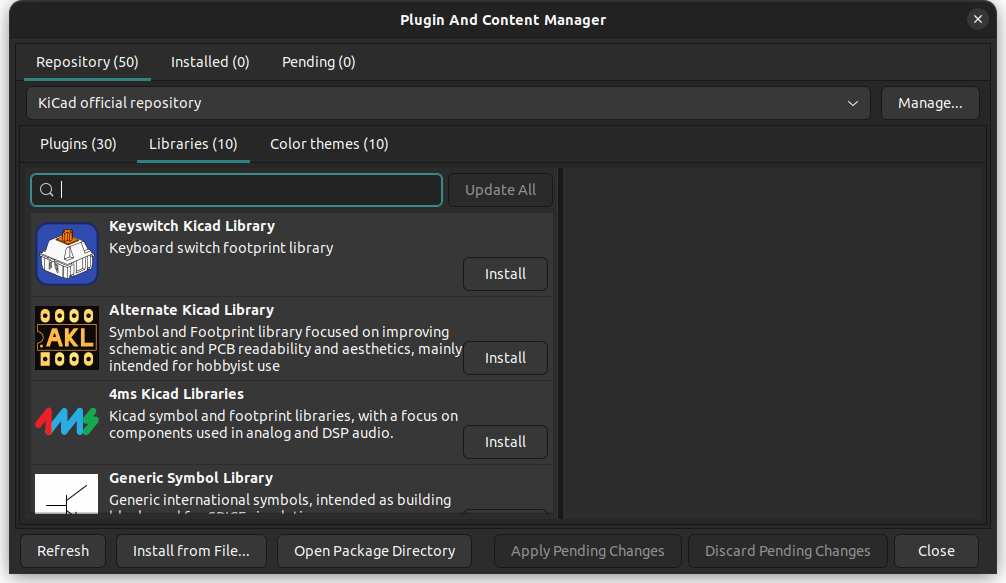
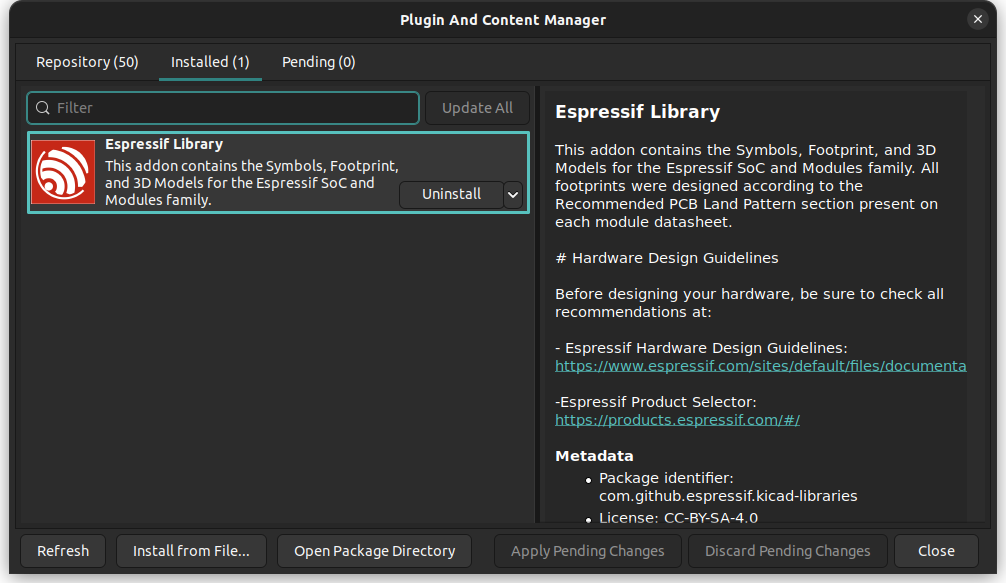
The Espressif KiCad library is distributed via the Plug-in and Content Manager (PCM) and the installation is done automatically.
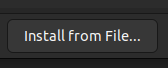
To install the library, you need to download the espressif-kicad-addon.zip file from the latest release. For legacy support, please visit the legacy branch and follow the instructions from there.
Make sure to download the correct zip file and do not extract the files. If you are using macOS and Safari, ensure to that the automatic unzip feature (Open safe files after downloading) is disabled.
For KiCad 6, 7 and 8 you can use the following steps:

If you want to contribute, please consider sending us a Pull Request (PR).
KiCad is a Cross-Platform and Open Source Electronics Design Automation Suite. See KiCad EDA for more information.
365 followers · starred May 2025
11,918 followers · starred Aug 2026
712 followers · starred May 2026
441 followers · starred Oct 2021
KiCad libraries for Espressif SoCs, modules, and DevKits.
Python
1,407
148 commits
updated Jul 28, 2026
Notice: A major update from version 1.0.1 was made to be compliant to the KLC. Please consider updating your library and checking the symbols and footprints.
From the version 2.0.0, the library installation process is done by the PCM.
This repository contains the Symbols, Footprint, and 3D Models for the Espressif SoC and Modules family.
The libraries in this repository are intended to be used with KiCad version 10
Each footprint library is stored as a directory with the .pretty suffix. The footprint files are .kicad_mod files within.
Before designing your hardware, be sure to check all recommendations at:
All footprints were designed according to the Recommended PCB Land Pattern section present on each module datasheet.
The following SoC are included in this library
Please note: The footprints in this table are only available when the official KiCad library is installed as the symbols rely on its footprints.
| SoC | Symbol | Footprint | Resource |
|---|---|---|---|
| ESP32 | Yes | Yes | Datasheet |
| ESP32-PICO-V3 | Yes | Yes | Datasheet |
| ESP32-S2 | Yes | Yes | Datasheet |
| ESP32-S3 | Yes | Yes | Datasheet |
| ESP8684 (ESP32-C2) | Yes | Yes | Datasheet |
| ESP32-C3 | Yes | Yes | Datasheet |
| ESP8685 | Yes | Yes | Datasheet |
| ESP32-C6 | Yes | Yes | Datasheet |
| ESP32-H2 | Yes | Yes | Datasheet |
| ESP8286 | Yes | Yes | Datasheet |
| ESP8285 | Yes | Yes | Datasheet |
| ESP32-P4 (EOL) | Yes | Yes | |
| ESP32-P4X | Yes | Yes | Datasheet |
| Module | Symbol | Footprint | Resource |
|---|---|---|---|
| ESP32-WROOM-32E | Yes | Yes | Datasheet |
| ESP32-WROOM-32UE | Yes | Yes | Datasheet |
| ESP32-WROOM-DA | Yes | Yes | Datasheet |
| ESP32-WROVER-E | Yes | Yes | Datasheet |
| ESP32-MINI-1 | Yes | Yes | Datasheet |
| ESP32-MINI-1U | Yes | Yes | Datasheet |
| ESP32-C3-MINI-1 | Yes | Yes | Datasheet |
| ESP32-C3-WROOM-02 | Yes | Yes | Datasheet |
| ESP32-C5-MINI-1 | Yes | Yes | Datasheet |
| ESP32-C5-WROOM-1 | Yes | Yes | Datasheet |
| ESP32-C5-WROOM-1U | Yes | Yes | Datasheet |
| ESP32-C6-MINI-1 | Yes | Yes | Datasheet |
| ESP32-C6-MINI-1U | Yes | Yes | Datasheet |
| ESP32-C6-WROOM-1 | Yes | Yes | Datasheet |
| ESP32-C6-WROOM-1U | Yes | Yes | Datasheet |
| ESP32-S2-MINI-1 | Yes | Yes | Datasheet |
| ESP32-S2-MINI-1U | Yes | Yes | Datasheet |
| ESP32-S2-SOLO | Yes | Yes | Datasheet |
| ESP32-S2-SOLO-2U | Yes | Yes | Datasheet |
| ESP32-S2-WROOM | Yes | Yes | Datasheet |
| ESP32-S2-WROVER | Yes | Yes | Datasheet |
| ESP32-S3-MINI-1 | Yes | Yes | Datasheet |
| ESP32-S3-MINI-1U | Yes | Yes | Datasheet |
| ESP32-S3-WROOM-1 | Yes | Yes | Datasheet |
| ESP32-S3-WROOM-1U | Yes | Yes | Datasheet |
| ESP32-S3-WROOM-2 | Yes | Yes | Datasheet |
| ESP32-S31-WROOM-3 | Yes | Yes | Datasheet |
| ESP32-H2-MINI-1 | Yes | Yes | Datasheet |
| ESP32-H2-MINI-1U | Yes | Yes | Datasheet |
| ESP8684-WROOM-02C | Yes | Yes | Datasheet |
| ESP8684-WROOM-01UC | Yes | Yes | Datasheet |
| ESP8685-WROOM-01 | No | No | Datasheet |
| ESP8685-WROOM-03 | No | No | Datasheet |
| ESP8685-WROOM-04 | No | No | Datasheet |
| ESP8685-WROOM-05 | No | Yes | Datasheet |
| ESP8685-WROOM-06 | Yes | Yes | Datasheet |
| Dev Board | Symbol | Footprint | Resource |
|---|---|---|---|
| ESP32-DevKitM-1 | Yes | Yes | Schematic |
| ESP32-S2-Saola-1 | Yes | Yes | Schematic |
| ESP32-S2-DevKitC-1 | Yes | Yes | Schematic |
| ESP32-DevKitC | Yes | Yes | Schematic |
| ESP32-S3-DevKitC | Yes | Yes | Schematic |
| ESP32-S2-DevKitM | Yes | Yes | Schematic |
| ESP32-C3-DevKitM | Yes | Yes | Schematic |
| ESP32-C5-DevKitC-1 | Yes | Yes | Schematic |
| ESP32-C6-DevKitC-1 | Yes | Yes | Schematic |
| ESP32-C6-DevKitM-1 | Yes | Yes | Schematic |
The Espressif KiCad library is distributed via the Plug-in and Content Manager (PCM) and the installation is done automatically.
To install the library, you need to download the espressif-kicad-addon.zip file from the latest release. For legacy support, please visit the legacy branch and follow the instructions from there.
Make sure to download the correct zip file and do not extract the files. If you are using macOS and Safari, ensure to that the automatic unzip feature (Open safe files after downloading) is disabled.
For KiCad 6, 7 and 8 you can use the following steps:
If you want to contribute, please consider sending us a Pull Request (PR).
KiCad is a Cross-Platform and Open Source Electronics Design Automation Suite. See KiCad EDA for more information.
365 followers · starred May 2025
11,918 followers · starred Aug 2026
712 followers · starred May 2026
441 followers · starred Oct 2021