Convert any LCSC components (including EasyEDA) to KiCad library
Python
1,692
437 commits
updated Apr 8, 2026




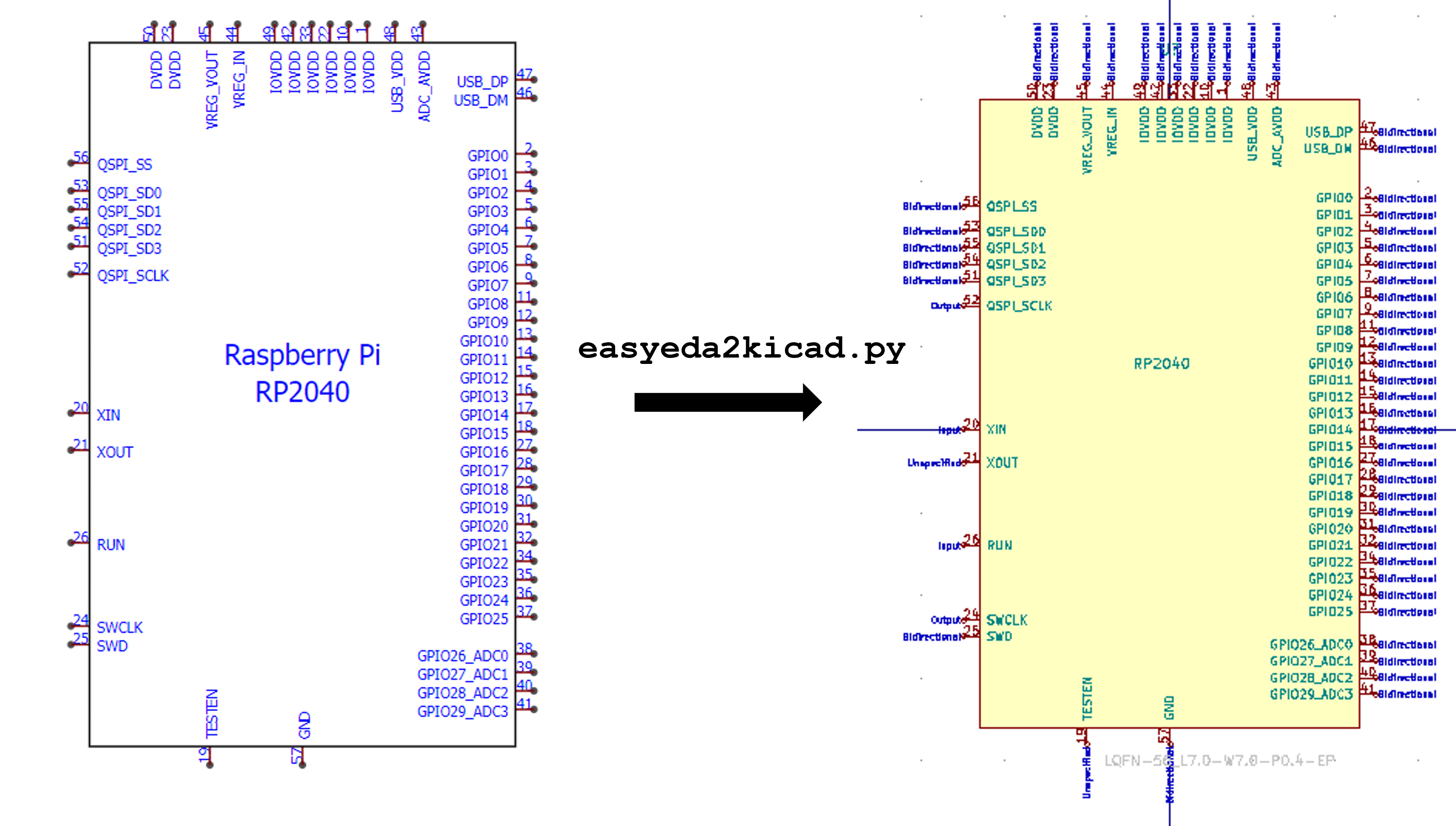
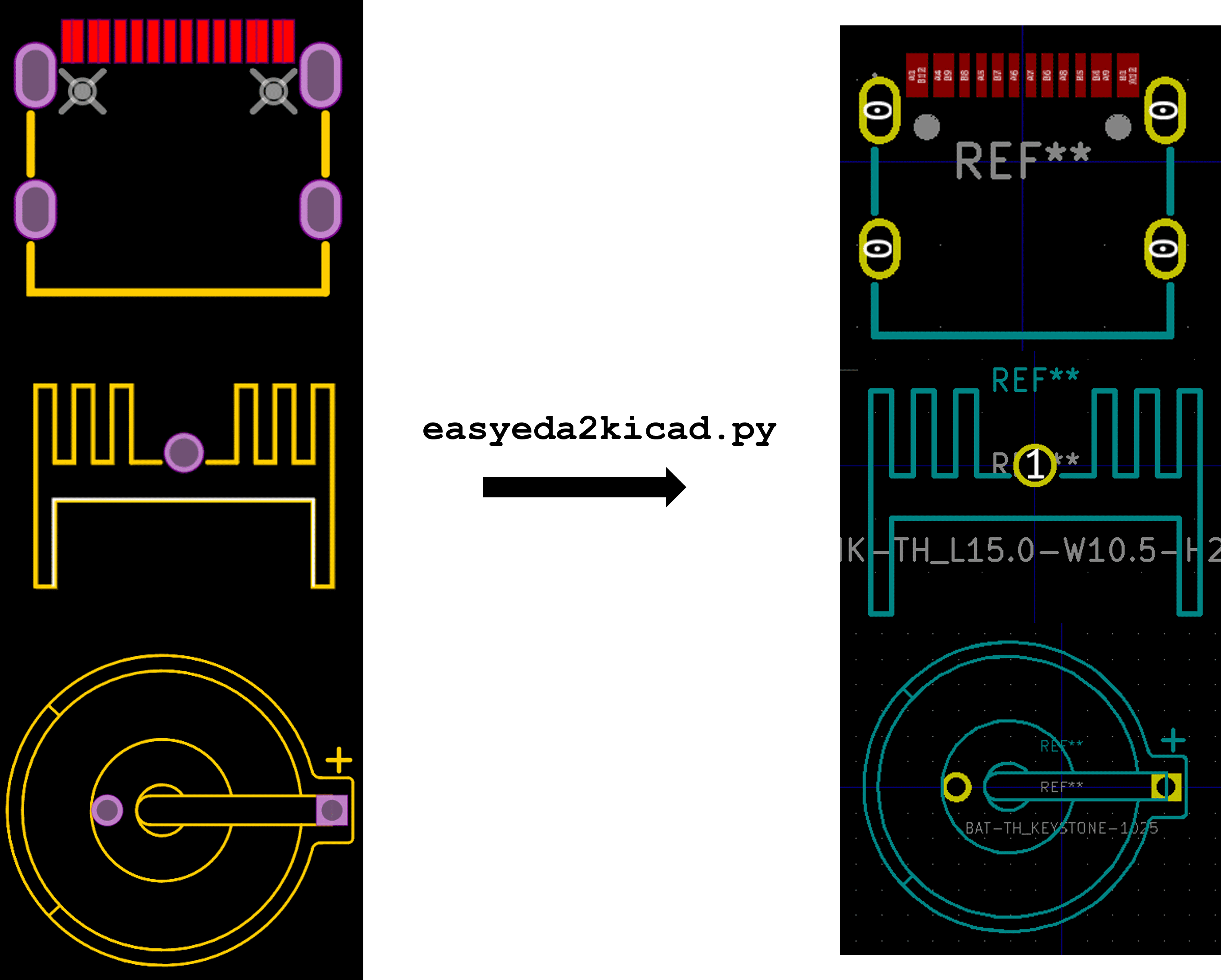
A Python script that converts any electronic components from EasyEDA or LCSC to a KiCad library including 3D model in color. This tool will speed up your PCB design workflow especially when using JLCPCB SMT assembly services. It supports KiCad v6 and newer.
If you have Python installed on your system:
pip install easyeda2kicad
KiCad ships with its own Python interpreter. If you don't have a separate Python installation, you can use KiCad's bundled Python to install easyeda2kicad.
Windows: KiCad bundles its own Python. Search for KiCad Command Prompt in the Start Menu, then run pip install easyeda2kicad. Note: KiCad's Scripts folder is not on PATH, so use python -m easyeda2kicad to run the tool from the KiCad Command Prompt.
Linux: On most distributions, KiCad uses the system Python — pip install easyeda2kicad works directly.
macOS: KiCad bundles its own Python. Install into it with:
/Applications/KiCad/KiCad.app/Contents/Frameworks/Python.framework/Versions/Current/bin/python3 -m pip install easyeda2kicad
Tip: In the PCB Editor, open Tools → Scripting Console and run
import sys; print(sys.executable)to get KiCad's Python path. Then run that path with-m pip install easyeda2kicadin a terminal.
After installation, run easyeda2kicad from the same terminal or KiCad Command Prompt.
# Symbol + footprint + 3D model
easyeda2kicad --full --lcsc_id=C2040
# Individual parts
easyeda2kicad --symbol --lcsc_id=C2040
easyeda2kicad --footprint --lcsc_id=C2040
easyeda2kicad --3d --lcsc_id=C2040
# Multiple components at once
easyeda2kicad --full --lcsc_id C2040 C20197 C163691
# Custom output path
easyeda2kicad --full --lcsc_id=C2040 --output ~/libs/my_lib
# SVG preview (no KiCad conversion)
easyeda2kicad --svg --lcsc_id=C2040 --output ~/libs/my_lib
By default, all libraries are saved in ~/Documents/Kicad/easyeda2kicad/ (Linux/macOS) or C:/Users/your_name/Documents/Kicad/easyeda2kicad/ (Windows), with:
easyeda2kicad.kicad_sym file for symbol library (KiCad v6+)easyeda2kicad.pretty/ folder for footprint librarieseasyeda2kicad.3dshapes/ folder for 3D models (.wrl and .step format)If you want to save components symbol/footprint in your own libs, you can specify the output lib path by using --output option.
easyeda2kicad --full --lcsc_id=C2040 --output ~/libs/my_lib
This command will save:
~/libs/my_lib.kicad_sym file for symbol library. The file will be created if it doesn't exist.~/libs/my_lib.pretty/ folder for footprint libraries. The folder will be created if it doesn't exist.~/libs/my_lib.3dshapes/ folder for 3d models. The folder will be created if it doesn't exist. The 3D models will be saved both in .WRL and .STEP format.Use --overwrite to replace an existing symbol, footprint, or 3D model already in the library:
easyeda2kicad --full --lcsc_id=C2040 --output ~/libs/my_lib --overwrite
When working in a KiCad project folder, use --project-relative together with --output to store 3D model paths relative to the project root (${KIPRJMOD}):
easyeda2kicad --full --lcsc_id=C2040 --output ~/myproject/libs/my_lib --project-relative
This stores the 3D path as ${KIPRJMOD}/libs/my_lib.3dshapes/... instead of an absolute filesystem path, making the project portable.
You can import several components in a single call:
easyeda2kicad --full --lcsc_id C2040 C20197 C163691
Use --custom-field to add extra properties to generated symbols:
easyeda2kicad --symbol --lcsc_id=C2040 --custom-field "Manufacturer:Texas Instruments" "Package:LQFN-56"
Malformed values (missing :) fail fast. Duplicate keys use the last value.
If EasyEDA does not provide a datasheet URL for a symbol, easyeda2kicad falls back to https://www.lcsc.com/datasheet/<LCSC-ID>.pdf.
Set the HTTPS_PROXY environment variable — no extra argument needed:
# Linux / macOS
HTTPS_PROXY=http://proxy.example.com:8080 easyeda2kicad --full --lcsc_id=C2040
# Windows
set HTTPS_PROXY=http://proxy.example.com:8080 && easyeda2kicad --full --lcsc_id=C2040
Use --use-cache to cache API responses in .easyeda_cache/ for faster, offline-capable runs. Use --debug for verbose log output. Both flags can be combined:
easyeda2kicad --full --lcsc_id=C2040 --use-cache --debug
Clear the cache with rm -rf .easyeda_cache.
These are the instructions to add the default easyeda2kicad libraries in Kicad. Before configuring KiCad, run the script at least once to create lib files. For example :
easyeda2kicad --symbol --footprint --lcsc_id=C2040
EASYEDA2KICAD :
C:/Users/your_username/Documents/Kicad/easyeda2kicad/,/home/your_username/Documents/Kicad/easyeda2kicad/easyeda2kicad : ${EASYEDA2KICAD}/easyeda2kicad.kicad_symeasyeda2kicad : ${EASYEDA2KICAD}/easyeda2kicad.prettyFor detailed information about the EasyEDA data format and how commands are parsed:
The correctness of the symbols and footprints converted by easyeda2kicad can't be guaranteed. Easyeda2kicad speeds up custom library design process, but you should remain careful and always double check the footprints and symbols generated.
Overall
Maintained
Code review
PyPI
Latest release
Releases this year
(top 24 of 25)
58 followers · starred Apr 2026
1,461 followers · starred Aug 2024
217 followers · starred Apr 2023
90 followers · starred Aug 2023
Convert any LCSC components (including EasyEDA) to KiCad library
Python
1,692
437 commits
updated Apr 8, 2026
A Python script that converts any electronic components from EasyEDA or LCSC to a KiCad library including 3D model in color. This tool will speed up your PCB design workflow especially when using JLCPCB SMT assembly services. It supports KiCad v6 and newer.
If you have Python installed on your system:
pip install easyeda2kicad
KiCad ships with its own Python interpreter. If you don't have a separate Python installation, you can use KiCad's bundled Python to install easyeda2kicad.
Windows: KiCad bundles its own Python. Search for KiCad Command Prompt in the Start Menu, then run pip install easyeda2kicad. Note: KiCad's Scripts folder is not on PATH, so use python -m easyeda2kicad to run the tool from the KiCad Command Prompt.
Linux: On most distributions, KiCad uses the system Python — pip install easyeda2kicad works directly.
macOS: KiCad bundles its own Python. Install into it with:
/Applications/KiCad/KiCad.app/Contents/Frameworks/Python.framework/Versions/Current/bin/python3 -m pip install easyeda2kicad
Tip: In the PCB Editor, open Tools → Scripting Console and run
import sys; print(sys.executable)to get KiCad's Python path. Then run that path with-m pip install easyeda2kicadin a terminal.
After installation, run easyeda2kicad from the same terminal or KiCad Command Prompt.
# Symbol + footprint + 3D model
easyeda2kicad --full --lcsc_id=C2040
# Individual parts
easyeda2kicad --symbol --lcsc_id=C2040
easyeda2kicad --footprint --lcsc_id=C2040
easyeda2kicad --3d --lcsc_id=C2040
# Multiple components at once
easyeda2kicad --full --lcsc_id C2040 C20197 C163691
# Custom output path
easyeda2kicad --full --lcsc_id=C2040 --output ~/libs/my_lib
# SVG preview (no KiCad conversion)
easyeda2kicad --svg --lcsc_id=C2040 --output ~/libs/my_lib
By default, all libraries are saved in ~/Documents/Kicad/easyeda2kicad/ (Linux/macOS) or C:/Users/your_name/Documents/Kicad/easyeda2kicad/ (Windows), with:
easyeda2kicad.kicad_sym file for symbol library (KiCad v6+)easyeda2kicad.pretty/ folder for footprint librarieseasyeda2kicad.3dshapes/ folder for 3D models (.wrl and .step format)If you want to save components symbol/footprint in your own libs, you can specify the output lib path by using --output option.
easyeda2kicad --full --lcsc_id=C2040 --output ~/libs/my_lib
This command will save:
~/libs/my_lib.kicad_sym file for symbol library. The file will be created if it doesn't exist.~/libs/my_lib.pretty/ folder for footprint libraries. The folder will be created if it doesn't exist.~/libs/my_lib.3dshapes/ folder for 3d models. The folder will be created if it doesn't exist. The 3D models will be saved both in .WRL and .STEP format.Use --overwrite to replace an existing symbol, footprint, or 3D model already in the library:
easyeda2kicad --full --lcsc_id=C2040 --output ~/libs/my_lib --overwrite
When working in a KiCad project folder, use --project-relative together with --output to store 3D model paths relative to the project root (${KIPRJMOD}):
easyeda2kicad --full --lcsc_id=C2040 --output ~/myproject/libs/my_lib --project-relative
This stores the 3D path as ${KIPRJMOD}/libs/my_lib.3dshapes/... instead of an absolute filesystem path, making the project portable.
You can import several components in a single call:
easyeda2kicad --full --lcsc_id C2040 C20197 C163691
Use --custom-field to add extra properties to generated symbols:
easyeda2kicad --symbol --lcsc_id=C2040 --custom-field "Manufacturer:Texas Instruments" "Package:LQFN-56"
Malformed values (missing :) fail fast. Duplicate keys use the last value.
If EasyEDA does not provide a datasheet URL for a symbol, easyeda2kicad falls back to https://www.lcsc.com/datasheet/<LCSC-ID>.pdf.
Set the HTTPS_PROXY environment variable — no extra argument needed:
# Linux / macOS
HTTPS_PROXY=http://proxy.example.com:8080 easyeda2kicad --full --lcsc_id=C2040
# Windows
set HTTPS_PROXY=http://proxy.example.com:8080 && easyeda2kicad --full --lcsc_id=C2040
Use --use-cache to cache API responses in .easyeda_cache/ for faster, offline-capable runs. Use --debug for verbose log output. Both flags can be combined:
easyeda2kicad --full --lcsc_id=C2040 --use-cache --debug
Clear the cache with rm -rf .easyeda_cache.
These are the instructions to add the default easyeda2kicad libraries in Kicad. Before configuring KiCad, run the script at least once to create lib files. For example :
easyeda2kicad --symbol --footprint --lcsc_id=C2040
EASYEDA2KICAD :
C:/Users/your_username/Documents/Kicad/easyeda2kicad/,/home/your_username/Documents/Kicad/easyeda2kicad/easyeda2kicad : ${EASYEDA2KICAD}/easyeda2kicad.kicad_symeasyeda2kicad : ${EASYEDA2KICAD}/easyeda2kicad.prettyFor detailed information about the EasyEDA data format and how commands are parsed:
The correctness of the symbols and footprints converted by easyeda2kicad can't be guaranteed. Easyeda2kicad speeds up custom library design process, but you should remain careful and always double check the footprints and symbols generated.
Overall
Maintained
Code review
PyPI
Latest release
Releases this year
(top 24 of 25)
58 followers · starred Apr 2026
1,461 followers · starred Aug 2024
217 followers · starred Apr 2023
90 followers · starred Aug 2023