
Local-first, MCP-native tool for modelling software architecture. C4-style semantic model, React Flow editor, SQLite, single container — a self-hosted Structurizr alternative your AI client can edit over MCP.
See the codeSee what people are saying
README

StructSmith
Model, document and share software architecture — locally, and with your AI client.




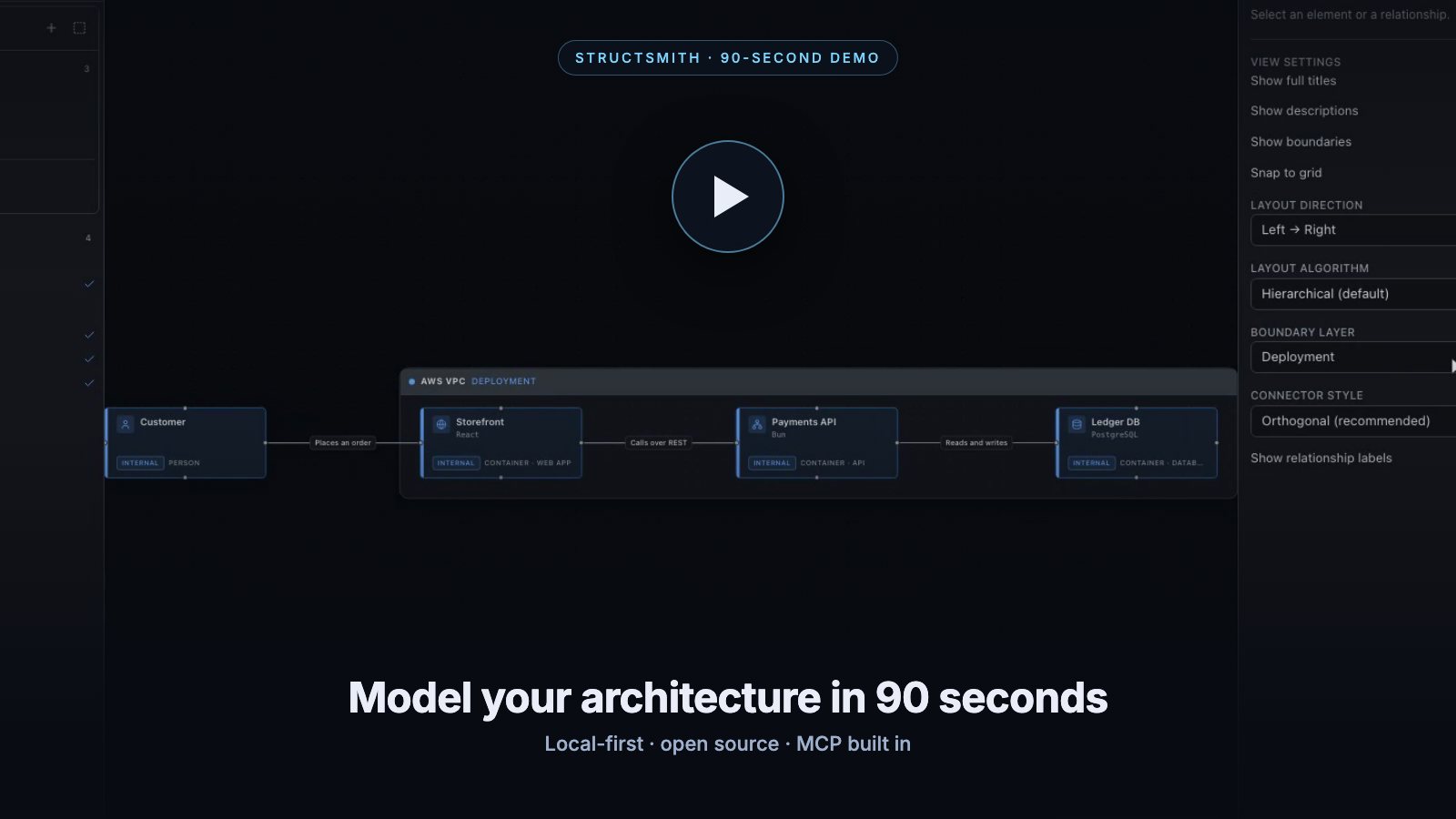
▶ 90-second demo — model a payments system, name the
relationships as you draw them, group containers in a boundary, then drill into one of them.
A local-first, open-source tool for modelling software architecture — a self-hosted alternative to Structurizr with a modern React Flow editor and MCP built in, so your AI client works on exactly the same model you do.
The diagram is not the source of truth. The semantic architecture model is. React Flow only visualises and lays out that model.
Useful for software architecture, the C4 model, presales, solution architecture, architecture workshops, documenting systems, designing integrations — and for working on architecture together with an AI assistant.
- MIT licensed, no account, no cloud, no telemetry — it works fully offline
- One container, one SQLite file
- REST API, MCP and the UI all sit on the same domain layer
Quick start
Stable releases and automatically generated release notes are available under
GitHub Releases. After the first
automated release, latest tracks the latest published release; use :vX.Y.Z
instead of :latest to pin a specific published version.
Run the public image
With Docker installed, run:
docker run -d --name structsmith \
  -p 127.0.0.1:8090:8080 \
  -v structsmith-data:/data \
  --restart unless-stopped \
  ghcr.io/dziksu/structsmith:latest
Then open http://localhost:8090. No repository clone or local build is needed.
Your workspaces persist in the structsmith-data Docker volume.
Build from source with Docker Compose
git clone https://github.com/dziksu/StructSmith.git structsmith
cd structsmith
docker compose up -d --build
Then open http://localhost:8090.
Local development
git clone https://github.com/dziksu/StructSmith.git structsmith
cd structsmith
bun install --frozen-lockfile
bun run dev
bun run dev starts both processes: the Bun/Express API on :3000 and the Vite dev server
on http://localhost:5173, which proxies /api and /mcp to the backend. The SQLite
database is created and migrated automatically — no Docker, Postgres, Redis, Java or Python
required for development.
The static project website lives in apps/site. Run it separately on
http://localhost:4174 with:
bun run dev:site
bun run build:site creates the GitHub Pages artifact in apps/site/dist. Changes to the
site, shared public assets, or its workflow are published automatically from main by the
GitHub Pages action. Before the first deployment, select GitHub Actions as the source in
the repository's Settings → Pages; later pushes need no manual publishing step. The build
prerenders the complete page with React's server renderer and inlines its CSS into index.html;
the published page has no client-side React runtime or JavaScript bundle.
Endpoints
| URL | Purpose |
|---|---|
http://localhost:8090/ | Web UI |
http://localhost:8090/api/... | REST API |
http://localhost:8090/mcp | MCP (Streamable HTTP) |
http://localhost:8090/health | Health check |
In development the same endpoints live on http://localhost:3000 (and :5173 for the UI).
Connecting an AI client (MCP)
MCP is a core feature, not an add-on: it starts with the backend and is served from the same process. The transport is Streamable HTTP (the deprecated SSE transport is not implemented).
Quick install by client
Start StructSmith first, then use the command for your client. The examples assume the public
Docker image is available at http://localhost:8090.
Codex CLI, Codex Desktop and the Codex IDE extension share the same MCP configuration:
codex mcp add structsmith --url http://localhost:8090/mcp
In Codex Desktop you can instead open Settings → MCP servers → Add server, choose Streamable HTTP, and paste the endpoint. Restart the current session after changing MCP configuration.
Claude Code:
claude mcp add --transport http structsmith http://localhost:8090/mcp
GitHub Copilot CLI:
copilot mcp add --transport http structsmith http://localhost:8090/mcp
VS Code with GitHub Copilot — add .vscode/mcp.json to the project where you want to use
StructSmith:
{
  "servers": {
    "structsmith": {
      "type": "http",
      "url": "http://localhost:8090/mcp"
    }
  }
}
Then run MCP: List Servers and start structsmith; use Copilot Chat in Agent mode.
Claude Desktop needs a local STDIO bridge to reach a StructSmith instance on localhost.
See the AI client installation guide for a copy-ready
configuration. A public HTTPS deployment can instead be added under
Customize → Connectors → Add custom connector, but Claude connects to it from Anthropic's
cloud — localhost will not work there.
For Cursor, Windsurf, JetBrains IDEs and other MCP clients, point a native Streamable HTTP connection at the endpoint or use this common configuration shape:
{
  "mcpServers": {
    "structsmith": {
      "type": "http",
      "url": "http://localhost:8090/mcp"
    }
  }
}
For full client-specific instructions, token authentication, local-development ports and troubleshooting, see Install StructSmith in AI clients. The MCP page in StructSmith also generates copy-ready snippets using the live URL, including custom ports.
Manual Codex configuration
Codex can also load StructSmith automatically from a trusted project's .codex/config.toml:
[mcp_servers.structsmith]
url = "http://localhost:8090/mcp"
default_tools_approval_mode = "writes"
tool_timeout_sec = 120
For clients that only speak stdio:
bun run mcp:stdio
The UI shows the live endpoint, the tool list and the read-only state under MCP in the top bar.
What the AI can do
Tools cover workspaces, the model, elements, relationships, views, view-owned boundaries,
presentation settings, saved layout, presales records, snapshots and export. The preferred way to make a larger change is a single call to
model_apply_operations, which is atomic, revision-guarded and takes an automatic snapshot
first:
- Start with
workspace_list, thenworkspace_inspectfor one complete, validated context packet. View membership, boundaries and settings are always included; requestincludeLayoutswhen coordinates or relationship bend points are needed. - Call
modeling_guidefor allowed values, C4 rules, relationship lifting and the recommended workflow instead of reading StructSmith source code. - Run
model_preview_operationsbefore a large batch. It uses the real operation engine and validator, then rolls the transaction back. - Apply the accepted batch with
model_apply_operationsand finish withmodel_validate. - References copied from the UI are one-line
StructSmithRefJSON payloads. Pass theirworkspaceId,typeandtargetIdtoreference_resolveto fetch the exact object and context.
{
  "workspaceId": "example-client-portal",
  "label": "Add asynchronous invoice processing",
  "operations": [
    { "op": "createElement", "ref": "queue",
      "data": { "kind": "container", "role": "queue", "name": "Invoice Queue", "technology": "SQS" } },
    { "op": "createElement", "ref": "worker",
      "data": { "kind": "container", "role": "worker", "name": "Invoice Worker" } },
    { "op": "createRelationship",
      "data": { "sourceElementId": "backend-api", "targetElementId": "@queue",
                "description": "Publishes invoice jobs to", "interactionStyle": "async" } },
    { "op": "createRelationship",
      "data": { "sourceElementId": "@queue", "targetElementId": "@worker",
                "description": "Delivers jobs to", "interactionStyle": "async" } },
    { "op": "setViewElements", "viewId": "containers-view-id", "elementIds": ["@queue", "@worker"] },
    { "op": "autoLayoutView", "viewId": "containers-view-id",
      "direction": "LR", "algorithm": "dagre" }
  ]
}
ref gives a new entity a local alias; later operations reference it as @alias. The whole
batch runs in one SQLite transaction — it either lands completely or not at all.
Boundaries are owned by a view and never become model elements or relationship endpoints. The same element can belong to different boundaries in different views or layers. An element with no boundary in the active layer remains an ordinary item in that view.
Resources expose the model in an AI-friendly shape (no React internals, no CSS, no viewport data):
architecture://guide
architecture://workspaces
architecture://workspace/{workspaceId}
architecture://workspace/{workspaceId}/inspection
architecture://workspace/{workspaceId}/model
architecture://workspace/{workspaceId}/views
architecture://workspace/{workspaceId}/view/{viewId}
architecture://workspace/{workspaceId}/records
Prompt templates: review_architecture, create_presales_architecture,
identify_architecture_risks, identify_unknowns, review_security, review_scalability.
When an AI changes the model, the browser is notified over SSE (GET /api/events) and the
diagram updates on its own — no refresh needed.
The model
Workspace
 ├── Elements          person · softwareSystem · container · component ·
 │                     deploymentNode · infrastructureNode · custom
 ├── Relationships     sync · async · event · data · dependency · custom
 ├── Views             landscape · systemContext · container · component ·
 │  │                  deployment · custom
 │  └── Boundaries     deployment · security · compliance · ownership · custom
 ├── Records           assumption · risk · unknown · requirement · decision · note
 └── Snapshots
StructSmith models itself — this diagram is the container view of the example
self-model, exported straight from the tool with export_mermaid:
flowchart LR
  architect(["Architect"])
  ai_client["AI Client<br/><small>Claude, Cursor, any MCP client</small>"]
  subgraph structsmith["StructSmith"]
    direction LR
    web_ui["Web UI<br/><small>React, Vite, React Flow</small>"]
    rest_api["REST API<br/><small>Bun, Express</small>"]
    mcp_server["MCP Server<br/><small>MCP SDK, Streamable HTTP</small>"]
    domain["Domain Services<br/><small>no Express, no SQL</small>"]
    event_bus["Event Bus<br/><small>in-process, SSE</small>"]
    repositories["Repositories<br/><small>Drizzle ORM</small>"]
    sqlite["SQLite<br/><small>WAL, bun:sqlite</small>"]
  end
  architect -->|"Models architecture in"| web_ui
  ai_client -->|"Reads and changes the model through"| mcp_server
  web_ui -->|"Calls"| rest_api
  rest_api -->|"Delegates to"| domain
  mcp_server -->|"Delegates to the same layer as REST"| domain
  domain -->|"Reads and writes through"| repositories
  repositories -->|"Persists to"| sqlite
  domain -.->|"Publishes model changes to"| event_bus
  event_bus -.->|"Notifies the SSE stream in"| rest_api
  rest_api -.->|"Pushes workspace.updated to"| web_ui
Three rules the implementation is built around:
- Positions belong to views, not to elements. One element can appear on five diagrams without five copies of the data; moving a node never changes the architecture.
- Roles are not C4 levels.
kind = container,role = database,technology = PostgreSQL— roles drive icons, styling and filtering only. - Views show implied relationships. If a view shows a system but not its containers, traffic to those containers is lifted to the system, the way Structurizr does it.
Every workspace has a revision. Mutating REST and MCP calls may pass expectedRevision;
a mismatch returns 409 Conflict, so a user and an AI editing at the same time cannot
silently overwrite each other.
REST API
GET    /api/workspaces                      POST   /api/workspaces
GET    /api/workspaces/:id                  PATCH  /api/workspaces/:id
DELETE /api/workspaces/:id                  POST   /api/workspaces/import
POST   /api/workspaces/import/mermaid

GET    /api/workspaces/:id/model            GET    /api/workspaces/:id/document
GET    /api/workspaces/:id/validate         GET    /api/workspaces/:id/activity
GET    /api/workspaces/:id/export/mermaid
POST   /api/workspaces/:id/commands         # atomic batch of operations

POST   /api/workspaces/:id/elements         PATCH/DELETE /api/elements/:id
GET/POST /api/views/:id/boundaries          PATCH/DELETE /api/boundaries/:id
POST   /api/workspaces/:id/relationships    PATCH/DELETE /api/relationships/:id
GET/POST /api/workspaces/:id/views          GET/PATCH/DELETE /api/views/:id
PATCH  /api/views/:id/layout                # batched, debounced layout write
POST   /api/views/:id/elements              POST /api/views/:id/auto-layout
GET/POST /api/workspaces/:id/records        PATCH/DELETE /api/records/:id
GET/POST /api/workspaces/:id/snapshots      POST /api/snapshots/:id/restore

GET    /api/events                          # SSE: workspace.updated
GET    /api/mcp-info                        GET  /api/presets   GET /api/settings
Errors always use the same envelope:
{ "error": { "code": "WORKSPACE_NOT_FOUND", "message": "...", "details": {} } }
Editor
- Desktop-first three-pane layout: explorer, canvas, inspector — all resizable
- Custom React Flow nodes with icon, name, technology and a kind/role badge; external elements are visually distinct
- Import existing Mermaid diagrams in
flowchart/graphsyntax from.mmd/.mermaidfiles as a semantic workspace baseline - Semantic, nested boundaries owned by a view, so the same model element can be grouped differently on deployment, security, compliance and ownership diagrams
- Explorer separates the active view tree from the reusable element library; elements can be added or dragged into a view or one of its boundaries
- Manual layout (debounced batch save) and automatic dagre, force, radial and grid layouts; compound dagre layout keeps boundary members together
- Views: the same element on many diagrams, each with its own structure, boundaries and layout
- Presales records linked to elements, with a subtle risk indicator on the canvas
- Deterministic validator with error / warning / info levels
- Export: semantic JSON, Mermaid, PNG, SVG. Import: native JSON and Mermaid flowcharts
- Snapshots with restore; undo/redo (
⌘Z/⌘⇧Z) rides on them - Command palette (
⌘K),Fto fit the view,Delete,Escape - Light / dark / system themes, English and Polish UI
- Built-in chat with local Codex, Claude Code and GitHub Copilot CLIs: project topics, general discussions, contextual node/relationship actions, scoped architecture edits, model and Codex thinking settings, streamed replies with collapsible reasoning, and topic renaming, archiving, restoration and drag-and-drop ordering
Chat with local agents
Run StructSmith from source on the same machine as your signed-in CLI (bun run dev).
Open Agent chat using the bubble in the lower right, select a project or
General · no project, and create a topic. A project here is a StructSmith
workspace; each topic shows its project and keeps that assignment when you navigate
elsewhere. Right-click a node or relationship and choose Ask agent about this
to attach it as a context chip; the inspector, view and record reference controls
also offer a chat button. Review the prompt, then press Send or Enter.
Shift+Enter adds a new line.
Choose Codex, Claude Code or GitHub Copilot inside the topic. Ask is the default. Edit architecture enables MCP changes in that topic's project, with revision checks, activity and snapshots; the diagram updates through the existing event stream. General topics cannot edit projects. Switching agents keeps the topic's conversation and project.
Open the chat gear to configure Agent settings:
| Setting | Behavior |
|---|---|
| Default agent | Provider used for new topics; existing topics keep their selected agent |
| CLI executable | Command or absolute path for each provider, such as codex, claude or copilot |
| Model | Codex offers a list from the configured CLI plus a custom model ID; other providers accept an optional model ID. Use the CLI default to keep its configured model |
| Codex reasoning effort | Thinking level for Codex; Default keeps the CLI's configured behavior |
Model and reasoning settings apply to subsequent turns across that provider's topics.
Refresh the Codex model list after changing its executable, updating the CLI or
switching CLI accounts. The list comes from codex app-server and may differ from
the desktop app's models; account access is still checked when a turn runs.
Available Codex thinking levels follow the selected model's CLI catalog. For a
custom model outside the catalog, compatibility depends on the installed CLI and model;
changing to a known model that cannot use the selected level resets it to Default.
The topic gear configures its title and optional absolute source directory on the
server for reading local code.
Manage topics from the sidebar:
- Rename: open the topic's … menu and choose Rename.
- Archive / restore: choose Archive to keep the history and project in the Archive tab. Use Restore topic there to continue the conversation. Renaming and archiving are disabled while that topic's agent is running.
- Reorder: hold the topic body for about 350 ms, outside the … action button, then drag it with a mouse or touch. With keyboard focus on the topic, press Space, use the up/down arrows and press Space to drop; Escape cancels. The saved order survives reloads and server restarts, including when topics receive new messages.
Replies stream into the conversation as the CLI produces them. Readable reasoning exposed by the CLI appears in a collapsed Reasoning panel; Codex provides reasoning summaries. Expand it to follow updates live. Both the reply and available reasoning are saved with the topic. Scrolling up keeps your reading position; returning near the bottom resumes following the response. Closing the chat or switching topics keeps the agent running, and reopening retrieves its current response. Stop interrupts the turn while preserving partial output and any architecture changes already applied.
Agent authentication stays with the installed CLI; sign in in your terminal first.
History, settings, topic order and archive status are saved under data/agent-chat
(configurable with AGENT_CHAT_DIR). Set AGENT_CHAT_ENABLED=false to disable the
CLI chat bridge.
This feature requires a localhost connection and a recent CLI version. A Docker container sees its own installed programs and paths, not the host's CLI. See the local chat guide for testing and implementation details.
Mermaid import
On the home page, choose Import workspace, drop or select a JSON backup,
.mmd, .mermaid, or text file, then edit the suggested workspace name and choose
Import and open. File selection alone does not create a workspace. The dialog
uses react-dropzone without a native extension filter so macOS can select Mermaid
files; content validation happens during import. Alternatively, call
POST /api/workspaces/import/mermaid / MCP import_mermaid with
{ "source": "flowchart LR\nA[Client] -->|Uses| B[API]" }.
An optional name overrides the Mermaid frontmatter title. Import creates a new
workspace by default. mode: "overwrite" requires workspaceId and replaces
that workspace's model, views, and records; it does not merge or synchronize.
MCP read-only mode does not expose this operation.
Supported syntax includes flowchart and graph, all five directions, standalone
and inline node declarations, traditional shapes, @{ shape: ..., label: ... },
Unicode and quoted labels, multiline/Markdown strings, common HTML/Mermaid entities,
semicolon-separated statements, labeled and chained edges, & endpoint groups,
dotted/thick/long links, circle/cross arrowheads, bidirectional links, edge IDs,
and nested subgraphs (including links to subgraphs). A single fenced Mermaid block
and YAML frontmatter with a scalar title are accepted. Configuration, styles,
classes, click actions, accessibility directives, and invisible layout links are
ignored; callbacks and external image/icon resources are never executed or loaded.
Nodes and subgraphs become reusable semantic elements of kind custom; subgraph
membership becomes parent/child containment. This is an import convention, not an
inference of C4 meaning from visual shapes. Kind, role, and technology explicitly
embedded in StructSmith export labels are recovered. Edge labels become descriptions;
a trailing [technology] is recognized. Dotted links map to async, directed links
to sync, and undirected links to custom; bidirectional links create two directed
relationships. Mermaid IDs are retained as provenance in properties["mermaid.id"].
Layout is computed by the existing domain layout helper and stored only on the view.
RL/BT imports are mirrored initially; later automatic layout uses the saved LR/TB axis.
This is a semantic starting point, not a pixel-perfect or lossless round trip. Per-subgraph directions, styling, animation, exact shapes, and Markdown formatting are not reproduced. Exported view boundaries cannot reliably be distinguished from semantic subgraphs. Mermaid does not carry all StructSmith model metadata, and older exports may use parent endpoint IDs distinct from their subgraph IDs. Sequence, class, ER, state, C4, and other diagram families require separate semantic adapters and are rejected with a clear error. Unrecognized structural syntax also fails before any workspace is changed. Limits are 1,000,000 source characters, 2,000 nodes, and 10,000 relationships.
The syntax scope follows the official Mermaid flowchart documentation. The transport/domain integration is small; most implementation and maintenance complexity lies in syntax coverage and mapping Mermaid constructs into a semantic model. Native JSON remains the format for complete backups and lossless round trips.
Adding a language
The UI is fully translated through i18next. Drop a JSON file next to
apps/web/src/i18n/locales/en.json, register it in apps/web/src/i18n/index.ts and add it
to supportedLanguages. No copy is hard-coded in components.
Configuration
| Variable | Default | Meaning |
|---|---|---|
PORT | 3000 (8080 in Docker) | HTTP port |
HOST | 0.0.0.0 | Bind address |
DATABASE_PATH | ./data/architecture.db | SQLite file |
MIGRATIONS_DIR | ./migrations | Migration folder |
AUTH_MODE | none | none or token |
APP_TOKEN | – | Bearer token required when AUTH_MODE=token |
MCP_READ_ONLY | false | When true, MCP exposes no mutating tools |
SEED_EXAMPLE | true | Seed the example workspace on first boot |
APP_NAME | StructSmith | Product name shown in the UI |
AGENT_CHAT_ENABLED | true | Enable the localhost-only CLI chat bridge |
AGENT_CHAT_DIR | ./data/agent-chat | Local chat history, settings and empty working directory |
In token mode, /api and /mcp require Authorization: Bearer <APP_TOKEN>; /health
stays public. There is no user system — this is a local/self-hosted tool.
[!WARNING] The defaults (
AUTH_MODE=none,HOST=0.0.0.0) are meant forlocalhost. As shipped, anyone who can reach the port can read and modify every workspace. Before exposing StructSmith beyond your own machine, setAUTH_MODE=token, put TLS in front of it, and publish the container port as127.0.0.1:8090:8080. See SECURITY.md.
Project layout
apps/
  web/        React + Vite UI          (React Flow, TanStack Router/Query, Zustand, shadcn-style UI)
  server/     Bun + Express            (REST, MCP transport, SSE, static UI)
docs/         Client setup and operating guides
packages/
  contracts/  Zod schemas and DTOs shared by frontend, backend and MCP
  domain/     Pure domain: rules, validation, operations, services (no Express, no SQLite)
  database/   Drizzle + bun:sqlite repositories implementing the domain ports
  mcp/        MCP server: tools, resources, prompts, Streamable HTTP handler
migrations/   Plain SQL, applied in order at startup
tests/        bun:test suite over the real domain and a real (in-memory) database
REST and MCP call the same services; only the database package knows SQL:
        REST ──┐
               ├──► Application / Domain services ──► Repositories ──► SQLite
        MCP ───┘
Scripts
bun run dev         # API + UI, one command
bun run build       # production build of the UI
bun run start       # run the server with the built UI
bun run test        # domain + persistence tests
bun run typecheck   # strict TypeScript across the whole monorepo
bun run db:generate # generate a migration with drizzle-kit
bun run db:migrate  # apply migrations
bun run db:seed     # (re)create the example workspace
bun run mcp:stdio   # MCP over stdio
Roadmap
Systems and containers now offer Open details on their cards, in the inspector, and in the context menu. Double-click is a shortcut. A system opens its scoped container view; a container opens its scoped component view. Multiple matching views show a chooser. When none exists, an explicit creation dialog can seed a view with one level of children and their connected context, or start empty. Back and the navigation trail restore the previous zoom, pan, and selection within the current workspace session. Browsing existing views does not change the model. Ctrl/Cmd-click remains multi-selection.
Use View settings beside the current view's name to edit its name in the inspector. Enter or leaving the field saves; Escape cancels. Renaming preserves the view's ID, links, scope, and layout, and supports undo/redo.
The next improvements focus on dependency exploration, inline expansion, and visual overlays. Later milestones add message flows, offline presentations, visual change review, and saved proposals.
See the product roadmap for priorities, scope, completion criteria, and follow-up work including documentation, interoperability, and collaboration.
Contributing
Pull requests are welcome. CONTRIBUTING.md covers the local setup, the four commands CI runs, and the five architecture invariants a change has to respect. Participation is governed by the Code of Conduct, and security issues go through SECURITY.md rather than public issues.
License
MIT — see LICENSE. React Flow is used strictly within its open-source scope; the attribution is intentionally left in place.
Similar repos


Local-first, MCP-native tool for modelling software architecture. C4-style semantic model, React Flow editor, SQLite, single container — a self-hosted Structurizr alternative your AI client can edit over MCP.
See the codeSee what people are saying
README
StructSmith
Model, document and share software architecture — locally, and with your AI client.
▶ 90-second demo — model a payments system, name the
relationships as you draw them, group containers in a boundary, then drill into one of them.
A local-first, open-source tool for modelling software architecture — a self-hosted alternative to Structurizr with a modern React Flow editor and MCP built in, so your AI client works on exactly the same model you do.
The diagram is not the source of truth. The semantic architecture model is. React Flow only visualises and lays out that model.
Useful for software architecture, the C4 model, presales, solution architecture, architecture workshops, documenting systems, designing integrations — and for working on architecture together with an AI assistant.
- MIT licensed, no account, no cloud, no telemetry — it works fully offline
- One container, one SQLite file
- REST API, MCP and the UI all sit on the same domain layer
Quick start
Stable releases and automatically generated release notes are available under
GitHub Releases. After the first
automated release, latest tracks the latest published release; use :vX.Y.Z
instead of :latest to pin a specific published version.
Run the public image
With Docker installed, run:
docker run -d --name structsmith \
  -p 127.0.0.1:8090:8080 \
  -v structsmith-data:/data \
  --restart unless-stopped \
  ghcr.io/dziksu/structsmith:latest
Then open http://localhost:8090. No repository clone or local build is needed.
Your workspaces persist in the structsmith-data Docker volume.
Build from source with Docker Compose
git clone https://github.com/dziksu/StructSmith.git structsmith
cd structsmith
docker compose up -d --build
Then open http://localhost:8090.
Local development
git clone https://github.com/dziksu/StructSmith.git structsmith
cd structsmith
bun install --frozen-lockfile
bun run dev
bun run dev starts both processes: the Bun/Express API on :3000 and the Vite dev server
on http://localhost:5173, which proxies /api and /mcp to the backend. The SQLite
database is created and migrated automatically — no Docker, Postgres, Redis, Java or Python
required for development.
The static project website lives in apps/site. Run it separately on
http://localhost:4174 with:
bun run dev:site
bun run build:site creates the GitHub Pages artifact in apps/site/dist. Changes to the
site, shared public assets, or its workflow are published automatically from main by the
GitHub Pages action. Before the first deployment, select GitHub Actions as the source in
the repository's Settings → Pages; later pushes need no manual publishing step. The build
prerenders the complete page with React's server renderer and inlines its CSS into index.html;
the published page has no client-side React runtime or JavaScript bundle.
Endpoints
| URL | Purpose |
|---|---|
http://localhost:8090/ | Web UI |
http://localhost:8090/api/... | REST API |
http://localhost:8090/mcp | MCP (Streamable HTTP) |
http://localhost:8090/health | Health check |
In development the same endpoints live on http://localhost:3000 (and :5173 for the UI).
Connecting an AI client (MCP)
MCP is a core feature, not an add-on: it starts with the backend and is served from the same process. The transport is Streamable HTTP (the deprecated SSE transport is not implemented).
Quick install by client
Start StructSmith first, then use the command for your client. The examples assume the public
Docker image is available at http://localhost:8090.
Codex CLI, Codex Desktop and the Codex IDE extension share the same MCP configuration:
codex mcp add structsmith --url http://localhost:8090/mcp
In Codex Desktop you can instead open Settings → MCP servers → Add server, choose Streamable HTTP, and paste the endpoint. Restart the current session after changing MCP configuration.
Claude Code:
claude mcp add --transport http structsmith http://localhost:8090/mcp
GitHub Copilot CLI:
copilot mcp add --transport http structsmith http://localhost:8090/mcp
VS Code with GitHub Copilot — add .vscode/mcp.json to the project where you want to use
StructSmith:
{
  "servers": {
    "structsmith": {
      "type": "http",
      "url": "http://localhost:8090/mcp"
    }
  }
}
Then run MCP: List Servers and start structsmith; use Copilot Chat in Agent mode.
Claude Desktop needs a local STDIO bridge to reach a StructSmith instance on localhost.
See the AI client installation guide for a copy-ready
configuration. A public HTTPS deployment can instead be added under
Customize → Connectors → Add custom connector, but Claude connects to it from Anthropic's
cloud — localhost will not work there.
For Cursor, Windsurf, JetBrains IDEs and other MCP clients, point a native Streamable HTTP connection at the endpoint or use this common configuration shape:
{
  "mcpServers": {
    "structsmith": {
      "type": "http",
      "url": "http://localhost:8090/mcp"
    }
  }
}
For full client-specific instructions, token authentication, local-development ports and troubleshooting, see Install StructSmith in AI clients. The MCP page in StructSmith also generates copy-ready snippets using the live URL, including custom ports.
Manual Codex configuration
Codex can also load StructSmith automatically from a trusted project's .codex/config.toml:
[mcp_servers.structsmith]
url = "http://localhost:8090/mcp"
default_tools_approval_mode = "writes"
tool_timeout_sec = 120
For clients that only speak stdio:
bun run mcp:stdio
The UI shows the live endpoint, the tool list and the read-only state under MCP in the top bar.
What the AI can do
Tools cover workspaces, the model, elements, relationships, views, view-owned boundaries,
presentation settings, saved layout, presales records, snapshots and export. The preferred way to make a larger change is a single call to
model_apply_operations, which is atomic, revision-guarded and takes an automatic snapshot
first:
- Start with
workspace_list, thenworkspace_inspectfor one complete, validated context packet. View membership, boundaries and settings are always included; requestincludeLayoutswhen coordinates or relationship bend points are needed. - Call
modeling_guidefor allowed values, C4 rules, relationship lifting and the recommended workflow instead of reading StructSmith source code. - Run
model_preview_operationsbefore a large batch. It uses the real operation engine and validator, then rolls the transaction back. - Apply the accepted batch with
model_apply_operationsand finish withmodel_validate. - References copied from the UI are one-line
StructSmithRefJSON payloads. Pass theirworkspaceId,typeandtargetIdtoreference_resolveto fetch the exact object and context.
{
  "workspaceId": "example-client-portal",
  "label": "Add asynchronous invoice processing",
  "operations": [
    { "op": "createElement", "ref": "queue",
      "data": { "kind": "container", "role": "queue", "name": "Invoice Queue", "technology": "SQS" } },
    { "op": "createElement", "ref": "worker",
      "data": { "kind": "container", "role": "worker", "name": "Invoice Worker" } },
    { "op": "createRelationship",
      "data": { "sourceElementId": "backend-api", "targetElementId": "@queue",
                "description": "Publishes invoice jobs to", "interactionStyle": "async" } },
    { "op": "createRelationship",
      "data": { "sourceElementId": "@queue", "targetElementId": "@worker",
                "description": "Delivers jobs to", "interactionStyle": "async" } },
    { "op": "setViewElements", "viewId": "containers-view-id", "elementIds": ["@queue", "@worker"] },
    { "op": "autoLayoutView", "viewId": "containers-view-id",
      "direction": "LR", "algorithm": "dagre" }
  ]
}
ref gives a new entity a local alias; later operations reference it as @alias. The whole
batch runs in one SQLite transaction — it either lands completely or not at all.
Boundaries are owned by a view and never become model elements or relationship endpoints. The same element can belong to different boundaries in different views or layers. An element with no boundary in the active layer remains an ordinary item in that view.
Resources expose the model in an AI-friendly shape (no React internals, no CSS, no viewport data):
architecture://guide
architecture://workspaces
architecture://workspace/{workspaceId}
architecture://workspace/{workspaceId}/inspection
architecture://workspace/{workspaceId}/model
architecture://workspace/{workspaceId}/views
architecture://workspace/{workspaceId}/view/{viewId}
architecture://workspace/{workspaceId}/records
Prompt templates: review_architecture, create_presales_architecture,
identify_architecture_risks, identify_unknowns, review_security, review_scalability.
When an AI changes the model, the browser is notified over SSE (GET /api/events) and the
diagram updates on its own — no refresh needed.
The model
Workspace
 ├── Elements          person · softwareSystem · container · component ·
 │                     deploymentNode · infrastructureNode · custom
 ├── Relationships     sync · async · event · data · dependency · custom
 ├── Views             landscape · systemContext · container · component ·
 │  │                  deployment · custom
 │  └── Boundaries     deployment · security · compliance · ownership · custom
 ├── Records           assumption · risk · unknown · requirement · decision · note
 └── Snapshots
StructSmith models itself — this diagram is the container view of the example
self-model, exported straight from the tool with export_mermaid:
flowchart LR
  architect(["Architect"])
  ai_client["AI Client<br/><small>Claude, Cursor, any MCP client</small>"]
  subgraph structsmith["StructSmith"]
    direction LR
    web_ui["Web UI<br/><small>React, Vite, React Flow</small>"]
    rest_api["REST API<br/><small>Bun, Express</small>"]
    mcp_server["MCP Server<br/><small>MCP SDK, Streamable HTTP</small>"]
    domain["Domain Services<br/><small>no Express, no SQL</small>"]
    event_bus["Event Bus<br/><small>in-process, SSE</small>"]
    repositories["Repositories<br/><small>Drizzle ORM</small>"]
    sqlite["SQLite<br/><small>WAL, bun:sqlite</small>"]
  end
  architect -->|"Models architecture in"| web_ui
  ai_client -->|"Reads and changes the model through"| mcp_server
  web_ui -->|"Calls"| rest_api
  rest_api -->|"Delegates to"| domain
  mcp_server -->|"Delegates to the same layer as REST"| domain
  domain -->|"Reads and writes through"| repositories
  repositories -->|"Persists to"| sqlite
  domain -.->|"Publishes model changes to"| event_bus
  event_bus -.->|"Notifies the SSE stream in"| rest_api
  rest_api -.->|"Pushes workspace.updated to"| web_ui
Three rules the implementation is built around:
- Positions belong to views, not to elements. One element can appear on five diagrams without five copies of the data; moving a node never changes the architecture.
- Roles are not C4 levels.
kind = container,role = database,technology = PostgreSQL— roles drive icons, styling and filtering only. - Views show implied relationships. If a view shows a system but not its containers, traffic to those containers is lifted to the system, the way Structurizr does it.
Every workspace has a revision. Mutating REST and MCP calls may pass expectedRevision;
a mismatch returns 409 Conflict, so a user and an AI editing at the same time cannot
silently overwrite each other.
REST API
GET    /api/workspaces                      POST   /api/workspaces
GET    /api/workspaces/:id                  PATCH  /api/workspaces/:id
DELETE /api/workspaces/:id                  POST   /api/workspaces/import
POST   /api/workspaces/import/mermaid

GET    /api/workspaces/:id/model            GET    /api/workspaces/:id/document
GET    /api/workspaces/:id/validate         GET    /api/workspaces/:id/activity
GET    /api/workspaces/:id/export/mermaid
POST   /api/workspaces/:id/commands         # atomic batch of operations

POST   /api/workspaces/:id/elements         PATCH/DELETE /api/elements/:id
GET/POST /api/views/:id/boundaries          PATCH/DELETE /api/boundaries/:id
POST   /api/workspaces/:id/relationships    PATCH/DELETE /api/relationships/:id
GET/POST /api/workspaces/:id/views          GET/PATCH/DELETE /api/views/:id
PATCH  /api/views/:id/layout                # batched, debounced layout write
POST   /api/views/:id/elements              POST /api/views/:id/auto-layout
GET/POST /api/workspaces/:id/records        PATCH/DELETE /api/records/:id
GET/POST /api/workspaces/:id/snapshots      POST /api/snapshots/:id/restore

GET    /api/events                          # SSE: workspace.updated
GET    /api/mcp-info                        GET  /api/presets   GET /api/settings
Errors always use the same envelope:
{ "error": { "code": "WORKSPACE_NOT_FOUND", "message": "...", "details": {} } }
Editor
- Desktop-first three-pane layout: explorer, canvas, inspector — all resizable
- Custom React Flow nodes with icon, name, technology and a kind/role badge; external elements are visually distinct
- Import existing Mermaid diagrams in
flowchart/graphsyntax from.mmd/.mermaidfiles as a semantic workspace baseline - Semantic, nested boundaries owned by a view, so the same model element can be grouped differently on deployment, security, compliance and ownership diagrams
- Explorer separates the active view tree from the reusable element library; elements can be added or dragged into a view or one of its boundaries
- Manual layout (debounced batch save) and automatic dagre, force, radial and grid layouts; compound dagre layout keeps boundary members together
- Views: the same element on many diagrams, each with its own structure, boundaries and layout
- Presales records linked to elements, with a subtle risk indicator on the canvas
- Deterministic validator with error / warning / info levels
- Export: semantic JSON, Mermaid, PNG, SVG. Import: native JSON and Mermaid flowcharts
- Snapshots with restore; undo/redo (
⌘Z/⌘⇧Z) rides on them - Command palette (
⌘K),Fto fit the view,Delete,Escape - Light / dark / system themes, English and Polish UI
- Built-in chat with local Codex, Claude Code and GitHub Copilot CLIs: project topics, general discussions, contextual node/relationship actions, scoped architecture edits, model and Codex thinking settings, streamed replies with collapsible reasoning, and topic renaming, archiving, restoration and drag-and-drop ordering
Chat with local agents
Run StructSmith from source on the same machine as your signed-in CLI (bun run dev).
Open Agent chat using the bubble in the lower right, select a project or
General · no project, and create a topic. A project here is a StructSmith
workspace; each topic shows its project and keeps that assignment when you navigate
elsewhere. Right-click a node or relationship and choose Ask agent about this
to attach it as a context chip; the inspector, view and record reference controls
also offer a chat button. Review the prompt, then press Send or Enter.
Shift+Enter adds a new line.
Choose Codex, Claude Code or GitHub Copilot inside the topic. Ask is the default. Edit architecture enables MCP changes in that topic's project, with revision checks, activity and snapshots; the diagram updates through the existing event stream. General topics cannot edit projects. Switching agents keeps the topic's conversation and project.
Open the chat gear to configure Agent settings:
| Setting | Behavior |
|---|---|
| Default agent | Provider used for new topics; existing topics keep their selected agent |
| CLI executable | Command or absolute path for each provider, such as codex, claude or copilot |
| Model | Codex offers a list from the configured CLI plus a custom model ID; other providers accept an optional model ID. Use the CLI default to keep its configured model |
| Codex reasoning effort | Thinking level for Codex; Default keeps the CLI's configured behavior |
Model and reasoning settings apply to subsequent turns across that provider's topics.
Refresh the Codex model list after changing its executable, updating the CLI or
switching CLI accounts. The list comes from codex app-server and may differ from
the desktop app's models; account access is still checked when a turn runs.
Available Codex thinking levels follow the selected model's CLI catalog. For a
custom model outside the catalog, compatibility depends on the installed CLI and model;
changing to a known model that cannot use the selected level resets it to Default.
The topic gear configures its title and optional absolute source directory on the
server for reading local code.
Manage topics from the sidebar:
- Rename: open the topic's … menu and choose Rename.
- Archive / restore: choose Archive to keep the history and project in the Archive tab. Use Restore topic there to continue the conversation. Renaming and archiving are disabled while that topic's agent is running.
- Reorder: hold the topic body for about 350 ms, outside the … action button, then drag it with a mouse or touch. With keyboard focus on the topic, press Space, use the up/down arrows and press Space to drop; Escape cancels. The saved order survives reloads and server restarts, including when topics receive new messages.
Replies stream into the conversation as the CLI produces them. Readable reasoning exposed by the CLI appears in a collapsed Reasoning panel; Codex provides reasoning summaries. Expand it to follow updates live. Both the reply and available reasoning are saved with the topic. Scrolling up keeps your reading position; returning near the bottom resumes following the response. Closing the chat or switching topics keeps the agent running, and reopening retrieves its current response. Stop interrupts the turn while preserving partial output and any architecture changes already applied.
Agent authentication stays with the installed CLI; sign in in your terminal first.
History, settings, topic order and archive status are saved under data/agent-chat
(configurable with AGENT_CHAT_DIR). Set AGENT_CHAT_ENABLED=false to disable the
CLI chat bridge.
This feature requires a localhost connection and a recent CLI version. A Docker container sees its own installed programs and paths, not the host's CLI. See the local chat guide for testing and implementation details.
Mermaid import
On the home page, choose Import workspace, drop or select a JSON backup,
.mmd, .mermaid, or text file, then edit the suggested workspace name and choose
Import and open. File selection alone does not create a workspace. The dialog
uses react-dropzone without a native extension filter so macOS can select Mermaid
files; content validation happens during import. Alternatively, call
POST /api/workspaces/import/mermaid / MCP import_mermaid with
{ "source": "flowchart LR\nA[Client] -->|Uses| B[API]" }.
An optional name overrides the Mermaid frontmatter title. Import creates a new
workspace by default. mode: "overwrite" requires workspaceId and replaces
that workspace's model, views, and records; it does not merge or synchronize.
MCP read-only mode does not expose this operation.
Supported syntax includes flowchart and graph, all five directions, standalone
and inline node declarations, traditional shapes, @{ shape: ..., label: ... },
Unicode and quoted labels, multiline/Markdown strings, common HTML/Mermaid entities,
semicolon-separated statements, labeled and chained edges, & endpoint groups,
dotted/thick/long links, circle/cross arrowheads, bidirectional links, edge IDs,
and nested subgraphs (including links to subgraphs). A single fenced Mermaid block
and YAML frontmatter with a scalar title are accepted. Configuration, styles,
classes, click actions, accessibility directives, and invisible layout links are
ignored; callbacks and external image/icon resources are never executed or loaded.
Nodes and subgraphs become reusable semantic elements of kind custom; subgraph
membership becomes parent/child containment. This is an import convention, not an
inference of C4 meaning from visual shapes. Kind, role, and technology explicitly
embedded in StructSmith export labels are recovered. Edge labels become descriptions;
a trailing [technology] is recognized. Dotted links map to async, directed links
to sync, and undirected links to custom; bidirectional links create two directed
relationships. Mermaid IDs are retained as provenance in properties["mermaid.id"].
Layout is computed by the existing domain layout helper and stored only on the view.
RL/BT imports are mirrored initially; later automatic layout uses the saved LR/TB axis.
This is a semantic starting point, not a pixel-perfect or lossless round trip. Per-subgraph directions, styling, animation, exact shapes, and Markdown formatting are not reproduced. Exported view boundaries cannot reliably be distinguished from semantic subgraphs. Mermaid does not carry all StructSmith model metadata, and older exports may use parent endpoint IDs distinct from their subgraph IDs. Sequence, class, ER, state, C4, and other diagram families require separate semantic adapters and are rejected with a clear error. Unrecognized structural syntax also fails before any workspace is changed. Limits are 1,000,000 source characters, 2,000 nodes, and 10,000 relationships.
The syntax scope follows the official Mermaid flowchart documentation. The transport/domain integration is small; most implementation and maintenance complexity lies in syntax coverage and mapping Mermaid constructs into a semantic model. Native JSON remains the format for complete backups and lossless round trips.
Adding a language
The UI is fully translated through i18next. Drop a JSON file next to
apps/web/src/i18n/locales/en.json, register it in apps/web/src/i18n/index.ts and add it
to supportedLanguages. No copy is hard-coded in components.
Configuration
| Variable | Default | Meaning |
|---|---|---|
PORT | 3000 (8080 in Docker) | HTTP port |
HOST | 0.0.0.0 | Bind address |
DATABASE_PATH | ./data/architecture.db | SQLite file |
MIGRATIONS_DIR | ./migrations | Migration folder |
AUTH_MODE | none | none or token |
APP_TOKEN | – | Bearer token required when AUTH_MODE=token |
MCP_READ_ONLY | false | When true, MCP exposes no mutating tools |
SEED_EXAMPLE | true | Seed the example workspace on first boot |
APP_NAME | StructSmith | Product name shown in the UI |
AGENT_CHAT_ENABLED | true | Enable the localhost-only CLI chat bridge |
AGENT_CHAT_DIR | ./data/agent-chat | Local chat history, settings and empty working directory |
In token mode, /api and /mcp require Authorization: Bearer <APP_TOKEN>; /health
stays public. There is no user system — this is a local/self-hosted tool.
[!WARNING] The defaults (
AUTH_MODE=none,HOST=0.0.0.0) are meant forlocalhost. As shipped, anyone who can reach the port can read and modify every workspace. Before exposing StructSmith beyond your own machine, setAUTH_MODE=token, put TLS in front of it, and publish the container port as127.0.0.1:8090:8080. See SECURITY.md.
Project layout
apps/
  web/        React + Vite UI          (React Flow, TanStack Router/Query, Zustand, shadcn-style UI)
  server/     Bun + Express            (REST, MCP transport, SSE, static UI)
docs/         Client setup and operating guides
packages/
  contracts/  Zod schemas and DTOs shared by frontend, backend and MCP
  domain/     Pure domain: rules, validation, operations, services (no Express, no SQLite)
  database/   Drizzle + bun:sqlite repositories implementing the domain ports
  mcp/        MCP server: tools, resources, prompts, Streamable HTTP handler
migrations/   Plain SQL, applied in order at startup
tests/        bun:test suite over the real domain and a real (in-memory) database
REST and MCP call the same services; only the database package knows SQL:
        REST ──┐
               ├──► Application / Domain services ──► Repositories ──► SQLite
        MCP ───┘
Scripts
bun run dev         # API + UI, one command
bun run build       # production build of the UI
bun run start       # run the server with the built UI
bun run test        # domain + persistence tests
bun run typecheck   # strict TypeScript across the whole monorepo
bun run db:generate # generate a migration with drizzle-kit
bun run db:migrate  # apply migrations
bun run db:seed     # (re)create the example workspace
bun run mcp:stdio   # MCP over stdio
Roadmap
Systems and containers now offer Open details on their cards, in the inspector, and in the context menu. Double-click is a shortcut. A system opens its scoped container view; a container opens its scoped component view. Multiple matching views show a chooser. When none exists, an explicit creation dialog can seed a view with one level of children and their connected context, or start empty. Back and the navigation trail restore the previous zoom, pan, and selection within the current workspace session. Browsing existing views does not change the model. Ctrl/Cmd-click remains multi-selection.
Use View settings beside the current view's name to edit its name in the inspector. Enter or leaving the field saves; Escape cancels. Renaming preserves the view's ID, links, scope, and layout, and supports undo/redo.
The next improvements focus on dependency exploration, inline expansion, and visual overlays. Later milestones add message flows, offline presentations, visual change review, and saved proposals.
See the product roadmap for priorities, scope, completion criteria, and follow-up work including documentation, interoperability, and collaboration.
Contributing
Pull requests are welcome. CONTRIBUTING.md covers the local setup, the four commands CI runs, and the five architecture invariants a change has to respect. Participation is governed by the Code of Conduct, and security issues go through SECURITY.md rather than public issues.
License
MIT — see LICENSE. React Flow is used strictly within its open-source scope; the attribution is intentionally left in place.