
README
 PhotoLibrarian
A fast, strictly local (no cloud service) photo library manager for Windows — built with WinUI 3 and Win2D.
PhotoLibrarian is designed to handle real photo libraries (tens of thousands of images, including RAW + video) without lock-up, with a single-purpose UI inspired by the late, well-loved Windows Live Photo Gallery. Unlike other solutions out there with hidden databases or local web servers, this is purely a local app. Nothing hidden or ties to a cloud service. Your photos and data stay on your computer.
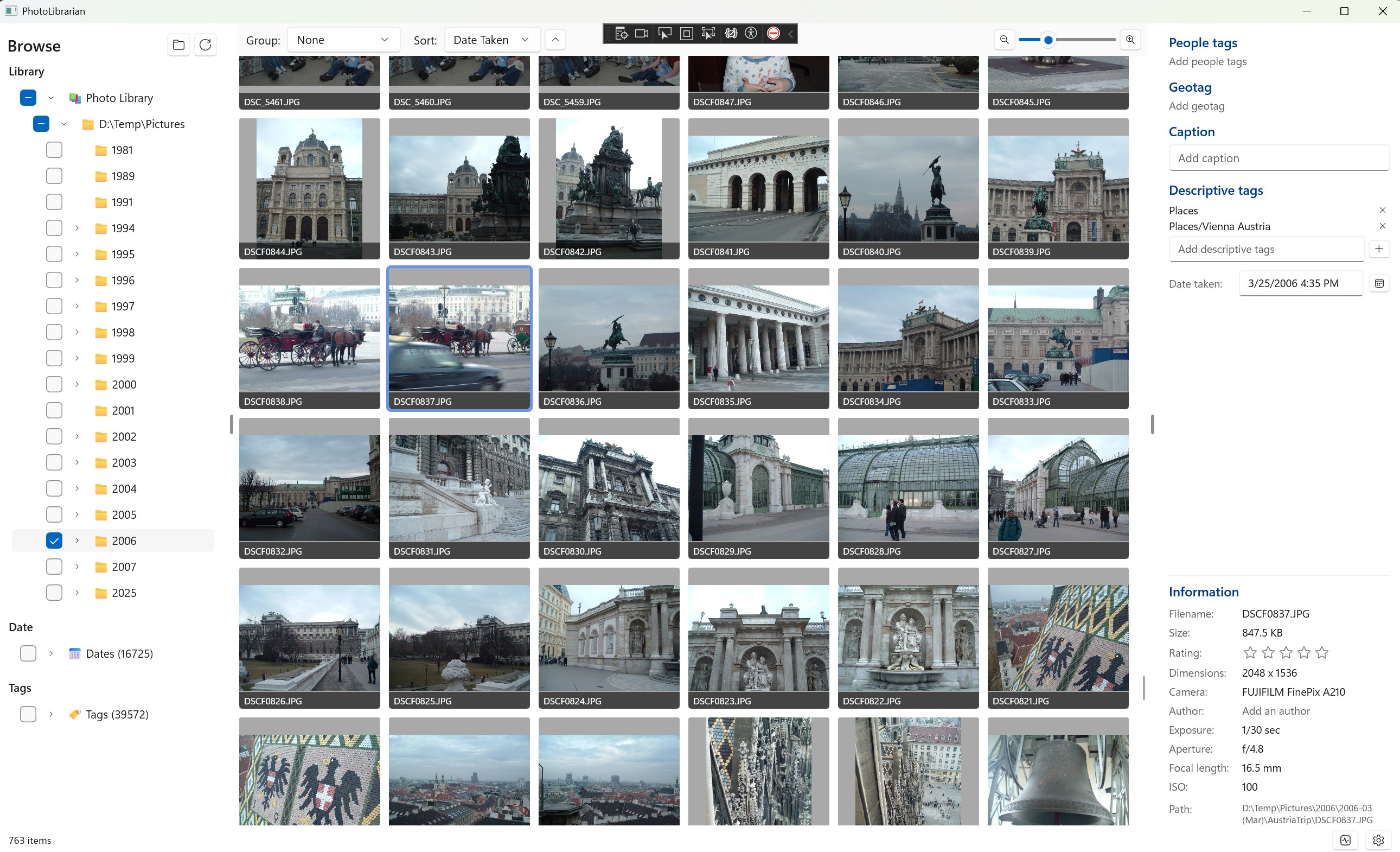
Premise: your edits stay with your images. Ratings, captions, tags, and capture dates are written directly into the image file using Windows Imaging Component, so moving a photo to another drive, computer, or app keeps every edit intact. No proprietary catalog, no parasitic sidecars (for the formats that can hold their own metadata).
Highlights
- 🚀 Custom virtualized grid that handles 18 000+ items per folder smoothly. No
ItemsRepeaterlayout cycles, no per-item bindings — just aCanvaswith a recycled element pool. - 🗂️ Windows-style folder tree with multi-checkbox selection plus parallel Date, People, Tag, and Flag trees; the sections combine as a union filter.
- 🏷️ Hierarchical tags (
people/family/kidsindexespeople+people/family+people/family/kidsso you can filter at any level). - ⚡ SQLite metadata index + Windows native thumbnail cache for instant viewport-aware loads.
- ✏️ Multi-select metadata panel — rating, caption, tags, and capture date all edit every selected image at once, with "(n of m)" hints when values differ and a date-shift mode for time-zone fix-ups.
- 🎨 Win2D real-time editor with Exposure / Brightness / Contrast / Highlights / Shadows / Saturation / Temperature / Tint / Clarity / Sharpness / Levels / Rotation.
- 🖼️ Make a copy before editing from the viewer to keep the original and editable variant as separate library items.
- 💾 In-place metadata writing for JPEG / TIFF / PNG / HEIC / JPEG-XR via
BitmapEncoder.CreateForInPlacePropertyEncodingAsync— image bytes are preserved exactly; only the metadata block is rewritten. RAW formats (CR2/CR3/NEF/ARW) fall back to XMP sidecars (industry-standard limitation). - 🔍 Background indexing with restartable re-index and a manage-folders dialog.
- 🔄 Watched-folder updates detect Explorer copies, edits, and deletions automatically; filesystem events are batched and only affected files are re-indexed.
- 🧠 Opt-in local automatic content tags with pluggable, checksum-pinned ONNX model profiles. A profile must be benchmarked and explicitly approved before generated labels can enter the distinct
Autotag hierarchy.
Status
Active personal project — usable for daily browsing, tagging, and rating today. See Roadmap for what's missing relative to Windows Live Photo Gallery.
Architecture
┌───────────────────────────────────────────────────────────────┐
│  PhotoLibrarian            (WinUI 3 app, Win2D, MVVM)         │
│  ┌─────────────────┬──────────────────┬────────────────────┐  │
│  │  FolderNav      │   ImageGrid      │   MetadataPanel    │  │
│  │  (Library/      │   (custom virt.  │   (multi-select    │  │
│  │   Date/People/  │    Canvas grid)  │    aware editor)   │  │
│  │   Tag trees,    │                  │                    │  │
│  │   union filter) │   ImageViewer    │   ImageEditor      │  │
│  │                 │   overlay        │   (Win2D)          │  │
│  └─────────────────┴──────────────────┴────────────────────┘  │
└───────────────┬───────────────────────────────────────────────┘
                │
┌───────────────▼───────────────────────────────────────────────┐
│  PhotoLibrarian.Core        (services + data layer)           │
│  • EmbeddedMetadataWriter   – in-place EXIF/XMP via WIC       │
│  • MetadataWriter / Reader  – rating, caption, date, tags     │
│  • FolderScannerService     – fast directory walk             │
│  • LibraryIndexingService   – background indexer              │
│  • ThumbnailService         – Windows shell thumbnail cache   │
│  • CacheDatabase            – SQLite metadata cache           │
│  • ImageEditService         – Win2D effect graph application  │
└───────────────────────────────────────────────────────────────┘
                │
┌───────────────▼───────────────────────────────────────────────┐
│  PhotoLibrarian.ML          (face detection, scene tagging)   │
│  • ONNX Runtime + DirectML                                    │
└───────────────────────────────────────────────────────────────┘
Solution layout
| Project | Purpose |
|---|---|
src/PhotoLibrarian | WinUI 3 application (views, viewmodels, controls). |
src/PhotoLibrarian.Core | Services, repositories, models. No UI dependencies (other than WIC). |
src/PhotoLibrarian.ML | ML pipelines (face detection, scene tagging) via ONNX Runtime. |
src/PhotoLibrarian.Inference | Shared zero-shot scoring and reference-matching image preprocessing for the app and comparison utility. |
src/PhotoLibrarian.Tests | xUnit + Moq test suite. |
tools/PhotoLibrarian.ModelBench | Standalone ONNX model comparison and scoring utility. |
Metadata-handling philosophy
PhotoLibrarian writes metadata in this priority order so your photos remain portable:
- Embedded in the image file (preferred) — using
Windows.Graphics.Imaging.BitmapEncoder.CreateForInPlacePropertyEncodingAsync. The image bytes are preserved exactly; only the metadata block changes. Field mappings:- Rating →
System.Rating+System.SimpleRating(XMPxmp:Rating+ EXIF RatingPercent) - Caption →
System.Title+System.Comment(XMPdc:description+ EXIF XPTitle/XPComment + IPTC) - Tags →
System.Keywords(XMPdc:subject+ EXIF XPKeywords + IPTC Keywords) - Date taken →
System.Photo.DateTaken(EXIF DateTimeOriginal) - Flag → XMP
plib:Flaggedin the PhotoLibrarian namespace (http://ns.photolibrarian.app/1.0/) — there is no standard EXIF/XMP flag field, so a private namespace is used rather than hijackingxmp:Label
- Rating →
- XMP sidecar (
*.xmp) — only for RAW formats that can't be safely rewritten. Lightroom does the same. - SQLite cache at
%LOCALAPPDATA%\PhotoLibrarian\cache.db— cache only; never authoritative. Wipe and re-index any time.
Move a JPEG to another drive or another machine and every edit goes with it.
Build & run
Prerequisites
- Windows 10 1809 or newer (WinUI 3 requirement).
- .NET 8 SDK with Windows targeting pack (
net8.0-windows10.0.22621.0). - Visual Studio 2022 17.10+ with the Windows App SDK C# Templates component, or just
dotnetCLI.
From the command line
git clone https://github.com/dunclaw/PhotoLibrarian.git
cd PhotoLibrarian
dotnet build src/PhotoLibrarian/PhotoLibrarian.csproj -c Release
dotnet run --project src/PhotoLibrarian/PhotoLibrarian.csproj -c Release
From Visual Studio
Open PhotoLibrarian.slnx, set PhotoLibrarian as the startup project, pick the x64 platform, and hit F5.
CI and Microsoft Store packages
GitHub Actions builds the app, runs the xUnit tests, and creates unsigned, self-contained x64 and ARM64 MSIX packages plus a combined Store bundle. See Windows CI and Store releases for workflow triggers, versioning, local packaging, and Partner Center submission instructions. Microsoft signs the Store-distributed package; CI does not need a certificate.
First run
-
Click the gear icon → Manage folders and add the root(s) you want to index.
-
The background indexer populates the cache; the grid starts filling as soon as the first folder's metadata is ready.
-
Automatic content tagging is off by default. The recommended RAM++ profile requires
ram_plus_swin_large_14m.onnxandram_plus_swin_large_14m_labels.txt, which PhotoLibrarian does not distribute. Settings links to compatible model setup instructions and each upstream model/license page. Choose Import model assets to verify and copy those exact files into managed local storage. Source files are never modified. Review the profile information, then explicitly trust it before enabling background processing. RAM++ uses a general-purpose eligibility policy derived from its complete vocabulary, rather than the labels present in a small test set. Useful subjects such as boats are available again; non-visual concepts, ambiguous terms, sensitive personal inferences and unhelpful fragments are excluded from automatic predictions, not erased from the taxonomy.The pinned RAM++ export returns a binary detected/not-detected mask in its
targetsoutput, not confidence probabilities. Its decision cutoffs are baked into the model, so Settings does not offer an adjustable confidence slider. Reports show detected, and inactive classes are always omitted: requesting ten tags can correctly return fewer than ten. Active detections tie, so a tag cap uses stable source-label order, not a confidence ranking. Earlier standalone reports incorrectly padded these results with zero-score classes when showing below-cutoff candidates; those entries were not RAM++ detections.
Lightweight tagging with TinyCLIP
Settings also offers TinyCLIP (lightweight, experimental) beside RAM++. It uses approximately 99 MB of runtime assets: the unchanged 40.6 MB image encoder plus embeddings for 3,632 general-purpose concepts. TinyCLIP has no fixed native class vocabulary; these concepts are supplied to its image-text matching pipeline. The earlier 247-label test vocabulary remains available as a historical benchmark fixture, not the application's current vocabulary. RAM++ remains the default selection and existing saved profiles are preserved. Selecting TinyCLIP does not enable or approve it.
Prepare the exact tested assets outside the repository:
.\.venv-modelbench\Scripts\python.exe tools\PhotoLibrarian.ModelBench\prepare_zero_shot.py `
  --output D:\Models\TinyCLIP `
  --vocabulary tools\PhotoLibrarian.ModelBench\home-photo-vocabulary.general-v2.json `
  --models tinyclip --precision int8
See the preparation environment instructions below if needed. In Settings,
select TinyCLIP, then Import model assets and choose the folder containing
tinyclip-vision-int8.onnx and tinyclip.json. The broader profile requires the
General V2 embedding bundle; the earlier General V1 and Review V3 JSON files will not match.
Both files must match pinned checksums. Imports copy, never modify, the source;
the same managed storage-location and cleanup controls apply as for RAM++.
Weights are not distributed with the app. The upstream TinyCLIP model uses
the MIT license; preparation records the original model and ONNX conversion sources.
Review the profile information before choosing Trust and enable selected
profile. TinyCLIP always uses CPU execution, matching
the calibration rather than the numerically different DirectML path. The app
and comparison utility share bicubic center-crop preprocessing and independent
cosine scoring. Cosine scores are not confidence percentages, so the global
confidence control is presented as a minimum cosine similarity cutoff. The
broader calibrated default is 30.33498%. Lowering it increases suggestions;
raising it returns fewer, stronger matches. A user adjustment shifts both the
shared cutoff and supported per-label adjustments by the same amount, preserving
their calibrated relative difference. Changing it clears approval and requires
another benchmark. The profile first
ranks the top ten candidates, then applies the versioned cutoff policy,
and returns up to the selected maximum (eight by default). It does not backfill
from lower ranks that were not calibrated.
Expanded-vocabulary calibration is provisional. The completed review covers
all 1,560 displayed TinyCLIP predictions across 156 photos. The current
broader-coverage profile uses the fitted 60% requested-precision operating point,
with a shared fallback of 0.3033498 (previously 0.3160873) and the unchanged
wildlife override of 0.22960028. These are cosine cutoffs, not probabilities.
At the default eight-tag maximum, this increases coverage on that library from
50 to 86 of 156 photos; 99 of 156 returned suggestions match the prior approvals,
versus 61 of 77 under the stricter policy. This deliberately trades some precision
for more tagged photos. The requested 60% target is not a guarantee; image-group
held-out calibration measured about 60% precision and 48% coverage before the
runtime tag cap. This small-library evidence does not establish accuracy for the
full vocabulary or unseen libraries.
Pending predictions are never counted as rejected or validated. The app never
preapproves the model. The checked-in calibration resource contains only labels,
thresholds, aggregate evidence counts and model/vocabulary identities, not private
photos or annotation rows. export_tinyclip_profile.py --target-precision 0.6
reproduces the current policy from the experimental calibration report; the
exporter's default remains 0.75 for reproducing earlier policies.
Changing vocabulary, embeddings, thresholds or preprocessing requires a new
pipeline version and renewed approval.
This cutoff-only revision changes only TinyCLIP's approval identity. RAM++,
the hierarchy, and imported model/embedding files are unchanged; no asset
reimport is needed.
The benchmark is a developer diagnostic rather than part of ordinary setup. With Settings open, press Ctrl+Shift+B to reveal or hide it.
Hierarchical automatic tags
RAM++ and TinyCLIP share a versioned hierarchy of 4,657 entries, covering all
4,585 RAM++ output labels, the supplied TinyCLIP concepts and parent nodes,
including labels excluded from automatic inference. The shared candidate vocabulary
contains 3,632 canonical concepts; 3,661 raw RAM++ labels map into it. This taxonomy
is semantically curated independently of which concepts occurred in test photos.
Generated tags remain under the separate Auto branch:
eagle becomes Auto/animal/bird/eagle, bald eagle becomes
Auto/animal/bird/eagle/bald eagle, and bird becomes Auto/animal/bird.
A broad prediction never invents a more specific species. Genuine synonyms
share a canonical path, while ambiguous labels are not forced into a misleading
subtype.
The General V2 revision excludes 3d glasses, abacus, and the named landmark
eiffel tower. Breed names are explicit: newfoundland dog, labrador retriever,
and chihuahua dog, not geographic-location tags. autumn leave becomes
autumn leaves. The raw RAM++ names remain mapped aliases. abalone and
monastery remain eligible: their frequent appearances in the earlier RAM++
review were inactive zero-score padding, not repeated positive detections.
Hierarchy mapping happens after each model's eligibility filters,
thresholds and candidate limit. The full-vocabulary expansion regenerates
TinyCLIP text embeddings and recalibrates its cutoff without changing the image
encoder or preprocessing. The in-app benchmark shows hierarchical paths.
Standalone raw-label reports remain unchanged; --labels mapped can use the
generated RAM++ mapping to exclude ineligible outputs and merge synonyms before
selecting its top candidates. Review transfer uses exact photo/label judgments,
not inferred judgments for new species or arbitrary synonyms.
Storage indexes every ancestor, so selecting Auto/animal or Auto/animal/bird
finds a photo tagged only with an eagle prediction. Ancestors are deduplicated
per photo and inherit the strongest contributing score, not a separately
measured confidence. Manual and imported tags, including any existing paths
inside Auto, are preserved.
This changes the RAM++ and TinyCLIP pipeline versions. Benchmark and approve
the updated profile again; its next background pass replaces old flat generated
tags with hierarchical tags. Existing tags are not rewritten merely by opening
Settings. The portable curation source is
tools\PhotoLibrarian.ModelBench\full-model-taxonomy.v2.json: every source label
has an explicit parent or canonical synonym, an automatic-eligibility decision,
and an explanation if excluded. It records the pinned RAM++ label source hash.
The compiler validates complete coverage, relationships, cycles and stable
ancestors before generating runtime resources:
python tools\PhotoLibrarian.ModelBench\build_general_vocabulary.py `
  --taxonomy tools\PhotoLibrarian.ModelBench\full-model-taxonomy.v2.json `
  --overrides tools\PhotoLibrarian.ModelBench\general-v2-overrides.json `
  --hierarchy src\PhotoLibrarian.ML\Assets\auto-tag-hierarchy-v3.json `
  --vocabulary tools\PhotoLibrarian.ModelBench\home-photo-vocabulary.general-v2.json `
  --profile src\PhotoLibrarian.ML\Assets\general-photo-profile-v2.json `
  --ram-mapping D:\Models\ram_plus_swin_large_14m_labels_Mapping.txt
Add --check (and omit --ram-mapping if not generated locally) to verify
reproducibility without writing. New vocabulary or taxonomy revisions require
new prepared assets, validation and pipeline-version/approval changes.
The override file also declares the sole permitted historical-review spelling
alias, autumn leave to autumn leaves. Pass it as review_changes.py --label-aliases to reuse that judgment; breed disambiguations receive no
implicit judgment transfer. Alias provenance participates in the review
fingerprint, and conflicting merged judgments still require review.
Compare tagging models
PhotoLibrarian.ModelBench evaluates the discussed EfficientNet, YOLOv8
classification/detection, YOLOv10 detection, JoyTag, and RAM++ ONNX models
against the same controlled image set. It does not write tags or modify source
photos. Model weights are not included in this repository.
SigLIP 2 Base and TinyCLIP ViT-40M/32 can also be compared using prepared
image-only encoders and a shared, provisional home-photo vocabulary.
dotnet run --project tools\PhotoLibrarian.ModelBench -p:Platform=x64 -c Release -- `
  --images D:\Photos\ModelComparison `
  --models-dir D:\Models `
  --output D:\ModelComparisonResults `
  --models all `
  --provider directml
The output directory contains:
report.html— thumbnails beside every model's predictions, editable 0–5 quality scores, per-prediction correctness checkboxes, and an Export scored CSV button.scorecard.csv— one editable row per image/model.predictions.csv— confidence and optional detection box for every result.summary.csv— model load and average preprocessing/inference times.results.json— complete machine-readable results.
Expected filenames in --models-dir:
| Model ID | Model file | External labels when required |
|---|---|---|
efficientnet | efficientnet-lite4-11.onnx | efficientnet-lite4-11_labels.txt |
yolov8-cls | yolov8x-cls.onnx | Labels are read from ONNX metadata |
yolov8-detect | yolov8x.onnx | Labels are read from ONNX metadata |
yolov10-detect | yolov10x.onnx | Labels are read from ONNX metadata |
joytag | joytagmodel.onnx | joytagmodel_labels.txt |
ram-plus | ram_plus_swin_large_14m.onnx | ram_plus_swin_large_14m_labels.txt |
siglip2 | Image encoder named in siglip2.json | Prepared vocabulary embeddings in siglip2.json |
tinyclip | Image encoder named in tinyclip.json | Prepared vocabulary embeddings in tinyclip.json |
Raw labels are used by default so unsuitable vocabulary is visible during
evaluation. Use --labels mapped to load matching
*_labels_Mapping.txt files when present. Run with --help for threshold,
image-limit, warm-up, and model-selection options.
Lightweight image-text comparison
prepare_zero_shot.py downloads pinned ONNX assets and computes text
embeddings once. It does not upload photos, train a model, or modify the app's
selected production profile. Python is needed only for preparation; subsequent
comparison runs use the C# ONNX runner without a text encoder.
Runtime assets are the image-only ONNX file and its JSON embedding bundle.
The preparation source-cache also contains text encoders and original models;
its larger disk usage is not the runtime deployment size.
python -m venv .venv-modelbench
.\.venv-modelbench\Scripts\python.exe -m pip install -r tools\PhotoLibrarian.ModelBench\requirements-prepare.txt
.\.venv-modelbench\Scripts\python.exe tools\PhotoLibrarian.ModelBench\prepare_zero_shot.py `
  --output D:\Models\Lightweight --models siglip2,tinyclip --precision int8

dotnet run --project tools\PhotoLibrarian.ModelBench -p:Platform=x64 -c Release -- `
  --images D:\Photos\ModelComparison --models-dir D:\Models\Lightweight `
  --output D:\ModelComparisonResults\Lightweight-CPU `
  --models siglip2,tinyclip --provider cpu --limit 500
Repeat with --provider directml and a different output folder. To include
RAM++ as a fresh reference, supply its model and labels in the same asset folder
and add ram-plus to --models. Keep prior scored reports separate.
Use Release builds for timings: the matching antialiased resize includes
managed loops that are substantially slower in Debug.
Both small models score the same labels from home-photo-vocabulary.json.
This is an experimental general-content list, not a finalized product taxonomy
or a claim that all labels have been validated. RAM++ retains its own much
larger vocabulary, so coverage differs. SigLIP uses independent sigmoid scores
with the learned scale/bias; TinyCLIP uses normalized cosine similarity without
softmax. Their default cutoffs (0.10 and 0.25 respectively) are provisional,
not calibrated confidence probabilities. Ranked candidates below the cutoff
remain visible for review. --labels raw|mapped applies to the older models;
the prepared image-text vocabulary is fixed at preparation time.
Input resizing matches the reference processors' antialiased bilinear/bicubic
byte-image behavior, including shortest-edge resize and center crop for
TinyCLIP. An explicit test checks synthetic tensors and CPU scores against
reference.json from preparation; set MODELBENCH_ASSETS and run
ZeroShotModelTests with the xUnit runner's -explicit on to include it.
Reports record model/bundle bytes, preprocessing, inference, postprocessing, total per-photo time, score type, and cutoff. The provider column denotes the requested ONNX execution provider; DirectML may execute unsupported nodes on CPU. Compare actual timings instead of assuming INT8 is faster on a GPU. Quantized scores and rankings can differ between CPU and DirectML, particularly near a cutoff; use the CPU report as the reference for quality scoring. Neither a successful run nor high match scores approve a production profile.
Calibrating reviewed suggestions
Use the report's Export scored CSV after rating photos and checking correct suggestions. The standard-library Python tool joins those ranks to the original saved scores; inference does not need to run again:
python tools\PhotoLibrarian.ModelBench\calibrate_scores.py `
  --results D:\ModelComparisonResults\Lightweight-CPU\results.json `
  --scores D:\ModelComparisonResults\Lightweight-CPU\human-scores.csv `
  --output D:\ModelComparisonResults\Calibration
The output directory must be new. calibration.html and calibration.json
compare the original cutoff with experimental global and per-label thresholds
at several precision targets. CSV files contain the threshold sweep, per-label
evidence, and held-out acceptance decisions. In the original five-column score
format, explicitly rated rows review all displayed predictions: unchecked tags
are negatives, but unrated rows and unseen labels are not. Incremental exports
add ReviewedPredictionRanks: only those ranks supply evidence, independently
of the optional overall quality rating. Correct ranks must be a subset of the
reviewed ranks; all other candidates stay unknown. "Checked-candidate retention"
is not recall over everything visible in a photo.
Conflicting judgments of the same image/label across models are exported to
annotation-conflicts.csv; model-specific marks are preserved, not silently
merged into new ground truth.
Thresholds are evaluated in five image-group folds, with each fold's thresholds
fitted without its held-out photos. Supply --groups D:\ReviewGroups.csv with
Image,Group columns to keep known events or near-duplicates together.
Otherwise only identical image paths are grouped; similar subjects can still
leak across folds. Reported precision targets are fitting goals, not guarantees.
Full-data fitted profiles are experimental artifacts, separate from held-out
metrics; neither changes the app or certifies general-purpose automatic tagging.
Labels with little evidence use the global fallback rather than being removed
from the vocabulary.
home-photo-vocabulary.review-v2.json is a separate review-informed experiment.
It preserves the original 234 concepts and adds 14 missing object/scene concepts
motivated by checked RAM++ tags, including water, sky, person, building, and fog.
These additions require fresh zero-shot review: existing positive examples do
not establish their accuracy across other photos. Do not reuse calibration metrics as an
accuracy claim for this expanded vocabulary or transfer thresholds between
providers/model versions without validation.
.\.venv-modelbench\Scripts\python.exe tools\PhotoLibrarian.ModelBench\prepare_zero_shot.py `
  --output D:\Models\Lightweight-ReviewV2 `
  --source-cache D:\Models\Lightweight\source-cache `
  --vocabulary tools\PhotoLibrarian.ModelBench\home-photo-vocabulary.review-v2.json `
  --models siglip2,tinyclip --precision int8
--source-cache reuses checksum-verified source downloads without replacing the
original bundles. Run the benchmark with the new asset directory and a fresh
report directory. Its cutoff markers remain provisional; review the full ranked
suggestions, not only those above the cutoff.
The subsequent home-photo-vocabulary.review-v3.json preserves V2 except for
removing beak, which review found unhelpful for home-library search compared
with bird. This is a usefulness exclusion, not a rewrite of historical
correctness marks or a rule that turns beak predictions into bird predictions.
Use the V3 file with a new preparation directory for the 247-label variant;
V2 assets and completed reviews remain reproducible.
Reviewing only new or changed tags
Reuse prior human judgments without rerunning models or rescoring every card:
python tools\PhotoLibrarian.ModelBench\review_changes.py `
  --results D:\ModelComparisonResults\Lightweight-ReviewV2\results.json `
  --prior-results D:\ModelComparisonResults\Lightweight-CPU\results.json `
  --prior-scores D:\ModelComparisonResults\Lightweight-CPU\human-scores.csv `
  --output D:\ModelComparisonResults\ReviewChanges
The target report's cached thumbnails folder must still exist. The new
report.html shows pending tags one photo at a time, hiding previous approvals
and rejections by default. A photo/tag shared by models needs only one decision.
Matching uses the exact label and absolute photo path (and recorded image hash,
when present), not the rank, score, model, or a guessed synonym. Older results
have no photo hashes, so path-based reuse assumes photos have not been replaced.
Conflicting judgments remain pending rather than being decided by majority vote.
Show reviewed tags and photos lets you inspect or correct inherited decisions.
Repeat --prior-results and --prior-scores in matching order, oldest to newest,
to include further review history. A newer explicit photo/tag judgment supersedes
older judgments; pending or absent judgments do not. An exported delta review
can be paired with its copied results.json as history for the next iteration.
The initial human-scores.csv already includes all reused tag decisions.
Browser edits persist locally when available; use Export scored CSV to save
the current state as human-scores-delta.csv. Browser export does not overwrite
the initial file on disk. Not sure leaves a tag unknown, not rejected.
Overall model quality scores are not invented or copied. Both the prefilled
and browser-exported CSVs work with calibrate_scores.py, including partial
reviews. Earlier reports, photos, and original score files are unchanged.
Run focused offline tests with
python -B -m unittest discover -s tools\PhotoLibrarian.ModelBench -p test_review_changes.py.
Optional interactive tests use installed Microsoft Edge and Python Playwright;
set MODELBENCH_BROWSER_TESTS=1 to exercise pending-only presentation, shared
decisions, persistence, and export/import roundtrips in an isolated headless browser.
Keyboard & mouse
| Action | Shortcut |
|---|---|
| Select item | Click |
| Range select | Shift+Click |
| Toggle item in selection | Ctrl+Click |
| Open viewer | Double-click |
| Pan/zoom viewer | Mouse wheel (zooms around cursor) |
| Next / previous in viewer | ← → arrow keys |
| Flag / unflag selection | F (grid and viewer) |
More shortcuts (Del, F2, 0-5 rating, F11 slideshow) are tracked in M5.
Roadmap
The roadmap lives in GitHub issues, organised into seven milestones. It was derived from a full audit of the codebase against a Windows Live Photo Gallery feature inventory; issues carrying the pg-parity label map to a specific Photo Gallery capability.
Done ✅
Library nav (folder/date/tag/flag) · grid virtualization · viewer with smooth zoom · multi-select metadata panel · ratings · captions · hierarchical tags · drag-drop tag assignment · flags with thumbnail badge and Flagged filter · capture-date edit (set or shift) · in-place metadata writing · context menu with Open With · grid keyboard navigation · crop tool · Win2D adjustments editor · background indexing.
Milestones
| Milestone | Theme |
|---|---|
| M1: Finish what is started | Close out half-wired features — crop verification, editor save pipeline, dead buttons |
| M2: Find & Filter | Flags, rating filters, full-text search, untagged view |
| M3: People & Faces | Surface the existing ONNX face pipeline: face UI, person tags, batch review |
| M4: Editing Suite | Straighten, red-eye, retouch, effects, histogram, undo |
| M5: Output & Sharing | Slideshow, print, batch resize/export, share, shortcuts |
| M6: Library Hygiene | Batch rename, camera import, duplicate detection, sidecar migration |
| M7: Geo & Create | Geotag display and edit, map view, panorama, photo fuse |
Photo Gallery features that depended on retired services — OneDrive/Facebook/Flickr/YouTube publishing, Bing geocoding, Order Prints, Windows DVD Maker — are deliberately out of scope.
Contributing
This is a personal project but PRs are welcome. Please keep changes scoped, run the existing build (dotnet build), and follow the existing style — small files, clear separation between Core services and UI viewmodels.
License
MIT © 2026 Duncan Lawler
Acknowledgements
- Windows Live Photo Gallery — RIP. The reference UX target.
- MetadataExtractor, XmpCore, Win2D, and the Community Toolkit MVVM libraries do a lot of heavy lifting.
- ONNX Model Zoo provides the pinned MobileNetV2 and EfficientNet-Lite4 legacy comparison profiles. RAM++ assets are user supplied and are not included or downloaded by PhotoLibrarian.
Similar repos


README
PhotoLibrarian
A fast, strictly local (no cloud service) photo library manager for Windows — built with WinUI 3 and Win2D.
PhotoLibrarian is designed to handle real photo libraries (tens of thousands of images, including RAW + video) without lock-up, with a single-purpose UI inspired by the late, well-loved Windows Live Photo Gallery. Unlike other solutions out there with hidden databases or local web servers, this is purely a local app. Nothing hidden or ties to a cloud service. Your photos and data stay on your computer.
Premise: your edits stay with your images. Ratings, captions, tags, and capture dates are written directly into the image file using Windows Imaging Component, so moving a photo to another drive, computer, or app keeps every edit intact. No proprietary catalog, no parasitic sidecars (for the formats that can hold their own metadata).
Highlights
- 🚀 Custom virtualized grid that handles 18 000+ items per folder smoothly. No
ItemsRepeaterlayout cycles, no per-item bindings — just aCanvaswith a recycled element pool. - 🗂️ Windows-style folder tree with multi-checkbox selection plus parallel Date, People, Tag, and Flag trees; the sections combine as a union filter.
- 🏷️ Hierarchical tags (
people/family/kidsindexespeople+people/family+people/family/kidsso you can filter at any level). - ⚡ SQLite metadata index + Windows native thumbnail cache for instant viewport-aware loads.
- ✏️ Multi-select metadata panel — rating, caption, tags, and capture date all edit every selected image at once, with "(n of m)" hints when values differ and a date-shift mode for time-zone fix-ups.
- 🎨 Win2D real-time editor with Exposure / Brightness / Contrast / Highlights / Shadows / Saturation / Temperature / Tint / Clarity / Sharpness / Levels / Rotation.
- 🖼️ Make a copy before editing from the viewer to keep the original and editable variant as separate library items.
- 💾 In-place metadata writing for JPEG / TIFF / PNG / HEIC / JPEG-XR via
BitmapEncoder.CreateForInPlacePropertyEncodingAsync— image bytes are preserved exactly; only the metadata block is rewritten. RAW formats (CR2/CR3/NEF/ARW) fall back to XMP sidecars (industry-standard limitation). - 🔍 Background indexing with restartable re-index and a manage-folders dialog.
- 🔄 Watched-folder updates detect Explorer copies, edits, and deletions automatically; filesystem events are batched and only affected files are re-indexed.
- 🧠 Opt-in local automatic content tags with pluggable, checksum-pinned ONNX model profiles. A profile must be benchmarked and explicitly approved before generated labels can enter the distinct
Autotag hierarchy.
Status
Active personal project — usable for daily browsing, tagging, and rating today. See Roadmap for what's missing relative to Windows Live Photo Gallery.
Architecture
┌───────────────────────────────────────────────────────────────┐
│  PhotoLibrarian            (WinUI 3 app, Win2D, MVVM)         │
│  ┌─────────────────┬──────────────────┬────────────────────┐  │
│  │  FolderNav      │   ImageGrid      │   MetadataPanel    │  │
│  │  (Library/      │   (custom virt.  │   (multi-select    │  │
│  │   Date/People/  │    Canvas grid)  │    aware editor)   │  │
│  │   Tag trees,    │                  │                    │  │
│  │   union filter) │   ImageViewer    │   ImageEditor      │  │
│  │                 │   overlay        │   (Win2D)          │  │
│  └─────────────────┴──────────────────┴────────────────────┘  │
└───────────────┬───────────────────────────────────────────────┘
                │
┌───────────────▼───────────────────────────────────────────────┐
│  PhotoLibrarian.Core        (services + data layer)           │
│  • EmbeddedMetadataWriter   – in-place EXIF/XMP via WIC       │
│  • MetadataWriter / Reader  – rating, caption, date, tags     │
│  • FolderScannerService     – fast directory walk             │
│  • LibraryIndexingService   – background indexer              │
│  • ThumbnailService         – Windows shell thumbnail cache   │
│  • CacheDatabase            – SQLite metadata cache           │
│  • ImageEditService         – Win2D effect graph application  │
└───────────────────────────────────────────────────────────────┘
                │
┌───────────────▼───────────────────────────────────────────────┐
│  PhotoLibrarian.ML          (face detection, scene tagging)   │
│  • ONNX Runtime + DirectML                                    │
└───────────────────────────────────────────────────────────────┘
Solution layout
| Project | Purpose |
|---|---|
src/PhotoLibrarian | WinUI 3 application (views, viewmodels, controls). |
src/PhotoLibrarian.Core | Services, repositories, models. No UI dependencies (other than WIC). |
src/PhotoLibrarian.ML | ML pipelines (face detection, scene tagging) via ONNX Runtime. |
src/PhotoLibrarian.Inference | Shared zero-shot scoring and reference-matching image preprocessing for the app and comparison utility. |
src/PhotoLibrarian.Tests | xUnit + Moq test suite. |
tools/PhotoLibrarian.ModelBench | Standalone ONNX model comparison and scoring utility. |
Metadata-handling philosophy
PhotoLibrarian writes metadata in this priority order so your photos remain portable:
- Embedded in the image file (preferred) — using
Windows.Graphics.Imaging.BitmapEncoder.CreateForInPlacePropertyEncodingAsync. The image bytes are preserved exactly; only the metadata block changes. Field mappings:- Rating →
System.Rating+System.SimpleRating(XMPxmp:Rating+ EXIF RatingPercent) - Caption →
System.Title+System.Comment(XMPdc:description+ EXIF XPTitle/XPComment + IPTC) - Tags →
System.Keywords(XMPdc:subject+ EXIF XPKeywords + IPTC Keywords) - Date taken →
System.Photo.DateTaken(EXIF DateTimeOriginal) - Flag → XMP
plib:Flaggedin the PhotoLibrarian namespace (http://ns.photolibrarian.app/1.0/) — there is no standard EXIF/XMP flag field, so a private namespace is used rather than hijackingxmp:Label
- Rating →
- XMP sidecar (
*.xmp) — only for RAW formats that can't be safely rewritten. Lightroom does the same. - SQLite cache at
%LOCALAPPDATA%\PhotoLibrarian\cache.db— cache only; never authoritative. Wipe and re-index any time.
Move a JPEG to another drive or another machine and every edit goes with it.
Build & run
Prerequisites
- Windows 10 1809 or newer (WinUI 3 requirement).
- .NET 8 SDK with Windows targeting pack (
net8.0-windows10.0.22621.0). - Visual Studio 2022 17.10+ with the Windows App SDK C# Templates component, or just
dotnetCLI.
From the command line
git clone https://github.com/dunclaw/PhotoLibrarian.git
cd PhotoLibrarian
dotnet build src/PhotoLibrarian/PhotoLibrarian.csproj -c Release
dotnet run --project src/PhotoLibrarian/PhotoLibrarian.csproj -c Release
From Visual Studio
Open PhotoLibrarian.slnx, set PhotoLibrarian as the startup project, pick the x64 platform, and hit F5.
CI and Microsoft Store packages
GitHub Actions builds the app, runs the xUnit tests, and creates unsigned, self-contained x64 and ARM64 MSIX packages plus a combined Store bundle. See Windows CI and Store releases for workflow triggers, versioning, local packaging, and Partner Center submission instructions. Microsoft signs the Store-distributed package; CI does not need a certificate.
First run
-
Click the gear icon → Manage folders and add the root(s) you want to index.
-
The background indexer populates the cache; the grid starts filling as soon as the first folder's metadata is ready.
-
Automatic content tagging is off by default. The recommended RAM++ profile requires
ram_plus_swin_large_14m.onnxandram_plus_swin_large_14m_labels.txt, which PhotoLibrarian does not distribute. Settings links to compatible model setup instructions and each upstream model/license page. Choose Import model assets to verify and copy those exact files into managed local storage. Source files are never modified. Review the profile information, then explicitly trust it before enabling background processing. RAM++ uses a general-purpose eligibility policy derived from its complete vocabulary, rather than the labels present in a small test set. Useful subjects such as boats are available again; non-visual concepts, ambiguous terms, sensitive personal inferences and unhelpful fragments are excluded from automatic predictions, not erased from the taxonomy.The pinned RAM++ export returns a binary detected/not-detected mask in its
targetsoutput, not confidence probabilities. Its decision cutoffs are baked into the model, so Settings does not offer an adjustable confidence slider. Reports show detected, and inactive classes are always omitted: requesting ten tags can correctly return fewer than ten. Active detections tie, so a tag cap uses stable source-label order, not a confidence ranking. Earlier standalone reports incorrectly padded these results with zero-score classes when showing below-cutoff candidates; those entries were not RAM++ detections.
Lightweight tagging with TinyCLIP
Settings also offers TinyCLIP (lightweight, experimental) beside RAM++. It uses approximately 99 MB of runtime assets: the unchanged 40.6 MB image encoder plus embeddings for 3,632 general-purpose concepts. TinyCLIP has no fixed native class vocabulary; these concepts are supplied to its image-text matching pipeline. The earlier 247-label test vocabulary remains available as a historical benchmark fixture, not the application's current vocabulary. RAM++ remains the default selection and existing saved profiles are preserved. Selecting TinyCLIP does not enable or approve it.
Prepare the exact tested assets outside the repository:
.\.venv-modelbench\Scripts\python.exe tools\PhotoLibrarian.ModelBench\prepare_zero_shot.py `
  --output D:\Models\TinyCLIP `
  --vocabulary tools\PhotoLibrarian.ModelBench\home-photo-vocabulary.general-v2.json `
  --models tinyclip --precision int8
See the preparation environment instructions below if needed. In Settings,
select TinyCLIP, then Import model assets and choose the folder containing
tinyclip-vision-int8.onnx and tinyclip.json. The broader profile requires the
General V2 embedding bundle; the earlier General V1 and Review V3 JSON files will not match.
Both files must match pinned checksums. Imports copy, never modify, the source;
the same managed storage-location and cleanup controls apply as for RAM++.
Weights are not distributed with the app. The upstream TinyCLIP model uses
the MIT license; preparation records the original model and ONNX conversion sources.
Review the profile information before choosing Trust and enable selected
profile. TinyCLIP always uses CPU execution, matching
the calibration rather than the numerically different DirectML path. The app
and comparison utility share bicubic center-crop preprocessing and independent
cosine scoring. Cosine scores are not confidence percentages, so the global
confidence control is presented as a minimum cosine similarity cutoff. The
broader calibrated default is 30.33498%. Lowering it increases suggestions;
raising it returns fewer, stronger matches. A user adjustment shifts both the
shared cutoff and supported per-label adjustments by the same amount, preserving
their calibrated relative difference. Changing it clears approval and requires
another benchmark. The profile first
ranks the top ten candidates, then applies the versioned cutoff policy,
and returns up to the selected maximum (eight by default). It does not backfill
from lower ranks that were not calibrated.
Expanded-vocabulary calibration is provisional. The completed review covers
all 1,560 displayed TinyCLIP predictions across 156 photos. The current
broader-coverage profile uses the fitted 60% requested-precision operating point,
with a shared fallback of 0.3033498 (previously 0.3160873) and the unchanged
wildlife override of 0.22960028. These are cosine cutoffs, not probabilities.
At the default eight-tag maximum, this increases coverage on that library from
50 to 86 of 156 photos; 99 of 156 returned suggestions match the prior approvals,
versus 61 of 77 under the stricter policy. This deliberately trades some precision
for more tagged photos. The requested 60% target is not a guarantee; image-group
held-out calibration measured about 60% precision and 48% coverage before the
runtime tag cap. This small-library evidence does not establish accuracy for the
full vocabulary or unseen libraries.
Pending predictions are never counted as rejected or validated. The app never
preapproves the model. The checked-in calibration resource contains only labels,
thresholds, aggregate evidence counts and model/vocabulary identities, not private
photos or annotation rows. export_tinyclip_profile.py --target-precision 0.6
reproduces the current policy from the experimental calibration report; the
exporter's default remains 0.75 for reproducing earlier policies.
Changing vocabulary, embeddings, thresholds or preprocessing requires a new
pipeline version and renewed approval.
This cutoff-only revision changes only TinyCLIP's approval identity. RAM++,
the hierarchy, and imported model/embedding files are unchanged; no asset
reimport is needed.
The benchmark is a developer diagnostic rather than part of ordinary setup. With Settings open, press Ctrl+Shift+B to reveal or hide it.
Hierarchical automatic tags
RAM++ and TinyCLIP share a versioned hierarchy of 4,657 entries, covering all
4,585 RAM++ output labels, the supplied TinyCLIP concepts and parent nodes,
including labels excluded from automatic inference. The shared candidate vocabulary
contains 3,632 canonical concepts; 3,661 raw RAM++ labels map into it. This taxonomy
is semantically curated independently of which concepts occurred in test photos.
Generated tags remain under the separate Auto branch:
eagle becomes Auto/animal/bird/eagle, bald eagle becomes
Auto/animal/bird/eagle/bald eagle, and bird becomes Auto/animal/bird.
A broad prediction never invents a more specific species. Genuine synonyms
share a canonical path, while ambiguous labels are not forced into a misleading
subtype.
The General V2 revision excludes 3d glasses, abacus, and the named landmark
eiffel tower. Breed names are explicit: newfoundland dog, labrador retriever,
and chihuahua dog, not geographic-location tags. autumn leave becomes
autumn leaves. The raw RAM++ names remain mapped aliases. abalone and
monastery remain eligible: their frequent appearances in the earlier RAM++
review were inactive zero-score padding, not repeated positive detections.
Hierarchy mapping happens after each model's eligibility filters,
thresholds and candidate limit. The full-vocabulary expansion regenerates
TinyCLIP text embeddings and recalibrates its cutoff without changing the image
encoder or preprocessing. The in-app benchmark shows hierarchical paths.
Standalone raw-label reports remain unchanged; --labels mapped can use the
generated RAM++ mapping to exclude ineligible outputs and merge synonyms before
selecting its top candidates. Review transfer uses exact photo/label judgments,
not inferred judgments for new species or arbitrary synonyms.
Storage indexes every ancestor, so selecting Auto/animal or Auto/animal/bird
finds a photo tagged only with an eagle prediction. Ancestors are deduplicated
per photo and inherit the strongest contributing score, not a separately
measured confidence. Manual and imported tags, including any existing paths
inside Auto, are preserved.
This changes the RAM++ and TinyCLIP pipeline versions. Benchmark and approve
the updated profile again; its next background pass replaces old flat generated
tags with hierarchical tags. Existing tags are not rewritten merely by opening
Settings. The portable curation source is
tools\PhotoLibrarian.ModelBench\full-model-taxonomy.v2.json: every source label
has an explicit parent or canonical synonym, an automatic-eligibility decision,
and an explanation if excluded. It records the pinned RAM++ label source hash.
The compiler validates complete coverage, relationships, cycles and stable
ancestors before generating runtime resources:
python tools\PhotoLibrarian.ModelBench\build_general_vocabulary.py `
  --taxonomy tools\PhotoLibrarian.ModelBench\full-model-taxonomy.v2.json `
  --overrides tools\PhotoLibrarian.ModelBench\general-v2-overrides.json `
  --hierarchy src\PhotoLibrarian.ML\Assets\auto-tag-hierarchy-v3.json `
  --vocabulary tools\PhotoLibrarian.ModelBench\home-photo-vocabulary.general-v2.json `
  --profile src\PhotoLibrarian.ML\Assets\general-photo-profile-v2.json `
  --ram-mapping D:\Models\ram_plus_swin_large_14m_labels_Mapping.txt
Add --check (and omit --ram-mapping if not generated locally) to verify
reproducibility without writing. New vocabulary or taxonomy revisions require
new prepared assets, validation and pipeline-version/approval changes.
The override file also declares the sole permitted historical-review spelling
alias, autumn leave to autumn leaves. Pass it as review_changes.py --label-aliases to reuse that judgment; breed disambiguations receive no
implicit judgment transfer. Alias provenance participates in the review
fingerprint, and conflicting merged judgments still require review.
Compare tagging models
PhotoLibrarian.ModelBench evaluates the discussed EfficientNet, YOLOv8
classification/detection, YOLOv10 detection, JoyTag, and RAM++ ONNX models
against the same controlled image set. It does not write tags or modify source
photos. Model weights are not included in this repository.
SigLIP 2 Base and TinyCLIP ViT-40M/32 can also be compared using prepared
image-only encoders and a shared, provisional home-photo vocabulary.
dotnet run --project tools\PhotoLibrarian.ModelBench -p:Platform=x64 -c Release -- `
  --images D:\Photos\ModelComparison `
  --models-dir D:\Models `
  --output D:\ModelComparisonResults `
  --models all `
  --provider directml
The output directory contains:
report.html— thumbnails beside every model's predictions, editable 0–5 quality scores, per-prediction correctness checkboxes, and an Export scored CSV button.scorecard.csv— one editable row per image/model.predictions.csv— confidence and optional detection box for every result.summary.csv— model load and average preprocessing/inference times.results.json— complete machine-readable results.
Expected filenames in --models-dir:
| Model ID | Model file | External labels when required |
|---|---|---|
efficientnet | efficientnet-lite4-11.onnx | efficientnet-lite4-11_labels.txt |
yolov8-cls | yolov8x-cls.onnx | Labels are read from ONNX metadata |
yolov8-detect | yolov8x.onnx | Labels are read from ONNX metadata |
yolov10-detect | yolov10x.onnx | Labels are read from ONNX metadata |
joytag | joytagmodel.onnx | joytagmodel_labels.txt |
ram-plus | ram_plus_swin_large_14m.onnx | ram_plus_swin_large_14m_labels.txt |
siglip2 | Image encoder named in siglip2.json | Prepared vocabulary embeddings in siglip2.json |
tinyclip | Image encoder named in tinyclip.json | Prepared vocabulary embeddings in tinyclip.json |
Raw labels are used by default so unsuitable vocabulary is visible during
evaluation. Use --labels mapped to load matching
*_labels_Mapping.txt files when present. Run with --help for threshold,
image-limit, warm-up, and model-selection options.
Lightweight image-text comparison
prepare_zero_shot.py downloads pinned ONNX assets and computes text
embeddings once. It does not upload photos, train a model, or modify the app's
selected production profile. Python is needed only for preparation; subsequent
comparison runs use the C# ONNX runner without a text encoder.
Runtime assets are the image-only ONNX file and its JSON embedding bundle.
The preparation source-cache also contains text encoders and original models;
its larger disk usage is not the runtime deployment size.
python -m venv .venv-modelbench
.\.venv-modelbench\Scripts\python.exe -m pip install -r tools\PhotoLibrarian.ModelBench\requirements-prepare.txt
.\.venv-modelbench\Scripts\python.exe tools\PhotoLibrarian.ModelBench\prepare_zero_shot.py `
  --output D:\Models\Lightweight --models siglip2,tinyclip --precision int8

dotnet run --project tools\PhotoLibrarian.ModelBench -p:Platform=x64 -c Release -- `
  --images D:\Photos\ModelComparison --models-dir D:\Models\Lightweight `
  --output D:\ModelComparisonResults\Lightweight-CPU `
  --models siglip2,tinyclip --provider cpu --limit 500
Repeat with --provider directml and a different output folder. To include
RAM++ as a fresh reference, supply its model and labels in the same asset folder
and add ram-plus to --models. Keep prior scored reports separate.
Use Release builds for timings: the matching antialiased resize includes
managed loops that are substantially slower in Debug.
Both small models score the same labels from home-photo-vocabulary.json.
This is an experimental general-content list, not a finalized product taxonomy
or a claim that all labels have been validated. RAM++ retains its own much
larger vocabulary, so coverage differs. SigLIP uses independent sigmoid scores
with the learned scale/bias; TinyCLIP uses normalized cosine similarity without
softmax. Their default cutoffs (0.10 and 0.25 respectively) are provisional,
not calibrated confidence probabilities. Ranked candidates below the cutoff
remain visible for review. --labels raw|mapped applies to the older models;
the prepared image-text vocabulary is fixed at preparation time.
Input resizing matches the reference processors' antialiased bilinear/bicubic
byte-image behavior, including shortest-edge resize and center crop for
TinyCLIP. An explicit test checks synthetic tensors and CPU scores against
reference.json from preparation; set MODELBENCH_ASSETS and run
ZeroShotModelTests with the xUnit runner's -explicit on to include it.
Reports record model/bundle bytes, preprocessing, inference, postprocessing, total per-photo time, score type, and cutoff. The provider column denotes the requested ONNX execution provider; DirectML may execute unsupported nodes on CPU. Compare actual timings instead of assuming INT8 is faster on a GPU. Quantized scores and rankings can differ between CPU and DirectML, particularly near a cutoff; use the CPU report as the reference for quality scoring. Neither a successful run nor high match scores approve a production profile.
Calibrating reviewed suggestions
Use the report's Export scored CSV after rating photos and checking correct suggestions. The standard-library Python tool joins those ranks to the original saved scores; inference does not need to run again:
python tools\PhotoLibrarian.ModelBench\calibrate_scores.py `
  --results D:\ModelComparisonResults\Lightweight-CPU\results.json `
  --scores D:\ModelComparisonResults\Lightweight-CPU\human-scores.csv `
  --output D:\ModelComparisonResults\Calibration
The output directory must be new. calibration.html and calibration.json
compare the original cutoff with experimental global and per-label thresholds
at several precision targets. CSV files contain the threshold sweep, per-label
evidence, and held-out acceptance decisions. In the original five-column score
format, explicitly rated rows review all displayed predictions: unchecked tags
are negatives, but unrated rows and unseen labels are not. Incremental exports
add ReviewedPredictionRanks: only those ranks supply evidence, independently
of the optional overall quality rating. Correct ranks must be a subset of the
reviewed ranks; all other candidates stay unknown. "Checked-candidate retention"
is not recall over everything visible in a photo.
Conflicting judgments of the same image/label across models are exported to
annotation-conflicts.csv; model-specific marks are preserved, not silently
merged into new ground truth.
Thresholds are evaluated in five image-group folds, with each fold's thresholds
fitted without its held-out photos. Supply --groups D:\ReviewGroups.csv with
Image,Group columns to keep known events or near-duplicates together.
Otherwise only identical image paths are grouped; similar subjects can still
leak across folds. Reported precision targets are fitting goals, not guarantees.
Full-data fitted profiles are experimental artifacts, separate from held-out
metrics; neither changes the app or certifies general-purpose automatic tagging.
Labels with little evidence use the global fallback rather than being removed
from the vocabulary.
home-photo-vocabulary.review-v2.json is a separate review-informed experiment.
It preserves the original 234 concepts and adds 14 missing object/scene concepts
motivated by checked RAM++ tags, including water, sky, person, building, and fog.
These additions require fresh zero-shot review: existing positive examples do
not establish their accuracy across other photos. Do not reuse calibration metrics as an
accuracy claim for this expanded vocabulary or transfer thresholds between
providers/model versions without validation.
.\.venv-modelbench\Scripts\python.exe tools\PhotoLibrarian.ModelBench\prepare_zero_shot.py `
  --output D:\Models\Lightweight-ReviewV2 `
  --source-cache D:\Models\Lightweight\source-cache `
  --vocabulary tools\PhotoLibrarian.ModelBench\home-photo-vocabulary.review-v2.json `
  --models siglip2,tinyclip --precision int8
--source-cache reuses checksum-verified source downloads without replacing the
original bundles. Run the benchmark with the new asset directory and a fresh
report directory. Its cutoff markers remain provisional; review the full ranked
suggestions, not only those above the cutoff.
The subsequent home-photo-vocabulary.review-v3.json preserves V2 except for
removing beak, which review found unhelpful for home-library search compared
with bird. This is a usefulness exclusion, not a rewrite of historical
correctness marks or a rule that turns beak predictions into bird predictions.
Use the V3 file with a new preparation directory for the 247-label variant;
V2 assets and completed reviews remain reproducible.
Reviewing only new or changed tags
Reuse prior human judgments without rerunning models or rescoring every card:
python tools\PhotoLibrarian.ModelBench\review_changes.py `
  --results D:\ModelComparisonResults\Lightweight-ReviewV2\results.json `
  --prior-results D:\ModelComparisonResults\Lightweight-CPU\results.json `
  --prior-scores D:\ModelComparisonResults\Lightweight-CPU\human-scores.csv `
  --output D:\ModelComparisonResults\ReviewChanges
The target report's cached thumbnails folder must still exist. The new
report.html shows pending tags one photo at a time, hiding previous approvals
and rejections by default. A photo/tag shared by models needs only one decision.
Matching uses the exact label and absolute photo path (and recorded image hash,
when present), not the rank, score, model, or a guessed synonym. Older results
have no photo hashes, so path-based reuse assumes photos have not been replaced.
Conflicting judgments remain pending rather than being decided by majority vote.
Show reviewed tags and photos lets you inspect or correct inherited decisions.
Repeat --prior-results and --prior-scores in matching order, oldest to newest,
to include further review history. A newer explicit photo/tag judgment supersedes
older judgments; pending or absent judgments do not. An exported delta review
can be paired with its copied results.json as history for the next iteration.
The initial human-scores.csv already includes all reused tag decisions.
Browser edits persist locally when available; use Export scored CSV to save
the current state as human-scores-delta.csv. Browser export does not overwrite
the initial file on disk. Not sure leaves a tag unknown, not rejected.
Overall model quality scores are not invented or copied. Both the prefilled
and browser-exported CSVs work with calibrate_scores.py, including partial
reviews. Earlier reports, photos, and original score files are unchanged.
Run focused offline tests with
python -B -m unittest discover -s tools\PhotoLibrarian.ModelBench -p test_review_changes.py.
Optional interactive tests use installed Microsoft Edge and Python Playwright;
set MODELBENCH_BROWSER_TESTS=1 to exercise pending-only presentation, shared
decisions, persistence, and export/import roundtrips in an isolated headless browser.
Keyboard & mouse
| Action | Shortcut |
|---|---|
| Select item | Click |
| Range select | Shift+Click |
| Toggle item in selection | Ctrl+Click |
| Open viewer | Double-click |
| Pan/zoom viewer | Mouse wheel (zooms around cursor) |
| Next / previous in viewer | ← → arrow keys |
| Flag / unflag selection | F (grid and viewer) |
More shortcuts (Del, F2, 0-5 rating, F11 slideshow) are tracked in M5.
Roadmap
The roadmap lives in GitHub issues, organised into seven milestones. It was derived from a full audit of the codebase against a Windows Live Photo Gallery feature inventory; issues carrying the pg-parity label map to a specific Photo Gallery capability.
Done ✅
Library nav (folder/date/tag/flag) · grid virtualization · viewer with smooth zoom · multi-select metadata panel · ratings · captions · hierarchical tags · drag-drop tag assignment · flags with thumbnail badge and Flagged filter · capture-date edit (set or shift) · in-place metadata writing · context menu with Open With · grid keyboard navigation · crop tool · Win2D adjustments editor · background indexing.
Milestones
| Milestone | Theme |
|---|---|
| M1: Finish what is started | Close out half-wired features — crop verification, editor save pipeline, dead buttons |
| M2: Find & Filter | Flags, rating filters, full-text search, untagged view |
| M3: People & Faces | Surface the existing ONNX face pipeline: face UI, person tags, batch review |
| M4: Editing Suite | Straighten, red-eye, retouch, effects, histogram, undo |
| M5: Output & Sharing | Slideshow, print, batch resize/export, share, shortcuts |
| M6: Library Hygiene | Batch rename, camera import, duplicate detection, sidecar migration |
| M7: Geo & Create | Geotag display and edit, map view, panorama, photo fuse |
Photo Gallery features that depended on retired services — OneDrive/Facebook/Flickr/YouTube publishing, Bing geocoding, Order Prints, Windows DVD Maker — are deliberately out of scope.
Contributing
This is a personal project but PRs are welcome. Please keep changes scoped, run the existing build (dotnet build), and follow the existing style — small files, clear separation between Core services and UI viewmodels.
License
MIT © 2026 Duncan Lawler
Acknowledgements
- Windows Live Photo Gallery — RIP. The reference UX target.
- MetadataExtractor, XmpCore, Win2D, and the Community Toolkit MVVM libraries do a lot of heavy lifting.
- ONNX Model Zoo provides the pinned MobileNetV2 and EfficientNet-Lite4 legacy comparison profiles. RAM++ assets are user supplied and are not included or downloaded by PhotoLibrarian.